Shopify Payout Restrictions by Country
Compare payout rules, bank requirements, currencies, settlement times and hold risks across eight countries for Shopify Payments.


Your customers’ location doesn’t decide whether you can receive Shopify Payments payouts. I start by checking your business location, entity details, bank account, and verification status - before setting a launch date. If you are targeting specific markets, you can use Shopify brand prospect lists to identify merchants in these regions.
This guide compares eight countries across business eligibility, bank rules, payout currencies, settlement times, and holds. The main difference? Some countries permit selected foreign-bank accounts. Others require local banking - even for foreign-currency payouts.
Quick Comparison
| Country | Standard payout account | Additional payout currencies | Main setup check |
|---|---|---|---|
| United States | U.S. USD checking account accepting ACH | AUD, CAD, EUR, GBP for eligible merchants | Currency-specific banking rules |
| United Kingdom | UK GBP account accepting FPS | Available on Advanced or Plus | Plan, bank ownership, and currency |
| Netherlands | EUR checking account accepting SEPA | Available on Advanced or Plus | Accepted IBAN and account eligibility |
| Belgium | EUR account accepting SEPA | Available on Advanced or Plus | Verification deadline for new accounts |
| France | Eligible EUR checking account accepting SEPA | Available on Advanced or Plus | Mainland-France eligibility and €10 payout minimum |
| Singapore | Singapore-based SGD checking account | Available on Advanced or Plus | Local accounts required for every payout currency |
| Hong Kong | Hong Kong-based HKD checking account | Available on Advanced or Plus | Proof of local business activity and local banking |
| United Arab Emirates | UAE-based AED checking account with AE IBAN | USD on Plus only | Eligible entity; online payments only |
I treat settlement times as estimates, not promises. Verification reviews, reserves, and bank changes can delay funds after approval. <u>A supported country is only the first check.</u> Before scoping work, confirm the exact payout route, fees, documents, and any active holds. Third-party providers need a separate review.
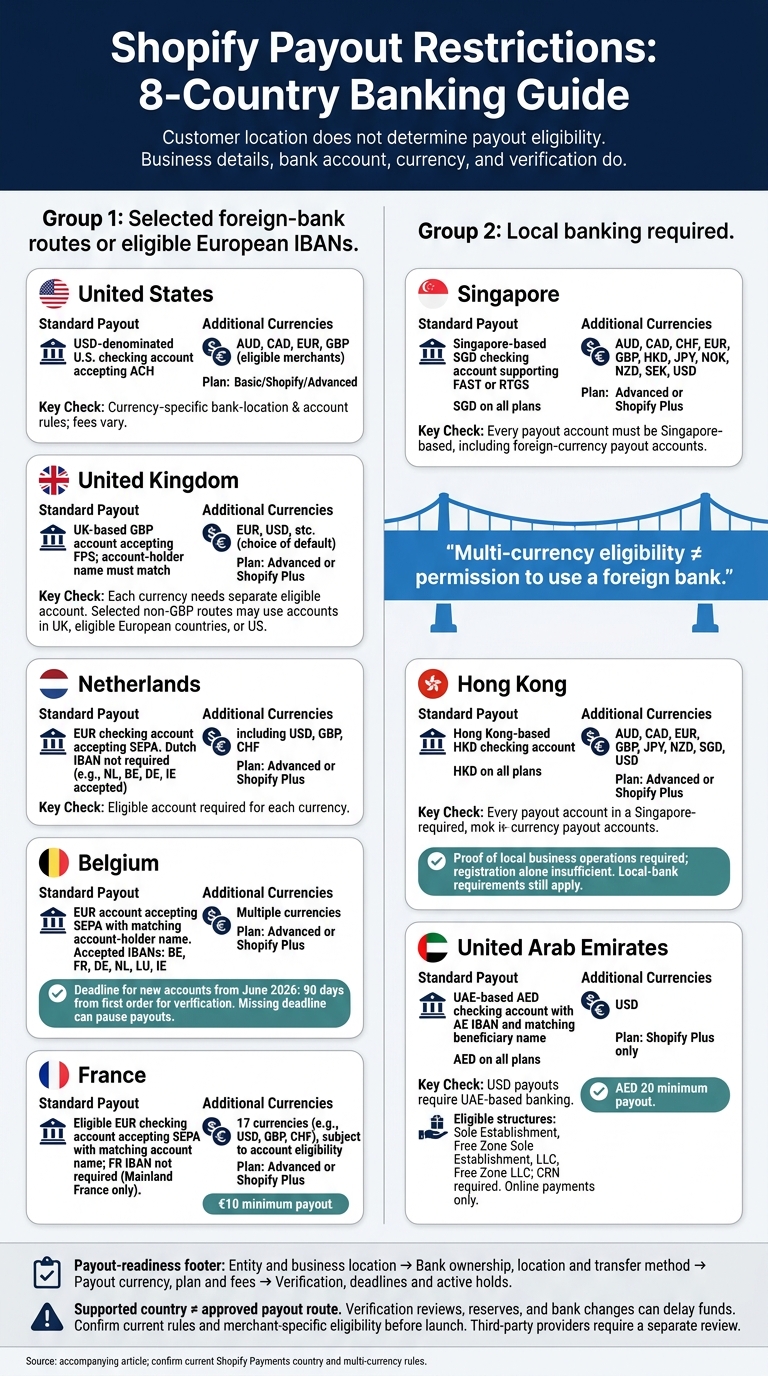
Shopify Payout Restrictions: 8-Country Banking Guide
1. United States
Entity eligibility
You don’t need an LLC or corporation, and having one doesn’t guarantee approval. Shopify checks merchant and business information during onboarding. The business’s activities and products must also meet Shopify Payments’ prohibited-business rules.
Every account needs an individual account representative, including corporate accounts. Check the legal name, entity type, physical business address, ownership details, and personal identification. You can research how other businesses structure their operations by browsing a list of Shopify stores in similar industries. Submitted information must match the merchant’s tax and banking records.[13][15][17]
Bank account requirements
The payout account must be a USD-denominated U.S. checking account that accepts ACH transfers. Savings accounts, wire-only checking accounts, and some money transfer or virtual accounts don’t qualify.[8][7][17]
Payout currencies
USD is the default payout currency. Eligible merchants can add payout accounts in AUD, CAD, EUR, and GBP under Shopify’s bank and currency rules. Fees for non-USD payouts vary by plan, so check the charge before quoting international settlement work.[9][10][16]
Settlement timing and holds
Shopify lists a minimum settlement time of 3 business days in the United States. Payouts to external banks typically arrive within 3–5 business days after capture.
Treat that window as a planning estimate, not a guarantee. Verification reviews, reserves, and risk holds can delay access to funds. No fixed hold percentage or release date applies. Before committing to a fixed launch date, check the merchant’s payout status, unresolved verification requests, reserves, and failed payouts in Shopify.[9][12][14]
sbb-itb-61169e3
2. United Kingdom
Entity eligibility
UK payout eligibility depends less on entity type than on whether registration, banking, and verification details match.
Sole traders, partnerships, and limited companies qualify only when their registration, verification, and business details match Shopify’s records. The business must operate in the UK and be a UK legal resident or properly registered or licensed to operate there.[19][20] Before accepting payment setup work, confirm the operating location, legal status, and verification requirements for that business structure in Shopify admin.
Bank account requirements
The payout account must be held at a UK bank, use GBP, and accept Faster Payments Service (FPS) transfers. The account holder’s name must match the Shopify Payments name on file.[11][7] Savings accounts, wire-only accounts, and unsupported multi-currency accounts don’t qualify for the standard UK setup.[11]
Before promising support for a fintech or virtual account, check its transfer type, currency, location, and ownership. Use a bank statement that shows the account holder’s name, bank name, sort code, account number, and issue date.[11]
Meeting the FPS and ownership rules is only part of the setup. Currency support has its own requirements.
Payout currencies
GBP payouts are available on all plans. Multi-currency payouts and a choice of default payout currency require Advanced or Shopify Plus.[18] EUR, USD, and other settlement currencies depend on the merchant’s plan and bank setup.[5] Each supported payout currency requires a separate eligible bank account.[10]
GBP payouts require a UK-based bank account. For other currencies, eligible accounts may be located in the UK, eligible European countries, or the United States, depending on the setup. Non-domestic payout currencies may carry multi-currency payout fees.[10][5]
Even with a valid account and currency, verification checks or bank changes can trigger a review that delays payouts.
Settlement timing and holds
Adding a payout bank account more than 24 hours after the initial Shopify Payments setup can pause payouts for 3–5 business days. Bank-account ownership verification may also be required before payouts begin.[21] Banks may then take another 24–72 hours to post the payout. The minimum payout is £1.[18]
Shopify can reserve funds or recover amounts owed, but it does not publish a fixed UK hold rate or duration.[20]
Want to Sell on Shopify but Live Outside of U.S.? Watch This First
3. Netherlands
The Netherlands has similar verification requirements, but allows more IBAN prefixes than many merchants expect.
Entity eligibility
Shopify Payments is available in the Netherlands. Verify the legal name, business address, registration details, and account representative. Shopify does not publish a full entity-type matrix for the country, so foreign-owned businesses and unusual structures need manual confirmation.[25]
Bank account requirements
The payout account must be a EUR checking account that accepts SEPA transfers. A Dutch IBAN isn't required: Shopify accepts several European IBAN prefixes, including NL, BE, DE, and IE.[24][7]
Savings accounts, wire-only accounts, and unsupported multi-currency accounts don't qualify. Before treating a fintech account as ready for launch, verify its ownership and account structure.[24][7]
That flexibility with IBAN prefixes doesn't apply to every payout currency.
Payout currencies
EUR payouts are available on all plans. Advanced Shopify and Shopify Plus can support additional payout currencies, including USD, GBP, and CHF, but each currency requires an eligible payout account. Confirm the exact currency-account match and any multi-currency fee before launch.[23][5][10]
Settlement timing and holds
Shopify lists a 3-business-day minimum settlement time and a €1 minimum payout for the Netherlands. Banks may add another 24–72 hours.[23][12][22][25]
Verification or risk reviews can delay payouts. Reserves may also cover expected refunds or disputes, but Shopify publishes no fixed Dutch reserve percentage or hold duration.[12][25]
Treat unresolved verification items, unsupported IBANs, and payout minimums as launch blockers before booking build or migration dates. For agencies, the risk isn't just failed activation - it's delayed funding.
4. Belgium
Entity eligibility
Shopify Payments is available in Belgium, but approval depends on the business type, registration documents, owner or representative ID, and address.[28][4] Shopify defines owners as individuals who directly or indirectly own at least 25% of the business.[29]
Belgium follows the same SEPA banking rules as the Netherlands, but new accounts face stricter verification deadlines.
Bank account requirements
The standard setup requires a EUR account that accepts SEPA transfers, with an account-holder name that matches. Shopify accepts BE IBANs and other listed prefixes, including FR, DE, NL, LU, and IE.[27][7]
Confirm any unusual account structure before connecting it. These checks affect whether merchants receive funds on time - and, in turn, their launch schedule and cash-flow planning.
Payout currencies
EUR payouts are available on all plans. Advanced Shopify and Shopify Plus support additional payout currencies.[26][5] Before quoting USD, GBP, or other non-EUR payouts, check the merchant’s plan, the currency-specific bank account, and any non-domestic payout fee.
Hold exposure
Belgium’s main hurdle is the verification deadline after the first order. For new accounts created from June 2026, Shopify allows 90 days from the first Shopify Payments order to complete verification. Missing that deadline can pause payouts and lead to refunds or payment-processing suspension.[27][29]
Build this deadline into the launch plan rather than leaving it to back-office follow-up. Otherwise, cash flow could stop after spending on ads, inventory, or migration work has begun.
5. France
France uses the same EUR/SEPA banking framework as other euro-zone markets, but has a higher payout minimum and supports more currencies.
Entity eligibility
Shopify Payments is available to merchants based in mainland France, but not in French Overseas Territories. Merchants must also pass Shopify’s personal and business verification checks.[31][4]
Bank account requirements
An FR IBAN is not required. Merchants can use an eligible non-French EUR checking account that accepts SEPA transfers and matches the Shopify Payments account name. This makes setup easier for cross-border merchants.[6][7]
Payout currencies
France supports EUR payouts on all plans, plus 17 additional currencies, including USD, GBP, and CHF, if the account supports the target currency. Advanced and Shopify Plus support multi-currency payouts, which may carry a fee.[30][5] These options don’t remove the payout minimum or the risk of delays.
Hold exposure
France has a 3-business-day minimum settlement time and a €10 minimum payout. Banks can add another 24–72 hours. Verification reviews and reserves can delay payouts further, and Shopify does not publish a France-specific hold percentage or duration.[30][12][32] Check for open verification or payout reviews before treating funds as available.
6. Singapore
Singapore has stricter payout rules than euro-zone markets: payout accounts must be local, even when you use multiple currencies.
Entity eligibility
Shopify Payments is available to businesses located in Singapore, but incorporation alone doesn’t qualify a merchant. Individuals and sole proprietors must also live in Singapore. Shopify may decline an application if the business type, products, or risk profile fails to meet its requirements. Confirm entity details and required documents with Shopify before planning launch work.[33][35][4]
Bank account requirements
Singapore Shopify Payments payouts require a Singapore-based SGD checking account that supports FAST or RTGS transfers. Shopify does not support savings accounts, wire-only accounts, flex-currency or multi-currency accounts, or foreign payout accounts - including European IBANs. Ask your bank to confirm the account’s transfer capabilities before onboarding.[33][34][10]
For cross-border merchants, this local-bank requirement is the main payout hurdle. A foreign treasury setup won’t meet Singapore’s payout account rules.
Payout currencies
SGD payouts are available on all plans. Advanced and Shopify Plus also support AUD, CAD, CHF, EUR, GBP, HKD, JPY, NOK, NZD, SEK, and USD payouts. Every payout account must be based in Singapore. If a currency isn’t configured for payout, Shopify sends those funds to the default-currency account.[34][10]
Hold exposure
Approval doesn’t mean immediate access to funds. The minimum payout is S$1, and Shopify lists a minimum settlement time of 4 business days for SGD payouts. Bank posting can add another 1–3 days. Use these figures as planning estimates, not guaranteed receipt dates.[34][12]
Verification issues, chargeback disputes, compliance reviews, high-risk orders, fulfillment problems, and other account-risk checks can also delay payouts. Shopify does not publish a Singapore-specific hold probability or guarantee how long a review will take. Before launch, check outstanding verification requirements, chargeback exposure, and cash reserves.[12][36]
7. Hong Kong
Entity eligibility
Like Singapore, Hong Kong requires local banking and proof of local operations. Shopify Payments is available in Hong Kong SAR, but a registered address alone won’t qualify a business. The business type must match the Business Registration Number (BRN). Merchants must also provide a Hong Kong business address and documents showing local operations. Mainland China residents cannot register as individuals or sole proprietors. Even a company registered in Hong Kong cannot qualify without proof that it operates there.[39][40][41]
Bank account requirements
The standard setup requires a Hong Kong-based HKD checking account. Savings, wire-only, and multi-currency accounts aren’t supported. Corporations and partnerships need a business account that matches the registered business name. Individuals and sole proprietors need an account in the owner’s legal name.[37][7]
An offshore treasury account won’t meet payout requirements. Once the bank account clears, the next step is checking currency support.
Payout currencies
HKD payouts are available on all plans. Advanced and Shopify Plus support eight additional currencies: AUD, CAD, EUR, GBP, JPY, NZD, SGD, and USD. Before quoting reconciliation work, check Shopify’s Multi-Currency Payouts guidance and the merchant’s admin for eligibility and applicable fees.[38][10]
Hold exposure
For agencies, approval doesn’t mean a merchant is ready to receive payouts. Hong Kong has a minimum payout window of four business days - not a guaranteed receipt date. Shopify’s Hong Kong Payments Terms allow reserves covering part or all of the transaction funds. Shopify publishes no fixed review timeline or reserve amount. Treat payout access as conditional until verification clears, and confirm cash reserves before launch.[12][42]
8. United Arab Emirates
Entity eligibility
Shopify Payments in the UAE supports online sales only - not POS.[46][45] Eligible business structures are Sole Establishment, Free Zone Sole Establishment, LLC, and Free Zone LLC. Merchants need a company registration number (CRN). Nonprofits and other structures aren’t eligible, and a trade license alone isn’t enough to qualify.[44]
Bank account requirements
Entity approval is only part of the setup. For standard AED payouts, merchants need a UAE-based AED checking account with an AE IBAN and a matching beneficiary name. Savings accounts, wire-only accounts, multi-currency “flex” accounts, and money transfer accounts aren’t supported.[44]
Payout currencies
AED payouts are available on all plans. USD payouts through Multi-Currency Payouts require Shopify Plus.[43][10]
Hold exposure
Shopify lists a five-business-day payout period and an AED 20 minimum payout.[12][43] Changing bank details can pause payouts for 3–5 business days. Posted payouts may then take another 1–3 days to appear in the account.[12]
Agencies need to account for these timing limits when planning launches and working capital. The payout setup limits below build on these rules.
Settlement Options and Setup Limits
Use this matrix to check country eligibility separately from payout-route eligibility. The key question is: Can this merchant receive funds through the intended bank route? A supported business location isn’t enough. The checking account must also meet the rules for the selected payout currency and bank location.[4][7]
| Country | Payout routes | Agency impact |
|---|---|---|
| United States | USD plus selected foreign-currency routes; bank eligibility depends on currency and account location.[9][10] | Account for currency-specific banking rules and fees. |
| United Kingdom | GBP plus additional currencies on Advanced or Plus; selected foreign-bank routes are permitted.[18][10] | Confirm plan eligibility before quoting cross-border settlement. |
| Netherlands | EUR plus additional currencies on Advanced or Plus; selected foreign-bank routes are permitted.[23][10] | Allow for more fee checks and reconciliation work with additional routes. |
| Belgium | EUR through eligible European accounts; additional currencies require Advanced or Plus.[27][26][5] | Don’t apply one euro-area setup rule to another market. |
| France | EUR plus supported foreign currencies on Advanced or Plus, with selected foreign-bank routes.[30][5][10] | Scope non-EUR settlement separately. |
| Singapore | SGD plus additional currencies on Advanced or Plus; all payout accounts must be Singapore-based.[34][10] | Foreign accounts cannot replace required local accounts. |
| Hong Kong | HKD plus supported foreign currencies on Advanced or Plus, subject to local-bank requirements.[37][38][10] | Establish local banking before scoping additional currencies. |
| United Arab Emirates | AED and Plus-only USD payouts require UAE-based accounts.[43][10] | Resolve local banking before launch. |
A country can fit more than one setup pattern. A merchant may qualify for multicurrency payouts but still need local bank accounts.[5][10] Use the framework below to turn those limits into project scope.
| Arrangement | Main benefit | Main limitation | Agency fit |
|---|---|---|---|
| Domestic-only | Simpler setup and reconciliation | Reviews and payout delays still apply | Standard implementation |
| Multicurrency | Can reduce unnecessary conversion | Fees and additional reconciliation | Test each payout route |
| Permitted foreign-bank | Supports selected cross-border banking needs | Holding a currency does not establish eligibility | Payments-specialist review |
| Local-bank-only | Clear banking boundary | Foreign accounts cannot replace local banking | Resolve banking before scoping |
Keeping the entity and bank in the same country simplifies setup, but it doesn’t remove the risk of payout holds. Before pricing the work, record the entity type, bank country, account currency, transfer method, plan, fees, and intended payout route.[4][7] These checks determine whether a merchant is ready, needs verification, or requires a payments specialist.
For agency scoping, the payout route matters as much as the country. Third-party providers need a separate payout review. Include approval dependencies, settlement costs, transaction and refund testing, reconciliation, and a backup plan for delayed approval in the scope. Switching providers does not automatically remove entity, identity, or banking restrictions.[4]
Conclusion: Check Payout Readiness Before Scoping Work
After the country checks above, apply the same rules to each merchant before scoping work. The main question is simple: Can the merchant receive funds through the intended payout route?
Check the payment setup, not just the storefront location. Entity details, bank ownership, settlement currency, and verification documents determine payout readiness. Eligibility depends on the provider’s country rules - not account geography alone.[4][7][24]
| Outcome | Proposed setup | Agency decision |
|---|---|---|
| Good fit | Provider, entity, bank, currency, and verification all align; no hold is active. | Proceed with normal implementation. |
| Conditional fit | One or more setup items still need confirmation. | Start with paid validation or remediation before launch. |
| Blocked fit | A hold, rejection, or unresolved verification blocks payout. | Scope diagnosis and provider coordination first. |
| No fit | No supported payout route exists, or restrictions remain unresolved. | Defer payment-dependent work until the setup is eligible. |
Use these outcomes to place each lead in discovery, remediation, or no-go status. Prospecting data finds leads. The payout checklist qualifies them.
Use StoreCensus to shortlist merchants by country, technology stack, revenue, and growth signals. Treat those results as discovery leads, not proof of payout eligibility.[3][47]
During discovery, check the provider, provider country, entity country, bank ownership, transfer type, and settlement currency against current rules. With permission, review verification requests and hold notices, then record deadlines and affected payouts.[4][7]
Scope payment fixes first. List provider approval and merchant document submission as dependencies, not deliverables. StoreCensus helps identify prospects; merchant documents and provider rules determine payout eligibility.[47]
FAQs
What happens to my payouts if I relocate my business?
If you move your business to a country that Shopify Payments doesn’t support, you’ll lose access to Shopify Payments and need to change your payment setup [1].
Your business registration and bank account must match the country where your store is legally based. Changing your store’s country settings alone isn’t enough [2].
Check the requirements in your new country to confirm whether you qualify for payouts and can continue using payment services.
Can I accept orders while my payouts are on hold?
Yes, you can generally keep accepting orders while your Shopify payouts are on hold. A payout hold pauses transfers from your Shopify balance to your bank account. It doesn’t automatically disable checkout.
Holds often involve business entity verification, requests for documents, or compliance checks. Work with Shopify Support to address the requirement as a priority and help prevent service disruptions.
How should my agency scope work when payout eligibility is uncertain?
Before setting the scope, check the merchant’s operating country, financial standing, and whether their payment gateway supports their business entity and bank account setup. Ineligibility for Shopify Payments can block some automated workflows and third-party integrations.
If payout options are unreliable, leave automated commission and vendor payouts out of scope until the merchant confirms that their gateway supports reliable settlements. That includes cross-border or multi-currency settlements when needed.