Shopify App Stack Gaps: 6 Lead Gen Angles
Verify six Shopify app-stack gaps—retention, conversion, search, email, support, and personalization—before outreach.


A missing Shopify app is a reason to check - not proof that a store needs help. I start with one public workflow, save the page URL and review date, and ask about anything I can’t verify.
Following proven Shopify store guides for prospecting, I use six angles to focus that review:
- Retention: Can customers easily reorder, manage subscriptions, or use rewards?
- Conversion: Do reviews, bundles, and recommendations help shoppers choose?
- Search: Can shoppers find products through search, filters, and collections?
- Email: What does the signup experience show, and which flows need merchant confirmation?
- Support: Can customers find tracking, shipping, and return answers?
- Personalization: Do product recommendations change across the pages I check?
Tools like StoreCensus help me sort Shopify brand prospect lists by stack and activity. But traffic and revenue estimates are screening signals, not proof of budget or results.
My outreach rule: <u>one observed gap, one supporting detail, one service hypothesis, and one diagnostic question</u>. I offer a short review - not a promised sales lift.
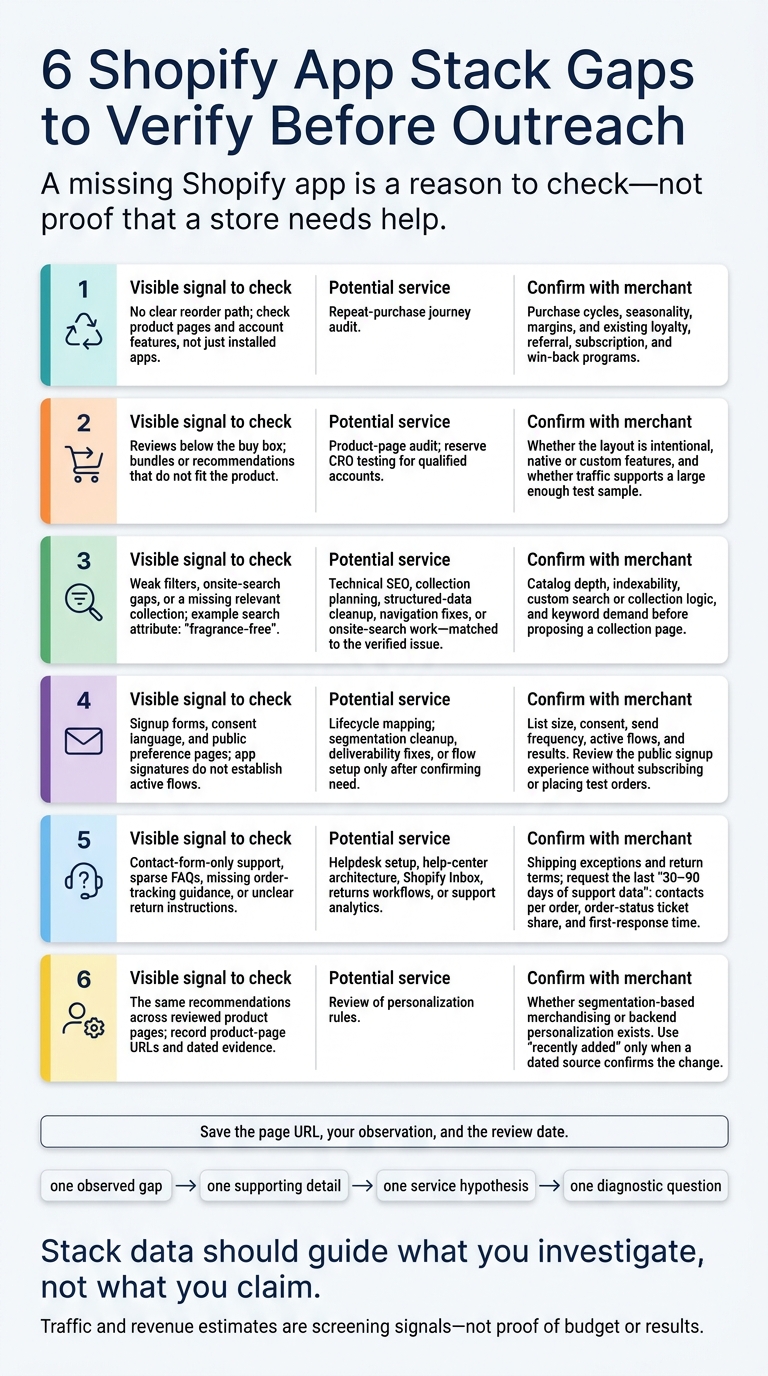
6 Shopify App Stack Gaps to Verify Before Outreach
This Shopify App Stack Can Grow Your Brand by 169%
sbb-itb-61169e3
Build and Check Your Shopify Prospect Segment
Use StoreCensus to find U.S.-based Shopify merchants. Filter by tech stack, revenue tier, country, and theme, then check each potential stack gap. Rank accounts for review using growth signals like 25,000+ monthly visitors, active Facebook ads, store age, or new app installs. Treat revenue and traffic estimates as ranking signals - not verified financial results or proof of budget. [4][2][3]
Tie each segment to one service you sell. Group stores by theme for usability reviews, or use app-stack filters to find workflows worth checking. Before outreach, review recent store changes. A theme switch or new app install gives you a reason to look closer; it doesn’t prove the merchant needs help. [3][5]
Check whether the detected technology supports an active workflow. Open the relevant storefront pages, test forms, inspect consent language, and see whether loyalty widgets or review sections work. Detection can miss custom integrations, server-side tools, and native Shopify features. An app signature may also remain after a workflow stops running. Save the page URL, your observation, and the review date with each lead. [3][4]
Pull founder emails and LinkedIn profiles, then verify each person’s current role before reaching out. Use the store domain as the account ID to prevent duplicate outreach. Prioritize merchants that fit your service and show recent activity - not just those with an email address you can find. [4][3]
Keep what you observed separate from what you don’t know. Public pages can show visible workflows and support a hypothesis. They can’t establish private flow settings, ticket volume, or conversion performance. Save those questions for the diagnostic instead of turning assumptions into cold-email claims. [3] Apply that filter to the six angles that follow, starting with retention: look for friction that could get in the way of repeat purchases.
1. Retention Gaps: Review the Repeat-Purchase Journey
Observed stack signal
Focus on consumables, collectibles, and repeat-use products such as coffee, supplements, skincare, pet food, replacement parts, hobby items, and refill packs.
Look for refill or multipack products with no clear reorder path, no visible loyalty or referral program, and limited reorder history in customer accounts. Check product pages and account features - not just which apps are installed. These gaps give you a basis for the audit offer.
Possible business problem
Customers may have to remember when to reorder. Limited account history can also make buying again harder. Missing loyalty, referral, or win-back flows may mean lost repeat revenue.
Subscriptions suit products that need regular replenishment, but rigid plans and limited delivery-frequency controls can lead to churn. Failed-payment recovery can help reduce it. Check whether subscribers can change frequency, skip a delivery, pause, or cancel - and whether payment recovery is available [7].
Agency offer and outreach example
Offer a repeat-purchase journey audit, rather than generic email execution. Group customers by recency, purchase frequency, and spend, then match each group to an action: replenishment reminders for overdue buyers, a second-purchase path for high-spend one-time buyers, and win-back testing for lapsed buyers. Deliver customer segments, recommended fixes, and a measurement plan [8].
For example: Your refill packs suggest a repeat-order opportunity, but I could not find a visible replenishment option; would a quick review of the reorder journey be useful?
Qualification checks
Before proposing work, confirm purchase cycles, seasonality, margins, and existing loyalty, referral, subscription, and win-back programs.
Use the merchant’s own numbers before making the offer. Ask for order dates, SKUs, revenue, refunds, and category data. Then use customer cohorts to measure second-order rate and time to second order.
Start with purchase data. If there’s little evidence of a repeat-purchase path, shift the review to product-page and checkout friction that may be getting in the way.
2. Conversion Gaps: Review Product-Page Friction
Observed stack signal
If the repeat-purchase path looks sound, check the product page that helps close the first order.
Look for review widgets, bundles, upsells, and recommendations in the buy box. A Dawn-style theme may suggest a lightweight stack, but it doesn't prove a conversion problem. Native features or custom code may already power the visible buy-box features [1][9].
Possible business problem
Reviews below the buy box may give first-time buyers less social proof at the point of purchase. Bundles or recommendations that don't fit the product can also slow the first order. Treat both as hypotheses - the layout may be intentional [9].
Agency offer and outreach example
Start with a product-page audit, and reserve CRO testing for qualified accounts. Base the offer on one observed issue, not a promised lift [9].
For example: On the product page I reviewed, reviews sit below the purchase area; would it be useful to scope a test that brings relevant buyer feedback closer to the decision? [9]
Qualification checks
Before proposing a test, confirm product complexity, price, catalog size, theme features, and traffic volume. Focus on stores with at least $20,000–$30,000 in monthly revenue, but verify that traffic supports a large enough test sample [1]. Ask who manages recommendations and whether the layout is intentional [9].
3. Search Gaps: Review SEO and Onsite Search
If product pages aren’t causing friction, check whether shoppers can find the right products in the first place.
Observed stack signal
Inspect metadata, collection structure, structured data, filters, and onsite search for gaps in how shoppers find products. Verify the storefront before calling something a gap [3].
Possible business problem
Stores with large catalogs can lose shoppers before they select a product if filtering is weak or dedicated collections are missing [6]. Search for attributes such as “fragrance-free,” then compare the results with existing collections.
Agency offer and outreach example
Match your offer to the problem: technical SEO for indexability, collection planning for missing product groupings, structured-data cleanup, navigation fixes, or onsite-search work.
For example: Your catalog includes several fragrance-free products, but I could not find a matching collection. Would you be open to reviewing whether the keyword deserves its own collection page?
Qualification checks
Before outreach, check indexable pages, organic visibility, catalog depth, and any custom search or collection logic. Include collections outside the navigation and both native and custom filtering [3].
A missing collection doesn’t prove organic search demand. Validate the keyword before proposing a page.
If product discovery isn’t the bottleneck, move to email flows.
4. Email Gaps: Review Lifecycle Flows
Observed stack signal
If discovery and product-page friction aren't the issue, check whether the store has working email lifecycle flows.
Email-app signatures, signup forms, consent language, and public preference pages suggest the store has tools to collect signups and send messages. They don't confirm that flows are set up or performing well [3].
Possible business problem
Review welcome, cart abandonment, browse abandonment, post-purchase, back-in-stock, replenishment, and win-back flows [3][6]. Once you've mapped those journeys, match your offer to the missing or weak flow.
Agency offer and outreach example
Start by mapping the lifecycle. Propose segmentation cleanup, deliverability fixes, or flow setup only after you've confirmed the need [6].
Open with a product-specific question tied to the visible signup offer, such as whether they already run a post-signup education flow for the featured products.
Qualification checks
Confirm list size, consent, send frequency, active flows, and results. Then review the public signup experience without subscribing or placing test orders [6][3].
If email is covered, move next to support workflows.
5. Support Gaps: Review Self-Service Workflows
Observed stack signal
Look for contact-form-only support, sparse FAQ pages, missing order-tracking guidance, and unclear return instructions. Check help links and customer-account entry points. Record the URL, date, task, and a screenshot. Limited help content points to a self-service gap, not just a support-volume issue.
Possible business problem
Missing tracking guidance can lead to repeated “Where is my order?” tickets. Vague shipping timelines can delay purchase decisions, while unclear return instructions can create avoidable contacts.[10] Use that gap as the outreach angle: make the self-service path easier to follow.
Agency offer and outreach example
Match the work to the gap you verified: helpdesk setup, help-center architecture, Shopify Inbox, returns workflows, or support analytics.[12]
For example: Your shipping policy lists different timelines for oversized items, but I could not find an order-tracking guide; would mapping that self-service journey be useful?
Qualification checks
Review shipping exceptions and return terms, including return windows, fees, and refund timing. Ask for the last 30–90 days of support data: contacts per order, order-status ticket share, and first-response time.[11]
6. Personalization Gaps: Back Each Claim With Store Data
Observed stack signal
When public signals are limited, narrow your claim before pitching a fix. Use StoreCensus to track store changes and group claims by workflows you can verify. Treat these signals as research leads - not proof of performance.[3]
Possible business problem
Generic personalization claims give merchants little reason to respond. And a missing public signal doesn’t mean a workflow is missing. Native Shopify features, custom code, and backend tools may keep it out of view.[3]
Agency offer and outreach example
Build each personalization claim around the same evidence chain: one observed fact, one conditional consequence, one service hypothesis, and one diagnostic question.
Your product pages use the same recommendations across the catalog, and I couldn’t verify any segmentation-based merchandising; would a quick review of personalization rules help?
Evidence required: Product-page URLs; dated evidence of recommendation or merchandising changes; and storefront checks for recommendation blocks, segmentation logic, or personalization widgets.[3]
Don’t send the outreach until you’ve tied the claim to a dated, visible signal.
Qualification checks
Use “recently added” only when a dated source confirms the change. Ask the merchant to confirm the workflow, and have a person verify every factual sentence before sending.[3]
Conclusion: Check the Gap Before Offering a Fix
Across retention, conversion, search, email, support, and personalization, the rule is the same: Stack data should guide what you investigate, not what you claim.[3]
Use the same test for every angle: verify the workflow, then match your service to what you can see.[2][3]
Once you’ve verified the gap, rank the account using recent public activity, such as store changes or Facebook Ad Library activity. Label estimates clearly. Visible advertising alone doesn’t establish a merchant’s budget.[2][3]
Build the pitch around one observed gap, one supporting detail, one service hypothesis, and one diagnostic question.[2][3] If your research doesn’t support all four, keep researching.
FAQs
Which stack gap should I prioritize when I find several?
Start with the clearest capability gap that could boost revenue fast, especially when intent or activity is high. Look first for strong top-of-funnel demand from content, ads, or engagement paired with weak systems for retention or conversion. Email capture and automation are often the missing pieces.
Next, tackle conversion blockers, such as slow or aging themes. Then address gaps in social proof, including missing review or user-generated content (UGC) tools.
How do I tell a workflow gap from an intentional choice?
Verify the business need first. What you see on a storefront doesn’t tell you how the backend works. A missing app doesn’t mean the functionality is missing. Keep observations separate from assumptions you haven’t tested.
Use your research to ask a question, not deliver a critique. Ask whether native features, server-side integrations, or other systems already handle the functionality. Before suggesting a fix, confirm the merchant’s pain point and who owns the workflow. Their existing apps may already do what they need.
How can I scale outreach without losing personalization?
Tie each message to one verified store gap, then use lead scores to decide how much personalization it needs. Priority A gets a manually written, custom opening. Priority B gets a personalized template with one store-specific detail. Priority C gets light nurture or a pause.
Keep gap details in your CRM - not outdated spreadsheets - and update them through change tracking before each batch. If you automate drafting, base each draft on evidence and require human approval before sending.