Best Security Questionnaire Software for Agencies
Compare top tools on setup, answer libraries, approvals, client separation, and retainer cost to pick the right questionnaire workflow.


I’d shortlist HyperComply for portal-based questionnaires, Loopio for security reviews plus RFPs, Responsive for multi-team approvals, and UpGuard for controlled document sharing. Before buying, I’d test one client review - and keep agency answers separate from merchant claims that need client approval.
I compare setup effort, answer libraries, file handling, approvals, client separation, and total cost. A faster draft isn’t enough: the tool also needs to protect client files and leave room in your retainer margin.
Quick Comparison
| Tool | Main use | What I’d check first |
|---|---|---|
| HyperComply | Portal answers and evidence sharing | Portal accuracy, approval steps, questionnaire limits |
| Loopio | Shared answers for questionnaires and RFPs | Library upkeep, review controls, seat costs |
| Responsive | Responses across security, legal, and engineering | Reviewer access, approval stages, quote details |
| UpGuard | Trust Centers and protected file sharing | Client separation, import limits, package scope |
My buying rule: <u>test access controls before counting time savings</u>. At $125 per hour, a $12,000 annual subscription needs to save 96 hours a year just to cover its fee - before setup and upkeep.
1. HyperComply
Setup and questionnaire turnaround
HyperComply is a better fit when completing portal-based questionnaires matters more than drafting proposals. It supports browser-based completion across XLS/XLSX, DOC/DOCX, PDF, and web portals. Highlight a question in a client portal, and its Chrome extension pulls suggested answers from a Knowledge Base. Test it in the portals your clients use, and track the time from account creation to the first usable response.[4][5][7][8]
Answer libraries and evidence files
Build the Knowledge Base with current policies and approved answers. HyperComply’s Trust Pages and Data Rooms let you share evidence files with access approval, expiration dates, watermarking, and access logs. Check file-size limits, download restrictions, and whether you can set up separate access spaces for each client.[9][10]
Approvals and client separation
File sharing works only when access and signoff stay separate. HyperComply supports question assignment, responses through email or Slack, and access roles. But collaboration isn’t final signoff: test who can edit, approve, and submit, and check the edit and version histories. Before using it for retainer work, confirm whether each merchant can have its own Knowledge Base, Data Room, users, branding, approval chain, and access logs.[4][5][9]
Retainer cost fit
For agencies, the pricing question is whether the workflow fits a retainer without extra seat or overage charges. Essentials is listed at $550/month for 12 questionnaires; Growth at $1,000/month for 24+; and Enterprise has custom pricing at 48+ annually.[11]
Compare the labor hours saved with the fixed monthly cost. Get written terms for annual questionnaire volume, portal work, seats - including whether outside contributors need paid seats - support, overages, and renewal increases.[5][10][11]
sbb-itb-61169e3
2. Loopio
Setup and questionnaire turnaround
Loopio suits agencies that handle security questionnaires and RFPs in one workflow. It’s a fit when security reviews run alongside proposal work and both need a shared library with clear controls. Measure time to a usable draft, not just a successful import. You’ll still need to set up categories, content owners, and review rules.[14]
Answer libraries and evidence files
Library history, duplicate detection, ownership controls, and review cycles help keep approved answers current. Schedule regular reviews for high-risk answers, and update them after major changes. For evidence attachments and cloud-storage connections, check how versions and access restrictions work - and whether reviewers can identify the exact file behind an answer.[12][13]
Approvals and client separation
Use role-based access and multi-step reviews to keep technical, legal, and final approvals separate. Higher tiers add confidential projects and multi-step reviews. During the pilot, test a restricted account to see whether it can view another client’s answers, attachments, or project details.[2][13]
Retainer cost fit
Loopio uses quote-based pricing. Foundations starts with 10 seats, plus unlimited projects and Library entries. Check whether that minimum makes sense if questionnaires arrive only occasionally.[2][15]
Ask for pricing on implementation, limited-access contributors, and temporary reviewers. Lower-cost limited-access licenses and free temporary guest access may be available. To estimate cost per questionnaire, divide the annual quote plus implementation cost by your expected questionnaire volume, then factor in the hours spent maintaining the library. Use that figure as a benchmark for teams that need questionnaire controls alongside a broader RFP workflow.[2][15]
3. Responsive
Setup and questionnaire turnaround
Responsive suits agencies that coordinate security, legal, and engineering responses across multiple clients. Its AI drafts answers from approved content and flags items for human review.[16][18][21]
Pilot three questionnaires and track setup time, first-draft rate, mapping errors, export cleanup, and portal-entry work. Check whether approved content remains usable when it moves into evidence files and portal entries.
Answer libraries and evidence files
Responsive’s library and Profile Center store approved security and compliance content, along with ownership details, audit history, and AI citations.[17][20][22][24]
Test whether staff can replace an expired certificate, find the current file, and keep its source reference intact in exports. Assign someone to maintain policies, certifications, and technical answers.
Approvals and client separation
Next, run three client projects at the same time, each with security, legal, and engineering reviewers. Test response section assignments, deadlines, ownership changes, and final approval before export.[16][19]
Give a contractor access to just one client’s project. Then check whether another client’s confidential answers appear in search results or AI suggestions.
Retainer cost fit
Request a workload-based quote. Named-user licensing can make occasional reviewers costly, so confirm seat minimums, guest access, implementation fees, and AI add-ons.[23][25]
G2 lists starting pricing of $10,000, but the cited information does not establish the billing period or what that price covers.[25] Compare recurring questionnaire volume and drafting hours saved with licensing costs, library upkeep, specialist review, and project administration.
Automate Security Questionnaires & Respond 90% faster with AI | Conveyor
4. UpGuard
UpGuard is best suited to controlled document sharing, rather than full questionnaire handling. Trust Exchange combines a content library with protected Trust Centers and NDA protection.[1] Before treating a Trust Center as a questionnaire workspace, check that the plan’s tools fit your agency’s workflow.
Setup and questionnaire turnaround
UpGuard supports Excel questionnaire imports, progress tracking, change history, and export in the original format.[26] Test one client workbook from import to export. Check that tabs, answer choices, and embedded instructions stay intact, and test PDF and Word handling separately.
Answer libraries and evidence files
AI Autofill drafts answers from evidence. Users can accept, reject, or edit its suggestions, then save new responses.[27][30] Verify that saved answers can be reused, and test document versioning, file replacement, and evidence links to individual answers. Also check whether large audit reports or other evidence files exceed the 10 MB per-document upload limit.[29][31]
Approvals and client separation
Change history helps track who changed what, but confirm whether your plan includes reviewer assignments, required sign-off, and export permissions. For confidential client materials, test NDA access, recipient permissions, and access revocation. Multiple Trust Centers can organize materials, but they don’t guarantee client-by-client isolation.[1] Check both these controls and the plan’s limits against your retainer margins.
Retainer cost fit
Published materials list one monthly import and one Trust Center on the free tier, compared with 15 imports and five Trust Centers on the paid tier.[1] UpGuard’s published Trust Exchange pricing puts the paid tier at about $600 per month or $6,000 per year.[28] Confirm the annual commitment and any user, storage, export, or import-overage limits before building the cost into your retainers.
Pros, Cons, and Agency Fit
Match the tool to the bottleneck in your review workflow. Treat these strengths as points to evaluate, not independently tested results. Check setup effort, approval controls, and total cost against how your team works.
Use the summaries below to narrow your shortlist before comparing costs and retainer margins.
| Product | Strength | Verify | Best fit | Poor fit |
|---|---|---|---|---|
| HyperComply | Browser workflows and Data Rooms help speed up questionnaire intake and evidence sharing. | Portal support, answer-match accuracy, approval controls, questionnaire caps, and annual commitment. | Agencies handling recurring questionnaire and evidence requests across retainers. | Firms with one or two reviews a year or little budget for recurring software. |
| Loopio | Curated libraries, review cycles, and routing to subject-matter experts help keep answers consistent. | Library upkeep, attachment permissions, approval steps, and evidence handling. | Agencies reusing answers across security reviews, proposals, and RFPs. | Teams that need only an evidence portal or lack a library owner. |
| Responsive | Assignments and progress tracking help coordinate multiple reviewers. | Review workflow setup, reviewer permissions, external collaboration, evidence sharing, and multi-client pricing. | Larger agencies where several departments contribute to each response. | Small teams handling occasional questionnaires in-house. |
| UpGuard | Best when controlled evidence sharing matters more than proposal reuse. | Whether approval workflows and module scope justify setup and subscription costs. | Agencies maintaining and sharing security evidence packages. | Teams mainly seeking spreadsheet autofill or broad RFP management. |
Mark client-owned details as client confirmation required. Record an owner, approval date, version, evidence location, and expiration date. Require recorded approval before submitting anything externally. If the tool can't enforce that step, use a separate approval process.
Include library cleanup, permissions, document updates, and client follow-ups in your retainer math. Faster drafting won't pay off if the tool adds more review work than it removes.
The next section turns these fit signals into retainer math.
Software Costs and Retainer Margins
Workflow differences affect both software costs and retainer margins.
Compare written quotes, not advertised starting prices. The table separates published pricing from items that need a quote. Get the terms in writing.
| Product | Pricing basis | Published seats or usage | Confirm extra costs | Source date/status |
|---|---|---|---|---|
| HyperComply | Quote-based. | Public tiers: $550/month for 12 questionnaires, $1,000/month for 24+, and custom pricing for 48+; questionnaire allowances are annual.[11] | Onboarding, reviewer seats, storage, integrations, branding, renewals. | Undated; request a dated quote. |
| Loopio | Custom quote. | Foundations: 10 seats, unlimited projects and library entries; higher tiers add review controls.[2] | Seats, migration, AI, storage, integrations, support. | Pricing page; 2026 update metadata. |
| Responsive | Annual fee; Emerging Edition starts at $10,000.[3] | Unlimited response projects; seat and workspace allowances unspecified.[3] | Implementation, AI, storage, integrations, governance, support. | January 22, 2025; later update metadata. |
| UpGuard | Standard plan priced by monitored vendors and users, not questionnaires. | $1,750/month billed annually; 50 vendors, six users. Confirm that the workflow fits questionnaire response, not vendor-risk tracking.[6] | Additional vendors ($79/month each), onboarding, integrations, user roles, contract minimums.[6] | Pricing page; 2026 update metadata. |
Use published pricing as a starting point, then test it against your labor estimates.
Hypothetical model: $125/hour, 24 implementation hours, 36 annual upkeep hours, and three reviewer hours per questionnaire. S = annual subscription; vendor onboarding charges are excluded.
Workload Use case Reviewer labor Year 1 Annual Low 12 reviews/year; one operator, occasional specialists. Prioritize low commitment. 36 hours / $4,500 S + $12,000 S + $9,000 Medium 24 reviews/year; recurring clients and shared-library upkeep. Compare approval and workspace costs. 72 hours / $9,000 S + $16,500 S + $13,500 High 48 reviews/year; overlapping reviews and formal approvals. Test integration and governance value. 144 hours / $18,000 S + $25,500 S + $22,500
Cost per review = (subscription + upkeep + reviewer labor + implementation in year one) ÷ completed reviews. For your estimate, use actual time spent on intake, drafting, evidence, review, revision, and submission.
Hypothetical margin check: Against $120,000 in annual retainer revenue, this model consumes 23.75% in year one and 21.25% annually, before other delivery costs. In this model, a $12,000 subscription costs $28,500 in year one and $25,500 annually, or $1,187.50 and $1,062.50 per review at 24 reviews per year. At $125/hour, the subscription alone must save 96 hours annually to break even, or 120 hours including first-year implementation.
Which Tool to Test Before You Buy
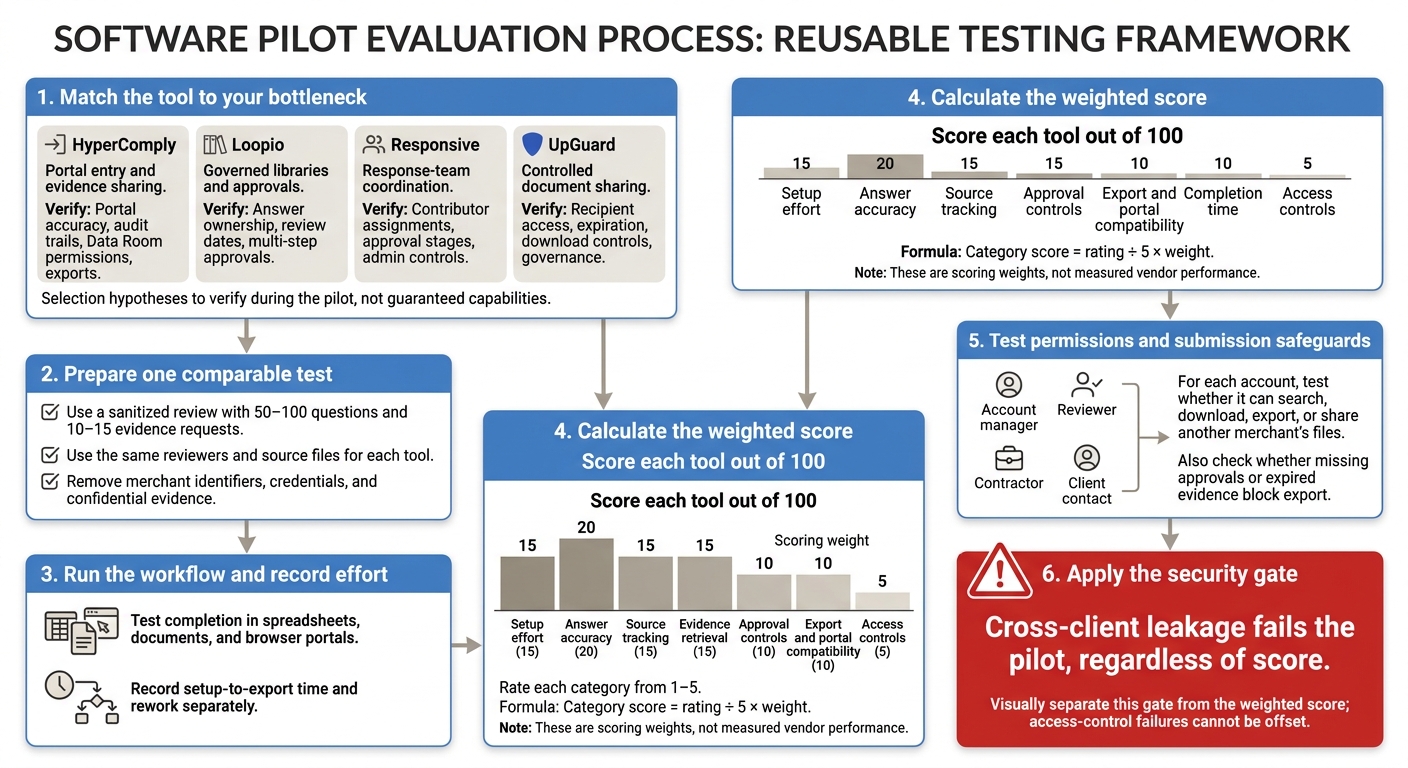
Security Questionnaire Software: Agency Pilot Checklist
After comparing features and pricing, choose tools that address your agency’s bottleneck. Then run a pilot to check whether they fit recurring client work.
| Tool | Best when you need… | Verify before buying |
|---|---|---|
| HyperComply | Portal entry and evidence sharing | Portal accuracy, audit trails, Data Room permissions, exports |
| Loopio | Governed libraries and approvals | Answer ownership, review dates, multi-step approvals |
| Responsive | Response-team coordination | Contributor assignments, approval stages, admin controls |
| UpGuard | Controlled document sharing | Recipient access, expiration, download controls, governance |
Use the same test for each tool to turn this shortlist into a pass-fail pilot.
Run a sanitized review with 50–100 questions and 10–15 evidence requests through each tool. Use the same reviewers and source files, with merchant identifiers, credentials, and confidential evidence removed. Test completion in spreadsheets, documents, and browser portals. Record setup-to-export time and rework separately.
Score each tool out of 100 using these weights: setup effort, 15; answer accuracy, 20; source tracking, 15; evidence retrieval, 15; approval controls, 10; export and portal compatibility, 10; completion time, 10; and access controls, 5. Rate each category from 1–5, then calculate category score = rating ÷ 5 × weight.
Using account manager, reviewer, contractor, and client contact accounts, test whether each can search, download, export, or share another merchant’s files. Check whether missing approvals or expired evidence block export. Cross-client leakage fails the pilot, regardless of score.
FAQs
When should my agency stop using spreadsheets for security reviews?
Spreadsheets can fall short when compliance gets complex, you manage multiple client environments, or security risks increase. Business growth, entry into new markets, and stricter regulations like GDPR can also demand more accurate records with a clear audit trail.
Switch to a dedicated system when you need a reliable risk register, strict separation between client environments, regular review schedules, and clear ownership and approval steps. Disconnected data and gaps in audit records are also signs that spreadsheets no longer meet your needs.
How can I safely reuse answers across clients?
Create a library of communication and policy templates before an incident or security review to save time and keep responses consistent. Group templates by incident type and get leadership approval to confirm they meet clients’ regulatory requirements.
Before reusing an answer, check that it matches the client’s current tech stack. Security configurations change quarterly, so past answers may no longer be accurate.
Should I bill clients separately for security reviews?
It depends on what your agency’s services cover. Auditing apps, maintaining risk registers, and preparing for third-party audits like SOC 2 take technical and administrative work.
Offering security reviews as a separate service can help match costs to each client’s risk profile. It also lets your agency charge for specialized work, including continued monitoring, role-based access management, and vendor compliance.