Shopify Headless vs Shopify Core: 2026
Compare Shopify core themes and headless storefronts — costs, performance, app fit, launch risk, and when headless is justified.


I’d start with core Shopify - and choose headless only when a theme can’t meet verified business needs. Before funding a rebuild, test your current store using Shopify store guides, check required apps, and name who will maintain the site after launch.
Both options use Shopify’s commerce backend and checkout. The difference? Core uses Shopify-hosted themes. Headless puts your team in charge of a custom frontend, integrations, and support.
Quick Comparison
| Factor | Core Shopify | Headless Shopify |
|---|---|---|
| Ownership | Shopify hosts the theme | Your team owns the frontend stack |
| Speed | Optimize theme code, images, and apps | Test rendering, APIs, and caching; gains aren’t guaranteed |
| App fit | Easier setup with theme apps | Verify API access and custom interface needs |
| Content | Shopify’s native editing tools | Custom workflows; external CMS optional |
| Cost | Lower when themes meet your needs | Adds engineering, testing, and upkeep |
| Launch time | Usually shorter | More dependencies and testing |
| Agency fit | Audits, redesigns, and optimization | Paid discovery, custom builds, and engineering support |
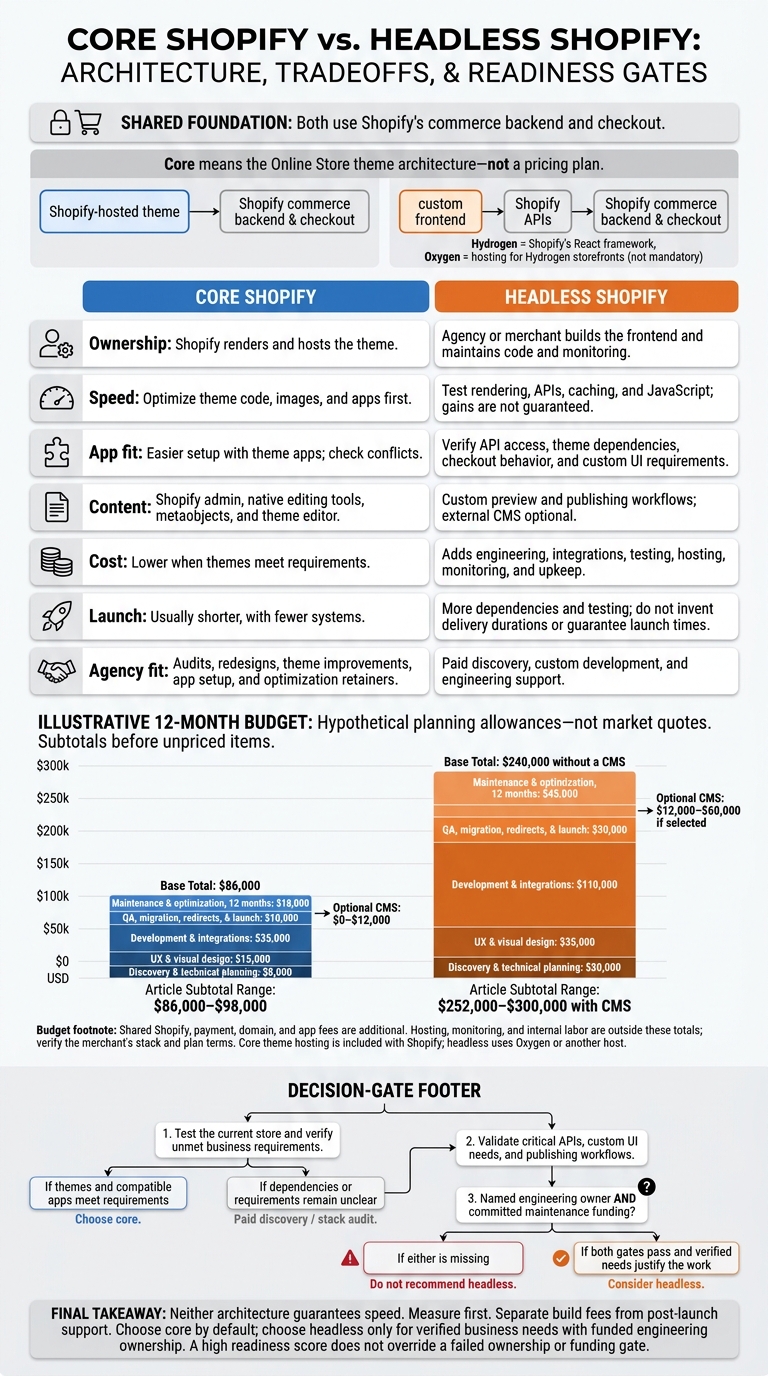
The article’s hypothetical 12-month budgets start at $86,000 for core versus $240,000 for headless without a CMS, before unpriced items - not market quotes.
My rule: <u>no named engineering owner or funded maintenance, no headless recommendation</u>. For agencies, that means selling an audit before a rebuild when requirements are unclear - and separating build fees from post-launch support.
Shopify Core vs Headless: 2026 Decision Guide
Headless Shopify: What It Costs and When It Pays Off
sbb-itb-61169e3
Shopify Headless vs Core: Architecture and Ownership
“Core Shopify setup” means the Online Store theme architecture, not a pricing plan. Both setups use Shopify’s commerce backend and lead to Shopify checkout. The difference is who owns the storefront work. [2][1]
| Area | Core Shopify | Headless Shopify |
|---|---|---|
| Storefront rendering | Shopify renders and hosts the theme | Agency or merchant builds the frontend |
| Hosting | Included with Shopify | Oxygen or third-party hosting |
| Publishing | Admin + theme editor | Custom preview and publishing workflow |
| Integrations | Theme apps | API integrations and custom UI |
| Maintenance | Shopify handles infrastructure | Agency or merchant maintains code and monitoring |
These differences affect speed, app fit, content workflow, cost, and launch time. For agencies, they also define what goes into the build scope and what becomes post-launch support.
Headless: Custom Frontend and Technical Requirements
A headless storefront uses Shopify’s Storefront and Customer Account APIs. Hydrogen is Shopify’s React framework, and Oxygen hosts Hydrogen storefronts. [1]
Before quoting a headless build, decide who handles each requirement.
| Prerequisite | Responsibility to assign before kickoff |
|---|---|
| Owners | Name the frontend developer, integration owner, and post-launch support owner |
| Content source | Decide where content lives and who handles previews and publishing |
| Deploys | Assign ownership of environment configuration and deployment |
| API support | Check API access for every required app; scope replacement UI where needed |
| QA | Assign testing for browsing, accounts, cart, checkout handoff, and supported devices |
| Post-launch support | Assign ownership and budget for dependency updates, integration maintenance, and monitoring |
Keep public and private tokens separate in the Headless sales channel. [1] These ownership decisions shape the launch timeline and the amount of support the store needs.
Headless vs Core: Speed, Apps, Content, Cost, Launch, and Sales Fit
Once ownership is clear, compare the tradeoffs that affect launch speed, scope, and profit.
| Comparison area | Shopify headless | Shopify core |
|---|---|---|
| Speed | A rebuild needs measurable speed gains to justify it. | Optimize the existing storefront first. |
| App fit | Check Storefront API compatibility, checkout behavior, webhooks, and custom UI before setting scope. | Theme app extensions simplify setup, but check for conflicts. |
| Content control | Use Shopify content with an optional CMS; the tradeoff is a more complex workflow. | Native publishing, metaobjects, and theme editing meet many merchandising teams’ needs. |
| Cost | Adds frontend engineering, integrations, QA, hosting, monitoring, and upkeep. | Costs less when a theme and compatible apps meet requirements. |
| Launch time | More systems and dependencies can extend delivery. | Fewer systems allow a faster launch. |
| Agency fit | Sell discovery, custom development, and engineering support when the case supports it. | Sell audits, theme improvements, app setup, and optimization retainers. |
Speed and App Fit: Test the Store First
Measure the problem before selling a rebuild. Test the mobile home, collection, product, search, and cart pages, plus checkout handoff and purchase-event tracking. Use field data and repeatable tests. Google’s “good” Core Web Vitals thresholds are LCP ≤2.5 seconds, INP ≤200 milliseconds, and CLS ≤0.1. [3][4]
Check server response time, rendering, image weight, JavaScript execution, and third-party scripts. For headless, check API latency and cache hits, too. Run independent requests in parallel rather than loading Shopify and CMS data one after the other. [5]
| Check | Core validation | Headless validation |
|---|---|---|
| Performance | Isolate slow theme code, images, and app scripts. | Compare rendering, API request chains, caching, and JavaScript with the baseline. |
| Subscriptions | Test theme controls and checkout behavior. | Verify selling-plan compatibility, cart logic, custom controls, and checkout behavior. |
| Reviews | Check theme blocks and their effect on speed. | Confirm API access and custom display requirements. |
| Search | Test filters, results, and tracking. | Validate indexing, API access, autocomplete, filters, and events. |
| Personalization | Check scripts, consent, and theme dependencies. | Confirm data access, custom UI, consent, and cache rules. |
If these checks fail, the decision shifts from optimization to rebuild scope.
An app’s presence in Shopify does not prove its storefront features work headlessly. Ask each provider about Storefront API compatibility, Liquid or theme-block dependencies, webhooks, and checkout restrictions. Prove that business-critical integrations work before committing to a fixed-price build.
Content Control and Launch Time: Compare Workflows
Headless does not require an external CMS. Shopify products, collections, pages, and metaobjects can supply content. Add another system only when editorial needs justify it.
Localization alone is not a reason to rebuild. Shopify Markets already supports languages, currencies, domains, and localized content. [7][8] Compare the actual publishing workflow - not just design freedom.
| Workflow | Shopify core | Shopify headless |
|---|---|---|
| Publishing | Use Shopify admin and theme editor. | Define publishing and synchronization across Shopify and any CMS. |
| Previews | Use theme previews. | Configure previews across content and frontend environments. |
| Localization | Validate Markets, translations, and app support. | Also test locale routing, metadata, currency behavior, and regional content. |
| Migration | Map products, collections, and content. | Also map content schemas and frontend routes. |
| Redirects | Audit URLs, redirects, canonicals, and structured data. | Define redirect handling and required SEO output. |
| Editor training | Train within Shopify’s publishing tools. | Train for custom components and any additional CMS. |
| Launch dependencies | Coordinate theme, apps, content, QA, and approvals. | Also coordinate API credentials, deployments, cache invalidation, and releases. |
With the workflow mapped, assess whether the extra system work will pay for itself.
Cost and Agency Margin: Budget Beyond the Build
This hypothetical 12-month budget uses planning allowances, not quoted prices. Shared Shopify, app, hosting, monitoring, and internal labor costs sit outside the totals. All amounts are in USD.
| Cost category | Core allowance | Headless allowance |
|---|---|---|
| Discovery and technical planning | $8,000 | $20,000 |
| UX and visual design | $15,000 | $35,000 |
| Development and integrations | $35,000 | $110,000 |
| QA, migration, redirects, and launch | $10,000 | $30,000 |
| Optional CMS, 12 months | $0–$12,000 | $12,000–$60,000 if selected |
| Maintenance and optimization, 12 months | $18,000 | $45,000 |
| Hosting and monitoring | Included with Shopify plan in many setups; verify plan terms | Oxygen or another host, plus monitoring and infrastructure allowances |
| Shared Shopify, payment, domain, and app fees | Additional; verify merchant’s stack | Additional; verify merchant’s stack |
| Subtotal before unpriced items | $86,000–$98,000 | $252,000–$300,000 with CMS; $240,000 without |
A larger contract does not automatically mean a better margin. Unpriced API debugging, app replacement, previews, and deployment support can eat into headless revenue. Repeatable core projects can be more profitable thanks to reusable sections, known apps, and repeatable QA.
Charge for discovery, price uncertain integrations separately, and define performance criteria. Sell support that includes quarterly Storefront API upgrades. [6] Qualify headless prospects for both the build and engineering support after launch; recommend core unless verified needs justify the headless delivery model.
Agency Sales: Qualify Prospects and Scope Services
Use the same scope findings to qualify prospects and price the work. Don’t make headless the default recommendation.
Score Headless Readiness Before Recommending Headless
Score verified requirements - not the merchant’s interest in a new stack. Use 1 for core, 2 for discovery, and 3 for headless. Record the evidence for each score, and place unverified items in column 2. [1][9]
| Criterion | 1: Favors core | 2: Needs discovery | 3: Supports headless |
|---|---|---|---|
| UI requirements | Theme sections meet requirements | Suspected theme limits need testing | Documented interactions require a custom frontend |
| App dependency | Critical features depend on theme blocks or scripts | Dependencies and replacement effort are unclear | Critical integrations have verified API access and scoped custom UI |
| Content workflows | Shopify publishing meets team needs | Workflow problems haven’t been mapped | Documented editorial requirements justify custom workflows |
| Engineering capacity | No named technical owner | Occasional developer support | Accountable in-house team or contracted engineering retainer |
| Budget | Build-only funding | Maintenance funding is unconfirmed | Build and recurring engineering are funded |
| Urgency | Launch required within weeks | Target is 2–3 months; dependencies remain unclear | A planned timeline of 4+ months allows integration work |
A high total score doesn’t override a failed gate. Headless requires both a named engineering owner and committed maintenance funding. Recommend it only when verified gaps justify the work. If your agency can’t maintain the proposed stack, don’t sell it. [1][9]
Find and Validate Prospects With StoreCensus
Use StoreCensus to shortlist Shopify merchants that match the scorecard. Filter by revenue tier, tech stack, theme, country, and growth signals, then pull decision-maker contact information for outreach. Start with an observable issue and an offer to investigate - not a headless pitch. Treat revenue and tech data as hypotheses, not proof of budget or constraints. [1]
On the sales call, confirm which apps power customer-facing features, where publishing breaks down, the launch deadline, the available budget, and who owns maintenance. Separate storefront scripts from admin integrations before calling it app bloat. If ownership or dependencies are unclear, sell a paid stack audit before an architecture proposal. [9]
Separate Build Scope From Post-Launch Ownership
Package core work around repeatable theme improvements, redesigns, CRO, merchandising, and app configuration. Reserve headless packages for verified custom requirements backed by funded engineering support. The proposal should define what “done” means - and who takes responsibility afterward. [1]
| Workstream | Core | Headless | Post-launch responsibility |
|---|---|---|---|
| Discovery | Theme and app audit; approved requirements | Architecture and integration validation; approved technical scope | Merchant approves priorities; agency records the decision |
| Frontend development | Templates and editable sections pass review | Custom routes and components pass review | Name the owner of theme or frontend changes |
| Integrations | App features pass purchase-flow tests | API-backed features and failure handling pass tests | Assign integration monitoring and vendor escalation |
| Performance | Pages meet documented test criteria | Same criteria, including API and caching behavior | Define monitoring and regression-fix coverage |
| QA | Devices, browsers, and purchase journeys pass | Also validate custom account and integration journeys | Separate defects from new requirements |
| Launch support | Release checklist and rollback plan approved | Also approve deployment and recovery procedures | State coverage hours and incident escalation |
| Optimization | Defined CRO, merchandising, and app backlog | Defined custom-feature and engineering backlog | Allocate recurring capacity and reporting |
Once you’ve set the scope, put ownership and support terms in the proposal. Spell out change-control rules: new templates, integrations, or workflows need an estimate and approval before work starts.
Separate defect fixes from improvements, response time from resolution time, and launch support from recurring support. Itemize recurring app, CMS, hosting, monitoring, and engineering costs where they apply. For headless, assign responsibility for dependency updates, API permissions, private-token rotation, and security reviews. [1]
Conclusion: Choose Core Unless Headless Justifies Its Cost
Choose core by default. Headless needs a documented business case tied to how the store will run.
| Priority | Favor core | Favor headless |
|---|---|---|
| Launch speed | A theme-based launch with standard integrations | A longer build and testing cycle is acceptable |
| App fit | Critical features depend on theme extensions | Required APIs and custom integrations have been validated |
| Store management | Merchants need visual editing without regular developer help | A funded technical owner can manage integrations |
| Budget | Predictable scope and lower running costs matter | Custom development and engineering after launch are funded |
| Experience and content | Theme editing meets the store’s needs | Verified custom interactions, content workflows, or multiple storefronts justify headless |
Neither architecture guarantees speed. Set measurable mobile performance targets and test typical shopping journeys before promising gains. [10]
Treat architecture and post-launch ownership as separate decisions. Include this ownership checklist in the final proposal:
- Shopify provides: Commerce administration, checkout, APIs, and core hosting. Headless may require Oxygen or another host.
- The agency builds: The theme or frontend, integrations, analytics, redirects, QA, and deployment.
- The merchant runs: Products, inventory, promotions, content, merchandising, and release approvals. Name a technical owner for custom or headless work.
- Costs continue after launch: Shopify fees, payments, apps, CMS and hosting where needed, monitoring, maintenance, and support. Show the build price separately from monthly and annual costs, all in U.S. dollars.
FAQs
How do I calculate the ROI of going headless?
Compare the revenue lift you expect from faster site speed and greater flexibility with the total cost of ownership. Headless builds typically cost $75,000–$300,000 upfront, plus $4,000–$15,000 per month for maintenance.
Check whether those gains solve a measurable bottleneck, such as high latency or complex requirements your current theme can’t support. The move generally makes the most sense for larger, high-growth brands.
Can I migrate to headless in stages?
Yes, you can move to headless in stages, but careful coordination matters. A phased approach lets you add headless components without rebuilding everything at once.
For example, Shopify Hydrogen lets you build a custom React-based frontend while Shopify keeps managing your existing backend and checkout. You get more flexibility and better performance without replacing your entire infrastructure in one go.
How can I protect SEO during a headless migration?
Keep existing URLs, manage redirects carefully, and audit the migration to make sure historical content and metadata map correctly to the new architecture. Avoid inefficient API calls and over-hydration, which can slow your site and hurt the user experience.
Plan for an 8% to 20% drop in organic traffic during the first 2 to 3 months as search engines re-index your new frontend. Temporarily increase your paid search budget to help offset the dip.