Lead Scoring Study: What 6M Store Signals Predict
Score Shopify and WooCommerce leads using revenue, platform, app gaps, and activity, then validate the model against a revenue-only baseline.


I’d use store signals to rank leads - not to assume they’re ready to buy. Start with revenue and platform, check app gaps and recent activity, then test whether your score produces more qualified meetings and wins than revenue alone.
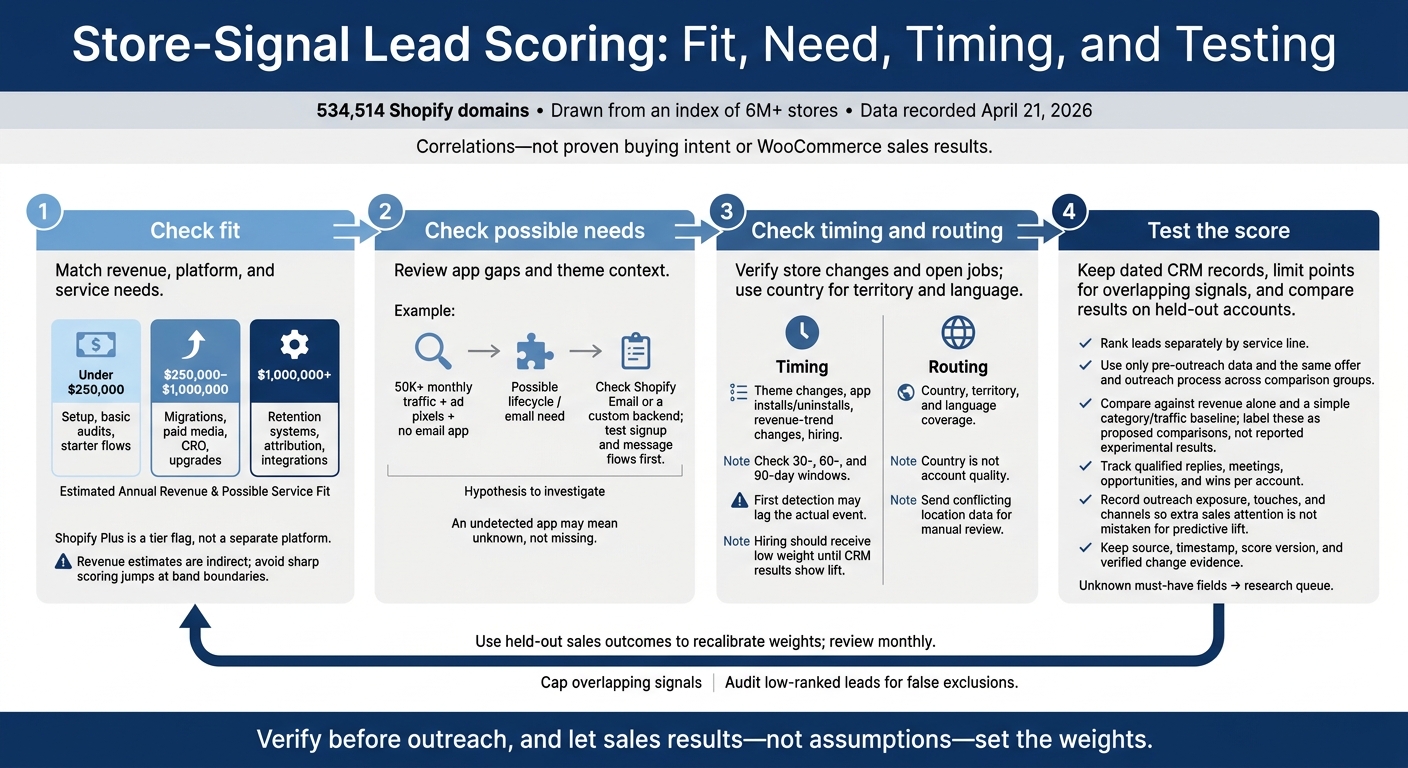
The study covers 534,514 Shopify domains, drawn from an index of 6M+ stores, with data recorded on April 21, 2026. It shows correlations - not proven buying intent or WooCommerce sales results.
Here’s how I’d put the findings to work:
- Check fit: Match revenue, platform, and service needs.
- Check possible needs: Review app gaps and theme context. (See our Shopify store guides for more on tech stack analysis.) An undetected app may mean unknown, not missing.
- Check timing and routing: Verify store changes and open jobs; use country for territory and language.
- Test the score: Keep dated CRM records, limit points for overlapping signals, and compare results on held-out accounts.
My rule: <u>verify before outreach, and let sales results - not assumptions - set the weights.</u>
Store-Signal Lead Scoring: Fit, Need, Timing, and Testing
Revenue, Platform, and App Gaps
Revenue Bands by Platform and Service
Revenue helps group accounts by service capacity and likely complexity. The source defines three broad maturity bands that turn fit signals into service tiers.[1]
| Estimated annual revenue band | Typical team / stack maturity | Likely service fit |
|---|---|---|
| Under $250,000 | Founder-led; DIY; 1–2 apps; free theme | Setup, basic audits, starter flows |
| $250,000–$1,000,000 | Small team forming; 3–5 apps; paid theme; active pixels | Migrations, paid media, CRO, upgrades |
| $1,000,000+ | Dedicated roles; 6–10+ apps; custom theme; often Shopify Plus | Retention systems, attribution, integrations |
Within each band, monthly revenue helps narrow the offer. Use it as a second filter: SEO above $10,000, email above $15,000, paid ads and loyalty above $20,000, subscriptions above $25,000, and redesign/CRO above $30,000.[4]
Treat Shopify Plus as a tier flag, not a separate platform. Missing values often get counted as "no." Keep that uncertainty visible in the CRM rather than assuming enterprise status. Revenue estimates also rely on indirect signals, so avoid sharp scoring jumps at band boundaries.[1]
Score against a held-out baseline, then track qualified replies and opportunities.[1]
App Stacks and Possible Service Needs
After revenue, app gaps usually offer the clearest clues about service needs. But a missing app isn't proof of a missing capability. Detectors can miss backend integrations, server-side tools, and custom workflows. Native features won't appear as third-party apps, either.[1]
| Signal combination | Possible need | False positive to check | Scoring treatment |
|---|---|---|---|
| 50K+ monthly traffic + Meta Pixel + no analytics app | Attribution / data | Native Shopify analytics or server-side tracking | Inspect consent and measurement setup before scoring |
| 50K+ monthly traffic + ad pixels + no email app | Lifecycle / email | Shopify Email or a custom backend | Test signup and message flows first |
| 50K+ monthly traffic + Shopify Plus + free theme | UX / UI redesign | A custom, highly optimized Dawn build | Verify the theme and implementation context |
| 50K+ monthly traffic + 5+ apps + no help desk app | Helpdesk / CX | Native "Contact Us" or social-only support | Confirm the support workflow before adding points |
| 50K+ monthly traffic + subscription app + no loyalty app | LTV optimization | A custom loyalty program or backend-only rewards | Treat the gap as a hypothesis, not a confirmed pain point |
In the study, the 95–100 score group averaged 8.6 apps and 9.8 pixels, compared with 0.6 apps and 1.0 pixels in the 0–29 group. Cap the points assigned to correlated signals, such as multiple tracking pixels, and test signal combinations against a revenue-only baseline.[1]
Theme age, hiring, country, and recent changes add signals for timing and routing.
sbb-itb-61169e3
Why Lead Scoring Almost Always Fails in B2B SaaS (2026)
Theme Age, Store Changes, Hiring, and Country
After checking fit and app gaps, use activity signals to spot accounts entering a buying window.
Theme Age and Recent Changes
Use theme changes, app changes, hiring, and country to guide timing and routing - not fit. Crawled data may lag the actual event, so treat first detection as the earliest known date, not the event date.[3] Check 30-, 60-, and 90-day windows.
| Signal | Data confidence | Proposed scoring treatment |
|---|---|---|
| Theme changed | Change observed; detection may lag the actual event | Use to time outreach |
| App installed or uninstalled | Stack change observed; first detection may lag the actual event | Test 30-, 60-, and 90-day windows before assigning weight |
| Revenue trend changed | Provides timing context for readiness | Use as a trigger to recheck the account, not as a primary score driver |
Hiring Signals and Outreach Timing
Give hiring a low weight as a timing signal until your CRM data shows lift.
Use geography last, after fit and timing, to route accounts correctly.
Country, Territory, and Sales Coverage
Use country for routing and language fit, not account quality. Apply country and language as pass-fail filters to check whether you can serve an account and whether it falls within your sales territory. Remove accounts you can't serve.
Send conflicting location data for manual review rather than making an automatic budget assumption. Convert market comparisons to U.S. dollars.
Build and Test the CRM Score
Turn fit, need, timing, and contact data into a CRM score you can test. Store each in a separate CRM field, and rank leads for each service instead of using one universal score. Treat the scoring worksheet as a hypothesis, not a validated purchase probability[1]. Test those signals against held-out accounts before assigning production weights.
Compare Scoring Models
Compare a simple category/traffic baseline with service-line rules on held-out accounts. Use the same offer and outreach process for both, and score accounts using only pre-outreach data.
Template: fill with held-out accounts.
| Model | Tests | What to track |
|---|---|---|
| Simple baseline | Basic category/traffic fit | Qualified replies, meetings, opportunities |
| Rules by service line | App gaps, theme age, store-change events, and other service cues | Qualified replies, meetings, opportunities |
Record whether each lead received outreach, how many touches it received, and which channels were used. Otherwise, extra sales attention can look like better prediction. Use held-out accounts to calculate lift over an unranked queue.
Set Signal Weights and Expiration
Use the configuration below as a hypothetical starting policy, not a research finding. Estimate each signal’s contribution using held-out outcomes before assigning production weights. Review monthly, check for correlated signals that count the same evidence twice, and audit low-ranked leads for false exclusions[1].
Use 24-hour, 7-day, 30-day, and 90-day signal expiration windows based on how often each signal changes[1].
| Signal | How to use it | Freshness / review | Missing-data treatment | Owner |
|---|---|---|---|---|
| Revenue band | Fit signal | Update monthly | Treat as unknown until verified | Sales operations |
| Platform | Routing and fit | Recheck monthly | Verify before routing | Sales operations |
| App-category gap | Need signal | Recheck before outreach | No match detected; absence is not confirmed | Service lead |
| Theme age | Need assessment: implementation context | Update monthly | Unknown; no automatic penalty | Technical lead |
| Store-change events | Timing: app, revenue, theme, or product-count changes | Apply expiration windows based on how often signals change | No event detected | Sales operations |
| Country / territory | Assign CRM territory ownership | Review when location or coverage changes | Manual review | Territory owner |
Use StoreCensus to Build CRM Lead Queues
Once the score is stable, use StoreCensus filters to build separate Shopify and WooCommerce service queues. Import decision-maker contacts and store-change events into your CRM. Store the source, timestamp, score version, and verified change evidence.
Keep leads with unknown must-have fields in a research queue. Record disqualification reasons, plus qualified replies, meetings, and opportunities per lead. Use those records to recalibrate weights when outcomes, offers, qualification rules, or sales coverage change.
Conclusion: Combine Fit, Need, and Timing
Revenue and platform help assess fit. App gaps and theme context point to need, while hiring and recent store changes offer clues about timing. Country helps route accounts, but no single signal proves buying intent.[1]
Test weights and expiration windows, then start with one Shopify or WooCommerce service line. Expand only when held-out data shows a sustained increase in opportunities and wins per account.[1]
FAQs
How can I adapt Shopify lead scoring for WooCommerce?
Keep Shopify’s scoring structure, but base it on WooCommerce signals. Start with pass/fail filters: the lead must run a WooCommerce store, have a verified contact, be past the brand-new stage, and show no clear signs of dropshipping.
Then score revenue band, country, team/role, and tech-stack sophistication. For the tech stack, look at plugins, the theme’s maturity and age, and key ecommerce capabilities.
Track timing through plugin additions and removals, theme updates, hiring, and spikes in social activity. Keep fit and timing scores separate before routing leads.
How much outcome data do I need to validate lead scores?
Check your lead scores by comparing your scoring worksheet against a simple baseline, such as category and traffic filters. Use held-out accounts, and keep the offer and outreach process the same [1].
Track qualified replies, booked meetings, and opportunities per researched account [1]. Then compare conversion rates across score bands to see whether higher-scoring leads convert more often than lower-scoring leads [2].
How should I score leads with conflicting store signals?
Start with pass-fail filters for requirements that aren’t negotiable. Then use a weighted, 100-point scoring model that separates fit from timing. Give pain signals the most weight, while also accounting for budget evidence, firmographic fit, verified contacts, and recent changes or hiring.
For leads scoring 80–100, prioritize immediate, personalized outreach. Nurture or monitor leads with lower scores, and update scores weekly as store signals change.