7 Apps Repair Stores Add on Shopify
How repair stores use seven Shopify app categories to manage intake, scheduling, returns, warranties, subscriptions, support, and parts.

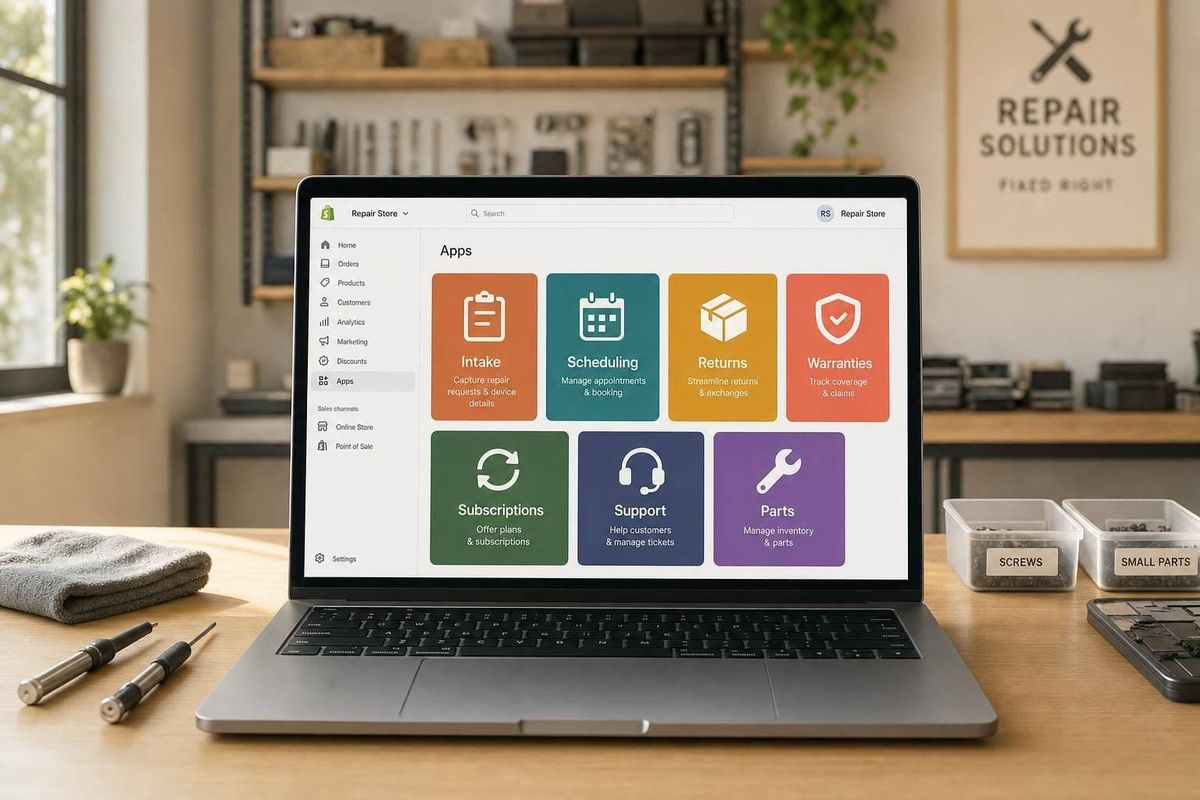
A repair store’s app stack shows how the business runs. If I see apps for work orders, booking, returns, warranty claims, subscriptions, support, and parts tracking, I can usually tell where the team is trying to keep work under control.
Here’s the short version:
- Work-order apps show a focus on intake, job tracking, and repair updates.
- Booking apps show the store wants customers to schedule service without calls or email back-and-forth.
- Returns and RMA apps point to tighter handling of send-ins, exchanges, and repair requests.
- Warranty apps show the team cares about claim checks and post-sale service.
- Subscription apps point to recurring revenue, like maintenance plans or member perks.
- Helpdesk apps show support volume is high enough to need one place for tickets.
- Parts and inventory apps point to better control of components, refurbished stock, and technician workflow.
A few numbers stand out. Booking and tracking tools can cut “Where is my order?” or repair-status questions by up to 40%. Storefront app detection is only about 70% to 80% accurate for customer-facing tools, so a missing app is a clue, not proof. And many backend systems won’t show up at all. This makes it harder to build a complete list of Shopify stores based on internal workflows alone.
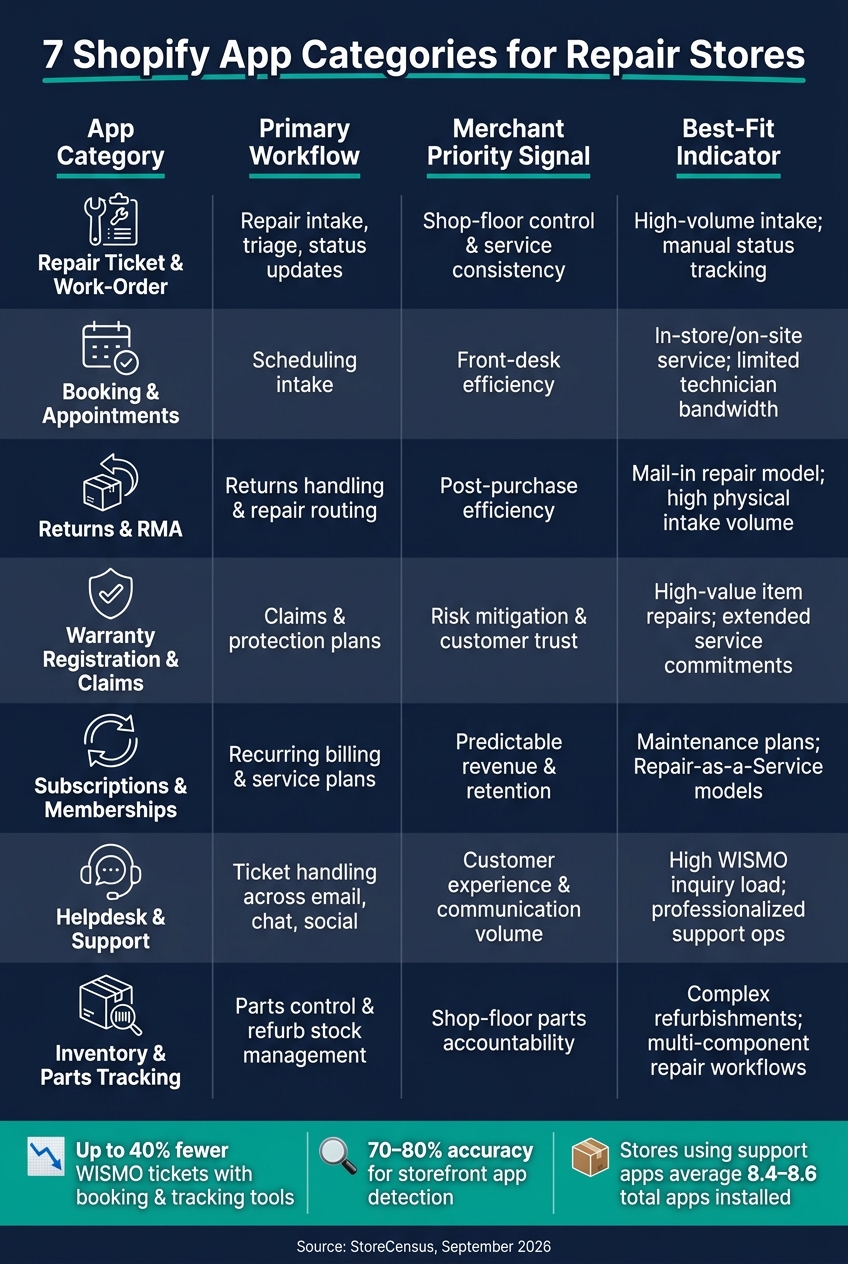
7 Shopify App Categories for Repair Stores: Workflows, Signals & Priorities
Quick Comparison
| App category | What it handles | What it says about the store |
|---|---|---|
| Repair ticket & work-order | Intake, triage, status updates | The team cares about repair flow and fewer manual handoffs |
| Booking & appointments | Scheduling | The store wants less front-desk friction |
| Returns & RMA | Returns, exchanges, repair requests | The team is putting more control into post-sale workflows |
| Warranty registration & claims | Coverage checks, claim intake | The store takes claims and service follow-up seriously |
| Subscriptions & memberships | Recurring billing, service plans | The business wants repeat revenue, not just one-time repairs |
| Helpdesk & support | Email, chat, social support | The team needs structure for customer messages |
| Inventory & parts tracking | Parts use, refurb stock, item relisting | The store is paying close attention to shop-floor stock movement |
If I’m reading a repair store’s Shopify setup, I don’t focus on brand names first. I analyze Shopify store tech stacks by looking at the app categories, because they show where the work gets stuck and what the merchant is trying to fix.
sbb-itb-61169e3
What a Repair Store's Shopify App Stack Actually Tells You
Repair stores don't run like a standard online shop. They run on a loop: intake, triage, estimates, technician handoff, parts sourcing, status updates, and then pickup or return. So the app stack isn't just a list of tools. It's a map of how the business works.
Why repair and refurbishment stores need more than standard ecommerce apps
A repair store has to handle much more than sales and conversions. It needs tools for intake, routing, and parts management. That's why these stores often lean toward booking, helpdesk, RMA, and parts-tracking apps instead of the usual ecommerce add-ons.
Those app choices point to the places where day-to-day workflow needs extra support. And that's where the next categories start to say a lot.
Why app categories matter more than individual app names
When you find and target Shopify stores in the repair niche, the app category usually tells you more than the app's brand name.
Why? Because the category points to the workflow priority. The app name is just the tool they picked to handle it.
So if you read the stack at the category level, you get a much clearer view of how the business is set up than you would from any one install on its own.
What these signals can and cannot tell you
That said, app signals only mean something if you read them with care. An install shows priority, not how well the store executes.
Storefront signature analysis is about 70% to 80% accurate for frontend-facing apps [1]. And backend tools, like parts databases or internal fulfillment software, often leave no visible footprint at all. So if a category seems to be missing, that might point to a manual process or a gap. It doesn't always mean the tool wasn't detected.
Read each signal as a workflow clue, not a scorecard.
| Signal Type | What It Suggests | What It Does NOT Prove |
|---|---|---|
| Booking app installed | Priority on intake control | Technician skill or repair turnaround time |
| Returns/RMA app installed | Focus on returns and claims handling | That the returns process runs smoothly |
| Missing key app | Manual process or missed revenue | Lack of business volume - can also indicate a manual workflow in a high-volume store |
These patterns get more useful once you connect them to merchant priorities.
1. Repair Ticket and Work-Order Apps
Core workflow supported
Work-order apps bring repair intake into one branded portal. They collect job details at the start and send status updates through pickup or shipment.
That takes pressure off the manual handoff that often creates “Where is my repair?” tickets. When updates go out on their own, WISMO inquiries can drop by up to 40% [8].
Merchant priority signal
When a repair store uses a work-order or service portal app, it usually points to a more mature operation. It suggests the team treats operations and customer experience as core parts of the business, not side tasks.
You can often see that in the rest of the stack too. Stores using support-related apps average 8.4 to 8.6 total apps installed, which hints at a more built-out setup [5].
Prospecting signal
As a sales signal, the absence of this app often means intake is still manual. If a high-traffic repair store has no visible work-order or service portal app, there’s a good chance the team is still piecing intake together by hand.
That’s why Operations or CX is often the best first contact. Those teams usually own support and post-purchase workflows. And once intake is under control, scheduling tends to become the next choke point.
2. Booking and Appointment Apps
Core workflow supported
Booking apps take repair stores off phone calls and long email chains and move them into a self-serve scheduling flow. A customer chooses a service type, picks an open time slot, and books either a drop-off or an on-site visit. These apps show live availability and send jobs to the right technician [1].
Operational bottleneck solved
The main problem these apps fix is manual scheduling. Without them, scheduling often lives on paper or inside email threads. That might work for a small shop, but it tends to fall apart as volume goes up [1].
Merchant priority signal
A booking app usually points to a store that cares about front-desk efficiency and making the first customer interaction smoother [1]. If a busy repair store still doesn't use one, scheduling is often being handled by hand. And once that part is under control, the next pain point is often returns and repair tracking.
3. Returns, RMA, and Repair-Portal Apps
Core workflow supported
Once a booking is done, returns and repair tracking often become the next jam-up. Returns and RMA apps give customers a branded portal where they can start a return or repair, generate an RMA, and track the case from start to finish [3][6].
That means a customer can send in a return or repair request, route it as a repair, exchange, or refund, and get automated status updates until the issue is resolved [3][6]. Integrated tracking also lets customers follow the case from shipment through resolution, which helps cut WISMO inquiries [6].
Operational bottleneck solved
These apps reduce the back-and-forth that comes with manual return and repair follow-up. They can cut support tickets and WISMO inquiries by up to 40% [6].
They also bring communication into one place and remove manual return approvals, which clears out a stubborn pain point for both merchants and customers [7].
Merchant priority signal
When a repair store runs a returns or RMA app, it’s a clear sign that post-purchase accountability matters to them. In most cases, these tools sit with Operations or CX teams, not marketing or growth [5].
This app category is also concentrated among a small group of high-share players [3]. Once this workflow is set up, warranty claims tend to become the next control point.
| Rank | App | Active Installs | Market Share |
|---|---|---|---|
| 1 | CWILL Returns & Exchanges | 19,708 | 35.3% |
| 2 | AfterShip Returns & Exchanges | 10,234 | 18.3% |
| 3 | Redo | 7,031 | 12.6% |
| 4 | Reveni Returns & Exchanges | 3,851 | 6.9% |
| 5 | ReturnGO Returns & Exchanges | 3,075 | 5.5% |
(Source: StoreCensus, September 2026) [3]
Best-fit agency or service opportunity
If a repair store has steady traffic but no visible returns or RMA app, there’s a good chance the team is still handling approvals by hand and soaking up extra support tickets [7].
That opens the door for agencies focused on CX, helpdesk migrations, or operations consulting. The sweet spot is connecting returns data into tools like Gorgias or Zendesk. And when you reach out, skip the marketing lead. Operations or CX directors are usually the people dealing with this headache day to day [5].
4. Warranty Registration and Claims Apps
Core workflow supported
Warranty apps give merchants a branded portal for product registration and claims. In plain terms, they make the post-sale process less messy.
These apps check claims against Shopify order data, show coverage terms before submission, and cut down the back-and-forth around receipts, eligibility, and duplicate claims. That saves support teams from doing the same manual checks over and over.
For repair and refurbishment merchants, this matters even more. The verification layer adds product life-cycle accountability that standard ecommerce tools usually don't handle well [5][8].
Merchant priority signal
A repair store using a warranty or registration app usually tells you something pretty clear: post-sale service is part of the business, not just a box they check later.
In many cases, operations or CX teams own this part of the stack because they're the ones dealing with claim checks and warranty enforcement every day [5][7].
As of September 30, 2026, the top 25 warranty and insurance apps on Shopify account for 7,464 active installs. Guide Protection + Returns leads the group with 2,855 installs [2].
| Rank | App | Active Installs | Market Share |
|---|---|---|---|
| 1 | Guide Protection + Returns | 2,855 | 38.3% |
| 2 | AddiFee | 1,080 | 14.5% |
| 3 | Simply Shipping Protection | 765 | 10.2% |
| 4 | Insure Bee | 600 | 8.0% |
| 5 | Extend Shopper Operations | 414 | 5.5% |
(Source: StoreCensus, September 30, 2026) [2]
Best-fit agency or service opportunity
The clearest prospect is a high-traffic store with no visible warranty or registration app, where support still checks coverage by hand.
That setup often points to friction: more tickets, slower claim handling, and extra work for the team. If a store is already dealing with enough volume, even a simple claims flow can remove a lot of drag.
Once warranty claims are systemized, recurring service offers often become the next step.
5. Subscription and Membership Apps
Core workflow supported
Subscription apps help repair shops turn one-time fixes into repeat revenue. That often looks like monthly maintenance plans, plus priority service tiers that give members faster turnaround or lower parts pricing.
At the center of this setup are a few moving parts: recurring billing, eligibility checks, and member status tracking. Without those, staff usually end up sending repeat invoices by hand. And that’s usually a clear sign the store is built around keeping customers coming back, not just handling one-off repairs.
Merchant priority signal
When a repair shop uses a subscription app, it’s sending a pretty clear signal: retention matters.
As of September 30, 2026, Appstle℠ Subscriptions App leads this category with 23,351 active installs, followed by Recharge Subscriptions App with 20,061 installs [4].
| Rank | App | Active Installs | Market Share |
|---|---|---|---|
| 1 | Appstle℠ Subscriptions App | 23,351 | 29.8% |
| 2 | Recharge Subscriptions App | 20,061 | 25.6% |
| 3 | Subi Subscriptions App | 13,792 | 17.6% |
| 4 | Recurpay Subscriptions App | 9,858 | 12.6% |
| 5 | PayWhirl Subscriptions | 4,377 | 5.6% |
(Source: StoreCensus, 2026) [4]
Recharge is used by about 42% of high-revenue Shopify stores [7]. That kind of concentration points to a simple pattern: subscriptions tend to fit merchants with more volume, bigger customer lists, and repeat service agreements.
Best-fit agency or service opportunity
Repair shops that run subscriptions but don’t use a loyalty or SMS tool stand out as strong retention targets. They already care about recurring revenue, but they may still be losing customers to churn [1].
That usually opens the door for work like:
- churn reduction
- renewal reminders
- service-tier promotion
- lifecycle marketing flows
For a lifecycle marketing consultant or a retention-focused agency, this is often a good fit. Once subscriptions are in place, the next headache is usually support volume and billing friction.
6. Helpdesk and Customer Support Apps
Once returns and warranty claims are systemized, support usually becomes the next big pressure point.
Core workflow supported
Helpdesk apps pull repair conversations into one place across email, chat, and social, so teams can manage the full repair process without bouncing between tools [5][9]. For repair customers, that matters a lot. Most of them aren’t browsing for fun - they want a clear answer, and they want it fast.
These apps also often connect with shipping, returns, and order-tracking tools, which gives support teams one view of each case instead of a messy trail spread across different systems [5][10].
Operational bottleneck solved
Helpdesk software cuts down on repeat status questions and keeps every reply in a single thread [5][9].
That sounds simple, but it fixes a common headache. When updates live in different inboxes, chats, or DMs, support turns into a game of catch-up. A helpdesk gives the team one record of the conversation, which makes follow-up much easier.
Merchant priority signal
A repair store that uses a helpdesk app is usually showing two things: support is now a formal part of operations, and service volume has grown enough to need structure. These tools are often owned by Operations or CX teams. After that, ecommerce managers are a strong next route, with the founder or CEO as a fallback [5].
Best-fit agency or service opportunity
Stores with rising order volume and no visible helpdesk are strong candidates for:
- CX audits
- Helpdesk migration
- Support automation setup
That kind of gap often points to a team that’s still handling support in a patchwork way, even as demand keeps climbing [5][9].
7. Inventory, Parts, and Refurbishment Tracking Apps
Inventory and parts tracking is what connects the shop floor to Shopify. After the customer-facing pieces are in place, the next step is backend stock control.
Core workflow supported
Parts and refurbishment tools usually step in after intake. They assign parts, track repairs, and move finished units back into inventory so they can be sold again. On top of that, backend inventory tools track which parts are tied to each job [1]. Marketplace connectors can also relist refurbished units across sales channels [1].
A lot of this work happens inside Shopify Admin or through external APIs, which is why frontend scans usually miss it [1].
That’s the tricky part: inventory control often stays out of sight, but it plays a big role in repair operations.
Operational bottleneck solved
These apps mainly fix inventory mistakes. Without real-time parts tracking, a repair shop can oversell components or relist a refurbished item that’s already tied to another order. If a part gets used in a repair, stock levels need to change right away so that conflict doesn’t happen [1].
It’s a simple idea, but it matters. One missed stock update can create a mess across repairs, sales, and fulfillment.
Merchant priority signal
When a repair store puts money into parts and refurbishment tracking, it usually means they’ve moved past basic ecommerce. It points to a strong focus on shop-floor control and day-to-day efficiency, often led by Operations or CX [5].
Best-fit agency or service opportunity
Backend-heavy stacks are easy to miss because they don’t leave much of a visible trail on the storefront. So if you’re trying to spot this need, look for the gaps instead. A store may have no returns portal and no B2B login, yet still show clear signs of enough order volume to need backend inventory systems [5][1].
How to Read App Choices as Merchant Priorities
Don’t look at app stacks as one-off installs. Look for patterns.
A single app can tell you what a merchant added. But a group of apps usually tells you what part of the business they’re trying to run tightly.
Now that the categories are clear, the next step is to read how they show up together in actual stores.
Work-order and parts apps point to shop-floor control
When a store uses work-order apps alongside parts tracking, that usually points to shop-floor control. In plain English, they’re trying to keep jobs moving, parts accounted for, and technicians aligned.
Booking and support apps point to front-desk efficiency
Booking paired with helpdesk tools usually signals front-desk efficiency. It often shows a business handling a high volume of service requests and trying to keep customer communication from turning into chaos.
Returns and warranty apps point to post-purchase accountability
Returns plus warranty tools usually point to post-purchase accountability. That combo suggests the merchant cares about what happens after the sale and has put time and money into reverse logistics.
Subscription apps point to recurring service revenue
Subscription and membership apps usually signal a recurring service revenue model. They also suggest a strong focus on retention, since repeat billing only works when customers keep seeing a reason to stay.
Read these combinations as business priorities, not just app names.
| App Combination | What It Signals |
|---|---|
| Work-order + parts tracking | Shop-floor control, technician coordination |
| Booking + helpdesk | Front-desk efficiency, high-touch service volume |
| Returns + warranty | Post-purchase accountability, reverse logistics investment |
| Subscription + membership | Recurring revenue model, long-term retention focus |
Read the workflow, not the brand.
Quick Comparison: What Each App Category Reveals
This table pulls the seven categories into one quick view: workflow, merchant priority, and the signal that tells you where each category fits best. Use the priorities above to read the stack faster. The table below turns those signals into a simple prospecting view.
| App Category | Primary Workflow | Merchant Priority | Best-Fit Signal |
|---|---|---|---|
| Repair Ticket & Work-Order | Repair intake, triage, and status updates | Shop-floor control and service consistency | Mail-in repairs; high-volume intake; manual status tracking |
| Booking & Appointments | Scheduling intake | Front-desk efficiency | In-store or on-site service model; limited technician bandwidth |
| Returns & RMA | Returns handling | Post-purchase efficiency | Mail-in repair model; high physical intake volume |
| Warranty Registration & Claims | Claims and protection plans | Risk mitigation & customer trust | High-value item repairs; extended service commitments |
| Subscriptions & Memberships | Recurring billing | Predictable revenue & retention | Maintenance plans; Repair-as-a-Service models |
| Helpdesk & Support | Ticket handling | Customer experience and communication volume | High WISMO inquiry load; professionalized support operations |
| Inventory & Parts Tracking | Parts control | Parts control | Complex refurbishments; multi-component repair workflows |
Use this table to spot the category pattern, not the app name.
Using App Signals for Prospecting and Positioning
How to qualify repair merchants faster using their app stack
Use the categories above to qualify prospects and pick your first outreach angle.
A store running work-order, booking, and warranty apps is usually a strong fit for a more complex repair business. That stack suggests a merchant with more moving parts, more service steps, and more chances for things to get stuck.
On the other hand, if a store is missing a returns or RMA app, that often points to manual refund handling. And that gives you a clear opening for an automation pitch.
How to tailor outreach based on what the app stack signals
App combinations often tell you where the pain is.
Subscription plus warranty apps can point to retention issues and claims friction. In that case, lead with churn reduction or claims automation.
If a store has support software but no booking app, there's a good chance intake is still being handled by hand. That's the kind of friction you can often measure fast and fix fast. Lead with the missing workflow, not the tool.
Where StoreCensus fits in the research workflow
For list building, you can turn those same app signals into search filters.
StoreCensus indexes 6 million+ Shopify and WooCommerce stores and lets you filter by tech stack, revenue signals, geography, and app combinations. For repair and refurbishment prospecting, that means you can build Shopify merchant lead lists using warranty, returns, or booking apps, then layer in revenue estimates and decision-maker contacts to prioritize outreach.
The platform also tracks real-time store changes. So when a repair store adds a workflow tool or drops an incumbent, that’s a live signal worth acting on.
Conclusion
A repair store’s app stack can tell you a lot. It shows where the day-to-day work gets squeezed and what the merchant cares about most. That’s why the stack is useful for both operations analysis and prospecting.
Booking, returns, warranty, subscription, helpdesk, and parts apps each map to a clear workflow: intake, reverse logistics, claims, retention, support, or parts control. Put together, these categories show the merchant’s operating model, not just the tools on the site.
Look at them as a group, and you can see whether a store is leaning into retention, shop-floor control, or both. Those patterns tie straight to prospect qualification and the angle you lead with in outreach.
Absence matters too, but it’s not proof. A missing app might point to a real workflow gap, or it might mean the store handles that job through a backend system with no public footprint. Either way, missing returns, booking, support, or retention tooling often points to the best opening.
Read the workflow, not the brand. Tools come and go, but the operational need stays the same.
FAQs
How do I know which app category to add first?
Start with the beginning of the post-purchase journey. For many merchants, returns and exchanges are the first sign that they’re starting to support circular commerce.
Once a returns portal is up and running, the next moves tend to follow a clear path: warranty and repair tools first, then resale or trade-in tools.
StoreCensus helps you spot stores that already have these basics in place. You can filter by app categories, revenue tiers, and growth signals.
Can a repair store run well without visible Shopify apps?
Yes. A repair store can run without visible Shopify apps, and that alone does not mean the store is inactive.
About 18% of Shopify stores show zero third-party apps. But app detection isn’t perfect. Backend-only tools, custom setups, or hidden integrations may not show up in storefront analysis.
What app stack fits a mail-in repair business best?
A mail-in repair business needs a stack built around intake control, status sync, and post-purchase support.
The repair side matters a lot here. You need tools that can manage work orders, track serial numbers, and store intake photos. Without that, things can go sideways fast. An item might get listed too early or shipped back before it's actually ready.
As the setup grows, it also helps to add a support platform like Gorgias, plus returns and exchange apps. Cloud middleware can then connect Shopify, your ERP, and repair tools so updates happen automatically across the system.