Circular Commerce Software: Shopify App Signals
Identify whether Shopify stores are testing or running circular commerce by reading app category, stack depth, traffic and storefront cues.

Most Shopify app installs are weak signals on their own. If I want to tell whether a merchant is just testing circular commerce or already running it, I need to look at traffic, stack depth, app category, storefront placement, and app changes over time.
Here’s the short version:
- A single app install is not enough
- Same-category swaps are the strongest public signal
- 50,000+ monthly visitors is a good baseline for cleaner reads
- Returns apps often mark the start
- Warranty/repair tools point to deeper post-purchase support
- Resale/trade-in tools are the clearest sign of a live circular program
- Policy pages and visible portals help confirm that the setup is active
- Stores with more app depth tend to be further along than stores with one isolated tool
A few numbers stand out:
- 61.6% of stores showed some visible app change in about 55 days
- 52.0% of those changes were add-only events, which can just mean tracking updates
- Stores in the 50K–200K traffic range showed a 74.3% app change rate, versus 33.8% for stores under 50K
- Higher-fit stores averaged 8.6 visible apps, while early-stage stores were closer to 2.4–2.6
- Only 3.6% of stores showed a clean same-category replacement, which is why that signal matters so much
If I were qualifying merchants for outreach, I’d keep the rule simple: look for stores with 50,000+ monthly visitors, 5+ visible apps, a paid or custom theme, and at least one circular tool that is visible on the storefront and backed by clear policy links.
| Signal | What I’d read from it |
|---|---|
| First returns app install | Early test or first step |
| Warranty/repair app present | Deeper post-purchase support |
| Resale or trade-in tool tied to inventory/pricing | Active circular program |
| Same-category app swap | Active vendor review |
| Visible self-service portal + policy coverage | Live rollout, not a trial |
| Under 50K monthly visitors | Noisier signal, more caution needed |
So the main takeaway is simple: don’t treat app presence as intent data by itself. I’d read the pattern, not the install.
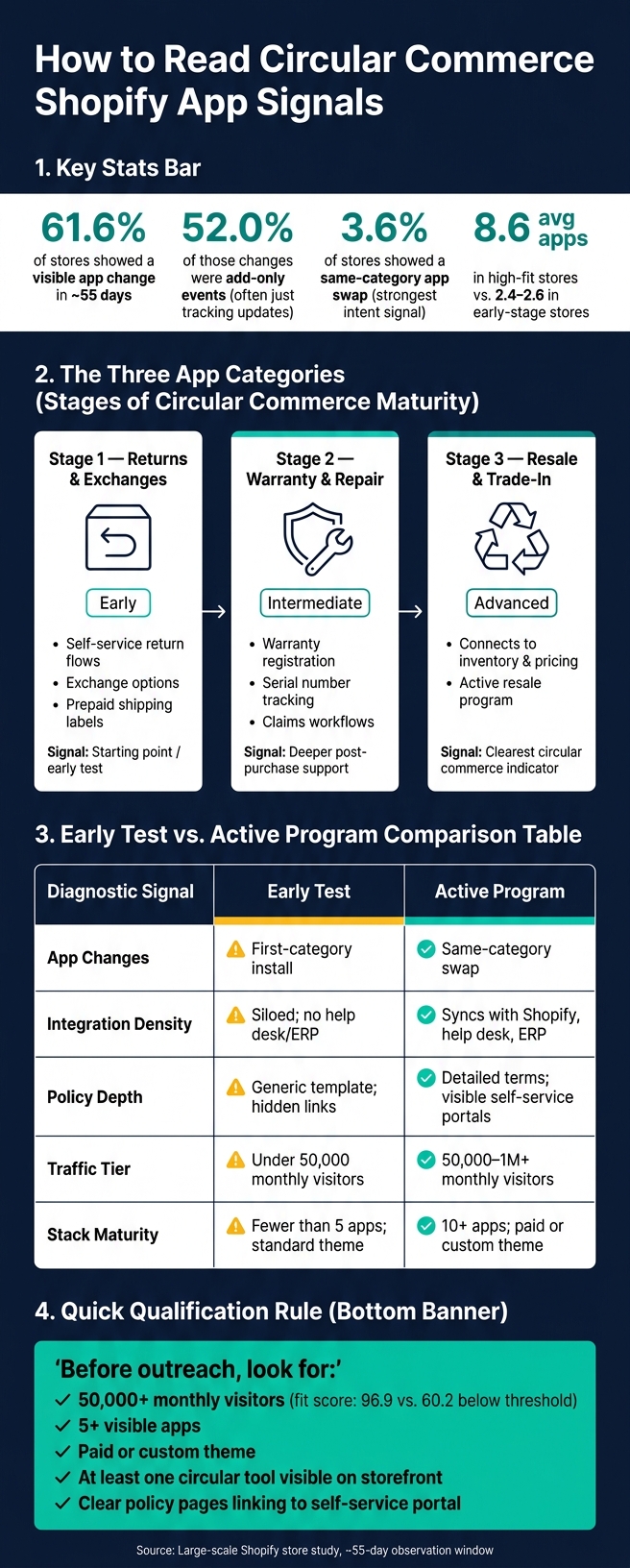
Circular Commerce Shopify App Signals: Early Test vs. Active Program
Circular commerce signals agencies are misreading
An app install, on its own, is not a buying signal.
In a large-scale study of Shopify stores, 61.6% showed some visible app change over a roughly 55-day window. But 52.0% of those changes were add-only events, which often point to tracking updates, not an actual purchase decision [1]. That’s the trap: it’s easy to see a new app and assume momentum, when the store may just be tweaking measurement.
What matters more is whether the merchant is building depth or just tossing in one-off tools.
When merchants build out returns, warranty, and resale workflows, they often create downstream demand across several service areas. That makes these signals worth watching. But stack depth needs to confirm that the program is maturing. Higher-fit stores average 8.6 visible apps, while early-stage stores sit closer to 2.4 to 2.6 [2][6]. In plain English, a merchant running a real circular commerce program usually has a layered stack, not one lonely app sitting by itself.
That pattern gets easier to spot when you break the stack into returns, warranty, and resale tools instead of treating every install the same.
A single install can mean a free trial, a seasonal pilot, or a small test on one product line. Traffic helps you read the signal with more confidence. Stores with under 50,000 monthly visitors average a lead fit score of 60.2, compared with 96.9 for stores above that mark [6]. So if you want a cleaner read, look at app signals next to traffic, stack depth, and app type.
App count matters. App category matters more.
sbb-itb-61169e3
The main Shopify app categories that signal circular commerce

If app depth shows maturity, app category shows intent. And on Shopify, three app categories matter most: returns and exchanges, warranty and repair, and resale or trade-in tools.
It helps to read them as stages.
- Returns signal the starting point
- Warranty and repair show a deeper level of support
- Resale and trade-in point to the clearest circular commerce signal
Returns and exchanges portals
Returns portals are common, so don’t treat their mere presence as proof of much on its own. What matters is where the app sits and how much it does.
This category includes self-service return flows, exchange options, prepaid shipping labels, and automated refund triggers. Those features are useful, but the key signal is broader: does the returns portal stand alone, or is it part of a larger circular stack?
Warranty and repair tools mark a step past reverse logistics.
Warranty, repair, and product registration tools
Apps in this group handle warranty registration, serial number tracking, claims workflows, repair intake, and service portals.
When a store runs warranty and repair tooling, it shows the merchant supports the product after delivery, not just at checkout. That’s a stronger sign of post-purchase commitment and a clearer move beyond a basic returns process.
Resale and trade-in tools push that signal even further, shifting from support after purchase to active circular commerce.
Resale, trade-in, and refurbishment tools
Trade-in and resale tools often connect to inventory and pricing. That matters because it points to an active resale program, not a simple add-on sitting on the side.
In practice, integration with inventory and pricing is what separates a live resale operation from a lighter feature that looks circular but doesn’t run deep.
The next step is reading these installs by placement, stack depth, and store context.
How to read Shopify app signals for circular commerce maturity
Read app signals with one simple question: is this merchant testing circular commerce, or actually running it? That framing helps you sort weak signals from the ones that matter.
Single installs versus category depth
One generic returns app, by itself, doesn't say much.
What matters is category depth. Is the store using tools across several circular commerce functions, like returns, claims, portals, and operations? Or is it relying on one isolated app?
When a merchant has coverage across multiple categories, the signal gets a lot stronger. It starts to look less like a trial run and more like a system the team uses day to day.
First-category installs versus same-category swaps
A first install shows that the merchant has started working on the problem.
A same-category swap says more. It shows the team is tuning performance, not just trying something out. If a store removes one returns app and adds another in that same category, that's usually not an experiment. It's optimization.
Only 3.6% of stores show a clean one-for-one same-category replacement [4]. That's exactly why this is the strongest intent signal you can see from the outside.
Policy pages, where the portal sits on the site, and coverage across the post-purchase journey
The storefront can tell you a lot beyond the app install itself.
You can often spot maturity in the customer journey: branded self-service portals, clear policy pages, and coverage across the full post-purchase flow all point to a live program. A store with an easy-to-find self-service portal is running a very different setup from one that hides a generic form behind a policy link.
Buried links, thin policy content, or patchy post-purchase coverage usually point to an unfinished rollout, not an active program.
Why traffic and revenue context changes how you read the same app
The same app can mean very different things depending on the store behind it.
App signals become much more dependable once a store passes 50,000 monthly visitors. At that level, merchants are more likely to have the budget and operating scale to support a formal program [1][3]. In those cases, app changes tend to reflect planned business decisions.
Below 50,000 monthly visitors, the picture gets noisier. Installs and removals are more often casual tests, detection drift, or small experiments that don't point to a live program.
Use 50,000+ monthly visitors as a baseline quality filter. Below that line, app signals are better treated as market research. Above it, they start to look like intent data worth acting on.
Use this quick read to tell early tests apart from active programs.
| Diagnostic Signal | Early Test | Active Program |
|---|---|---|
| App changes | First-category install | Same-category swap |
| Integration density | Siloed; no help desk or ERP connection | Syncs with Shopify, help desk, and ERP systems |
| Policy depth | Generic template; hidden links | Detailed terms; visible self-service portals |
| Traffic tier | Under 50,000 monthly visitors | 50,000–1M+ monthly visitors |
| Stack maturity | Fewer than 5 apps; standard theme | 10+ apps; paid or custom theme |
How agencies can build a prospecting workflow around circular commerce signals
Build a target list with app, revenue, and growth filters
Once you know how to spot the signal, turn it into a prospect list.
Start with the app category. Then narrow the list using a few simple filters: stores with 50,000+ monthly visitors, a paid or custom theme, 6+ visible apps, and steady growth signals. If an account checks all of those boxes, move it into the active outreach queue. If not, keep it in a research segment for later review.
That split matters. It keeps your team focused on stores that look active and ready to buy, instead of spending time on merchants that still need more proof.
Use StoreCensus to track app changes and prioritize mature accounts
Don’t rank accounts by app presence alone. Look at change velocity too.
A store that swaps one tool for another in the same category is often a stronger lead than a store that just added its first app. One suggests active vendor review. The other may still be early.
StoreCensus lets you search 6M+ Shopify and WooCommerce stores by app stack, revenue, theme, country, and growth. It also tracks real-time app changes, so you can catch installs and swaps as they happen instead of finding out weeks later.
Use this table to score leads as signals come in:
| Signal | Score Weight | Interpretation |
|---|---|---|
| Same-category swap | High | Highest intent; active vendor evaluation in progress [1][4] |
| First specialized circular tool installed | High | Advanced maturity; strong commitment signal [2][4] |
| Visible portal with clear policy coverage | Medium | Live program, not a test rollout |
For circular commerce tools, send outreach to Operations or CX first [5].
Set guardrails before outreach and discovery
Once an account clears the filter, use what you can see on the storefront to shape the first message.
One thing to keep in mind: app detection is probabilistic, not definitive. Frontend tools like portals and widgets are detectable about 70–80% of the time, but backend-only tools often don’t show up in scans [2][4]. So if there’s no visible app, that doesn’t prove the merchant has nothing running. It just means there may be room to dig deeper.
Before you write a custom audit or send a cold email, check at least two public signals:
- Confirm the portal is visible on the storefront
- Verify that policy pages link to it in a clear way
If the portal is buried or missing, treat the rollout as stalled, not as a live program worth a high-effort pitch.
And if a merchant removed a circular commerce tool, skip the hard sell. A simple diagnostic opener tends to land better:
"I noticed your returns portal disappeared - are returns handled differently now?"
Conclusion: What circular commerce software signals actually tell you
When you look at these signals together, they help you tell the difference between casual interest and actual buy-in. App installs can point to maturity, but they only mean something when you read them in context: category depth, app-change patterns, and what shows up on the storefront. A same-category swap usually means the merchant is actively comparing options. And when you can spot multiple circular tools on the storefront, that’s a strong sign the program is live and in use.
A simple rule for qualifying merchants
Before outreach, use a simple screen: focus on stores with 50,000+ monthly visitors, a paid or custom theme, 5+ visible apps, and at least one circular tool visible on the storefront backed by policy pages. Stores with 50K+ traffic average a lead fit score of 96.9, compared to 60.2 for stores below that mark [6]. Put weak signals on a watch list. Put strong signals into outreach.
FAQs
How can I tell if a store is testing or fully running circular commerce?
Check the storefront tech stack for signs of how the program is being run. One app install might just mean the team is testing things. A more built-out setup usually points to an active program.
Look for tools like return portals, warranty management, and resale widgets, along with a broader retention-focused stack like loyalty tools or advanced support. StoreCensus can help track these changes and verify how far along the store is by using traffic and revenue data.
Why is a same-category app swap a stronger signal than a new app install?
A same-category app swap is a stronger signal because it points to an active replacement decision, not just the usual storefront churn. A new app install by itself can mean all sorts of things.
A clean one-for-one swap tells you the merchant is already dealing with migration, setup, and evaluation. In plain English, the store is past the early research stage and is now putting time and money into a new solution. And because only 41.5% of visible app removals lead to a same-category swap, this signal also helps cut out noise.
What should I check on a storefront before reaching out to a merchant?
Audit the storefront to see what’s already in place and where the holes are. That gives you a fast read on the merchant’s stage, priorities, and likely needs.
Use StoreCensus to filter by revenue tier, traffic, and tech stack. Then review recent app installs, removals, or theme changes. Those updates can point to an active project, a new direction, or a shift in focus.
You should also check for tools that fit well with your service - or tools that are missing. For example, a store using ReCharge but missing an email marketing tool can point to a clear integration opportunity.