9 Product Update Triggers for Cold Outreach
Turn nine catalog changes into timely cold-outreach angles—map triggers to service gaps and email within 24–72 hours.


Most cold emails fail because they show up with no reason to matter today. I’d sum this up in one line: if a store just changed its catalog, pricing, stock, or campaign page, that change gives me a timely angle for outreach.
Here’s the short version:
- I look for 9 store changes that often point to near-term buying intent
- I match each change to a clear service gap
- I reach out within days, not weeks
- I lead with the change first, then the pitch
The 9 triggers covered here are:
- New product added
- New variant added
- Price increase or price drop
- Sale badge or discount copy change
- Restock of a sold-out product
- Product discontinued or hidden
- New collection created or expanded
- Product detail page copy or asset update
- Launch page, bundle, or campaign page edit
The core idea is simple: trigger → gap → pitch.
If I see a new product, I can pitch launch email flows. If I see a restock, I can pitch back-in-stock email or SMS. If I see a campaign page edit, I can pitch landing page tests. That’s why this works better than broad cold outreach based only on store size or niche.
Timing matters a lot here. The best windows in the article are often 24–72 hours, 1–2 weeks, or Day 1 after a change. That’s when the store team is still dealing with follow-up, traffic, and conversion issues.
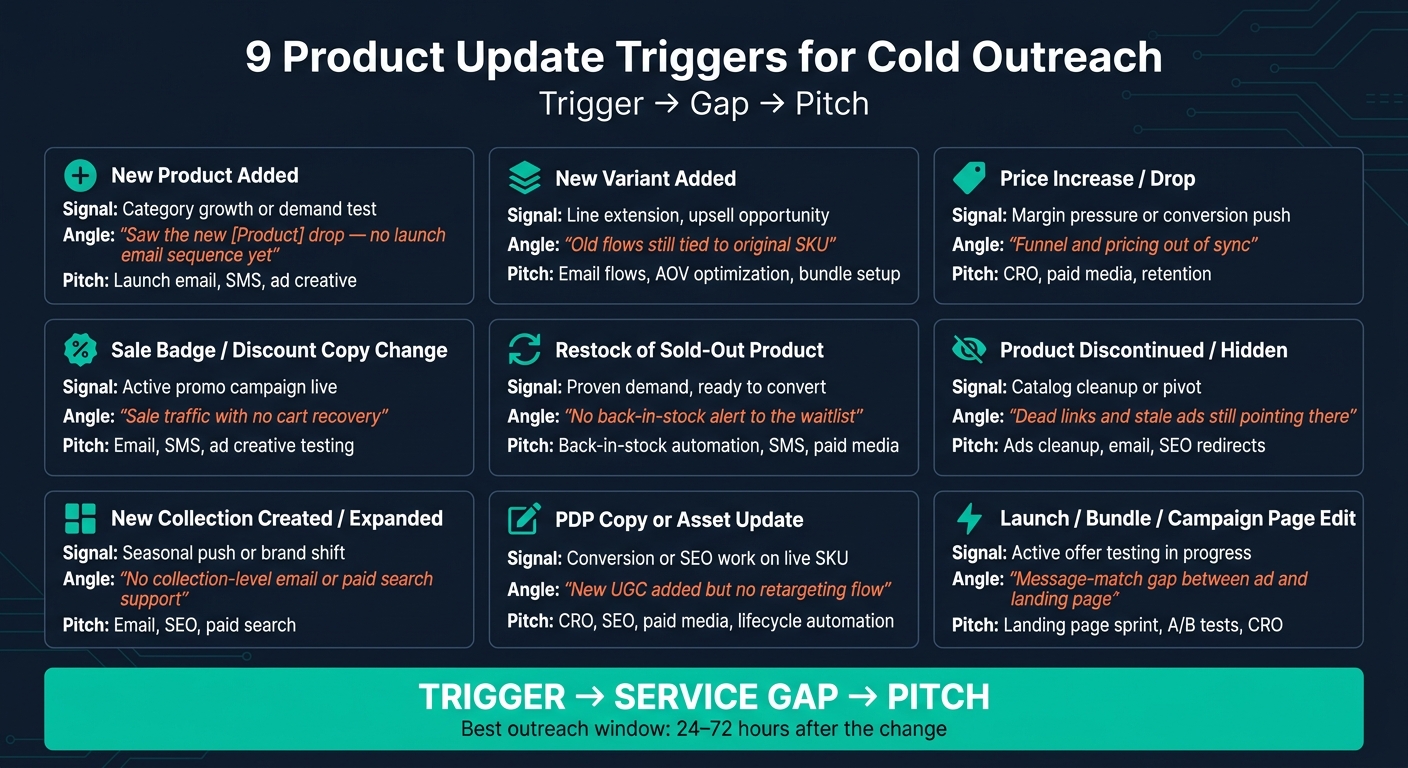
9 Product Update Triggers for Cold Outreach: Trigger → Gap → Pitch
How to 10x Your Cold Outreach Results With Buying Triggers
sbb-itb-61169e3
Quick Comparison
| Trigger | What it often points to | First outreach angle | What I’d pitch |
|---|---|---|---|
| New product | Category growth or demand test | Missing launch follow-up | Email, ads, CRO |
| New variant | Line extension | Flows and ads still tied to old SKU | Email, ads, retention |
| Price change | Margin or conversion pressure | Funnel and pricing mismatch | CRO, paid media, retention |
| Sale change | Live promo push | Weak recovery during sale traffic | Email, SMS, ads |
| Restock | Demand is already there | No back-in-stock follow-up | Email, SMS, paid media |
| Product removed | Channel cleanup needed | Dead links or stale ads | Ads, email, SEO cleanup |
| New collection | Category push | No collection-level support | Email, SEO, paid search |
| PDP update | Conversion work on live SKU | Asset added but weak follow-up | CRO, SEO, paid media |
| Campaign page edit | Live offer testing | Message mismatch or cart friction | Landing page tests, CRO |
My main takeaway: product updates give you a reason to email now, but only if the message fits the exact change. The article then shows how to turn those 9 triggers into alerts, fit checks, CRM routing, and a 4-touch cadence on Days 1, 4, 7, and 14.
Why Product Updates Create Better Cold Outreach Angles
Cold outreach tends to flop when it leans on static data like industry or store size. Product catalog changes work differently. They give you a live reason to reach out right now. That makes catalog edits more useful than fixed firmographic data.
Catalog Changes Show Active Decision-Making
When a merchant adds a SKU, changes pricing, or launches a new collection, they're already in motion. They're either fixing a problem or going after a new shot at growth. That matters, because trigger-based outreach beats generic messaging.
Timing Matters More Than Personalization Alone
Deep personalization helps, but it doesn't tell you when to hit send. Timing does.
An email sent within days of a product update lands in the exact window when a merchant is most likely dealing with sales follow-up, inventory movement, and conversion gaps. That's the sweet spot.
The point isn't just the update itself. It's the pitch that update makes possible.
A Good Trigger Still Needs a Clear Service Pitch
A catalog change only helps if it maps to a service gap. A new product line often leaves holes in abandoned cart flows, retargeting, and follow-up. A restock creates a clear back-in-stock automation angle. A price change can open the door to a CRO conversation.
The formula is simple: trigger → gap → pitch.
Use that trigger-to-pitch logic to read the nine updates below. The next nine triggers show exactly how to match each update to a service offer.
1. New Product Added to the Catalog
What the catalog change signals
When a merchant adds a new product, it usually points to growth, not routine upkeep. That makes the change easy to tie to a clear service gap. If a supplement brand adds collagen, for instance, it suggests expansion. And that makes it a strong prospecting signal: the store is scaling. You can find similar opportunities using Shopify brand prospect lists.[2]
Why the timing creates urgency
The first 1–2 weeks after launch matter most. That’s when the merchant is still watching early performance and trying to spot what’s working and what isn’t. Reach out during that window, while launch issues are still easy to see.
Best outbound angle
Mention the launch by name, then call out one missing follow-up flow. That gives you a direct way to pitch the gap created by the launch.
"I saw your new [Product Name] launch - noticed you're not running a dedicated abandoned cart flow for it yet."
That kind of note shows you looked into the account and turns the launch into a clear service opening.
Service pitch to attach
Pitch email marketing first: abandoned cart and retargeting flows for the new line. If traffic is organic, pitch paid media to help scale the launch. If the product page is thin, pitch CRO to improve the page while launch traffic is still fresh.
If the launch is already live, check for smaller product changes next. Those often point to the same demand-testing cycle.
2. New Variant Added to an Existing Product
What the catalog change signals
A new variant may be smaller than a full product launch, but it often creates the same follow-up holes. A new color, size, flavor, or bundle usually points to a product line that's already getting demand and now needs launch support around the new option. [2]
Why the timing creates urgency
When a brand adds a new variant, the old setup often doesn't keep up. Email flows, ads, and landing pages may still point back to the original SKU, which creates an immediate mismatch.
That tends to show up fast in places like:
- abandoned cart flows
- browse abandonment flows
- retargeting ads
- ad creative tied to the original SKU
That's the gap your outreach should lean on. It gives you a timely reason to reach out instead of sending a generic pitch. [2]
Best outbound angle
Mention the variant by name, then point out the missing follow-up in their flows or ads.
"I saw your brand is running ads for your new [Variant Name], but noticed you're not sending variant-specific email flows." [2]
That works because it feels current and specific. You're not just saying something looks off. You're pointing to a launch gap they can fix right now.
Service pitch to attach
The cleanest fit here is email marketing. You can pitch abandoned cart or browse abandonment flows built for the new variant.
If they're already putting paid traffic behind the launch, ad management is another strong angle. Offer to help scale the variant with ad creative frameworks that have worked for similar brands.
For products people buy again and again, a retention or subscription pitch can also fit. A new flavor or size is a natural time to introduce subscribe-and-save. [2]
3. Price Increase or Price Drop on a Key SKU
What the catalog change signals
A price change on a key SKU usually points to margin pressure, a response to demand, a shift in market position, or a push to clear inventory.
A price drop is often meant to lift conversion or move stock. A price increase is usually about protecting margin or testing demand.[2]
Either way, the brand is changing the offer in a direct, visible way. That creates an opening if you catch the rest of the funnel before it updates.
Why the timing creates urgency
Price changes can throw ads, email, and landing pages out of sync.
And that mismatch adds up fast. Even a small drop in conversion or a small margin leak can compound quickly after a price change.[2]
Best outbound angle
When you spot the change, lead with the gap it creates.
Call out the exact price move and tie it to the risk: lower conversion, weaker AOV, or less efficient paid media. Keep it concrete. If the price drops, center the pitch on margin recovery through bundles and cross-sells.
With StoreCensus, you can track SKU price changes in real time, including timestamps, so your outreach lands while the update is still fresh.
Service pitch to attach
Offer a short price-change audit that looks at PDP copy, bundle logic, and any email or ad creative still showing the old price.
For a price increase, pitch retention work. For a price drop, pitch paid media or CRO.
4. Sale Badge or Discount Copy Change
What the catalog change signals
When a merchant changes a sale badge or rewrites discount copy - for example, moving from 20% off to Buy 2, Get 1 - that usually points to an active campaign call. In plain English, they’re in motion. And when a store is already making campaign changes, it’s often more open to outside help.[2]
Why the timing creates urgency
As soon as the offer changes, campaign pressure kicks in. The merchant now has a short window to see what works before the sale wraps up, which makes timing matter a lot.[2]
A sale page without recovery flows leaks high-intent traffic. That’s the kind of gap worth calling out. A message tied to one clear issue is much more likely to get a reply than a broad, generic pitch.[3]
Best outbound angle
Start with the exact change you saw. Keep it simple and specific:
I noticed you updated your site to a Buy 2, Get 1 offer on [specific collection].
That one detail helps prove you’re writing about a real store update, not sending the same note to 200 brands.[2]
From there, move straight to the gap. If the store is running a sale without cart recovery or retargeting, that’s the opening. For subscription-based brands, email can generate 30–40% of total revenue. If that setup isn’t in place during a sale, money is slipping away.[3]
With StoreCensus, you can track sale badge and discount copy changes in real time and cross-check the store’s tech stack. That makes it easy to spot whether tools like Klaviyo are already in place.
Service pitch to attach
Your pitch should fit the promo mechanics, not just the discount on the page.
- New sale badge with no abandoned cart flow? Pitch email or SMS retention.[3]
- Discount copy rewrite with active paid traffic? Offer ad creative testing or a landing page audit.[3]
- Seasonal discount with room to scale? Pitch Meta or Google Ads management to push the offer that’s already working.[3]
5. Restock of a Previously Sold-Out Product
What the catalog change signals
A restock points to proven demand. The merchant now has inventory back on hand and usually wants to sell through it fast. The product already showed it can attract buyers. Now the job is to win those sales before that window starts to shrink.
Why the timing creates urgency
Once a sold-out SKU comes back, the focus changes. It’s no longer about testing whether people want it. It’s about turning that interest into sales.
The period right after a restock is often when the merchant is most focused on sending traffic back to that product page. If they don’t have a back-in-stock flow or retargeting support in place, they can lose people who already showed intent. Those buyers were close before. They may be ready to come back now.
That gap is your opening.
Best outbound angle
Call out the exact product that’s back in stock. Don’t keep it general.
I noticed your [product name] is back in stock after being sold out.
Using the specific product makes the message feel grounded and believable. Then you can point to the missing piece. If there’s no automated notification flow or retargeting set up for that SKU, that’s the pain point worth naming.
With StoreCensus, you can track store changes in real time and check whether the shop already has email automation tools like Klaviyo installed. That makes it easier to match your pitch to the store’s current setup.
Service pitch to attach
The pitch should match what the store already has in place.
- If a store restocks a high-demand SKU and has no email automation, this is a clear email/SMS angle.
- If the store already uses Klaviyo but isn’t sending paid traffic to the restocked product page, that opens the door for a paid media pitch.
Lead with the gap that fits their setup.
6. Product Discontinued or Hidden from the Catalog
What the catalog change signals
Unlike a restock, a hidden SKU tends to create cleanup work across active channels. When a merchant removes or hides a product, they may be cutting dead weight, shifting focus, or making room for a new launch. Either way, the store is moving, and that kind of change is worth tracking.
Why the timing creates urgency
The main risk is all the assets still pointing to that product: ads, email flows, and SEO links. Reaching out on Day 1 after the change matters because the merchant often hasn't fixed those gaps yet.[2]
"Timing isn't a nice-to-have. It's the whole game." - Dorian Barker [1]
Best outbound angle
Mention the product by name, then point to the exact issue it caused.
"I noticed [Product Name] is no longer in your catalog, but [specific observation] still points there." [2]
That kind of message shows you took the time to look at their store. It also starts a real conversation instead of shoving in a pitch.
With StoreCensus, you can track and target Shopify stores in real time and cross-reference the merchant's tech stack to see what else changed around the same time.
Service pitch to attach
Start with the channel that's still sending traffic to the dead SKU. Pitch ad management for live ads, email marketing for stale flows, or SEO cleanup for broken links.
7. New Collection Created or Expanded
What the catalog change signals
When the change goes beyond a single SKU, the collection itself becomes the signal. A new or expanded collection usually points to category growth and active momentum. The merchant isn’t just maintaining the catalog anymore - they’re adding to it.
The weak spots tend to show up right after launch. That’s when flows, ads, and site navigation often fall behind. So the first places to look are the collection page, the flows, and the ads.
Best outbound angle
Mention the collection by name, then call out a gap tied to that collection.
"I noticed your new [Collection Name] is live, but there's no collection-specific abandoned cart flow tied to those products yet."
Start with the gap. Then move into the pitch.
Service pitch to attach
Pitch email automation if the new collection doesn’t have a launch email sequence. Pitch paid creative if they’re running ads with thin assets. Pitch launch strategy if they need help turning the collection into revenue.
If the collection is live but the surrounding assets still look stale, the next trigger is the campaign page.
8. Product Detail Page Copy or Asset Update
What the catalog change signals
Product detail page (PDP) copy or asset updates usually point to conversion work, SEO work, or creative work on a live SKU.
Why the timing creates urgency
PDP edits often show up about 30 days before a major shopping season, or right at the end of a launch phase. That’s the point where a store moves from simply getting the product live to making the page convert.[3] In plain terms, the SKU is still being tuned, which makes the timing useful for outreach.
Best outbound angle
Treat PDP edits as optimization signals, not launch signals. Call out the product, mention the exact update, and then show the gap it creates.
"I noticed you added a new UGC video to [Product Name] - but there's no retargeting flow set up to push that asset to warm audiences."
That angle works because it feels specific. You’re not guessing. You’re reacting to a visible change on a live product page.
Service pitch to attach
Let the update guide the pitch.
- Copy edits usually point to CRO or SEO work.
- New UGC or video usually points to creative support and paid media support.
- A multi-PDP refresh can open the door to retention work or broader agency support.[2]
If the update shows weak follow-up after the page visit, lead with email or lifecycle automation.
If the edit grows from a PDP into a launch page or campaign page, shift the pitch from product-page optimization to campaign execution.
9. Launch Page, Bundle, or Campaign Landing Page Edit
What the catalog change signals
Edits to launch, bundle, or campaign pages usually point to active offer testing, not day-to-day catalog upkeep. In plain English, the merchant is tweaking a live promotion.
That can show up as:
- hero copy rewrites
- CTA changes
- bundle updates
A PDP edit is about improving a product page. A launch or campaign page edit is about improving the promotion itself. That makes these pages a stronger outbound trigger than static product pages.
Why the timing creates urgency
The best time to reach out is 24–72 hours after a meaningful edit. At that point, ads and emails are often still running, and the team is still making changes.
That short window matters. It gives you a chance to connect the edit to a clear conversion gap while the campaign is still in motion.
Best outbound angle
Lead with the exact page edit you noticed. Then spell out the campaign gap it may have created. After that, offer help improving conversion while the promotion is still live.
That framing works because it feels like performance support, not generic prospecting. The pattern stays simple: trigger → live campaign gap → fast offer.
Example: if they changed the headline, you can point to message-match issues between the ad, email, and landing page. If they updated the bundle layout, you can speak to drop-off around offer clarity or cart friction.
Service pitch to attach
A strong offer here is a 1–2 week landing page sprint with 2–3 A/B tests focused on headlines, CTAs, and bundle layout.
The angle can shift based on what changed on the page:
| Edit signal | Best offer to attach | Why it fits |
|---|---|---|
| Headline or hero-copy rewrite | Landing page sprint with headline and CTA tests | Message changes often point to conversion issues at the top of the page |
| CTA update | CTA test plus funnel review | A new CTA can signal weak click-through or poor action clarity |
| Bundle update | Bundle layout and offer-structure test | Bundle edits often mean the merchant is trying to lift AOV or improve offer clarity |
| UGC or reviews added | Creative and paid media support | New social proof usually connects to ad creative and conversion support |
| Subscription offer added or adjusted | Lifecycle marketing | Subscription pages often need email and retention support to work well |
StoreCensus detects launch and campaign page edits in real time across Shopify and WooCommerce stores, then surfaces decision-maker contact info.
Use the table above to match each edit to the right offer.
Trigger-to-Pitch Reference Table
Use this table as a quick outreach cheat sheet. It shows what changed, why the merchant likely made that move, what you can say first, and what to pitch after that.
| Trigger | Merchant Motivation | Outreach Angle | Service Offer |
|---|---|---|---|
| New product added | Market expansion / testing a new category | "Saw the new [Product Name] drop - noticed there's no launch email sequence tied to it yet." | Launch email, SMS, ad creative |
| New variant added | Line expansion / upsell | "Added variants usually mean you're testing demand - are you using them to lift AOV?" | Post-purchase flows, AOV optimization, bundle setup |
| Price increase | Margin protection / premium repositioning | "Noticed the price shift - how are you communicating the value change to existing customers?" | Retention strategy, loyalty programs, email re-engagement |
| Price drop / sale badge | Inventory clearance / rapid acquisition | "The price drop is a good window to scale paid traffic before the sale ends." | Paid social scaling, ad creative optimization |
| Restock of sold-out item | Capturing pent-up demand | "Your [Product] is back - are you running back-in-stock alerts to the waitlist?" | Back-in-stock automation, push notifications, SMS |
| Product discontinued / hidden | Catalog cleanup / pivot | "Saw [Product] come down - are you redirecting that traffic before it disappears?" | SEO redirect strategy, lifecycle email, catalog consulting |
| New collection created or expanded | Seasonal push / brand shift | "The new [Collection Name] looks sharp - the SEO metadata isn't optimized for the new keywords yet." | SEO, collection page CRO, paid search |
| PDP copy or asset update | Conversion improvement / SEO tuning | "Noticed you added new UGC to [Product Name] - there's no retargeting flow pushing that asset to warm audiences yet." | CRO, SEO, paid media, lifecycle automation |
| Launch page / bundle / campaign page edited | Active offer testing / conversion improvement | "Caught the headline change on your campaign page - there may be a message-match gap between the ad and the landing page." | Landing page sprint, A/B tests, CRO |
A simple rule: go after high-intent changes first. That usually means:
- New products
- Live campaigns
- Seasonal collection pushes
Lead with the outreach angle. Then move into the service offer. That order matters. If you pitch too early, the message can feel generic. If you point to a change they just made, your outreach feels timely and specific.
Next, turn these triggers into alert rules and outbound templates.
How to Turn These Triggers into an Outbound Workflow
Nine triggers only matter if they plug into a system you can run again and again. That means define the event, filter the store, route the alert, and send the right message. The gap for most teams isn't data. It's process.
The goal is simple: turn each trigger into a set alert, a fit check, a routed task, and a message your team can send right away.
Set Clear Trigger Definitions
Start by grouping the nine triggers from the list above into four alert types:
- catalog additions
- pricing changes
- inventory updates
- page edits
Then assign one message template to each trigger before alerts go live. This keeps your team from scrambling every time a new event comes in.
Prioritize Stores That Fit Your ICP
When an alert fires, don't send it straight to sales. First, qualify the store using proven prospecting strategies. Filter alerts by revenue, traffic, and tech stack before outreach starts. Skip low-budget stores. Put your attention on merchants with solid traffic and an active stack.
"Targeting 50 perfect stores beats blasting 5,000 random ones." - StoreCensus [4]
StoreCensus lets you filter across 6M+ Shopify and WooCommerce stores by revenue band, installed apps, theme, country, and growth signals. So instead of working from a huge trigger list, you can cut it down to the accounts that fit before a single message goes out.
Route Alerts into Your Sales System
Once fit is confirmed, send the alert straight into your CRM. At that point, the workflow should happen on its own: detect the trigger, enrich the contact, create the CRM record, and place it into the right sequence.
That way, reps aren't wasting time copying data from one tool to another. The handoff is clean, and the next step is clear.
Write One Message Per Trigger Type
Build one template for each trigger type, then run a 4-touch cadence on Days 1, 4, 7, and 14. Keep each message tied to the specific catalog change instead of falling back on a broad pitch.
That's what keeps the outreach grounded in the trigger itself, not in generic sales ops language.
With this workflow in place, each trigger turns into a repeatable outbound event instead of a one-off alert.
Conclusion
Product updates can signal purchase intent. They show a merchant is making changes right now, which makes your outreach more timely.
But the trigger by itself doesn't do much. The pitch has to fit the change. That means you need to pair the update with a relevant message and send it fast. Start by naming the exact change. Skip the generic opener and call out the specific update.
Timing plays a big role here. The closer your email lands to the change, the more useful it feels. And the upside comes from turning that speed into a workflow your team can use again and again.
Define your triggers, qualify fit, route alerts to your CRM, and send one message per trigger.
FAQs
Which trigger should I prioritize first?
Focus first on triggers tied to immediate revenue risk or active buying intent. Think competitor app uninstalls or major storefront errors. Those signals are usually the closest thing to money moving in or out, which is why they often convert best.
A good place to start is stores with 50,000+ monthly visitors. That helps you zero in on high-intent prospects that are more likely to have the budget to act.
StoreCensus can handle this for you by tracking real-time changes across 6M+ stores and sending those signals straight into your outreach workflow.
How quickly should I send outreach after a product update?
For most product updates, send outreach within 24 to 48 hours after you spot the event. That’s the sweet spot: the signal is still current, and your message is less likely to come off as a random interruption.
A few cases call for different timing:
- Send it right away for high-priority signals
- Wait about 2 weeks after a product launch
- Wait about 1 week after design updates or site refreshes
How do I match each trigger to the right service pitch?
Match each product update trigger to one of five signal types: pain, project, hiring, tool, or growth. Then line up your offer with the agency service that makes sense.
Here’s the simple version:
- Pain → audits or fixes
- Project → UX/UI or development
- Hiring → fractional CMO or retention support
- Tool → migration or setup help
- Growth → full-service growth or scaling strategy
The logic is pretty straightforward. If a company is dealing with a problem, lead with a fix. If they’re building something new, lead with execution. If they’re hiring, they may need extra hands or senior support before they fill the role. If they’ve added a new tool, they may need help getting it live. And if they’re growing, that’s often the time to pitch broader support.
StoreCensus helps you spot these triggers and reach the right decision-maker.