How Shopify Handles MySQL at Petabyte Scale
Shopify's MySQL scaling explained: pods, shards, Vitess, replicas, failover, rebalancing, and why agencies should measure before changing.


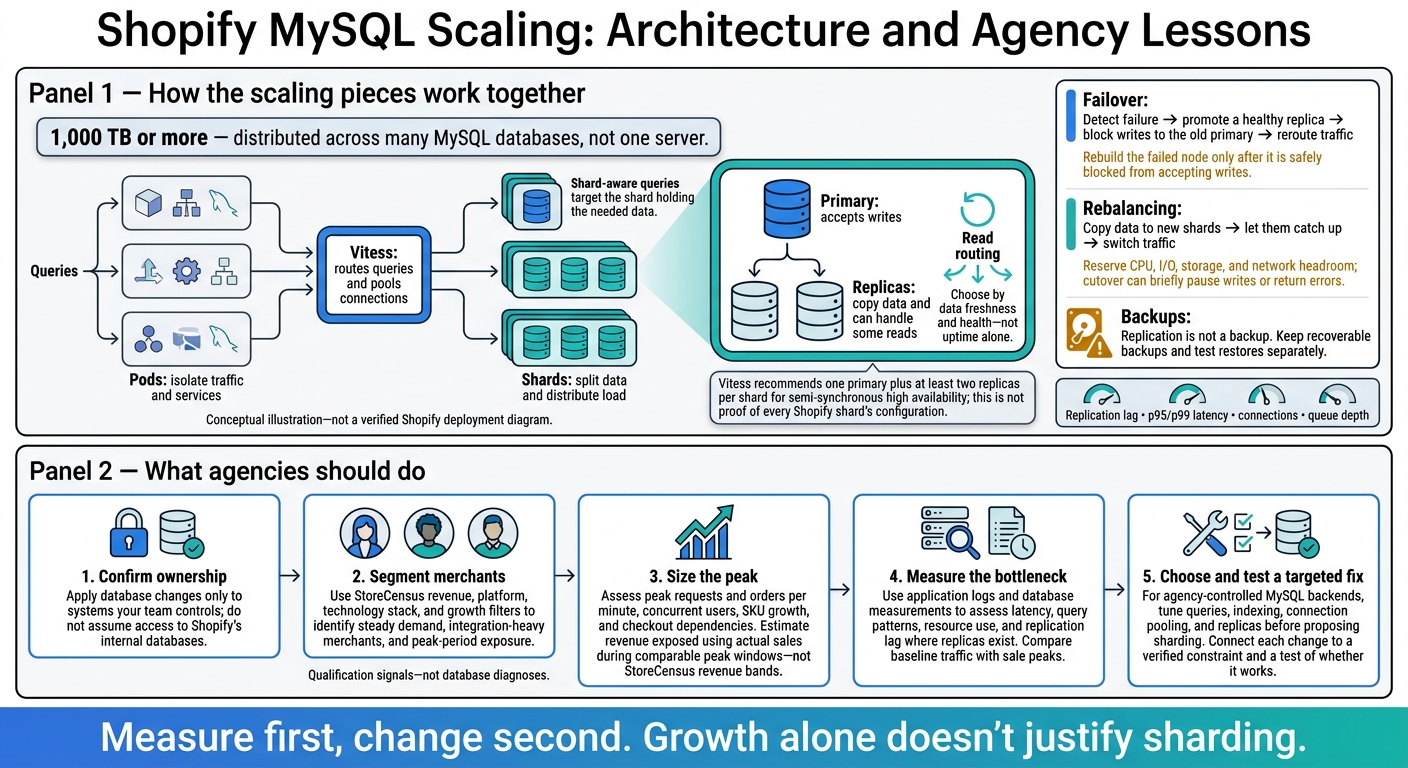
Shopify handles 1,000 TB or more by spreading data and traffic across many MySQL databases - not relying on one server. My takeaway for agencies: confirm which systems you control, then measure peak demand before recommending database changes.
Here’s how the pieces fit together:
- Pods and shards separate workloads and divide data.
- Vitess routes queries and pools connections to reduce database pressure.
- Replicas and failover support reads and recovery, but require lag checks, safe promotion, and separate backups.
- Rebalancing moves load off busy shards, with capacity checks before switching traffic.
For merchant qualification, I’d use StoreCensus to flag accounts worth checking - not to diagnose private databases. Then I’d use logs, peak sales, and database measurements to assess checkout risk and choose a fix.
The rule I’d follow: <u>measure first, change second</u>. Merchant growth alone isn’t a reason to shard.
Shopify MySQL Scaling: Architecture and Agency Lessons
Megabytes to Petabytes: the journey of scaling a database
sbb-itb-61169e3
How Requests Move Through Pods, Shards, and Vitess
Shopify separates workloads into pods, splits data across shards, and uses routing and connection pooling to prevent MySQL from becoming a single bottleneck. Each layer reduces pressure on the database in a different way.
Pods Isolate Workloads; Shards Split Data
Pods isolate traffic and services. Shards split data so one database doesn’t carry the full load.
For agencies, that distinction matters: isolation limits how far a failure can spread, while sharding distributes data and load across smaller units.
Vitess Routes Queries and Pools Connections
Vitess routes queries to the right shard and reuses database connections through pooling. Reusing connections cuts overhead and limits connection pressure. The next constraint is how much work each query requires.
Shard-Aware Queries Limit Database Work
Shard-aware queries go to the shard that holds the needed data instead of searching every shard. That means less unnecessary database work.
Agencies should analyze store data in their own systems using supported APIs or exports - not assume they can access Shopify’s internal databases directly.[2] Keeping reporting workloads separate reduces operational risk, the same concern behind replica, failover, and balancing decisions.
How Replicas, Failover, and Balancing Support Reliability
Replicas Support Reads but Can Fall Behind
Once a query is routed, the next decision is where to send reads if a shard is busy or unhealthy.
A primary accepts writes for a shard. Replicas copy its data and can handle some reads, but replication lag means they may serve older data. Reads that need the latest data should go to the primary or a caught-up replica. For session-sensitive users, keep routing consistent or send them back to the primary so they don’t see older data after newer data. Route by data freshness and health - not uptime alone.[5][6]
Up-to-date reads help keep inventory, pricing, and account pages accurate. Adding replicas increases read capacity and recovery options, but it also means more lag monitoring and routing work.
Vitess recommends one primary plus at least two replicas per shard for semi-synchronous high availability. That’s a Vitess recommendation, not proof that every Shopify shard uses that setup.[10] Availability still depends on placement and tested failover. Replication is not a backup: accidental deletes and destructive writes can spread to every replica. Keep recoverable backups and test restores separately.
Failover Moves Writes to a New Primary
Failover involves detecting a failure, promoting a healthy replica, blocking writes to the old primary, and rerouting traffic. Only rebuild the failed node after it has been safely blocked from accepting writes.[4][7]
Recovery time objective (RTO) defines how long service can be down. Recovery point objective (RPO) defines how much recent data loss is acceptable, measured in time. Test both against primary loss, network partitions, lagging replicas, and stale connections.[5]
These tests help prevent a short database outage from turning into prolonged checkout downtime.
Balancing Relieves Overloaded Shards
Merchant growth, traffic spikes, and bulk imports can overload one shard while others run normally. Replicas help with reads, but they don’t fix an overloaded write path. Resharding copies data to new shards, allows them to catch up, and then switches traffic over.[3][8][9]
That cutover can briefly pause writes or return errors. Before migration, reserve CPU, I/O, storage, and network headroom. Set thresholds for pausing the migration based on replication lag, p95/p99 latency, connections, and queue depth.
| State | Typical symptoms | Business impact | Appropriate fixes |
|---|---|---|---|
| Balanced shards | Similar latency, lag, and resource use across shards | Predictable performance | Continue monitoring and review headroom before peaks |
| Overloaded shard | Queueing, lock contention, rising lag, or heavy tenant/import activity | Slow storefronts, delayed admin actions, checkout risk | Throttle jobs, optimize queries, move tenants, or split the shard |
| Isolated hot tenant | One merchant dominates its assigned capacity | Neighbors are better protected; that merchant remains exposed | Limit heavy jobs, schedule imports, or add dedicated capacity |
Agencies use these same signals and Shopify brand prospect lists to assess whether a merchant is nearing backend risk.
How Agencies Use Scaling Lessons to Qualify Merchants
Build Merchant Segments With StoreCensus
Apply Shopify’s scaling lessons only where your team controls the backend. Agencies can use those scaling signals to qualify merchants, but first confirm who owns each system. Do that before discussing sharding or failover.
Use StoreCensus revenue, platform, technology stack, and growth filters to group merchants into three segments: steady demand, integration-heavy merchants, and peak-period exposure. Estimated monthly sales and visits help identify accounts with more revenue at risk during scaling events[2].
ERP, WMS, or PIM integrations call for questions about synchronization. A move into a higher revenue band calls for a closer look at capacity needs. But an app install or growth signal is only a hypothesis - not proof of database overload or downtime risk. Check whether peak demand threatens systems your team can change.
Assess Peak Demand and Revenue at Risk
Once ownership is clear, size the peak - not the average. Ask about the busiest sale window, including peak requests and orders per minute, concurrent users, and SKU growth.
Trace which integrations must respond before checkout completes. For each dependency your agency controls, determine whether a failure blocks purchases, delays fulfillment, or affects only reporting. Estimate revenue exposed to an interruption using the merchant’s actual sales during comparable peak windows - not StoreCensus revenue bands[2].
Measure Bottlenecks Before Choosing Sharding
Growth alone doesn’t justify sharding. The lesson from Shopify’s petabyte-scale systems isn’t to copy its architecture. It’s to measure the constraint before changing the system.
Measure latency, query patterns, resource use, and replication lag where replicas exist. Compare baseline traffic with sale peaks. For MySQL backends your agency controls, tune queries, indexing, connection pooling, and replicas before proposing sharding. Make changes only when they address the measured bottleneck.
Document the segment, owner, bottleneck, and affected systems, then connect the proposed fix to that bottleneck. StoreCensus supplies the segmentation signals; application logs and database measurements provide the evidence[2].
Conclusion: Match Database Changes to Measured Risk
Shopify spreads risk across shards, replicas, routing, and rebalancing. Agencies should use this as a risk-control pattern - not a blueprint to copy.
Start by segmenting merchants and confirming who owns the backend. Then measure peak load and reliability needs before recommending changes supported by data. StoreCensus can flag merchants worth qualifying, but those signals alone don’t prove database risk.
For each change, name the constraint it addresses and the test that will check whether it works. A database change should solve a verified problem, not simply reflect a merchant’s size.
FAQs
How can I distinguish Shopify issues from integration bottlenecks?
Monitor the entire buying path, not just site uptime. Use synthetic transaction monitoring - automated test purchases every 1 to 5 minutes - to catch payment or shipping calculation failures, even when the storefront seems to work.
Errors or slower load times without a traffic increase point to a technical issue. If checkout fails while the storefront stays responsive, the bottleneck is almost certainly an integration or script failure.
When should I shard instead of adding replicas?
Use sharding to limit the reach of database issues. Replicas spread read traffic and help keep your service available during hardware failures. But they can also copy corrupted data or accidental deletions to every replica.
Sharding divides your infrastructure into isolated pods, so a database incident stays within one pod instead of affecting the entire platform. Use replicas for speed and uptime and sharding to contain risk [1].
How can I turn StoreCensus signals into qualification questions?
Connect StoreCensus data points to the business problems they may point to. Filter by revenue, tech stack, and growth signals to find stores that match your ideal client profile. Then use that data to ask targeted questions.
High traffic but poor Core Web Vitals? Ask how page load speeds affect conversions during peak traffic.
No email marketing tool? Ask how they collect and nurture leads.
Recently installed an app? Ask what business goal the app is meant to address.