How Agencies Read Database Choices in Merchant Stacks
Qualify e-commerce leads from storefront clues, score migration risk, and offer scoped discovery—confirm business needs before proposing technical work.


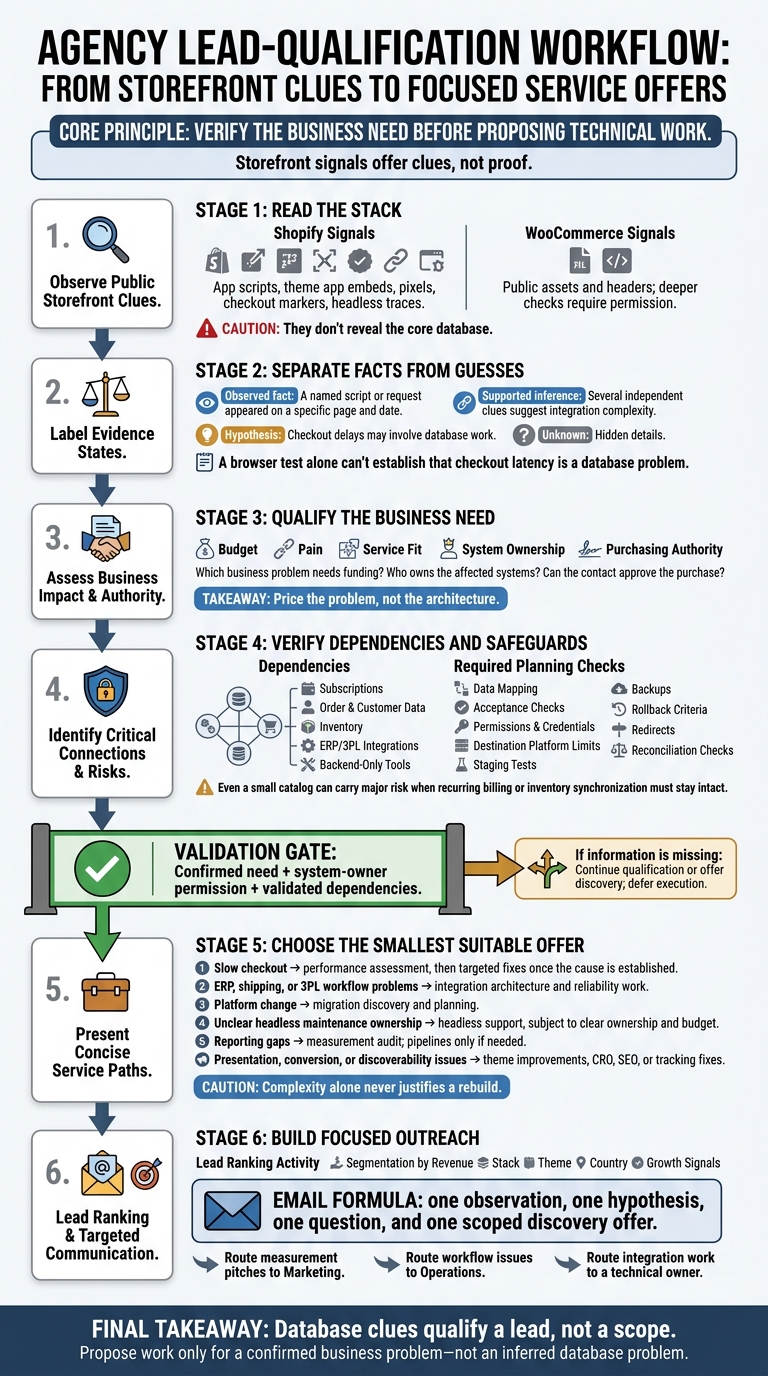
I use storefront clues to qualify leads - not identify their databases. Five visible apps can give me questions to ask, but they can’t tell me what runs behind the store. Before I pitch fixes or a migration, I confirm the problem, budget, and system owners.
Here’s how I turn those clues into a service offer:
- Read the stack: Shopify shows app and frontend clues; WooCommerce allows deeper checks with permission.
- Separate facts from guesses: I record what I can see and mark hidden details as unknown.
- Check risk and fit: I verify data, subscriptions, and integrations before pricing work - and don’t assume a rebuild is needed.
- Build focused outreach: I use StoreCensus to group leads, then lead with one observation, one question, and a scoped discovery offer. For more on lead generation, see our Shopify store guides.
My rule: <u>verify the business need before proposing technical work.</u>
Merchant Stack Clues to Qualified Agency Offers
Read Database and Infrastructure Clues
Relational Databases, Document Stores, and Caches
Storefront signals offer clues, not proof, about databases, caching, hosting, and the source of truth [2][3]. Relational systems usually point to standard commerce operations. Document stores and custom services tend to suggest more complex builds and migrations. Caches point to performance tuning - not a different source of truth.
Shopify and WooCommerce Infrastructure
On Shopify, APIs, apps, checkout markers, and headless traces can hint at complexity. They don't reveal the core database.
With permission, WooCommerce lets you look deeper into the infrastructure. Request the WooCommerce System Status report, hosting limits, and order-storage settings. Check cache and database settings separately: Redis support doesn't mean object caching is enabled.
How you assess each platform depends on what it exposes - and what it keeps out of view.
| Architecture | Public clues | Details visible only with authorized access | Agency takeaway |
|---|---|---|---|
| Shopify storefront | App scripts, theme app embeds, pixels, Shopify Plus status, checkout URL markers | Installed private apps, integration settings, server-side logs | Assess app and integration work; visible tools don't establish backend customization [2][3] |
| Headless Shopify | Frontend framework traces and public network requests | Architecture documents, middleware, supporting data stores | Assess frontend and integration maintenance; a custom frontend doesn't prove a custom transaction database |
| WooCommerce | WordPress/WooCommerce assets and headers that may describe a proxy or CDN | Hosting configuration, MySQL or MariaDB version, PHP resources, Redis object-cache status, custom tables | Consider hosting and performance services; verify custom tables and dependencies before estimating migration risk |
Separate Facts From Assumptions
Record evidence and interpretation in separate fields. Headers may describe a proxy or CDN, while scripts may come from third-party services. Pixels show measurement activity - not attribution architecture [3].
| Evidence level | What to record | What remains unproven |
|---|---|---|
| Observed fact | A named script or request appeared on a specific page and date | Whether the tool is actively used or correctly configured |
| Supported inference | Several independent clues suggest integration complexity | Actual dependencies, operating costs, and maintenance burden |
| Hypothesis | Checkout delays may involve database work | The cause; investigate application traces, queries, external calls, and resource usage with authorization |
A browser test alone can't establish that checkout latency is a database problem. Record the affected step, timestamp, and request timing. Then request permission for server-side diagnostics.
If no app is visible, you have no frontend evidence - not proof that no workflow exists. Native platform features and backend-only integrations may already handle it [3].
These clues can inform estimates of spend, custom build depth, and migration risk.
sbb-itb-61169e3
Assess Budget, Custom Builds, and Migration Risk
Turn your recorded clues into a screening tool for budget, custom-build depth, and migration risk.
Check Budget and Custom-Build Signals
Score budget, custom-build depth, migration exposure, and service fit separately. Shopify Plus suggests spending capacity, but you still need to know who approves spending and who owns the stack.[1] Compare estimated revenue with actual platform, app, hosting, and agency costs. Ask which business problem needs funding, who owns the affected systems, and whether your contact can approve the purchase.
| Infrastructure clue | Possible interpretation | Alternative explanation | Validation question |
|---|---|---|---|
| Shopify Plus plan | Enterprise budget; complex day-to-day operations | The merchant may need premium support while running a simple stack | Does the merchant have a dedicated Success Manager or internal dev team? |
| Custom or paid theme | Investment in brand identity; low technical debt | A previous agency may have left behind a theme with technical debt | Was the theme built in-house or by a previous agency? |
| 5+ visible apps | Willingness to pay for specialized tools | The apps may solve core problems - or create app bloat | Are these apps solving core problems or creating app bloat? |
| Paid-media pixels or tags | Active paid acquisition budget | Tracking may be installed without reliable attribution | What is the current ROAS, and is attribution being tracked accurately? |
| No helpdesk at scale | Support bottleneck; manual CX work | The team may use another system for support | How many support tickets are handled manually per day? |
Check who handles maintenance, what the merchant currently spends, and which business problem each tool or theme solves. Price the problem, not the architecture.
Map Migration Dependencies and Safeguards
Catalog size is a starting point, not a verdict. A catalog with 1,000+ SKUs, custom checkout scripts, and ERP or 3PL integrations points to migration risk.[1] Also assess order history, customer data, custom entities, scheduled jobs, and undocumented integrations. Even a small catalog can carry major risk when recurring billing or inventory synchronization must stay intact.
| Migration exposure | Working indicators | What to validate before estimating |
|---|---|---|
| Low | Fewer than 50 SKUs, standard theme, fewer than 3 apps | Catalog mapping, customer and order-history requirements, URL redirects, access permissions |
| Moderate | 51–1,000 SKUs, custom theme, subscription apps | Custom fields and entities, recurring-billing dependencies, scheduled jobs, data ownership, reconciliation rules |
| High | 1,000+ SKUs, custom checkout scripts, ERP or 3PL synchronization | Undocumented connections, sync direction, credential ownership, downtime tolerance, rollback feasibility |
Before quoting, agree on data mapping and acceptance checks. Confirm permissions and credentials with each system owner. Check the destination platform’s limits on data transfers and whether it can reproduce the required behavior.
Include redirects, staging tests, backups, rollback criteria, and reconciliation checks in the scope. Assign someone to verify orders, payments, inventory, and fulfillment after launch. Audit backend-only integrations and private apps that storefront scanners cannot detect.[2]
Match Merchant Infrastructure to Agency Services
Choose the smallest offer that solves the verified problem. Theme work, CRO, SEO, or tracking fixes may be a better fit than infrastructure work when the issue involves presentation, conversion, discoverability, or measurement. Complexity alone never justifies a rebuild.
| Merchant profile and clue | Discovery question | Suitable offer | Reason to defer |
|---|---|---|---|
| WooCommerce merchant with specialized hosting and reported slow checkout | Where does checkout slow down, and what diagnostic access is available? | Performance assessment, then targeted fixes | Defer fixes until the cause is established |
| Merchant with ERP, shipping, or 3PL connections | Which system owns inventory, and where do sync failures occur? | Integration architecture and reliability work | Defer without system-owner access or a confirmed workflow problem |
| Merchant considering a platform change with a large amount of historical data | What must transfer, and what interruption is acceptable? | Migration discovery and planning | Defer execution until mappings, platform limits, and rollback are agreed |
| Headless merchant with unclear maintenance ownership | Who owns frontend releases and supporting services? | Headless support or managed technical services | Defer without clear ownership or a maintenance budget |
| Paid-media merchant with multiple pixels | How are sales and campaign results reconciled? | Measurement audit; reporting pipelines if needed | Defer pipeline work until reporting gaps are verified |
| Standard-theme merchant with adequate infrastructure | Which customer journey or acquisition metric needs improvement? | Theme improvements, CRO, SEO, or tracking fixes | Defer a rebuild unless a specific requirement cannot be met |
Build a Lead Qualification and Outreach Workflow
Build Merchant Segments in StoreCensus
Turn store clues into segments, then outreach lists. Use StoreCensus to group Shopify and WooCommerce stores by revenue, stack, theme, country, and growth signals. Create a separate list for each service, then find contacts and track store changes.
For established merchants, start with the 50,000–200,000 monthly-visit tier and narrow by category and geography. Paid pixels without a visible analytics app suggest a measurement lead - not proof that reporting is missing. These filters help rank leads; they do not identify the database.[2][3][4]
Record Complexity, Confidence, and Service Fit
Track fit, budget, pain, reachability, and timing in separate fields. Keep facts separate from interpretation. Score SKU volume, checkout customizations, app depth, and migration risk tied to shipping or 3PL integrations.
Mark unverified details as unknown, not low complexity. Public crawlers cannot expose private apps, backend tools, or server-side connections.[1][2][3]
| Observable clue | Interpretation | Confidence | Discovery question | Service fit |
|---|---|---|---|---|
| Meta or Google Ads pixel; no detected analytics app | Measurement may need validation | Medium for detection; low for inferred gap | Is reporting handled through an app or another system? | Measurement discovery |
| Recent app installation or removal | Vendor or workflow changes may be underway | Medium until confirmed | What prompted the change? | App and workflow review |
| No visible apps | Functionality may be hidden from view | Low for architecture | Which functions run outside the storefront? | Qualification before scoping |
Use the score to decide who gets a discovery email and who needs more qualification.
Write Outreach From Verified Observations
Base the first message only on verified clues. Send measurement pitches to Marketing, workflow issues to Operations, and integration work to a technical owner.[3]
Keep that email focused: one observation, one hypothesis, one question, and one scoped discovery offer. Visible apps do not justify architecture claims, and performance issues do not establish a database diagnosis.
Save questions about shipping or 3PL integrations, private apps, server-side tracking, and other unlisted connections for discovery. Use the answers to confirm fit for measurement discovery, workflow review, or integration work.
Public research supports qualification; technical inspection requires permission. Request agreed, least-privilege access before inspecting private apps, backend tools, logs, or server-side tracking. A contact record establishes reachability - not purchasing authority or permission to audit.[2][3]
Conclusion: Qualify the Business Before Proposing Work
Database clues qualify a lead, not a scope. Shopify’s app layer points to spending, but storefront data doesn’t reveal all backend tools or custom code.[1][2] Once you qualify the lead, assess the cost of making changes.
Migration risk comes down to what must keep working: subscriptions, loyalty, and fulfillment. Before estimating costs, confirm who owns the data and which systems depend on each other. A database label can’t tell you the cost of breaking those connections.[1][3] If those dependencies pose a risk, offer discovery before defining the scope.
Then move to outreach. Build Shopify brand prospect lists using StoreCensus, check the infrastructure clues, and record your confidence level alongside what’s still unknown. Pick one angle that fits your service, then confirm the need, dependencies, and budget with the merchant. Propose work only for a confirmed business problem - not an inferred database problem.[2][5]
FAQs
How should I weight infrastructure clues when scoring leads?
Treat infrastructure clues - like missing email or review tools or outdated themes - as signs of pain. Give these the most weight, followed by budget evidence, then timing signals. Use firmographic fit to confirm whether a store matches your ideal customer profile.
StoreCensus helps you spot tech stack gaps, revenue tiers, and growth signals. Use infrastructure data to prioritize leads, not to predict immediate purchases. Update scores after app installs or theme migrations.
How can I scope discovery when backend access is limited?
Use storefront-visible signals to gauge how well a store runs and where it may need support. In StoreCensus, filter stores by revenue, traffic, and tech stack. Then look for mismatches - like a high-traffic store without review or email tools - that may point to gaps in its setup.
Prioritize prospects by pairing those gaps with recent theme updates or app changes. These signals offer clues about where merchants are investing and what they’re prioritizing. They’re not a complete audit.
When should I offer migration planning instead of targeted fixes?
Offer migration planning when a merchant’s current solution no longer meets their needs or supports growth. Targeted fixes work for small gaps or tuning opportunities. But when a merchant is unhappy with their provider or approaching contract renewal, migration is the next step.
Use StoreCensus to track app usage and contract windows so you can time your migration pitch for when the merchant is most likely to switch.