Device Fingerprinting for Shopify Fraud Detection
Score Shopify orders using device fingerprints plus IP, payment, and customer history; route risky orders to verification to reduce false positives.

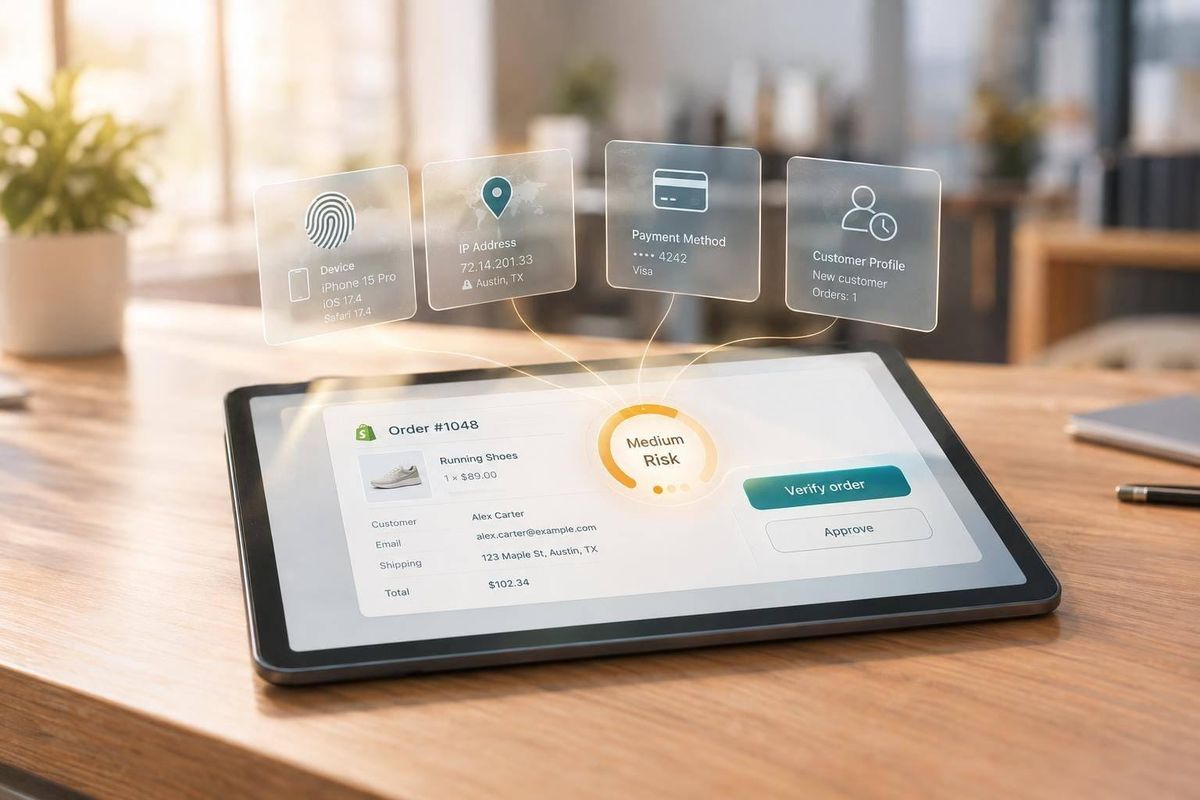
I use device fingerprints to decide which Shopify orders need review - not to prove fraud. My starting point: link device signals to orders, check payment and customer history, and review repeat activity across 24-hour, 7-day, and 30-day windows.
Here’s the approach I recommend:
- Connect the data: Keep device, IP, payment, and Shopify risk signals separate, and record how confidently each device event links to an order.
- Set review rules: Combine signals into a score, then choose whether to approve, hold, verify, cancel, or block. A shared device or VPN alone isn’t enough.
- Check the results: Assign reviewers and track fraud caught, legitimate orders flagged, review time, and verification completion.
- Limit data use: Restrict access, set deletion dates, and keep each merchant’s records separate.
- For agencies: Use StoreCensus to find merchants for outreach - not to judge their fraud risk.
My rule: <u>verify uncertain orders before fulfillment</u>, and change the rules based on recorded outcomes - not assumptions.
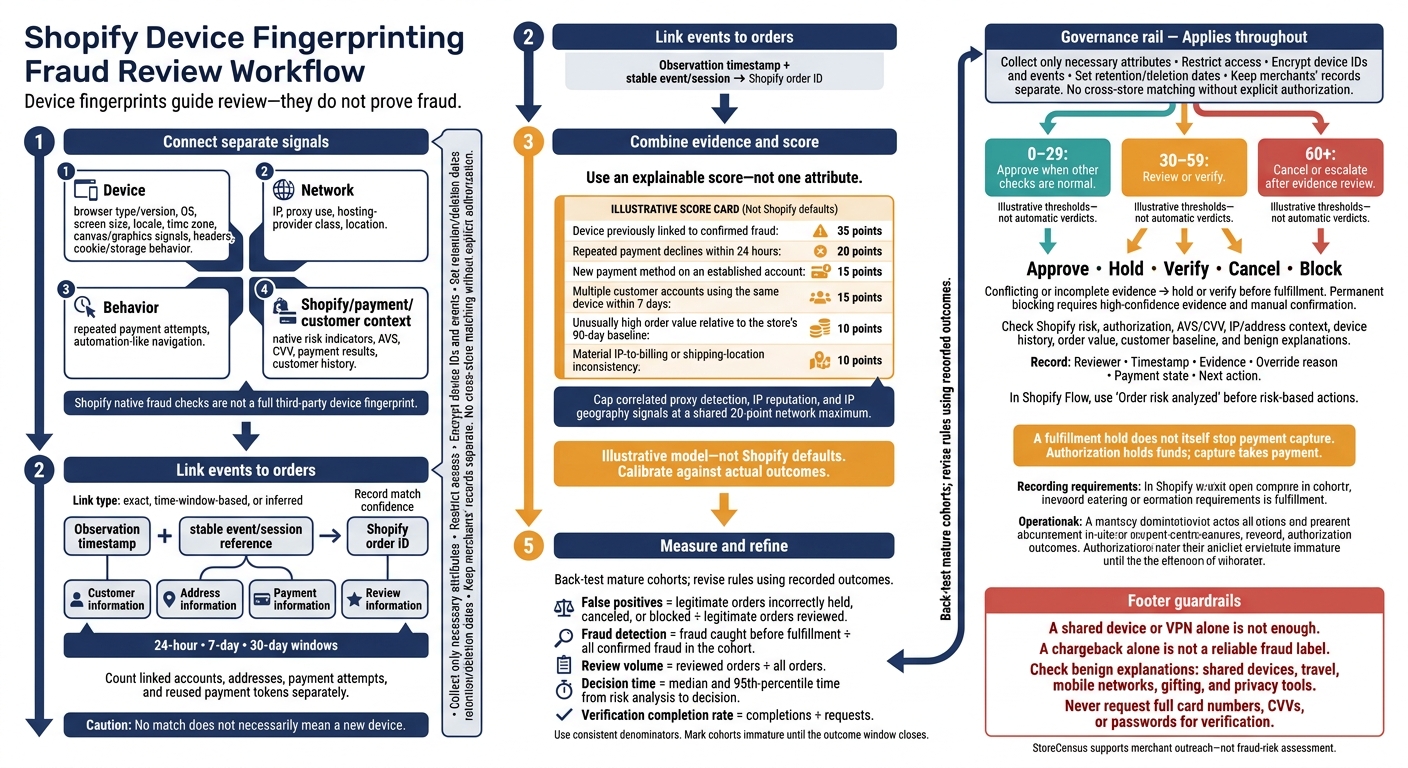
Shopify Device Fingerprinting Fraud Review Workflow
How Device Data Supports Shopify Fraud Analysis
Device Fingerprint Inputs and Limits
A device fingerprint combines browser type and version, OS, screen size, locale, time zone, canvas/graphics signals, headers, and cookie/storage behavior. Keep device, network, and behavior signals separate. Network signals include IP, proxy use, hosting-provider class, and location. Behavior signals include repeated payment attempts and automation-like navigation. Shopify’s native fraud checks show AVS, CVV, IP, and payment-pattern signals - not a full third-party fingerprint.
Match quality depends on how the fingerprinting system works. Browser updates, OS changes, privacy protections, blocked scripts, and display changes can weaken a match. Common default settings and shared computers can also link unrelated shoppers.
Store a match-confidence score rather than treating the token as a permanent identity. No match doesn’t necessarily mean a new device, and a fingerprint proves neither identity nor fraud. These limits make accurate order mapping a must.
Link Device Data to Shopify Orders
Check the integration’s permissions, use a Shopify tech stack tool to see if it supports the store’s storefront, checkout setup, accelerated checkout methods, and post-purchase events. Record an observation timestamp and a stable internal event or session reference. After the order is created, link that reference to the Shopify order ID. Store customer, address, payment, and review fields separately.
Label Shopify-native fields separately from externally collected device tokens, match scores, and network classifications. Once the event is linked to an order, compare browser and network signals for mismatches.
Record whether the event-to-order link is exact, based on a time window, or inferred, along with the match confidence. Keep payment declines, authorization failures, cancellations, and chargebacks separate from confirmed fraud. A chargeback alone isn’t a reliable fraud label - disputes can have other causes.
Browser Patterns, IP Mismatches, and Repeat Devices
Review inconsistent browser attributes, fast-changing configurations, and automation-like activity alongside independent evidence. Shopify advises checking IP location, hosting-company origins, and proxy use. But IP metadata alone isn’t enough to flag fraud.
Within defined windows - such as 24 hours, 7 days, and 30 days - count linked accounts, addresses, payment attempts, and reused payment tokens separately. Give more weight to a strong device match tied to confirmed fraud, while allowing for VPNs, travel, mobile networks, shared devices, and agency ordering. Use these counts to set review thresholds and action rules.
sbb-itb-61169e3
Build Shopify Fraud Review Rules
Once device, IP, and payment signals are linked to orders, use them to set scoring rules and action thresholds.
Combine Signals and Score Risk
Build rules from linked device, browser, IP, and repeat-order signals. Use an explainable score rather than blocking an order based on one attribute.
An illustrative model could assign 35 points to a device previously linked to confirmed fraud, 20 points to repeated payment declines within 24 hours, 15 points to a new payment method on an established account, 15 points to multiple customer accounts using the same device within 7 days, 10 points to an unusually high order value relative to the store’s 90-day baseline, and 10 points to a material IP-to-billing or shipping-location inconsistency. Cap correlated signals so proxy detection, IP reputation, and IP geography share a 20-point network maximum. Thresholds such as 0–29 to approve, 30–59 to review or verify, and 60+ to cancel or escalate are illustrative and should be calibrated against actual chargebacks, approval rate, and false-positive rate. These are not Shopify defaults.[1][2]
Give each signal a specific lookback window, and include it in the rule.
Use these combinations as starting points only; confidence depends on accurate device matching and order linkage.
Signal combination Lookback window Confidence Action Benign explanation to check Device fingerprint linked to a confirmed fraud chargeback plus a new card and mismatched billing country Device history: 12 months; payment and billing location: current order High Hold fulfillment; do not capture if authorization remains open; escalate or cancel after review Shared household or corporate device; compromised prior account Same device used by 4 accounts and 7 orders in 48 hours, with repeated declines 48 hours Medium-high Hold and request step-up verification Family shopping, gift orders, or a workplace network New payment method, order value above the store’s 95th percentile, and IP country inconsistent with shipping country Current order plus 90-day customer baseline Medium Verify before fulfillment; capture under the merchant’s policy Travel, international gifting, VPN, or legitimate cross-border purchase Three declines followed by a successful payment from the same device and address 24 hours Medium Review authorization and payment results; avoid automatic blocking Typo correction, bank decline, insufficient funds, or a replaced card Familiar device with matching AVS and CVV and normal order value 90-day device and customer history Low, not zero Approve when other checks are normal Stolen account or stolen device Device linked to confirmed fraud, multiple accounts, proxy use, and inconsistent billing or shipping addresses 12 months for device; current order for network and addresses Very high Cancel or block; document the evidence Shared device or privacy technology, requiring manual confirmation before a permanent block
Record each signal’s source, rule version, score, reviewer override, and final outcome. Keep observed facts separate from conclusions. Back-test rules against mature order cohorts, and remove those that create more reviews without improving detection. Use Shopify’s native risk indicators alongside - not instead of - device linkage from a fraud tool or custom integration.[1][2]
Then map each risk band to one action.
Choose When to Approve, Hold, Verify, Cancel, or Block
| Action | Evidence needed | Cost and customer friction | Can it be undone before shipment? | Tool needed and payment impact |
|---|---|---|---|---|
| Approve | Clear evidence; no unresolved issues | Low cost; no added friction | Easier before shipment | Shopify controls; capture according to payment settings |
| Hold | Conflicting or incomplete evidence; manual review needed | Review labor; shipping delay | Yes | Shopify admin or supported Flow workflow; fulfillment hold does not itself stop capture |
| Verify | A legitimate customer may clear the risk | Support cost; extra customer step | Yes, before fulfillment | May need added authentication integration; hold fulfillment and, where possible, payment capture until the result is recorded |
| Cancel | Strong reviewed evidence that the order should not proceed | Lost sale; possible refund and support costs | Limited; order may need replacement | Shopify controls or workflow; cancel before fulfillment; void an uncaptured authorization or refund a captured payment as appropriate |
| Block | Repeated, high-confidence abuse | Risk of excluding legitimate buyers | Requires an unblock or appeal process | Usually a fraud app or custom integration; stop future checkout or send future orders to review, depending on the tool |
Choose review or verification when the evidence conflicts. Authorization holds funds; capture takes payment. Cancellation stops the order. Voiding releases an uncaptured authorization, while refunding returns captured funds, subject to processor behavior.
Set payment capture delays explicitly, and monitor authorization expiry. In Shopify Flow, use Order risk analyzed, not just order creation, before taking risk-based actions.[3][4][5]
Never ask for full card numbers, CVVs, or passwords during verification. Use secure account authentication or verification supported by the payment provider.
With actions in place, assign queue owners and track whether the rules improve results.
Manage Review Queues and Measure Results
Start by confirming Shopify’s risk result. Then check authorization, AVS/CVV, IP and address context, device history, order value, the customer baseline, and any benign explanation.
Record the decision before fulfillment. Include the reviewer, timestamp, evidence, override reason, payment state, and next action.
Set response targets based on product type and shipping urgency. Fast-shipping products may need near-real-time decisions. Made-to-order goods may allow more time for review.
| Queue | Criteria | Response target | Owner | Escalation |
|---|---|---|---|---|
| Low risk | Consistent payment and billing or shipping location results; no concerning device history; score below the approval threshold | Automated or within 4 business hours | Fraud automation or fulfillment | Fraud lead if a later signal appears |
| Medium risk | Conflicting signals; new payment method; moderate device-account linkage; unusual value | Within 4 business hours, before fulfillment | Fraud analyst or trained support specialist | Senior analyst or payments lead |
| High risk | Strong combination of device, payment, billing or shipping location, and order anomalies; high Shopify risk recommendation | Before shipment or capture | Fraud lead | Payments lead, legal/privacy, or executive owner for exceptions |
| Confirmed fraud | Prior confirmed fraud linkage, customer confirmation of unauthorized use, chargeback evidence, or validated abuse pattern | Immediately; follow payment-network deadlines | Fraud lead and payments operations | Acquirer, processor, legal, or account-security team |
Define what happens in each queue when a response target is missed. For example:
Automatically fulfill low-risk orders, continue holding high-risk orders, or escalate to a named backup owner.
Measure rule quality with these metrics:
- False positives: Legitimate orders incorrectly held, canceled, or blocked ÷ legitimate orders reviewed.
- Fraud detection: Fraud caught before fulfillment ÷ all confirmed fraud in the cohort.
- Review volume: Reviewed orders ÷ all orders.
- Decision time: Median and 95th-percentile time from risk analysis to decision.
- Verification completion rate: Completions ÷ requests.
Track dollars delayed by review, canceled revenue, and false positives separately. Canceled value is not automatically lost legitimate revenue. Mark cohorts as immature until the stated outcome window closes, and use the same denominators when comparing rule versions.
Agency Setup and Data Governance
Once you’ve defined your fraud rules, set clear controls for how device data is collected, stored, and reviewed.
Limit Data Collection and Record Decisions
Collect only the device attributes you need for fraud prevention, and keep them separate from marketing or attribution profiles. Encrypt device IDs and events, document your collection methods, and restrict access to authorized staff.
Set retention and deletion rules for raw attributes, identifiers, and linked events. Record retention periods, deletion dates, and linked order IDs.
Keep each merchant’s data separate. Don’t cross-match stores without explicit authorization.
Agencies can also use StoreCensus to find Shopify merchants that fit their fraud-review offer.
Find and Qualify Agency Leads With StoreCensus
Use StoreCensus filters for revenue, country, tech stack, and growth signals to shortlist Shopify brand prospect lists that may need device-fingerprint fraud review.
Decision-maker contacts and store-change alerts can help you tailor outreach to fraud-review needs. Don’t treat growth or tech stack changes as evidence of fraud.
Conclusion: Combine Signals and Refine Rules
Use device fingerprints as one input in your fraud review process, alongside customer history and review rules. IP mismatches and repeat-device patterns should inform a review - not trigger action on their own.
Escalate only when multiple signals align. Score each order, send exceptions to human review, and document outcomes and overrides with privacy controls in place. Use those results to adjust your rules. The best Shopify fraud rules combine device, payment, and network signals while sending edge cases to review.
FAQs
How can I test device-based rules before blocking orders?
Change one factor at a time, such as a rule threshold or integration setting. Keep testing to one market or payment method. When possible, use a randomized holdout group to compare results against a baseline.
Record the original configuration and set rollback limits for fraud loss and manual review capacity. During testing, track approval rates, recovery, disputes, and chargebacks. Before assigning fault, tie declines to specific rules or logs.
How do I set review thresholds with limited fraud history?
Avoid strict, fixed cutoffs for device reviews. First, verify real-time login and checkout signals, scoring before payment, and clear reason codes. Set review tiers based on the strength of the evidence.
Use baseline false-decline rates and manual-review capacity to guide changes. Adjust one threshold or rule at a time, with a holdout group or randomized test when possible. Check results after about two weeks, then monitor through the full dispute and chargeback window to reduce unnecessary reviews without increasing fraud. [1][2]
What happens if a shopper blocks fingerprinting scripts?
Blocking fingerprinting scripts stops a fraud detection tool from collecting the browser patterns and device identifiers it needs to build a device fingerprint. Instead, the system may assess risk through behavioral biometrics, network, identity, and transaction checks.
Tools that depend heavily on JavaScript may receive incomplete data. That can lead to inaccurate risk scores or trigger default decline rules when the tool can’t verify that a human is behind the session.