Download Forms: Best Fields for Lead Quality
Keep download forms lean: ask name, work email, store URL, platform, service need and country; collect budget and team size later.

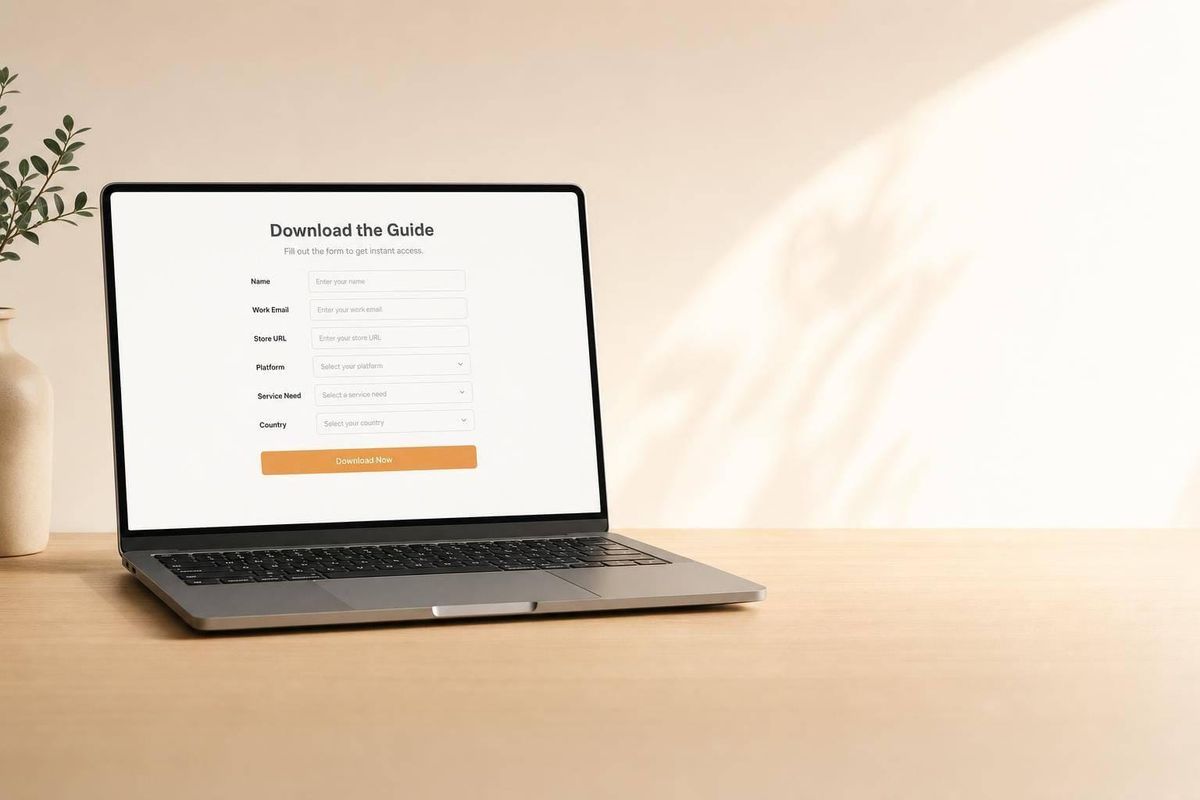
Most download forms ask for too much and learn too little. If I want better lead quality without hurting form completions, I’d keep the first form tight: name, work email, Store URL, Platform Choice, Service Need, and Country.
Here’s the short version:
- Keep now: Store URL, Platform Choice, Service Need, Country
- Start with basics: First name, last name, work email
- Defer for later: Budget Range, Team Size
- Skip at this stage: required phone number, street address, ZIP code, long open-text fields
Why this mix? Because each field should do one of three jobs:
- qualify the lead
- route the lead
- prioritize follow-up
A few stats make the case. Only 12.2% of Shopify stores have a verified non-generic contact, so a submitted work email gives me a much better starting point. And stores with more than 50,000 monthly visitors show an average fit score of 96.9, versus 60.2 for stores below that level. That’s why Store URL matters so much: it gives me data I can check instead of guesses.
How to Generate More Leads with Better Lead Capture Forms
sbb-itb-61169e3
Quick Comparison
| Field | Keep on first form? | Main reason |
|---|---|---|
| First name, last name, work email | Yes | Identity and follow-up |
| Store URL | Yes | Account check and enrichment |
| Platform Choice | Yes | Fit with delivery stack |
| Service Need | Yes | Better routing and reply |
| Country | Yes | Region routing |
| Budget Range | Later | Good signal, but adds friction |
| Team Size | Later | Useful, but not first-form data |
| Phone number | No | Too much friction at download stage |
So if I’m building a download form today, I’d ask for the fields that help sales act right away - and save the rest for later steps.
What Your Download Form Needs Before You Add More Fields
Start with the basics: first name, last name, and work email. That’s the minimum you need to identify the lead, tailor outreach, and support enrichment.
Start with first name, last name, and work email
A full name helps with personalization and contact matching. A work email gives you an individual identifier.
That matters because person-level emails are much more useful than shared inboxes for qualification and follow-up. Only 12.2% of Shopify stores have a verified non-generic contact [1], so when someone submits a work email on your form, you’re starting from a much stronger place for enrichment, scoring, and outreach.
Why phone number is usually optional at the download stage
Requiring a phone number at the top of the funnel adds friction without giving you much extra signal.
At this stage, it’s better to ask for it later, once the lead has shown more intent. Save deeper qualification for higher-intent fields, like budget range.
Use structured fields instead of open text
Open-text fields create messy data and slow down routing. Dropdowns and fixed ranges make things much easier on the back end.
A role dropdown, for example, lets your CRM route leads by function. Fixed ranges do the same kind of work. They make scoring cleaner, routing faster, and follow-up less of a manual mess.
With that baseline in place, the next fields should add only clear qualification signal.
1. Budget Range
Once the basics are covered, budget is usually the first field that separates a good fit from pure noise.
Budget range is a strong signal for account size and fit. It helps you tell which leads are worth a sales call now and which ones should go into nurture. Even one dropdown can tell your team if a prospect meets your minimum account size before anyone spends time on a call.
Qualification signal strength
Budget range, often collected as revenue bands or budget tiers, shows whether a lead clears your minimum threshold. If your agency starts at a $3,000/month retainer, a lead who selects Under $250K annual revenue falls below that account size right away. You learn that instantly, without booking a discovery call.
Without a tiered field, every lead looks the same at first glance. Then your team has to sort them by hand, and follow-up slows down [3].
Form friction
A dropdown is much easier to fill out than an open-text budget field. It also cuts out messy replies like flexible or depends. Fixed choices keep the form fast and the data clean.
Routing value
Set budget brackets, and you can route leads the second they submit the form. For example:
- A lead in the $1M–$5M revenue tier can go to one team
- A lead in the $5M+ tier can go to another
That kind of setup saves time and keeps sales from chasing the wrong accounts.
Data cleanliness
When every lead chooses from the same list of options, your CRM data stays consistent and easy to report on. You can filter, segment, and automate follow-up by tier [3]. That only happens if the field is structured from the start.
| Revenue Tier | Sales Priority | Agency Pricing Match |
|---|---|---|
| $50K–$250K | Low | Pass or $2K–$3K |
| $250K–$1M | Medium | $3K–$5K |
| $1M–$5M | High | $5K–$10K |
| $5M+ | Very High | $10K–$20K |
Source: StoreCensus Agency Framework [3]
Next, platform choice shows whether the lead fits your delivery stack.
2. Platform Choice
After budget, platform is the next field that shows whether a lead fits your delivery stack at all. Keep this as a single-select dropdown: Shopify, WooCommerce, Both, Migrating, or Not sure. Platform tells you the stack. The store URL then confirms the account.
Qualification signal strength
Platform choice is a hard account-fit filter. If your agency only builds on Shopify, a WooCommerce lead isn't a bad lead - it's the wrong lead for your team right now. Finding that out on the form, instead of 20 minutes into a discovery call, saves time on both sides.
It also gives your team an early read on integrations and stack complexity. That matters fast. A Shopify build, a WooCommerce setup, and a migration project can each need a very different path.
Form friction
Use a single-select dropdown and include a Not sure option. That keeps the field easy to answer without forcing people to guess.
A Migrating option matters too. It picks up leads that are in the middle of a switch, and that's often a high-intent moment worth treating on its own.
Routing value
Platform data helps you send leads to the right specialist the moment the form comes in.
Data cleanliness
Fixed platform values keep routing, scoring, and reporting clean. Store URL comes next because it verifies the exact merchant behind the platform.
| Platform Option | Routing Action | Follow-Up Angle |
|---|---|---|
| Shopify | Shopify specialist | App stack gaps, Plus upgrade signals |
| WooCommerce | WooCommerce developer | Plugin audit, hosting performance |
| Both | Route to specialist | Multi-platform complexity |
| Migrating | Migration specialist | Timing, platform fit, transition scope |
| Not sure | Nurture sequence | Education-first content, platform comparison |
3. Store URL
After someone picks a platform, the store URL helps confirm who is behind the form. It takes a self-reported lead and turns it into an account you can check. That also opens the door to account-level enrichment before the first call.
Qualification signal strength
A submitted URL gives your team a direct look at the merchant’s store to target Shopify stores more effectively. Paste it into StoreCensus and you can quickly see traffic tier, tech stack, theme type, installed apps, active ad pixels, and country [1][2]. Stores with more than 50,000 monthly visitors average a lead fit score of 96.9, compared with 60.2 for stores below that mark [2]. That means a URL helps you place a lead in the right tier right away instead of leaning on self-reported answers.
It can also show pain points fast. For example, if a store is running paid media pixels but doesn’t have a retention tool like Klaviyo, your rep has a clear reason to reach out. That’s a lot better than sending generic outreach that sounds like it could go to anyone.
That makes the URL useful for both qualification and routing.
Form friction
Store URL adds moderate friction, but it also cuts out several follow-up questions.
Routing value
Use URL-based signals to send high-fit stores to senior reps and lower-fit stores to nurture.
Data cleanliness
A URL is a verifiable signal. It helps cross-check self-reported data and makes it easier to deduplicate submissions.
| Signal Type | What the URL Reveals | Why It Matters |
|---|---|---|
| Account Fit | Traffic tier, category, country, platform, theme | Confirms the lead matches your ICP before the first call |
| Budget Proxy | Shopify Plus status, paid/custom theme, app depth | Shows willingness to invest without asking directly |
| Pain Signal | Missing app categories, mismatched tech stack | Gives your rep a specific reason to call, not generic outreach |
| Growth Signal | Active Meta/TikTok pixels, recent app installs | Indicates active spend and timing for new services |
Once the URL confirms the merchant, team size shows how much buying power sits behind the account.
4. Team Size
Once the store URL confirms the account, team size gives you a quick read on how many people are likely in the approval chain. Put simply: it tells you how many voices may weigh in on the deal.
A solo founder can often move fast. A bigger team usually means more stakeholders, more handoffs, and a slower yes.
Qualification signal strength
In the 200K–1M traffic tier, 9.9% of stores have a verified non-generic outreach-role contact, compared with just 0.4% for stores under 50K traffic [1]. That gap matters. Team size helps you spot which accounts are more likely to have reachable decision-makers and how fast a deal might move.
Form friction
This field should be quick to fill out. A dropdown with fixed ranges does the job without making people stop and think too hard.
Use ranges like:
- 1
- 2–10
- 11–50
- 51+
That gives you the tiers you need without asking for an exact headcount.
Routing value
Team size also helps with routing. Smaller, founder-led teams are often a good fit for founder-level strategy or redesign work. Larger teams usually make more sense to route toward marketing, ecommerce, or operations contacts, especially for narrower offers like paid media, lifecycle email, or CRO.
Data cleanliness
Fixed ranges make CRM data easy to search and score.
Once team size is clear, country adds the next routing layer.
5. Country
After team size, country is the last fast filter before you dig deeper. It tells you, almost right away, whether a lead sits inside your service region before sales spends time on follow-up.
Qualification signal strength
Country works as a first-pass gate. If the lead is outside your service region, budget and platform fit won't save the opportunity.
In a study of 567,990 Shopify stores, country was listed as one of the fields needed for a minimum usable export for outbound sales [1]. That puts it in the baseline bucket, not the nice-to-have bucket.
The main case for a direct country field is simple: it gives you one clean source of truth for routing, reporting, and suppression. Yes, URL enrichment can sometimes guess location. But a dedicated field keeps that data steady and easier to trust across your system.
Form friction
Use a country dropdown. It's quick to answer and adds almost no friction.
Routing value
Use country to route leads by region and time follow-up around local business hours [1][4].
Data cleanliness
Free-text country fields tend to create duplicates and messy records. One person writes "United States", another writes "USA", and someone else types "U.S." That kind of mess breaks filtering fast.
A standardized dropdown keeps CRM data clean and usable for segmentation and suppression lists [1].
Once geography is clear, service need can narrow the lead's actual request.
6. Service Need
Service need tells you what problem the lead wants solved. After you know where the lead is located, this field explains why they downloaded in the first place. That gives you a simple way to tailor the first reply instead of sending the same message to everyone.
Qualification signal strength
When someone picks a service need, they’re pointing to a specific pain point. That gives sales a clear reason to reach out and helps sort urgency. Some leads need help now. Others are still in research mode.
Getting this detail early makes follow-up easier to prioritize and helps teams assign ownership before the first outreach [4].
Form friction
Keep the options list short:
- Aim for 4–6 choices
- Use single-select by default
- Switch to multi-select only if your ICP often has more than one need at the same time
A short list cuts confusion and keeps the form moving.
Routing value
Each service-need option should map to one owner or specialist. That way, the lead goes straight to the right team with no extra sorting. The rep already knows the core issue before making contact.
Data cleanliness
A fixed list keeps service-need values consistent across scoring, routing, and reporting [2].
Next, separate fields that qualify leads from fields that only slow the form down.
Fields That Add Friction Without Helping Sales
Cut any field that doesn't help with qualification, routing, or prioritization. Simple rule: if a field doesn't help sales move faster, leave it off the form.
Full street address and ZIP code
Street address and ZIP code don't add much for download forms. For most offers, they won't help your team decide who to contact or what to do next. If you need that info, collect it later.
Mandatory phone number
A required phone number is one of the fastest ways to lose a lead right before submission. People hesitate, back out, or type fake numbers just to get through. Ask for a phone number later, once intent is higher.
Broad demographic questions
Broad demographic questions sound useful, but they often don't help sales take action. If an answer doesn't map cleanly to a routing lane, it can't be scored or followed up on in a clear way. When role data matters, use structured role lanes such as Founder/CEO, Marketing/Growth, Ecommerce/Merchandising, or Operations/CX [1].
Long open-text business descriptions
Free-text business descriptions create a mess fast. They're tough to score, tough to route, and tough to standardize. That slows automation and makes routing harder than it needs to be.
The table below shows which fields to keep, skip, or defer.
Quick Comparison Table: Keep, Skip, or Defer
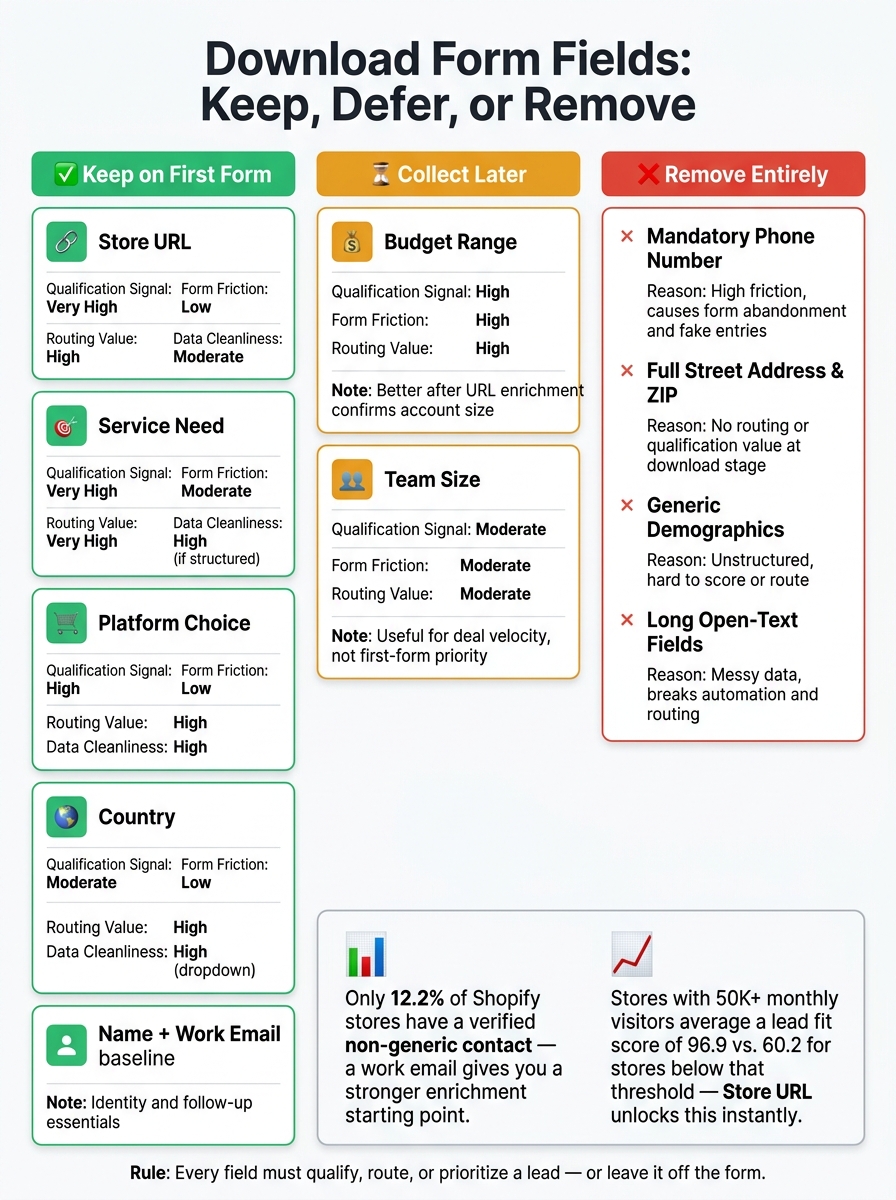
Download Form Fields: Keep, Defer, or Remove for Better Lead Quality
Now that each field is on the table, this side-by-side view makes the tradeoffs easier to see. Some fields give you strong lead signal without adding much friction. Others slow people down before you’ve earned the extra detail.
| Field | Qualification Signal | Form Friction | Routing Value | Data Cleanliness |
|---|---|---|---|---|
| Store URL | Very High | Low | High | Moderate (needs verification) |
| Service Need | Very High | Moderate | Very High | High (if structured) |
| Budget Range | High | High | High | Moderate |
| Platform Choice | High | Low | High | High |
| Country | Moderate | Low | High | High (dropdown) |
| Team Size | Moderate | Moderate | Moderate | Moderate |
The short version: keep Store URL, Service Need, Platform Choice, and Country. Defer Budget Range and Team Size.
This next table shows the call more plainly.
| Decision | Fields | Why |
|---|---|---|
| Keep Now | Store URL, Country, Service Need, Platform Choice | High signal, low-to-moderate friction, directly usable for routing and enrichment |
| Defer to Later | Budget Range, Team Size | Better estimated via traffic tiers and tech stack depth once the URL is known |
| Remove Entirely | Full Street Address, Mandatory Phone, Generic Demographics | High friction with little immediate value for lead fit or routing |
Store URL should sit near the top of the form because a domain opens the door to enrichment for traffic, tech stack, and platform [1][2].
That order keeps the form lean up front, then lets you gather secondary details later.
How to Use Progressive Profiling Without Killing Conversions
Once you’ve picked the fields that belong on the first form, progressive profiling handles the rest. The idea is simple: collect the must-have details up front, then gather secondary info later as the relationship moves forward.
Ask for high-signal fields first
Your first form should answer one thing: is this account worth pursuing?
That’s why it makes sense to lead with Store URL, Platform Choice, Service Need, and work email. Those fields help separate strong-fit accounts from low-intent visitors. And once someone submits a URL, traffic tier can come in as an inferred signal. So you keep the form short without giving up qualification data.
Move secondary questions to later steps
If you already have the store profile, don’t ask for Budget Range or Team Size again.
Save those deeper qualification questions for later touchpoints, like a demo request form or the first sales call. That way, the first interaction feels lighter, and later conversations can do the heavier lifting.
Reuse known CRM data for repeat visitors
When the CRM already knows the account, the next touchpoint should move the conversation forward instead of sending the person back to square one.
If someone has already filled out a form, don’t make them repeat the same company details. Use that moment to ask for one new piece of information, like their current pain point or budget range.
Conclusion
The best download forms ask for better information, not more of it. Across all six fields, the rule is simple: each one should help you qualify, route, or prioritize a lead before sales follows up.
If a field gives you a strong signal, use it right away for routing. Keep the form short, put high-signal fields first, and let progressive profiling handle the rest. That’s how you keep conversions high without hurting lead quality.
FAQs
What if I can’t ask for Store URL?
If you can’t ask for a store URL, you lose the main identifier used for lead deduplication and CRM routing.
In that case, put the focus on the store name and the owner or decision-maker’s contact details. Then use StoreCensus to search its database, fill in the missing store URL, and check decision-maker details before outreach.
When should I ask for budget and team size?
Use revenue first to check budget fit. A monthly retainer often lands at 0.5%–1% of annual revenue, so revenue gives you a fast way to see if the account makes sense before you go any deeper.
Once revenue points to a fit, ask about team size.
Team size tells you a lot about how decisions get made and how long the deal may take. Smaller, founder-led stores often move fast and decide within 1–2 weeks. Mid-market and enterprise accounts usually have more people involved, more approvals, and sales cycles that stretch to 8+ weeks.
Should any first-form fields be optional?
Yes - stick to the core fields only: decision-maker name, job title, verified email, and store name or store URL.
Make the rest optional unless a field directly affects qualification, routing, scoring, or the first message you send. Things like traffic tier, revenue tier, Shopify Plus status, tech stack, theme, country, and team size are useful, but they matter more after you’ve confirmed basic deliverability and ICP fit.