How Home Subscription Stores Pick Apps
How to evaluate subscription apps for home-product stores by testing billing, self-service, integrations, and retention.

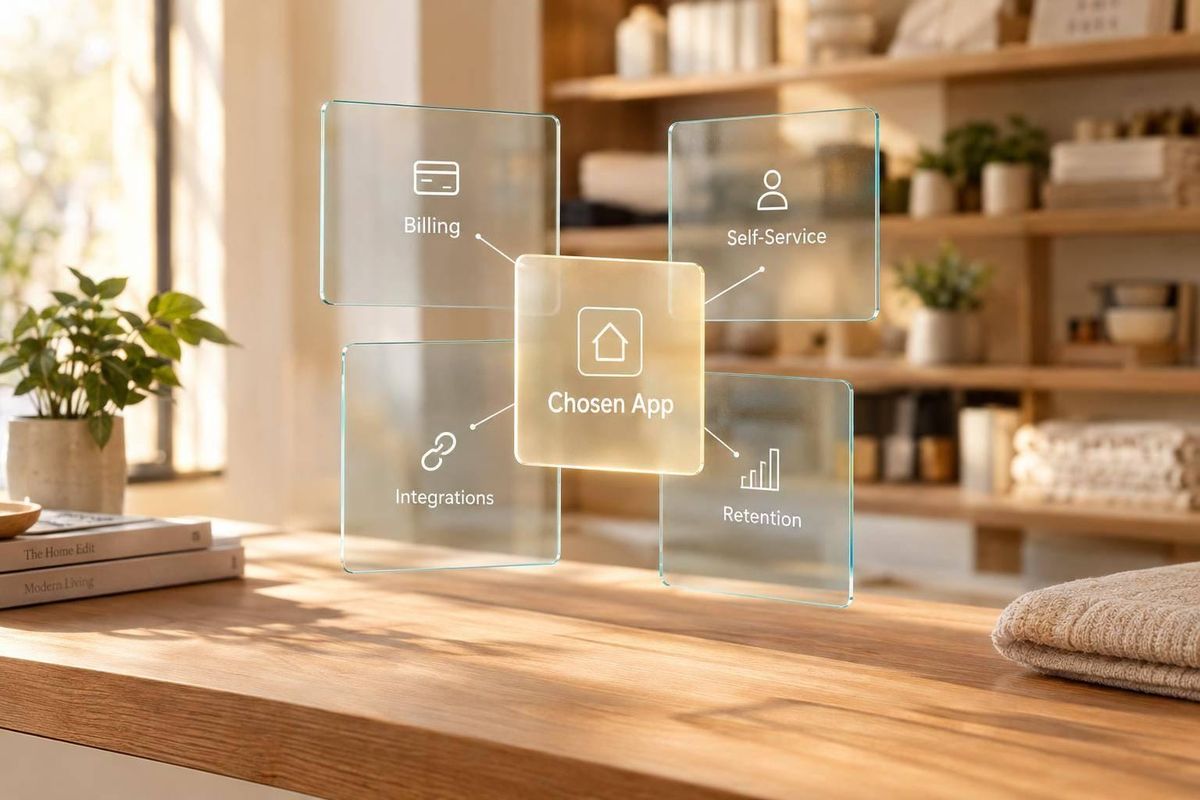
I judge a home subscription app by what customers can do - not just its feature list. Can they change delivery dates, skip an order, or update a payment method? I check those flows alongside inventory, fulfillment, platform support, and total cost.
Here’s what I look at:
- Subscription tools: Billing, scheduling, customer controls, cancellation, and failed-payment messages.
- Supporting apps: How loyalty, SMS, reviews, bundles, and add-ons work with subscription data.
- Service fit: One issue I can verify, rather than a guess based on installed apps.
For lead research, I use StoreCensus’s reported 6M+ Shopify and WooCommerce stores as a starting point, then check the live storefront. A broken subscription link gives me something specific to discuss; an app listing alone doesn’t.
My rule: <u>verify the issue before outreach</u>, inspect private flows only with permission, and treat business impact as a question to confirm with the merchant.
Best Shopify Subscription Apps (Easy Guide)
sbb-itb-61169e3
Subscription Apps: Billing, Self-Service, and Churn
Once replenishment rules are clear, compare apps on billing, delivery schedules, self-service, integrations, and retention - not individual features alone. Assess Shopify and WooCommerce separately. App support and workflows differ between platforms.
Use Recharge as a Shopify reference point; public documentation does not show native Recharge support for WooCommerce.[4]
Billing, Delivery Schedules, and Customer Portals
Check supported payment processors, wallets, native checkout, and prepaid billing. Confirm whether billing and delivery dates can differ.
Next, check integrations with email, SMS, loyalty, tax, and fulfillment tools. Find out who maintains those connections after theme or checkout changes. Total cost goes beyond the monthly fee: include transaction fees, development, and maintenance.[1][2]
Verify current pricing, features, and platform support before recommending an app.
| Subscription experience | Implementation | Visible controls | Merchant trade-offs |
|---|---|---|---|
| Basic selector | Product-page widget and selling-plan setup | One-time versus subscription, frequency, discount | Lighter setup; limited account-level control |
| Configured self-service portal | Portal setup and account-flow testing | Skip, pause, delay, swap, and payment-update controls | More customer autonomy; more workflows to test |
| Custom branded portal | Portal configuration and possibly API work | Custom account navigation and controls | More design control; recurring development costs |
Cancellation Flows and Failed-Payment Recovery
Check whether the cancellation flow asks for a reason, offers a relevant pause or skip option, and clearly confirms when cancellation takes effect.
For failed renewals, look for automated retries and payment-update prompts.[3] Public pages show only what customers see. They don't confirm backend settings or recovery results.
Inspect only public pages or customer flows you have permission to access. Never trigger a payment failure or cancel a live subscription without permission.
Match Subscription Features to Agency Services
Treat the table below as service hypotheses only. Visible features don't prove revenue, subscriber volume, or plan tier. Before scoping work, request a test account you have permission to use or a recording. Confirm the app, plan, and baseline metrics.[2]
Use visible controls to identify possible service needs, then verify those needs before outreach.
| Visible subscription signal | Likely merchant priority - hypothesis | Confidence level | Agency opportunity |
|---|---|---|---|
| Frequency selector or subscribe-and-save option | Improve subscription conversion and clarity | High for the observed UX; low for business impact | Product-page UX, analytics, testing, and offer architecture |
| Skip, pause, delay, or swap controls | Reduce support friction and give subscribers flexibility | High for feature presence; medium for retention intent | Portal audit, account UX, help content, and lifecycle messaging |
| Branded or passwordless customer portal | Improve self-service and reduce staff workload | High for portal presence; medium for implementation quality | Portal customization, QA, API work, and support-volume analysis |
| Cancellation reason survey or pause offer | Understand and reduce active cancellations | High for flow presence; medium for business priority | Retention-flow audit, offer testing, and churn reporting |
| Payment-update prompt or failed-payment messaging | Recover failed renewals | High for customer-facing prompt; low for backend recovery performance | Dunning copy, notification sequencing, payment UX, and reporting |
| Subscription bundles or build-your-own options | Increase basket size or simplify recurring routines | High for merchandising complexity; medium for commercial objective | Bundle strategy, product data, pricing, labeling, and conversion testing |
Supporting Apps: Loyalty, SMS, Reviews, and Bundles
After billing and self-service, review the retention and merchandising apps that influence repeat purchases. Loyalty, SMS, reviews, and bundles show how a store keeps customers, attracts new buyers, and grows order size.
Choose the customer behavior first, then the app. Favor native features when they share customer, order, and subscription data. Add a separate tool only when it does the job much better. Compare software, usage, setup, support, and app-conflict costs. Agencies can also use Shopify brand prospect lists to identify stores using specific tech stacks. Assign one source of truth for identity, consent, points, discounts, and product availability.
Loyalty Rewards and SMS
Check whether points, referral credits, and VIP perks apply to renewals, one-time add-ons, and bundles - not just the first checkout. Confirm that subscription events sync with the messaging tool and that canceled or opted-out customers are excluded from the relevant audiences.
A phone-number pop-up alone tells you little. Look for a program with clear rules that connects subscription events with customer preferences.
| Tool category | Observable signal | Likely operational priority | Integration requirement | Agency opportunity |
|---|---|---|---|---|
| Loyalty points | Points banner, rewards widget, or account balance | Encourage repeat orders and larger baskets | Customer accounts, order data, subscription events | Audit earning rules, redemption friction, and subscriber eligibility |
| Referrals and tiers | Referral page, invite code, or VIP progress bar | Drive acquisition and purchase frequency | Customer identity, order history, and attribution | Improve referral tracking, tier economics, and landing-page UX |
| SMS marketing | Phone-number capture, keyword opt-in, or promotional pop-up | Support launches, add-ons, replenishment, and win-back | Consent records, SMS provider, catalog, and segmentation data | Review consent language, segmentation, deliverability, and campaign timing |
| Delivery and payment messages | Upcoming-charge, shipment, or failed-payment notification | Prevent surprise charges and reduce involuntary churn | Subscription billing, payment status, and fulfillment events | Map lifecycle messages and fix gaps or contradictory notices |
U.S. promotional SMS generally requires prior express written consent, clear disclosure that messages may be automated and recurring, and an explanation that consent is not a condition of purchase.[5][8] Stores should identify themselves, provide opt-out instructions such as “STOP,” honor opt-outs promptly, keep consent records, and account for carrier requirements such as A2P 10DLC registration.[6][7]
Don't assume delivery, payment, or other service messages are exempt from every consent or compliance obligation. The merchant’s counsel and messaging provider should classify each message type.
Once messaging and loyalty are mapped, check how review tools help build trust at renewal.
Review Tools and Subscription Decisions
Review placement shows how a merchant helps shoppers decide whether to subscribe. Check verified-buyer labels, photo and video support, grouped variants, and links to order records and loyalty rewards.
Place reviews near subscription selectors and related products so shoppers can assess fit, durability, and performance. Don't group unrelated products under one rating.
For post-purchase audits, verify which product and variant the review request covers. Note timing only when the message or authorized account settings show it. An existing platform’s review module may replace a separate app if it retains the media, moderation, placement, and integrations the store needs.
Next, examine how bundles increase recurring value and order size.
Fixed Bundles, Build-Your-Own Bundles, and Add-Ons
Choose bundle tools based on product rules and inventory behavior. Check component inventory sync, discount stacking, initial versus renewal pricing, out-of-stock handling, and customer editing controls. Clearly separate one-time accessories from recurring refills.
Use native bundle or upsell features when they support recurring-order rules. Otherwise, use a specialized app. Verify which system controls renewals, swaps, and add-ons rather than assuming the storefront builder handles them.
| Bundle type | Merchandising objective | Implementation complexity | Observable signal | Agency opportunity |
|---|---|---|---|---|
| Fixed bundle | Increase average order value with a curated solution | Low to medium | “Complete set” product, preset components, single price | Test positioning, savings clarity, inventory resilience, and subscription eligibility |
| Build-your-own bundle | Personalize the assortment and increase units per order | Medium to high | Component selectors, quantity controls, progress bar, or bundle builder | Improve UX, validation, pricing logic, and mobile completion rate |
| Subscription bundle | Increase recurring value through coordinated replenishment | High | Bundle offered with delivery frequency or recurring discount | Audit renewal behavior, component swaps, skips, and fulfillment rules |
| Add-on or upsell | Increase basket size without changing the core offer | Low to medium | Cart drawer recommendation, post-purchase offer, or subscription-page add-on | Improve product pairing, timing, relevance, and margin protection |
Find and Qualify Home Subscription Leads
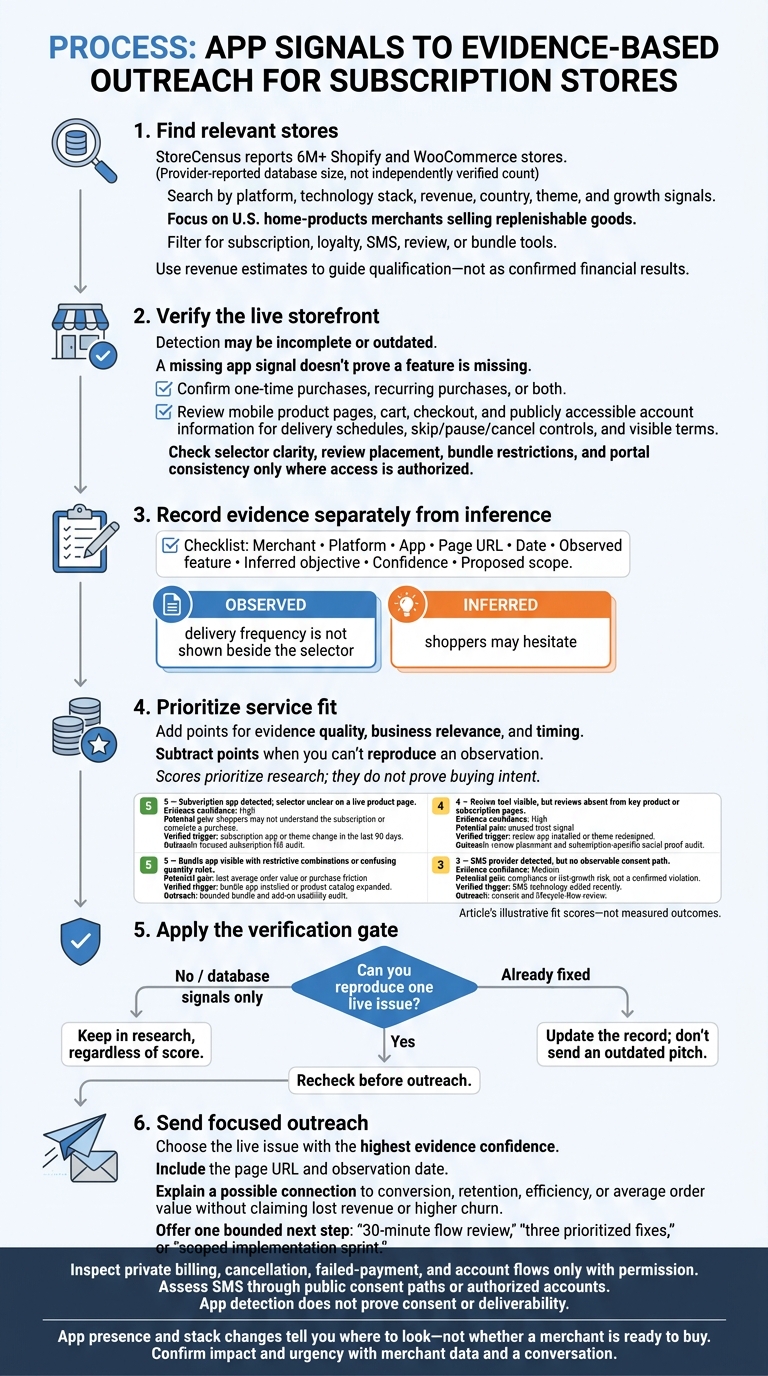
How to Qualify Home Subscription Store Leads
Find Relevant Stores With StoreCensus
Once you’ve mapped the app stack, use those signals to build a lead list for manual review. StoreCensus lets you search 6M+ Shopify and WooCommerce stores by platform, technology stack, revenue, country, theme, and growth signals.[10][11] Focus on U.S. home-products merchants selling replenishable goods. Then filter for the subscription, loyalty, SMS, review, or bundle tools covered above. Use revenue estimates to guide qualification - not as confirmed financial results.[12][13]
Check the live store before qualifying a lead. Detection may be incomplete or outdated, so a missing app signal doesn’t prove a feature is missing.[9] Confirm whether products offer one-time purchases, recurring purchases, or both. Inspect the mobile product page, cart, checkout, and account area for clear delivery schedules, skip/pause/cancel controls, and visible terms.
Use contact data and store-change tracking to identify the right owner and time your follow-up. An app signal gives you a starting point; the live purchase flow confirms the issue.
Record Observations and Score Service Fit
For each lead, record the merchant, platform, app, page URL, date, observed feature, inferred objective, confidence, and proposed scope. Keep what you saw separate from what you think it means:
“delivery frequency is not shown beside the selector” is an observation; “shoppers may hesitate” is an inference.
Check selector clarity, review placement, bundle restrictions, and consistency across the portal. Don’t inspect private billing, cancellation, or failed-payment flows without permission. Assess SMS only through public consent paths or accounts you have permission to use. App detection does not prove consent or deliverability.
Use the scoring guide below to set priorities, not to prove buying intent. Add points for evidence quality, business relevance, and timing. Subtract points when you can’t reproduce an observation. Leads backed only by database signals stay in research, regardless of score.
| App signal | Evidence confidence | Potential pain point | Verified change trigger | Fit score | Outreach angle |
|---|---|---|---|---|---|
| Subscription app detected; selector unclear on a live product page | High | Shoppers may not understand the subscription or complete a purchase | Subscription app or theme change in the last 90 days | 5 | Offer a focused subscription UX audit |
| Review tool visible, but reviews absent from key product or subscription pages | High | Unused trust signal | Review app installed or theme redesigned | 4 | Audit review placement and subscription-specific social proof |
| Bundle app visible with restrictive combinations or confusing quantity rules | High | Lost average order value or purchase friction | Bundle app installed or product catalog expanded | 5 | Propose a bounded bundle and add-on usability audit |
| SMS provider detected, but no observable consent path | Medium | Compliance or list-growth risk | SMS technology added recently | 3 | Offer a consent and lifecycle-flow review; detection does not prove consent or deliverability |
Use the live issue with the highest evidence confidence as your outreach hook.
Base Outreach on One Verified Issue
Choose one issue you can reproduce and connect it to conversion, retention, efficiency, or average order value. Include the page and observation date. Explain the possible effect without claiming lost revenue or higher churn.
Offer a clearly defined next step: a 30-minute flow review, three prioritized fixes, or a scoped implementation sprint. Recheck the issue before sending. If the store has already fixed it, update your record instead of sending an outdated pitch.
Conclusion: Qualify Leads With Verified Features
Replenishment needs shape billing, delivery, and self-service requirements. Loyalty, SMS, reviews, and bundles must also sync with accounts, checkout, fulfillment, and subscription data. Assess the stack by verified storefront behavior - what customers can actually do - not just which tools are installed.
After mapping the stack, use StoreCensus to find relevant stores. Then build focused outreach around one issue verified in a live customer flow.
App presence and stack changes tell you where to look - not whether a merchant is ready to buy. Confirm impact and urgency through merchant data and a conversation.
FAQs
Which apps should I prioritize on a limited budget?
Choose apps that support your core business model. Early-stage stores typically use 5 to 10 apps focused on conversion and retention. Start with a review app like Judge.me and an entry-level email marketing tool to collect customer data. If you rely on recurring revenue, add one subscription or upsell app.
Use StoreCensus to track which apps similar stores install as they grow. This helps you focus your budget on tools that drive revenue.
How can I spot conflicts between subscription apps?
Check for overlapping tools, like two subscription management apps or loyalty layers that clash. These can point to technical friction or an unfinished migration.
Use StoreCensus to find stores running multiple apps in the same category and track weekly stack changes. Recent uninstalls - or older apps still running alongside newer tools - can reveal opportunities to offer migration services or stack optimization.
Which metrics should I request before pitching an audit?
Ask for the current ROAS or the acquisition metric that needs improvement. Confirm which business problem is driving the funding, who owns the system, and who can approve the purchase.
Ask whether performance diagnostics are accessible and which system serves as the inventory source of truth. Check for custom or undocumented connections to subscription, loyalty, or fulfillment systems.
For WooCommerce, request the system status report, hosting limits, and order-storage settings. Before accessing private apps, logs, or backend integrations, confirm permissions and credentials with the system owner.