Vendor Risk Reports for Shopify Apps: Guide
Step-by-step process to inventory Shopify apps, verify permissions and data flows, assess security and business risk, and assign remediation.

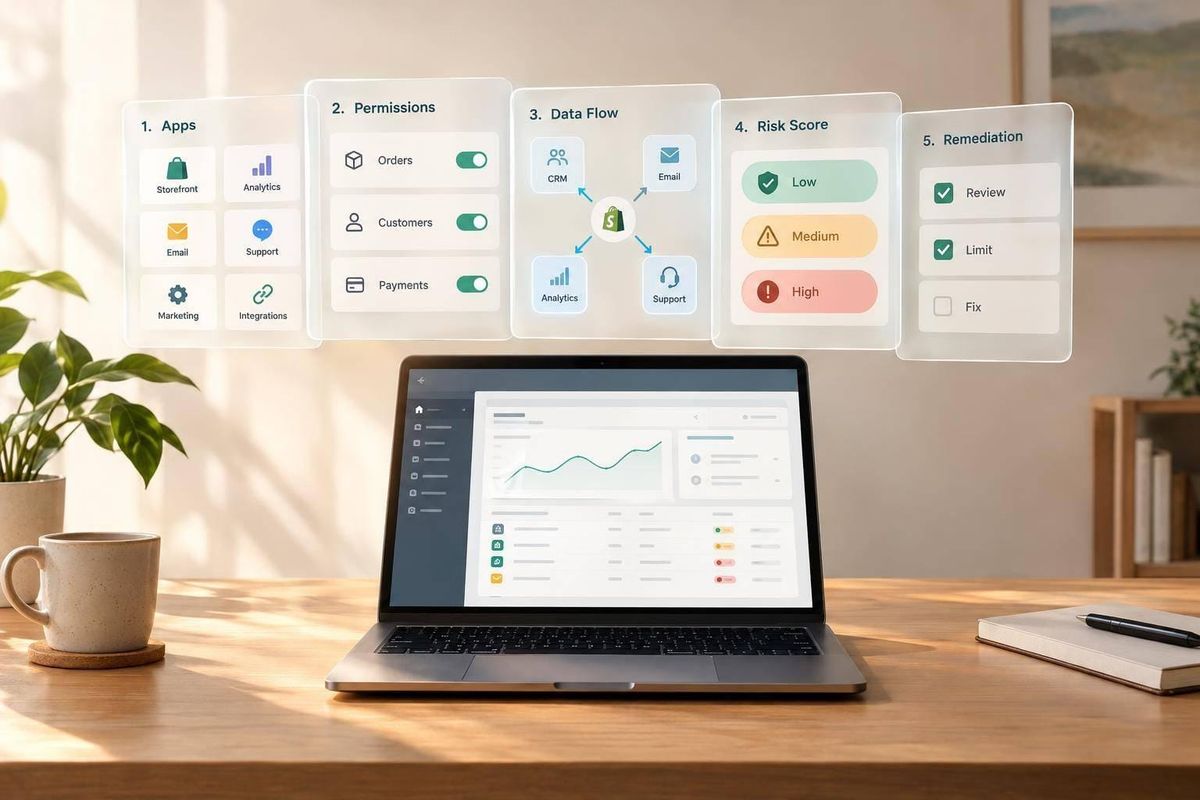
Shopify App Store approval does not replace your own vendor risk review. I use a vendor risk report to answer one question: Should you install, retain, restrict, or replace an app? Start by checking its permissions against its purpose, then document data handling, security checks, and what happens if the app stops working.
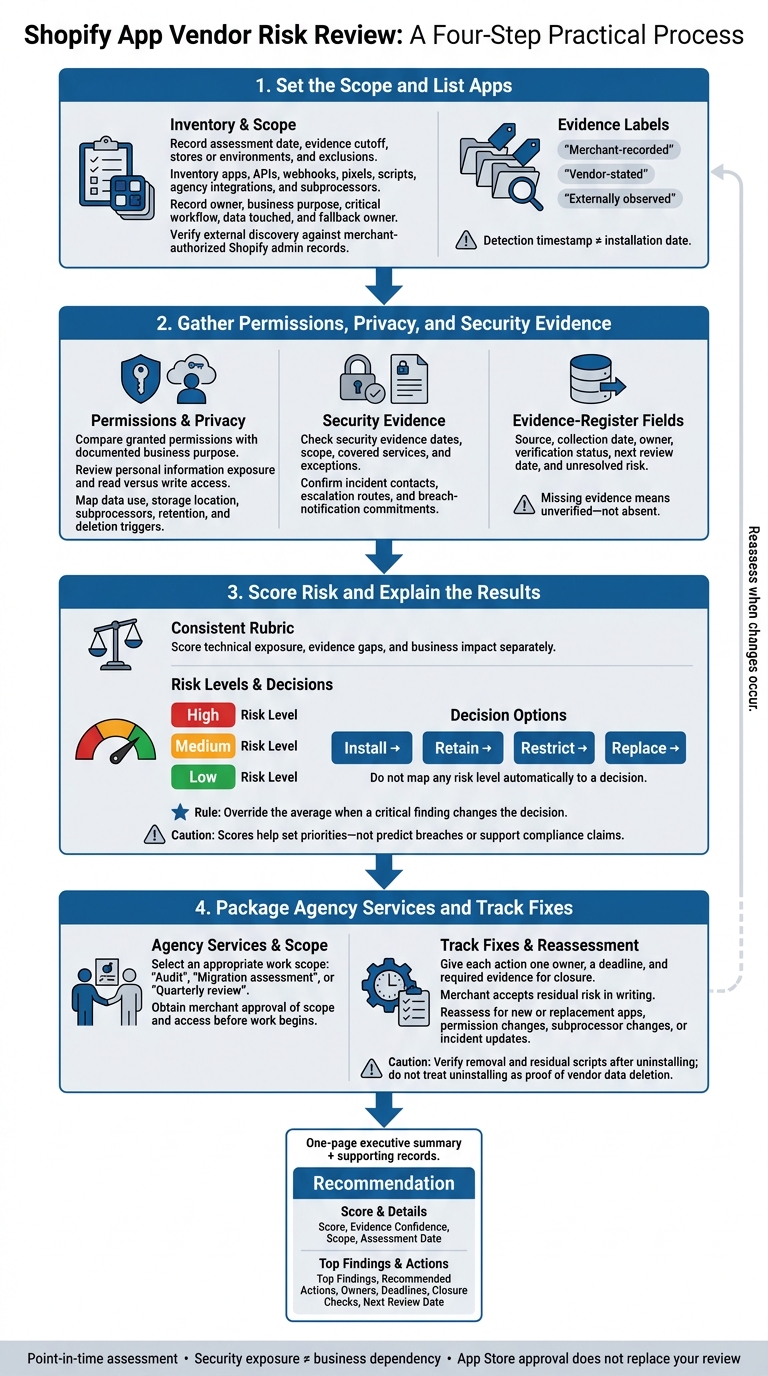
In this guide, I cover four steps:
- List your apps: Confirm owners, business dependencies, and assessment dates using merchant records and external discovery.
- Check access and vendor records: Review permissions, privacy terms, subprocessors, retention, deletion, and security reports. Missing proof does not mean a control is absent.
- Rate the risk: Use High, Medium, or Low ratings, explain business impact, and let critical findings override an average score.
- Assign the work: Set audit, migration, or review scope, then give each fix an owner, deadline, and closure check.
I keep the decision in a one-page executive summary, with supporting records behind it. The goal: <u>a clear decision and a plan you can track</u> - not a score that promises an app is safe.
Shopify App Vendor Risk Review: 4 Steps
The Shopify App-ocalypse: what it is and what it means for Shopify stores
sbb-itb-61169e3
1. Set the Scope and List Apps
Record the assessment date, evidence cutoff, stores or environments covered, and any exclusions. Include backend or admin-only apps that public signals cannot detect among those exclusions.
When comparing two snapshots, list both dates. Treat the report as a point-in-time assessment, not a live assurance report or a full install log. Don’t reconstruct installs or removals between scan dates. [1]
Record App Owners and Business Dependencies
Create one row for each app, API, webhook, pixel, script, agency integration, or subprocessor. Record its owner, business purpose, critical workflow, data touched, and fallback owner.
Include the dates each entry was first detected, changed, and removed. Keep installation dates separate from detection timestamps: a detection records an observation, not the exact time of installation. [1][2]
Verify the Inventory and Label Evidence
Use StoreCensus to identify visible Shopify technologies through external discovery. Then check those findings against Shopify admin records accessed with the merchant’s permission. Label each item as merchant-recorded, vendor-stated, or externally observed.
External discovery can reveal themes, payment providers, and third-party integrations. It cannot confirm every installation or internal control. Only mark a connection as removed when merchant records confirm its removal. Backend and admin-only connections also need records accessed with permission - not public signals. [1][3]
Once the inventory is confirmed, map each app’s permissions, data use, and controls.
2. Gather Permissions, Privacy, and Security Evidence
For each app in your inventory, build an evidence register using Shopify admin disclosures, vendor policies, contracts, questionnaires, and independent assessments. Record each item’s source, collection date, owner, verification status, next review date, and unresolved risk.
Missing evidence means unverified - not absent. Restrict contracts, security reports, and technical details to authorized reviewers. Use this register to score each app in the next section.
Build a Shopify Permissions Matrix
Compare each app’s granted access with its documented business purpose. The matrix below is a template, not a statement about any specific app.
Record exact scope identifiers from the admin disclosures. Then check current Shopify documentation and the merchant’s disclosures to understand what that access allows. Flag unnecessary permissions, access to personal information, and write access where read-only access would do the job.
For every row, collect both admin disclosures and scope documentation.
| Scope or access to verify | Enabled data or action | Documented business purpose | Sensitivity | Write access | Risk rating |
|---|---|---|---|---|---|
| Personal data access | Available customer or merchant fields | Why each field is needed | Personal information | Confirm scope | High-review priority |
| Order data access | Order fields and permitted changes | Required order workflow | Personal information exposure | Confirm scope | Rate by fields and actions |
| Product or inventory access | Stock visibility or changes | Required inventory workflow | Operational data | Confirm read versus write | Medium; escalate unnecessary writes |
| Read-only access only | Non-sensitive data only | Why read access is sufficient | Low sensitivity | Read only | Low if minimal and verified |
| Write permissions | Changes to store data | Why writes are required | Higher sensitivity | Write access | High if read-only would suffice |
Connect each permission gap to its business impact before scoring it.
Map Data Use, Subprocessors, and Retention
Check how the app uses customer, staff, device, and activity data against its privacy policy, data-processing agreement (DPA), subprocessor list, and retention policy.
Review data minimization, deletion triggers, profiling, model training, and contractual breach-notification commitments. Uninstalling an app does not prove the vendor deleted its copies of your data. Require documented deletion triggers and procedures for confirming deletion. Refer jurisdiction-specific obligations to counsel.
| Shopify source | Data category | Processing purpose | Storage location | Subprocessors | Retention period | Deletion trigger |
|---|---|---|---|---|---|---|
| Customer records | Personal information | Document each use | Vendor disclosure | Identify recipients | Verify stated retention period | Verify deletion trigger and uninstall handling |
| Order records | Transaction and customer data | Document fulfillment or other use | Vendor disclosure | Identify recipients | Verify stated retention period | Verify contract and policy terms |
| Admin-facing integration | Staff identity and activity, if collected | Document use in business workflows | Vendor disclosure | Identify recipients | Verify stated retention period | Verify account-closure handling |
| Storefront pixel or script | Device and activity data, if collected | Check analytics, profiling, or training uses | Vendor disclosure | Identify recipients | Verify stated retention period | Verify applicable deletion process |
Check Security Controls and Incident Readiness
Request evidence of security controls and incident readiness, including breach-notification commitments and response contacts. For SOC 2 reports or ISO 27001 certificates, check dates, scope, covered services, and exceptions - not just the badge.
Use only authorized assessment methods. Record unanswered questions and residual risk alongside the evidence.
Confirm a security contact, an escalation route, and breach-notification terms. Keep contractual notification deadlines separate from legal deadlines; they are not the same. Carry unresolved controls into the weighted score.
3. Score Risk and Explain the Results
Calculate Weighted Scores and Set Overrides
Use the same rubric across apps and review periods. Score technical exposure, evidence gaps, and business impact separately. Override the average when a critical finding changes the decision.
| Risk Level | Indicators | Action Required |
|---|---|---|
| High | Access to personal data; write access to themes/orders; missing security evidence | Conduct an immediate security review, establish a DPA, review API logs |
| Medium | Access to product/inventory; unusually high API volume; duplicate functionality | Consolidate features, confirm the need, conduct quarterly reviews |
| Low | Read-only access to non-sensitive data; minimal performance impact | Monitor routinely, revalidate annually |
Use the score to decide whether to install, restrict, retain, or replace the app. Scores help set priorities - not predict breaches or support compliance claims.
Show Decisions, Owners, and Deadlines
Start with the executive summary: scope, assessment date, score, confidence in the evidence, top findings, and recommended action. Place the decision above the overall score.
Explain customer-data exposure, revenue disruption during downtime, recovery time, contractual obligations, and remediation costs. Label any assumptions.
Keep a risk register that records each finding, the affected store or process, evidence, likelihood, impact, severity, owner, due date, remediation, and status. Carry those owners and deadlines into the remediation package in the next section.
Score a Hypothetical Fulfillment App
Illustrative scenario: a merchant depends heavily on a fulfillment integration.
Missing recovery-test evidence lowers confidence; it does not prove recovery controls are absent.
Total Score Result Context 3.90 High risk Prioritize remediation of evidence gaps.
Use this result to assign fixes and schedule follow-up.
4. Package Agency Services and Track Fixes
Use the risk score to select a service package and follow-up schedule. This turns the report’s decision into assigned work.
Define Audit, Migration, and Quarterly Review Packages
Specify how many stores, vendors, and integrations the package covers, along with any exclusions. Get merchant approval of the scope and access before work begins.
| Package | Scope | Deliverables | Merchant inputs | Completion criteria |
|---|---|---|---|---|
| Audit | Inventory, permission matrix, and vendor documentation review | Evidence-based report and action register | App access and vendor documentation | Agreed inventory assessed; unavailable evidence labeled; findings reviewed with merchant |
| Migration assessment | Required exports, customer/review identifiers, consent records, templates, flows, and non-transferable history [4] | Migration map tied to scored dependencies | Export access and merchant approval | Migration map completed; transfer limits documented |
| Quarterly review | Changes to apps, permissions, subprocessors, and incidents | Updated report and revised action register | Change log, incident updates, vendor notices, and remediation evidence | Agreed changes reviewed; next review scheduled |
For migration work, promise only what Shopify can export. Check data portability limits before quoting: restrictions on exporting certain order, customer, or theme history can affect the scope [5].
Record the scope and exceptions of any SOC 2 Type II reports, ISO 27001 documentation, or penetration test summaries. Don’t imply that your agency performed those tests.
Once the report is delivered, move findings into tracked remediation.
Assign Fixes and Set Reassessment Triggers
Give each action one owner, a deadline, and required evidence for closure. The agency handles technical monitoring; the merchant accepts residual risk in writing.
Reassess when monitoring detects a new app, a replacement serving the same function, permission changes, subprocessor changes, or incident updates. Confirm the transition is complete before proposing migration work [1].
After uninstalling an app, verify its behavior before marking removal complete. Manually inspect theme.liquid and asset folders for scripts left behind after uninstallation.
Conclusion: Vendor Risk Report Checklist
Before sending the report for merchant review, confirm it includes everything needed to make a decision:
- Decision and scope: Executive recommendation, stores and integrations assessed, exclusions, assessment dates, app and vendor inventory, and business impact level.
- Access and evidence: Validated permissions matrix, data flows, subprocessors, security-evidence register, and incident-readiness findings. Label evidence sources, review dates, assumptions, and missing information. Treat storefront scripts as exposure signals - not proof of an active install [4].
- Scoring and remediation: Weighted score, scoring rationale, overrides, findings, owners, deadlines, closure evidence, and next review date.
Keep security exposure separate from business dependency. An app’s importance does not establish its safety. Check that the report helps the merchant explain the decision, see what remains uncertain, and track required actions to closure.
FAQs
What if an app vendor won’t share security evidence?
If an app vendor won’t share security documents - such as a DPA, SOC 2 report, or ISO 27001 documentation - weigh that risk against your client’s data requirements. Missing documentation is a major red flag for apps that handle PII or payment data.
If the vendor won’t provide a DPA, it’s best to stop using the app to handle EU customer data. Put transparency and documented security practices ahead of marketing claims.
How should I set risk-scoring weights for my store?
Rank apps by data access and business impact. Assign the highest risk to apps that access personally identifiable information (PII) or can edit themes and orders. Use medium risk for apps with high API call volumes or overlapping features, and the lowest risk for read-only tools with little effect on performance.
Update your risk register as your app stack changes. Check critical apps monthly and reassess their risk annually. Review low-tier apps annually or when their contracts come up for renewal.
How can I replace a high-risk app without disrupting orders?
Export the data you need, then test the replacement app in a staging environment to check that it works with your theme, catalog, and integrations. Map out migration dependencies, including checkout scripts, ERP or 3PL sync requirements, and automated workflows.
Set a rollback plan and clear success criteria before launch. Include checks to confirm that payment reconciliation and inventory synchronization still work after launch. When you remove the high-risk app, manually delete any code snippets or scripts it leaves behind in your theme files.