WordPress and Shopify: Plugin Stack Trends
Four WordPress–Shopify integration patterns—embeds, plugins, storefronts, SEO stacks—with costs, SEO tradeoffs, and team signals.


Most brands use WordPress for traffic and Shopify for sales. From what I see in this article, the setup usually falls into 4 patterns: direct Buy Button embeds, WordPress plugins that pull in Shopify products, WordPress-led storefronts with Shopify checkout, and SEO-first stacks built around search traffic.
If I strip it down, the story is simple:
- Embeds are the lowest-cost option, often around $5–$9/month
- Plugin stacks give you more control over product pages and search traffic
- WordPress-front setups put most of the shopping experience on one site, then send buyers to Shopify for checkout
- SEO-first builds give teams more URL and content control, but cost more time and money
- At the high end, custom Storefront API or headless work can run about $73,000 to $152,000
This also tells me something about the team behind the store. A simple embed often means a small shop, whereas larger operations might use Shopify brand prospect lists for outreach. A synced WordPress + Shopify setup usually means the team cares more about content and search. A custom build often means a bigger brand with in-house dev help.
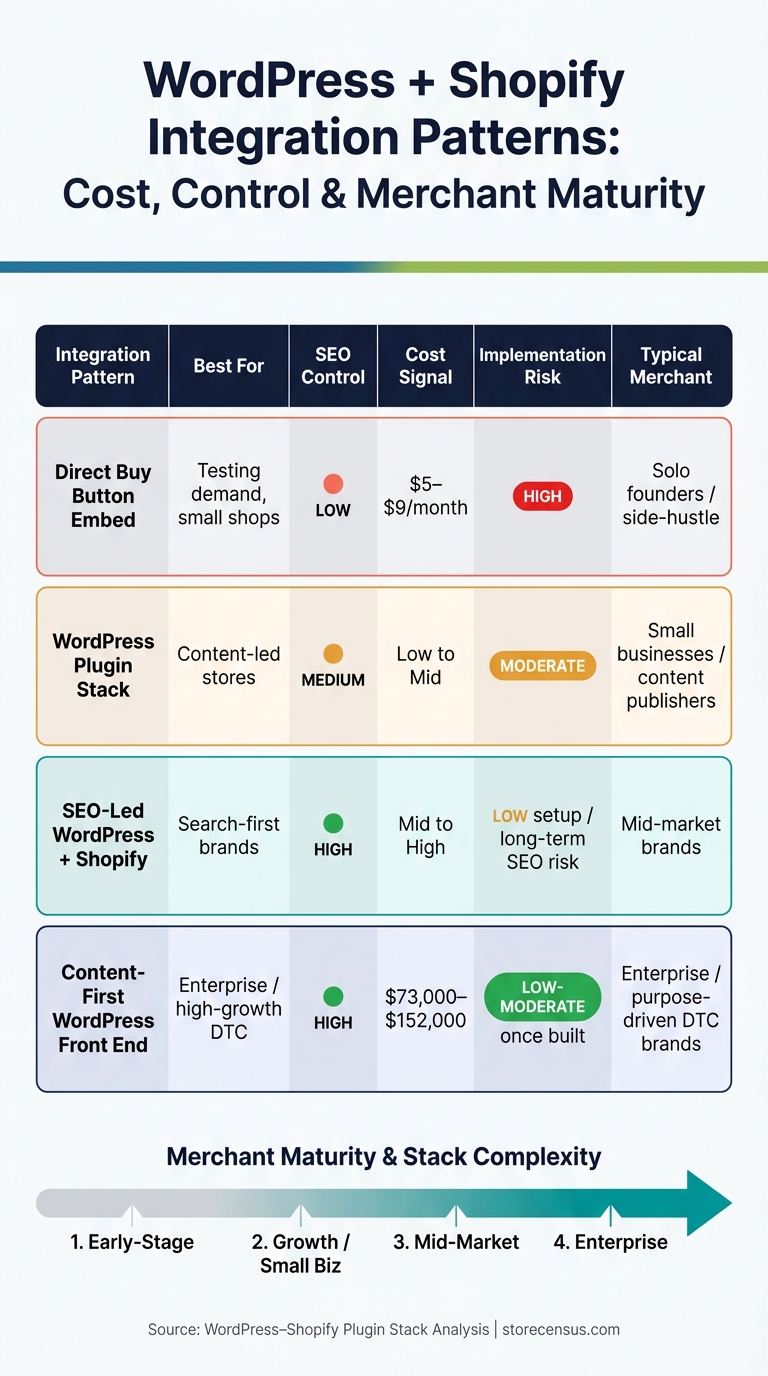
WordPress + Shopify Integration Patterns: Cost, Control & Merchant Maturity
How To Embed Shopify Products on WordPress [New - 2026]

sbb-itb-61169e3
Quick Comparison
| Setup | Best for | SEO control | Setup load | Cost signal |
|---|---|---|---|---|
| Direct Buy Button embed | Testing demand, small shops | Low | Low | Low |
| WordPress plugin stack | Content-led stores | Medium | Medium | Low to mid |
| WordPress front end + Shopify checkout | Brands that want one site feel | High | Medium to high | High |
| SEO-led WordPress + Shopify stack | Search-first brands | High | Medium to high | Mid to high |
So if you want the short answer: the more a merchant depends on content and Google traffic, the more likely they are to move past embeds and into plugin syncs or custom WordPress-led builds.
1. Direct Shopify Buy Button Embeds in WordPress
The Buy Button is the lightest way to connect WordPress and Shopify. You generate a Shopify script, then paste it into a WordPress Custom HTML block or widget. There’s no need for a WordPress plugin. That makes this the baseline setup: no plugin, low overhead, and limited control.
How the embed works
WordPress handles the page content and on-page copy. Shopify takes care of inventory, checkout, payments, and shipping. If you change a price or update stock in Shopify, that change shows up on the WordPress side automatically.
The embed supports three main flows: direct checkout, an add-to-cart slide-out widget, and a product-details modal for variants [5].
Content and SEO control
WordPress keeps visitors on your site, which is the big draw here. But there’s a tradeoff. You get less styling control and less SEO value than you would with a native WordPress product page. Buy Button embeds often rely on iframes, and that limits styling options while also reducing SEO performance compared to native WordPress posts [4].
"When you can add Shopify to an existing website, you monetize this established traffic without redirecting users to unfamiliar platforms." - Sami Ullah Khan, Backend Developer [5]
Maintenance overhead
Setup usually takes just a few minutes. After that, maintenance stays low because Shopify handles SSL, security, and updates [5].
Budget and team signal
This setup often points to a solo operator or a small team testing demand [5]. Plans that support Buy Button embeds start at about $5 to $9 per month [5].
When merchants need more control than an embed can give them, they usually shift to a plugin-based Buy Button stack.
2. WordPress Plugins for Shopify Buy Buttons
The next step up from a raw embed is a plugin-based setup. Tools like ShopWP connect to the Shopify API and pull product data straight into WordPress, so products show up as WordPress posts or custom post types. This is the middle ground most teams look for: more native than an embed, but not as heavy as headless.
Commerce connection
Shopify still runs the commerce side. WordPress becomes the front end for product pages. The big shift from a raw embed is that the plugin turns Shopify products into WordPress-native content. Checkout still takes place on Shopify.
Content and SEO control
This is the main SEO step up from a raw embed: product pages become crawlable WordPress content. That means merchants can use standard WordPress SEO plugins to manage metadata and structured data. If a brand publishes blog posts, guides, or other editorial content tied to its products, that indexability is often the whole point of using a plugin.
"The main drawback to [the standard embed] is that Shopify uses iFrames for the embed which limits the ability for layout customizations." - Andrew, Plugin Developer [4]
That extra SEO control comes with more moving parts.
Maintenance overhead
Merchants can manage products through WordPress blocks or shortcodes, but they still need to deal with API permissions, webhooks, theme conflicts, CSS clashes, and caching. [7]
Budget and team signal
Plugin-based stacks usually point to a growing merchant. It’s often the choice for teams that have outgrown simple embeds but aren’t ready for a full headless build. [8]
In plain English: this setup tends to fit teams that care about SEO and content control, while still wanting Shopify to handle commerce. Teams that want more control often turn to plugins like ShopWP, EmbedUp, or Buy Button Plus for synced product displays and simpler checkout flows. [8]
The next pattern takes this one step further by making WordPress the main storefront and Shopify only the checkout layer.
3. Content-First WordPress Front Ends with Shopify Checkout
The next step is a WordPress-led storefront with Shopify handling checkout. This is a bigger shift than a simple buy button embed. Product pages, site navigation, and the day-to-day storefront experience now live inside WordPress.
Commerce connection
Merchants usually connect WordPress to Shopify through the Storefront API or plugins like ShopWP, which sync Shopify products into WordPress as custom post types.[6] WordPress runs the storefront, while Shopify takes over at checkout.
That split matters. It makes the shopping experience feel like it belongs on the site instead of looking patched together.
Content and SEO control
When products sync in as native WordPress posts, standard SEO tools like Yoast or Rank Math can work directly on product metadata. That gives teams much more control over titles, descriptions, and on-page SEO without leaving WordPress.
There’s also a clear domain-level upside. Keeping the blog, lookbook, and catalog on one domain avoids splitting SEO authority between a subdomain and the main site.[6][2] Put simply: one domain, one content system, one storefront experience.
Maintenance overhead
The tradeoff is extra upkeep. ShopWP, for example, adds extra database tables and options in WordPress to manage the Shopify connection. Teams also need to set up API credentials through a Private App in Shopify and keep an eye on WordPress and PHP version compatibility.[6][9]
This isn’t just a plug-it-in-and-walk-away setup. Someone has to own updates, test changes, and make sure the connection keeps working.
Budget and team signal
From a budget and staffing angle, shortcode- and block-based setups tend to fit smaller teams. Storefront API builds usually point to bigger budgets and in-house technical staff.[10]
Here’s the quick breakdown:
| Integration Method | Complexity | Front-End Flexibility | Maintenance Level |
|---|---|---|---|
| Shortcodes / Blocks | Low | Moderate | Low |
| Native CPT Sync (ShopWP) | Moderate | High | Moderate |
| Storefront API (Headless) | High | High | Moderate |
That same structure often becomes the starting point for SEO-first stacks.
4. SEO-Led WordPress + Shopify Stacks
SEO-led stacks put WordPress at the center of search. It’s not just a place to publish articles while Shopify handles sales. In this setup, WordPress becomes the main surface people find in Google, and the whole stack is shaped around search visibility first.
Commerce connection
Teams usually connect WordPress and Shopify in one of three ways: Buy Button embeds, a shop subdomain or subfolder split, or a headless build with Hydrogen and the Storefront API [11][2]. This is the most control-heavy WordPress–Shopify setup in the article.
That control has a tradeoff. Subdomain splits can create a noticeable mental shift for shoppers when they move from content to store, and they often make cross-domain tracking and attribution harder to manage [2].
Content and SEO control
This is where the SEO-led stack pulls away from the content-first model.
Shopify locks product and collection URLs to /products/ and /collections/. WordPress gives teams full permalink control, deeper content silos, and advanced schema markup through plugins like Yoast SEO or Rank Math [12]. Shopify is stronger for commerce, while WordPress gives teams more room on the editorial side [2].
If the stack stays on a single domain, WordPress can manage the robots.txt file and XML sitemaps for the whole site. That makes it easier to keep crawlers away from checkout and cart pages [13][14].
More SEO control sounds great on paper. But there’s no free lunch. More control also means more WordPress upkeep.
Maintenance overhead
WordPress still needs hosting, security, and plugin updates. Shopify still takes care of checkout security and core platform updates [11][12].
Budget and team signal
All that added control comes with a higher price tag and a stronger need for technical ownership.
Simple Buy Button setups usually point to smaller operations or content-first creators adding a commerce layer [11]. Headless and Storefront API builds sit in a very different tier. Median enterprise-grade implementations run between $73,000 and $152,000, and they need ongoing developer support [1].
A unified-domain, schema-heavy Storefront API stack usually signals an established team with budget, technical ownership, and a clear SEO plan.
5. Merchant Intelligence Workflows for Reading WordPress–Shopify Stacks
For agencies and sales teams, the job isn't just spotting WordPress and Shopify on the same site. The job is understanding how they work together. The best way to read that stack is in sequence: connection, SEO control, maintenance load, and then budget.
Commerce connection
Intelligence tools look for tech fingerprints that show both WordPress and Shopify on one domain. From there, they verify Buy Buttons or Storefront API activity through network calls. If the setup is split between brand.com and shop.brand.com, it's usually easier to identify and often points to a simpler setup.
Custom integrations are a different story. In those cases, checking network calls for Storefront API activity is the most reliable way to confirm what's happening behind the scenes [2].
Content and SEO control
SEO plugins can tell you a lot about where content decisions live. If Yoast or Rank Math shows up next to Shopify checkout signals, content authority usually remains in WordPress. That often means the site uses WordPress for publishing and Shopify for commerce.
If you see a Shopify-side builder like Shogun, that's a strong sign content control is shifting toward Shopify [1].
Maintenance overhead
Plugin volume says a lot. A high plugin count - especially when some versions are out of date - usually means more upkeep and more security exposure [3]. It's a simple signal, but a useful one.
Hosting can also hint at how the merchant handles upkeep. Premium managed hosting such as WP Engine or Kinsta often points to a team that's paying for outside support instead of managing everything internally [1].
Budget and team maturity signal
StoreCensus helps teams filter these stack signals at scale. That makes it easier to separate DIY WordPress–Shopify setups from merchants using premium hosting, active SEO plugins, and custom Storefront API work.
Those signals tie pretty directly to the tradeoffs around control, speed, and upkeep.
"The key difference is integration at the code level, not just the brand level." - Josh Attwood, Josh Attwood Studio [2]
Tradeoffs Across Each Integration Pattern
These patterns mainly split on control, cost, and upkeep. That’s where the fit gets clear.
| Integration Pattern | Strengths | Limitations | Implementation Risk | Likely Operator Profile |
|---|---|---|---|---|
| Direct Buy Button Embeds | Lowest cost; fast to set up; zero server maintenance | JS Buy SDK deprecated January 2025; fragile cart behavior; weaker product SEO [8] | High - code can break without notice | Solo founders; small boutiques |
| WordPress Plugins for Shopify Buy Buttons | Syncs products as native WordPress posts; better SEO than raw embeds; keeps Shopify checkout [6][8] | Dependent on plugin updates; PHP and WordPress compatibility issues [6] | Moderate - tied to plugin maintenance cycles | Small businesses; content publishers |
| Content-First WordPress Front Ends with Shopify Checkout | Unified experience on a single domain; strong editorial control; fast performance [1][2] | High build cost ($73,000–$152,000); requires a developer team [1] | Low-Moderate once built, but high upfront complexity | Enterprise; high-growth DTC; purpose-driven brands |
| SEO-Led WordPress + Shopify Stacks | Easiest to configure; keeps both platforms fully separate [2] | Splits SEO authority; split customer experience; branding inconsistencies [2] | Low to set up, but long-term SEO risk is real | Mid-market brands with limited dev resources |
If you look at the table, the middle option stands out for a reason. WordPress plugins are often the practical middle ground. They keep Shopify checkout in place, make product pages feel more native inside WordPress, and skip the cost and build load that comes with a full headless setup.
That same tradeoff also tends to line up with merchant maturity, which is the next lens.
What Each Stack Pattern Says About Merchant Maturity
These tradeoffs line up pretty neatly with merchant maturity. In many cases, you can get a solid read on a merchant’s stage just by looking at its WordPress–Shopify stack.
Here’s the stack, from the simplest setup to the most involved:
| Stack Pattern | Typical Merchant Profile | Cost Tier | Team Composition | Likely Next Upgrade Path |
|---|---|---|---|---|
| Direct Buy Button Embeds | Early-stage / side-hustle | Low | Solo or non-technical owner | WordPress buy-button plugin |
| WordPress Plugins for Shopify Buy Buttons | Growth / small business | Low–Mid | Freelance editor + part-time developer | SEO-led stack |
| SEO-Led WordPress + Shopify Stacks | Mid-market brand | Mid | Marketing team + ecommerce manager | Headless / Shopify Hydrogen |
| Content-First WordPress Front End with Shopify Checkout | Enterprise / high-growth DTC | High | Dedicated engineering team | Custom Next.js or global headless |
At the low end, the direct buy button embed usually means commerce plays a smaller role than content. The team is often tiny, and technical help is limited.
WordPress buy-button plugins point to a merchant that has decided content and commerce should work together, but isn’t ready to pay for a custom setup.
The SEO-led stack is a common landing spot for mid-market brands. They want WordPress for content reach and Shopify for checkout, so this setup gives them both without going fully headless.
At the top end, a content-first WordPress front end with Shopify checkout points to a deliberate and expensive architecture choice. This is often the move for a purpose-driven DTC brand where storytelling sits near the center of the business.
For agencies, StoreCensus can segment these tiers using signals like Shopify Storefront API activity, Buy Button scripts, and WordPress plugins such as Elementor across 6 million+ stores.
Conclusion
Choosing between WordPress and Shopify usually comes down to three things: budget, content goals, and team size.
When you look at the stack from the simplest setup to the most advanced, the pattern stays pretty clear. Lower-complexity stacks tend to show up in early-stage stores that don’t need much content.
At the top end, content stops being just a publishing layer and starts acting like a revenue channel. SEO-led and content-first setups usually appear once editorial traffic begins driving sales.
The best stack fits the main growth channel. If growth depends on search traffic and long-form content, the extra work of a WordPress–Shopify integration can make sense. If the store is mostly product-first, Shopify’s native tools are often enough.
For agencies, these stack signals work like a practical filter. StoreCensus can help turn those signals into a more targeted outbound workflow - the stack shows the maturity tier, and that tier points to what the merchant is ready to buy.
FAQs
Which WordPress-Shopify setup fits my team?
The right WordPress-Shopify setup comes down to your team’s technical skill, budget, and what you’re trying to get done first.
If editorial control and SEO matter most, a WordPress-first setup is often the starting point. The tradeoff? It usually brings extra work around hosting, security, and site speed.
If you want a more unified, high-speed setup, a headless architecture can make more sense. In that model, Shopify handles commerce while WordPress handles content.
When should I move beyond a Buy Button embed?
Move past a Buy Button embed when you need a full-featured storefront, not just simple product links.
That shift often makes sense when your brand leans on rich content, storytelling, and one consistent experience across the site. It can also help when running content in one place and commerce in another starts to feel clunky and slow.
A full storefront may also be the better fit if you need:
- Integrated checkout
- Native social commerce tools
- A more polished backend
In short, this is less about adding one more sales link and more about building a store that feels like part of your brand.
How do these stacks affect SEO and upkeep?
For SEO, WordPress works well for content-first plans because plugins like Yoast SEO and Rank Math give you close control over metadata, schema, and internal linking.
But if you move that content into Shopify, you need to handle URL mapping and redirects with care. If you don’t, you can lose search equity.
On the upkeep side, WooCommerce needs more hands-on work. That includes hosting, security patches, and dealing with plugin conflicts when they pop up.
Shopify cuts down on maintenance, which is a big relief for a lot of teams. The trade-off is less room to customize things exactly the way you want.