WooCommerce Email List Guide for Agencies
Audit WooCommerce signup flows, fix consent/sync/deliverability, and test offers to grow revenue per visitor.

I start with an audit - not another plugin. Score seven controls from 0–2: offer, placement, consent, deliverability, sync, automation, and reporting. Fix the weakest verified control, then measure whether it helps shoppers subscribe and buy.
Here’s the workflow I use:
- Check the signup journey: Test forms, consent, incentive delivery, welcome emails, and unsubscribe behavior on desktop and mobile.
- Choose tools to fit the problem: Compare MailPoet, Klaviyo, Mailchimp for WooCommerce, and AutomateWoo by store needs, costs, compatibility, and data flow.
- Test offers without hurting sales: Keep checkout signup optional. Track revenue per visitor, discount costs, and margin - not just opt-ins.
- Measure results: Compare signup groups at the same age. Where volume allows, use a randomized 5%–10% holdout to estimate sales caused by marketing.
- Sell a defined repair: Use StoreCensus to find stores, check each lead, and scope diagnosis, repairs, testing, or maintenance with clear acceptance tests.
My rule: <u>prove the problem before pitching the fix</u>. A larger list is not proof of better results.
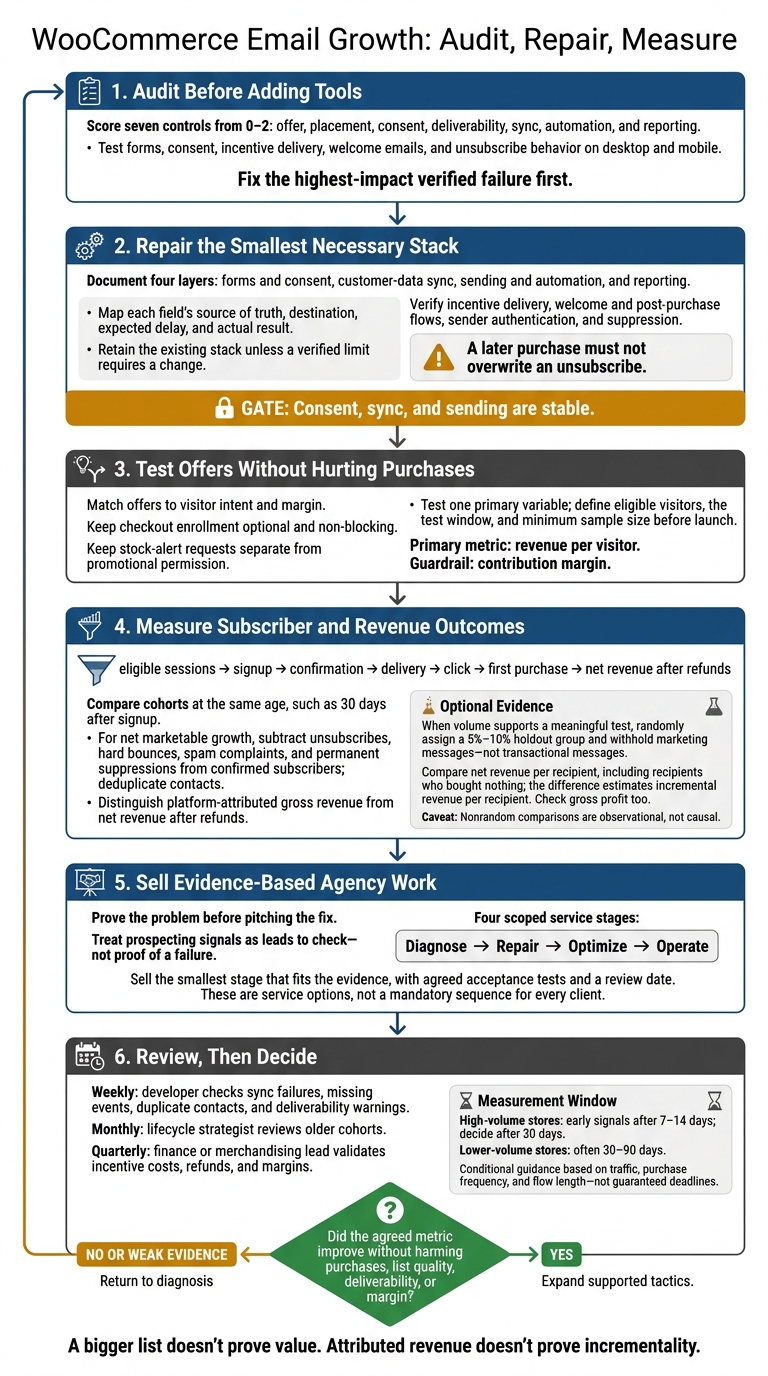
WooCommerce Email Growth: Audit, Repair, Measure
Choose Plugins and Connect WooCommerce Data
Compare Plugin and Email Platform Roles
Use the audit scores to choose the smallest stack that fixes the broken control. Document four layers: forms and consent, customer-data sync, sending and automation, and reporting.
Check supported WordPress/WooCommerce versions, High-Performance Order Storage (HPOS), Checkout Block compatibility, consent records, sync, logs, and deliverability. Record the date of every compatibility check.
| Tool | What it does | What it needs | What can break |
|---|---|---|---|
| MailPoet | WordPress-native newsletters, transactional email, and WooCommerce automation | Approved signup source, WooCommerce data, compatible hosting and sending plan | Subscriber and send caps, hosting capacity, version and block compatibility, reporting limits[5][10] |
| Klaviyo | Behavioral segmentation, lifecycle automation, and multichannel marketing | Forms or checkout consent; customer, order, product-view, checkout, and purchase events; configured lists, flows, and suppressions[4][7] | Contact-based pricing, integration version, event sync, consent behavior, attribution tracking |
| Mailchimp for WooCommerce | Connects WooCommerce customer and order data to Mailchimp campaigns and automation | Mailchimp audience and plugin settings; name, email, and order sync[8][9] | Plan limits, duplicate contacts, audience structure, sync errors, feature availability[8][9] |
| AutomateWoo | WooCommerce-triggered workflows using customer, order, and extension data | Tested triggers, compatible extensions, a designated sender, and maintained workflows | License cost, deliverability, extension compatibility, hosting load, reporting limits[6] |
Match the Tool Setup to Store Needs
Stick with the existing stack unless a verified limit requires a change. Compare subscriber count, monthly sends, staffing, and hosting capacity - not just plugin price.
MailPoet’s listings currently advertise up to 500 subscribers free, up to 5,000 monthly emails, and paid plans starting at $10/month. Confirm these limits when preparing the proposal.[5][10]
| Store requirement | Required features | Setup complexity | Recommended setup |
|---|---|---|---|
| Under 500 subscribers; one or two basic campaigns monthly | Forms, welcome email, simple reporting | Low | MailPoet with compatible hosting and sending plan |
| Several thousand subscribers; regular promotions | Segments, suppression, campaign reporting | Medium | Mailchimp for WooCommerce or Klaviyo; one designated connector |
| Behavioral segmentation and lifecycle messages | Tested product, checkout, purchase, and refund synchronization | High | Klaviyo with documented event and flow rules |
| Subscription, membership, or booking workflows | Extension-specific triggers and conditions | Medium-high | AutomateWoo with a designated sender |
| Limited staff or hosting resources | External sending, clear logs, restrained tracking | Low-medium | One primary platform and one maintained connector |
Map Data Fields and Test Sync
Build a data dictionary that records each field, source of truth, destination, expected delay, and actual result. Use these mappings:
- Email identity → WooCommerce, with explicit rules for matching guest emails.
- Orders, refunds, and cancellations → WooCommerce.
- Consent and suppression → the designated consent/email system.
- Signup source and timestamps → the originating form.
- Product interests → defined view, cart, purchase, or preference events.
Label each field’s sync delay as real time, near real time, scheduled, or manual, then measure it.[7]
Use approved test accounts to check new and existing subscribers, guest and logged-in purchasers, duplicate emails, multiple-item orders, and failed webhooks. Save expected and actual outcomes, timestamps, and event or order IDs. A later purchase must not overwrite an unsubscribe.
Test Welcome and Post-Purchase Emails
Check that the incentive arrives once, the subscriber enters the correct flow, and the sequence changes or stops after a purchase. Test coupon edge cases, too.
For post-purchase emails, check behavior after payment and account for fulfillment timing, product category, subscription status, cancellation, and refund. Document the sender for every message to prevent duplicate sends.
Add cart recovery only when events are reliable and purchase suppression and frequency limits are in place. Replenishment needs product-specific repurchase windows. Win-back needs a defined inactivity period and exclusions for recent purchasers.
Check Consent and Deliverability
Verify that the selected system stores consent metadata and syncs suppressions across senders. Klaviyo records checkout consent after order submission and order creation - not simply when a shopper abandons checkout.[4]
Check sender identity and confirm that opt-outs are processed within 10 business days. Verify SPF, DKIM, and DMARC, then monitor bounces, complaints, and unsubscribes. Follow applicable U.S. and local email rules, and send the final review to counsel.
Move to offer and placement testing only after consent, sync, and sending are stable.
sbb-itb-61169e3
Design Signup Offers and Choose Form Placements
Match Offers to Visitor Intent and Margin
Once consent, sync, and deliverability are stable, test offers and placements that fit what visitors came to do. Offer buying guides for research visits, category-specific advice on category pages, stock alerts for unavailable products, early access for launches, and care or replenishment content after purchase.
Keep stock-alert requests separate from promotional permission. Before offering a discount, compare average order value (AOV), gross margin, redemption cost, first-order conversion, and total payment, fulfillment, and return costs.
State the Benefit, Terms, and Email Permission
Make four things clear: what visitors get, which emails they can expect, what clicking the button does, and which offer terms apply.
Use action labels such as “Send My Guide” or “Notify Me.”
Place minimum spend, expiration, exclusions, and stacking rules near the form, along with a privacy-policy link. Where affirmative permission is required, provide a separate, unchecked marketing choice. Give overlays an accessible decline control.
After submission, confirm whether the incentive was applied or sent by email. Then make sure it’s delivered.
Place Forms Without Blocking Purchases
Review form placements on the homepage, category pages, product pages, guide pages, account pages, and after purchase. Keep checkout enrollment optional and non-blocking. Hide acquisition overlays from existing subscribers, recent submitters, and visitors who dismissed them.
Where supported, record source, page type, offer variant, campaign, device, and experiment assignment. Test mobile screens, slow connections, load impact, field labels, errors, keyboard access, and close controls. Keep modal focus inside the dialog, and return focus to the trigger when it closes.[11]
Use these placements as the baseline for the test plan below.
Test Signup Changes Against Revenue Results
Judge each change by revenue, not just opt-ins. The goal is to improve revenue per visitor while protecting contribution margin.
Before launch, define eligible visitors, traffic source, and one primary variable. When comparing offers, keep placement, timing, and the welcome sequence the same. Make revenue per visitor the primary metric, define the test window, and use the same purchase window for both groups. Set a minimum sample size.
Track signup rate, first-order conversion, discount cost, contribution margin, unsubscribes, complaints, and checkout conversion. Don’t declare a winner from a small sample. Record promotions, traffic shifts, stock changes, and seasonality so you don’t mistake their effects for the offer’s effect.
Measure List Growth and Revenue
Build a Signup-to-Revenue Dashboard
After the test runs, review results by cohort - not just opt-ins. Track the full funnel, from eligible sessions to net revenue after refunds. Include signup, confirmation, delivery, click, and first-purchase rates, plus net marketable list growth, revenue per new subscriber and per delivered recipient, incentive cost, and contribution margin.
Break down results by placement, device, offer, traffic source, and signup cohort. Compare cohorts at the same age, such as 30 days after signup. Use the audit’s controls to pinpoint where list growth breaks down.
Define each metric once in a dashboard data dictionary. Calculate signup rate using eligible sessions as the denominator, and keep pending confirmations separate. For net marketable growth, subtract unsubscribes, hard bounces, spam complaints, and permanent suppressions from confirmed subscribers. Deduplicate contacts using the platform profile ID or a normalized email address.
Use completed or paid WooCommerce orders, and update cohort revenue as refunds arrive. Display platform-attributed gross revenue beside net revenue after refunds, using a consistent margin formula. Document the attribution rule and conversion window. Use opens only to diagnose issues. Platform-attributed revenue is reporting credit - not proof that the marketing caused extra sales.[12][13][16]
When volume is high enough, withhold marketing messages - not transactional messages - from a 5%–10% holdout group. Only run this test if the sample can detect a meaningful difference, and assign recipients randomly.
Compare net revenue per recipient between the two groups, including recipients who bought nothing. The difference estimates incremental revenue per recipient. Check gross profit, too. If recipients weren’t assigned randomly, label the comparison observational rather than causal.[14][15]
Set Review Dates and Assign Owners
Have the developer check weekly for sync failures, missing order events, duplicate contacts, and deliverability warnings. The lifecycle strategist should review older cohorts monthly. Each quarter, the client’s finance or merchandising lead should validate incentive costs, refunds, and margins.
Log changes to traffic, pricing, inventory, and promotions alongside agency work. Fix tracking issues before interpreting results. Expand tactics only when older cohorts show better economics without hurting deliverability, refund rates, or margin. Use these reviews to isolate the fix before pitching it to the client.
Find Prospects and Sell List-Growth Repairs
Find WooCommerce Prospects With StoreCensus
Use StoreCensus to find WooCommerce stores to audit by revenue tier, technology stack, country, and growth signals. Its decision-maker contacts can help you reach the merchant owner or operator.[1][2][17]
Focus on merchants within your service range that recently changed themes, added marketing tools, or expanded their catalogs. Store-change alerts can help you time outreach and choose accounts for a diagnostic. Treat each signal as a lead to check - not proof that something is broken.
Decision-maker contact data is not subscriber consent. Keep it in your agency CRM, separate from the merchant’s subscriber list. For U.S. commercial outreach, CAN-SPAM applies to business-to-business email. Use accurate sender details, clear and truthful subject lines, a physical mailing address, and a working opt-out. Honor opt-outs within 10 business days.[3]
Use Audit Evidence on Sales Calls
Start with the weakest-scoring control. Build the call around observation → impact → questions → scoped repair → measurement.
Bring a short evidence pack with the tested URL, screenshot, timestamp, test identifier, and any authorized platform events. Be clear about what you observed and what you couldn’t verify.
Ask which email platform receives signups, how many opt-ins arrive each month, what incentives cost, whether records sync correctly, and who can grant reporting access. Propose a limited repair with agreed acceptance tests and a review date - not a revenue promise. If you need access to prove the cause, start with a paid diagnostic.
Turn the call into a scoped offer only after you’ve isolated the failure.
Package Diagnosis, Repairs, Testing, and Maintenance
Give each stage its own scope and acceptance criteria. Move from diagnosis to repairs, testing, and maintenance only when the evidence supports it. Sell the smallest stage that fits the evidence.
| Stage | Scope and deliverables | Access needed | Exclusions | Acceptance criteria | Fee model |
|---|---|---|---|---|---|
| Diagnose | Signup-path audit, tool inventory, evidence pack, prioritized findings | Read-only WordPress/WooCommerce access, email-platform reporting, analytics, privacy documentation | Code changes, copywriting production, campaign management | Agreed paths tested; evidence separated from hypotheses | One-time diagnostic |
| Repair | Form or plugin configuration, field mapping, audience rules, welcome-flow setup, consent-copy implementation, tracking fixes, deliverability prerequisites | Admin or developer access, staging environment, email-platform permissions, domain-authentication access where needed | Major redesigns, custom plugin development, legal advice, unrelated WooCommerce fixes | Approved test cases pass; records sync correctly; suppression works | One-time implementation fee |
| Optimize | Offer and placement tests, form copy variants, segmentation, incentive economics, experiment design | Analytics, testing tools, product-margin or incentive-cost data, campaign access | Guaranteed conversion or revenue increases | Test launched with a documented hypothesis, baseline, stopping rule, and reporting definition | Fixed test or project fee |
| Operate | Monthly monitoring, dashboard updates, list hygiene, flow maintenance, deliverability review | Continued platform access, reporting access, approval contact, defined response times | Unlimited content production, emergency development, software subscriptions unless included | Scheduled reports delivered; agreed service levels met | Recurring agency fee |
Keep implementation fees, recurring agency fees, and software costs separate in the proposal. State who pays for each subscription. The merchant should own the WordPress, WooCommerce, email, domain, and analytics accounts.
Define who approves incentives and consent copy, publishes changes, and responds to failed syncs. Include a handoff package with field mappings, form locations, flow logic, test results, dashboards, known limitations, rollback instructions, and configuration documentation.
Build your Email List FAST & Setup an Email Subscribe Form (COMPLETE GUIDE) WooFunnels Autonami
Conclusion: Audit, Repair, and Measure Before Expanding
Start with a documented WooCommerce audit. Fix the highest-impact verified failure first. Then improve offer clarity, placement, consent capture, subscriber sync, incentive delivery, and welcome and post-purchase flows. Test the repaired signup experience from start to finish.
Once the repair is live, stick to the measurement window you set before making changes. High-volume stores can review early signals after 7–14 days and decide after 30 days. Lower-volume stores often need 30–90 days. Base that window on traffic, purchase frequency, and flow length - not a reporting deadline.
Track confirmed subscribers, first purchases, and revenue per subscriber by signup source. Monitor margin, unsubscribes, and complaints, too. A bigger list doesn’t prove value, and attributed revenue doesn’t prove incrementality. Use a randomized holdout to estimate incremental impact.
Expand only if the agreed metric improves without hurting purchases, list quality, or deliverability. If the evidence is weak, go back to diagnosis instead of adding another plugin.
FAQs
How do I prioritize equally weak audit controls?
Review workflow logs to find the largest drop-offs or backlogs. Break down the data by revenue band and platform to see whether issues affect all merchants or specific store profiles. Focus first on the segment with the greatest impact on lead conversion.
Use StoreCensus to fine-tune enrollment triggers and match messaging to those stores’ growth signals and tech stack gaps. Address the most critical performance bottlenecks first.
How can I measure impact with low traffic?
When traffic is low, focus on lead quality, not volume. Use the STAMP framework to assess prospects based on traffic levels and missing apps. Give priority to high-intent signals, such as recent app installations, theme changes, or moves into higher revenue brackets.
Use StoreCensus to track these signals and time your outreach to active buying cycles. Reaching decision-makers when they’re ready to buy can improve conversion rates - even with fewer prospects.
How should I price a list-growth repair?
A good rule of thumb: Set your monthly retainer at 0.5% to 1% of the merchant’s annual revenue. Use StoreCensus to check the store’s revenue tier and spot gaps in its tech stack before setting your fee.
If the store lacks an email platform or upsell tools, those gaps can support premium pricing. Frame your service as a way to recover lost revenue - and an investment in growth.