Hosted Checkout vs Embedded Checkout Security
Hosted checkout cuts merchant security work; embedded checkout gives branding control but raises PCI, fraud, and maintenance duties.


I recommend hosted checkout when your team has limited security resources. Before choosing either model, confirm platform support and PCI eligibility, assign a maintenance owner, and require server-side payment checks before fulfillment.
Embedded checkout can also be secure. But isolated payment fields don’t protect the surrounding store page. And neither option removes your duties for fraud controls, store security, or order verification.
I compare 5 criteria: origin boundaries, fraud exposure, PCI burden, checkout speed, and update ownership.
Quick Comparison
| Criterion | Hosted checkout | Embedded checkout |
|---|---|---|
| Origin boundaries | Provider controls the payment page. | Provider may isolate payment fields; you control the surrounding page. |
| Fraud exposure | A compromised store can alter the payment handoff. | Store scripts can disrupt or tamper with the checkout flow. |
| PCI burden | Often smaller when eligibility conditions are met. | Depends on the exact integration and required page protections. |
| Checkout speed | Adds navigation to the provider’s page. | Adds SDK and iframe loading without a full-page transition. |
| Update ownership | Provider maintains its payment page; you maintain the integration. | You maintain more page code, dependencies, and compatibility tests. |
For Shopify, I’d stay within supported checkout options. For WooCommerce, I’d check gateway, plugin, and theme compatibility. With either, <u>test failed payments, retries, and delayed notifications before launch</u> - then measure the full mobile purchase flow, not just page-load speed.
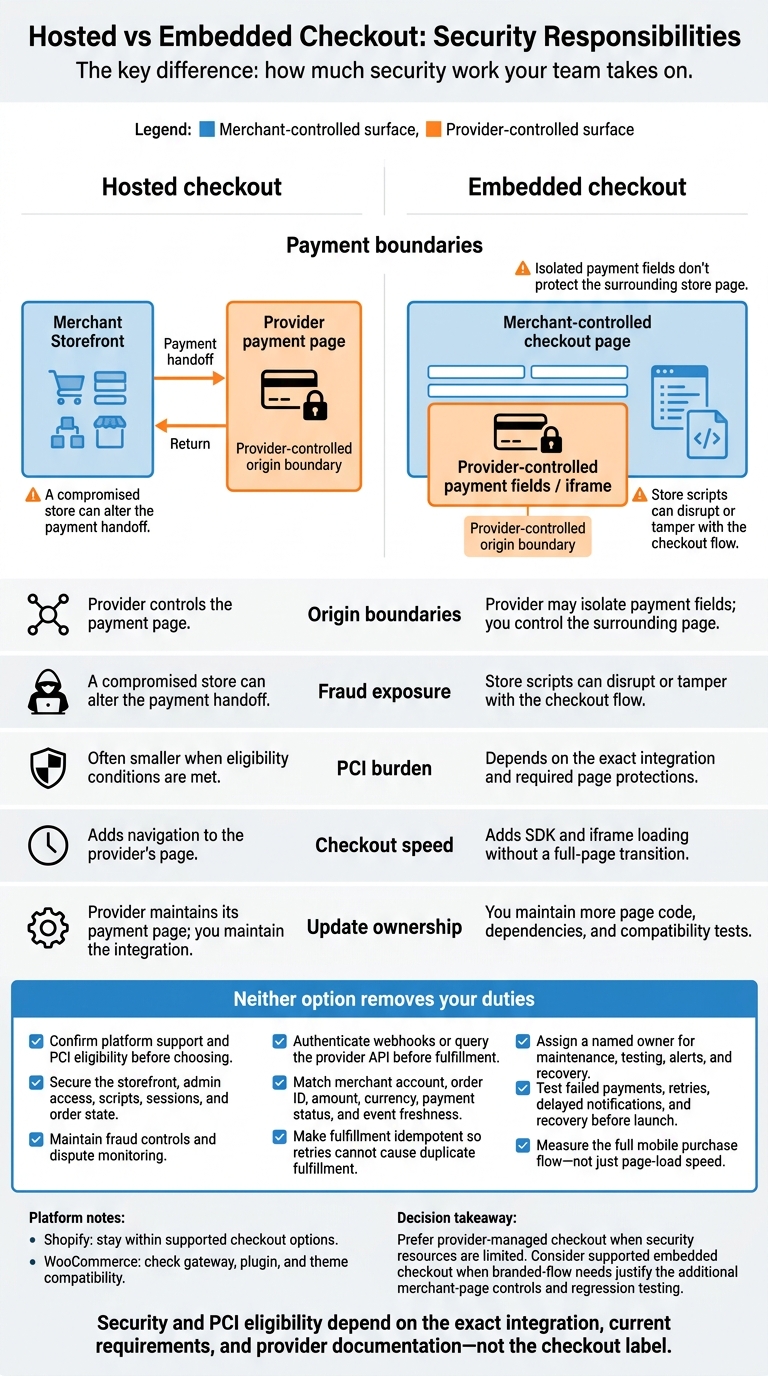
Hosted vs Embedded Checkout: Security Responsibilities
Stripe Hosted-Page Checkout Tutorial: Redirect Flow + Secure Webhooks
sbb-itb-61169e3
Hosted vs Embedded Checkout: 5 Decision Criteria
The main difference isn’t where checkout appears. It’s how much security work your team takes on.
Compare the models using the criteria below. Security and PCI eligibility depend on the exact integration, current requirements, and provider documentation - not the checkout label.[4][3]
| Criterion | Hosted checkout | Embedded checkout | Team responsibilities |
|---|---|---|---|
| Cross-origin control | The provider owns the payment-page origin. | Your team controls the surrounding page. | Verify allowed domains, CSP, HTTPS, and postMessage handling. |
| Fraud exposure | A compromised storefront can change the handoff. | Storefront scripts and plugins can disrupt checkout. | Limit scripts, secure admin access, validate messages, verify webhooks, and monitor changes. |
| PCI burden | Usually has the smallest PCI scope when eligibility conditions are met. | Hosted fields or iframes may reduce scope, but the merchant page still affects compliance. | Confirm the applicable SAQ with the provider, acquirer, or qualified assessor. |
| Checkout speed | Adds navigation and a provider-page load. | Avoids a full-page transition but adds SDK, iframe, initialization, validation, and event-handling work. | Measure the complete mobile purchase journey. |
| Maintenance | The provider handles most payment-page updates. | The agency handles more integration and compatibility work. | Document who owns updates, testing, and recovery. |
Origin Boundaries and Fraud Risks
Even when provider-controlled fields stay isolated, a compromised storefront can replace a checkout button, redirect shoppers, or change surrounding content.[3] Hosted checkout reduces the payment surface your team maintains. Embedded checkout puts more responsibility on your team for the surrounding page and integration.
| Threat | Provider controls | Team responsibilities |
|---|---|---|
| Checkout tampering | Hosted pages, isolated fields, tokenization, domain allowlists, secure SDKs, and webhook signing where supported | Remove unnecessary scripts, secure storefront and admin access, enforce HTTPS and CSP, validate provider messages, verify webhook signatures, and monitor changes made without permission. |
| Transaction fraud, account takeover, and card testing | Address and card verification, 3-D Secure, behavioral signals, velocity rules, bot controls, authorization monitoring, and chargeback tools where supported | Secure customer accounts, require appropriate MFA, limit retries, monitor authorization patterns, protect discount and gift-card logic, validate order and shipping changes server-side, and define review, escalation, and recovery procedures. |
These attack paths also affect PCI scope and the duties your team keeps.
PCI Scope and Merchant Duties
Confirm which SAQ applies to your exact build with the provider, acquirer, or qualified assessor. For eligible embedded solutions, also confirm protection against checkout script tampering. That can come from appropriate controls or assurance from the compliant payment provider that its documented implementation supplies the required protection.[4]
| Review area | Hosted redirect | Embedded payment page |
|---|---|---|
| Eligibility checks | Verify that the fully outsourced flow meets current SAQ conditions. | Verify that the specific iframe or hosted-fields implementation meets current SAQ conditions. |
| Retained duties | Secure the referring page, redirect, sessions, and order state. | Secure scripts, configuration, messages, and surrounding checkout content. |
| Script security and tampering | Review scripts that can change the handoff and confirm applicable obligations. | Confirm protection against checkout script tampering. Use the provider’s documented script-protection controls.[4] |
Checkout Speed and Update Ownership
Fewer page transitions don’t always make checkout faster. Measure the full flow, including loading, authentication, confirmation, and recovery.
| Operational area | Hosted checkout | Embedded checkout |
|---|---|---|
| Performance measurements | Track redirect readiness, completion, return-page load, and failed-return recovery. | Track SDK and iframe readiness, validation, authentication, and confirmation rendering. |
| Dependencies and updates | The provider updates its payment page; the agency maintains the handoff and order integration. | The agency maintains SDK integration, gateway compatibility, and event handlers. |
| CSP and layouts | Maintain storefront policies and supported redirect behavior. | Test provider-required CSP rules, responsive fields, keyboards, and viewport behavior. |
| Recovery states | Handle lost sessions, canceled payments, and successful payments without a browser return. | Handle initialization failures, timeouts, retries, and interrupted authentication. |
| Regression testing | Test return URLs, order reconciliation, and webhook delays. | Also test browser restrictions, component loading, and plugin or theme conflicts. |
Assign these duties before estimating maintenance. The split matters most when platform rules limit checkout customization.
On Shopify, use supported checkout and extension mechanisms.[2] On WooCommerce, test gateway, plugin, theme, and version compatibility, along with webhook verification, tokenization, 3-D Secure, and staging behavior.[5] Test both models for duplicate submissions, delayed webhooks, and capture errors.
Cross-Origin Controls and Platform Limits
Browser cross-origin controls set limits on what checkout code can access. Platform rules then determine how you can put those controls to work.
Different schemes, hosts, or ports create separate origins. That means storefront JavaScript cannot read or change a payment document on another origin. This boundary limits what compromised storefront code can touch, but it does not secure the entire checkout journey.[9] Cross-origin rules explain the risk; Shopify and WooCommerce set the implementation boundaries.
| Area | Hosted checkout | Embedded checkout |
|---|---|---|
| Origin boundary | A separate provider origin limits direct storefront access; secure the redirect and return flow. | Cross-origin frames keep documents separate; merchant-rendered card fields remove that separation. Configure CSP and validate postMessage exchanges. |
| Failure modes | Broken returns, blocked redirects, amount mismatches, provider downtime, and webhook delays. | Frame blocking, invalid postMessage handling, CSP errors, consent-tool blocking, script conflicts, and plugin or theme regressions. |
| Platform limits | Use platform- and gateway-supported redirects and return behavior. | Use supported extensions or gateway components, not arbitrary checkout embeds. |
Control Scripts and Verify Payments
Build your CSP using the provider’s listed domains. Use frame-src for frames, script-src for libraries, connect-src for browser API calls, and form-action for form destinations where applicable. Test in report-only mode before enforcing it. frame-ancestors controls who can embed your page, not the provider’s iframe. Track script owners, remove unnecessary checkout scripts, and apply authorization, integrity, and tamper-detection controls.[7][9]
Require HTTPS for storefront, payment, return, API, and webhook endpoints. For postMessage, check the exact event.origin, the expected event.source, and the message schema. Send messages with an explicit targetOrigin, and reject unexpected or replayed transaction identifiers.[8][9][12]
Before fulfillment, authenticate the webhook or query the provider API. Match the merchant account, order ID, amount, currency, payment status, and event freshness. Make processing idempotent so retries cannot trigger duplicate fulfillment.[8][9][12]
Platform support determines which of these controls you can use.
Shopify: Stay Within Supported Checkout Options
Shopify checkout is not a generic iframe. Follow Shopify’s checkout-extension and payment-app docs, plan limits, approved methods, and transport rules. These boundaries allow fewer custom controls. Also, checkout.liquid is unsupported for the Information, Shipping, and Payment steps.[6][10][11][13]
Test approved offsite payment flows against Shopify’s return rules. Check that buyers return to its order-confirmation page and that the flow preserves the checkout amount, currency, and buyer details.[10][11]
WooCommerce places more of this work in plugins, themes, and gateway configuration. Compatibility testing matters more than whether the checkout is labeled hosted or embedded.
WooCommerce: Check Gateway and Plugin Compatibility
Confirm that the gateway supports your block-based or classic checkout. Check compatibility with the active theme, custom code, caching, consent, fraud, and security tools. Verify provider notifications in the gateway’s documented settings - not only in WooCommerce webhooks.[8][12]
Test optimization tools that defer, combine, or rewrite payment scripts. Also test consent denial, redirect returns, and order transitions, including payment success without a browser redirect. Repeat these tests after integration updates.
| Review area | Shopify | WooCommerce |
|---|---|---|
| Supported integration boundary | Native checkout, supported extensions, and approved offsite payment flows. | Gateway-supported redirect or embedded integration. |
| Platform limits | Check plan, extension, payment-method, and transport restrictions. | Confirm gateway support for the deployed checkout type and versions. |
| Origin configuration | Use documented domains and approved return behavior. | Check provider domains, CSP, return URLs, and message rules. |
| Script or plugin review | Review apps and third-party scripts, pixels, and extensions within supported surfaces. | Review theme code, optimization, consent, and security plugins. |
| Payment verification | Reconcile verified provider results with Shopify order state. | Verify gateway notifications and resulting order transitions. |
| Update testing | Retest after API, extension, provider, and policy changes. | Retest gateway, plugin, theme, and core updates, including mobile layouts and recovery. |
Choose a Checkout Architecture and Define the Scope
With security boundaries set, define the build’s scope before choosing an architecture. Platform support and PCI eligibility come first, before the hosted-vs-embedded decision. Before quoting, confirm the supported integration, PCI requirements, and who will own maintenance.
Start With Provider-Managed Checkout
Choose provider-managed checkout when the team lacks PCI expertise or changes plugins often. Use embedded checkout only when branded-flow needs justify control over the merchant page and the team can handle regression testing.
Reject embeds that depend on unsupported cross-origin behavior or scripts that affect payments. If merchant systems receive raw card data, require a formal PCI scope review before moving forward.[14]
Match the checkout choice to the team’s capacity and compliance workload:
| Merchant situation | Checkout choice, subject to prerequisites | Required safeguards |
|---|---|---|
| Limited technical capacity | Provider-managed | Supported integrations; named maintenance owner; confirmed PCI validation requirements. |
| Frequent plugin changes | Provider-managed | Checkout-access inventory; compatibility review; regression tests after changes. |
| Branded-flow requirements | Supported branding first; embedded only where supported and justified | Document merchant-page controls, permitted scripts, and regression tests. |
| Dedicated engineering support | Supported embedded checkout may be appropriate | CSP and origin controls; recurring security tests; assigned monitoring and update ownership. |
Test Security and Payment Recovery Before Launch
Block launch until the flow passes sandbox testing, including failure recovery. Assign named owners for alerts, updates, regression testing, and incident escalation.
Keep implementation, compliance, and maintenance in separate scopes. Include the provider’s PCI documentation in the handoff packet.
Find Checkout Review Leads With StoreCensus
Use StoreCensus to find Shopify and WooCommerce stores that may need checkout-security reviews, based on technology-stack and recent-change signals.[15]
Conclusion: Reduce Security Duties Before Customizing
Comparing origin boundaries, fraud exposure, PCI burden, speed, and maintenance leads to a clear trade-off: hosted checkout puts more security work on the provider; embedded checkout leaves more with the merchant. Neither eliminates fraud risk, PCI obligations, or payment verification. PCI eligibility depends on the exact integration.[3][16]
With either model, verify payments server-side, make fulfillment idempotent, and keep fraud and dispute monitoring active.
Revisit the choice using those same five criteria at least quarterly and after major platform or gateway changes. Base your decision on supported platform features, PCI eligibility, measured mobile performance, reliable order processing, and a named owner. Measure speed by completed payments. Choose checkout that limits merchant security duties while staying within supported Shopify or WooCommerce boundaries.
FAQs
How do I confirm my checkout’s PCI eligibility?
Treat PCI as a control requirement for anything involved in payments. Under PCI DSS 4.0, inventory every script or tag loaded on the payment page, and flag anything you don’t expect to see.
Open a new incognito session, reload the checkout page, and check Network activity for payment-related third-party resources.
If third-party scripts appear or can be changed without documented controls, you may not be meeting PCI expectations.
When is embedded checkout worth the extra maintenance?
Embedded checkout is worth the extra maintenance when you need full control over a custom UI, complex pricing, or consistent branding across a decoupled or headless storefront.
Hosted checkouts mean less upkeep and automated security. With embedded checkout, your engineering team takes on more PCI responsibilities, custom tokenization, and security patches.
It’s typically a fit for high-revenue brands that have outgrown theme-level adjustments and need tight integration between their commerce engine and frontend.
How can I detect checkout tampering on my store?
Use centralized logging across your store, hosting, and platform systems to spot suspicious patterns or spikes in activity [1].
To detect payment skimming, keep an inventory of every checkout script and remove unexpected tags or those added without approval [1]. PCI DSS 4.0 requires third-party script and tag management [1].
If you suspect a breach, confirm that script management is active. Document every approved vendor and use that record to check for malicious code in your payment flow [1].