
Ultimate Guide to Email Campaign Metrics for Ecommerce
Treat email metrics as diagnostic tools: prioritize deliverability, use CTOR over opens, and focus on revenue-driven automation.

Email marketing is one of the most cost-effective tools for ecommerce, delivering an average ROI of $36 for every $1 spent. But to maximize results, you need to track the right metrics. Here's the core idea: focus on numbers that reveal how your campaigns are performing at every stage of the funnel - from delivery to revenue.
Key Takeaways:
- Deliverability matters most: Keep your delivery rate above 97% and hard bounce rate under 2%.
- Engagement is crucial: Use metrics like Click-to-Open Rate (CTOR) instead of open rates, which are often inflated by privacy changes. Aim for a CTOR of 10–20%.
- Revenue is the ultimate goal: Metrics like Revenue Per Email (RPE) and Revenue Per Subscriber (RPS) show whether your campaigns are driving sales. Automated flows outperform standard campaigns - RPE for flows averages $1.04, compared to just $0.06 for regular emails.
Actionable Insights:
- Segment your audience: Tailor emails based on behavior, lifecycle stage, or purchase history to increase relevance and revenue.
- Test and optimize: A/B test subject lines, CTAs, and layouts to improve engagement.
- Clean your list: Remove inactive subscribers to maintain deliverability and sender reputation.
By tracking these metrics and refining your strategy, you can turn email campaigns into a reliable revenue driver for your ecommerce business.
Email Marketing Metrics & KPIs Explained (For Ecommerce)
sbb-itb-61169e3
Key Ecommerce Email Campaign Metrics
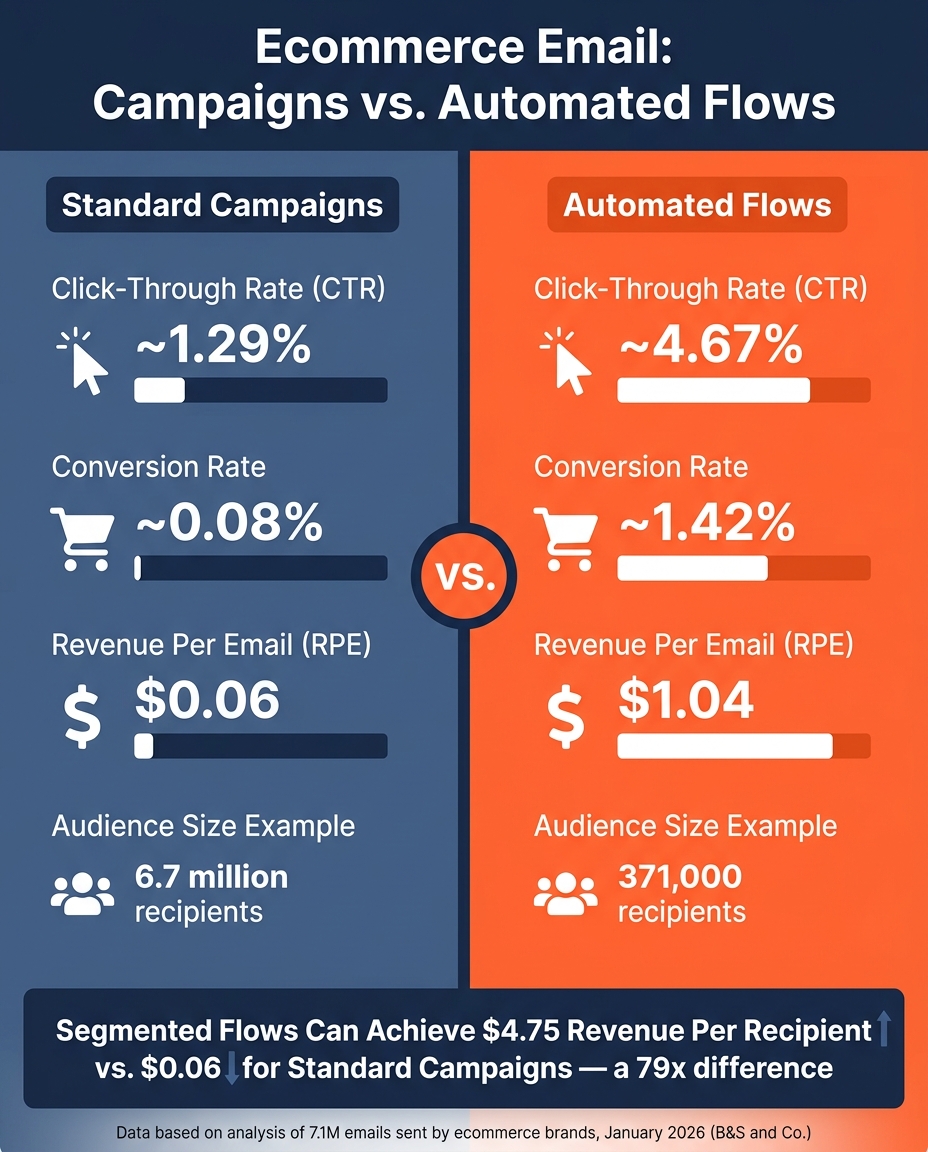
Ecommerce Email Metrics: Campaigns vs. Automated Flows
Deliverability Metrics
Getting emails into inboxes is the first hurdle for any campaign. If your emails don’t land where they should, even the best design or copy won’t matter. As EmailCalculator.com explains:
"The earlier in the funnel you improve performance, the greater the compounding impact across the entire system."
Start by keeping your delivery rate above 97%. If it dips below 90%, clean up your email list immediately. Pay attention to your bounce rate too. Remove hard bounces (like invalid email addresses) right away, while soft bounces (temporary issues like full inboxes) are usually retried automatically by your email service provider. Aim to keep your hard bounce rate under 2%.
Another critical figure is your spam complaint rate. Even a small percentage of complaints can hurt your sender reputation. Gmail, for instance, begins penalizing senders when complaints exceed 0.10%, and at 0.30%, inbox placement can take a serious hit. Keep your spam complaint rate below 0.08% and make sure your unsubscribe link is easy to find. If people can’t opt out easily, they’re more likely to mark your emails as spam.
Lastly, an unsubscribe rate over 0.5% might mean your content isn’t resonating with your audience. This could call for a closer look at your segmentation or how often you’re sending emails.
Once you’ve nailed down deliverability, shift your focus to how recipients are interacting with your emails.
Engagement Metrics
While open rate can give you a general sense of how well your subject lines are performing, it’s not always the most reliable metric - especially with Mail Privacy Protection (MPP) potentially inflating these numbers. For ecommerce and retail, an open rate between 18–25% is a good benchmark. Welcome emails, however, tend to perform exceptionally well, with an average open rate of 91.43%.
A more telling metric is the click-through rate (CTR), which shows how many recipients clicked on links in your email. This is calculated as (unique clicks ÷ emails delivered) × 100. The average CTR for campaigns is around 1.29%, while automated flows - like cart abandonment emails - see a much higher average of 4.67%. If your CTR is low, it might be time to rethink your call-to-action (CTA) and make it more enticing.
The Click-to-Open Rate (CTOR) focuses on how well your email content resonates with those who actually opened it. This is calculated as (unique clicks ÷ unique opens) × 100. A healthy CTOR typically falls between 10–20%. If your open rate is strong but your CTOR is low, the problem likely lies in your email’s content, not the subject line.
"Click rate is a directional metric, not a goal. If your click rate improves but revenue drops, you didn't win." - B&S and Co.
After engagement metrics, it’s time to look at how your emails directly impact revenue.
Conversion and Revenue Metrics
The ultimate measure of an email campaign’s success is how much revenue it generates. Start with the conversion rate, which tells you the percentage of delivered emails that result in a purchase. Campaigns average a 0.08% conversion rate, but automated flows significantly outperform them, achieving about 1.42%. This is because flows often target high-intent moments, like right after someone abandons their cart.
Another key metric is Revenue Per Email (RPE), calculated as total revenue divided by emails delivered. For example, in January 2026, B&S and Co. analyzed 7.1 million emails sent by ecommerce brands. These emails generated $773,331 in revenue. Automated flows, which reached 371,000 people, had an RPE of $1.04, compared to just $0.06 for standard campaigns sent to 6.7 million recipients. This shows that smaller, more targeted sends can often be more profitable than mass campaigns.
Revenue Per Subscriber (RPS) is another valuable metric, measuring the revenue generated by your active email list over time. If your RPS is declining even as your list grows, it’s a sign that your list quality might be deteriorating. Given that email lists naturally lose 22–25% of subscribers each year, regular list maintenance is essential.
Finally, while not exclusive to email, Average Order Value (AOV) can offer additional insight. Including sections like "Frequently bought together" or "You might also like" in transactional emails - such as order confirmations - can help boost AOV. These types of emails typically see open rates 4–8× higher than promotional emails.
| Metric | Formula | Benchmark |
|---|---|---|
| Delivery Rate | (Delivered ÷ Sent) × 100 | >97% |
| Hard Bounce Rate | (Hard Bounces ÷ Sent) × 100 | <2% |
| Spam Complaint Rate | (Complaints ÷ Delivered) × 100 | <0.08% |
| Open Rate | (Unique Opens ÷ Delivered) × 100 | 18–25% (Retail) |
| CTR (Campaigns) | (Unique Clicks ÷ Delivered) × 100 | ~1.29% |
| CTOR | (Unique Clicks ÷ Unique Opens) × 100 | 10–20% |
| Conversion Rate (Flows) | (Conversions ÷ Delivered) × 100 | ~1.42% |
| Revenue Per Email (Flows) | Total Revenue ÷ Delivered | ~$1.04 |
How to Improve Email Campaign Performance
Using Segmentation to Increase Relevance
Once you’ve established clear metrics, the next step is to refine your strategy through segmentation. Why? Because segmentation transforms generic email blasts into tailored messages that resonate with each subscriber. In short, it’s about delivering content people actually care about.
The most effective segments are based on behavior - what someone has purchased, browsed, or how recently they’ve interacted with your brand. For instance, a first-time buyer needs a completely different approach compared to a loyal customer or someone who hasn’t engaged in months.
"Intent-based triggers will always outperform broadcasts on a per-recipient basis. The question isn't whether to prioritize flows - it's how much you're leaving on the table by not doing it." - B&S and Co.
Here’s a compelling example: In January 2026, a large ecommerce brand achieved a Revenue Per Recipient (RPR) of $4.75 through segmented flows, compared to just $0.06 for standard campaigns. That’s a staggering difference and a clear argument for targeted segmentation.
| Segment Type | Data Points Used | Goal |
|---|---|---|
| Purchase History | Products bought, categories, AOV | Cross-sell and upsell |
| Engagement Level | Last open date, click frequency | Frequency capping/re-engagement |
| Customer Lifecycle | New subscriber, first-time buyer, VIP | Loyalty and retention |
| Browse Behavior | Specific product views, site visits | Abandonment recovery |
A/B Testing Frameworks
Once your segments are set, it’s time to test and tweak. The golden rule? Test one variable at a time. Changing multiple elements - like the subject line and CTA - won’t tell you which change made an impact.
Start with subject lines, since they account for 50–60% of open rate variation in campaigns sent to the same audience. Experiment with curiosity-driven, urgent, or personalized styles and let the data guide you. Afterward, focus on CTAs - test different wording, colors, and placements. For example, "Get the Free Template" often outperforms "Learn More" because it’s specific and actionable.
Don’t forget preview text, which can boost engagement when crafted thoughtfully. Also, keep in mind that Apple Mail Privacy Protection (MPP) impacts about 50% of email clients and can inflate open rates. To get a clearer picture of engagement, pair open rates with CTOR (Click-to-Open Rate).
| Element to Test | Metric to Monitor | Goal |
|---|---|---|
| Subject Line | Open Rate | Increase initial engagement |
| CTA Wording/Color | Click-Through Rate | Drive traffic to landing pages |
| Email Layout | Click-to-Open Rate | Improve relevance and readability |
| Send Time | Open/Click Rate | Find the most attentive audience |
Re-engaging and Removing Inactive Subscribers
Email lists naturally shrink by 22–25% per year, so even the healthiest lists need upkeep. Inactive subscribers - those who haven’t engaged in three to six months - can hurt your sender reputation, dragging down key metrics like deliverability and engagement.
A multi-step re-engagement sequence is far more effective than a single email. Begin with a simple “We miss you” message to gauge interest without offering incentives. If there’s no response, follow up with a modest offer, like 10–15% off or free shipping. Next, send an email asking for feedback: “What went wrong?” This not only provides insights but also gives subscribers another chance to re-engage. Finally, a “last chance” email with a 24-hour expiration creates urgency without feeling pushy. When done right, these sequences can recover 5–15% of dormant subscribers.
If subscribers remain unresponsive after all four steps and have been inactive for six to twelve months, it’s time to remove them. A smaller, engaged list will always outperform a larger, disengaged one. As Desirae Odjick, Product Marketer at Shopify, explains:
"A lot of your email deliverability depends on how people are engaging with your email. Are they not opening, are they bouncing, are they marking it as spam? Or are they opening, clicking, reading, engaging with your content?"
Make unsubscribing easy, too. A single spam complaint is far more damaging than several clean unsubscribes. By optimizing your list through segmentation, A/B testing, and re-engagement, you set the foundation for stronger email campaign performance.
Using Ecommerce Intelligence to Improve Campaigns
Taking segmentation and testing strategies to the next level, ecommerce intelligence can significantly boost the performance of your campaigns.
While segmentation and A/B testing are effective, their true potential is unlocked when paired with detailed store-level insights. Understanding your target stores - what they sell, the tools they use, and their growth trajectory - goes beyond analyzing email behaviors. This deeper knowledge is key to achieving superior email marketing results.
Using Store-Level Data to Build Targeted Lists
Broad, generic email lists often lead to underwhelming outcomes. By contrast, Shopify brand prospect lists built using store-level data - such as revenue tiers, installed apps, or tech stacks - transform cold outreach into something akin to high-intent, automated workflows. And the results speak for themselves: automated, intent-driven emails generate an average of $2.87 in revenue per email, compared to just $0.18 for scheduled campaigns in 2025.
Tools like StoreCensus make this possible by tracking over 2.5 million ecommerce stores and enriching each profile with more than 25 data points, including revenue, apps, and growth indicators. For example, you could create a list of Shopify stores in the health and beauty sector that recently added a loyalty app. This level of specificity allows you to craft messaging that feels relevant and timely, outperforming the generic approach of broad subscriber imports. The result? Outreach that aligns with real-time store activity and delivers better results.
Timing Campaigns Around Store Activity Signals
Timing is everything in email marketing. As Salesforce notes:
"Identifying key triggers that initiate automated email workflows enables you to capitalize on pivotal moments in your customers' journey."
The same principle applies to store activity signals. When a merchant installs a new app, updates their theme, or hits a growth milestone, they’re actively making decisions - making it the perfect moment to reach out. With real-time alerts from StoreCensus, you can time your outreach to coincide with these pivotal moments, rather than relying on guesswork.
This strategy mirrors what works in consumer email: abandoned cart emails sent within 1–2 hours recover significantly more revenue than those sent the following day. For B2B ecommerce outreach, acting quickly on fresh data ensures your message lands at the right time, amplifying the benefits of segmentation and testing.
Connecting Ecommerce Data with ESPs and Analytics Tools
Integrating store-level data into your existing tools ensures a seamless, data-driven approach to email marketing. StoreCensus connects with platforms like HubSpot, Pipedrive, and Instantly.ai, enabling enriched store data to flow directly into your email sequences - no manual input required.
The value of such integrations is clear. In 2025, ASUS used Improvado to consolidate global marketing data into a BigQuery instance, saving their team about 90 hours per week on manual data tasks. As Jeff Lee, ASUS’s Head of Community and Digital Strategy, explained: "Improvado saves us about 90 hours per week and allows us to focus on data analysis rather than routine data aggregation, normalization, and formatting."
Conclusion: Turning Metrics Into Action
Email marketing offers a powerful return on investment, but achieving that ROI depends on tracking the right metrics and using them to make smarter decisions.
Key Takeaways
Think of your email funnel as a system where improvements at the top amplify results throughout. As EmailCalculator.com explains:
"The earlier in the funnel you improve performance, the greater the compounding impact across the entire system."
Focusing on deliverability creates a ripple effect, boosting performance at every stage. Next, use the Click-to-Open Rate (CTOR) to measure how well your content resonates. Keep an eye on Revenue Per Subscriber (RPS) each month to ensure your list's value is growing, not shrinking. Remember, email lists naturally decay by 22–25% annually, so it's vital to remove inactive subscribers every 6–12 months and maintain spam complaint rates below 0.10%. With Apple's Mail Privacy Protection affecting about 50% of email clients, treat open rates as directional rather than definitive.
These metrics aren't just numbers - they're tools to identify and fix weak points in your funnel.
Next Steps for Ecommerce Marketers
It’s time to take action. Start by auditing your email funnel to locate performance gaps and address them. Use the table below as a guide:
| Metric | Action |
|---|---|
| Deliverability / Bounce Rate | Clean your email list; verify SPF, DKIM, and DMARC records |
| Click-Through Rate (CTR) | Refine call-to-action clarity; segment emails by customer lifecycle stage |
| Conversion Rate | Match your email offer with its landing page; include urgency-driven elements |
| Revenue Per Subscriber (RPS) | Focus on automated email flows rather than one-off broadcasts |
| Unsubscribe Rate | Offer a preference center; reduce how often you send emails |
Once you’ve addressed these areas, step up your targeting game. Tools like StoreCensus provide detailed data on over 2.5 million ecommerce stores. Instead of guessing which customers to target and when, you’ll work with real insights - like app usage, growth trends, and tech stack updates. Combine this data with your Email Service Provider (ESP) and Customer Relationship Management (CRM) tools to turn your campaigns into a well-oiled system.
"If your click rate improves but revenue drops, you didn't win. If click rate drops but revenue grows, you did." - BS&Co
The goal isn’t just better clicks; it’s better outcomes. If fewer clicks lead to higher revenue, you’re on the right track. This mindset shift distinguishes marketers who chase vanity metrics from those who drive meaningful growth.
FAQs
Which email metric should I prioritize first?
Focusing on the click rate is key because it directly reflects how engaged your audience is. It shows how effective your email content is at encouraging recipients to take action. This metric offers a clear view of whether your audience is interacting with your emails and following through on the steps you want them to take.
How can I track engagement if open rates are unreliable?
If open rates aren’t giving you the full picture, shift your attention to click-through rates (CTR). This metric reveals how many recipients are actively engaging with the links in your email. Beyond that, keep an eye on conversion rates to see how many people are taking meaningful actions, like completing a purchase or signing up for a service.
For a deeper understanding, leverage ecommerce analytics tools to track behavioral signals - things like store activity or app installs can shed light on how your emails influence user behavior. Another powerful metric to consider is revenue per recipient (RPR), which gives a direct view of how much revenue each email recipient generates, making it easier to gauge your campaign’s overall effectiveness.
What’s the fastest way to raise revenue per email?
The fastest way to increase revenue from your emails is to fine-tune your campaigns with targeted segmentation, personalization, and smart timing. By delivering content that’s relevant and tailored to your audience, you can boost engagement and drive more conversions.
To improve performance, try using A/B testing. Experiment with subject lines, offers, and send times to see what resonates most with your audience. Small tweaks can make a big difference.
Don’t overlook the power of automation flows, either. Set up campaigns like abandoned cart reminders or re-engagement emails to connect with customers at critical moments in their journey. These automated messages can bring in significant revenue with minimal effort.



