UGC Consent Checklist for Client Campaigns
Pre-publish UGC checklist: record source, secure written consent for exact use, clear minors/music/testimonials, and store auditable proof.

Most agencies still skip rights checks: only 23.03% of marketers always ask for rights before using someone else’s content. If I’m running a client campaign, I need one rule: no UGC goes live until the source, consent, risk review, and proof record are done.
Here’s the full point of this article in plain English:
- I should treat any customer or creator-made asset as UGC, even if it came from a public post or hashtag.
- A public post is not permission to use that asset in ads, email, web pages, or reposts.
- Before publishing, I need to:
- log the source post and rights holder
- check for people, minors, logos, music, tags, and reposted parts
- get written permission that matches the exact use
- confirm FTC disclosure if the post involved free product, payment, discounts, affiliate links, or sweepstakes entry
- review testimonials, attribution, and music rights
- store proof in one system with status, dates, and takedown history
- If consent expires or is pulled, I should remove the asset fast and keep a dated record of what changed.
A few details matter more than most:
- Paid ads need tighter permission terms than a simple in-platform repost.
- Minors, bystanders, and endorsers may need extra approval or a release.
- Platform music is often limited to personal use, so a song that works in a post may fail clearance for paid media or off-platform use.
- FTC rules apply to endorsements and testimonials, and both the brand and the creator can face problems when disclosures are missing.
If I had to boil the article down to one checklist, it would be this:
- Save the original post details and screenshots.
- Confirm who can grant rights.
- Get written consent with dates, channels, edit rights, and paid vs. organic use.
- Check minors, music, testimonials, and credit terms.
- Store all proof in one place before launch.
That’s the whole job of the publish gate: stop bad approvals before they turn into takedowns, platform issues, or client problems.
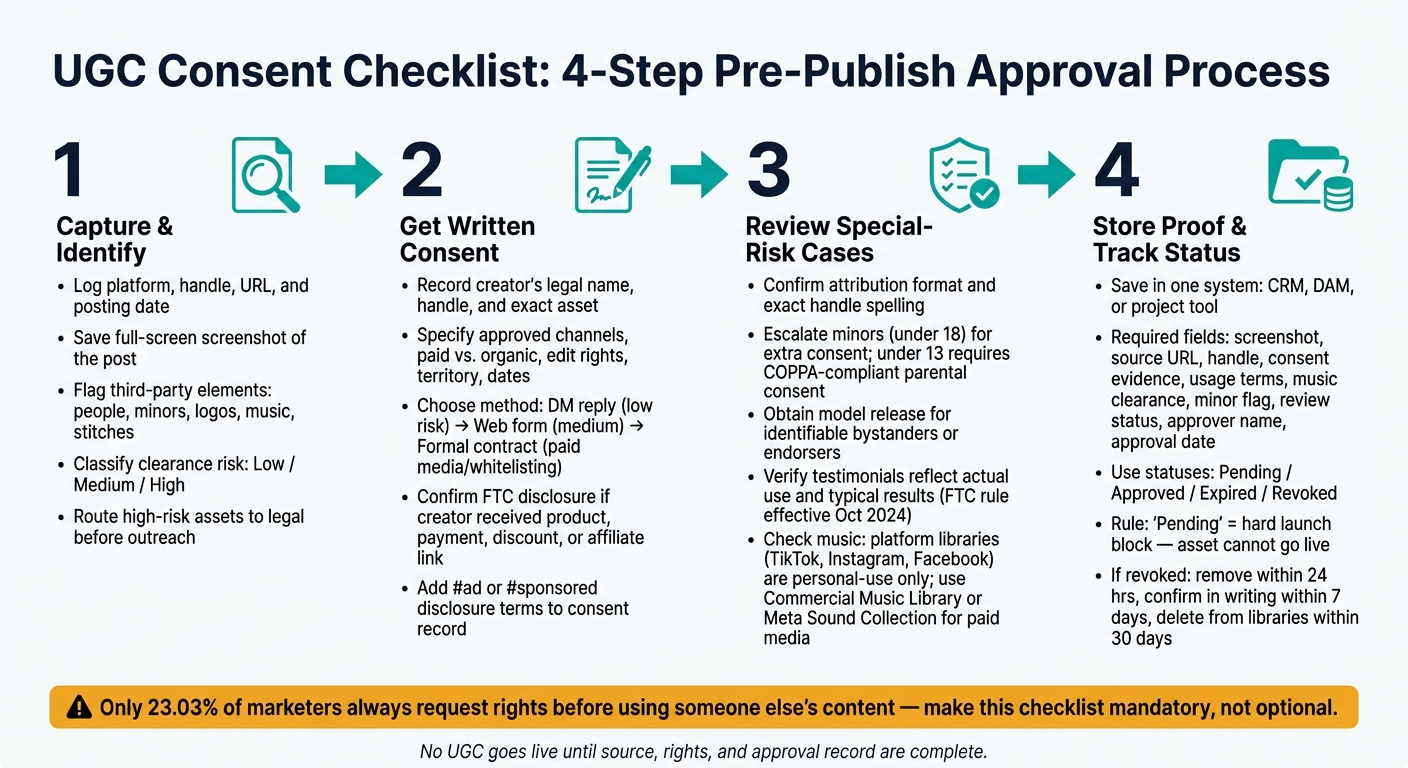
UGC Consent Checklist: 4-Step Pre-Publish Approval Process
Step 1: Capture the original post and identify who can grant rights
Before you send even one DM or permission request, get a clean record of where the content came from and who can legally say yes. In many cases, the creator is the default rights holder. But that isn’t always the full story. The account you can see may not control the rights if the content was made under a separate deal. So before outreach, confirm who can actually grant rights. This step gives your team the paper trail you need before asking for permission.
Start by documenting the source first.
Record the source, handle, URL, and posting date
For every UGC asset, log the platform, creator handle, display name, direct URL or post ID, discovery date and time in MM/DD/YYYY, 12-hour format, time zone, content type, and internal owner. Also include the internal owner and timestamp for the audit trail. If the post gets edited or deleted later, the URL or post ID gives you a way to check it again.
Save a full-screen capture of the post view that shows the media, handle, caption, tags, and platform UI. On TikTok, include the sound attribution line and any on-screen text. On Instagram, include the username, caption, and tags. Screenshots show what was public when your team found the post. They do not give you reuse rights.
After that, check for outside elements that may affect clearance.
Flag third-party elements before asking for permission
Once the asset is logged, review it for anything that could cause a clearance issue. A creator may have posted the content, but that doesn’t mean they own every part of it. Look for other identifiable people, minors, visible brand logos or trademarks, background music, stitches, remixes, reposted edits, and artwork or overlays from someone else.
This part matters because a clean source record makes the permission request faster and easier to defend later.
Classify each issue as low, medium, or high clearance risk. Send minors, clear brand logos, outside music, stitches, remixes, and reposted edits to legal or a senior account lead before you ask for permission. Also check whether the post has a "Paid partnership" label or a brand tag. If it does, rights may be shared or limited, and the visible creator may not be able to grant a clean license alone.
A simple yes/no intake form works well here. It helps junior staff log UGC fast and route high-risk assets to the right person. Once the source file is complete, move to written consent.
sbb-itb-61169e3
Step 2: Get written consent with terms that match the intended use
Once the source record is done, get written consent that lines up with the exact use you have in mind. A vague yes is not a license[2]. If the planned use is not clearly spelled out, don't publish.
Collect the minimum written license terms
At a minimum, record the creator's legal name and handle, the exact asset, approved channels, whether the use is paid or organic, edit rights, territory, start and end dates, compensation terms, and revocation terms.
Be specific in every consent record. For example:
You grant [Agency/Brand] a non-exclusive, worldwide license to use this video on Instagram, TikTok, and YouTube for organic posts, paid ads, website product pages, and email campaigns from 09/01/2026 to 12/31/2026.
That kind of detail makes the consent record easy to audit. It also helps stop scope creep when the creative team adds captions, hooks, or calls-to-action for ad testing.
Use DM approvals, forms, and contracts correctly
The right consent method depends on the way the content will be used.
| Consent method | Best use case | Paid media suitability | Evidence to save | Risk level |
|---|---|---|---|---|
| DM reply | Low-risk in-platform reposting | Low | Screenshot of the original post, full DM thread with timestamps, creator handle | Low to medium |
| Web form | Repeatable intake at scale | Medium | Submitted form, IP/timestamp, copy of the legal language shown to the user | Medium |
| Formal contract | Paid media, whitelisting, long-term reuse | High | Executed agreement, scope exhibit, e-sign log | Lower |
DM replies work for low-risk reposts. Web forms make sense when you're handling repeat submissions at scale. Formal contracts are the safer route for paid media, whitelisting, or any long-term reuse.
Check FTC disclosure terms before approval
Before approving any asset, confirm whether the creator received anything of value. That includes free product, payment, affiliate commission, a discount code, or even a sweepstakes entry. If they did, that counts as a material connection under FTC guidelines, and disclosure is required.
The FTC says disclosures must be clear and conspicuous, placed with the endorsement itself, and written in plain language such as #ad or sponsored[4].
Add those disclosure terms to the consent record so the team knows what has to appear with the endorsement. Both the creator and the brand can be held responsible for disclosure compliance[3].
Next, screen the asset for minors, identities, music, and testimonial risk before approval.
Step 3: Review Special-Risk Cases Before Publishing the Asset
Once written consent is signed, do one final clearance check for attribution, minors, testimonials, and music. Start with the signed license, then look for the exceptions that still need added approval. Do not publish until each item is cleared.
Confirm Handle Usage, Tags, and Credit Format
Use the creator's approved credit format, exact handle spelling, and credit placement exactly as stated in the signed consent. It also helps to add an Attribution field to your UGC intake form with set options so this gets decided before design starts.
Before an asset goes live, confirm how the creator wants to be credited and make sure it matches the written consent. Some creators want a visible @handle. Others want a first name only, a general location credit like Customer, New York, or no attribution at all.
For each asset, document four things:
- The attribution preference
- The exact handle spelling for each platform where the ad will run
- Where the credit will appear
- Whether the consent allows that format
If the consent says the brand may use the content without tagging the creator, don't add a tag in the ad.
If a creator changes their handle or asks for different credit after the campaign is live, update every live placement you control. Then log the request date, action date, and updated assets. That record matters if a right-of-publicity issue shows up later.
Escalate Minors and Identifiable People for Extra Consent
Review every asset for anyone who appears under 18, including people in the background. If age is unclear, send it for legal review.
Under COPPA, brands generally need verifiable parental consent before posting UGC that contains an image of a child under 13. [8] If a child under 13 is featured in a clear, central way, tag the asset in your project tool as "minor under 13 – legal review required" and block it from the ad library until legal approves it.
Other people in the content need review too. A friend giving the product demo, a store associate speaking on camera, or a clearly recognizable bystander may each need a separate model release. If the person seems to endorse the product, get a release. That release should cover name, likeness, voice, channels, territory, term, and compensation.
Review Testimonials and Music Before Reuse
For testimonials, confirm the product was actually used, remove edits that change meaning, and disclose any result that is not typical. The FTC's Consumer Reviews and Testimonials Rule, effective October 2024, empowers the FTC to seek civil penalties for deceptive UGC endorsements. [11] Add a required FTC check field to your approval form that asks whether the edit changes the meaning or makes results appear typical when they are not.
Once claims are cleared, check audio rights before export.
Music libraries on TikTok, Instagram, and Facebook are usually licensed for personal use, not for brand, business, or influencer marketing. [9][7] TikTok requires businesses to use its Commercial Music Library for commercial activity. [5][6] Meta's Sound Collection serves the same role for Instagram and Facebook paid use. [9][10] Just because a track is available on-platform doesn't mean you have commercial clearance.
| Use case | Music source | Extra license needed | Risk level |
|---|---|---|---|
| Same-platform organic | Platform's standard library | Usually none if reposted via platform tools | Low to medium |
| Cross-platform organic | Original platform's library | Often required; rights are platform-specific | Medium to high |
| Paid social | Track from a consumer-facing library | Almost always required, such as a sync license or commercial library | High |
| Website/email/CTV | Stock or custom-licensed track | Verify the license covers the medium, territory, and duration | Low if documented |
If there's no clear commercial license for the track, mute it or swap it out before the asset moves into paid or off-platform use. Log the track name, source, license type, allowed uses, and any expiration dates in your project tool so the choice is documented and easy to follow next time.
Step 4: Store proof in your CRM or project tool so the record is auditable
Once an asset clears Step 3, log the proof in one system before it goes live anywhere. That can be your CRM, DAM, or project tool. The point is simple: account managers, paid media buyers, and legal reviewers should be able to check rights status fast, without digging through Slack threads, inboxes, or random folders.
Save the minimum proof package for every UGC asset
Treat every UGC asset the same way. Use the same record fields every time so nothing slips through the cracks.
Each record should include:
- original post screenshot
- source URL
- creator handle
- consent evidence (DM screenshot or signed form)
- approved usage terms
- music clearance notes
- minor flag (yes/no)
- review status
- approver name
- approval date
Also save the same source details and consent terms captured in Steps 1 and 2. If someone checks the file later, they should see the full paper trail in one place.
Use four main statuses: pending, approved, expired, and revoked. Add sub-statuses only when there’s a clear reason. And one rule should be non-negotiable: an asset marked pending does not go into a live ad set.
Track expiration, takedowns, and campaign links in one place
After you save the record, connect it to every place the asset appears. That includes the client, campaign, channel, and each live placement, like ad creative IDs, landing page URLs, and organic post links.
Set alerts before rights expire. That way, no one wakes up to a usage issue after the asset is already out in the wild.
If consent is revoked, move fast:
- remove live content within 24 hours
- confirm removal in writing within 7 days
- delete it from ad libraries and your DAM within 30 days [1]
Log every takedown with a timestamp and the name of the person who confirmed removal. It may feel like small admin work, but when a client or reviewer asks for proof, this is the stuff that saves time and stress.
Use StoreCensus to keep client records tied to the right merchant
If your agency uses StoreCensus to track Shopify and WooCommerce merchants, link each UGC record to the correct merchant profile. That keeps the rights proof attached to the right client account, which matters a lot once you’re handling many brands at once.
Conclusion: The short pre-publication checklist every agency should enforce
UGC moves fast. That speed is often where agencies skip rights checks.
A simple publish gate slows the process just enough to catch the issues that lead to emergency takedowns, client complaints, and avoidable risk.
At the finish line, the rule should be dead simple: no UGC goes live until the source, rights, and approval record are complete.
Only 23.03% of marketers always request rights before using other people's content [12]. That's exactly why pre-publish checks need to be mandatory, not optional. If the gap is that big, the checklist can't live as a nice-to-have. It has to sit inside the workflow itself.
Build that checklist into required fields. Make "Consent Pending" a hard launch block. Once compliance is part of the workflow, it feels less like friction and more like protection. It also shows clients there's a professional review process behind every post.
FAQs
Is a public post enough permission to reuse UGC?
No. A public post by itself does not give you permission to reuse user-generated content in a paid campaign.
If someone tags a brand or uses a hashtag, that still doesn’t give you legal rights to put that content in ads, emails, or on product pages. For that, you need explicit, documented consent that spells out the usage terms clearly.
When do I need a formal UGC contract instead of a DM?
Use a formal, branded submission form whenever you need UGC rights. Social tags, hashtags, or DMs don't give you the clear, explicit permission needed to use that content across ads, emails, and product pages.
A submission form gives you documented consent, clear usage terms, and an audit trail. That paper trail helps prevent complications and supports compliance.
What should I do if UGC consent is revoked after launch?
Remove the content from every platform right away. Once consent is withdrawn, stop using it across all marketing channels, including ads, emails, and product pages.
Then update your internal records to note the revocation and confirm the content has been removed from all active campaign assets so your team stays compliant.