Open-Source CRM vs HubSpot for Ecommerce
Compare managed CRM speed and native Shopify reporting with self‑hosted control, no contact caps, and lower long‑term costs.


If I need a CRM fast, I’d pick HubSpot. If I need lower software cost at scale and full control, I’d look at open-source CRM.
Here’s the short version: HubSpot is easier to launch, comes with built-in Shopify reporting, and gives sales teams clear daily sending rules. Open-source CRM shifts the trade-off. I get no plan-based contact caps, no seat fees, and more control over data - but I also take on hosting, setup, sync work, and email deliverability.
For ecommerce agencies, this choice usually comes down to 7 things:
- Cost
- Control
- Setup time
- Shopify and WooCommerce integrations
- Reporting
- Contact limits
- Outbound sending limits
A few numbers make the split clear:
- HubSpot Sales Hub Professional is about $90–$100 per seat/month
- A 5-rep team can land around $450–$500/month before added marketing tools
- HubSpot Marketing Hub tiers include 1,000, 2,000, or 10,000 marketing contacts
- Sales reps on HubSpot Professional can send up to 500 emails/day per user
- Self-hosted open-source CRM often starts around $50–$200/month for hosting
- B2B contact data decays by about 2.1% per month
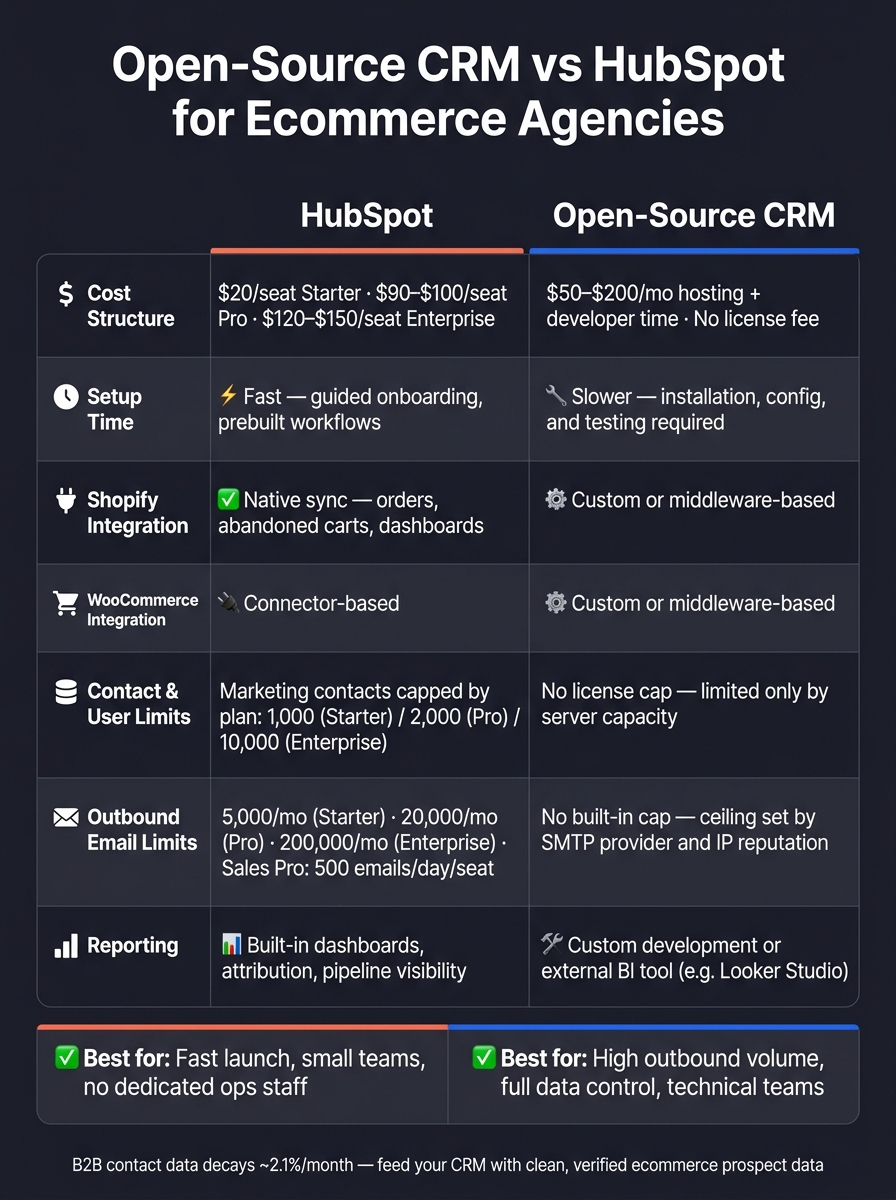
Open-Source CRM vs HubSpot for Ecommerce: Full Comparison
I Tested 12 Self-Hosted CRMs For 30 Days - Only 2 Survived | twenty crm
sbb-itb-61169e3
Quick Comparison
| Criteria | HubSpot | Open-Source CRM |
|---|---|---|
| Cost model | Subscription pricing by seats and contact tier | Low/no license fee; hosting and dev time |
| Setup | Fast | Slower |
| Data control | Limited | Full |
| Shopify | Native sync | Custom setup or middleware |
| WooCommerce | Connector-based | Custom setup or middleware |
| Reporting | Built in | Custom work or BI tool |
| Contact caps | Marketing contact limits by plan | No license cap |
| Outbound limits | Daily and monthly plan limits | Limited by SMTP and sender setup |
My take: if your team wants to get moving now, HubSpot is the simpler path. If you run heavy outbound to Shopify or WooCommerce stores and have technical help, open-source can cost less over time. (See our guide on how to find and target Shopify stores.)
The other big point is this: a CRM does not create pipeline by itself. You still need clean merchant data, the right contacts, and a repeatable way to move those records into sales workflows.
HubSpot for ecommerce agencies: what you get and what it costs
HubSpot puts CRM, marketing, sales, and service data in one managed platform.
Pricing, onboarding, and scaling costs
The free CRM tier handles basic contact storage, deal tracking, and limited email tools. You move to a paid tier when you need extra seats, sequences, custom reports, or more automation.
Sales Hub uses seat-based pricing. Starter costs about $20 per seat/month. Professional lands around $90 to $100 per seat/month, while Enterprise is about $120 to $150 per seat/month. For a five-rep team on Professional, you're looking at roughly $450 to $500/month before adding Marketing Hub tools.[20][21][23][26]
On higher tiers, onboarding fees come into play. Sales Hub Professional is about $1,400 to $1,500 in year one, and Enterprise is around $3,300 to $3,500.[22][25][26] If you also need migration or setup help, that bill grows fast.
Marketing Hub pricing works differently. It's based on marketing contacts, not total contacts. Starter includes 1,000 marketing contacts, Professional includes 2,000, and Enterprise includes 10,000.[19][24] You can store more total contacts than that, but only marketing contacts affect what you pay.
Shopify and WooCommerce integrations, reporting, and automation
HubSpot’s native Shopify integration syncs customers, products, orders, and abandoned checkouts into the CRM.[2][3][7][9] It also sets up an orders pipeline, ecommerce dashboards, and default workflows like abandoned cart nurturing without custom setup.[3][9][10] Built-in reports track average order value, lifetime value, new sales, and abandoned cart recovery.[3][4][9]
WooCommerce support depends on official and marketplace connectors. The stronger options sync contacts, deals, products, order history, cart abandonment events, and coupon usage.[5][6][8] Some plugins also offer one-click sync for historical orders as deals.[8] Before you commit, check exactly which objects and fields are covered. That's where the small print matters.
For agencies, HubSpot reporting gives you built-in dashboards, attribution, and pipeline visibility without extra development work. That makes it easier to show lead sources, deal stages, and sales activity in a format clients can follow. The automation helps too, but outbound volume still runs into plan limits.
Contact limits and outbound guardrails
HubSpot only charges for marketing contacts, even if your total contact count is higher. But once you hit your marketing-contact cap, email sending stops until you upgrade, suppress contacts, or wait for the next billing cycle.[14][15][18]
Email send limits are tied to your marketing-contact tier:
- Starter: 5,000 emails/month with 1,000 marketing contacts
- Professional: 20,000 emails/month with 2,000 marketing contacts
- Enterprise: 200,000 emails/month with 10,000 marketing contacts[1][16][17][18][24]
For outbound sales sequences, Professional seats are capped at 500 sales emails per day per user, and Enterprise seats allow up to 1,000 per day.[11][12][13] So a five-rep outbound team on Professional can send up to 2,500 prospecting emails per day across the team. For many agencies, that's enough. For high-volume cold outreach, it's a hard ceiling.
| Plan | Marketing Contacts | Monthly Email Send Limit | Sales Emails/Day (per seat) |
|---|---|---|---|
| Starter | 1,000 | 5,000 | - |
| Professional | 2,000 | 20,000 | 500 |
| Enterprise | 10,000 | 200,000 | 1,000 |
These limits are set by plan. With open-source CRM, that ceiling moves from vendor rules to your own infrastructure. That's the core trade-off in the open-source comparison.
Open-source CRM for ecommerce agencies: lower license cost, more operating work
If HubSpot's contact caps and send limits are the issue, open-source changes those limits into infrastructure choices.
Tools like SuiteCRM, EspoCRM, and Odoo remove license fees. But that doesn't mean the CRM is cheap. The cost moves to hosting, maintenance, and setup.
Cost structure, hosting, and data ownership
A small self-hosted setup often runs $50–$200/month for hosting, plus steady developer or IT time.[32] Managed hosting plans usually start around $130–$180/month for up to 10 users.[30][31][32] At a larger scale, total cost can still come in below HubSpot. But that only holds if maintenance stays under control.
This is the part people often miss: the cost doesn't disappear. It just moves. With HubSpot, you get a plain monthly bill. With open-source, you pay with engineering hours and day-to-day operating focus. For agencies without dedicated RevOps or technical staff, that hidden workload can eat up the savings fast.
On the plus side, you control your own data and infrastructure. Your CRM database lives in your own cloud account, which means you control retention, access, backups, and schema design. That's a big deal if you're storing sensitive merchant data such as revenue estimates, tech stack details, and decision-maker contacts.
That same control also changes what you can build inside the CRM.
Customization, integrations, and reporting trade-offs
Open-source CRM lets you shape the data model around Shopify store prospecting instead of squeezing your process into someone else's setup. You can add ecommerce-specific fields, build store-based account structures, and score leads using growth signals. Lead scoring can weight ecommerce signals so the highest-priority merchants rise to the top first.
Shopify and WooCommerce syncs usually need middleware, custom scripts, or connector modules.[27][28][29] In plain English, these integrations need to be treated like internal products. They need versioning, monitoring, and documentation. Otherwise, a quiet sync failure can chip away at data quality without anyone spotting it for weeks.
Reporting works the same way. Basic pipeline views and activity logs are built in. But if you want ecommerce-specific reporting - like performance by platform, campaign ROI by merchant revenue band, or multi-touch attribution - you'll usually need custom development or a connection from the CRM database to an outside BI tool like Looker Studio. Open-source CRM gives you more room to shape reporting, but you have to build that room first.
Contact and user limits: what the license allows vs. what infrastructure supports
Open-source licensing doesn't put caps on contacts or users. A big team with a large database pays the same license fee as a small team. That's a real structural edge for agencies building large outbound lists aimed at Shopify and WooCommerce merchants.
For agencies running high-volume outbound, this is the biggest structural difference.
The limits that do show up come from your infrastructure, not the license. As the contact database grows, query speed depends on how well the database is indexed and tuned. More user sessions put pressure on server CPU and memory. And outbound email has no built-in guardrails - no daily send caps enforced by the software. Your sending ceiling comes from your SMTP provider, IP reputation, and deliverability setup.
| Constraint | Open-Source CRM | HubSpot |
|---|---|---|
| Contact storage limit | Server disk space & DB design | Marketing contact tier |
| User seats | Server CPU/RAM capacity | Per-seat license fee |
| Outbound email volume | SMTP provider & IP reputation | Plan-based daily caps |
| Reporting depth | Custom development required | Built-in dashboards |
Side-by-side comparison: cost, control, setup time, integrations, reporting, and outbound limits
Use this summary to match the platform to the way your team works.
| Criteria | HubSpot | Open-Source CRM |
|---|---|---|
| Cost structure | Monthly subscription; scales with contacts and users | Low/no license fee; cost shifts to hosting and developer time |
| Data ownership | Hosted by HubSpot; limited schema control | Self-hosted; full control over database, retention, and access |
| Setup time | Fast; guided onboarding, prebuilt workflows | Slower; requires installation, configuration, and testing |
| Shopify integration | Native | Custom or middleware-based |
| WooCommerce integration | Connector-based | Custom or middleware-based |
| Reporting | Built-in dashboards | Custom BI or development required |
| Total-contact capacity | Large total-contact capacity; marketing contacts capped by plan | No license cap; limited only by server capacity and database design |
| User limits | Per-seat pricing | No license limit; constrained by server capacity |
| Outbound email limits | Plan-based send caps; Sales Pro seats can send up to 500/day [11] | No built-in cap; the ceiling is set by email infrastructure and your compliance policy |
When HubSpot is the better choice
Choose HubSpot when you need a fast rollout, native ecommerce integrations, and reporting out of the box. For a small team without dedicated ops support, that can save a lot of time early on.
When open-source CRM is the better choice
Choose open-source CRM when you need full data control, custom workflows, and no license-based contact caps. There are no plan-based limits on contacts or users, so a big outbound list of Shopify stores and WooCommerce merchants doesn't turn into a pricing issue.
A decision framework for agencies
Once the feature differences are clear, the next question is simple: who's going to own the system?
Choose HubSpot if your team lacks technical support and needs speed. Its built-in send caps, prebuilt integrations, and managed infrastructure mean you can spend more time on pipeline and less time dealing with ops.
Choose open-source CRM if you have technical ownership and high outbound volume. No contact-tier pricing, plus the freedom to shape your own data model, can make the setup work worth it. The catch is straightforward: your team needs to own hosting, integration monitoring, and deliverability for the long haul.
At the core, this comes down to a plain trade-off: speed and simplicity now, or control and lower operating cost as you grow.
The next step is feeding either CRM with clean ecommerce prospect data.
Connecting your CRM to ecommerce prospecting data
Once you know how each CRM handles scale, the next limit is the quality of the data you put into it.
A CRM manages contacts. It doesn’t create them.
For ecommerce agencies, the bottleneck usually starts before the CRM: finding the right Shopify and WooCommerce merchants, then finding the right person to contact.
B2B contact data decays about 2.1% per month, which means a static merchant list can get old fast [37][38].
Using StoreCensus upstream of either CRM
StoreCensus sits upstream of your CRM as a prospecting and enrichment layer. It helps agencies search across 6M+ Shopify and WooCommerce stores by revenue band, tech stack, theme, country, and growth signals, then pull decision-maker contacts before import [33][35][36].
In plain English: instead of dumping a giant list into your CRM and hoping something sticks, you start with stores that fit your ICP.
You can filter for good-fit merchants, verify contacts, and sync qualified accounts into your CRM. With HubSpot, StoreCensus can feed data into pipelines through direct integrations, Zapier, or CSV export [39][34]. With an open-source CRM, the same data gives you more room in how you set up fields and segment by platform, revenue tier, or growth signal. The tradeoff is simple: your team handles the import and field mapping.
Use signals like theme swaps, new apps, and expansion activity as outreach triggers instead of blasting the same old list. That matters more than raw list size.
Key points before you decide
The best setup is a clean data layer feeding the CRM your team can actually use. Qualified merchants beat bigger unvetted lists.
FAQs
Which option is cheaper long term?
Long-term cost comes down to your agency’s size and the features you need.
Lower-cost or open-source options like Zoho can start at $14.00 per user per month. That sounds budget-friendly up front. But there’s usually a tradeoff: more manual setup, more upkeep, and more time spent getting things to work the way you want.
HubSpot offers a free starting point, which is nice if you just want to get in the door. But if you need full workflow tools, pricing usually starts around $890.00 per month.
Over time, affordability isn’t just about the sticker price. It usually depends on three things: setup effort, maintenance demands, and whether the CRM can keep up as your pipeline grows.
How much technical work does open-source CRM need?
Open-source CRMs often take more hands-on technical work if you want integrations and automation to run without issues.
Setup time can vary a lot depending on the approach:
- Native connectors are usually fast to set up.
- iPaaS setups can take hours to days.
- API integrations often take weeks.
- Custom code can take months.
That’s only part of the job, though. You also need to plan your CRM fields carefully, keep ID mapping clean, and stay on top of webhook and API limits.
For example, Shopify has a 5-second webhook timeout. If your system doesn’t respond in time, things can break or get missed. Updates also need async processing, which adds another layer to manage.
How should agencies choose between HubSpot and open-source CRM?
Choose based on how well the CRM supports repeatable sales processes, reliable data sync, and ecommerce-specific intelligence.
Focus on two-way sync, automated field mapping, dependable API integrations, and clear field ownership. The best choice should act as a single source of truth, keep data clean as you scale, and either save significant time or help generate revenue.