Track Competitor Stock Across 1,000 Stores
Turn stockouts, restocks, and new SKUs across Shopify/WooCommerce into sales-ready outbound leads.


If I’m tracking stock across 1,000 stores, I need one thing first: a clear sales use case. Otherwise, I just collect alerts that go nowhere.
Here’s the short version: I’d focus on U.S. Shopify and WooCommerce stores doing $50,000 to $500,000 per month, watch only a small set of stock signals, and tie each signal to a sales action. That means looking for stockouts, restocks, low-stock messages, pre-orders, backorders, and new SKU launches - then using those changes to build weekly outbound lists.
A few numbers make the case. Research in the piece says stockouts drive about 40% of lost ecommerce sales, and about 69% of online shoppers will buy from another brand when an item is unavailable. So if I can spot repeat stock issues on top SKUs, I’m not just seeing inventory movement - I’m seeing a live reason to reach out.
What I’d do:
- Pick the outcome first: find stores with repeat stockouts, fast catalog growth, or frequent launches
- Build a ranked list of 1,000 stores: filter by niche, revenue, platform, app stack, and recent store changes
- Tier the list: check top accounts more often and lower-fit stores less often
- Standardize the data: store product, variant, price, availability, timestamp, and change type the same way for every store
- Set alert rules: stockout, restock, low inventory, new SKU, and repeat stockout rules
- Push alerts into sales: route events to Slack or CRM with contact data and a clear next step
- Turn patterns into lists: segment stores by chronic stockouts, fast SKU growth, or repeat restocks
I’d also keep the workflow simple. Not every stock change matters. A flagship SKU going out of stock for days matters. A random low-value item disappearing once usually does not.
If I do this right, I end up with a steady list of stores that have a current problem, a current launch, or a current growth signal - and that makes outreach a lot easier to time.
Build a target list of 1,000 stores before you monitor anything
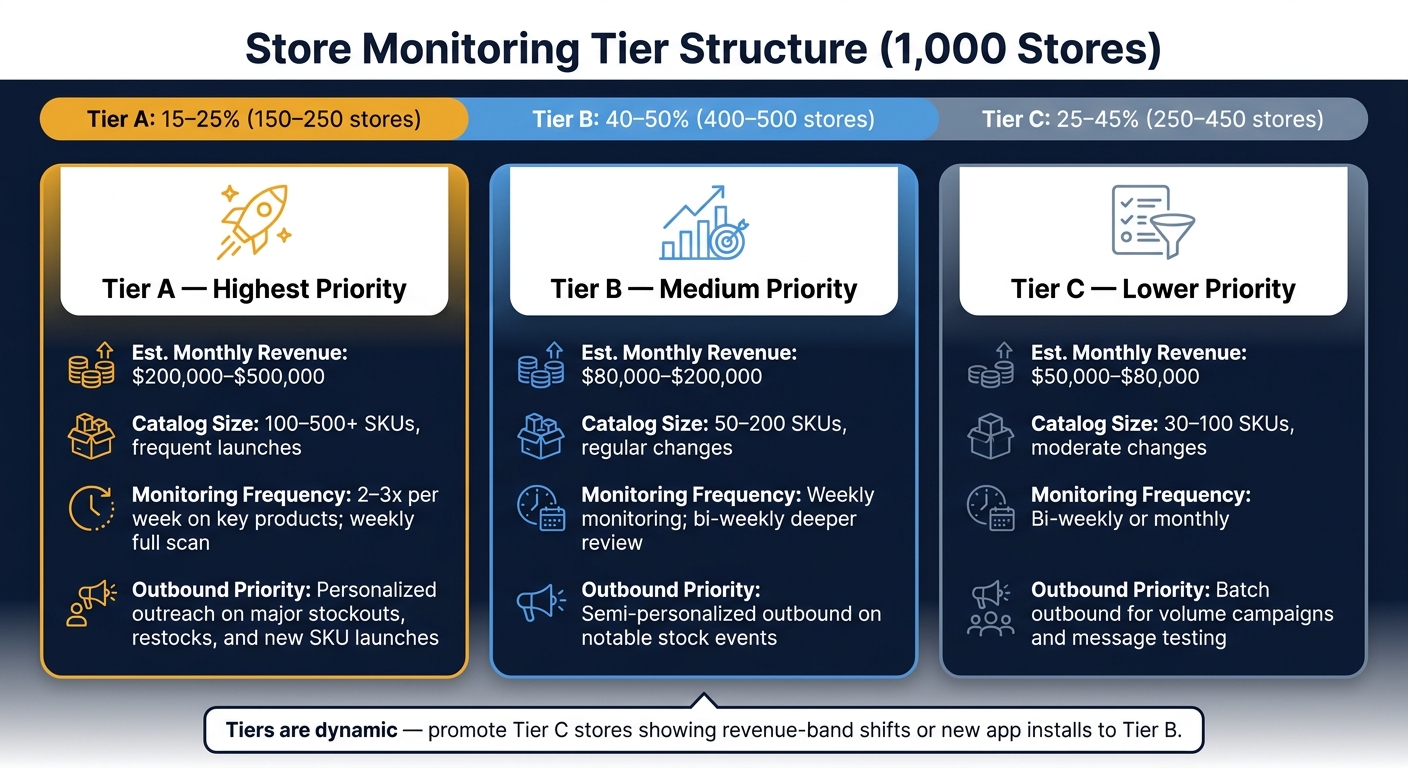
A/B/C Store Monitoring Tiers: Revenue, Catalog & Outreach Priority
Once you know which inventory signals matter, the next move is simple: rank the stores most likely to produce those signals before you start monitoring them.
That order matters more than it might seem. A clean 1,000-store list turns stock alerts into sales signals. A weak list does the opposite. It eats up scan capacity on merchants that sit outside your ICP and gives you a pile of noise instead of useful outreach triggers.
Filter by niche, revenue band, and platform
The most practical place to start is with four filters: niche, estimated monthly revenue, platform, and recent catalog activity.
For niche, beauty, fitness, apparel, and home goods tend to produce the strongest signals. These categories usually have product drops, seasonal SKUs, bundles, and frequent restocks. That means more chances to spot changes that lead to outreach. On the flip side, sparse or highly custom catalogs usually don't generate enough stock movement to justify close monitoring.
Revenue matters just as much. For most agencies, the sweet spot is the $50,000–$500,000/month range. Stores below $50,000/month often don't have room in the budget for a retainer. Stores above $500,000/month are more likely to have in-house teams or set agency relationships already in place, which changes the pitch quite a bit.
Platform focus helps on the ops side. Shopify and WooCommerce storefronts are similar enough that you can standardize stock collection and reuse the same playbooks across many accounts. That saves time and keeps your process cleaner.
A good way to work this is to start broad, then narrow by niche and revenue, require active catalog changes, and pull the top 1,000 from there.
Use StoreCensus to narrow a broad market into a ranked store list
StoreCensus indexes millions of Shopify and WooCommerce stores and lets you filter by revenue, tech stack, theme, and growth signals, then export a ranked list straight into your workflow.
For a stock-monitoring list, the most useful filters are:
- Revenue band
- Platform
- Installed apps
- Catalog size
Tech stack data is especially useful when you're trying to exclude weak-fit stores. Merchants without basic marketing or analytics tools, or with very thin app stacks, are often low-budget or still rough on the ops side. In plain English: they're less likely to pay for agency services.
Growth signals inside StoreCensus, such as recent app installs and theme updates, help you push active stores to the top of the list. A merchant that just added a subscription app and refreshed its theme is in a very different spot from one whose stack hasn't changed in a long time. One is moving. The other may be coasting.
Once you have the ranked export, use it as the source for your monitoring tiers.
Set monitoring tiers so you don't treat every store the same
Not every store deserves the same level of attention. That's where a simple A/B/C tier model helps. If you base tiers on revenue, growth signals, catalog size, and ICP fit, you can put scan capacity where it has the best chance of paying off.
For a 1,000-store list, a practical split looks like this: 150–250 Tier A stores (15–25%), 400–500 Tier B stores (40–50%), and 250–450 Tier C stores (25–45%).
| Tier | Est. Monthly Revenue (USD) | Approx. Catalog Size | Monitoring Frequency | Outbound Priority |
|---|---|---|---|---|
| A | $200,000–$500,000 | 100–500+ SKUs, frequent launches | 2–3x per week on key products; weekly full scan | Highest - personalized outreach on major stockouts, restocks, and new SKU launches |
| B | $80,000–$200,000 | 50–200 SKUs, regular changes | Weekly monitoring; bi-weekly deeper review | Medium - semi-personalized outbound on notable stock events |
| C | $50,000–$80,000 | 30–100 SKUs, moderate changes | Bi-weekly or monthly | Lower - batch outbound for volume campaigns and message testing |
Tier C stores don't need to stay Tier C forever. If they start showing stronger growth signals, like a revenue band shift or a new app install, move them up to Tier B. That keeps scan capacity pointed at the best opportunities instead of getting stuck on old assumptions.
Use these tiers to set scan cadence and alert priority in the next workflow step.
sbb-itb-61169e3
Design a monitoring workflow that handles 1,000 stores
Once your store tiers are in place, you need a system that runs on a schedule without falling apart. The job is simple in theory: pull product and variant data on a set cadence, store it in one clean format, and flag changes on its own. In practice, that structure matters a lot. If you want to spot inventory events fast enough to support outreach, your monitoring setup has to stay clean and repeatable. Those change states will later become the alert rules.
Collect product availability data in a consistent format
Use one schema for every store and every check. If one store’s records look different from another’s, change detection starts to get messy fast.
At the variant level, capture these fields on every run:
- Store domain
- Product URL
- Product title
- Variant title
- Availability status
- Price
- Timestamp
- Event type
Event type is the piece that turns a simple snapshot into something you can act on. Instead of just storing raw snapshots, classify each check as in-stock → out-of-stock, out-of-stock → restocked, or new variant added. That classification is what later powers alerts and outbound triggers.
A good rule here: only track fields that can lead to outreach. If a field never affects alerts, it’s probably just adding clutter.
Keep store metadata and inventory snapshots in separate tables. Store metadata like niche, tier, revenue band, and assigned rep should live in one place. Inventory snapshots should live in another. Blend them together and the database can turn into a knot as your list grows.
Pick a workflow setup that matches your volume and engineering capacity
At this scale, there are two practical paths. The right one depends on how much engineering time your team can spare and how often your target store list changes.
| Custom Scraping Pipeline | Hosted Multi-Store Tracking | |
|---|---|---|
| Scalability | Requires managing proxies, rate limits, and compute at large scale | Designed for large-scale monitoring without building the collection layer yourself |
| Maintenance overhead | High - parsers break when stores change themes or HTML structure | Low - the platform handles collection and normalization |
| Data consistency | Variable - different storefronts return data in different formats | Standardized fields across tracked stores |
| Setup speed | Weeks to months of development | Fast deployment via filtering and export |
| Best fit | Teams with dedicated engineering and deep pipeline control | Agencies that need reliable data without building infrastructure, for repeatable outbound |
For most agencies, the hosted route makes more sense. It cuts maintenance work and gives you normalized data from the start. That matters when you’re watching a lot of stores and need output you can trust.
For Shopify stores, the public /products.json endpoint returns up to 250 products per page, and each store must be queried individually [3][2]. On a list of 1,000 stores, that adds up fast. You’re not just making requests - you’re managing orchestration across a large batch of separate storefronts.
Once the collection layer is in place, the next move is deciding which changes should fire alerts.
Decide how often to check each store
Your monitoring cadence should follow the tier structure, not one flat schedule for everyone.
Higher-priority stores can be checked every 12 hours. Mid-priority stores can run daily. Lower-priority stores can run weekly when the goal is prospecting.
Why does this matter? Because not every store moves at the same pace. A fast-moving DTC apparel brand with frequent variant changes gives you more signal than a slower catalog store. If you check both on the same schedule, you burn capacity on the lower-priority account and flood your alert queue with noise.
Tie check frequency to catalog change rate and revenue band. That keeps the system focused on the stores most likely to produce outreach triggers you can use.
Set bulk alert rules and route signals into your sales workflow
Once your scan timing is locked in, the next step is deciding which changes are worth your team's attention. Raw inventory data sitting in a database won't do much on its own. Before you send anything into Slack or your CRM, spell out the exact conditions that should trigger an alert - and just as important, what should be ignored.
Create alert rules for stockouts, restocks, and new SKUs
For most agencies, four alert types handle the bulk of the work: stockouts, restocks, low inventory, and new SKUs.
A simple way to manage this is with global rules plus tier-based overrides. Tier A accounts track flagship SKUs across all four alert types. Tier B accounts track stockouts and new SKUs. Tier C accounts only surface major events, like repeated stockouts or new product category launches.
Thresholds matter here. A low-inventory alert can fire when quantity drops below a set point, like 10 units or 20% of 30-day average sales. Restock alerts should trigger only after a SKU has been unavailable for at least 24 hours, which helps filter out brief sync glitches. New SKU alerts should fire when a new product ID or URL shows up in the list of Shopify stores you are monitoring.
Connect alerts to StoreCensus change tracking and CRM workflows
Alerts get a lot more useful when you pair them with store-level context. On their own, raw inventory events can be noisy. Add store-level change signals, and the picture gets much clearer.
StoreCensus tracks store-level changes - theme switches, app installs and removals, catalog growth, and revenue-band shifts - and logs them with timestamps so you can see a store's full activity timeline [1]. When an inventory alert fires, that added context helps score the account and decide who needs attention first. A stockout paired with a revenue-band drop tells a very different story than a stockout on a store adding 40+ SKUs a month.
StoreCensus also surfaces decision-maker contact information tied to each store [1]. That means when an alert lands in your CRM, the rep already knows who to contact.
Map each alert to a next action
Every rule in your system should have a documented owner, channel, and action before you switch it on. If that part is fuzzy, alerts tend to pile up and go nowhere.
| Alert Type | Trigger Condition | Notification Channel | Downstream Action |
|---|---|---|---|
| Flagship SKU stockout | In-stock → out-of-stock | Slack (Tier A), CRM event | Create opportunity; send outreach referencing inventory pain |
| Restock | Out-of-stock → in-stock after >24 hours | Slack (Tier A), email | Propose restock campaign; prioritize outreach within 24 hours |
| Low inventory | Quantity < threshold or "low stock" status | Slack (Tier A), CRM task | Add CRM task; prepare proactive pitch |
| New SKU | New product ID/URL detected in catalog | Slack launch channel, CRM | Create "launch support" opportunity; outreach within 48 hours |
| Repeated stockouts | ≥3 stockouts on same SKU in 30 days | Email digest, CRM scoring | Increase account priority score; plan operations pitch |
These alerts become the source list for outbound in the next step.
Turn Stock Movement into Outbound Lists and New Client Leads
Use the alert rules from the previous step to sort stores into outbound segments. Inventory data only matters when it gives you a reason to reach out. The job here is simple: spot stock changes you can act on, then match each one to the right offer.
Build Prospect Segments from Inventory Behavior
Three inventory patterns usually point to three different service needs.
Chronic stockouts on hero SKUs often mean demand is beating the store’s planning. Tag a store when at least three hero SKUs go out of stock for 72 hours or more at least twice in a 90-day window. That’s a good time to pitch back-in-stock flows, waitlists, and CRO that helps recover missed demand.
Fast catalog expansion usually tells you the store is in growth mode. It may also mean the team is putting strain on merchandising and paid media. Tag stores when SKU count grows 10% to 20% month over month, or when 30 or more new products are added in a 30-day window. From there, pitch paid media, creative, merchandising, and site-search fixes.
Frequent restocks point to steady demand. If SKUs keep cycling out of stock and back in on a regular cadence, the store is often ready for the next step in retention. That’s where subscriptions, replenishment reminders, and loyalty offers fit.
Attach Contacts and Export Weekly Outbound Lists
Once your segments are tagged, turn them into a weekly export. A simple rhythm works well:
- Refresh and tag on Monday
- Enrich contacts on Tuesday
- Export on Thursday
- Review replies on Friday
StoreCensus surfaces founder, head of ecommerce, and CMO contact information tied directly to each store profile [1], so reps can skip the generic contact form. And the outreach angle should match the stock event. Use subject lines built around what changed in inventory, not a broad service pitch.
Conclusion: The Repeatable Workflow for Tracking Stock at Scale
When signal, segment, contact, and export line up in that order, stock movement turns into a steady source of weekly outbound opportunities.
FAQs
How do I choose the right 1,000 stores to monitor?
Start with your ideal customer profile, not a random list. Use StoreCensus to narrow stores by revenue tier, niche, and traffic volume. Then zero in on stores where you can spot a clear opening to help, like missing pieces in their tech stack.
From there, rank your list with a simple scoring system based on budget, need, and reachability. That way, you spend your time on the prospects most likely to turn into good-fit clients.
Which stock alerts are most useful for sales outreach?
Focus first on alerts tied to immediate revenue risk or active buying intent: low or zero inventory, back-in-stock events, and restocks after low inventory periods.
Then narrow the list by store maturity. For example, target stores with 50,000+ monthly visitors so your team spends time on leads that are more likely to fit.
For time-sensitive cases, send urgent alerts to Slack or SMS so your team can act the same day.
How often should I check each store for stock changes?
For most competitor tracking and lead generation workflows, a weekly cadence works best. It helps you spot changes that matter - like revenue tier shifts, new app installs, or theme updates - without the extra work of checking every day.
StoreCensus monitors stores continuously, so you can get instant alerts for specific high-intent triggers. But when it comes to reviewing dashboards and lead lists, a weekly check tends to keep things useful. You get enough signal to act on, with less noise, and it’s easier to focus on the prospects most worth your time.