
Ultimate Guide to Third-Party App Security for Agencies
Agencies must treat third-party apps as controlled assets: inventory, assess, and govern them or face breaches, fines, and lost client trust.

Third-party apps are essential for ecommerce stores, but they come with risks. Agencies managing these tools must prioritize security to protect client data, maintain trust, and avoid costly breaches. Here’s what you need to know:
- Why It Matters: 60% of ecommerce breaches involve third-party apps, with an average breach costing $4 million. Agencies are often held accountable for security failures.
- Common Risks: Apps inject JavaScript into storefronts, access sensitive data, and leave behind unused code after uninstallation. Mismanagement can lead to data leaks, compliance fines, and reputational damage.
- Key Steps:
- Inventory Apps: Track all active apps, their permissions, and data access. Remove leftover code from uninstalled apps.
- Rank Risks: Prioritize apps based on their access to sensitive data and potential business impact.
- Evaluate Vendors: Check for certifications (e.g., SOC 2, ISO 27001) and review security practices.
- Monitor Activity: Regularly review API usage, permissions, and script integrity.
- Prepare for Incidents: Act quickly to contain threats, notify clients, and clean up affected systems.
- Compliance: Ensure apps meet PCI DSS, GDPR, and other relevant regulations to avoid fines and penalties.
Agencies can create a scalable, repeatable security process by assigning clear responsibilities, maintaining a risk register, and conducting regular audits. This approach not only prevents breaches but also improves client trust and operational efficiency.
Uncovering Ecommerce Cyber Attack Trends: Insights from SecurityMetrics’ New 6.4.3 & 11.6.1 Tool
sbb-itb-61169e3
Identifying and Mapping Third-Party Risks in Client Stacks
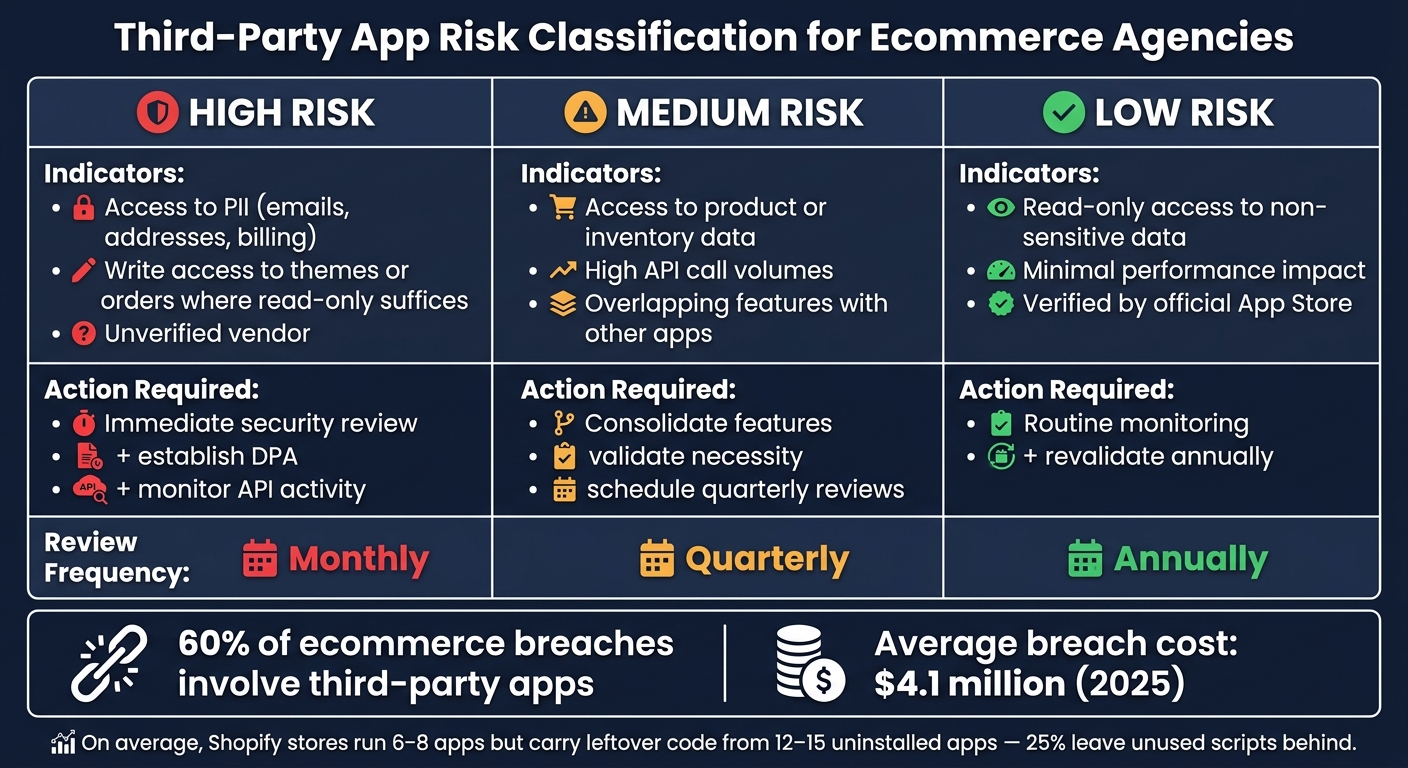
Third-Party App Risk Levels: How to Classify & Act on Ecommerce App Security
For agencies managing multiple ecommerce clients, creating a detailed app inventory is a crucial first step in tackling third-party risks. It starts with gaining a clear understanding of all active apps in use.
How to Build an App Inventory for Each Client
Start by exporting a complete list of active apps from the platform's admin panel (e.g., Shopify's Settings > Apps). For each app, make sure to note down the vendor name, the app's purpose, installation date, and whether it’s categorized as public, custom, or private.
Pay close attention to the data each app can access - such as customer emails, phone numbers, billing information, and order history. Also, review every third-party JavaScript tag on critical pages, particularly checkout and payment pages. This aligns with PCI DSS 4.0 Requirement 6.4.3, which mandates merchants to inventory and control all payment page scripts.
Then, dig deeper into data access patterns. Shopify provides Admin API request counts over the past 30 days, which can help you identify apps making unusually high API calls. These spikes might indicate misconfigured processes or unauthorized data exports. Additionally, confirm that any uninstalled apps haven’t left behind code fragments in the theme. On average, Shopify stores run 6–8 apps but often have leftover code from 12–15 apps, with nearly 25% of uninstalled apps leaving unused scripts behind. Lastly, document who approved each app's permissions and ensure that a Data Processing Agreement (DPA) is in place for apps handling personally identifiable information (PII) .
Once the inventory is complete, evaluate each app's risk level to decide which ones require immediate attention.
How to Rank Apps by Risk Level
Not all apps pose the same level of risk. To streamline your efforts, rank apps based on their data access and potential business impact.
| Risk Level | Indicators | Action Required |
|---|---|---|
| High | Access to PII (e.g., emails, addresses); write access to themes or orders where read-only access would suffice; unverified vendor | Conduct an immediate security review, establish a DPA, and monitor API activity |
| Medium | Access to product or inventory data; high API call volumes; overlapping features with other apps | Consider consolidating features, validate the app’s necessity, and schedule quarterly reviews |
| Low | Read-only access to non-sensitive data; minimal performance impact; verified by the official App Store | Perform routine monitoring and revalidate annually |
For instance, if a simple countdown timer app requests access to customer emails, that’s a red flag requiring immediate investigation .
"A store should be able to explain every app in one sentence. What outcome does it protect or improve? If the answer turns into guesswork, that app belongs in the audit queue." - Jonathan Kennedy, Founder, App Store Research
Run a full inventory and risk ranking at least every quarter. For high-risk stores - those with large customer bases or heavy transaction volumes - this process should be done monthly .
Red Flags and High-Risk Patterns to Watch For
Certain warning signs might not seem obvious until a problem arises, so it's important to stay vigilant.
- Privilege sprawl: Apps requesting excessive read/write access to orders, customers, or products beyond their stated purpose . For example, a loyalty points app doesn’t need write access to an entire order history.
- Unusual Admin API activity: Sudden spikes in API calls may indicate bulk data exfiltration or a misconfigured process.
- Vendor abandonment: Be cautious with apps from developers who haven’t updated their software in over six months, lack active support, or have been removed from the official App Store.
- Stale admin access: Old admin accounts pose a major risk - 88% of data breaches involve stolen credentials, often from accounts that were never deactivated after a project ended.
- Feature overlap: Running multiple apps with similar functions, like popup builders or analytics tools, not only wastes resources but also increases the attack surface through redundant JavaScript.
- Pirated or nulled themes: If a client is using these, treat it as a critical risk. Such themes often include hidden scripts designed to steal data.
Evaluating Apps Before You Recommend or Install Them
Once you've built a solid app inventory and assessed risks, the next step is to evaluate new apps using strict security standards before they go live in any store.
Vendor and App Due Diligence
Start by examining the vendor behind the app. Look for certifications like SOC 2 Type II or ISO 27001, and request full reports, including their scope and any noted exceptions. Don't just rely on marketing claims - dig into the vendor's history with security incidents. How they handle vulnerabilities speaks volumes. A vendor that promptly discloses breaches and outlines remediation steps is far more reliable than one with no visible security documentation but a "clean" public record.
"In ecommerce, security is not a cost center - it is a conversion driver. Customers buy from stores they trust." - Atlant Security
For integrations that involve sensitive data, such as PII or payment systems, request a current penetration test summary or a third-party security audit report before proceeding. Always test new apps in a staging environment first. This approach minimizes risk by letting you observe how the app behaves with data before it interacts with real customers.
Lastly, scrutinize whether the app’s permissions and data handling practices align with its stated purpose.
Reviewing App Permissions and Data Handling
Once you're confident in the vendor's credentials, shift your focus to the app itself. Assess whether the permissions it requests are appropriate. For instance, an upsell tool should not need write_orders access if read_orders would suffice. Similarly, a review app asking for customer billing information should raise serious concerns.
Check that the app uses AES-256 encryption for data stored on servers and TLS 1.2 or higher for data in transit. Obtain written confirmation of their data retention and deletion policies. If the app processes PII, a Data Processing Agreement (DPA) is a must. This agreement should include breach notification timelines (typically 24–72 hours) and a right-to-audit clause.
For third-party scripts, especially those running on checkout pages, ensure that Subresource Integrity (SRI) hashes are implemented. SRI attributes verify that the script hasn’t been altered between the vendor’s server and the store, protecting against code injection attacks. For example, the 2024 Polyfill.io supply chain attack compromised over 100,000 websites, including ecommerce stores, by injecting malicious code through a popular JavaScript library.
Checking Apps for Regulatory Compliance
Compliance isn't just a legal formality - it directly impacts liability. Starting in March 2025, PCI DSS 4.0 becomes mandatory for all merchants handling card payments. Notably, Requirement 6.4.3 mandates that every script on a payment page must be inventoried, authorized, and monitored for integrity.
Understand which Self-Assessment Questionnaire (SAQ) applies to your client’s payment setup:
| SAQ Type | When It Applies | Controls Required |
|---|---|---|
| SAQ A | Payment fully outsourced via iframe or redirect | 22 controls |
| SAQ A-EP | Payment page on-site; data sent via JavaScript/API | 139 controls |
| SAQ D | Card data processed or stored on merchant server | 300+ controls |
"The shift from SAQ A-EP to SAQ A can save a mid-sized merchant $15,000–$30,000 annually in compliance costs. But the switch requires a properly configured payment integration - which is exactly what the audit validates." - Alexander Sverdlov, Security Analyst, Atlant Security
Beyond PCI compliance, verify whether apps meet GDPR standards if European customers are involved, or CCPA/CPRA requirements for California-based customers. Also, confirm where the vendor stores data. Cross-border data transfers can introduce compliance risks that are easy to overlook during a quick app installation. Use Shopify's Settings > Apps panel to double-check the types of personal data each app accesses before approving it for a client’s store.
Building a Repeatable App Security Program Across Clients
Keeping client apps secure isn't just about technology - it’s about creating a consistent, repeatable process as your agency grows. The challenge is ensuring that process works uniformly across every client you manage.
Defining Who Is Responsible for What
One of the biggest pitfalls in agency app security isn’t a lack of technical expertise - it’s unclear ownership. When no one is explicitly responsible for an app, it becomes a breeding ground for unmonitored risks.
The solution? Assign two key roles for every app:
- An agency assessment team to handle technical evaluations and ongoing monitoring.
- The merchant, who owns the risk and ensures vendor compliance.
By clearly defining these roles, you minimize the risk of vulnerabilities slipping through the cracks.
"Your security is only as strong as the weakest link in your vendor chain." - Agency Insights
Documenting each app’s owner, success metrics, and review dates is another crucial step. This simple policy prevents those “we installed it two years ago, and no one remembers why” scenarios that often arise during audits. With ownership clarified, managing the app lifecycle becomes a much smoother process.
Standardizing the App Lifecycle from Intake to Removal
Every app - no matter how minor or low-risk - should go through the same standardized process. Before installation, complete a change request that outlines the following:
- The problem the app addresses
- The assigned owner
- Affected systems or components
- A rollback plan
Equally important is the decommissioning process. Uninstalling an app doesn’t always remove all its scripts. To fully clean up, you’ll need to manually remove any leftover code from theme.liquid, as well as snippets and assets folders.
"No new app enters the stack without a documented owner, clear success metric, and planned review date. That single policy prevents a large share of future tech debt." - StoreBuilt Team
This standardized process not only simplifies app management but also keeps your clients’ app environments dynamic and secure.
Maintaining a Risk Register for Each Client
A risk register doesn’t need to be overly complex. For each app, track these key details:
- App name and primary function
- Types of data accessed (e.g., PII, financial)
- Assigned risk tier
- Whether a signed DPA is on file
- Next scheduled review date
This log is essential for staying prepared for audits like SOC 2 or GDPR. To keep things manageable, use a tiered review schedule based on the app’s risk level:
| Tier | Criteria | Review Frequency |
|---|---|---|
| Tier 1 (Critical) | Handles sensitive PII, has network access, or is business-critical | Monthly monitoring; annual reassessment |
| Tier 2 (Significant) | Moderate impact on business, limited system integration | Quarterly monitoring; biannual reassessment |
| Tier 3 (Low) | No sensitive data access, easily replaceable | Annual review or during contract renewal |
Apps that haven’t received updates in over six months should raise a red flag. This often indicates the app may be abandoned, which brings its own risks for security and stability. The risk register should always reflect the current app stack, not the one configured during onboarding.
"The strongest inventories make app ownership obvious. Once a human owner is attached to each tool, weak apps become much easier to challenge." - Jonathan Kennedy, Founder, App Store Research
Monitoring Apps, Handling Incidents, and Reporting to Clients
Once your risk register is set up, the next step is maintaining its accuracy and acting quickly when issues arise.
Setting Up Monitoring and Review Schedules
Your monitoring schedule should align with the risk levels assigned to each app in your risk register. High-risk apps - those handling payment data or customer PII - require weekly reviews. These checks should focus on API activity spikes, unusual admin logins, and the integrity of checkout scripts. For standard apps, monthly reviews are sufficient and should cover permission updates, the removal of unused apps, and credential updates. A full audit of all apps across clients should be conducted quarterly.
| Monitoring Frequency | Store Type | Focus Areas |
|---|---|---|
| Weekly | High-risk / High-volume | API activity spikes, admin login logs, checkout script integrity |
| Monthly | Standard SMB | Staff permission review, unused app removal, credential rotation |
| Quarterly | All Stores | Full app stack audit, DPA verification, performance benchmarking |
Shopify's dashboard (Settings > Apps) can be a useful tool for monitoring Admin API activity. It shows app-specific data, like the number of requests made against customers, orders, and products within a 30-day period. If you notice a sudden spike, investigate immediately - it could indicate unauthorized data exports or a misconfigured integration loop.
Another overlooked issue is zombie scripts - code left behind by uninstalled apps. Tools like Google Tag Manager or a tag inspector can help you identify these silent remnants.
When an incident occurs, these monitoring practices will guide your response and containment efforts.
Steps to Take When a Security Incident Occurs
When a security incident strikes, speed and clear communication are critical. If you notice unusual activity, such as an unexpected API spike or unfamiliar code on the checkout page, your first step is containment. Revoke the app's access tokens or uninstall it through the platform’s settings.
Before uninstalling, make sure to export essential app data, like loyalty points, subscription records, or reviews, to avoid losing important information. Afterward, manually inspect theme files for leftover scripts, as these can persist even after an app is removed. For WordPress users, the wp-config.php file should be checked for suspicious function calls or encoded strings, which are common signs of compromise.
The WordPress supply chain attack in April 2026 highlights how quickly things can escalate. In this case, 31 plugins were removed from the official directory after a backdoor was injected, putting 400,000 websites at risk. The attacker had purchased the plugins on Flippa and disguised malicious code as a compatibility patch for WordPress 6.8.2. The code remained dormant for eight months before activation.
"The Essential Plugin attacker didn't exploit a vulnerability. They purchased trust on Flippa and weaponized it through the official update pipeline." - WordPress Plugin Supply Chain Crisis
Once the immediate threat is contained, review Admin API logs to identify affected records, confirm breach-notification timelines with your DPAs, and notify the client without delay. Timing is crucial:
"Clients can forgive a security incident. They won't forgive finding out about it from someone else." - WordPress Plugin Supply Chain Crisis
If data exposure or active skimmers are confirmed, inform the client immediately, not during the next scheduled check-in.
Transparent communication after an incident builds trust and provides a foundation for improving security measures.
Including App Security in Client Reports
When presenting app-related security updates to clients, provide a clear and actionable assessment: Keep, Consolidate, Replace, or Cut. Support each recommendation with hard data - API activity, permission levels, update history, and whether a signed DPA is in place. This approach turns abstract discussions into concrete decisions and positions your agency as a strategic partner rather than just a service provider.
"In ecommerce, security is not a cost center - it is a conversion driver. Customers buy from stores they trust." - Alexander Sverdlov, Security Analyst, Atlant Security
Quarterly reports are effective for most clients, but be ready to send immediate alerts for critical incidents, such as confirmed data breaches, active skimmers, or ownership changes on key apps. Pre-written communication templates can save valuable time during these emergencies.
Conclusion: Key Takeaways for Agencies
Final Thoughts on Managing App Security as an Agency
After assessing risks, performing due diligence, and streamlining processes, one thing is clear: third-party apps are a permanent fixture in ecommerce. By 2026, the average Shopify Plus merchant is projected to use 47 apps, up from 31 in 2024. This increase brings significant exposure - over 60% of ecommerce breaches involve third-party integrations, and the average cost of a data breach for ecommerce businesses hit $4.1 million in 2025. For agencies managing multiple stores, the stakes are even higher.
The upside? A structured approach delivers measurable benefits that clients can see. Take Thrive Botanics, for example: in Q1 2026, they reduced their Shopify app stack from nine apps to four. As a result, their page load time improved by 1.4 seconds, and conversion rates jumped 11% within 30 days. These gains highlight the impact of effective app governance.
"The problem is not 'using apps.' The problem is running apps without governance." - StoreBuilt Team
To improve app security, agencies should make a habit of assigning ownership for every app, complete with performance metrics and review schedules. Combine this with quarterly audits, maintaining a risk register, and a thorough offboarding process - like manually removing orphaned scripts from theme files - and you’ve got a scalable framework that works across all client accounts.
FAQs
What app permissions are most dangerous?
Granting certain app permissions can unnecessarily expose sensitive resources, creating potential security vulnerabilities. Here are two critical areas of concern:
- Read access: This permission can reveal sensitive customer and order data, including personally identifiable information (PII), increasing the risk of data breaches.
- Write access: With this level of control, apps can make unauthorized changes to storefront content, pricing, or discounts, potentially harming your business.
To minimize risks, regularly review app permissions by navigating to Settings > Apps. Ensure permissions follow the principle of least privilege, and confirm that the apps you use have robust privacy policies and security safeguards in place.
How do I detect leftover “zombie” scripts after uninstalling an app?
If you've uninstalled a Shopify app but suspect leftover code is still lurking, here's how to track it down:
- Compare Installed Apps with Storefront Code: Start by reviewing your installed apps in Shopify Admin. Then, examine the scripts, style tags, and iframes that are loading on your storefront.
-
Use Browser DevTools: Open your browser’s DevTools and check:
- The Network tab for any third-party domains still active.
- The Sources panel to see which domains are loading resources.
- Manually Search Theme Files: Dive into your theme files and look for vendor domains or comments that might be linked to the uninstalled app. If you find any unmatched code, you can safely remove it.
These steps will help you identify and clean up any leftover "zombie scripts" to keep your Shopify store running smoothly.
What should my agency do first when an app security incident occurs?
The first step is to contain the threat and evaluate the extent of exposure. Here's how you can do that effectively:
- Review platform activity logs: For platforms like Shopify, check areas such as Settings and Apps for any unusual activity. Look for unauthorized changes or suspicious API requests that might hint at a breach.
- Revoke app access if necessary: If a specific app is identified as the source of the issue, immediately revoke its access to prevent further damage.
- Inspect critical files on WordPress: Focus on essential files like
wp-config.php. Compare these files to clean backups to detect any unauthorized modifications or anomalies. - Document everything: Maintain a detailed audit trail of your investigation. This is crucial for meeting regulatory requirements and ensuring compliance with insurance policies.
By taking these steps quickly and methodically, you can limit the damage and start addressing the root of the problem.



