
How Agencies Use Tech Stack Data for Prospecting
Leverage technographic signals to find high-value ecommerce prospects, expose tech gaps like missing email or outdated themes, and shorten sales cycles.


Tech stack data, or technographics, reveals the tools merchants use to run their online stores - like apps, themes, and hosting setups. Unlike traditional firmographic data (e.g., revenue, location), technographics show how a business operates, uncovering gaps and opportunities for targeted outreach. Agencies using this data can identify prospects with clear needs, like a store running paid ads without email marketing or a high-budget merchant using outdated tools. This approach boosts conversion rates by 28% and shortens sales cycles by 27%.
Key takeaways:
- Tech stack data provides actionable insights into a merchant’s operations.
- It helps agencies focus on high-value prospects and avoid poor-fit leads.
- Tools like StoreCensus analyze over 6M Shopify and WooCommerce stores, flagging gaps like missing apps or outdated themes.
- Combining static data (e.g., app usage) with dynamic signals (e.g., recent upgrades) ensures timely, relevant outreach.
How to run Technographic Cold Email Campaigns
sbb-itb-61169e3
Core Elements of Tech Stack Data for Prospecting
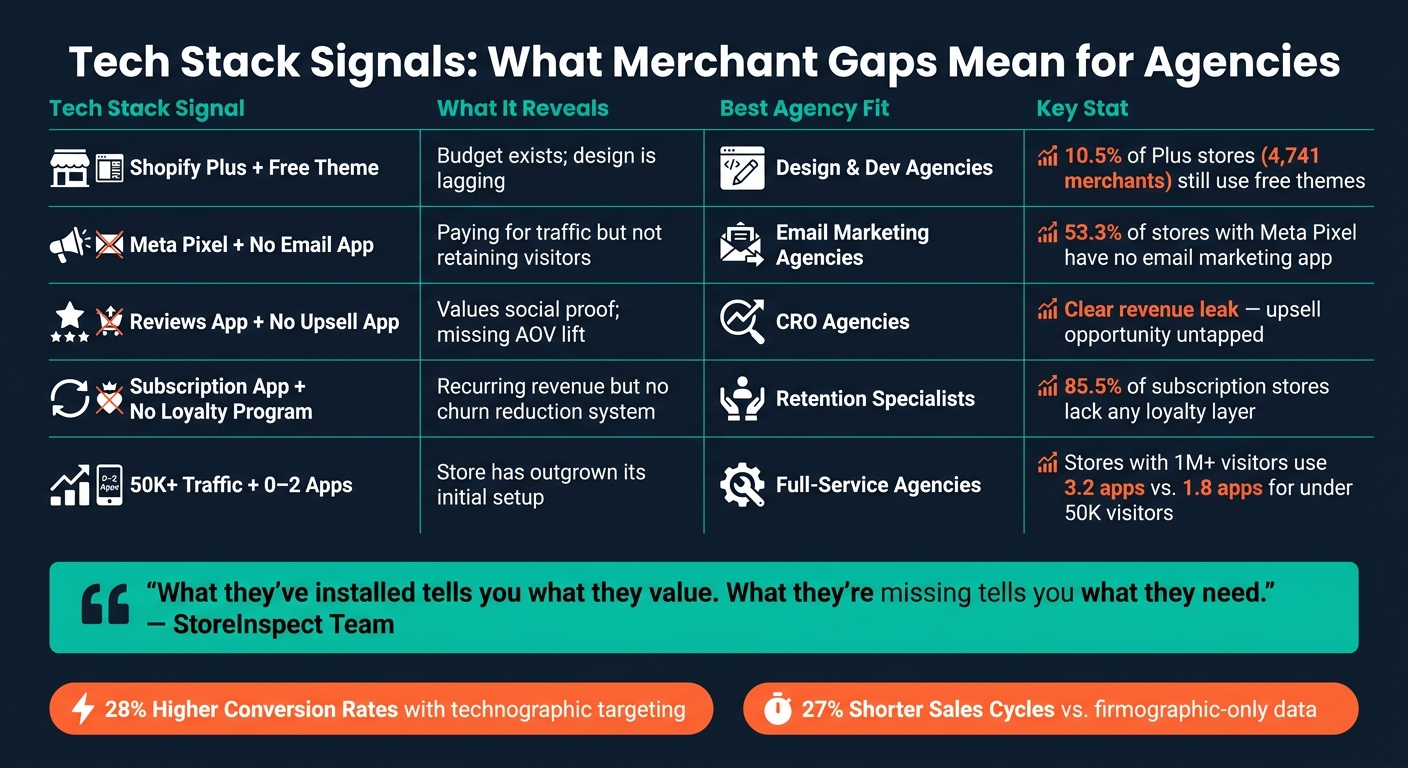
Tech Stack Signals: What Merchant Gaps Mean for Agencies
Key Data Points Agencies Need
Tech stack data offers critical insights that can shape prospecting strategies.
Platform and Infrastructure provide a clear starting point. For example, a Shopify Plus store paying at least $2,000 per month signals a solid budget, making the prospect worth pursuing even before diving deeper.
App Usage sheds light on where merchants are focusing their resources. Tools like Klaviyo and Recharge indicate an emphasis on email marketing or subscription models, suggesting areas where additional services could bring value.
Theme Type can highlight missed opportunities. A high-revenue merchant using a free Shopify theme like Dawn or Debut may be struggling with outdated design or unresolved technical issues - an immediate opportunity for agencies specializing in design and development.
Tracking Pixels from platforms like Meta, TikTok, or Google Ads reveal active ad campaigns. This data not only confirms ad spend but also hints at potential gaps in customer retention strategies.
By analyzing these metrics, agencies can pinpoint operational gaps and identify prospects with strong buying intent. This data not only provides a snapshot of current investments but also uncovers areas where targeted services could drive significant improvements.
What Tech Stack Signals Reveal About Merchants
Tech stack signals go beyond the surface, revealing a merchant's priorities and challenges. For instance, stores with under 50,000 monthly visitors typically use 1.8 apps on average, while those with over 1 million visitors rely on 3.2 apps. This trend suggests that larger stores are more operationally advanced and more likely to need external expertise.
Infrastructure choices can also be telling. A study of 295,000 Shopify stores found that 10.5% of Shopify Plus merchants - about 4,741 stores - still use free themes despite paying for a premium platform. This mismatch highlights merchants with a healthy budget but unresolved design needs, making them ideal prospects for design or development agencies.
App usage offers even more clarity. For example, a store using Recharge is committed to a subscription model, while Klaviyo suggests a focus on email marketing. Interestingly, 85.5% of stores using a subscription app lack a loyalty program, presenting a clear opening for retention-focused services.
"Their buying signals are embedded in their tech stack. What they've installed tells you what they value. What they're missing tells you what they need." - StoreInspect Team
The table below connects tech stack signals with the types of agencies best equipped to address them:
| Tech Stack Signal | What It Reveals | Best Agency Fit |
|---|---|---|
| Plus Status + Free Theme | Budget exists; design is lagging | Design & Dev Agencies |
| Meta Pixel + No Email App | Paying for traffic but not retaining visitors | Email Marketing Agencies |
| Reviews App + No Upsell App | Values social proof; missing AOV lift | CRO Agencies |
| Subscription App + No Loyalty | Recurring revenue but no system to reduce churn | Retention Specialists |
| 50K+ Traffic + 0–2 Apps | Store has outgrown its initial setup | Full-Service Agencies |
Dynamic Signals That Drive Outreach Timing
While static metrics provide foundational insights, dynamic signals help agencies identify the best moments to engage. These real-time changes often indicate when a merchant is actively making investments, creating a prime opportunity for outreach.
For instance, a recent theme change suggests the merchant is in the middle of a redesign, making it an ideal time to pitch design or development services. Similarly, installing a subscription app like Recharge signals a focus on retention strategies, while a rapidly expanding product catalog may point to scaling challenges that require automation or feed management solutions.
StoreCensus actively monitors these dynamic signals, alerting agencies as soon as a high-value prospect makes a significant move. This ensures agencies can reach out promptly - while the merchant is still in the decision-making phase - not weeks later when the window of opportunity has closed.
"Activity signals alert you when stores make changes that indicate buying intent, ensuring timely outreach while investment is underway." - StoreCensus
To stay ahead, agencies should refresh their prospect lists monthly. A merchant who previously seemed like a poor fit might quickly evolve - installing a Meta Pixel, upgrading to a paid theme, or surpassing 50,000 monthly visitors - creating a narrow but valuable window for a well-timed pitch.
Defining Ideal Client Profiles Using Tech Stack Data
Agencies often define ideal client profiles (ICPs) based on industry and size, but a merchant's tech stack paints a much clearer picture of their growth stage, budget, and challenges. By leveraging insights from tech stack data, you can refine your targeting strategies. Combining technographic information with revenue tiers allows you to focus on merchants who genuinely need your services. This approach sharpens your ICP for both Shopify and WooCommerce merchants.
Segmenting Shopify Stores by Tech Stack

Shopify Plus status is a strong indicator of a merchant's budget strength. These merchants pay a minimum of $2,000 per month for their platform and are 5.75 times more likely to use advanced app stacks compared to standard Shopify users. This combination of spending power and operational complexity makes them an ideal starting point for targeting.
You can further refine your ICP by analyzing app usage. For example, a store using tools like Klaviyo, Recharge, and Judge.me signals a focus on retention and social proof - traits of a brand that might be ready for advanced optimization work. On the other hand, a Shopify Plus store using a free theme suggests an opportunity to pitch design services. The budget is there, but the execution hasn’t caught up yet.
Revenue tiers also play a key role in segmentation. A useful rule of thumb is to set your monthly retainer at 0.5–1% of a merchant's annual revenue. Here's how that breaks down:
| Revenue Tier | Monthly Retainer | Service Fit (Examples) | Decision Maker |
|---|---|---|---|
| $500K–$2M | $2K–$5K | Foundational services (email flows, basic ads, CRO) | Founder |
| $2M–$10M | $5K–$15K | Strategic services (retention, omnichannel, advanced ads) | CMO / Head of Growth |
| $10M+ | $15K–$50K+ | Enterprise-level services (attribution, international expansion, analytics) | VP Marketing / C-suite |
"A $5M/year supplement brand has more in common with a $5M/year fashion brand than it does with a $200K/year supplement brand." - StoreCensus
Segmenting WooCommerce Stores by Plugins and Hosting
WooCommerce doesn’t have a direct equivalent to Shopify Plus, so segmentation here relies heavily on plugin usage. For instance, a store using WooCommerce Subscriptions, a dedicated reviews plugin, and performance optimization tools operates on a much higher level than one relying solely on WooCommerce’s default setup.
Hosting choices also reveal key insights. Merchants using managed WordPress hosts like WP Engine or Kinsta are paying a premium for performance and reliability, signaling a willingness to invest. When combined with tools like analytics or attribution plugins, these choices indicate a merchant that values infrastructure and is likely to appreciate comprehensive agency services.
These strategies help you refine your prospect list by identifying merchants who align with your agency’s offerings, while filtering out those less likely to be a good fit.
Filtering Out Poor-Fit Prospects
Once you’ve defined high-value profiles, it’s equally important to eliminate poor-fit prospects. For example, merchants with fewer than 10,000 monthly visitors or those in low-margin sectors may struggle to justify a retainer above $2,000 per month. Similarly, a store generating decent revenue but running only 0–2 apps might indicate a founder who hasn’t yet embraced external tools. Focusing on merchants already investing in their tech stack ensures more productive client relationships.
StoreCensus simplifies this process by allowing you to filter Shopify brand prospect lists across 6M+ stores using criteria like revenue tier, app usage, theme type, and growth signals. This makes it easier to zero in on merchants who are primed for your services.
Building and Prioritizing Prospect Lists
Turn your Ideal Customer Profile (ICP) into a well-organized merchant list. This structured strategy helps you zero in on the most promising opportunities.
Building Lists Around Complementary Apps
Focus on what your ideal client is missing. Instead of only targeting Klaviyo users, look for stores using a Meta Pixel but lacking an email marketing tool. These businesses are spending on paid traffic but aren’t optimizing for customer retention. Data from millions of Shopify stores shows that 53.3% of stores with a Meta Pixel don’t have a detectable email marketing app installed. That’s a gap you can highlight in your pitch.
This approach works across different service types. For example:
- A store with a reviews app but no upsell tool is missing a chance to boost their average order value.
- Subscription merchants without a loyalty program risk higher churn rates. In fact, 85.5% of stores running subscription apps lack any loyalty or retention layer.
By identifying these missing tools, you can pinpoint merchants with clear revenue leaks and tailor your outreach accordingly.
Targeting Merchants on Legacy or Outdated Tools
Some merchants are stuck with outdated Shopify themes like Debut, Brooklyn, Venture, or Minimal. Shopify stopped updating these themes in 2021, meaning they lack features like app blocks, sections everywhere, and improved performance. For design or development agencies, this is a straightforward pitch: these merchants need an upgrade, and they need it now.
"A Plus store running Debut has both a design problem and a technical debt problem." - StoreInspect Team
Here’s a surprising stat: 10.5% of Shopify Plus stores - roughly 4,741 merchants - still use free themes, even though they're paying over $2,000 a month for their platform. These businesses can clearly afford better, but they haven’t prioritized it yet. That’s your opportunity. Once you flag these outdated setups, look for other growth indicators to refine your outreach strategy.
Using Growth Signals to Rank Prospects
Dynamic signals can take your prospect list to the next level when combined with static gaps in a merchant's tech stack. Start by ranking merchants based on how many gaps or mismatches they have. For example, a store missing three or more key elements (like no email tool, no upsell app, and an outdated theme) is far more likely to convert than one with just a single gap.
In addition to gaps, pay attention to activity signals like:
- Recent theme updates
- Newly installed apps
- Rapid product catalog expansion
These signals suggest a merchant is actively investing in their business, making them more open to new opportunities. Agencies that leverage technographic signals report 27% shorter sales cycles compared to those relying only on firmographic data.
To streamline outreach, score prospects on a 0–10 scale based on factors like revenue fit, growth signals, tech sophistication, and ease of reaching decision-makers. Then, focus your efforts on the highest-scoring prospects:
| Prospect Tier | Score | Approach |
|---|---|---|
| A-Tier | 8–10 | Highly personalized outreach focusing on specific gaps |
| B-Tier | 6–7 | Semi-personalized messages with a custom first line |
| C-Tier | 4–5 | Automated nurture sequences |
| Disqualified | 0–3 | Remove from your list |
Tools like StoreCensus can simplify this process by letting you filter through over 6 million Shopify and WooCommerce stores. You can combine criteria like revenue tier, app usage, theme type, and growth signals into one search, helping you build ranked, ready-to-contact lists without the hassle of piecing together data manually.
Putting Tech Stack Data to Work in Your Prospecting Workflow
Once you've ranked your prospect lists, the next step is turning that data into a practical and effective sales workflow. This means integrating your insights into a system that drives action.
Adding Tech Stack Data to Your CRM
Storing prospect information in scattered spreadsheets, email threads, or Slack messages is a common pitfall. When technographic data sits in an outdated CSV file, it quickly loses relevance. Instead, attach key details - like missing tools (e.g., "Missing Klaviyo"), revenue brackets, and growth indicators - directly to each prospect's CRM profile. This way, the context stays accessible throughout the entire sales process.
A well-structured CRM workflow should track five key statuses: Contacted, Replied, Negotiating, Closed, and Rejected. Without this structure, as much as 70% of qualified leads can go cold simply because no next step is clearly defined. Assign trigger actions to each status. For instance, when a prospect replies, schedule a discovery call immediately. If a deal is rejected, set a 6-month follow-up reminder - especially for timing-related rejections (e.g., "Klaviyo contract ends in March").
"Shopify prospecting isn't just about finding stores. It's about building a systematic funnel that moves prospects from discovery to qualification to personalized outreach to closed deals." - StoreCensus
Automating repetitive tasks like email sequences, list building, and data entry can save time and allow your team to focus on high-value activities like personalized research and closing deals. Tools like StoreCensus can export filtered, scored prospect lists - including decision-maker contacts - directly to your CRM.
With your CRM enriched and processes automated, the next step is improving your outreach based on performance data.
Refining Campaigns Based on Results
Once your CRM is set up, use it to fine-tune your campaign strategies by tracking key metrics. Two crucial ones to watch are your discovery-to-qualification ratio and your positive response rate. If your response rate is under 5%, it may signal that your qualification criteria are too broad or your outreach isn't personalized enough to address the prospect's specific needs.
Analyze your outreach by tech segment. Group responses based on the gap you highlighted (e.g., "Meta Pixel but no email app" versus "subscription app but no loyalty layer"). If one segment consistently performs better, shift more of your resources toward it. Agencies using this type of signal-based segmentation see 28% higher conversion rates compared to those relying only on firmographic data. A strong target for personalized, tech-driven outreach is a 15–25% positive reply rate - far exceeding the 1–2% typical of generic cold emails.
Keeping Tech Stack Data Fresh
To keep your CRM and outreach aligned, your tech stack data needs regular updates. Prospect lists can become outdated quickly as merchants add or remove apps, change themes, or launch new ad channels. Reaching out with a pitch for a solution they’ve already implemented wastes your time and makes you appear unprepared.
Think of your prospect database as an evolving system rather than a static list. Refresh your saved filters weekly to catch new qualifying prospects and update scores based on the latest growth signals. Perform a full audit monthly to remove stores that have pivoted, closed, or already resolved the issues you planned to address. Before each outreach batch, re-check the targeted tech gap to ensure your pitch is still relevant.
| Maintenance Frequency | Action | Why It Matters |
|---|---|---|
| Weekly | Refresh saved filters for new qualifying stores | Identifies merchants who’ve just entered your ideal customer profile (ICP) |
| Weekly | Update qualification scores | Adjusts rankings based on new growth indicators |
| Monthly | Full list audit | Removes stores that have pivoted, closed, or solved the problem |
| Per batch | Re-check specific tech gap before sending | Confirms your pitch is still timely and relevant |
Conclusion: Turning Tech Stack Data Into Better Clients
Many agencies miss out on up to 70% of their qualified leads simply by targeting the wrong businesses at the wrong time. Tech stack data doesn’t just reveal the tools a merchant uses - it highlights critical gaps, allowing for precise and actionable outreach.
Here’s an example of how this works in practice: Imagine a store using ReCharge but without a Klaviyo integration. That’s not just any lead - it’s a business with a clear, addressable gap. Reaching out with this level of specificity can boost reply rates from a low 2% to an impressive 20%. These insights aren’t just numbers - they’re a game-changer for outreach success.
Take Sarah, for instance, the founder of an email retention agency. Using StoreCensus, she filtered for subscription-based beauty brands running ReCharge but missing Klaviyo. This targeted approach helped her identify 247 qualified prospects. Within a year, she added 14 clients to her agency, generating $84,000 in monthly recurring revenue. Her story is a testament to the power of leveraging tech stack data for smarter prospecting.
The key isn’t working harder - it’s working smarter. By identifying the right gaps and timing your outreach effectively, you can transform your prospecting strategy. Tools like StoreCensus make this process scalable, offering access to over 6 million Shopify and WooCommerce stores, filtered by tech stack, revenue, and more - all starting at just $49/month.
"The difference isn't hustle. It's systems." - StoreCensus
The most successful agencies aren’t the loudest - they’re the ones armed with actionable insights tailored to the right merchants. Consistently applying this approach can turn tech stack data into your secret weapon for winning better clients.
FAQs
What’s the difference between technographics and firmographics?
Firmographics outline a company’s key characteristics, such as its industry, revenue, employee count, and location. On the other hand, technographics dive into the tools and technologies a company uses, including software, platforms, and other elements of its tech stack. While firmographics offer a broad understanding of the market landscape, technographics reveal specific operational details, like technical requirements, integration possibilities, or areas where your solution could address gaps. Combined, these two data sets provide a well-rounded view of a prospect’s profile and operational needs.
How do I score and prioritize prospects using tech stack gaps?
To identify and prioritize potential prospects, look for stores already investing in related tools but missing your solution. With StoreCensus, you can uncover high-intent signals like stores with 50,000–200,000 monthly visitors, active ad spending, but no presence in your service category.
Use the STAMP framework to evaluate leads:
- Size: Consider revenue or traffic levels.
- Tech: Review their current tech stack.
- Activity: Look for recent updates or changes.
- Multiple Contacts: Identify key decision-makers.
- Pain Points: Spot gaps or areas where your solution fits.
By focusing on stores where these signals intersect, you can zero in on higher-quality leads that are more likely to convert.
How often should I refresh tech stack data before outreach?
To keep your tech stack data current, make it a habit to refresh it weekly. This ensures you're always up-to-date on app installations and store modifications. For core contact data, a re-verification every three to six months helps maintain accuracy.
StoreCensus simplifies this process by updating its database weekly and offering real-time activity signals. With these tools, you can monitor important changes - such as new app installations or theme updates - and connect with prospects when it matters most.



