
How to Spot Stores Using Personalization Engines
Identify Shopify stores using personalization with on-site signals, DevTools checks, and StoreCensus filters.


Want to pinpoint stores using personalization tools? Here's why it matters: Stores with personalization engines show higher growth potential. They average 4.6 installed apps (vs. 1.7 without), have 67% more tracking pixels, and score 42% higher on lead fit metrics. Yet, only 2.5% of Shopify stores use detectable personalization apps, leaving a 97.5% gap - a huge opportunity for agencies targeting growth-focused businesses.
Key Takeaways:
- Traffic correlates with adoption: Only 1.4% of stores under 50K monthly visitors use personalization tools, but adoption jumps to 57.1% for stores with over 5M visitors.
- Target sweet spots: Focus on stores with 50K–200K monthly visitors - they have enough traffic for ROI without enterprise-level hurdles.
- Tools to identify usage: Look for on-site clues like "Recommended for You" sections or technical signals from tools like Nosto, Rebuy, or Dynamic Yield using browser DevTools.
- StoreCensus simplifies prospecting: Filter stores by traffic, app usage, and growth signals to find high-potential prospects.
Why it works: Personalization boosts revenue by 5%–15%, with some businesses reporting up to 40% growth. For example, Orveon Global saw a 10%–15% increase in AOV after implementing Nosto.
Ready to refine your prospecting? Combine tools like StoreCensus with manual verifications for a scalable, precise outreach strategy.
What Personalization Engines Are and How to Recognize Them
What Are Personalization Engines?
Personalization engines are tools that adapt website content - like banners, product recommendations, copy, and offers - based on a visitor's specific context. This context could include factors such as location, referral source, browsing habits, or purchase history. These engines come in two main types: rule-based and AI-driven. Rule-based engines rely on simple if-then logic (e.g., showing a summer sale banner to visitors from Facebook), while AI-driven systems use machine learning to automatically refine and optimize content as they gather more data.
The impact of personalization can be substantial. Stores often see a revenue boost of 5% to 15%, while high-growth businesses report up to 40% more revenue. For example, Orveon Global, the company behind beauty brands like bareMinerals and Laura Mercier, experienced a 10% to 15% jump in average order value (AOV) after integrating Nosto's AI-powered merchandising tools in early 2026.
"We saw an AOV lift between 10% to 15% for each brand. So I think our ability to cross-sell with Nosto live drove an immediate sales lift." - Carney Nir, VP of Ecommerce, Orveon Global
Grasping how these engines work is key to spotting the signs of their use, both on-site and technically.
On-Site and Technical Signals of Personalization Tools
Identifying whether a store uses a personalization engine can help agencies focus on businesses that are primed for advanced growth strategies. These tools leave behind both visible on-site clues and technical traces that can be uncovered using browser tools.
On-site indicators of personalization include:
- Recommendations labeled as "Recommended for You", "Frequently Bought Together", or "Customers Also Bought".
- Hero banners that change dynamically based on UTM parameters.
- Cross-sell suggestions in the shopping cart that adjust based on what’s currently in the cart.
- Location-specific messages, such as different shipping thresholds for various regions.
Technical signals, on the other hand, can be spotted using browser developer tools. By opening the Network tab, you can filter for vendor names like nosto, rebuy, or dynamicyield to see which scripts and requests are triggered when a page loads. For example:
- Nosto sends an
ev1network request to share page context and fetch campaign data. - Rebuy can be identified through its JavaScript signatures and smart cart widget markup.
- Dynamic Yield generates network requests to
*.dynamicyield.com. - Klaviyo uses a
static.klaviyo.comscript tag and tracking pixels.
You can also check the page source (Ctrl+U) to search for initialization strings that confirm the presence of these tools.
| Tool | Technical Signal to Look For |
|---|---|
| Nosto | ev1 network request; nostojs global variable; #nosto- div IDs |
| Rebuy | Rebuy-specific JavaScript signatures; smart cart widget markup |
| Dynamic Yield | *.dynamicyield.com network requests |
| Klaviyo | static.klaviyo.com script tag; tracking pixels |
Another clue is a brief flicker in content when a page loads, often indicating client-side personalization. However, more modern edge-rendered methods can eliminate this flicker. By understanding these technical and on-site signals, agencies can prioritize outreach to stores that are already investing in growth-focused tools and strategies.
What is AI e-commerce personalization? (Simplified!)
How to Use StoreCensus to Find Stores with Personalization Tools
StoreCensus turns raw data into a streamlined prospecting tool, making it easier to identify stores that use - or should use - personalization tools. It’s a game-changer for scaling your outreach without tedious manual checks.
Setting Filters to Pinpoint the Right Stores
StoreCensus scans over 6 million Shopify and WooCommerce stores, allowing you to filter by tech stack. This means you can quickly find stores using tools like Rebuy, Nosto, OptiMonk, LimeSpot, or Dynamic Yield. Want to go further? Flip the search criteria to uncover stores that don’t yet use a personalization app but show strong growth signals.
A smart starting point is targeting stores with 50,000–200,000 monthly visitors. Many of these stores rely on paid traffic but lack a personalization layer, leaving untapped potential on the table. Combine the “no personalization app” filter with revenue tiers and paid-media signals (like Meta Pixel or Google Ads tags) to zero in on stores actively investing in customer acquisition but missing opportunities to boost conversions.
Adding a Klaviyo filter is another savvy move. Stores using Klaviyo but without a personalization app represent a clear gap - they’re investing in retention but haven’t optimized their on-site experience.
Once your list is ready, refine it further by monitoring real-time growth signals.
Using Growth Signals and Change Tracking to Prioritize Prospects
A filtered list is just the beginning. StoreCensus tracks real-time changes like new app installations, theme updates, and catalog expansions. These signals help you differentiate between warm and cold prospects.
For example, a theme change often signals a broader redesign or conversion rate optimization (CRO) effort. This is the perfect time to introduce a personalization tool. Similarly, when a store significantly expands its product catalog, personalization becomes increasingly critical - larger inventories benefit most from AI-driven discovery. By setting your activity filter to 7 or 30 days, you can focus on stores actively evolving.
"StoreCensus completely changed how we do outreach. We stopped guessing and started targeting stores based on niche, app usage stage, and real growth signals. Our install rates jumped." - Aditya Singh, Founder, Oxify
For agencies targeting Shopify Plus merchants, the data is compelling: Shopify Plus stores are 9.5x more likely to use personalization tools than standard Shopify stores (10.4% vs. 1.1%). However, this also means many Plus stores may already have a vendor in place, making uninstall signals worth tracking.
Once you’ve prioritized your prospects, you can export your list and integrate it directly into your CRM for efficient outreach.
Exporting Prospect Lists and Connecting to Your CRM
After fine-tuning your filters, StoreCensus lets you export your results as a CSV or push them directly to your outreach tools via Zapier. From there, you can integrate leads into platforms like Apollo.io, Instantly.ai, or Smartlead.ai for sequencing, or into CRMs like HubSpot, Pipedrive, or Close for pipeline management.
The platform’s built-in contact finder takes things a step further by surfacing key decision-makers - founders, CMOs, or ecommerce leads - directly from your filtered list. This eliminates the need for manual contact searches. For $99/month, the Professional plan includes 5,000 credits and API access, making it ideal for targeted outbound campaigns.
"StoreCensus's installed-app filters let us zero in on high-potential prospects in a fraction of the time. It's become our go-to tool for precision targeting." - Noopur, Co-founder, Skailama
To get the most out of your export, keep it focused. Narrow your list by vertical, traffic tier, and at least one activity signal. This ensures your outreach efforts are tailored and impactful.
sbb-itb-61169e3
Manual Methods for Confirming Personalization Tool Usage
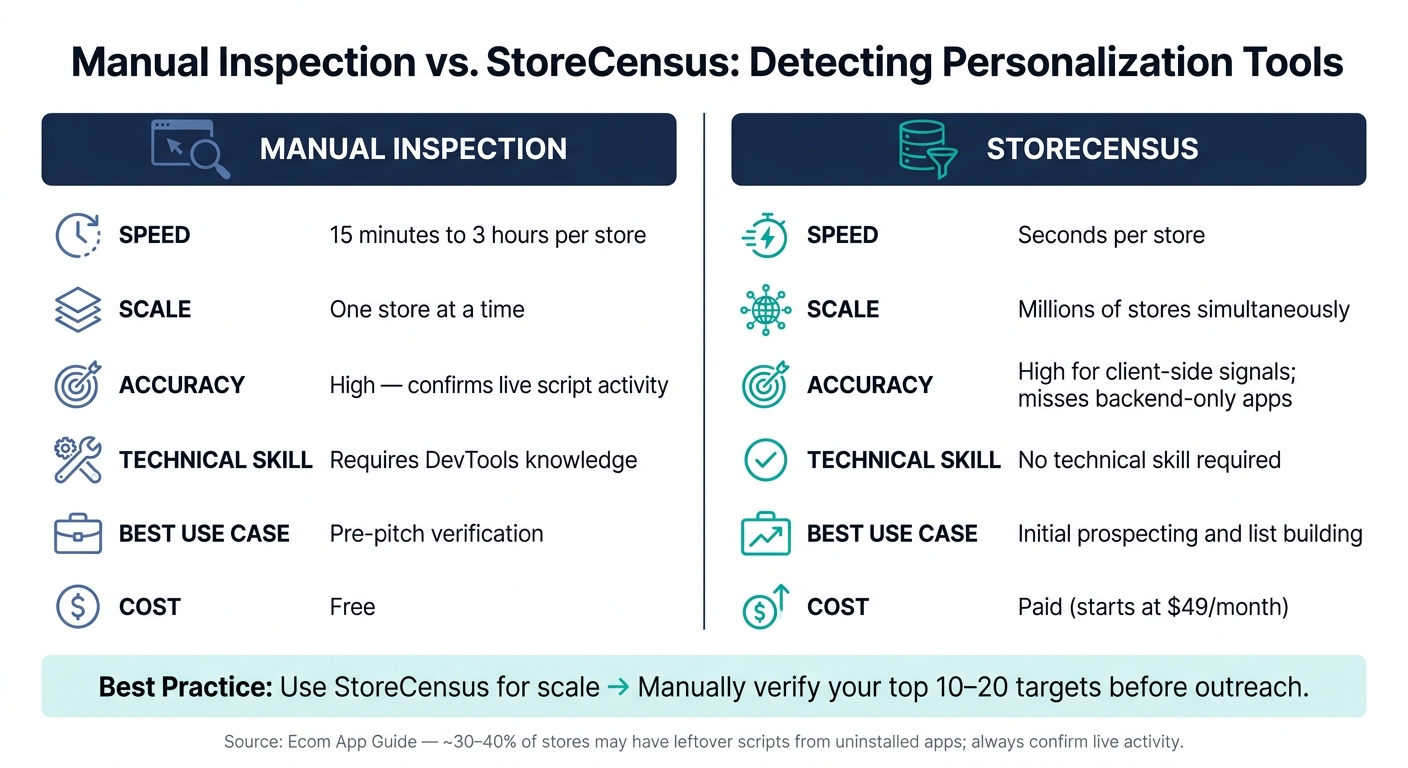
Manual Inspection vs. StoreCensus: Personalization Tool Detection Compared
Once you've used StoreCensus to narrow down your prospects, manual methods can help confirm whether a store is actively using personalization tools. This step ensures your pitch is both accurate and relevant. While StoreCensus provides a fast way to identify potential prospects, manual verification digs deeper to confirm their setup.
Quick On-Site Checks
Start with the basics by exploring the store's website. Focus on three key areas: the homepage, a product page, and the cart. These pages are hotspots for personalization features. Keep an eye out for:
- "Recommended for You" sections
- "Recently Viewed" carousels
- Dynamic upsell offers in the cart after adding an item
- Urgency countdowns or timers
These widgets are often clear indicators that a personalization engine is active. To further confirm, check for "Powered by" labels at the bottom of widgets or popups. These badges often reveal the specific vendor powering the tool.
Spend about 15 minutes evaluating these signals for each store. This quick scan not only validates StoreCensus findings but also sharpens your pitch by giving you concrete examples to reference.
Using Dev Tools to Inspect Scripts and Network Calls
When visible signs aren't enough, browser developer tools can provide deeper insights. Open DevTools (F12 on Windows or Cmd+Option+I on Mac) and navigate to the Network tab. Reload the page and filter for "JS" or "XHR" requests. Look for activity from domains like:
nosto.comrebuyengine.comdynamic-yield.comsearchspring.com
If these domains show active requests, it confirms the personalization tool is not only installed but also running.
You can also use the Console tab to check for global objects. For example, typing window.Rebuy or window.Nosto into the console will often reveal if a tool is actively loaded. However, check across multiple pages (like product and cart pages), as some tools only load on specific sections of a site.
Keep in mind, though, that around 30%–40% of stores may still have leftover scripts from apps they’ve uninstalled. If you see a script without corresponding network activity or global objects, it's likely a false positive. These technical checks help refine your prospect list by ensuring you're targeting stores with fully functional setups.
Manual Inspection vs. StoreCensus Detection: A Comparison
Both manual inspection and StoreCensus have their strengths. Here's a quick breakdown of how they compare:
| Feature | Manual Inspection | StoreCensus |
|---|---|---|
| Speed | 15 minutes to 3 hours per store | Seconds per store |
| Scale | One store at a time | Millions of stores simultaneously |
| Accuracy | High; confirms live script activity | High for client-side signals; misses backend-only apps |
| Technical skill needed | Requires DevTools knowledge | No technical skill required |
| Best use case | Pre-pitch verification | Initial prospecting and list building |
| Cost | Free | Paid (starts at $49/month) |
The ideal workflow combines both methods: use StoreCensus to quickly generate a large prospect list, then manually verify the top 10–20 targets before crafting your outreach. This approach balances volume with precision, ensuring your pitches are well-informed and impactful.
"Automated tools are great for scale and speed; manual inspection is precise and reveals signals automation misses. Use both." - Ecom App Guide
Turning Personalization Data into Lead Qualification Criteria
Once you've confirmed insights through both automated tools and manual verification, it's time to use that data to qualify leads efficiently. The goal here is to create a system that helps prioritize outreach efforts while tailoring your approach for maximum impact.
Classifying Stores by Personalization Maturity
Organizing prospects based on their personalization maturity allows you to align your messaging with their current needs. By grouping them into tiers, you can craft pitches that resonate with their specific stage of growth.
| Tier | Profile | Typical Tools | Opportunity for Agencies |
|---|---|---|---|
| Non-Adopters | 97.5% of all Shopify stores | Shopify's native "Search & Discovery" | Basic setup - email capture, popups |
| Mid-Market | Standard Shopify, budget-conscious | LimeSpot ($18/mo), OptiMonk ($39/mo) | AOV optimization, tailored recommendations |
| Growth | Shopify Plus, more advanced tools | Rebuy ($99/mo+) | AI-driven upsells, smart cart configurations |
| Enterprise | Large catalogs, custom pricing | Nosto, Dynamic Yield | Attribution, data management, global scaling |
The 50K–200K monthly visitor range is where most agencies can find the sweet spot. These stores generate enough traffic to see measurable ROI from personalization efforts. Yet, only 8.1% of them have adopted any personalization tools. This gap is your opportunity to step in and make a difference.
Building a Lead Scoring Model with StoreCensus Data
To avoid wasting time on leads that won't convert, use a straightforward 0–10 scoring system based on StoreCensus data. This keeps your prospecting efforts focused and efficient.
| Criteria | Points | What to Look For |
|---|---|---|
| Revenue Fit | 0–2 | Your retainer should be about 0.5–1% of their annual revenue |
| Growth Signals | 0–2 | Look for active ad spend, new product launches, or recent theme updates |
| Tech Sophistication | 0–2 | Shopify Plus, Klaviyo, and 5+ visible apps - personalization users tend to run 171% more apps on average |
| Personalization Gap | 0–2 | Stores with email and review apps but no upsell or personalization tools |
| Decision-Maker Access | 0–2 | Direct contact with a founder, CMO, or Head of Growth |
Focus your efforts on stores scoring 8–10 points with highly tailored outreach. Leads scoring 5–7 points can go into an automated follow-up sequence. Anything below 5? Save it for later - or skip it entirely for now.
"Amateur prospecting is reactive and random. Professional prospecting is systematic and predictable." - StoreCensus
This scoring model helps you prioritize prospects and match your outreach strategy to their potential value.
Building a Pre-Outreach Brief from Personalization Insights
For high-priority prospects, create a concise, one-page brief to fine-tune your pitch. A well-crafted brief includes three key elements:
- Specific Observation: Highlight something unique about their setup, like, "You're using Klaviyo and running Meta ads, but your site treats every visitor the same."
- Relevant Insight: Tie it to their traffic level - for instance, stores with 200K–1M monthly visitors have a 24.1% personalization adoption rate, meaning most competitors are still behind.
- Social Proof: Share a success story, such as a similar brand recovering 22% more revenue after implementing personalization.
Wrap up with a low-pressure call-to-action, like scheduling a 15-minute strategy session. The goal isn't to close the deal right away - it's to walk into the first conversation armed with insights that impress and build trust.
Conclusion: Building a Repeatable Prospecting Workflow
To identify personalization engine usage effectively, you need a structured process. Successful agencies treat prospecting like an assembly line: discovery, qualification, verification, outreach, and conversion. By maintaining a steady, weekly prospecting schedule, you can avoid pipeline gaps and keep opportunities flowing.
This approach combines data-driven filtering with hands-on verification. Start by using tools like StoreCensus to create a list of potential stores, filtering for factors like traffic volume, tech stack gaps, and growth indicators. Then, validate the data manually - something as simple as a quick DevTools check can confirm what the numbers suggest. Once verified, score your prospects and segment them by revenue tiers before crafting any outreach messages.
Consistency is key. Agencies that dedicate 5–10 hours per week to prospecting - aiming to add 150 new stores to their list and conduct 4–5 strategy calls - are the ones that grow. For context, closing 100 clients might require contacting around 19,067 qualified prospects, assuming a 3% outreach-to-call rate and a 35% proposal-to-close rate. This disciplined effort transforms chaotic prospecting into a measurable, scalable system.
"Amateur prospecting is reactive and random. Professional prospecting is systematic and predictable." - StoreCensus
The 91,003 Shopify stores with paid-demand apps like email or review tools but no visible personalization engine won’t seek you out. By applying targeted filters, identifying growth signals, and committing to weekly prospecting, you can uncover these prospects before your competitors do.
FAQs
How can I tell if a personalization app is actively running (not just installed)?
To determine if a personalization app is active, check for visible changes on the storefront, such as recommendation widgets, dynamic content, or behavioral popups. These apps usually add specific code to the site. You can inspect the page source or use a scanning tool to identify JavaScript globals, specific script URLs, unique DOM elements, or network requests tied to known app providers. If you spot these indicators, the app is functioning.
What’s the minimum traffic a store needs for personalization to pay off?
Stores typically require at least 50,000 monthly visitors to make personalization tools a practical investment. Below this number, there’s usually not enough traffic or demand to warrant using advanced solutions. For stores attracting between 50,000 and 200,000 visitors, this is a prime range to consider engaging with an agency, as these businesses are more inclined to enhance their tech stack. With tools like StoreCensus, you can easily filter for stores surpassing this threshold, helping you focus on businesses that are ready to refine their operations.
Which StoreCensus filters best find “high-spend, no-personalization” stores?
To identify high-spend stores that don't use personalization, start by combining traffic and paid media filters with specific tech stack details. With StoreCensus, filter for stores that have 50,000+ estimated monthly traffic and show active paid-media signals, while excluding those with visible personalization apps. To refine the list further, look for stores using email and review apps, as these often indicate a level of maturity that aligns with the benefits of personalization.



