Shopify PCI Coverage: What Merchants Own
Explains which payment systems Shopify secures, what merchants must manage, and prelaunch checks to avoid PCI risk.

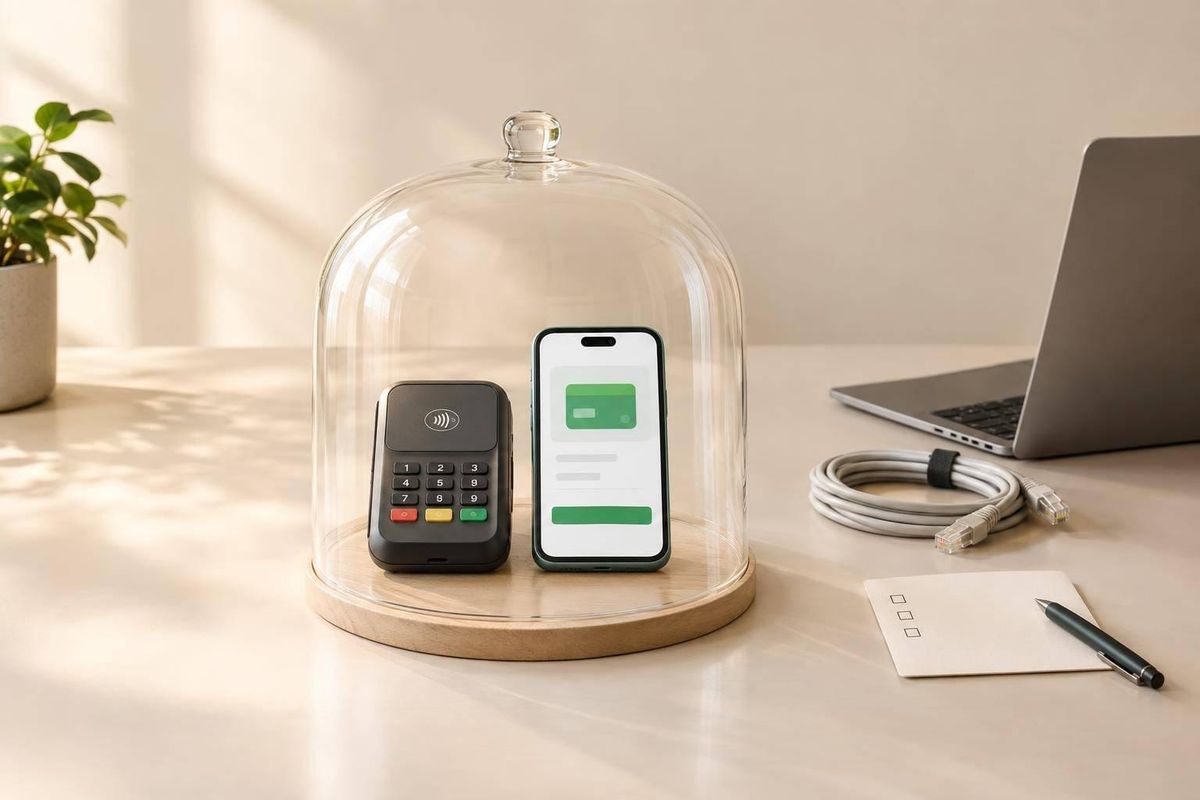
Shopify’s Level 1 PCI DSS compliance does not make your entire store compliant. My starting point: check who can access payment data, where it can go, and which controls fall outside Shopify’s coverage.
Here’s what I check before launch:
- Access and data: Limit permissions, require MFA, and keep card numbers and CVVs out of notes, logs, and support tools.
- Code and providers: Review apps, scripts, checkout changes, and external payment services - not just Shopify’s platform.
- Release decisions: Map payment flows, collect provider records, assign owners, and pause changes when payment-data handling is unclear.
- PCI validation: Confirm required forms, scans, and deadlines with your processor or acquiring bank.
I treat this as a launch risk review, <u>not proof of PCI compliance</u>. Custom payment forms or unusual checkout setups need a PCI specialist’s review before release.
Shopify’s Coverage and Merchant Responsibilities
Infrastructure and Payments Shopify Manages
Shopify’s PCI scope covers its hosted infrastructure, checkout, and Shopify-operated payment services. Merchant systems and third-party services fall outside that scope.[4][5]
Request Shopify’s current AOC and keep it with your compliance records. Check which services it covers, what it excludes, and what merchants must do. Get separate compliance evidence for each external payment provider you use.[2][8]
With that boundary clear, check which merchant-side changes could put payment data at risk.
Access, Data Handling, and Provider Checks
Use named accounts, MFA, and least privilege. Remove access immediately when someone leaves. Review provider compliance annually, and maintain incident-response procedures and current incident contacts for Shopify, payment providers, and the agency. For Shopify POS, keep a device inventory and check devices for tampering or substitution.[7][9]
Never paste card numbers, expiration dates, or CVV into email, spreadsheets, order notes, support tickets, screenshots, or logs. Use filtering and redaction to prevent accidental collection. Handle refunds and disputes through provider tools; never collect card details again for these tasks. Shopify Payments terms prohibit storing account data in merchant systems and retaining CVV2. PCI DSS prohibits retaining CVV after authorization.[9]
These limits matter most when custom code or apps can access checkout data.
PCI Responsibility Matrix
Use this matrix to see which controls Shopify handles and which belong to merchants, agencies, or third parties.
| Area | Shopify | Merchant | Agency | Third parties |
|---|---|---|---|---|
| Infrastructure | In-scope hosting, networks, checkout, vulnerability management, and monitoring. | Maintains systems outside Shopify. | Agency-managed development, staging, and administrative systems. | Hosted-system security and compliance evidence. |
| Configuration | Platform controls and supported settings. | Payment methods, permissions, apps, and day-to-day settings. | Secure implementation of approved configurations. | Secure product or service configurations. |
| Access | Platform and administrative access mechanisms. | Merchant accounts, MFA, roles, credentials, and access reviews. | Named accounts, least privilege, MFA, and immediate offboarding. | Provider-side access and credentials. |
| Custom code | Shopify services only, not merchant-authored code. | Business approval, testing, and continued oversight. | Code, dependencies, deployments, and connected-system security. | Provider-operated APIs, scripts, SDKs, and hosted components. |
| Integrations | Documented interfaces and in-scope security controls. | Provider approval, limited data sharing, and compliance verification. | Data-flow review and contracted implementation. | Transmission security and relevant PCI evidence. |
| Payment data | Account-data protection within Shopify’s documented scope. | Prevention of account-data storage or accidental collection. | Prevention of payment-data collection, exposure, or logging. | Provider-specific data controls and contractual duties. |
| Incidents | Shopify incident processes and required communications. | Incident-response planning and prompt provider notification. | Immediate escalation and evidence preservation. | Required customer and partner notifications. |
Responsibility allocation reflects documented service boundaries and provider terms.[7][8][9] Agency duties depend on services and access; third-party duties depend on their role and data flow.
Merchant validation depends on payment architecture, transaction volume, acquirer or payment-brand requirements, and provider agreements - not platform choice alone. Confirm the required SAQ, AOC, scans, and deadlines with the acquirer or processor.[5][6][9]
sbb-itb-61169e3
PCI Compliance: What every business owner needs to know.
Payment Risks in Store Customizations
With Shopify’s boundary clear, the next risk is merchant-controlled code and flows that can expand payment scope.
Review every change by data access, runtime location, and outbound destinations. These three factors determine whether a customization adds merchant PCI risk. The ratings below set review priorities; they do not define PCI scope or SAQ eligibility.
Start with the table, then check the implementation details below.
| Implementation | Exposed data | PCI concern | Review owner | Triage rating |
|---|---|---|---|---|
| Liquid, CSS, or merchandising JavaScript without payment access | Product and browsing data | Check dependencies; no direct payment-field access | Agency technical lead and merchant owner | Low |
| Theme app extension, pixel, or support tool | Events, identifiers, URLs, order context | Permissions, collection limits, destinations | Agency and merchant privacy/security owner | Review required |
| Checkout UI extension using documented APIs | API-permitted checkout data | Allowed targets, sandbox limits, prohibited collection | App owner and agency | Review required |
| Headless storefront with Shopify-hosted checkout | Storefront data and checkout redirects | Redirect integrity and externally controlled dependencies | Agency architecture lead and merchant security owner | Review required |
| External payment page or embedded card-entry form | Payment fields, credentials, or tokens | Payment architecture, script controls, provider evidence | Payment provider and merchant PCI owner | High risk |
| Proposed storage of card numbers or CVV | Cardholder data | Expanded exposure and provider restrictions | Merchant PCI owner and payment provider | High risk |
Theme Edits and Custom Storefronts
Theme edits do not automatically invalidate Shopify’s compliance. They remain low risk unless they read inputs, intercept submissions, change checkout redirects, or send data to external servers. Use theme app extensions and documented checkout APIs only when they avoid sensitive inputs and redirect changes.
For headless journeys, identify every externally controlled component and record its dependencies and destinations. Test checkout on mobile and desktop, including accelerated checkout, declines, and abandoned sessions. Keep a tested rollback version, and confirm that accelerated-checkout interfaces preserve the intended payment route.
Apps, Scripts, and Data Transfers
App Store approval does not mean a configuration is safe. Inspect scopes, webhooks, destinations, retention, and third-party dependencies. After uninstalling an app, remove any scripts it leaves behind.
Check analytics, session recording, and support tools for collected inputs, order links, and customer identifiers. Treat theme scripts, checkout UI extensions, and app or custom pixels as separate mechanisms. Verify each one’s current sandbox restrictions rather than assuming they have the same access. Shopify’s managed checkout isolates custom code; checkout extensions cannot request raw payment data.
Where applicable, PCI DSS 6.4.3 requires payment-page script authorization, integrity assurance, and an inventory with business justification. Requirement 11.6.1 requires detection of unauthorized changes to payment pages and security-impacting HTTP headers, with alerts and checks at least weekly or at a frequency supported by the applicable risk analysis.[10][11]
Assign implementation to whoever controls the page or component - Shopify, the merchant, or another provider - and obtain evidence. Escalate custom iframes, external checkout, or missing controls to the merchant’s PCI owner. Do not assume Shopify covers merchant-controlled code.
Next, review flows that can move beyond displaying information to executing payments.
Post-Purchase Flows, Subscriptions, and Refunds
Review thank-you pages, order-status pages, post-purchase upsells, and customer portals only through supported Shopify flows. Check whether each flow only displays data or can trigger a new charge. For subscriptions, verify authorization, retries, cancellation, and token access. For refunds, check permissions and transaction behavior.
Order metadata is not card data, but provider tokens can still trigger charges. Limit transfers to external order systems, and verify token scope, charge capability, and logging.
| Proposed change | Standard review or escalation | Review focus |
|---|---|---|
| Display order metadata or send it to an authenticated order system | Standard review | Minimum data, access controls, retention |
| Use provider-managed tokens through a verified integration | Standard review with security confirmation | Token permissions, authentication, logging |
| Add a payment form or embedded card-entry iframe | Escalation before launch | Changed payment architecture and PCI responsibilities |
| Change authorization, capture, retries, refunds, or recurring charges | Escalation before launch | Transaction controls and provider approval |
| Introduce an unverified payment or subscription provider | Escalation before launch | Compliance evidence and responsibility allocation |
| Expose sensitive order links without adequate authentication or expiry | Privacy/account-access escalation | Customer-data exposure; not automatically direct PCI scope |
| Propose storing card numbers or security codes | High-risk escalation; stop implementation | Provider restrictions and PCI exposure |
An Agency’s Prelaunch PCI Review
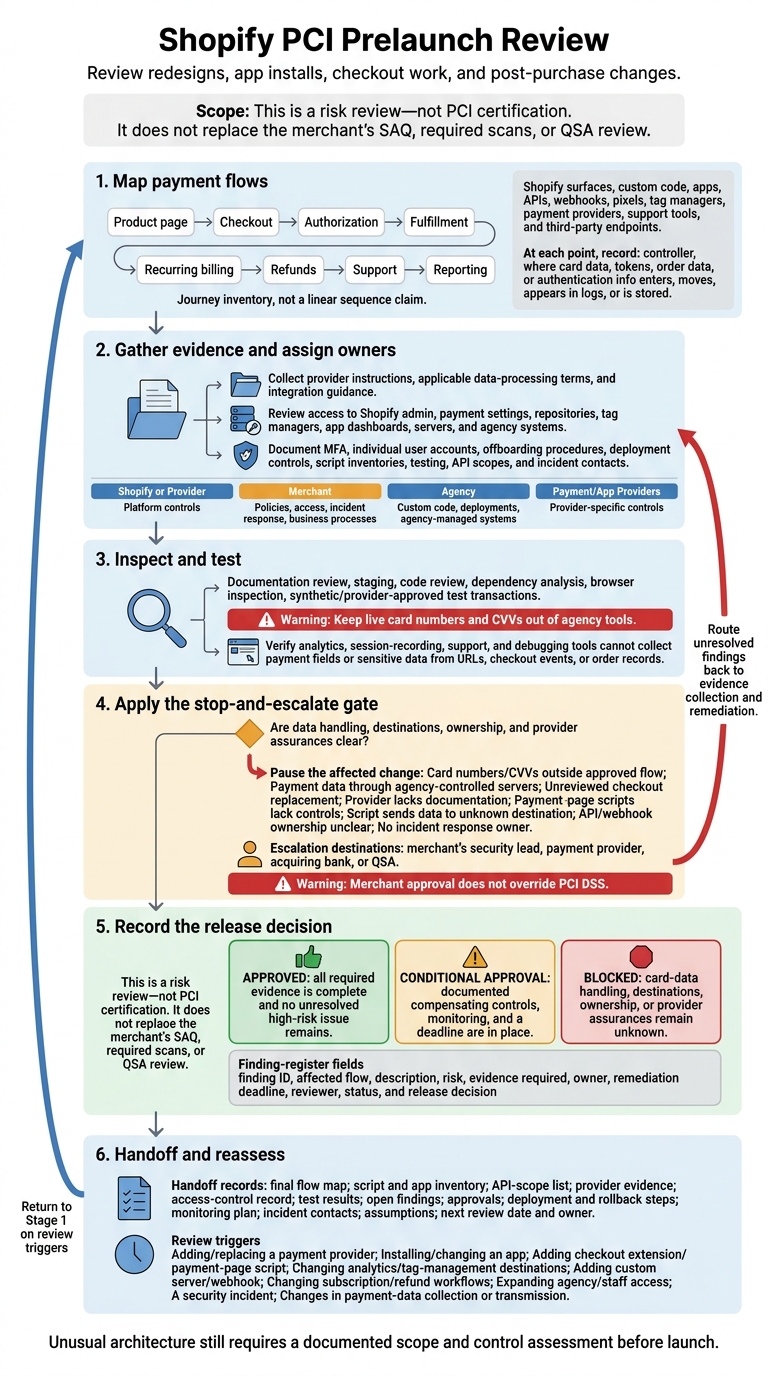
Shopify PCI Prelaunch Review: From Data Flows to Release
Apply the same go/no-go review to every change that could affect the payment flows above, including redesigns, app installs, checkout work, and post-purchase changes. Map data flows, confirm where Shopify’s coverage ends, gather evidence, assign owners, and record the release decision. This is a risk review - not PCI certification. It does not replace the merchant’s SAQ, required scans, or QSA review.[3]
Map Payment Flows and Gather Evidence
Trace the customer journey from the product page through checkout, authorization, fulfillment, recurring billing, refunds, support, and reporting. Inventory the relevant Shopify surfaces, custom code, apps, APIs, webhooks, pixels, tag managers, payment providers, support tools, and third-party endpoints. At each step, record who controls it and where card data, tokens, order data, or authentication information can enter, move, appear in logs, or be stored.
Gather evidence for the specific implementation: provider instructions, applicable data-processing terms, and integration guidance. Check who can access Shopify admin, payment settings, repositories, tag managers, app dashboards, servers, and agency systems. Document MFA, individual user accounts, and offboarding procedures. Review deployment controls, script inventories, testing, API scopes, and incident contacts.
Inspect network requests and logs through documentation review, staging, code review, dependency analysis, browser inspection, and synthetic or provider-approved test transactions. Keep live card numbers and CVVs out of agency tools. Confirm that analytics, session-recording, support, and debugging tools cannot collect payment fields or sensitive data from URLs, checkout events, or order records. If ownership or data movement is unclear, stop and escalate before launch.
Escalate Payment Risks Before Launch
Pause the affected change if card numbers or CVVs could be collected or stored outside an approved payment flow, payment data passes through agency-controlled servers, a checkout replacement has not been reviewed, or a provider lacks documentation. Also pause if payment-page scripts lack authorization or integrity controls, a script sends data to an unknown destination, API or webhook ownership is unclear, or no one owns incident response.
Assign platform controls to Shopify or the relevant provider. The merchant owns policies, access, incident response, and business processes. The agency owns custom code, deployments, and agency-managed systems, while payment and app providers own their provider-specific controls.
Escalate unresolved scope or control questions to the merchant’s security lead, payment provider, acquiring bank, or QSA. Merchant approval does not override PCI DSS. Unusual architecture still requires a documented scope and control assessment before launch.
When the risk review is complete, record the decision and assign the next review trigger.
Document Approval, Handoff, and Review Triggers
Create a finding register with at least these fields: finding ID, affected flow, description, risk, evidence required, owner, remediation deadline, reviewer, status, and release decision.
Mark a change approved only when all required evidence is complete and no unresolved high-risk issue remains. Use conditional approval when documented compensating controls, monitoring, and a deadline are in place. Block the change if card-data handling, destinations, ownership, or provider assurances remain unknown.
Keep the final flow map, script and app inventory, API-scope list, provider evidence, access-control record, test results, open findings, and approvals. Include deployment and rollback steps, the monitoring plan, incident contacts, assumptions, and the date and owner of the next review.
Reassess when the merchant adds or replaces a payment provider, installs or materially changes an app, or adds a checkout extension or payment-page script. Other review triggers include changes to analytics or tag-management destinations; a new custom server or webhook; changes to subscription or refund workflows; expanded agency or staff access; a security incident; or changes in how payment data is collected or transmitted.
Conclusion: Check Payment Boundaries Before Launch
Shopify covers its documented environment - not the merchant’s surrounding stack. Merchants remain responsible for access, data handling, and PCI validation requirements. Agencies should flag risks, not treat a launch review as proof of compliance.[1][3]
If storefront changes touch payment data or route checkout outside Shopify’s documented flow, pause and escalate before release.[12][13]
For custom payment handling, embedded payment forms, or unusual payment architectures, have a QSA or another PCI specialist confirm scope, controls, and validation before launch.[3][6][13]
FAQs
How do I determine which PCI SAQ my store needs?
Review how your payment integration handles card data to identify which Self-Assessment Questionnaire (SAQ) may apply:
- SAQ A: Payments are fully outsourced through an iframe or redirect.
- SAQ A-EP: On-site payment pages transmit card data through JavaScript or an API.
- SAQ D: Your servers process or store card data.
Confirm the applicable SAQ with your payment provider, acquirer, or qualified security assessor to ensure your setup meets PCI DSS 4.0.
How can I check whether an app captures payment data?
Review the permissions requested during installation and in Shopify admin under Settings > Apps. Make sure each permission fits the app’s purpose: a review app should never need customer billing information.
Check Admin API request counts for the past 30 days. Unusually high activity may point to data exports made without permission. Also, inventory all third-party JavaScript tags on checkout and payment pages, as required by PCI DSS 4.0.
What should I do if card data appears in my logs?
Treat card data found in logs as a critical security incident and act immediately. Revoke access or credentials for any third-party app or integration suspected of causing the leak.
Audit the scope of the exposure. Document every investigation step, including affected records and actions taken, to support forensic requirements.
Notify the merchant immediately. They retain ultimate responsibility for breach notification.