Best Fit: Cloud or On-Prem for Agencies
Start with cloud for most agencies, compare 12-month costs, assign support owners, and test backups, recovery, and compliance.


I’d start with cloud for most agencies - and choose on-premises only when a workload or client requirement calls for it. Before committing, compare 12-month costs, name the people responsible for support, and test backups and recovery.
My default: cloud for founder-led shops, outbound teams targeting Shopify stores, and Shopify Plus agency systems. Enterprise consultancies should check client contracts, data rules, and staffing before choosing cloud, owned hardware, or selective hybrid. Shopify’s commerce platform stays hosted by Shopify.
<u>Less hardware work doesn’t mean less accountability.</u> Cloud still needs access controls, spending checks, and an exit plan. Flexera’s 2025 survey estimated that 27% of IaaS and PaaS cloud spending was wasted.[6]
Quick Comparison
| What I’d compare | Cloud | On-premises | Selective hybrid |
|---|---|---|---|
| Cost and staffing | Usage fees or subscriptions; less hardware work | Equipment purchase plus staff and upkeep | Costs and support across both |
| Setup and scaling | Add resources without buying hardware | Procurement and installation can take weeks | Depends on each system |
| Security and data rules | Duties split with the provider | Agency handles physical and system security | Controls must cover both |
| Uptime and recovery | Check vendor terms and test recovery | Agency funds and runs recovery | Plan for failures between systems |
| Best fit | Remote teams and changing demand | Verified local hardware or client requirements | One restricted workload kept separate |
I’d choose the setup your team can support - not the one that gives you the most hardware control.
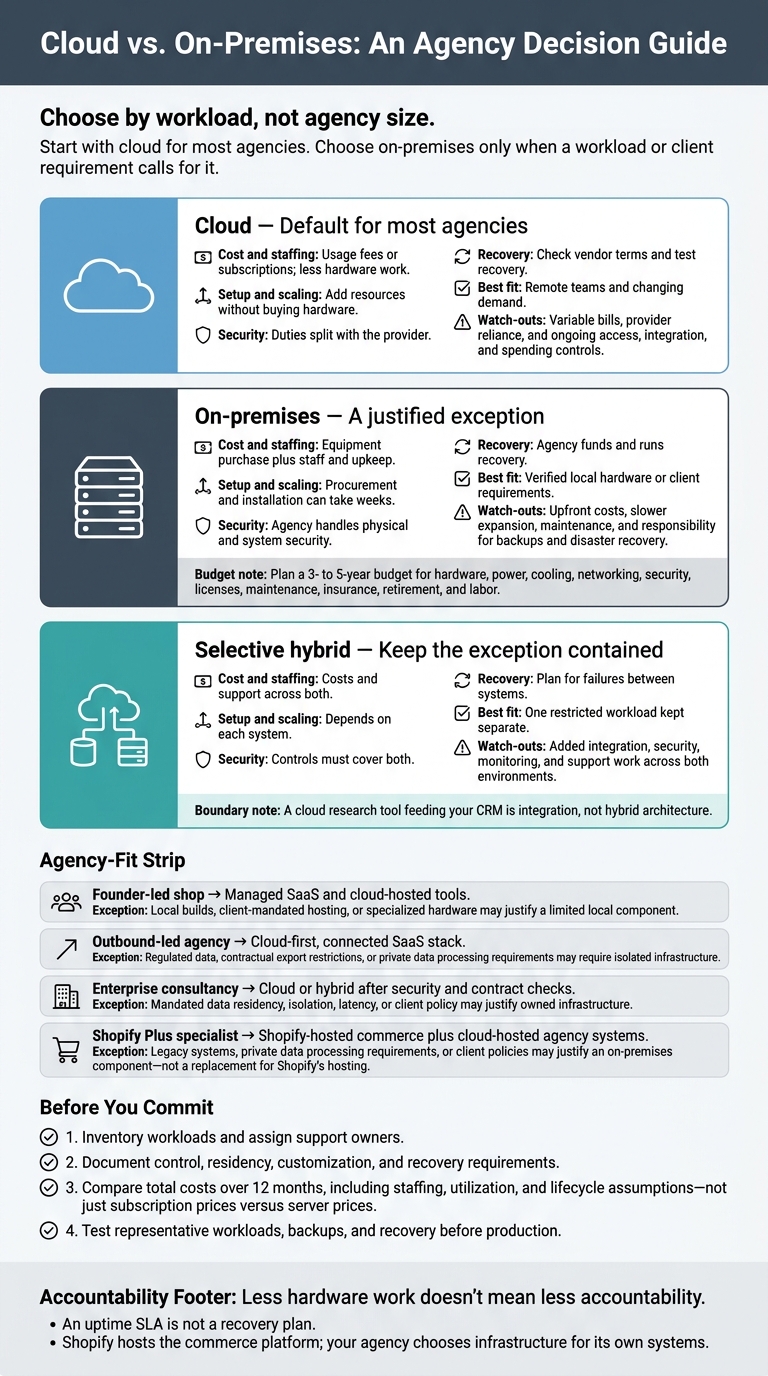
Cloud vs. On-Premises: An Agency Decision Guide
1. Cloud Infrastructure
Total Costs and Staffing
Compare the full 12-month operating cost, not just the hosting bill. Include compute, storage, bandwidth, backups, monitoring, security tools, support, licenses, migration, and staff time.
IaaS requires systems administration or DevOps skills. SaaS moves most infrastructure work to the provider. For small teams, staff time often costs more than the infrastructure itself. Flexera’s 2025 survey estimated that 27% of IaaS and PaaS cloud spend was wasted. Assign someone to own monthly usage reviews and quarterly SaaS-seat audits.[6]
Setup Time and Scaling
Cloud lets teams provision resources through provider consoles, templates, or infrastructure-as-code rather than buying and installing hardware.[5] Before launch, set budgets, deployment approvals, monitoring, and rollback procedures.
Scaling still takes planning. With IaaS, the agency must design capacity controls. PaaS handles more infrastructure work, while SaaS scales within the product’s limits. Those differences matter when teams need to add seats, tools, or campaigns quickly. For agencies focused on e-commerce, this might include scaling Shopify brand prospect lists for outreach.
Security and Data Governance
Assign an owner to each control before signing. Define data classes, client-isolation rules, IAM, MFA, encryption, secrets, logging, vulnerability management, backup retention, and offboarding steps.
Use technical access controls to keep client environments separate. Check vendor terms for data residency, deletion, breach notification, audit rights, and export options.[7][8]
Responsibilities depend on the service and contract:
| Service model | Provider operates | Agency remains responsible for |
|---|---|---|
| IaaS | Physical facilities, power, cooling, and core infrastructure | Guest OS patches, applications, network security, identities, and data |
| PaaS | Infrastructure, operating system, and managed platform components | Application code, configuration, data, identities, and application-level controls |
| Managed SaaS | Most infrastructure and application stack | Configuration, users, roles, API keys, integrations, endpoints, and data policies |
This division explains why cloud reduces internal operations work without removing the agency’s governance duties.[7][8]
Uptime, Recovery, and Control
An uptime SLA is not a recovery plan. Review exclusions, credits, escalation paths, backup retention, maintenance terms, and export options. Document your recovery time objective (RTO: maximum acceptable time to restore service) and recovery point objective (RPO: maximum acceptable amount of data loss).[3][4]
Test restores. Monitor health, DNS, integrations, queues, certificates, and transactions - not just servers. For SaaS, confirm the vendor’s recovery commitments. Document how the team will export critical data, switch to an alternate workflow, or temporarily pause campaigns during an outage.
The next question is whether that control is worth the overhead of owning the stack.
sbb-itb-61169e3
2. On-Premises Infrastructure
Total Costs and Staffing
Agency-owned hardware comes with years of operating costs. Plan a 3- to 5-year budget covering hardware, power, cooling, networking, security, licenses, maintenance, insurance, retirement, and labor. Staffing matters just as much as the equipment bill. Whether your equipment sits in your office or a colocation facility, you’ll still need qualified staff or a managed-services partner.
Account for idle capacity and billable work lost during outages, too. The purchase price is only part of the cost. Choosing on-prem means deciding how much capacity your agency can afford to own and support - not just which technology to buy.
Setup Time and Scaling
Procurement and installation can take weeks. Build in time to assess workloads, prepare the facility, install equipment, migrate systems, test, and document the setup. Size equipment for peak demand. Before adding clients, set capacity alerts for CPU, memory, storage, bandwidth, and backup windows.
Security and Data Governance
Knowing where your data lives doesn’t prove it’s secure. Your agency must secure the site, harden servers, manage firmware, separate client networks, and wipe retired drives. Maintain an asset inventory and network diagram, with named owners for maintenance and incident response.
Check contractual data-location requirements before purchasing hardware. Owning the equipment doesn’t establish compliance.
Uptime, Recovery, and Control
You choose maintenance windows, but you also bear the cost of power, cooling, connectivity, and hardware failures. Budget for UPS equipment, replacement parts, environmental monitoring, and redundancy suited to each workload. Redundancy within one site won’t protect you from a building-wide incident. NIST recommends assessing facility hazards and redundancy needs.[9]
Keep a recovery copy separate from production systems, and prevent production accounts from deleting it. Document how to access replacement hardware, system dependencies, recovery order, and escalation contacts. Run quarterly recovery exercises. NIST calls for documented recovery resources, production-system mappings, and test procedures.[10]
If only one engineer can restore systems, that person remains a single point of failure. Next, assess whether your agency has the team and tolerance to carry that load.
On‑Prem vs Cloud Infrastructure: Which one is better?
Which Infrastructure Fits Your Agency?
Choose by workload, not agency size. Your services and sales process matter more than headcount. Start with these defaults, then adjust for contracts, data rules, and capacity.
| Agency profile | Typical workloads | Sales motion | Best fit | When this breaks |
|---|---|---|---|---|
| Founder-led shop | Project delivery, retainers, reporting, development, automation, founder-run prospecting | Referrals, repeat business, founder-led outreach | Managed SaaS and cloud-hosted tools | Local builds, client-mandated hosting, or specialized hardware may justify a limited local component |
| Outbound-led agency | Merchant research, enrichment, CRM synchronization, lead scoring, campaigns, reporting | Multi-user outbound campaigns and pipeline management | Cloud-first, connected SaaS stack | Regulated data, contractual export restrictions, or private data processing requirements may require isolated infrastructure |
| Enterprise consultancy | Large delivery teams, legacy integrations, private data processing, formal reporting, enterprise support | Procurement-led, security-reviewed, multi-stakeholder sales | Cloud or hybrid after security and contract checks | Mandated data residency, isolation, latency, or client policy may justify owned infrastructure |
| Shopify Plus specialist | Development, integrations, analytics, personalization, data pipelines, monitoring, headless frontends | Launch-driven, international, high-volume accounts | Shopify-hosted commerce plus cloud-hosted agency systems | Legacy systems, private data processing requirements, or client policies may justify an on-premises component - not a replacement for Shopify’s hosting |
Founder-Led Shops: Keep Setup and Overhead Low
For project work and retainers, use managed SaaS and cloud-hosted tools. When admin time is limited, document tool ownership, access, retention, and offboarding before adding accounts.
Keep specialized local builds or client-restricted work separate. You don’t need to move CRM, reporting, and collaboration on-premises to support them. Small teams can then spend more time on delivery and less on infrastructure.
Outbound Teams: Connect Research, CRM, and Campaigns
Use StoreCensus to find Shopify and WooCommerce merchants, find decision-maker contacts, and track store changes. Sync qualified leads, scores, owners, and next actions into your CRM. Connect prospecting and enrichment to campaign execution, then track replies, meetings, opportunities, and revenue attribution.
Set access, retention, and credential controls for shared outbound systems. Keep suppression lists synced and honor opt-outs promptly.[11][13] Isolate processing only when data or contract restrictions require it. Build one pipeline: research to CRM to campaign.
Enterprise Consultancies: Check Requirements Before Buying Hardware
Turn procurement requirements into controls you can test: approved data locations, private connectivity, identity access, audit logs, recovery targets, and exit terms. Check whether cloud services meet those requirements before buying hardware.
If you need owned infrastructure, confirm these requirements before purchasing:
| Capability | Minimum requirement | Accountable owner |
|---|---|---|
| IT or DevOps coverage | Named administrators and after-hours escalation coverage | IT or DevOps lead |
| Procurement and replacement budgets | Approved capital and operating budgets, including equipment replacement cycles | Finance and procurement |
| Physical security | Controlled facility access, environmental monitoring, and power protection | Facilities and IT |
| Incident response | Approved playbooks, escalation contacts, and client notification process | Security and leadership |
Owning equipment puts responsibility on the agency; it doesn’t remove it. If any control is missing, cloud or colocation is the safer default.
Shopify Plus Specialists: Separate Platform Hosting From Agency Infrastructure
Shopify hosts the commerce platform; your agency chooses infrastructure for its own systems.[12][14][15] Launches, international teams, and changing processing demand favor cloud access and scaling.
A client’s local ERP, private data processing requirement, or explicit hosting policy may justify an on-premises component. It doesn’t mean moving Shopify’s platform hosting.
| System | Hosting responsibility | Agency duties | Infrastructure decision |
|---|---|---|---|
| Shopify Plus commerce platform | Shopify | Store configuration and access | Platform hosting stays with Shopify |
| Custom theme and storefront code | Shopify or separate host, depending on architecture | Deployment and rollback | Separate hosting depends on storefront architecture |
| Integrations and middleware | Agency, client, or cloud provider | Credentials and failure handling | Private connectivity or legacy constraints may require a local component |
| Analytics and reporting | Agency or client-selected service | Access and retention | Managed SaaS or cloud data platform |
| Personalization services | Agency, client, or specialist vendor | Consent and data controls | Data and contract restrictions may change the fit |
| Data pipelines | Agency, client, or cloud provider | Validation and recovery | Sensitivity and volume may justify hybrid processing |
| Monitoring and alerting | Agency or client | Alerts and escalation | Cloud monitoring with client access |
| Headless frontend | Agency, client, or hosting provider | Deployment and incident response | Client hosting requirements may change the fit |
Your infrastructure decision covers the systems around Shopify, not the platform itself. The tradeoffs below show what each model gives up.
Cloud and On-Premises: Key Tradeoffs
Use this table to check whether your workload warrants the extra control - and the support work that comes with it.
| Model | Advantages | Disadvantages | When this fits |
|---|---|---|---|
| Cloud | Fast setup, remote access, and capacity that grows with demand | Variable bills, reliance on the provider, and setup work for access, integrations, and spending controls | When demand changes often, staff work across locations, or speed matters more than hardware control. |
| On-premises | Direct hardware control and potentially lower costs for steady, sustained use | Upfront costs, slower expansion, maintenance, and responsibility for backups and disaster recovery | When steady use covers the full cost of ownership or a workload needs local hardware. |
| Selective hybrid | Keeps a workload with specific constraints local while other systems stay in the cloud | Adds integration, security, monitoring, and support work across both environments | Only when a specific workload cannot reasonably move and the agency can support both environments. |
Compare total costs over 12 months, not just the subscription price against the server price. The platform’s sticker price doesn’t tell the whole story.
Cloud capacity can grow or shrink with demand, but variable billing still needs budgets, usage alerts, and spending controls.
Treat hybrid as a controlled exception. Define the boundary between systems, how data moves, access controls, monitoring, and who owns support.
A cloud research tool feeding your CRM is integration, not hybrid architecture.
Conclusion: Choose by Workload and Team Capacity
Choose based on the work your agency runs - not its headcount. Use the tradeoffs above to find the lowest-risk default for each agency type.
| Agency profile | Services and how the agency sells | Workload variability | Internal admin/DevOps capacity | Client constraints | Recommended model | On-premises exception |
|---|---|---|---|---|---|---|
| Founder-led shop | Niche services; founder-led sales | Campaign peaks | Limited | Minimal | Cloud | Verified requirement that cloud cannot meet. |
| Outbound team | Research and outreach; outbound sales | Campaign bursts | Moderate | Data access and integrations | Cloud | Proven need for high-volume processing. |
| Enterprise consultancy | Complex delivery; long sales cycles | Baseline plus project peaks | Dedicated | Security, residency, and control | Cloud; hybrid only when required | Verified residency or control requirement. |
| Shopify Plus specialist | Agency development and integrations; project sales | Project peaks | Moderate | Agency-system requirements | Cloud for agency systems | Client-mandated local development or processing. |
Enterprise size alone doesn't justify hardware. Agencies serving Shopify Plus merchants still own their systems, integrations, and recovery.
Before committing, inventory workloads and assign owners. Document requirements for control, residency, customization, and recovery. Compare total cost using clear assumptions about staffing, utilization, and lifecycle costs. Then test with representative workloads before moving to production, including whether your team can support the setup without hidden administrative or maintenance work.
FAQs
How do I calculate my agency’s cloud break-even point?
Add up your monthly hosting fees and the cost of your internal engineering hours. A standard setup often runs $50–$200 per month for hosting, plus time spent on maintenance. You break even when the value of time saved or revenue generated exceeds those costs.
Open-source models often shift spending from fixed bills to labor. Track engineering hours closely so hidden costs don’t eat into your profit margins.
How can I migrate client systems without disrupting campaigns?
Use detailed documentation and roll out changes in phases. During onboarding, audit the current setup and record what works and what needs replacing. Set a clear approval process for new messaging and design assets.
For data transfers, use integration versioning, monitoring, and documentation to guard against silent sync failures that can hurt data quality. Send clients status updates at least weekly so they know what’s happening and what to expect.
How do I test whether hybrid infrastructure is worth the complexity?
Run a time-and-risk pilot to measure your “infrastructure tax”: the hours spent on hosting, integration, monitoring, and deliverability. Watch for silent sync failures, and cross-check store and contact updates alongside reporting metrics each week. Check whether query performance and outbound email caps become bottlenecks before the extra work pays off.
If you can’t keep integration sync and QA stable, hybrid complexity isn’t paying for itself. [1][2]