Shopify CRM Field Mapping for Sales Teams
Normalize domains and emails, assign field ownership, set overwrite and sync rules to prevent CRM drift and enable accurate outreach.

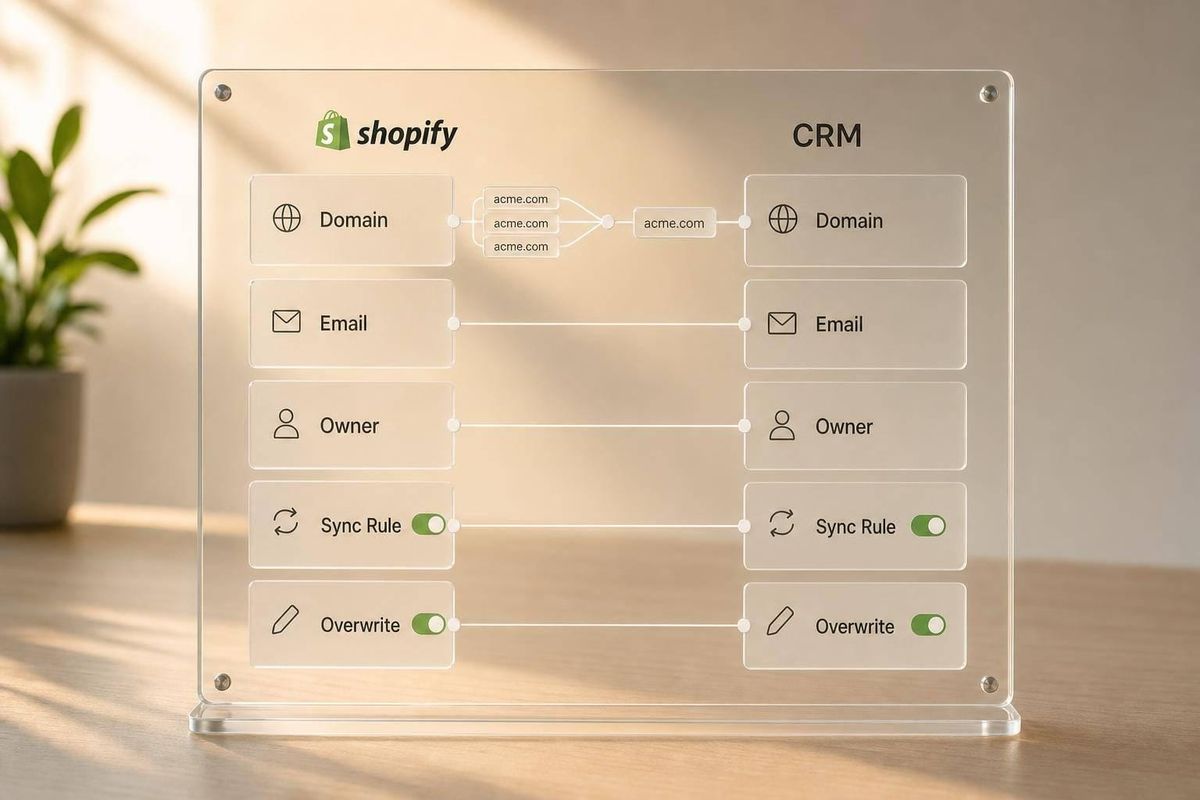
If your Shopify sales data does not share one account key, your CRM will drift fast. I’d fix that by using normalized domain for accounts, lowercase email for contacts, and clear overwrite rules before any sync goes live.
Here’s the full point in plain English: Shopify merchant data often comes from store pages, contact tools, enrichment tools, and the CRM itself. Those sources do not agree. That is why one merchant can turn into multiple account records, mismatched contacts, and bad routing. In the data cited here, 75.3% of Shopify stores have contact data, 32.9% have a verified contact, 31.8% have a verified contact but no buyer-role mapping, and only 1.1% are ready for outreach. That gap is what your field mapping has to fix.
If I were setting this up, I would keep the model simple:
- Map Shopify objects first: Customer, Company, Order, and Company Location
- Split fields by record type: account, contact, and buying signal
- Pick one system of record per field
- Match accounts by normalized domain
- Match contacts by normalized email
- Lock rep-entered fields from imports and enrichment
- Use one-way, two-way, and conditional sync rules
- Test 50–100 accounts before production
- Keep duplicates under 5% before automation
A few rules matter more than the rest:
- Store identity is not the same as contact identity
- Buyer role should not be mixed into raw contact data
- Enrichment should backfill blanks, not replace CRM truth
- Signal-based outreach works only when dedupe and suppression are clean
- Current customers and open deals should sync into outreach suppression lists
Here’s the short version of the model:
| Area | What I’d use |
|---|---|
| Account key | Normalized root domain |
| Contact key | Lowercase email |
| Account fields | Store/company identity, commerce data, geography |
| Contact fields | Name, email, phone, title, role, consent |
| Signal fields | Traffic, app stack, lead score, growth changes |
| Safe two-way sync | Owner, pipeline stage, opt-out status |
| Never overwrite | Rep notes, verified phone, primary contact, open opportunity status |
Bottom line: I’d treat Shopify CRM mapping as a data-governance job, not just a sync setup. When field ownership, match rules, and sync logic are set from the start, sales reps work cleaner records and outreach triggers hit the right accounts.
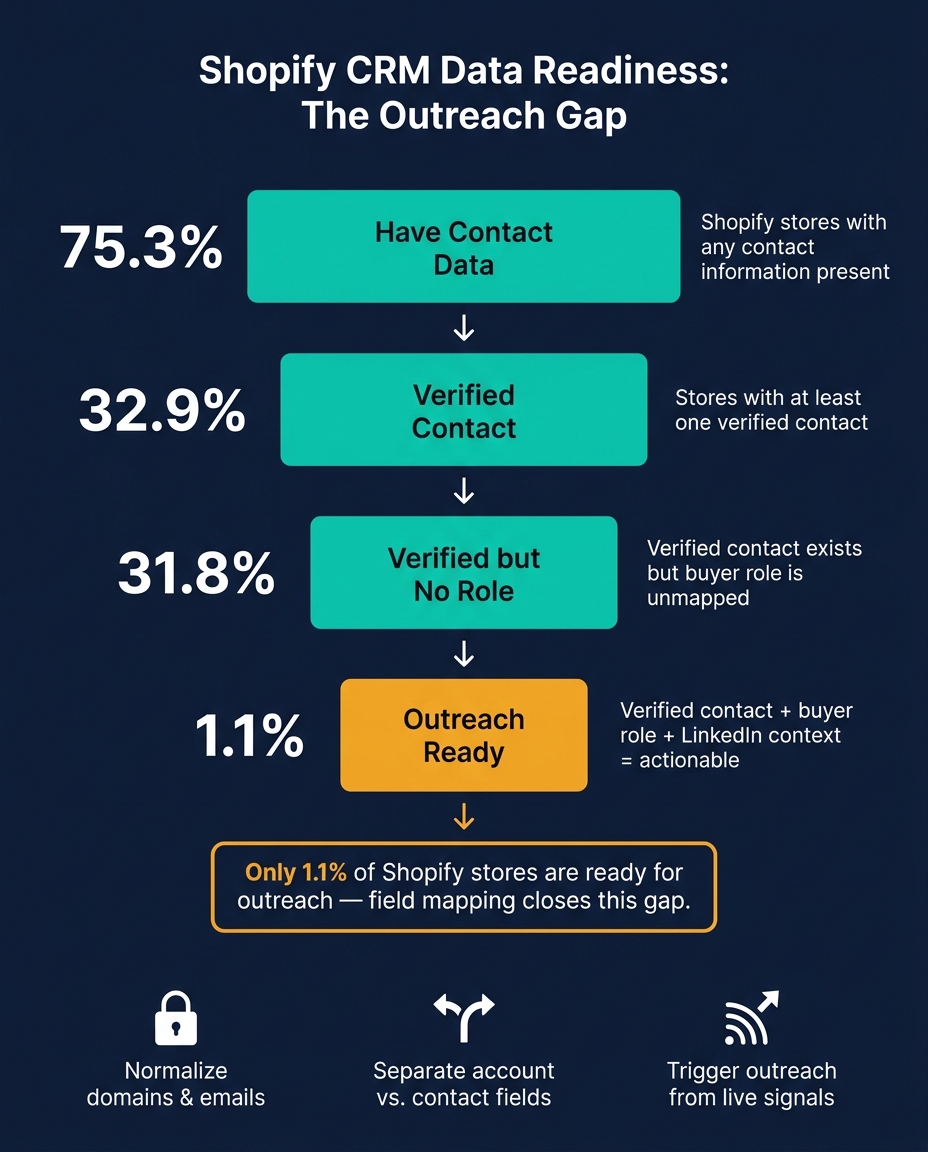
Shopify CRM Data Readiness: The Outreach Gap Explained
Shopify Pro for Zoho CRM - New UI and Advanced Features
sbb-itb-61169e3
1. Map Shopify source objects before touching the CRM
Shopify splits merchant data across four objects. Before you build a single CRM field, decide what each object is for.
That step matters more than it sounds. If you skip it, contact data ends up on account records, order data gets scattered around the CRM, and your team starts working from messy records.
Customer, Order, Company, and Company Location objects explained
The Customer object stores identity and contact details, especially email, phone, and tags. For sales teams, this usually becomes the contact record you can reach out to, while role details can be filled in elsewhere.
The Order object is your buying signal. Total spent and last order date show how active a merchant is and how much they buy.
The Company object is your account record. It groups data by business entity instead of by person or by single purchase.
Company Location adds location-level detail. That's a big deal when one merchant runs more than one store location.
Put simply:
- Customer = contact
- Company = account
- Order = buying signal
- Company Location = location attribute
These objects help you decide where each value belongs: on an account record, a contact record, or a buying-signal field.
Which source fields are worth carrying into sales systems
Not every Shopify field needs to go into your CRM. Most of them don't.
The fields worth mapping are canonical account name, website domain, customer email, phone, tags, order count, total spent, last order date, and billing state.
Use MM/DD/YYYY for date fields. For spend values, use standard U.S. currency formatting like $125,000.00.
You can also use tech-stack gaps as a priority signal when ranking accounts. It's a simple way to spot which merchants may be a better fit for outreach.
Build a field-mapping matrix before implementation
A field-mapping matrix is the source of truth for field names, field types, ownership, and overwrite rules.
Write the mapping before any CRM field exists. That way, every sync downstream follows the same rules instead of turning into a patchwork of one-off decisions.
| Shopify Source Object | Source Field | CRM Destination Object | CRM Field Name | Data Type | Ownership | Overwrite Rule | Dedupe Key |
|---|---|---|---|---|---|---|---|
| Company | Company Name | Account | Account Name | String | Sales Ops | Always | Yes |
| Company | Website Domain | Account | Website | URL | Sales Ops | Never | Yes |
| Customer | Contact | Marketing | Never | Yes | |||
| Order | Total Spent | Account | Lifetime Value | Currency ($) | Finance | Always | No |
| Order | Last Order Date | Account | Last Purchase | Date | Sales | Always | No |
| Company Location | State | Account | Billing State | String | Sales | Conditional | No |
| Customer | Tags | Contact | Persona Tags | Multi-select | Marketing | Append | No |
Use domain for account matching and email for contact matching.
This matrix becomes the reference point for the account/contact model in the next step.
Next, split these source fields into account, contact, and buying-signal records.
2. Design the CRM model: accounts, contacts, and buying signals
Once your field-mapping matrix is set, follow our Shopify store guides to sort every field into one of three buckets: account, contact, or buying signal. If those lines get fuzzy, reps end up staring at cluttered records, and automations start firing off the wrong data. From there, split the fields into the right record types: account, contact, and buying-signal records.
What belongs on the account record
The account record is what drives reporting, routing, and forecasting. If a field describes the store or company as a business, it should live there.
That includes identity fields like Account Name - normalized and cleaned up so it doesn't include legal suffixes or -myshopify noise - plus Normalized Domain like brand.com instead of brand.myshopify.com, and Platform such as Shopify or Shopify Plus. Commerce fields like Order Count, Total Spent, and Last Order Date belong on the account too. So do geography fields like Country and State for territory routing.
One call teams often miss is this: should the account be the store or the parent company? Use store-as-account when the product is billed at the store level. Use company-as-account when one contract covers multiple stores. Most teams start with store-as-account because Shopify data is store-level. Then they connect stores to a parent company with a lookup field for rollup reporting. That choice affects dedupe, routing, and rollup reporting.
What belongs on the contact record
Contact records should hold anything tied to a person, not the business. That means first name, last name, email, phone, job title, and a normalized Role picklist.
Two fields get skipped all the time, even though they matter a lot: Relationship to Store and Marketing Consent Status. For Relationship to Store, examples include store operator, brand HQ, agency, or freelancer. For Marketing Consent Status, use values like Opted-in, Transactional-only, Opted-out, and Unknown.
Consent data should also include source and timestamp fields such as consent_source and consent_updated_at. That gives you a clean record for compliance and internal governance.
If an account has more than one decision-maker, use a Primary Contact checkbox on the contact record instead of putting a primary email on the account. That setup works better in practice. You might have an Ecommerce Manager handling day-to-day work and a Founder making the final call on the same account. No need to keep syncing a duplicate field back and forth.
Where external prospecting data fits in the CRM
External enrichment from Shopify brand prospect lists helps fill gaps and supports scoring. But it should never overwrite canonical CRM fields. The better setup is to create dedicated enrichment fields right next to the canonical account fields.
When enrichment data enters the CRM, map it to fields like storecensus_revenue_band, storecensus_platform, storecensus_apps, storecensus_country, storecensus_state, storecensus_theme, and storecensus_growth_signal. Your canonical platform and country fields should stay untouched.
Here’s the rule:
- If a core field is blank, enrichment can backfill it.
- If there’s a conflict, keep the CRM value and log the conflict in the enrichment field.
That gives your team a clean way to use enrichment for prioritizing fast-growing accounts without muddying the source of truth. Once the model is set, lock down field ownership and dedupe rules so the sync stays predictable.
3. Set naming rules, field ownership, and dedupe logic
Field mapping only works when naming, ownership, and matching rules are locked in. Before anything syncs, match and qualify by normalized domain.
Canonical naming and normalization rules
Normalization makes records line up across tools instead of drifting apart. Apply these rules at entry:
- Domains: Remove
www.and lowercase the full value. Use the normalized domain as the account key. - Emails: Lowercase them and trim extra spaces.
- Job titles: Map them to a controlled role picklist. A ladder like Marketing > Ecommerce > Founder works far better than loose free-text entries.
The big point here is simple: use one accepted format per field when data comes in, not later during cleanup.
Once those formats are set, give each field one clear owner so bad data doesn't slip into the CRM.
Assign a single owner for every field
| Field | Primary Owner | Editable by Reps? |
|---|---|---|
| Canonical store identity | Shopify / Storefront | No - locked |
| Traffic and tech signals | Store intelligence tool | No - locked |
| Verification status | Verification service | No - locked |
| Job title / role | Enrichment tool | Yes |
| Account owner | CRM | Yes |
| Lifecycle stage | CRM | Yes |
| Consent / opt-in | Shopify / Marketing tool | No - locked |
Locked fields help protect data integrity. In the source data, only 32.9% of Shopify stores have a verified contact [1], so verification should stay system-managed instead of being changed by reps.
After ownership is clear, set dedupe rules so there's no confusion about which record wins when values clash.
Dedupe and matching rules for accounts and contacts
Match accounts by normalized domain first. Use company name only as a fallback. For contacts, anchor matching on normalized email.
Also, watch for one contact tied to more than one Shopify entity. That happens a lot in the Shopify world. The same person may run multiple stores, brands, or regional domains. When that happens, don't merge the accounts. Keep each relationship separate, then use ICP match logic to decide which store should get priority in a campaign.
Generic inboxes need their own lane. Route them for low-touch account messaging instead of mixing them with a named executive contact.
For conflicts, keep the record with the strongest verified identity as the master. A simple hierarchy works well:
- verified role with LinkedIn
- verified generic inbox
- found/matched
- bounced
Block bounced emails at the contact level. Suppress the full account only when the account itself should be excluded, such as an active customer or a poor ICP fit.
Use these match keys and suppression rules to control what syncs in the next step.
4. Define sync logic across the CRM, prospecting, and outreach tools
Once ownership and matching rules are in place, the next step is sync behavior. This is where teams decide which fields move, where they go, which way they sync, and when updates are allowed.
That matters more than it sounds. If the rules are loose, enrichment tools can wipe out rep notes. Outreach tools can also start sequences for accounts that are already in an active deal. That’s the kind of mess that snowballs fast.
One-way, two-way, and conditional sync policies
Raw storefront emails should move one-way into the CRM. They don’t include buyer-role detail, so they should only create or update a contact when the account already exists.
Use two-way sync only for Account Owner, Pipeline Stage, and Opt-out Status. Those fields need to stay aligned between the CRM and the outreach tool in near real time. Otherwise, a rep can end up sequencing an account that just entered a live deal.
Most enrichment fields belong under conditional sync. Job Title, LinkedIn URL, and Verified Email should update only if the CRM field is blank or has been stale for 90+ days. B2B contact data decays at about 22.5% per year [3], so a timestamp rule is a clean way to handle that decay without letting old enrichment replace newer rep-sourced detail.
Use this as the default sync matrix.
| Sync Type | Fields | Trigger |
|---|---|---|
| One-Way (Source → CRM) | Storefront Email, Source URL, Store Category | Create if domain is new |
| Two-Way (CRM ↔ Outreach) | Account Owner, Pipeline Stage, Opt-out Status | Immediate two-way sync |
| Conditional (Enrichment → CRM) | Job Title, LinkedIn URL, Verified Email | Update if blank or stale 90+ days |
| Signal-Based (Shopify → CRM) | Traffic Tier, App Stack, Lead Score | Refresh weekly |
Anything outside this matrix should stay locked.
Fields that should never be overwritten
Some fields need a hard stop. Manually verified phones, rep notes, primary contact, and open opportunity status should never be changed by an import, enrichment run, or webhook.
By contrast, merchant signals like traffic tier, app stack, and lead score are safe to refresh on a set cadence [1][3]. That’s not a bug. It’s the whole point of signal-based routing.
Here’s the practical rule:
- If a rep had to use judgment to set the value, lock it.
- If a system can observe it from public data, let it refresh.
Route outreach from merchant signals instead of static lead lists
Outreach should start from account-level signals, not static lists. A store passing the 50,000+ traffic mark, installing 5+ apps, or adding a Meta Pixel for the first time are all useful triggers [1]. Each one points to growth intent.
That matters because only 1.1% of Shopify stores are "ready now" with a verified outreach-role contact and LinkedIn context [1]. So instead of blasting the same cold export again and again, route outreach to that small group when live signals say the timing is right.
Also sync Current Customers and Open Opportunities into outreach as suppression lists. That keeps active accounts out of new sequences.
5. Roll out the mapping in the right order and validate it
Implementation order: audit, map, govern, test, then automate
Once you've set field ownership and sync rules, roll things out in this order. If you skip steps, you open the door to duplicate accounts and messy source records. This is where field mapping stops being a planning exercise and starts affecting live data.
Start with an audit. Export every CRM account, contact, and opportunity field. Then label each one as active, duplicate, legacy, or unknown owner. Pay close attention to fields that may already hold Shopify merchant data, such as store URL, platform, revenue, and plan type. Write down how each field gets filled and who maintains it. That work helps you spot conflicts before new data piles on.
Then map. Build your field-mapping matrix. Match each Shopify source field to a CRM destination, data type, transformation rule, and system of record. Keep a transformation column in the sheet. Currency should convert to USD formatting. Dates should land as MM/DD/YYYY.
Govern before you sync. Give each field one owner, document overwrite rules, and lock the schema. After that, run a controlled test with 50–100 accounts in a sandbox. Check that duplicate domains merge into one account, that contacts connect to the right account through domain matching, and that no enrichment tool has quietly overwritten a manually curated field.
If the sandbox test passes, move to production only after your validation checks clear.
Validation checks before the system goes live
Before go-live, make sure the data can support routing and outreach. Keep duplicates under 5% before you scale automation [2][4][5].
Beyond duplicates, run these checks:
| Check | What to Verify |
|---|---|
| Domain normalization | www.brand.com, brand.com, and brand.myshopify.com all resolve to one account |
| Account–contact association | contacts from prospecting data attach to the correct account via domain key |
| Currency and date formatting | Revenue fields show USD with correct separators; dates display as MM/DD/YYYY |
| Consent handling | Opt-out status is present on every contact and syncs correctly to the outreach tool |
| Order and spend fields | Total spent and order count match the source data after sync |
If any of these checks fail, fix them before turning on routing automation. Outreach built on bad data burns through sequences and leaves you with even more cleanup later.
Conclusion: the minimum governance model for clean Shopify CRM data
The minimum governance model is pretty simple: map Shopify objects before touching the CRM, keep account and contact fields separate, and assign one system of record to each field. Use a dedupe key - normalized root domain for accounts and lowercase email for contacts - and use it the same way across every import and sync.
Signal-based routing only works when the data underneath it is clean. If a merchant signal triggers outreach but the account is duplicated, or the contact doesn't have a usable email, that signal goes nowhere. The governance model laid out across this playbook - ownership, overwrite rules, dedupe keys, and staged rollout - is what turns merchant signals into something your team can act on instead of noise.
FAQs
How do I choose between store-as-account and company-as-account?
It depends on your business model.
For B2C stores, map Shopify customers straight to CRM Contacts.
For B2B stores, map the Shopify company to an Account, then link individual buyers as Contacts under that Account.
In both cases, use the store’s website domain as the main key for matching and deduplication. That helps keep data clean and reduces the risk of account leakage.
What should I do when one contact is tied to multiple Shopify stores?
Avoid duplicate contact records. Start with email-based matching as your main identity method, and use phone numbers as a backup when email isn’t available.
In your CRM, sync Shopify companies to separate Account records, then map buyers to Contacts under each Account. Use the store domain as the match key for Accounts so data and interaction history stay connected to the right store.
How can I test field mapping before turning on automation?
Start with a small pilot in a sandbox using 100 to 200 records. That gives you room to check match quality, see how overwrites behave, review source logs, and test deduplication before you turn on full automation.
Next, run user acceptance testing with real-world cases. Create new leads, confirm the data maps to the right fields, and make sure unsubscribe requests sync properly. This is where small issues tend to show up before they become a bigger mess.
Before going live, set up a weekly QA check. Compare exported data against source metrics and scan for anomalies. If the numbers don’t line up, or something looks off, it’s a sign to dig in before the system runs at scale.