
Shopify Contact Enrichment: Best Practices
Qualify stores by traffic and apps, enrich verified role-specific contacts, and re-verify regularly to improve Shopify outreach.


Reaching out to Shopify store owners often fails because of incomplete or incorrect contact data. Most stores lack verified, role-specific contacts, which limits your ability to target decision-makers effectively. Here's how contact enrichment solves this problem and improves your outreach:
- Core Data Matters: Focus on verified email addresses, job titles, LinkedIn profiles, and store details.
- Target Decision-Makers: Tailor your pitch to roles like Marketing Lead, Ecommerce Manager, or Founder.
- Avoid Generic Emails: Skip
info@addresses and aim for personalized outreach to real people. - Leverage App Data: Use installed apps and traffic tiers to qualify stores before enrichment.
- Validate Regularly: Re-verify contact data every 3–6 months to maintain accuracy and sender reputation.
Tools like StoreCensus make this process faster, helping you identify decision-makers and sync real-time updates with your CRM. Keep reading to learn how to enrich Shopify contact data effectively and avoid common pitfalls. For a broader look at prospecting, see our guide on how to find and target Shopify stores.
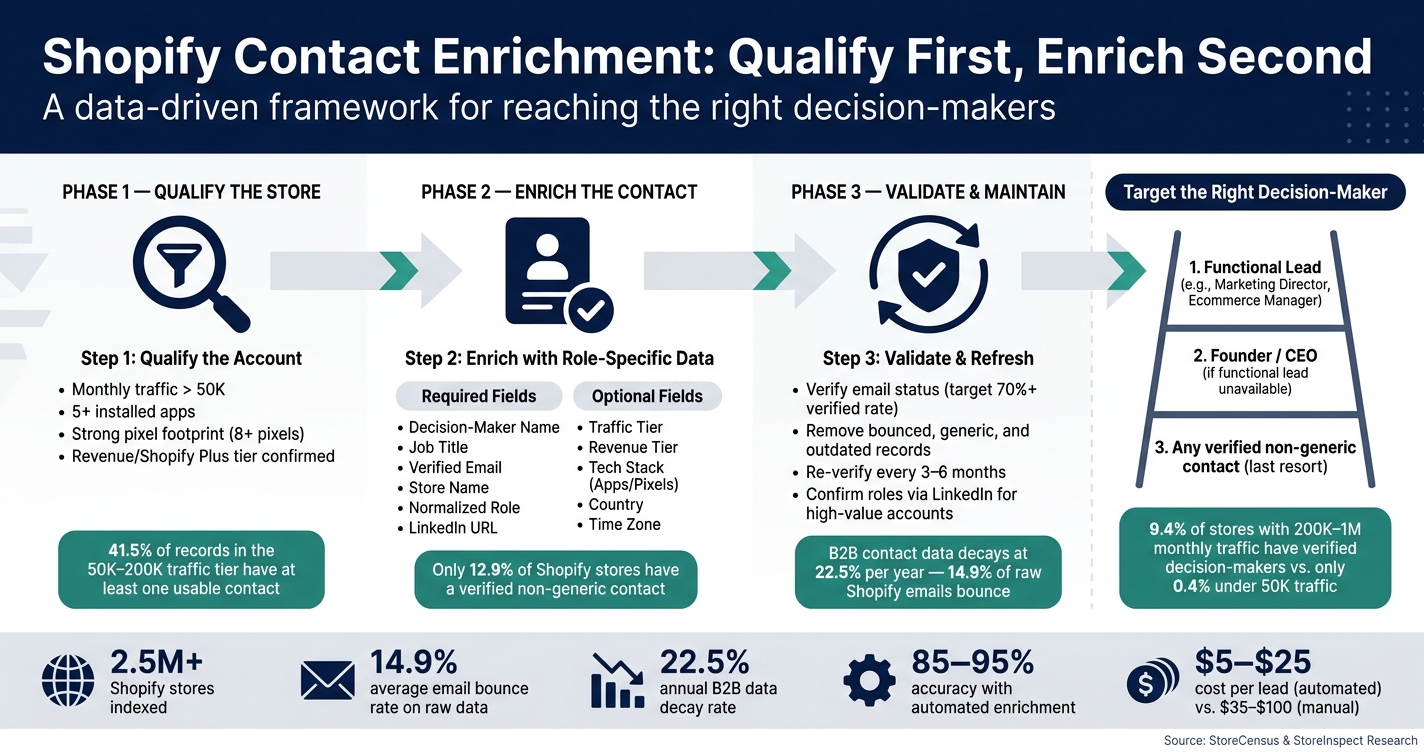
Shopify Contact Enrichment: Qualify First, Enrich Second
Key Data Fields for Shopify Contact Enrichment
When enriching Shopify contact data, it's essential to focus on the fields that matter most. Prioritizing the right data not only saves time but also protects your sender reputation by ensuring precise and effective outreach.
Required Fields for Contact Enrichment
At the heart of any enriched record are these key fields: decision-maker name, job title, verified email address, store name, and a normalized role (like Founder, Marketing Lead, or Ecommerce Manager). These fields ensure you're reaching the right person with the right message. Without them, your outreach risks being ineffective.
One critical element here is the verified email address, which has undergone deliverability checks. Why is this so important? Raw Shopify brand prospect lists can be risky - approximately 14.9% of email rows typically bounce. Sending emails to unverified lists at scale can push your bounce rate above 5%, triggering spam filters and harming your domain's reputation.
Another essential field is the LinkedIn URL, which helps confirm that the contact still holds their listed role. It also provides an alternative outreach channel, which is crucial given that only 0.4% of Shopify stores have more than one verified decision-maker on record.
Optional Fields for Deeper Targeting
Once the core fields are in place, optional data points allow for more precise targeting and personalization. Fields like traffic tier, revenue tier, and Shopify Plus status can help you determine if a store has the scale and budget to align with your offer.
Additionally, technology stack data - including details on installed apps, pixels, and themes - can uncover specific pain points or opportunities that your solution can address. Including country and time zone information further ensures that your outreach is timely and tailored to regional contexts.
Here’s a breakdown of how these fields contribute to your strategy:
| Field Type | Specific Fields | Why It Matters |
|---|---|---|
| Required (Core) | Decision-Maker Name, Job Title, Verified Email, Store Name | Ensures basic deliverability and enables personalization |
| Required (Context) | Normalized Role, LinkedIn URL | Confirms authority and supports multi-channel outreach |
| Optional (Segmentation) | Traffic Tier, Revenue Tier, Shopify Plus Status | Qualifies the prospect's operational scale and budget |
| Optional (Personalization) | Tech Stack (Apps/Pixels), Theme, Category | Reveals pain points and technical gaps |
| Optional (Logistics) | Country, Time Zone | Facilitates timely and regionally compliant outreach |
The "Account-First" Approach
Before diving into contact enrichment, it's important to qualify the store itself. As the StoreInspect Team advises:
"Do not reveal contacts until the account is worth contacting. Do not send until the person matches the pitch."
- StoreInspect Team
This approach ensures you’re only spending enrichment credits on stores with high potential. Indicators of a valuable store include monthly traffic exceeding 50K, five or more installed apps, and a robust pixel footprint. Stores in the 50K–200K monthly traffic tier strike the best balance, as 41.5% of records in this range have at least one usable contact. Skipping this step can lead to wasted resources on low-value prospects. For more detailed strategies, see our Shopify store guides.
sbb-itb-61169e3
How to Identify Decision-Makers in Shopify Stores
Figuring out who calls the shots at a Shopify store can be tricky. Most stores don’t offer direct, reliable contact information, which often causes prospecting efforts to stall. To tackle this, it's essential to focus on enriching data with verified, role-specific details. Here’s how you can effectively identify and prioritize the right decision-makers.
Role-Based Enrichment Strategies
Not every pitch should land in a founder's inbox. A smarter way is to use a role ladder: start with the functional lead most aligned with your offer, then move up to the Founder or CEO if that role isn’t available, and finally target any verified non-generic contact.
| Your Offer | Primary Contact | Why |
|---|---|---|
| Email marketing or lifecycle flows | CMO, Marketing Director | They control the marketing budget. |
| CRO, Shopify apps, retention tools | Ecommerce Manager/Director | They oversee product and revenue decisions. |
| Shipping, returns, inventory software | Operations Manager, COO | They handle fulfillment and logistics. |
| Theme rebuilds or complex migrations | CTO, Developer | They are the technical decision-makers. |
| Strategic or company-wide tools | Founder/CEO | They have the final say on major investments. |
For larger stores, decision-maker data is often easier to find. For instance, 9.4% of stores with 200K–1M monthly traffic have verified decision-makers listed, compared to just 0.4% of stores with under 50K monthly traffic. This means that for smaller stores, the founder is often your best bet, while for larger ones, targeting department heads is usually more effective.
Once you’ve identified the right contact, it’s crucial to steer clear of generic inboxes that can derail personalized outreach efforts.
Avoiding Generic Contact Inboxes
Generic inboxes like info@ or hello@ are common across Shopify stores, but they’re rarely effective for meaningful outreach. In fact, only 12.9% of Shopify stores have a verified non-generic contact. This means that most emails scraped from footers or contact pages won’t reach someone who can make budget decisions.
"A generic info@ inbox may be technically reachable and still be useless for a $5,000 implementation pitch." - StoreInspect Team
For high-value offers, it’s best to exclude generic email addresses from your outreach campaigns. A good rule of thumb: if the email doesn’t belong to a real person or specific role, use it only as a last resort. To ensure accuracy, cross-reference contacts on LinkedIn to confirm their identity and current role. After all, a verified email only guarantees deliverability - not that the person is still employed in that position.
Using App Usage Data to Improve Enrichment
App Usage as a Signal of Business Needs
The apps a Shopify store uses can tell you a lot about its priorities and where it might need help. For example, a store running Klaviyo and Judge.me is clearly focused on retention and conversion. On the other hand, a store with just a default theme and a couple of apps is likely founder-led and in its early stages. These technical details often hint at the store's buying intent.
One key indicator of a store's maturity is the number of apps it uses. Stores with less than 50,000 monthly visitors average just 2.7 apps, while those in the 50,000–200,000 range average 8.1 apps, and stores with 200,000–1,000,000 visitors average 11.1 apps. Beyond just the number of apps, the specific tools installed can reveal actionable insights. For instance:
- A store using Meta and TikTok pixels but lacking an attribution tool shows a gap in measurement capabilities.
- A beauty or food store with email tools but no subscription app presents a clear opportunity for subscription-focused SaaS.
These insights help segment stores more effectively, even before diving into further data enrichment.
Segmenting Stores by Technology Stack
Once you've identified these app signals, you can use them to segment stores and tailor your outreach. Start by focusing on stores with 5+ apps and 50,000+ monthly visitors. This combination often indicates businesses that are already investing in software and likely have the revenue to expand further. From there, look for specific app signals that highlight gaps you can address.
| Offer Type | Target App Signal | Potential Gap |
|---|---|---|
| Retention Agency | Klaviyo/Omnisend | Missing loyalty or referral app |
| CRO Agency | Reviews (Judge.me/Loox) | Missing upsell or personalization tools |
| Analytics SaaS | Active Meta/TikTok pixels | Missing advanced attribution tools (e.g., Triple Whale/Elevar) |
| Support/AI SaaS | High traffic + paid ads | No visible helpdesk or chat tool (e.g., Gorgias/Zendesk) |
| Subscription SaaS | Beauty/Food category + email | No subscription app (e.g., ReCharge/Bold) |
When reaching out to stores based on these gaps, be precise in your messaging. Instead of saying, "You don't have X", use language like, "If X isn't visibly present on your storefront." This approach is more accurate since some tools might operate behind the scenes and not show up in a standard tech stack scan.
Tracking pixels also provide valuable insights. Stores with 8+ pixels - from platforms like Meta, Google, TikTok, and Pinterest - show a strong focus on measurement and acquisition. These businesses are often prime candidates for high-ticket services. Combining pixel data with app counts and traffic tiers helps confirm a store's level of sophistication.
Validating and Checking Data Quality
Once your Shopify contact data is enriched, the next step is validation. This process is essential to safeguard your sender reputation and improve outreach effectiveness.
Key Validation Steps
The first priority is verifying email statuses to maintain bounce rates below 5% and steer clear of spam filters. Here's how to classify and handle email statuses:
| Email Status | What It Means | Action |
|---|---|---|
| Verified | Successfully passed SMTP checks | Safe to send immediately |
| Found / Matched | Derived from patterns or web sources | Verify before sending |
| Catch-all / Guessed | Domain accepts all emails | Risky; test in small batches or skip |
| Bounced | Mailbox doesn't exist | Remove permanently |
It's critical to ensure that at least 70% of your list is verified before launching any outreach campaigns. Tools like ZeroBounce, NeverBounce, or Clearout can handle bulk email verification efficiently, costing around $0.001–$0.008 per email. This small investment can prevent the costly consequences of being flagged by spam filters or blacklisted domains. As a final step, weed out contacts that are non-decision-makers, generic inboxes (like info@ or support@), or outdated records. These measures ensure your contact list is actionable and reliable.
Avoiding Outdated or Incorrect Data
Verification doesn't just improve deliverability - it also strengthens your targeting efforts. However, it's important to remember that email verification only confirms inbox activity, not whether the contact is still employed at the same company. B2B contact data tends to decay at a rate of 22.5% per year, largely due to job changes and company reorganizations. This means even a list that's just six months old could already have significant inaccuracies.
"Email verification is not employment freshness. A verified inbox still needs role, company, and recency checks before high-touch outreach." – StoreInspect Team
To maintain accuracy, prioritize records verified within the last 30 days. Re-verify any data older than 90 days and refresh saved lists every 3–6 months. For high-value prospects - such as stores with over 200,000 monthly visitors - take the extra step of manually confirming roles via LinkedIn or the store's "About Us" page before sending personalized outreach. By combining these practices, you ensure your Shopify contact data is not only verified but also up-to-date, setting the stage for more effective and targeted communication.
Using StoreCensus for Shopify Contact Enrichment
After validating your contact data, the next step is keeping it accurate and actionable. That’s where StoreCensus comes in. With access to real-time intelligence on over 2.5 million Shopify stores, this tool is designed to help businesses discover and enrich contact data effectively.
Discovering and Enriching Shopify Store Data with StoreCensus
StoreCensus doesn’t just hand over a list of generic emails. Instead, it identifies specific buyer roles - like Founder, CMO, Ecommerce Manager, or Operations Lead - based on a role ladder approach. This ensures you’re targeting the right decision-maker for your pitch. For instance, if you’re promoting a shipping app, you’d focus on the Operations Lead, whereas email marketing services would be better suited for the Marketing Lead.
You can also filter for verified, non-generic contacts upfront. Combined with store-level insights such as installed apps, revenue tiers, and traffic estimates, StoreCensus helps you qualify leads before spending an enrichment credit. This streamlined approach ensures your outreach is targeted and aligned with the best practices for contact enrichment.
Automating Data Updates with StoreCensus
Static contact lists can quickly become outdated, but StoreCensus solves this problem by automatically tracking key store changes in real time. These changes include app installations, removals, theme updates, and growth milestones. By monitoring these signals, you can trigger automation workflows in your outbound tools, ensuring your outreach is always timely and relevant.
StoreCensus integrates seamlessly with platforms like HubSpot, Pipedrive, Close, Apollo, Instantly.ai, Smartlead, and Zapier. This integration keeps your CRM updated without the need for manual data entry. The automated enrichment process is fast and highly accurate, processing leads within minutes with an accuracy rate of 85–95%, compared to hours and a 60–75% accuracy rate with manual methods.
| Metric | StoreCensus Enrichment | Manual Qualification |
|---|---|---|
| Time per lead | Minutes | Hours |
| Leads processed daily | Thousands | 20–50 |
| Accuracy rate | 85–95% | 60–75% |
| Cost per lead | $5–$25 | $35–$100 |
| Data updates | Automated, real-time | Manual, prone to delays |
Maintaining and Syncing Enriched Data
CRM Integration and Data Syncing
After enriching and verifying your contact data, the next step is ensuring it seamlessly integrates into your tools and stays updated. The success of this process largely depends on how you sync the data, which can vary based on the complexity of your tech stack.
| Integration Method | Best For | Key Benefit |
|---|---|---|
| Native Connectors | Common CRMs (e.g., HubSpot, Klaviyo) | Quick setup, minimal maintenance, reliable performance |
| iPaaS (Zapier, Patchworks) | Complex multi-tool systems | Links tools without direct native integrations |
| APIs (GraphQL) | Tailored workflows | Fine-tuned control over fields and sync timing |
| Custom Code | Proprietary or older systems | Full control for handling intricate data needs |
Before syncing, clean your data to avoid errors. Normalize email addresses by converting them to lowercase and trimming any extra spaces. Also, remove duplicate records using normalized email deduplication. For instance, in a dataset of 712,801 records, this process eliminated 34,388 duplicates, which would have otherwise disrupted accurate reporting. Additionally, suppress bounced emails, generic inboxes (like info@ or support@), existing customers, and open opportunities before pushing data into sales tools.
When exporting data to your CRM, include standardized fields such as store name, domain, category, traffic tier, contact name, title/role, email, verification status, and LinkedIn URL. This consistency prevents workflow errors and ensures smooth automation. According to 74% of salespeople, integrated CRM systems significantly enhance access to customer data, but this benefit depends entirely on the quality and format of the data.
Once your CRM is populated with clean, structured data, it’s essential to keep it current as businesses evolve.
Refreshing Data as Stores Change
Regular updates to your data are key to maintaining effective outreach and protecting your sender reputation. In fast-paced environments, like the Shopify ecosystem, data becomes outdated quickly. Roles often shift, and public records may lag behind these changes.
Here’s a suggested refresh schedule:
| Verification Age | Action |
|---|---|
| 0–30 days | Safe to send; maintain high deliverability standards |
| 31–90 days | Generally reliable; confirm employment for high-value accounts |
| 91–180 days | Re-verify email status before outreach |
| 180+ days / No timestamp | Perform a full refresh - verify role, company, and email |
At a minimum, aim to re-verify your entire contact database every 3–6 months. Strive for a 70%+ verification rate before sending emails. Falling below this threshold indicates poor data quality, which can harm your sender reputation. For high-value accounts - those with 200,000+ monthly visitors - syncing 2–5 contacts per store, such as the Founder, CMO, or Ecommerce Manager, can boost response rates. However, this level of detailed outreach is best reserved for a small portion of your overall list.
Conclusion
Shopify contact enrichment transforms raw contact data into a precise, conversion-ready pipeline. Why does this matter? Because raw contact data from Shopify stores often falls short for outreach. For instance, 14.9% of email rows bounce, and only 1.1% of stores include a verified, role-specific contact with LinkedIn details.
A disciplined, two-step approach works best: qualify first, enrich second. Start by using store-level signals - like traffic tiers, app stacks, and growth metrics - to decide which top Shopify stores deserve enrichment efforts. Once you've identified the right accounts, focus your pitch on the right decision-makers. For example, target Marketing and Growth roles for attribution tools, or Operations and CX teams for logistics and returns solutions.
Maintaining data quality is critical. B2B contact data doesn’t age well, with decay rates often reaching 22.5%–25% per year. To keep your pipeline healthy, re-verify contacts regularly, suppress bounced emails, and aim to target 2–3 contacts per store. These steps not only protect your sender reputation but also ensure your outreach stays effective from start to finish.
If you're looking for a way to streamline this process, StoreCensus offers an all-in-one solution. It filters a list of Shopify stores by revenue, tech stack, and growth signals, identifies verified decision-maker contacts, and automates workflows when stores show changes. By replacing manual, credit-heavy research with a smart, continuously updated system, it simplifies and strengthens your outreach strategy.
FAQs
What data fields should I enrich first for Shopify outreach?
To enhance Shopify outreach, focus on gathering decision-maker contacts (like owners, CEOs, or marketing heads), verified email addresses to minimize bounce rates, and store activity signals such as recent app installs or updates. These details are crucial for identifying high-growth stores and boosting engagement. Decision-maker information is particularly important, as only a small fraction of stores have verified contacts available.
How do I choose the right decision-maker to contact at a Shopify store?
When reaching out to potential clients, it's essential to focus on verified, role-specific contacts like owners, founders, or CEOs. These individuals typically have the authority to make purchasing decisions, making them key players in your outreach strategy.
Identifying these decision-makers can be challenging, especially in high-traffic stores, but their influence makes the effort worthwhile. To ensure your contact data is accurate and current, leverage data enrichment tools. These tools help verify roles and keep your information up to date, allowing you to prioritize outreach to stores with trustworthy decision-maker details. This approach increases the likelihood of meaningful and effective communication.
How often should I re-verify Shopify contact data to avoid bounces?
Re-checking your Shopify contact data every 3 to 6 months is a smart way to keep it accurate and reduce bounce rates. Staying on top of updates ensures your data remains clean and dependable, making your outreach efforts more effective.



