
Shopify API Authentication: Best Practices
Secure Shopify apps with OAuth, expiring offline tokens, HMAC webhook verification, minimal scopes, and per-store token isolation.


Shopify API authentication ensures your app securely interacts with store data while protecting sensitive information. This process involves verifying your app's identity and managing permissions through various methods like OAuth 2.0, token exchange, session tokens, and API keys. Starting April 1, 2026, Shopify will require all public apps to use expiring offline access tokens, replacing static credentials to enhance security.
Key takeaways:
- Authentication Methods: Choose based on app type (e.g., OAuth for public apps, token exchange for embedded apps).
- Token Security: Encrypt tokens, avoid plaintext storage, and implement proactive refresh mechanisms.
- Access Scopes: Request only necessary permissions to minimize risks.
- Multi-Store Integration: Use per-store token isolation and rate control to manage traffic effectively.
To build secure Shopify apps, follow OAuth standards, verify webhooks, and prioritize short-lived tokens for frontend-backend communication. These practices are essential for passing Shopify's app review and maintaining merchant trust.
How to Get a Shopify Access Token (OAuth) – Step-by-Step Guide
Understanding Shopify Authentication Models
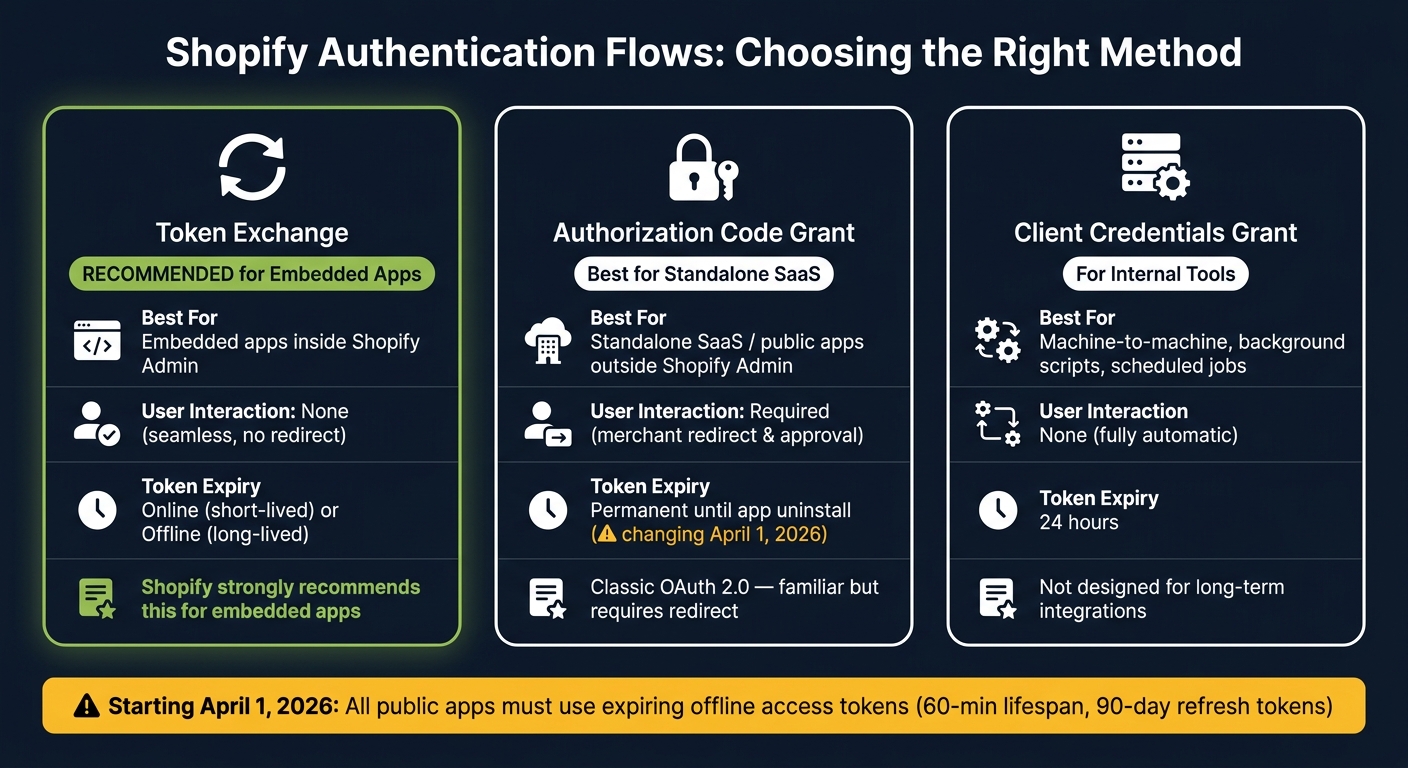
Shopify OAuth Flows Compared: Which Authentication Method Is Right for Your App?
Authentication vs. Authorization in Shopify
In Shopify, authentication (AuthN) and authorization (AuthZ) serve two distinct purposes. Authentication verifies who is making the request, while authorization determines what the app is allowed to do.
- Authentication answers: Who is making this request? Shopify uses session tokens - short-lived JWTs - to verify that a request from your app's frontend originates from a valid shop or user.
- Authorization answers: What is this app allowed to do? This is managed through API access tokens, which are paired with specific access scopes like
read_productsorwrite_orders.
"Session tokens are for authentication, and aren't a replacement for authorization." - Shopify Developer Documentation
In practice, session tokens confirm identity, while access tokens enable API calls. Both elements must function correctly to ensure your app operates as intended.
Now that we've clarified these concepts, let’s dive into how Shopify applies them across its different API surfaces.
Shopify API Surfaces and Their Auth Mechanisms
Shopify provides three main API surfaces, each with its own authentication method. Misunderstanding these mechanisms is a frequent cause of integration errors.
| API Surface | Auth Mechanism | Primary Use Case |
|---|---|---|
| Admin API | Access Token via OAuth or Token Exchange | Managing orders, products, customers (backend) |
| Storefront API | Public or Private Storefront Access Token | Headless storefronts and custom buyer experiences |
| App Backend (Embedded) | Session Token (JWT) | Verifying shop or user identity in embedded apps |
Each API surface has unique security and access requirements, ensuring appropriate safeguards for its specific use.
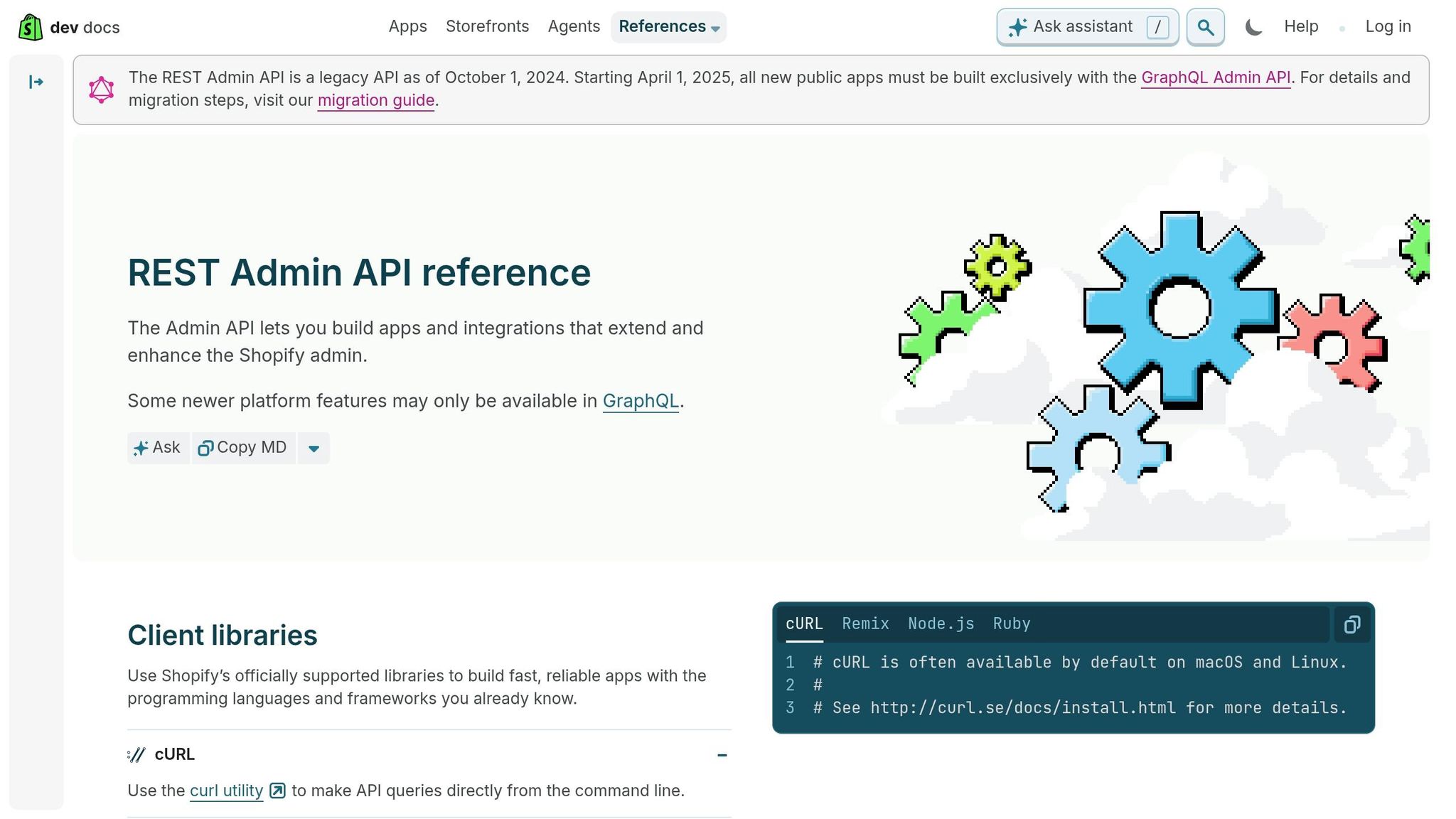
The Admin API is the most common starting point for developers. Accessing it requires the X-Shopify-Access-Token header, with tokens obtained through OAuth or Token Exchange. It's worth noting that the REST Admin API will become a legacy API on October 1, 2024, so new projects should prioritize GraphQL.
The Storefront API operates differently. Basic read-only queries (up to a complexity limit of 1,000) can be performed without tokens. However, for more complex or sensitive operations, developers can use public access tokens for client-side apps or private access tokens for server-side environments like Hydrogen backends. The ideal token type depends entirely on where your code runs.
How to Choose the Right Authentication Flow
The architecture of your app will heavily influence which authentication flow to implement.
-
Token Exchange is ideal for embedded apps that run within the Shopify Admin UI. Instead of redirecting merchants to an OAuth consent screen, the app silently exchanges a session token for an access token in the background. This eliminates unnecessary redirects and speeds up load times. Shopify emphasizes this approach:
"If you are building an embedded app, we strongly recommend using Shopify managed installation with token exchange instead of the authorization code grant flow." - Shopify Developer Documentation
- Authorization Code Grant is the classic OAuth 2.0 flow, best suited for standalone SaaS tools or public apps that operate outside the Shopify Admin. It requires a browser redirect for merchants to approve requested scopes. If your app is independent of the Shopify Admin, this flow is the better choice.
- Client Credentials Grant works well for machine-to-machine scenarios such as internal tools or background scripts. It’s useful for tasks like scheduled jobs or one-off data syncs but isn’t designed for long-term integrations.
| Flow | Best For | User Interaction | Token Expiry |
|---|---|---|---|
| Token Exchange | Embedded apps in Shopify Admin | None (seamless) | Online (short) or Offline (long) |
| Authorization Code | Standalone SaaS / public apps | Required (redirect) | Permanent until uninstall |
| Client Credentials | Internal tools / background scripts | None (automatic) | 24 hours |
For embedded apps, Shopify recommends using the Shopify CLI for managed installation. This ensures scope changes are automatically handled.
Implementing OAuth for the Shopify Admin API
Setting Up Your Shopify App
To begin, head over to the Shopify Dev Dashboard. From there, create a new app by selecting "Create app" and choosing "Start from Dev Dashboard". Once your app is created, make sure to configure two key settings right away: your App URL and your Redirect URLs. Keep in mind that every redirect URL must be a fully qualified HTTPS URL.
Next, set up your access scopes. You can do this in the "Versions" tab of your app settings or by using a TOML file. Only request the scopes your app actually needs. For instance, if your app displays product data, use read_products, or if it modifies orders, use write_orders. You'll find your Client ID and Client Secret on the app's "Settings" page after registration.
Running the OAuth Flow
The OAuth flow involves four steps: building an authorization URL, handling the callback, validating the response, and exchanging the code for an access token. With your app ready, you can authenticate merchants following these steps. Each phase ensures secure authentication across Shopify's platform.
Step 1 - Build the authorization URL. Redirect merchants to https://{shop}/admin/oauth/authorize with the following query parameters:
| Parameter | Description |
|---|---|
client_id |
Your app's Client ID from the Dev Dashboard |
scope |
Comma-separated scopes (e.g., read_products,write_orders) |
redirect_uri |
Must exactly match a URL registered in your Dashboard |
state |
A unique, cryptographically secure nonce |
grant_options[] |
Set to per-user for online tokens; omit for offline tokens |
Step 2 - Handle the callback. After the merchant approves access, Shopify redirects to your redirect_uri with a code and hmac parameter.
Step 3 - Validate the response. This is a critical step. Use crypto.timingSafeEqual for HMAC validation to avoid timing attacks. Remove the hmac from the query string, sort the remaining parameters alphabetically, and validate them using HMAC-SHA256 with your Client Secret. Also, confirm the state matches your original nonce to prevent CSRF attacks. Lastly, validate the shop domain using a regex pattern to ensure it ends with .myshopify.com and contains only alphanumeric characters and hyphens.
"If you are building an embedded app, we strongly recommend using Shopify managed installation with token exchange instead of the authorization code grant flow." - Shopify API Documentation
If your app runs inside the Shopify Admin iframe, a standard 3xx redirect to the grant screen will fail due to X-Frame-Options: DENY restrictions. In this case, use Shopify App Bridge to escape the iframe first.
Step 4 - Exchange the code. Send a POST request to https://{shop}.myshopify.com/admin/oauth/access_token with your client_id, client_secret, and code. The response will include your access_token.
Storing Sessions and Access Tokens Safely
Once you've obtained tokens, storing them securely is crucial. Never store access tokens as plaintext. Instead, use AES-256-GCM encryption for credentials saved in a database. For session management, rely on a persistent database or Redis to ensure sessions are accessible across server nodes.
Choose your token type based on your app's needs. Offline tokens are ideal for background tasks or long-term access since they persist even after the merchant leaves the app. Online tokens, on the other hand, are tied to a specific user session and expire when that user logs out. For added security, consider using expiring offline tokens, which include a refresh token and a set expiration date.
Implement automatic token refresh logic to ensure tokens are updated before they expire. Use row-level database locking during refresh operations to prevent race conditions when handling concurrent requests. Additionally, regularly check that the stored scopes match your app's current requirements. If there's a mismatch - like adding a feature that requires write_inventory - redirect merchants through the OAuth flow again to approve the new permissions. Proper session management like this helps maintain secure access tokens, aligning with Shopify's authentication standards.
sbb-itb-61169e3
Protecting Tokens and API Keys in Production
Token Security Best Practices
When it comes to Shopify integrations, safeguarding tokens and API keys in production is absolutely critical. After completing the OAuth flow, ensure that credentials are stored securely. Avoid plaintext storage of access tokens or client secrets. Instead, rely on encryption to protect these sensitive details within your production database.
It's equally important to use secure environment variables for storing values like SHOPIFY_CLIENT_SECRET, SHOPIFY_CLIENT_ID, and access tokens. Hardcoding these values is a risky move, and if they're ever committed to a Git repository, consider them compromised.
Here's why this matters: Between 2022 and 2024, 47 security vulnerabilities were reported in third-party apps, with 68% tied to API authentication or input validation issues. One notable case in 2024 involved a basic BOLA (Broken Object Level Access) vulnerability, which led to a $500,000 loss for a developer agency due to liability and reputational damage. Token security isn't just about best practices - it can have real financial and reputational consequences.
To further protect tokens:
- Always use HTTPS.
- Set a strict
Referrer-Policy. - Avoid exposing long-lived tokens to browsers.
For embedded apps requiring frontend-to-backend communication, short-lived signed JWTs (lasting 5–15 minutes) are a safer option.
Once tokens are securely stored, managing their lifecycle becomes the next essential step.
Managing Token Lifecycles
Securing tokens doesn't end with their initial setup. Tokens can expire, become compromised, or require rotation, and your app needs to handle these scenarios seamlessly.
Starting April 1, 2026, all new public apps interacting with the Shopify Admin API must use expiring offline access tokens. These tokens last for 60 minutes, while refresh tokens are valid for up to 90 days. To avoid disruptions, implement a proactive refresh mechanism to request new tokens 5–10 minutes before they expire.
"Expiring tokens enhance security. If a token is ever leaked, its limited lifespan significantly narrows the risk to both your app and the merchants who trust it." - Shopify Developer Changelog
When rotating client secrets, follow a structured process:
- Generate a new secret.
- Update your app to accept webhooks signed by both the old and new secrets.
- Use a temporary refresh token (valid for one hour) from the Dev Dashboard to migrate existing tokens.
- Revoke the old secret only after all tokens have been updated.
Skipping the overlap period during secret rotation can disrupt webhook processing, so ensure a smooth transition by adhering to this sequence.
Effective token lifecycle management also supports a minimal access approach, reducing potential vulnerabilities.
Limiting Access Scopes
Another key security measure is limiting access scopes. Request only the permissions your app genuinely needs. For instance:
- Use
read_productsif your app only reads product data. - Use
write_ordersif it processes orders.
Avoid requesting unnecessary scopes like write_inventory, as each additional scope increases the risk if a token is leaked. Shopify's documentation emphasizes this principle, making it an easy yet impactful way to enhance security.
"Security isn't a feature. It's the foundation. The best Shopify apps balance speed and security - never speed at security's expense." - Marcus Chen, Security Researcher
Building Multi-Store Integrations Securely
When working with Shopify's secure authentication methods, managing multi-store integrations demands extra attention to isolation and rate control to ensure smooth and secure operations.
Per-Store Authentication Design Patterns
Handling authentication for dozens - or even hundreds - of Shopify stores requires a well-thought-out strategy. The cornerstone here is strict data separation: each store's access token should be stored individually and encrypted. Typically, this involves a dedicated "shops" table that maps each shop's domain to its encrypted access token. For encryption, AES-256-GCM is a solid choice. Always validate incoming requests by matching the shop identifier with your database before using the corresponding token.
For embedded apps, it's crucial to keep long-lived tokens securely on your server. Instead, rely on short-lived session tokens, like JWTs with a 1-minute lifespan, for communication between the frontend and backend. This approach minimizes risks even if a token is intercepted.
Another challenge in multi-store setups is the potential for a "rate limit cascade." This happens when one high-traffic store uses up your API budget, causing throttling for other stores. To prevent this, track API usage per store and apply exponential backoff with jitter to manage traffic and maintain isolation.
These measures form the backbone of secure multi-store authentication, setting the stage for integrating with external systems.
Connecting External Data Sources Securely
Integrating Shopify API calls with third-party systems like ERPs, CRMs, or inventory platforms introduces additional risks. The golden rule? Never expose Shopify access tokens outside your server. All external API calls should be handled strictly by a secure backend.
For two-way data syncs, always verify the X-Shopify-Hmac-Sha256 header on incoming webhooks before processing any data. As the ECOSIRE Research and Development Team puts it:
"HMAC verification on every webhook and OAuth callback is non-negotiable. Skipping signature validation exposes your application to spoofed payloads and data tampering." - ECOSIRE Research and Development Team
When dealing with large-scale updates, like inventory changes affecting millions of records, consider using GraphQL's bulkOperationRunQuery for asynchronous processing. To avoid duplicate processing, use the X-Shopify-Webhook-Id header as a deduplication key. Additionally, design webhook handlers to return a 200 OK response immediately while queuing the payload for further processing. This approach prevents repeated delivery attempts from Shopify, which can occur up to 19 times over a 48-hour period.
Using StoreCensus Data in Your Workflows
Enhancing multi-store security with data-driven insights can further optimize your authentication workflows. Tools like StoreCensus provide valuable intelligence for managing multi-store integrations.
Before starting an OAuth flow, use the StoreCensus /website/{domain} endpoint to confirm if a store is hosted on Shopify by checking the ecommerce_info.platform field. The apps_integrations data can also help you customize your OAuth scope requests, limiting permissions to only what's necessary based on the store's existing app stack.
For onboarding multiple stores, the /stores endpoint offers useful filters like estimatedSales, vertical, or specific installed apps. This allows you to identify stores needing integration updates or re-authentication. Pairing this with activity_signals data enables you to automate re-authentication workflows when a merchant installs a new app or hits a certain revenue milestone.
| StoreCensus Data | How It Enhances Auth Workflows |
|---|---|
ecommerce_info.platform |
Confirms Shopify platform usage |
apps_integrations |
Adjusts requested scopes based on existing apps |
activity_signals |
Automates re-authentication for store changes |
enrich.decision_makers |
Personalizes the OAuth consent and onboarding process |
location_info |
Ensures accurate region parameters during login |
When working with StoreCensus data at scale, handle HTTP 429 responses by adhering to the Retry-After header. Professional plan users are limited to 6 requests per second, while Enterprise users can make up to 30. For efficient navigation of large datasets, use cursor-based pagination via the nextCursor field from the /stores endpoint.
Conclusion
The Shopify API authentication landscape has undergone a major transformation. By January 1, 2026, static API tokens and legacy private apps will be completely phased out. The new standard - OAuth 2.0 - brings improved security with structured token lifecycles, granular scope management, and a reliable audit trail that static tokens simply couldn't provide. This guide has outlined the key practices needed to ensure secure authentication for all Shopify integrations.
With static tokens now obsolete, OAuth 2.0 introduces a more robust framework. Key practices include encrypting tokens at rest using AES-256-GCM, requesting only the permissions your app truly needs, verifying webhooks with HMAC-SHA256, and rotating credentials every quarter. For embedded apps, the Token Exchange flow simplifies authentication by relying on short-lived session tokens instead of long-term credentials, reducing potential vulnerabilities.
The risks of neglecting these practices are real. Between 2022 and 2024, 68% of the 47 reported security vulnerabilities in third-party Shopify apps stemmed from authentication or input validation failures. These aren't isolated incidents - they highlight the consequences of ignoring foundational security principles.
As Marcus Chen emphasized on February 13, 2026:
"Security isn't a feature. It's the foundation. The best Shopify apps balance speed and security - never speed at security's expense."
To strengthen your app against known vulnerabilities, start by migrating any lingering non-expiring tokens using the migrateToExpiringToken utility. Limit scopes strictly to what is necessary, implement timing-safe HMAC verification, and ensure per-store token isolation. Additionally, set up rate limiting for your endpoints and automate refresh logic for multi-store setups. Each of these steps enhances security while reducing the risks tied to oversight or neglect.
FAQs
Do I need OAuth, token exchange, or client credentials for my Shopify app?
The way you handle authentication depends on how your app is designed and how users interact with it:
- Use token exchange if your app operates within the Shopify admin.
- For standalone apps, the authorization code grant flow is the standard approach.
- Opt for client credentials when building private, server-to-server integrations that don't require user interaction.
If you're using Shopify CLI starter apps, they already come with the right authentication setup tailored to your app's structure.
What changes do expiring offline access tokens bring for public apps in 2026?
Starting April 1, 2026, all new public apps will be required to implement expiring offline access tokens. This change is designed to enhance merchant data security. These tokens will have expiration periods and will need to be refreshed using a refresh token, following OAuth 2.0 standards. The goal is to minimize potential risks in case a token is compromised. For existing apps, there’s an option to transition to this system through a one-time, irreversible token exchange process.
How can I securely store and refresh Shopify access tokens for multiple stores?
To keep Shopify access tokens secure, store expiring offline tokens in an encrypted database or a secret manager. Make sure your authentication logic is centralized so you can validate tokens before making any API calls. Plan to refresh tokens a few minutes before they expire and have a fallback mechanism to handle 401 errors gracefully.
When refreshing tokens, save the new ones within a transaction to ensure data consistency. To avoid race conditions during concurrent requests, implement a per-store mutex. This way, only one process at a time can update tokens for a specific store, keeping things streamlined and secure.



