SFCC vs Shopify AR: Integration Comparison
Shopify AR gets AR live fast via native product media; SFCC needs partner cartridges, longer timelines, and enterprise teams.

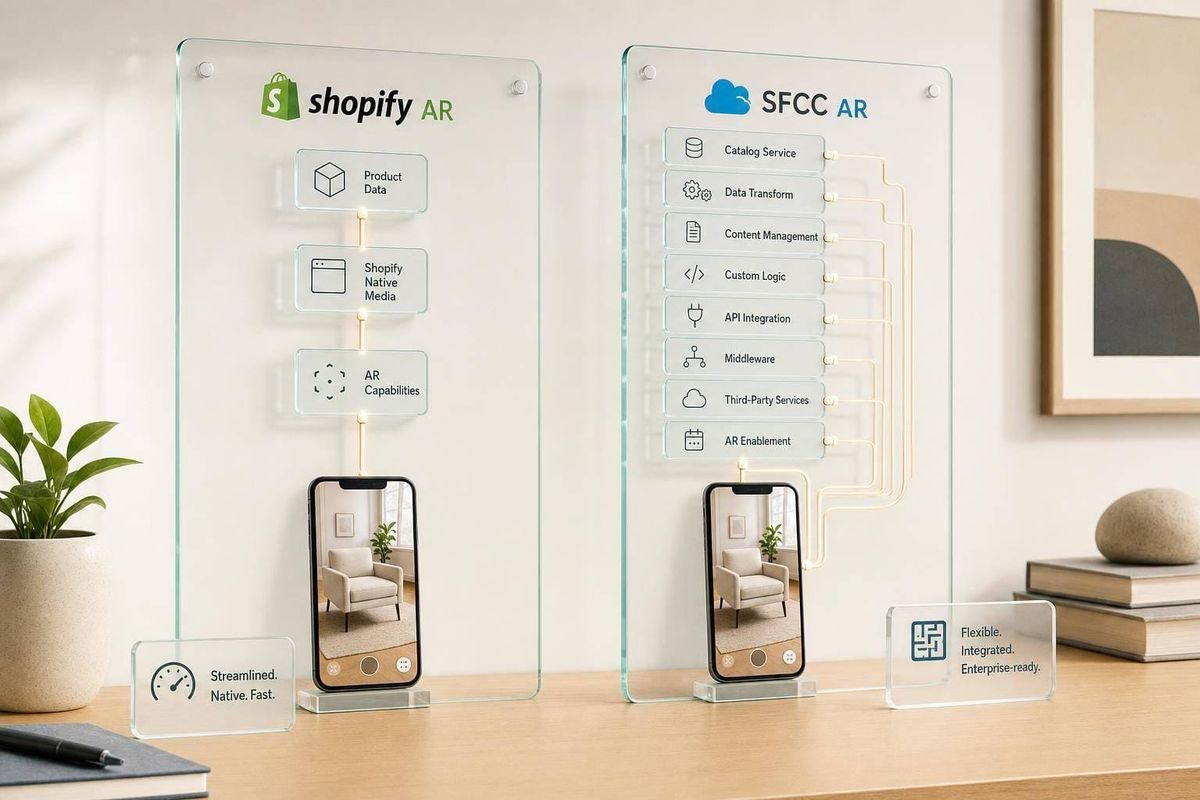
If you want AR live with less dev work, Shopify is usually the simpler path. If you want AR inside a more custom enterprise setup, SFCC is usually the heavier one.
Here’s the short version:
-
Shopify AR works like product media
You upload GLB/USDZ files, use theme support, and launch AR through Apple Quick Look or Android Scene Viewer. -
SFCC AR usually works through partners
You add AR with a cartridge, SDK, or custom JavaScript, then map product data and test across environments. -
Launch timing is very different
Shopify projects often land in 1–4 weeks.
SFCC projects often take 8–16 weeks. -
Team needs are different
Shopify can often move with a theme developer and QA.
SFCC often needs front-end, back-end, architecture, vendor support, and enterprise QA. -
Budget signals are different
Shopify usually fits mid-market pilot budgets.
SFCC usually points to enterprise budgets, longer review cycles, and more people in the deal. -
Agency model changes too
Shopify fits a service that is easier to package and sell many times.
SFCC fits fewer deals, larger scopes, and more custom work.
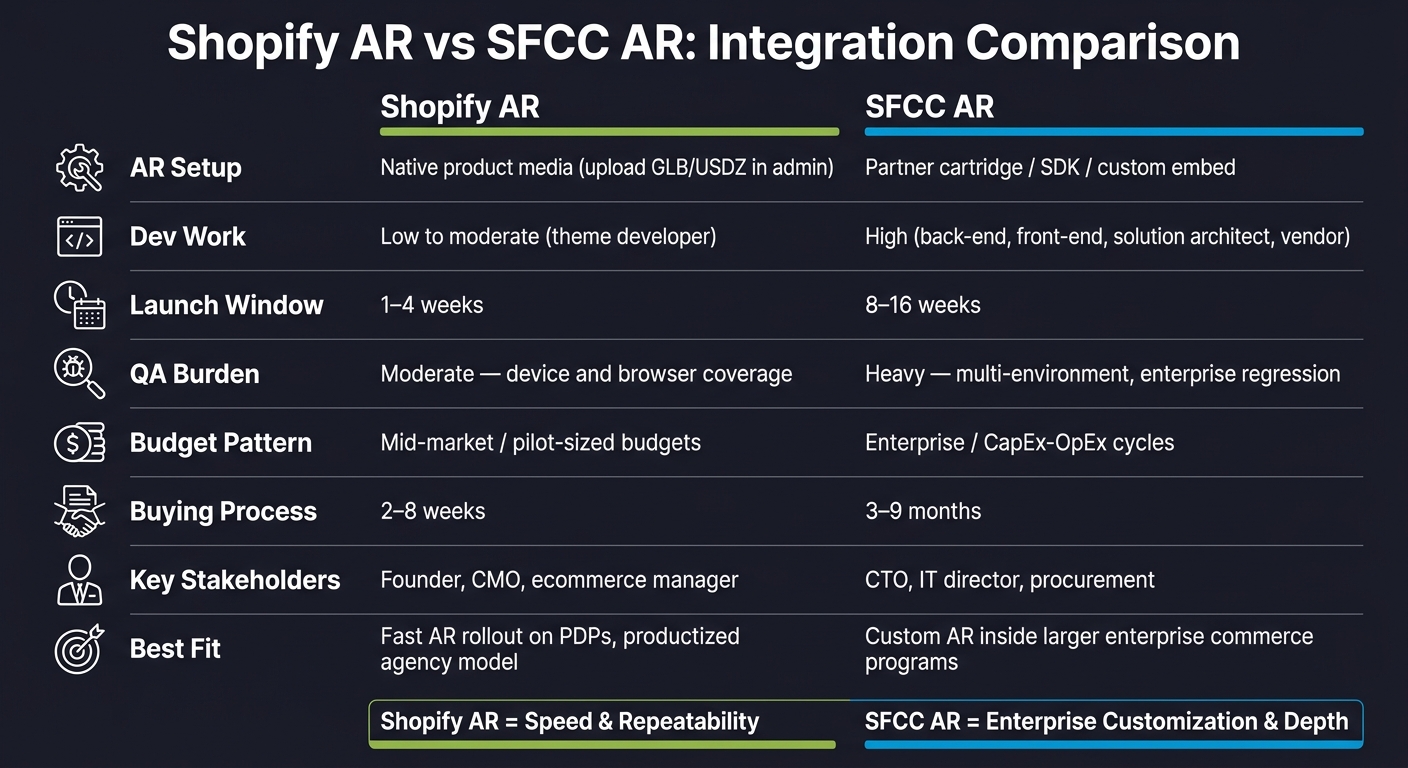
Shopify AR vs SFCC AR: Side-by-Side Integration Comparison
Quick Comparison
| Criteria | Shopify AR | SFCC AR |
|---|---|---|
| AR setup | Native product media | Partner cartridge / SDK / custom embed |
| Main file flow | GLB + USDZ | Vendor-based setup |
| Dev work | Low to moderate | High |
| Launch window | 1–4 weeks | 8–16 weeks |
| QA load | Device and theme checks | Multi-environment and regression testing |
| Buyer type | Founder, ecommerce lead, marketing | IT, commerce, procurement |
| Budget pattern | Mid-market | Enterprise |
| Best fit | Fast AR rollout on PDPs | Custom AR inside larger commerce programs |
If I were scoping this for an agency, I’d treat Shopify AR like a lighter PDP media project (often managed via a Shopify tech stack tool) and SFCC AR like a custom platform integration from day one.
sbb-itb-61169e3
Shopify AR: Native product media, faster setup, lighter engineering
Native 3D and AR support in Shopify
Shopify supports 3D and AR as native product media, which means merchants can manage everything right inside the product admin. There’s no need for a custom backend just to get the basics live.
When a theme supports it, the product page will automatically show an interactive 3D viewer and an AR button. That gives shoppers a simple way to inspect a product and, on mobile, place it in their space.
For file types, GLB handles web and Android, while USDZ handles iOS Quick Look. Shopify can generate USDZ from GLB, so agencies can standardize on GLB and let Shopify deal with iPhone and iPad support. The file size cap is 500 MB per model, although models above about 15 MB are automatically optimized for geometry and textures.[2][3]
Shopify’s viewer runs on <model-viewer>.
Where apps and partners expand Shopify AR
Native support handles the core use case well: a shopper opens a product page, views the 3D model, and taps a button to place it in their room from a phone. For many furniture, home goods, and décor brands, that’s enough.
When a merchant needs more than that, Shopify’s app layer fills the gap. That can include:
- Virtual try-on for footwear or eyewear
- Guided product configurators
- More advanced model viewers
- QR-based desktop-to-mobile AR handoff
The upside for agencies is pretty clear. You can start with native AR, then add apps as needs grow instead of pushing a custom build from day one. That also makes AR easier to sell alongside CRO and PDP work.
What Shopify AR projects typically look like in scope and timeline
Once native media and app choices are set, the build is usually pretty small. A standard Shopify AR project tends to cover five parts: 3D asset prep, media upload and admin setup, theme QA, optional app setup, and cross-device testing.
In practice, the main lift is usually the asset work. Agencies need optimized GLB files from a 3D vendor. After that, if the theme supports Shopify’s native media flow, the rest is mostly setup and QA.
That’s why many pilots go live in days or a few weeks once assets are ready and theme support is confirmed.
For agencies, Shopify AR is repeatable. The scope is easier to estimate, the tooling is documented, and delivery tends to be consistent.
SFCC AR: Partner-led architecture, deeper customization, heavier delivery
With SFCC AR, teams usually don't start with a native product-media upload. They start with a vendor cartridge or SDK. In practice, AR comes together through three parts: a cartridge, a vendor platform, and an implementation partner. So this is not a simple media upload. It's a platform project.
How AR is typically added to SFCC
The usual setup looks pretty straightforward on paper: install a cartridge or SDK, map product data to the vendor API, and render the viewer on the PDP.
In headless builds, agencies often skip the storefront layer and embed the vendor's JavaScript SDK straight into React or Vue components. SFCC still handles commerce on the back end, while the AR experience lives in the front-end app.
The SFCC partner ecosystem for AR and 3D
The vendor market here doesn't work like Shopify's app store model. It's more partner-led, and each choice carries more weight.
Threekit is listed on Salesforce's AppExchange and supports B2C Commerce, B2B Commerce, CPQ, Sales Cloud, and Service Cloud. That means a 3D configurator used on the storefront can also show up in quoting workflows.
VNTANA centers on automated asset optimization and serves AR through its own CDN.
Zolak connects through a JavaScript snippet or API-based SKU mapping, without changing core SFCC code.
That vendor pick shapes scope, maintenance, and pricing. For agencies, this isn't just choosing a tool off a shelf. It's choosing a vendor relationship. Each platform comes with its own asset pipeline and API contract, and that dependency has a direct effect on QA, asset pipelines, and day-to-day support.
What SFCC AR projects typically look like in scope and timeline
SFCC AR delivery is heavier than a Shopify AR project. A typical engagement includes:
- cartridge installation
- Business Manager configuration
- custom attribute setup
- PDP template changes
- API-based data mapping
- multi-device QA
- coordination across merchandising, IT, and brand teams
Timelines usually land in the 8 to 16 week range from discovery to launch for an enterprise merchant.
The two phases that often take the longest are vendor selection and 3D asset production for large catalogs. Vendor selection can drag because of InfoSec reviews, procurement cycles, and legal sign-off for external SaaS platforms.
For agencies, that makes SFCC a higher-ticket AR sale with less repeatability than Shopify. (Agencies often use Shopify brand prospect lists to find higher-volume, lower-complexity opportunities.) You see that most in setup, staffing, and budget. The side-by-side comparison below makes that gap easier to spot.
SFCC vs Shopify AR: Side-by-side integration comparison
The main gap comes down to how each platform gets AR live. Shopify AR usually slides into an existing ecommerce setup with less friction. SFCC AR, on the other hand, tends to need a custom layer before anything works smoothly. That one difference shapes delivery speed, cost, and the kind of team you need.
Tooling, setup steps, and developer workload
Shopify is mostly admin-led. SFCC usually needs a cartridge, Business Manager setup, and template changes. In plain English: Shopify feels like configuration work, while SFCC feels like a full build.
| Factor | Shopify AR | SFCC AR |
|---|---|---|
| Primary workflow | Admin upload + theme config | Cartridge install + partner SDK |
| Setup steps | Upload GLB/USDZ, enable in theme, minor JS | Cartridge, Business Manager config, attribute mapping, PDP template edits |
| Engineering effort | Low - theme developer | High - back-end, front-end, solution architect |
| QA burden | Moderate - device and browser coverage | Heavy - multi-environment, catalog-wide, enterprise regression |
| Specialist reliance | Low - generalist Shopify developer | High - SFCC-certified engineers, AR vendor |
| Typical launch window | 1–4 weeks[1] | 8–16 weeks[4] |
That workload gap matters fast. A Shopify AR launch can often move with one theme developer and light testing. SFCC usually pulls in back-end and front-end work, architecture input, and much more QA across environments and product detail pages.
Budget signals and service opportunities for agencies
Platform choice changes the sales motion too.
Shopify AR usually points to a mid-market budget and a shorter buying cycle. The buyer is often a founder, head of ecommerce, or marketing lead who can say yes without dragging the project through layers of internal review. When AR is framed as a CRO or PDP improvement play, it becomes much easier to bundle nearby services into the same deal.
That usually opens the door for work like:
- PDP optimization
- A/B testing
- App implementation
SFCC sends a very different signal. It usually means enterprise budget, more people involved, and a formal procurement path. Commerce leaders, IT, and merchandising all weigh in. In that setup, AR is rarely sold as a small test. It’s more often part of a larger digital experience plan tied to a roadmap that stretches across several quarters.
| Factor | Shopify AR | SFCC AR |
|---|---|---|
| Budget pattern | Mid-market; pilot-sized budgets | Enterprise; CapEx/OpEx cycles |
| Buying process | 2–8 weeks[4] | 3–9 months[4] |
| Key stakeholders | Founder, CMO, ecommerce manager | CTO, IT director, procurement |
| Service attach | CRO, PDP optimization, app implementation | Custom dev, systems integration, managed services |
For agencies, that split changes how you sell. Shopify deals tend to move faster and close around a clear scope. SFCC deals take more pre-sales work, more alignment, and more patience.
Which platform fits which agency model
The day-to-day business math is different too.
Shopify AR supports a productized model. Scope is easier to define, delivery steps are easier to repeat, and QA is more predictable. That usually leads to healthy margins because discovery and execution can be templated across many clients.
SFCC AR is a different beast. Each project depends on its cartridge setup, catalog structure, and vendor stack. That makes repeatability tough. Revenue per client can be much higher, but so are the delivery costs. You need senior talent, heavier pre-sales effort, and tight project management just to keep things on the rails. The payoff is that these accounts can turn into long-term retainers and lead to more Salesforce work.
| Agency model | Shopify AR | SFCC AR |
|---|---|---|
| Productized / Shopify Partner | Strong fit - repeatable, fast delivery | Poor fit - too much custom overhead |
| Enterprise dev shop | Weak fit - lower billable hours per project | Strong fit - large custom scopes |
| Margin profile | High - efficiency-driven | High - rate-led |
| Delivery risk | Low | High |
| Scalability | High - standardized across many clients | Low - requires senior specialist talent per project |
A simple way to look at it: Shopify AR favors volume, with many mid-sized projects and steady margins. SFCC AR favors depth, with fewer accounts, larger deal sizes, and more moving parts to manage. That split should shape how you package the offer, staff the work, and price it.
Conclusion: Speed and repeatability vs enterprise customization
After looking at the tools, timelines, and delivery work, the choice comes down to one thing: Shopify gets AR live faster through native product media and theme support; SFCC usually needs a custom integration layer. That single gap shapes the whole engagement. It affects scope, staffing, and pricing from day one.
Shopify AR fits a repeatable service model. You can standardize scope, move faster, and close deals more easily with mid-market buyers. SFCC AR fits a custom enterprise model. That usually means fewer clients, bigger projects, longer timelines, senior talent, and close project control.
For agencies, that boils down to three calls:
- Platform capability: Shopify's native media support cuts engineering work. SFCC's partner cartridges and custom front-end work make more sense for enterprise programs where that extra complexity earns its keep.
- Budget and agency fit: Shopify AR lines up with mid-market budgets and productized offers. SFCC AR lines up with enterprise budgets, layered procurement, and longer pre-sales cycles tied to bigger engagements.
- Prospecting: StoreCensus can help Shopify-focused agencies find merchants by revenue, tech stack, and growth signals for targeted AR outreach.
Match the platform to the way you deliver, then package AR around the budget and service model that platform points to.
FAQs
Do I need separate 3D files for iPhone and Android?
No. Modern AR on Salesforce Commerce Cloud and Shopify uses file formats like glTF and USDZ that work across mobile operating systems.
In plain English: you can usually keep one 3D asset for both iOS and Android. That makes asset management simpler and cuts down the work needed to deploy AR across devices.
When does SFCC AR justify the extra complexity?
SFCC AR fits best when a business needs advanced catalog customization, deep ERP integration, or more control at the regional level across multi-brand operations.
For agencies, the clearest signal is complexity. If a client is running into technical performance limits or has more demanding editorial needs, SFCC’s added complexity can pay off in a meaningful way.
What should agencies scope before selling an AR pilot?
Before selling an augmented reality pilot, agencies should map out both the technical side and the day-to-day work needed to keep things running. That means sorting out who owns campaign page content, product updates, and local versions up front. If you skip that step, small gaps can turn into big problems later.
They should also check whether the merchant runs a headless setup or manages multiple storefronts. From there, it helps to review the current tech stack, including the Shopify plan and app ecosystem, so the AR integration fits the store and can keep working over time.