Seasonal Product Tracking Tools for Competitor Stores
Use store-level signals plus product, page, and price monitors to track seasonal competitor moves across Shopify and WooCommerce.

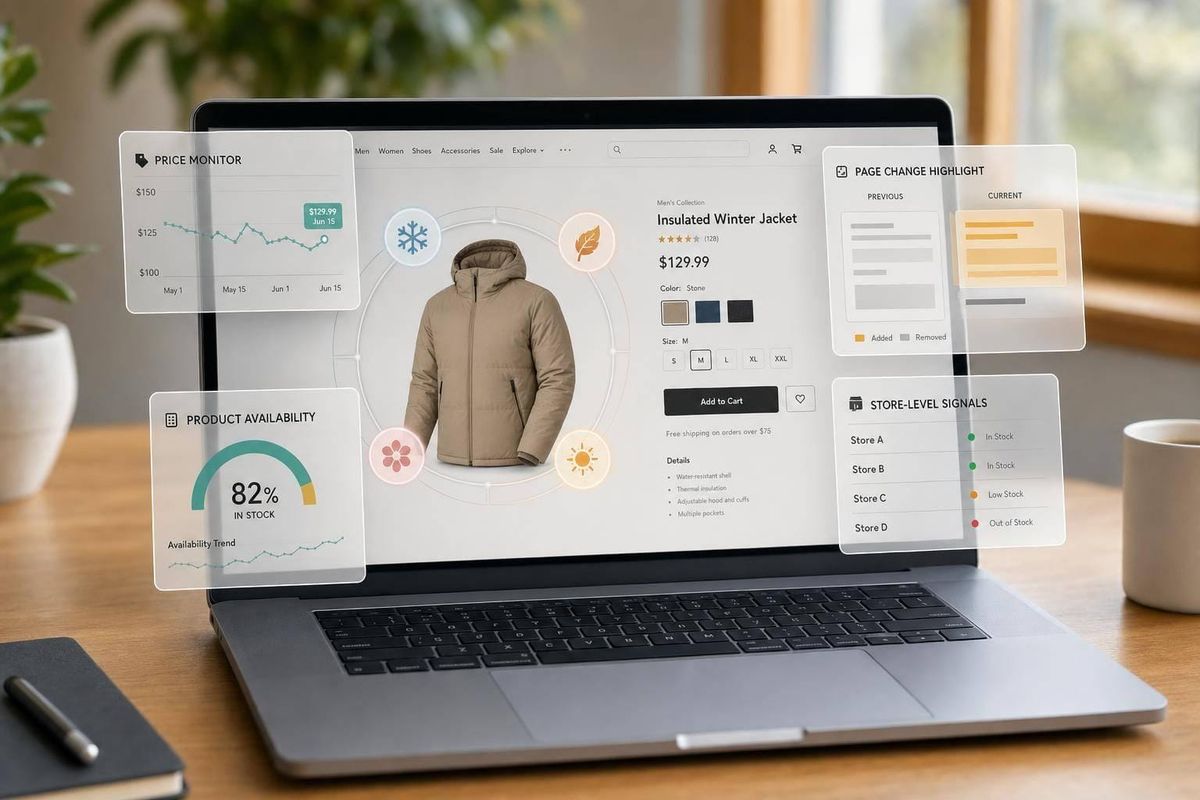
If I need to track competitor stores during BFCM, holiday gifting, or back-to-school, I would not rely on one tool alone. The article’s main point is simple: I’d use StoreCensus for watchlists and store-level signals, then add Shopify apps, page monitors, price trackers, or WooCommerce scraping only when I need tighter product or page checks.
Here’s the short version:
- StoreCensus fits watchlist building across 6M+ Shopify and WooCommerce stores
- Shopify-native apps work best for product, stock, and price checks on Shopify stores
- Page-change tools work across mixed store lists when I only need to watch public pages
- Price monitors focus on markdowns, discounts, and stock moves
- WooCommerce workflows need more setup, but they help when store structure is less uniform
What matters most is the signal I want:
- Store context: StoreCensus
- SKU-level price or stock: Shopify apps or price trackers
- Banner, collection, or page edits: page monitors
- WooCommerce product and category tracking: scraping workflows
Best Software to Track Competitor Prices & Trends Automatically | Browse.ai Tutorial
sbb-itb-61169e3
Quick Comparison
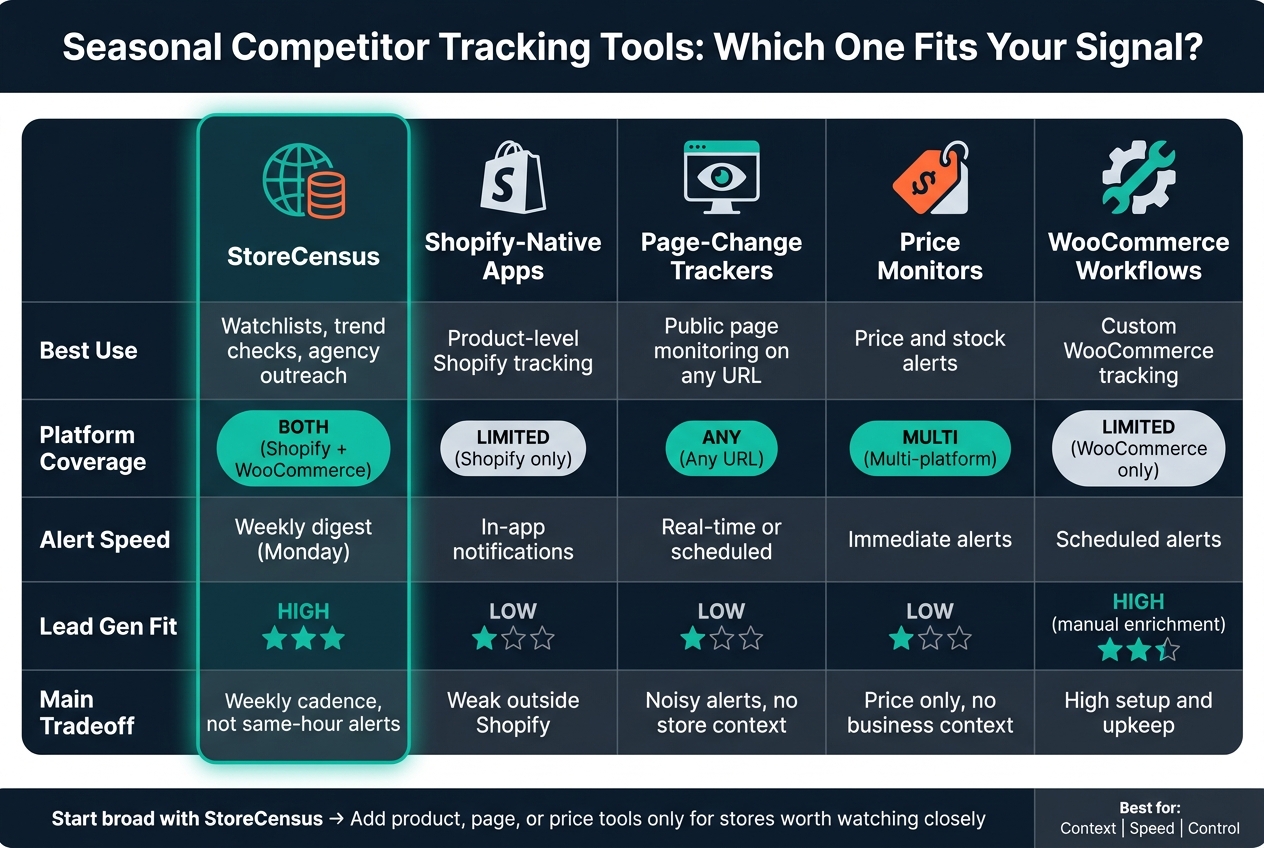
Seasonal Competitor Tracking Tools: Which One Fits Your Signal?
| Tool type | Best use | Main tradeoff |
|---|---|---|
| StoreCensus | Watchlists, trend checks, agency outreach | Weekly cadence, not same-hour alerts |
| Shopify-native apps | Product-level Shopify tracking | Weak outside Shopify |
| Page-change tools | Public page monitoring on any URL | More setup noise, less store context |
| Price monitors | Price and stock alerts | Price only, little business context |
| WooCommerce workflows | Custom WooCommerce tracking | Higher setup and upkeep |
So if I were setting this up today, on September 2, 2026, I’d keep it simple: start broad, then go deeper only for stores worth watching closely. That’s the core takeaway from the article. For more strategic advice, see our Shopify store guides.
1. StoreCensus
StoreCensus indexes 6M+ Shopify and WooCommerce stores with structured metadata, including revenue band, tech stack, theme, country, and growth signals.[1] That kind of scale matters. Seasonal timing only starts to mean something when you can compare it across a large set of stores.
Data Scope
Each store record includes product count, price history, installed apps, theme data, estimated traffic, and a timestamped change log. For seasonal tracking, this helps you see not just what changed, but when it changed compared with similar stores. That gives you a lot more context than a simple page-change alert. Those records also power the change alerts used in the next layer of monitoring.
Seasonal Change Alerts
StoreCensus surfaces real-time store changes through its monitoring layer. Agencies can build saved segments and review the change feed each week. The signals worth watching most closely are:
- theme overhauls
- new seasonal navigation
- major catalog expansions
These tend to be the clearest signs that a store is moving into a seasonal push.
Platform Coverage
StoreCensus covers both Shopify and WooCommerce. So you can compare seasonal rollout timing across platforms and revenue tiers without juggling separate workflows. You can also filter by country to keep the analysis focused on U.S.-based merchants and tied to domestic retail moments like Thanksgiving, Black Friday, Cyber Monday, and back-to-school. Those same signals can point you toward stores that may be worth contacting.
Agency Prospecting Fit
Once you spot stores with strong seasonal activity, you can export decision-maker contacts into your outbound stack. A smart move is to filter for stores that launched seasonal collections late, flag them, and reach out with a pitch built around the gap you found. That could be a delayed holiday collection, a missing seasonal navigation update, or a catalog expansion that trailed peer stores. Over time, the same segment data helps agencies figure out which seasonal triggers get the strongest response.
2. Shopify-native competitor monitoring apps
If StoreCensus gives you the store-level view, Shopify-native apps add product-level tracking for the stores you already watch. Tools like Prisync AI, PriceMole, ShopVision, and PriceOtus track product, price, and stock changes on public Shopify stores using public storefront data.
The big gap is context. These tools usually don't show the broader company picture, like tech stack details or business profile data. Prisync AI's Platinum plan starts at $399/month for up to 5,000 products, while PriceOtus starts at $39/month.[5][3]
Where do these apps shine? Mostly in time-sensitive retail moments. They're useful for alerts tied to:
- seasonal collections
- price drops
- sale tags
- stock changes around BFCM, back-to-school, and holiday gifting
The main drawback is platform coverage. These tools work best for Shopify-to-Shopify monitoring. Once a target store runs on WooCommerce, Magento, or a custom build, visibility tends to fall off. At that point, page-change tools and scraping workflows usually become the backup plan.
A good way to use them is after StoreCensus. That lets you check how target stores price, stock, and merchandise seasonal products before moving into the next category: generic page-change monitoring.
3. Generic page-change monitoring tools
For mixed Shopify and WooCommerce lists, generic page monitors help you spot public-page changes that hint at seasonal campaigns. They track public URLs across both platforms, so you can use one setup for a mixed-store list. Tools like Visualping, Hexowatch, Distill.io, ChangeTower, and Apify's Website Change Monitor don't need platform-specific integration. That makes them a good fit when the signal shows up on a public page instead of inside a catalog feed.
Data scope
These tools don't pull SKUs or catalog data on their own. They watch page elements. You give them a URL, choose the part you want to track - a price field, stock label, hero banner, or collection title - and they notify you when that element changes.
Distill.io and Apify's Website Change Monitor support CSS or XPath selectors and can return structured diffs or JSON outputs. That makes it easier to follow availability changes across several competitor pages without checking each one by hand.
Seasonal change alerts
For seasonal monitoring, focus on pages that show merchandising decisions in plain sight:
- Homepages
- Seasonal collections
- Sale pages
Check them more often during peak periods. It also helps to set keyword alerts for phrases like "Holiday Sale" or "New Arrivals" so you don't get distracted by every minor layout tweak.
Agency prospecting fit
The downside is pretty simple: these tools show page changes, but not store context or contact data. You also need to know which URLs matter before you start. That said, they work well as a trigger layer. Once you've identified target stores, they can alert you to launches, price moves, or promo banner updates. From there, you can pipe those alerts into Slack or a CRM and time outreach around the change[1][2].
If price changes are the main thing you're tracking, the next step is pricing-focused monitors.
4. Price tracking and repricing monitors
When price is the main signal, this layer focuses on markdowns, discounts, and repricing patterns. Price trackers do one job: they show changes in what a competitor charges. They can spot markdowns fast, but they don't tell you why the price changed.
Data scope
These tools show price movement, not the business context behind it. StoreCensus adds Average Price History, catalog changes, and revenue band shifts, all timestamped for trend analysis [1]. That extra context matters. A revenue band drop can show up weeks or months before heavier discounting starts [1].
If you're only watching price fields, you're reacting after the fact. If you're watching revenue trends too, you have a better shot at moving first.
Seasonal change alerts
During peak seasons, price monitors can catch first markdowns and flash sale launches. StoreCensus sends a weekly digest of pricing shifts, app installs, and theme updates, with changes usually detected within 7 days [1].
Agency prospecting fit
Standard price trackers give you the what - a price changed - but not much context around whether a merchant is under pressure. When revenue bands drop and average prices fall at the same time, that's often a sign the store is feeling pressure and may be worth timely outreach.
For broader public-page monitoring across a list of Shopify stores and WooCommerce, use page-change alerts next.
5. WooCommerce web scraping and alert workflows
WooCommerce tracking often needs custom scraping and alert setups because storefront layouts vary from site to site. That’s why structured extraction tends to work better than broad visual checks. It lets you track the seasonal changes that matter most: products, prices, stock, and category shifts.
Data scope
Scraping workflows can pull data like product counts, pricing, stock status, and category-page updates from public WooCommerce storefronts. Revenue estimates, though, are weak because public data can’t confirm order volume[4].
Some signals are far more dependable. Theme detection lands at 90% to 95% accuracy, and pixel detection comes in at 85% to 95%[4].
For outreach, app gaps usually matter more than revenue guesses. If a competitor has no TikTok pixel, no loyalty program, or no review app, that gives you a much clearer angle for outreach than a noisy revenue estimate[4].
Seasonal change alerts
Structured scraping cuts down on false positives by targeting DOM patterns and script tags.
Platform coverage
For WooCommerce research, platform-agnostic tools like Wappalyzer and BuiltWith are the practical place to start because they can identify technologies on any website[4].
Agency prospecting fit
App gaps are the main outreach hook here. 98% of analyzed stores lack upsell or analytics apps, and 57% lack email marketing apps[4].
There’s a catch, though. Custom workflows can break when a store’s structure changes, and they don’t surface contacts on their own. Those limits matter when you compare these signals with other tool types in the next section.
How Each Tool Handles the Signals That Matter
The matrix below shows which signal each tool is best at picking up. That makes it easier to match the tool type to the signal you care about most.
| Criterion | StoreCensus | Shopify-Native Apps | Page-Change Trackers | Price Monitors | WooCommerce Workflows |
|---|---|---|---|---|---|
| Data Scope | Tech stack, revenue bands, product count, app installs [1] | Product, price, stock, and theme data | Visual and HTML changes only | SKU-level price and stock | Custom scraped data |
| Alert Type | Weekly email digest every Monday [1] | In-app notifications, depending on the tool | Real-time or scheduled alerts | Immediate price and stock alerts | Scheduled alerts |
| Platform Coverage | Shopify and WooCommerce | Shopify only | Any URL | Multi-platform | WooCommerce |
| Lead Gen Fit | High - find and target Shopify stores with outbound tools [4] | Low - no contact data | Low - no contact data or lead qualification | Low - no merchant context | High - customizable, but contacts require manual enrichment |
StoreCensus adds context. Alert tools add speed. WooCommerce workflows give you more control.
That means StoreCensus works best for weekly review, while faster tools make more sense for same-day alerts. Page trackers and price monitors are best used as trigger layers, not as lead sources. WooCommerce workflows can go just as deep, but you still need to enrich contact data by hand.
The next section breaks down the tradeoffs.
Pros and Cons of Each Tool Type
Use the table below to choose by signal first: context, speed, or control. That matters most when you're watching seasonal signals like launches, markdowns, and stock shifts.
| Tool | Best For | Main Advantages | Main Limitations |
|---|---|---|---|
| StoreCensus | Agency prospecting & strategic competitive intel | Weekly alerts; tracks tech stack, revenue bands, and product count across Shopify and WooCommerce [1]. Includes decision-maker contacts for outbound. | Weekly cadence may miss same-day price shifts [1]. |
| Shopify-native research apps | Product-level research on individual stores | Detects best-sellers and inventory changes. | Manual: check each store individually; revenue estimates are rough [4]. |
| Generic Page-Change Trackers | Visual and content monitoring across any URL | Works on any URL; tracks text, image, and layout changes. | Noisy alerts; requires manual setup for every URL; no ecommerce-specific context. |
| Price Monitors | SKU-level price and stock alerts | Fast, granular price and availability data. | No tech stack or merchant context. |
| WooCommerce Scraping Workflows | Custom data collection on self-hosted WooCommerce stores | Highly flexible; extracts only the fields you define. | High technical barrier; scrapers break when site layouts change. |
The tradeoff is pretty simple: tools with broader merchant context tend to move at a slower pace, while faster tools often give you less detail about the store behind the signal.
If you need the full picture, a tool like StoreCensus can help you spot patterns across platforms and merchants [1]. If you care more about same-day price moves or stock flips, price monitors and page trackers are usually the better fit. And if you want total control, WooCommerce scraping workflows let you pull exactly what you want, but you'll pay for that control with setup time and maintenance.
Conclusion
Seasonal tracking works best when you treat it like a layered workflow across Shopify and WooCommerce. That matters most during BFCM, holiday gifting, and back-to-school, when stores can change in a hurry.
StoreCensus should sit at the center of that setup for Shopify and WooCommerce. It helps you spot meaningful store-level shifts early, so you can focus your outreach where it has the best shot.
After that, bring in product- and page-level tools only when a deeper look is worth the extra work. Shopify-native apps, page-change monitors, and price trackers are best used for validation and alerting, not broad prospecting.
The play is simple: use StoreCensus to build your watchlist, then add product-, page-, or price-level tracking only for accounts that warrant closer attention. Match the tool to the signal, then step up your monitoring only when the store calls for it.
FAQs
How should I prioritize stores for deeper seasonal tracking?
Prioritize stores that line up with your ICP and are most likely to show seasonal signals. Start by looking at niche, platform (Shopify or WooCommerce), and active catalog changes. Then sort stores by estimated monthly revenue, growth signals, and tech-stack fit.
Use A/B/C tiers to match your scan capacity:
- Tier A ($200,000–$500,000/month): scan 2–3 times per week, plus a full scan every week
- Tier B ($80,000–$200,000/month): scan weekly, with a deeper review every other week
- Tier C ($50,000–$80,000/month): scan every other week or monthly
When is weekly monitoring enough vs. same-day alerts?
Use same-day alerts for high-intent signals linked to immediate revenue risk, growth chances, or active buying intent. That includes storefront or checkout errors, out-of-stock events, price changes, and unexpected order spikes.
Weekly monitoring works fine for lower-priority signals like catalog growth, general tech stack shifts, or broad prospecting. It cuts noise and lets you review changes in batches without stretching your team too thin.
What seasonal signals matter most for agency outreach?
Focus on signals tied to near-term revenue risk or active buying intent:
- Low stock, out-of-stock items, and restocks
- New SKUs, product variants, or seasonal collections
- Price changes on key products
It also helps to watch for fast-moving site changes. That can include theme updates or bursts of edits across PDPs and the homepage. When you spot a change that matters, reach out within 24–48 hours. If it’s tied to a launch, the sweet spot is usually the first 1–2 weeks after it goes live.