
Real-Time Social Signals for Outbound Campaigns
Use fresh public signals to trigger 24–48h outbound campaigns, score leads by fit, and convert merchants with timely offers.

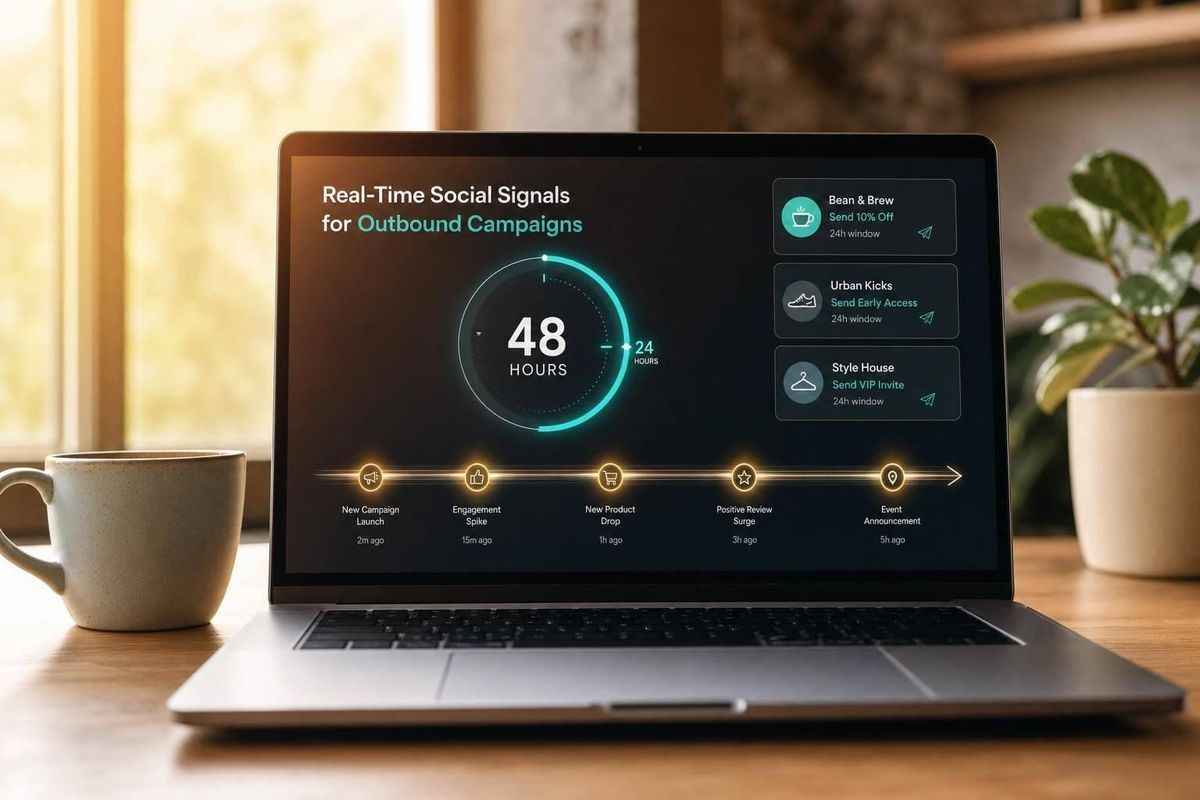
If I wait even a few days, most outbound signals lose value. The main point is simple: I get better reply rates when I reach out within 24 to 48 hours, tie the message to a visible business event, and filter hard for store fit before I send anything.
Here’s the article in plain English:
- I should stop building outbound around old lead lists alone.
- I should watch for public signals like:
- founders posting about poor ROAS
- new product launches
- hiring for growth roles
- app installs, removals, or migrations
- theme changes
- I should sort those signals into five groups: pain, project, hiring, tool, and growth.
- I should match each group to the right offer:
- pain → audit or fix
- project → build or support work
- hiring → fractional help
- tool → migration or setup help
- growth → broader growth support
- I should only act when the signal is recent, shows a clear issue or change, and fits my service tier.
- I should enrich each lead with store data like revenue, traffic, tech stack, theme, and country before routing it.
- I should score signals by type, timing, revenue band, and stack fit.
- I should focus first on stores above 50,000 monthly visitors, where contact coverage is stronger.
- I should route high-priority signals into same-day or next-day outreach.
- I should track results by signal type using reply rate, meeting rate, win rate, pipeline, and closed-won revenue.
A few numbers stand out:
- 59% of Shopify stores in the cited data had no email marketing app
- 97% had no dedicated analytics app
- For stores with 50,000 to 200,000 monthly visits, 92.1% had an email contact and 53.7% had a verified email contact
- Decision-makers reply about 3x more often than generic inboxes
- For well-targeted lists, reply rates can land around 10% to 15%, with meeting rates around 3% to 5%
My takeaway: this is not about “personalization” in the usual sense. It’s about timing, fit, and sending the right offer when a merchant has already shown movement.
The rest of the piece explains how I’d set up that workflow from signal detection to CRM routing to measurement.
Next-Level Outbound: Using Clay Signals & Apify for Real-Time Lead Gen
sbb-itb-61169e3
Build a Signal Taxonomy Tied to Your Agency Offers
Start by sorting signals based on the merchant’s situation, then connect each one to a clear offer. That shift matters. It moves outreach from reactive to deliberate.
The goal is simple: turn scattered signals into a taxonomy your team can actually use.
The 5 Core Signal Groups: Pain, Project, Hiring, Tool, and Growth
Each signal group points to a different moment in a merchant’s journey.
Pain signals show up through visible gaps or public frustration. If a merchant is spending on paid ads but has no email automation, no abandoned cart flows, or no review app, money is slipping away. Store-level research shows that 59% of Shopify stores have no email marketing app installed, and 97% have no dedicated analytics app.
Project signals show that a merchant is building, changing, or fixing something right now. A theme migration, like moving from Dawn to a custom build, usually means they’re working on performance, a brand update, or both. That’s a strong opening for design, UX, or development services.
Hiring signals get ignored more than they should. When a brand posts a role like “Growth Lead” or “Email Manager,” it usually means they’ve named a problem, set money aside, and are trying to solve it. That’s the right time to pitch fractional support while the search is still active.
Tool signals are some of the strongest intent triggers you can get. If a merchant moves from Mailchimp to Klaviyo, they’re not just browsing. They’re making a change. And when the switch stays in the same category, it usually points to setup and migration work, not early-stage research.
Growth signals point to a brand in motion. If a store is adding products fast or installs three or more apps in a short window, that usually means it’s in an active scaling cycle.
| Signal Category | Likely Merchant Situation | Best-Fit Agency Service | Ideal Response Speed |
|---|---|---|---|
| Pain | Wasting ad spend; no email capture or retention flow | Email Marketing / CRO | < 24 hours |
| Project | Active design or performance project underway | UX/UI Design / Development / CRO Audit | < 48 hours |
| Hiring | Internal resource gap; budget already allocated | Fractional CMO / Retention Agency | < 48 hours |
| Tool | Migrating workflows; open to new vendor | Migration Support / Email Strategy | < 24 hours |
| Growth | Scaling fast; building out infrastructure | Full-Service Growth / Strategy | < 48 hours |
Use this matrix to decide which signals need fast outreach and which ones aren’t worth the time.
Which Signals Are Worth Acting On and Which Are Noise
Not every post, update, or app change calls for a reply.
Generic thought leadership is usually noise. Clear tech stack changes or hiring for specific roles are much stronger. For example, a first-time install of a customer support app like Gorgias across 5,773 stores in one dataset is a high-intent trigger. It suggests the merchant is dealing with real support pressure, not casually testing tools.
A good rule of thumb: act when the signal lines up across three things:
- It happened recently
- It points to clear operational pain
- The store tier fits your service tier
Once your taxonomy is in place, send only high-fit signals into your data stack.
Set Up the Data Stack for Real-Time Outbound
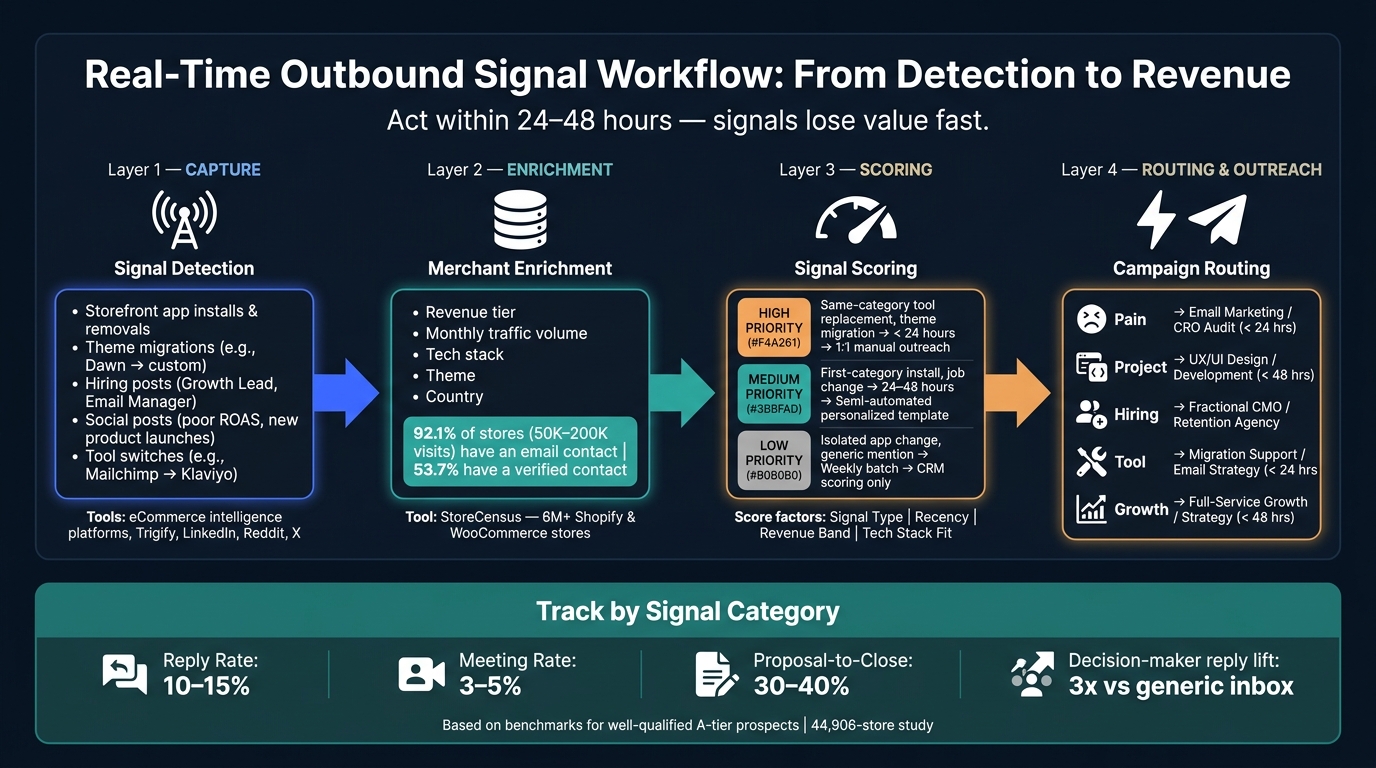
Real-Time Outbound Signal Workflow: From Detection to Revenue
Once your signal taxonomy is set, the next step is practical: how do you catch those signals, tie them to the right merchants, and get a solid lead into a sequence before the moment passes? The cleanest way to do that is with a four-layer stack: Capture, Enrichment, Scoring, and Routing. That setup keeps outreach inside the 24- to 48-hour window when signals still carry weight.
Listening Sources, Merchant Enrichment, and CRM Routing
The capture layer watches for storefront changes and public social activity. Storefront changes, like app installs and theme migrations, come from ecommerce intelligence tools. Social signals, such as posts, comments, and follows, come from monitoring tools like Trigify, which tracks public activity across professional networks, Reddit, X, and YouTube.
After you catch a signal, you need to match it to an actual merchant account and add store-level context. That usually means pulling in:
- revenue tier
- traffic volume
- tech stack
- theme
- country
before the lead hits your CRM. Without that extra context, routing gets messy. With it, routing becomes much more precise.
CRM routing should run on autopilot and reflect the signal taxonomy. For example, a store in the $50,000-$250,000/month revenue band that just changed its helpdesk tool should go straight into your support migration sequence. Pain, project, hiring, tool, and growth signals each need their own rule set. Those rules decide which accounts get a direct touch right away and which ones can wait for the next batch.
How StoreCensus Fits Into the Workflow
StoreCensus belongs in the enrichment layer. It filters signals by revenue, tech stack, theme, country, and growth data before they reach your CRM. In plain English, it turns raw activity into accounts you can act on. A store on your base list that installs a support app for the first time stops being just another line in a dataset and becomes a high-fit lead.
For stores with 50,000-200,000 monthly visits, 92.1% have an email contact and 53.7% have a verified email contact. Decision makers respond about 3x more often than generic company email addresses, so timing matters, but so does reaching the right person.
A Simple Scoring Model for Signal Freshness and Fit
Not every signal should trigger the same move. A light scoring model helps your team stay focused on the strongest opportunities and keeps junk out of the CRM.
Score each incoming signal across four factors: signal type, recency, revenue band, and tech stack fit. If a signal scores high on all four, it should get immediate, high-touch outreach. If it scores low on recency or merchant fit, push it into a weekly batch or use it only to update CRM records.
| Priority | Signal Type | Response Window | Outreach Treatment |
|---|---|---|---|
| High | Same-category email-platform replacement; theme migration | < 24 hours | 1:1 manual outreach; reference the specific tool gap or migration context |
| Medium | First-category install (e.g., first reviews or support app); job change | 24–48 hours | Semi-automated personalized template; focus on what typically breaks next |
| Low | Isolated app change; generic social mention | Weekly batch | Use for CRM scoring only; no direct outreach |
Based on a 44,906-store study.
One rule is worth enforcing: filter by store maturity before you apply any trigger. If you run signal logic on stores with under 50,000 monthly visitors, you’ll end up with a lot of leads that are hard to reach. Above that line, contact rates and verified decision-maker data improve sharply. Start with the revenue and traffic filter, then let the signals do the rest. High-priority signals should move into the right campaign motion next.
Turn Signals Into Outbound Campaigns Merchants Actually Answer
Once a signal passes your freshness-and-fit score, send it into the campaign motion that makes sense. Signal-based outbound works for a simple reason: it connects a recent event to a clear offer.
Match Each Signal Type to the Right Campaign Motion
Use this rule: pain signals lead to audits, project signals to execution support, hiring signals to fractional offers, and tool signals to migration or optimization. The offer should match the merchant’s visible situation, not some default pitch.
That small shift matters. It keeps outreach from feeling intrusive and makes it feel more like a research-led question the merchant may want to answer.
Use Segmentation That Reflects Real Merchant Buying Context
The next layer is merchant context. A signal on its own should not route a lead. Add social triggers alongside platform, revenue tier, installed apps, theme, and country before routing.
That segment filter is what turns a signal into something you can act on.
Run Campaigns Inside a 24- to 48-Hour Window
After segmentation, speed becomes the deciding factor. A founder post, a hiring ad, or a theme migration doesn’t stay useful for long. Outreach should happen within 24 to 48 hours to keep it relevant.
A simple flow works well:
- Send a same-day first touch
- Follow with one value-add follow-up
- Use the channel the merchant already uses, such as email, LinkedIn, or DMs
Before you send anything, check account fit, signal fit, contact fit, and suppression lists. Suppression lists should exclude customers, open opportunities, and bounced contacts.
Measure Results and Build a Repeatable System
Once outreach is live, measure signal quality by speed, response, and revenue impact. After routing and outreach, the next question is simple: did the signal produce revenue?
Use merchant data to judge whether a signal deserves immediate outreach. Track reply rate, meeting rate, win rate, and revenue by signal type and freshness score. Different signals convert in different ways, and lumping them together can hide what's pulling its weight.
Segment everything by service line and traffic tier. For well-qualified, targeted lists, reply rates should land around 10% to 15%, meeting rates around 3% to 5%, and proposal-to-close rates around 30% to 40%.
Use these targets as directional benchmarks, then compare performance by signal category.
| Signal Category | Target Reply Rate | Target Meeting Rate | Target Win Rate |
|---|---|---|---|
| Pain (e.g., missing app, broken stack) | 12–15% | 5% | 35% |
| Project (e.g., new theme, migration) | 10–12% | 4% | 40% |
| Growth (e.g., new ads, social momentum) | 8–10% | 3% | 30% |
| Hiring/Tool (e.g., new marketing role) | 5–8% | 2% | 25% |
Rates are based on benchmarks for well-qualified A-tier prospects.
Then track closed-won revenue in USD and total pipeline value by signal category. That's how you see which triggers are worth your time and which ones are just busywork dressed up as activity.
Common Failure Points in Real-Time Outbound
If the numbers look soft, the issue is usually one of three things.
First, teams often treat public data like complete data. If a store doesn't show a tool in its public stack, that doesn't mean the store lacks that function. It may be running backend systems you can't see. A better move is to frame outreach as a research-led question, not a hard claim. That helps you stay credible and protect reply rate.
Second, there's stale follow-up. A signal that's four days old is often too old to matter. The 24- to 48-hour window is the main operating constraint here. If an agency can't automate routing from detection to first touch, it will keep missing that window.
Third, some teams ignore ICP fit altogether. A social mention or a new ad launch isn't buying intent by itself. Without account fit and verified contacts, you're guessing.
Contact quality is also a quiet bottleneck that many agencies underrate. In a study of 583,376 stores, only 4,766 - about 0.8% - had both a verified outreach-role contact and LinkedIn context. That's the actual send-ready market.
Key Takeaways for Agency Founders
The goal isn't one-off wins. It's a repeatable signal-to-revenue system.
The workflow comes down to five concrete steps:
- Define a signal taxonomy tied to your offers
- Enrich every signal with store-level data before routing
- Score for freshness and ICP fit
- Trigger campaigns within 24 to 48 hours
- Measure outcomes by signal category instead of in aggregate
StoreCensus helps you search 6M+ Shopify and WooCommerce stores by revenue, tech stack, theme, country, and growth signals, then surface decision-maker contacts for fast outbound execution.
FAQs
How do I find signals fast enough to act within 24–48 hours?
To act within a 24–48 hour window, you need to move past manual research and set up automated, trigger-based monitoring.
Use StoreCensus to filter stores by revenue, tech stack, and growth signals. Then set alerts for high-intent actions so your team can jump in at the right moment.
Look for triggers like:
- a competitor’s app removal
- a traffic spike
- a new tech integration
Send those signals into your CRM or email tools so outreach starts as soon as a prospect shows clear readiness.
What makes a signal strong enough to trigger outreach?
A signal is strong enough to trigger outreach when it points to active intent or clear business movement that lines up with your ideal customer profile.
That can show up in simple ways:
- Pricing page visits
- Demo requests
- App uninstalls
- New integrations
- Traffic growth
- Moving into a new revenue band
On their own, these signals can be useful. But they get much stronger when they stack.
For example, a decision-maker might engage with content tied to your offer at the same time the company changes its tech stack. That’s the kind of timing that makes outreach feel relevant instead of random.
StoreCensus helps you layer these signals so you can reach out at the right moment, with a message that fits what’s happening.
How should I change my pitch for pain, hiring, and tool signals?
Move away from generic outreach. Write messages that are observant and backed by data.
For pain signals, point to what you noticed without sounding like you're calling the prospect out. State the issue as an observation, not an accusation.
For hiring signals, treat new job posts as signs that the company is growing. Then position your offer as support for that growth.
For tool signals, use gap analysis to spot where a team is investing or making a switch. From there, present your pitch as a suggestion to help close an operational gap, not as a critique.



