
Best CRMs for Shopify Subscription Stores
Retention-first CRMs beat general-purpose tools when subscription events drive revenue and timing.


If I had to sum this up in one line: Klaviyo is the best fit for most DTC subscription brands, HubSpot and Salesforce fit larger mixed-sales teams, Pipedrive and Zoho fit sales-led teams on lower budgets, and StoreCensus fits agencies selling to Shopify stores.
Subscription stores win or lose on timing. A failed payment, a renewal date, or a cancel request can change retention fast. If your CRM misses those events, your follow-up lands late. And that matters when getting a new customer can cost 5 to 7 times more than keeping one, and when many ecommerce brands get about 65% of revenue from repeat buyers.
Here’s the short version of what I found:
- HubSpot: best if you want sales, marketing, and service in one place, but subscription data often needs extra setup
- Salesforce: best for large teams that can handle custom setup and higher costs
- Klaviyo: best for retention flows, churn signals, and subscriber messaging
- Pipedrive: best for wholesale or B2B pipeline tracking, not subscriber retention
- Zoho CRM: best low-cost pick if you want more control and can spend time on setup
- StoreCensus: not a CRM for retention; it helps agencies and SaaS teams find Shopify stores to target
What this comparison looks at:
- Shopify sync
- Recharge, Bold, Skio, and other subscription-app sync
- Lifecycle flows
- Churn, LTV, and MRR reporting
- U.S. pricing
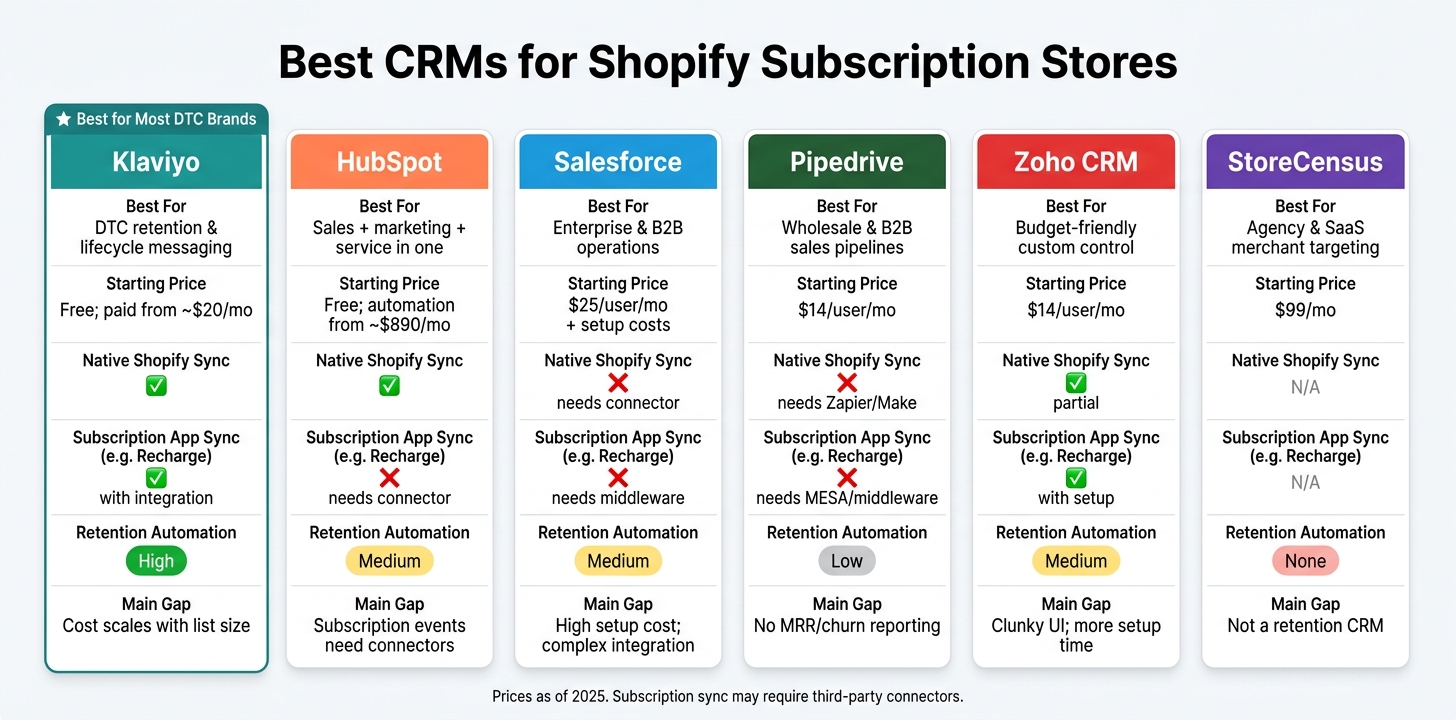
Best CRMs for Shopify Subscription Stores: Side-by-Side Comparison
Top 5 Best E‑commerce CRM Tools for Shopify Stores in 2026
sbb-itb-61169e3
Quick Comparison
| Tool | Best for | Main gap | Starting price |
|---|---|---|---|
| Klaviyo | DTC retention and lifecycle messaging | Cost climbs with list size | Free; paid plans from about $20/month |
| HubSpot | Teams that need CRM + marketing + service | Subscription events need connectors | Free; full workflow tools from about $890/month |
| Salesforce | Large brands with B2B or mixed sales motions | High setup cost and no native Shopify sync | From $25/user/month plus setup |
| Pipedrive | Wholesale and B2B sales pipelines | Weak subscription reporting | From $14/user/month |
| Zoho CRM | Lower-cost CRM with custom control | More setup work and rougher UI | From $14/user/month |
| StoreCensus | Agencies and SaaS teams targeting Shopify merchants | Not built for subscriber retention | From $99/month |
If you run a subscription store, I’d start with one question: Do you need better retention automation, better sales pipeline tracking, or better store targeting? That answer usually points to the right tool fast.
1. HubSpot CRM
HubSpot is a well-rounded CRM that covers sales, marketing, and service. For Shopify subscription stores, though, the fit comes down to one thing: how much setup work you're willing to take on.
Shopify and Subscription Data Sync
The native HubSpot-Shopify integration handles the core ecommerce data well. Contacts, orders, products, and abandoned checkouts sync on their own, usually within about 10 minutes.
The trouble starts with subscription events. If you're using Recharge, Bold Subscriptions, or a similar app, HubSpot's native sync doesn't pull in those events. That means renewals, failed payments, pauses, and cancellations usually need a third-party connector like Zapier, Make, or Celigo, or custom API work before they show up in HubSpot. Shopify metafields and product variants also aren't supported in the native sync.
Lifecycle Automation
HubSpot can run abandoned cart and win-back flows, but multi-step automation sits behind the Professional plan, which starts at about $890/month. For subscription stores, that gap matters. Without native subscription event data, things like renewal reminders, cancellation recovery, and failed-payment triggers won't run unless you add connector logic first.
There's also a lifecycle-stage wrinkle here. The native sync tends to move first-time buyers straight into the "Customer" stage, which can cause them to miss onboarding sequences entirely. To fix that, you need custom workflow logic.
Churn and LTV Reporting
HubSpot supports custom dashboards for LTV, repeat purchase rate, cohort revenue, and RFM scoring. But MRR isn't native, so you need mapped subscription data to report on it cleanly. HubSpot AI also includes predictive churn scoring, though it has less ecommerce context than tools built just for DTC.
Pricing Fit
| Plan | Monthly Cost | What You Get |
|---|---|---|
| Free | $0 | Basic CRM, contact management |
| Starter | ~$15–$20/mo | Limited automation |
| Professional | ~$890/mo | Full workflows, custom reporting |
| Enterprise | ~$3,600/mo | Advanced AI, multi-touch attribution |
HubSpot makes the most sense for Shopify subscription stores that also need B2B, wholesale, or service workflows. If that's not part of the picture, the paid tiers can feel hard to justify.
If you need deeper enterprise workflow control, Salesforce is the next comparison.
2. Salesforce
Salesforce is an enterprise CRM. It has a lot of muscle, but Shopify subscription stores usually pay for that muscle with heavy setup work and extra integrations. So the key question is simple: how much custom integration work are you willing to take on?
Shopify and Subscription Data Sync
Salesforce doesn't have a native Shopify integration. That means you'll need a connector or custom API work to sync customer and order data. And when you add subscription events like renewals, failed payments, and cancellations, you usually need middleware too.
This is where things can get messy. Data mapping is manual, and custom fields often come into play when schemas don't line up. In plain English: if the systems speak different dialects, someone has to translate. Implementation usually costs between $5,000 and $30,000+ before launch, and more complex enterprise setups can go past $50,000.
Lifecycle Automation
Salesforce can automate renewals, win-backs, and failed-payment triggers through Flow Builder or Apex. But if you want marketing sequences, you'll need Salesforce Marketing Cloud. That starts at $1,250/month.
Churn and LTV Reporting
Reporting is one of Salesforce's strong points. Einstein AI surfaces lead scores, deal predictions, and next-action recommendations. That can help teams spot subscription customers who may be at risk of churning. Tableau integration also supports cohort and retention analysis.
The catch: those reports are only as good as the data feeding them. If subscription data isn't mapped cleanly upstream, the output can fall apart fast.
Pricing Fit
All that flexibility comes with license, connector, and implementation costs.
| Plan | Monthly Cost (per user) | Best For |
|---|---|---|
| Starter Suite | $25 | Basic CRM, limited automation |
| Professional | $80 | Lead/opportunity management and forecasting |
| Enterprise | $165 | Advanced customization and workflow automation |
| Unlimited | $330 | Advanced analytics and 24/7 support |
Then add connector costs, support, and partner fees on top of the license price. Salesforce tends to make sense when you're above $5M GMV and have a dedicated admin or a Salesforce partner ready to help.
Below that line, total cost of ownership is tough to justify for most subscription stores.
For stores that want less overhead and a faster launch, the next option is Klaviyo.
3. Klaviyo
Klaviyo is built for ecommerce, and that shows up right away in how well it works with Shopify. The Shopify sync is strong out of the box, which makes Klaviyo a common pick for brands that want deep customer data and retention automation.
Shopify and Subscription Data Sync
Klaviyo's native Shopify integration syncs in near real time and captures a wide range of data points per customer profile, including purchase history, browsing behavior, and cart events.
The weak spot is subscription events. Standard order data flows in automatically, but events like Subscription Created, Charge Failed, and Subscription Cancelled need a direct integration with platforms like Recharge or Skio. Without that connection, you miss the signals that matter most for subscription retention.
Klaviyo syncs only the past year of Shopify data by default, so you'll need to import older records manually if you want accurate long-term LTV or churn predictions.
That level of data matters because Klaviyo's main edge is what it can automate once those events are flowing in.
Lifecycle Automation
This is Klaviyo's main strength. Once subscription events sync, Klaviyo can trigger upcoming-charge, charge-failed, and cancellation flows for retention and dunning.
Churn and LTV Reporting
Klaviyo predicts CLV, churn risk, and next order date. It also includes built-in attribution, so you can see which recovery and win-back flows bring in revenue.
The catch is price. Costs can climb fast as your list gets bigger.
Pricing Fit
| Profiles | Email Only (Monthly) | Email + SMS (Monthly) |
|---|---|---|
| Up to 250 | Free | Free |
| 500 | $20–$45 | $35 |
| 5,000 | $100–$200 | $120 |
| 25,000 | $400 | $450 |
| 100,000 | $1,200 | $1,310 |
Klaviyo bills all profiles in an account, including suppressed contacts, so it's smart to remove inactive profiles before billing.
Klaviyo makes the most sense when subscription revenue is high enough to support advanced segmentation and predictive CLV.
If you want a lighter, sales-first CRM instead of retention automation, Pipedrive is next.
4. Pipedrive
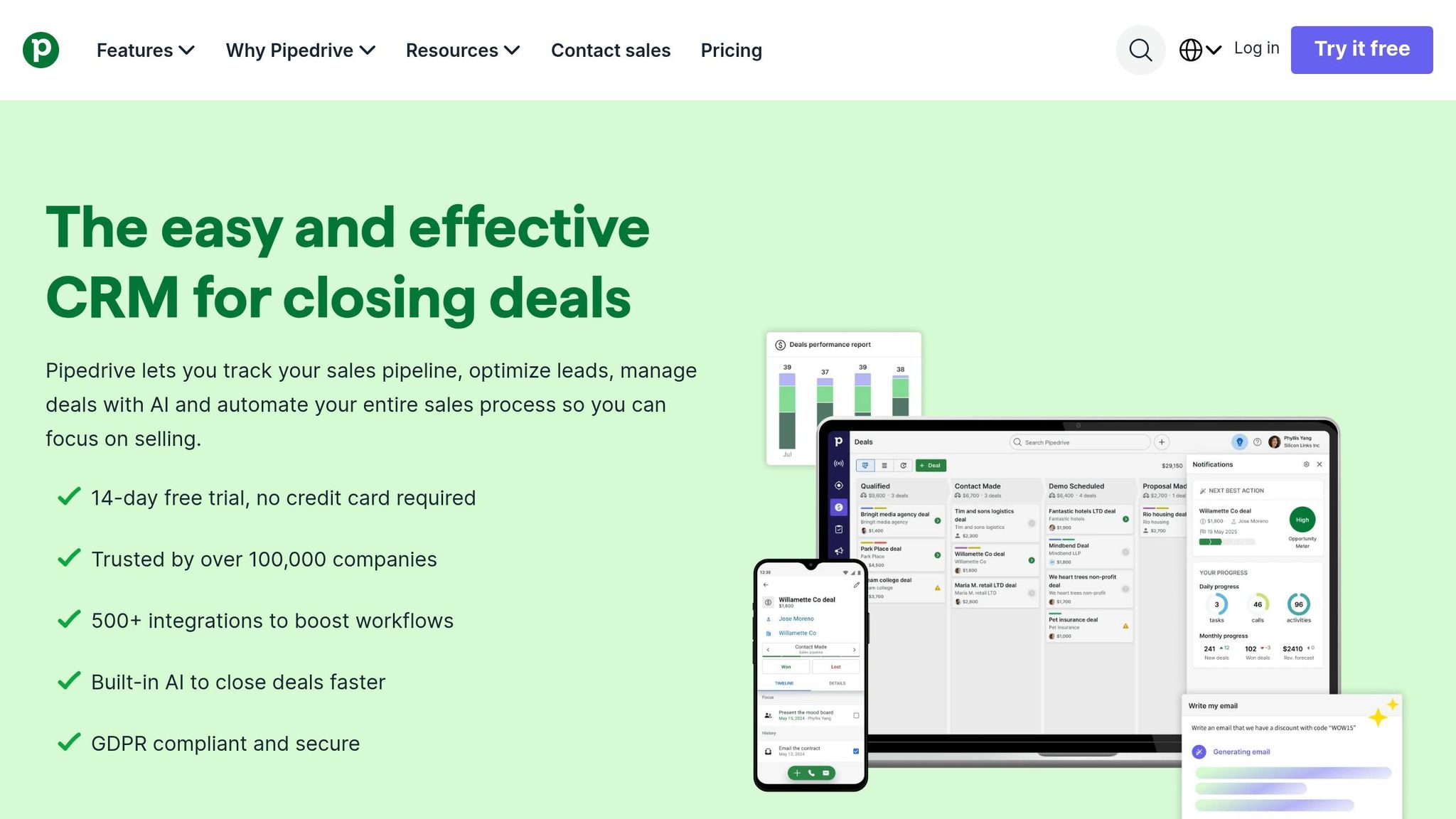
For Shopify subscription stores that care more about sales visibility than retention automation, Pipedrive is the lightest option in this group. That can be a good thing if your team lives in pipelines, follow-ups, and deal stages. But when it comes to being the main source of truth for subscriptions, it falls short.
Shopify and Subscription Data Sync
Pipedrive doesn't have a native Shopify integration, so every sync sits on top of other tools. In most setups, merchants connect it through Zapier, Make, or custom middleware. Those tools can send Shopify customers into People or Organizations and turn orders into Deals.
The bigger issue is subscription data. Events from Recharge still need middleware, often MESA, to move over in a steady way using direct workflow triggers. Without that extra layer, Pipedrive misses the subscription signals that matter most for retention.
Lifecycle Automation
Pipedrive was built for sales workflows, not subscription management. It can create renewal deals and send basic reminders, which may be enough for a sales-led team. But it can't manage failed payments, proration, or billing adjustments.
So if a DTC brand needs failed-payment recovery or renewal follow-up automation, Pipedrive usually has to sit alongside a tool like Klaviyo or a billing platform built for recurring revenue. You can feel that gap most in reporting, where Pipedrive has the least native subscription insight of the CRMs in this comparison.
Churn and LTV Reporting
Pipedrive has no native MRR, NRR, or churn reporting. That means subscription analytics depend on custom fields or a separate reporting layer. Put simply: use Pipedrive for sales activity, not recurring-revenue reporting.
Pricing Fit
Pipedrive pricing starts at $14 per user/month, with higher tiers at $29, $59, $69, and $79 per user/month. At first glance, that looks simple. The catch is that third-party sync tools and support apps can add up fast.
| Plan | Price (per user/month) |
|---|---|
| Essential | $14 |
| Advanced | $29 |
| Professional | $59 |
| Power | $69 |
| Enterprise | $79 |
Pipedrive makes the most sense for Shopify stores with a dedicated Shopify brand prospect lists for outbound or wholesale sales teams. It's a weaker fit for high-volume DTC brands that need automated lifecycle management inside the CRM.
5. Zoho CRM
Zoho is the budget-friendly CRM in this group, and it gives you a lot of control. The trade-off is setup time. It needs more hands-on work than HubSpot or Klaviyo. For Shopify subscription stores, the main draw is range and price, not easy out-of-the-box use.
Shopify and Subscription Data Sync
Zoho has a native Shopify connection that supports one-way or two-way sync. Customers can become Contacts or Leads, and orders can map to Deals or Sales Orders. It does not backfill old Shopify data, and syncing complex product variants and discount codes usually needs extra tooling. If you use Zoho One, Zoho Flow is usually the cleanest path because it can connect CRM, Books, and Inventory in one workflow.
Before you sync anything, set email-based deduplication rules in Zoho CRM. If you skip that step, guest checkouts can create duplicate contacts and throw off your reporting.
Once the Shopify data is mapped the right way, Zoho can support renewals, dunning, and win-back flows.
Lifecycle Automation
New Shopify customers can automatically create Contact or Lead records. Zoho Billing can run dunning sequences at set intervals - days 1, 3, 7, 10, and 14 - and send automated notices asking subscribers to update their payment method. For win-backs, you can tag contacts as "Lapsed" after 90 days without a Shopify order and trigger a re-engagement sequence through Zoho Campaigns. Blueprint helps teams handle refunds and VIP escalations the same way each time, which matters when multiple people touch those workflows.
Churn and LTV Reporting
Zoho CRM can calculate LTV at the contact level by adding up total order value from synced Shopify Sales Orders. If you want cohort views, churn by acquisition source, or MRR trend reporting, you'll need Zoho Analytics. Zoho Billing tracks MRR, ARR, and churn rate natively for subscription billing data.
Pricing Fit
| Plan | Price (per user/month) | Notes |
|---|---|---|
| Standard | $14 | Requires third-party tools for Shopify sync |
| Professional | $23 | Adds Zia AI and advanced reporting |
| Enterprise | $40 | Required for the official Shopify extension |
| Zoho One | $37 | Includes CRM, Books, and Analytics |
Zoho One at $37/user/month stands out on price for scaling brands because it bundles CRM, Books, and Analytics. Smaller stores, though, will often need Flow too, which pushes the total up.
Zoho has a 4.1/5 rating on G2 across 2,800+ reviews. Users often like the price and the broad feature set, but many say the interface feels rougher than HubSpot's. Zoho makes sense for smaller subscription stores that want more CRM control without Salesforce-level overhead.
If your next step is merchant intelligence instead of CRM workflow, the article shifts here from customer management to store-level prospecting.
6. StoreCensus
For teams selling to Shopify merchants, the job changes a bit. It’s less about managing current customers and more about finding the right stores first.
StoreCensus is a B2B prospecting tool built for agencies and SaaS teams that sell to Shopify merchants. It scans 6M+ Shopify and WooCommerce stores and lets users filter by revenue, tech stack, theme, country, and growth signals. It also surfaces decision-maker contacts for outreach. On top of that, it can detect store signals like subscribe-and-save widgets and management portals to figure out which subscription app a store is using.
How It Helps with Merchant Targeting
The data here is pretty useful if you’re building outbound lists.
A scan of 154,065 Shopify stores found that 98.3% had no detectable subscription app. That works out to 151,489 stores. As of May 1, 2026, StoreCensus identified 19,326 high-traffic, repeat-purchase stores with no visible subscription layer.
Stores that already use subscription apps also show a different pattern. On average, they have 3.6 apps installed, compared with 1.7 for non-subscription stores. They also score higher on lead quality scores: 85.2 vs. 65.7. And Shopify Plus stores are 5.75x more likely to run a subscription app than standard Shopify stores.
So the best fit here is list building and outbound targeting, not customer retention.
Best Uses
Subscription adoption is highest in a few categories:
- Food & Beverage: 5.6%
- Health & Wellness: 5.0%
- Beauty: 3.4%
StoreCensus is handy for spotting high-traffic stores that already use email platforms like Klaviyo or Omnisend but don’t yet have a subscription layer. It can also help find stores running starter setups like Seal Subscriptions + Mailchimp that may be ready for migration.
Pricing
The Professional plan at $99/month is the best pick for most users because it includes decision-maker contacts and API access.
Strengths and Tradeoffs by Platform
These six tools split into two very different jobs: retention and revenue management, or sales and prospecting. So the first step is simple: pick based on the job you need done most - retention, pipeline management, or outbound.
Klaviyo makes the most sense for retention-first DTC brands. It shines when your focus is keeping customers, growing repeat purchases, and running lifecycle campaigns. The catch? Pricing climbs fast as your list gets bigger, hitting about $400/month at 25,000 contacts.
HubSpot starts to make more sense at that same stage if you need one system for both ecommerce and B2B or wholesale. It can cover a lot in one place. But if you want full automation, pricing starts at $890/month.
Salesforce is usually the move once you're above $5M GMV and dealing with more complex operations. It gives you deep control, but it also comes with baggage: a dedicated admin is usually part of the deal, and setup often takes 6–12 months.
Pipedrive works well for smaller wholesale or B2B sales teams that want a clean, visual pipeline without all the extra weight.
Zoho CRM sits in the budget slot, with customization priced around $14–$40/user/month. On paper, that looks strong. In day-to-day use, though, UI friction and the lack of native Shopify sync can slow teams down.
If your team sells to Shopify merchants instead of running a Shopify store, the job changes. At that point, you're not looking for a CRM to manage subscribers or lifecycle campaigns. You're looking for account discovery. StoreCensus is built for outbound list building for teams targeting Shopify merchants, not for customer retention or subscription management.
Here’s the side-by-side view:
| Platform | Best Advantage | Main Limitation | Best For |
|---|---|---|---|
| Klaviyo | Predictive CLV and churn risk; 80+ pre-built flows | Pricing scales fast with list size | Pure DTC subscription brands focused on retention |
| HubSpot | All-in-one marketing, sales, and service | $890/month minimum for automation; mandatory onboarding fee | Mid-to-large brands running DTC + wholesale |
| Salesforce | Deepest customization and B2B reporting | High total cost; complex setup; requires third-party Shopify connectors | Enterprise brands ($5M+ GMV) with B2B operations |
| Pipedrive | Best-in-class visual pipeline | No native marketing automation; Shopify sync via Zapier | Wholesale and B2B sales teams |
| Zoho CRM | Affordable customization at $14–$40/user/month | Clunky UI; non-native Shopify sync | Price-conscious brands needing pipeline management |
| StoreCensus | Outbound list building for Shopify merchant targets | Not a customer-retention CRM | Agencies and SaaS teams prospecting Shopify merchants |
One thing ties all of these tools together: bad data gets expensive fast. It pushes up contact costs and throws off retention metrics from day one.
So in practice, the choice usually comes down to one thing: which workflow your team needs most right now.
Final Recommendation
After comparing the tools, the choice comes down to three things: store size, retention needs, and how your team sells.
Choose the CRM that fits how you work right now, not the roadmap you hope to grow into later.
Small Shopify subscription stores should start with Zoho CRM if keeping costs down is the main goal, or Klaviyo if retention-focused automation matters more. Growing DTC brands should switch to Klaviyo once segmentation and lifecycle management start to matter more than basic automation. That shift can pay off because repeat customers spend 67% more than first-time buyers.
For Shopify Plus operators, HubSpot makes sense when the goal is one system for sales, marketing, and service. Salesforce is the better fit when a team needs deeper workflow control. Pipedrive works well for wholesale and B2B sales teams that want a clean visual pipeline without extra complexity.
For agencies, the job is a bit different. A core CRM can manage pipeline and follow-up, but it won’t show you which stores are worth going after in the first place. That’s where StoreCensus comes in. It helps with account discovery and outbound list building using store-level signals.
Start with one metric. If your North Star is repeat purchase rate, go with a retention-first tool. If it’s wholesale pipeline velocity, choose something built around deal management.
FAQs
Which CRM is best for retention?
That choice comes down to how you keep customers coming back.
Klaviyo is a strong default for lifecycle marketing. It uses Shopify data to power automated win-back flows and replenishment reminders, which makes it a solid fit if your retention plan leans on email and SMS.
If loyalty is the main driver, Marsello makes more sense. But if retention depends on support, especially fixing bad experiences before they turn into lost customers, Re:amaze is the better pick. It shows order history and customer value right inside support conversations, so your team has more context when helping people.
Do I need a subscription app integration?
Yes - if you want to go beyond Shopify’s basic built-in features.
Shopify stores customer profiles and order history. But it doesn’t give you deeper CRM tools like sales pipelines, deal stage tracking, or more advanced lifecycle automation.
A CRM integration pulls store data into one place, including contacts, order history, and shopping behavior. That makes it much easier to track revenue attribution, recover abandoned carts, and run segmented marketing without manual imports or custom development.
When should I upgrade to an enterprise CRM?
Consider an upgrade when Shopify’s built-in tools, or simple add-ons, start getting in the way of growth. For many brands, that point shows up somewhere between $100,000 and $500,000 in revenue.
This move tends to make sense when your team needs more than basic store data and simple automations. Maybe you need complex integrations across teams, advanced predictive modeling, or high-volume data pipelines that give everyone one clear view across commerce, service, and marketing.
For larger brands, the case gets stronger. If you’re running multiple stores or dealing with specialized sales processes, an enterprise CRM can give you more control and stability. The trade-off is pretty straightforward: these systems often need dedicated in-house support or outside consultants to set up, manage, and get the most from them.



