How to Protect Shopify Stores from Accessibility Lawsuits
Learn how Shopify store owners handle accessibility lawsuit risk with image alt text, popup fixes, compliance scans, and ADA support steps.

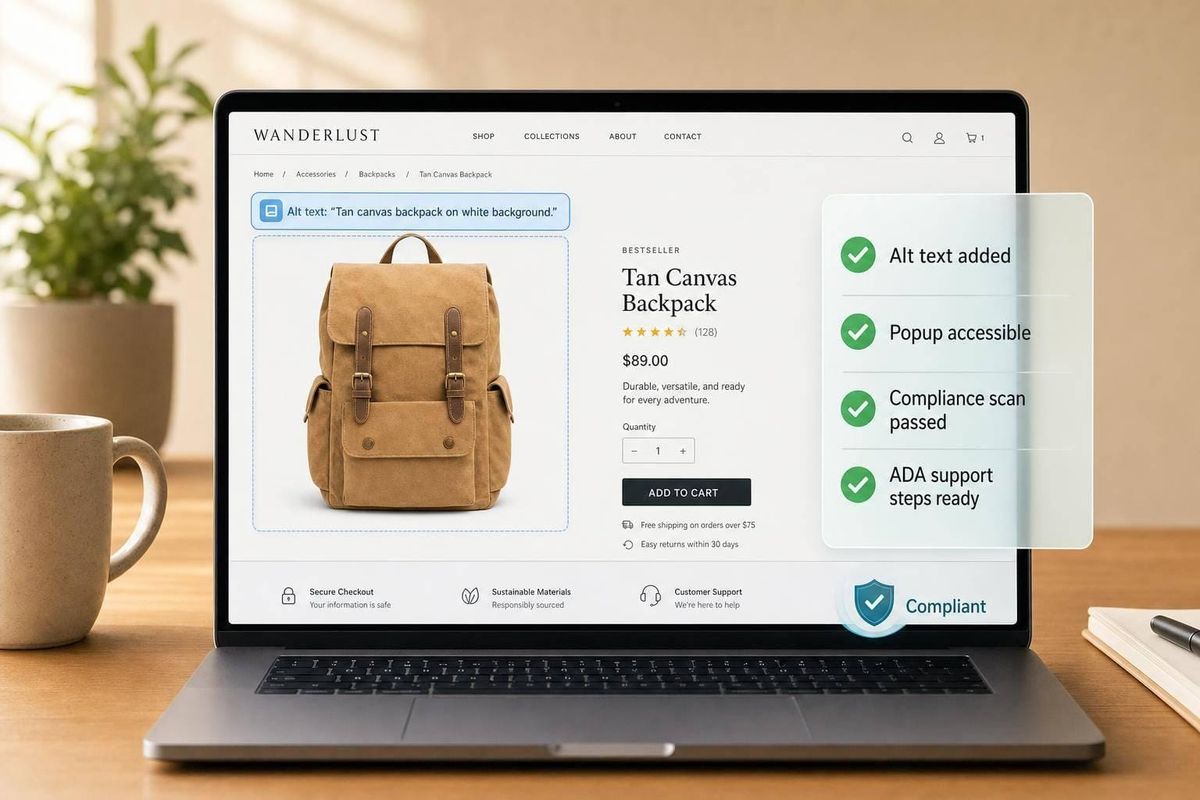
Accessibility compliance has moved from a "nice to have" technical improvement to a real operational risk for ecommerce brands. For agencies and Shopify Partners, that shift matters for two reasons: it affects your clients’ legal exposure, and it creates a new category of site health work that many merchants still overlook.
In the video discussion behind this article, the founders of Antler Rings shared a troubling experience: they received a demand letter alleging accessibility violations on their Shopify store, followed by a lawsuit when the issue wasn’t immediately addressed. Their story is less about one brand’s legal problem and more about a broader pattern ecommerce operators should understand.
This article does not replace legal advice, and it is not a summary of every accessibility standard. Instead, it translates the discussion into practical guidance for agencies serving Shopify and WooCommerce brands: what happened, why ecommerce stores appear especially vulnerable, and how to turn accessibility into a proactive audit and service line before it becomes a crisis.
Key Takeaways
- Accessibility lawsuits are not theoretical. Ecommerce brands, especially larger catalogs, may be targeted over issues like image descriptions, popups, and navigational barriers.
- Many merchants still don’t know what "compliant" means in practice. Agencies can add immediate value by translating vague legal risk into concrete site fixes.
- Alt text quality matters. Generic or repeated image descriptions may not be enough; image-specific descriptions were a central issue in the case discussed.
- Third-party apps can create exposure. Even if a merchant didn’t build a feature, they may still be held responsible for accessibility failures caused by popups or other embedded tools.
- An accessibility statement and support contact can help. It won’t eliminate legal risk, but it shows intent and provides a path for users to report issues.
- Quick scans are useful, but not sufficient. Automated tools can surface obvious problems, but they won’t catch every issue or replace human review.
- Agencies should add accessibility to launch and redesign checklists. Waiting until after a complaint arrives is far more expensive.
- For prospecting agencies, this is a strong value-led conversation starter. Accessibility risk can justify audits, retainers, and remediation projects when positioned responsibly.
sbb-itb-61169e3
The Case: A Shopify Brand Gets Hit With an Accessibility Claim
The discussion centered on Antler Rings, a jewelry brand that received a settlement demand from a law firm alleging web accessibility violations. According to the founders, the initial letter sought a payment to resolve the matter before formal litigation. After setting it aside for several weeks, they were later served with a lawsuit.
What makes the story relevant to agencies is not the legal procedure itself, but the pattern behind it:
- the issue appeared without prior warning
- the alleged user problem had not, in their view, been clearly communicated to the brand beforehand
- the fixes involved technical and content-level changes that many store operators wouldn’t know to prioritize
- the scope of remediation was significant because the store had thousands of images
This is the kind of problem that catches merchants off guard. They may have privacy policies, terms, and standard compliance pages in place, yet still miss accessibility issues that create legal exposure.
Why This Matters More Than Many Store Owners Realize
One of the most important themes in the discussion was simple: the law and the ecommerce stack do not evolve at the same speed.
Store owners are juggling themes, apps, CRO tests, email capture flows, merchandising, mobile UX, and paid traffic. Accessibility often gets buried under "we’ll handle it later" technical debt. That may be understandable, but it doesn’t reduce risk.
The speakers cited data points indicating that thousands of web accessibility lawsuits have been filed in federal court, with ecommerce making up a large share of targets. Whether every case is equally legitimate is a separate question. Operationally, the lesson is the same: merchants need a plan.
For agencies, this creates a familiar gap:
- merchants assume their platform handles more than it does
- developers assume content teams are managing the details
- marketers add conversion layers like popups without checking accessibility impact
- nobody owns accessibility end to end
That ownership gap is exactly where agencies can step in.
The Specific Issues Mentioned in the Lawsuit
The conversation surfaced three practical areas that agencies should add to audit checklists.
1. Image descriptions
The biggest issue discussed was image-specific descriptions for site images.
On a Shopify store, this often means ensuring that each image has meaningful alt text or equivalent descriptive metadata that works with screen readers. The distinction that mattered in this case was not merely having some description, but having descriptions tailored to each image, rather than repeating the same text across all images on a product page.
For a visually impaired shopper using assistive technology, "silver ring" repeated five times may be far less useful than:
- front view of hammered silver band
- side profile showing width of ring
- close-up of interior engraving
- product worn on hand for scale
That level of specificity becomes a real workload issue at scale. Antler Rings reportedly had more than 8,000 images to review.
2. Popup usability
The founders also described problems related to popups, particularly how easy they were to dismiss.
This is a classic ecommerce tension: the same popup that improves list growth can degrade usability. For accessibility, a small close icon, poor contrast, unclear labeling, or keyboard-navigation issues may all create friction.
Agencies running CRO or email growth programs should take note. Accessibility is not only a development issue; it is also a conversion-layer issue.
3. Site interaction and navigation
A third issue involved on-site interaction and scrolling behavior, described in the conversation as one of the easier fixes.
The bigger lesson is that accessibility risk can come from the cumulative experience, not just one obvious defect. Navigation, overlays, forms, buttons, focus states, and dynamic content can all contribute to a poor experience for users relying on assistive tools.
Where Many Stores Are Most Exposed
The case points to a broader truth: larger, more customized stores have more places to break accessibility.
That includes brands with:
- large product catalogs
- image-heavy merchandising
- multiple installed apps
- custom themes or older theme modifications
- aggressive lead-capture overlays
- frequent landing page experiments
- mixed ownership across marketing, design, and development teams
The more complex the stack, the less likely accessibility has been handled consistently.
For agencies, that means your most sophisticated clients may also be the most exposed, especially if no one has audited the store in the last 6 to 12 months.
Accessibility Is Not Just a Legal Issue
The discussion made an important distinction: the frustration was not with accessibility itself, but with the way enforcement can happen.
That distinction matters for how agencies communicate this topic. If you position accessibility only as "lawsuit prevention", you risk making it sound cynical or reactive. The better framing is:
- accessibility improves usability
- usability supports conversion
- inclusive design expands who can buy
- better site structure often improves overall site quality
- reducing legal risk is an added business benefit
In other words, accessibility is not merely a defensive expense. It can also be a quality standard.
A Practical Agency Framework for Accessibility Reviews
If you serve Shopify or WooCommerce merchants, here is a practical way to turn this into an operational offering.
H2: Step 1: Run a baseline accessibility scan
The video mentioned using a quick compliance scan to identify issues. That is a smart first step.
An automated scan can help surface:
- missing image descriptions
- low contrast elements
- empty buttons or links
- form labeling problems
- heading structure issues
- ARIA or semantic markup gaps
Important caveat: automated scans are only the beginning. They are useful for triage, not certification.
H2: Step 2: Review high-risk ecommerce elements manually
A manual pass should focus on the features most likely to affect a shopper’s path:
- homepage hero sections and sliders
- collection pages
- product galleries
- product option selectors
- add-to-cart interactions
- cart drawers
- popups and quiz overlays
- checkout-adjacent messaging
- account and login flows
- customer support widgets
If your agency manages growth tools, this step is especially important because third-party scripts often introduce problems merchants don’t notice.
H2: Step 3: Audit image alt text at scale
This was one of the clearest lessons from the case.
Your review should distinguish between:
- missing alt text
- keyword-stuffed alt text
- duplicated alt text across multiple images
- decorative images that should be ignored by screen readers
- product imagery that needs angle- or context-specific descriptions
For catalogs with thousands of images, this quickly becomes a systems problem, not a one-off cleanup.
That means agencies should think in terms of:
- export and bulk review workflows
- AI-assisted drafts with human review
- rules for decorative vs. functional images
- content governance for new product uploads
H2: Step 4: Evaluate all popups and overlays
Ask basic but critical questions:
- Can users dismiss the popup clearly?
- Is the close control visible and labeled?
- Can someone navigate it with a keyboard?
- Does it trap focus?
- Does it interrupt core tasks like product selection or cart access?
- Is the text readable and contrast sufficient?
Many email capture tools were built for conversion first, accessibility second. Your agency may need to pressure vendors for fixes or configuration changes.
H2: Step 5: Add an accessibility contact path
In the video, the brand added an accessibility-specific email address and footer language inviting users to report issues.
That is a practical move because it does three things:
- shows good-faith intent
- provides support for users who encounter barriers
- creates a documented process for issue handling
This is not a substitute for compliance work, but it is better than silence.
H2: Step 6: Build accessibility into every redesign and launch
One striking detail in the discussion was that the brand had just signed with a website company that included accessibility work in the redesign scope.
That is where this needs to live: not as emergency cleanup, but as part of normal launch discipline.
Agencies should add accessibility checks to:
- theme migrations
- redesign QA
- CRO test deployment
- app onboarding
- product upload SOPs
- content publishing checklists
If you wait for a complaint, the work becomes rushed, expensive, and emotionally draining.
The Third-Party App Problem
One of the most useful agency insights from the discussion was this: merchants may be responsible for accessibility failures created by third-party software they do not fully control.
That is a major issue in the Shopify ecosystem, where brands rely on apps for:
- popups
- reviews
- subscriptions
- chat widgets
- search
- upsells
- loyalty programs
- bundles
A merchant may assume app vendors have handled compliance. That assumption is risky.
For agencies, this means accessibility audits should include a vendor-layer review:
- Which app is injecting UI into the storefront?
- Is the UI keyboard accessible?
- Are labels and controls screen-reader friendly?
- Can the feature be configured to be less intrusive?
- Does the vendor provide accessibility documentation or support?
This is an important lead-generation angle, too. Many brands have no visibility into which apps are introducing accessibility liabilities.
How Agencies Can Turn This Into a Valuable Client Service
For StoreCensus-style audiences, the commercial angle is obvious, but it should be handled carefully.
Accessibility shouldn’t be sold through fear alone. It is better packaged as a storefront risk and usability audit that combines:
- accessibility review
- app bloat review
- UX friction analysis
- technical SEO overlap
- conversion blocker identification
That creates a more strategic conversation and avoids sounding like a legal scare tactic.
Here’s how different agency types can use it:
Web design and development agencies
Offer accessibility audits before redesigns and migrations. Position remediation as part of site quality assurance.
Paid media agencies
Use accessibility as a landing-page quality issue. If traffic is paid for but some users cannot interact with the page properly, ad efficiency suffers.
Email and retention agencies
Review popup tools, form inputs, and modal interactions. Accessibility and list growth should not work against each other.
SEO agencies
Tie accessibility to better structure, cleaner semantics, and improved content hygiene where relevant.
CRO agencies
Treat accessibility barriers as conversion barriers. A hard-to-dismiss popup or poorly labeled variant selector affects more than compliance.
A Smart Prospecting Angle for Agencies
Because your audience includes agencies that build outbound lists, this topic can support a high-value prospecting workflow.
For example, agencies can identify stores with likely accessibility gaps by looking for signals such as:
- heavy popup usage
- outdated themes
- very large image catalogs
- app-heavy storefronts
- custom product pages
- brands in higher revenue tiers that are more likely to attract legal scrutiny
That does not mean sending alarmist cold emails. It means offering a thoughtful audit with concrete observations.
A message framed around "we found usability and accessibility issues affecting customer experience" is stronger than one framed around "you’re going to get sued."
What the Video Suggests About the Legal Environment
The founders and host were careful to separate the ethics of accessibility from the tactics of some law firms. They discussed concerns that certain cases may function less like user-centered remediation and more like pressure-based settlement tactics.
That observation is important, but agencies should stay disciplined here. The video shared one company’s experience and cited concerns raised by their attorney. It did not provide a full legal analysis of all accessibility litigation, and this article should not be read as one either.
What agencies can responsibly take away is this:
- litigation risk exists
- standards are not always obvious to merchants
- waiting is costly
- documentation, scanning, and remediation are prudent now
Questions Agencies Should Ask Every Ecommerce Client
Add these to onboarding or quarterly reviews:
- Have we ever run an accessibility scan on the storefront?
- Who owns accessibility internally: dev, marketing, or no one?
- Do product images have image-specific descriptions?
- Which third-party apps inject storefront UI?
- Are popups navigable and easy to dismiss?
- Is there a documented accessibility statement or contact path?
- Has the site been reviewed against WCAG guidance recently?
- Are new products and landing pages following the same standards?
If a client can’t answer most of these, there is likely opportunity for useful work.
Conclusion
The Antler Rings story highlights a reality many ecommerce brands are only now confronting: accessibility is no longer a background concern. It sits at the intersection of user experience, operational discipline, legal exposure, and platform complexity.
For agencies and Shopify Partners, that creates both a responsibility and an opportunity. The responsibility is to stop treating accessibility as an edge-case compliance task. The opportunity is to help merchants build stronger storefronts through audits, remediation, and better launch processes.
The brands most at risk are often the ones moving fastest: large catalogs, lots of apps, constant testing, and no single owner for accessibility. That’s exactly why agencies should step in early.
The most practical next move is not panic. It is process: scan the site, review the high-risk areas, fix what is obvious, document support pathways, and make accessibility part of every future release.
That approach won’t solve every legal ambiguity. But it will put merchants in a far better position than finding out about accessibility only after a demand letter arrives.
Source: "Website Accessibility Lawsuits: What Every Ecommerce Store Owner Needs to Know | SM Podcast Ep 284" - Smart Marketer, YouTube, Jul 15, 2026 - https://www.youtube.com/watch?v=sd1jYoXGnGs