Lead Nurturing with Automated CRM Workflows
Stop early follow-up: use four automated CRM workflows, clean store data, and merchant signals to move more ecommerce leads through pipeline.

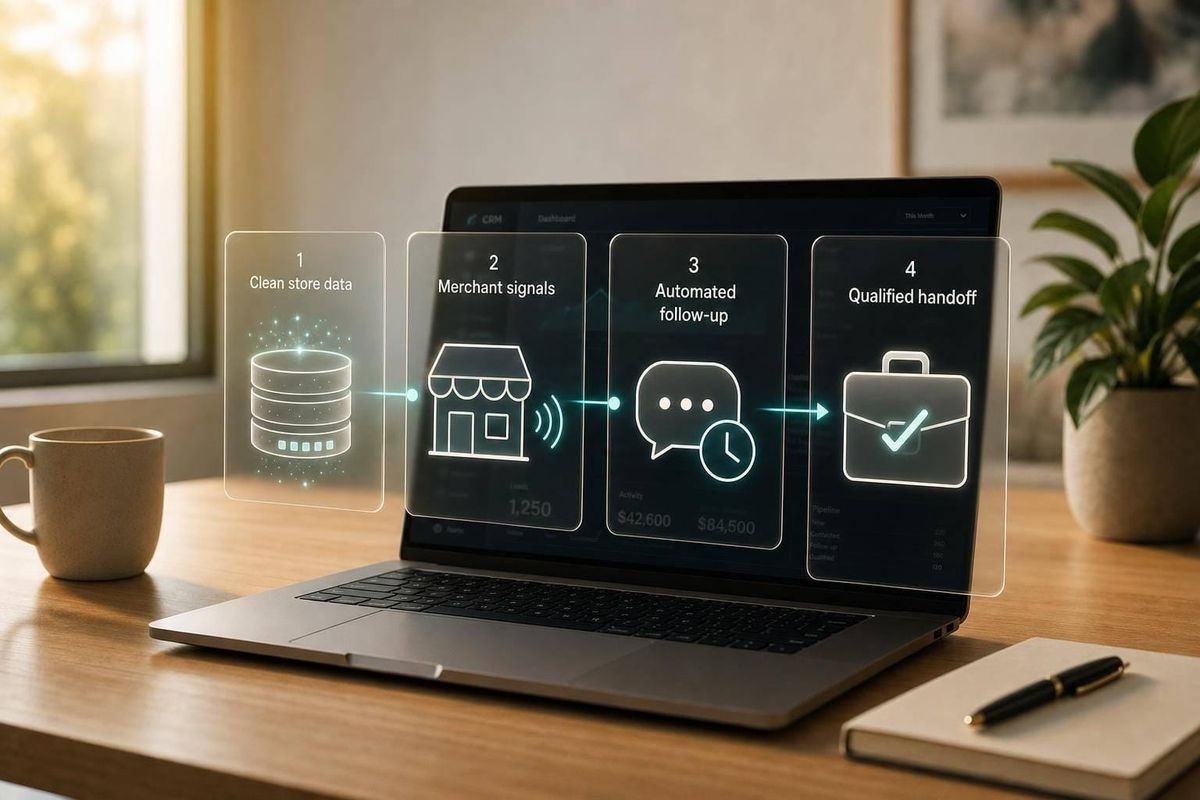
Most agency follow-up fails for one simple reason: it stops too early. If I were setting this up for an ecommerce agency, I’d focus on four automated CRM workflows, a small set of clean CRM fields, and lead scoring based on platform, revenue, tech stack, and buying signals.
Here’s the short version:
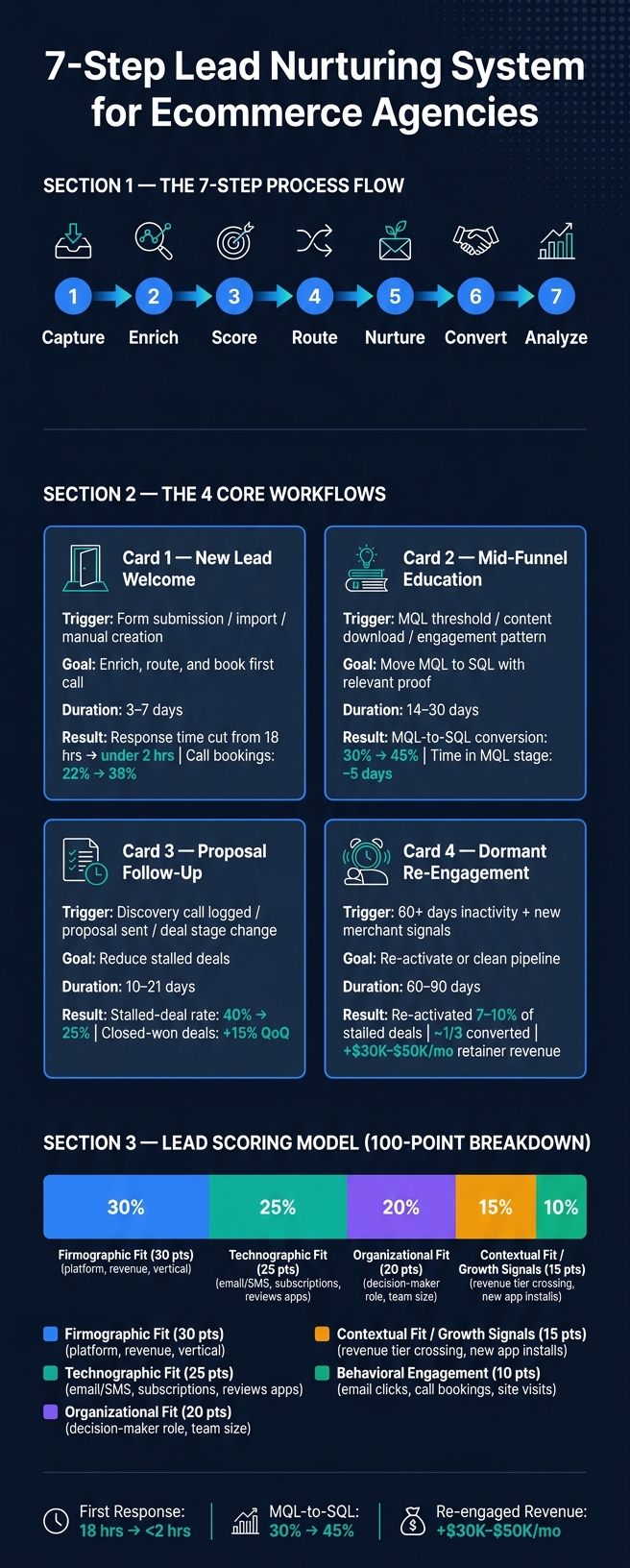
- I’d build around 7 steps: capture, enrich, score, route, nurture, convert, and analyze
- I’d track only the CRM fields that drive action: source, stage, platform, revenue band, vertical, tech stack, role, last engagement, and score
- I’d start with 4 workflows:
- New lead welcome
- Mid-funnel education
- Proposal follow-up
- Dormant lead re-engagement
- I’d use store data to trigger follow-up when a merchant:
- I’d judge performance by pipeline movement, not email volume:
- meetings booked
- proposal rate
- closed-won rate
- pipeline value in USD
A few numbers from the article stand out. One agency cut first-response time from 18 hours to under 2 hours and moved call bookings from 22% to 38%. Another moved MQL-to-SQL conversion from 30% to 45%. Re-engagement based on merchant changes brought back 7%–10% of stalled deals, with about one-third of those later closing.
What I like here is the core idea: don’t automate more noise. Automate the next best action based on store fit and buyer behavior. That means your CRM is not just sending emails. It is helping reps know who to contact, when to contact them, and why now.
If you sell services to Shopify or WooCommerce brands, this article gives you a clear setup path: keep the data clean, keep stages fixed, tie workflows to merchant signals, and review results every month.
7-Step Lead Nurturing System for Ecommerce Agencies
How Lead Nurturing Works (Automate!)
sbb-itb-61169e3
Set up CRM data, stages, and scoring before building workflows
Before you build workflows, set up the small set of CRM fields that will power segmentation, scoring, and routing for Shopify and WooCommerce prospects. Focus on: lead source, lifecycle stage, platform, revenue band, vertical, tech stack, contact role, last engagement date, and lead score. If a field doesn't affect segmentation, scoring, or automation, don't make it required. That keeps data cleaner and makes capture, enrichment, scoring, and routing work the way they should.
Create lifecycle stages for ecommerce agency sales
Start with the stage names your automations will actually use.
Use seven stages: New Lead, Contacted, Discovery Scheduled, Proposal Sent, Negotiation, Closed Won, and Closed Lost. For each stage, define one entry rule, one exit rule, and one owner. That removes guesswork and stops leads from bouncing around the pipeline. For Closed Lost, either remove the lead from the active sales process or move it into a long-term re-engagement stream.
Segment leads by platform, revenue, and tech stack
For ecommerce agency segmentation, four fields do most of the heavy lifting: platform, revenue band in USD, vertical, and tech stack.
Platform matters because Shopify and WooCommerce merchants often deal with different technical limits and service needs. Revenue band matters because a store doing $250,000 per year usually needs a different offer than one doing $2 million. Vertical matters because DTC beauty, apparel, and supplements respond to different proof points. And tech stack matters because the tools a merchant has installed show where they are in their growth path.
Tech stack is often the fastest way to tailor nurture content. A Shopify merchant using Klaviyo, a subscriptions app, and a review platform is likely further along than one running a basic theme with no automation tools. Someone with a simple email setup might need education around lifecycle messaging. A merchant with a more mature stack may be ready for a retention or CRO-focused offer.
Use StoreCensus data to enrich records and improve lead scoring
StoreCensus fills CRM records with store platform, estimated revenue band, growth signals, tech stack, and decision-maker contact information across 6M+ Shopify and WooCommerce stores. Those enriched fields can feed scoring rules and trigger different workflows based on actual store changes, not just form fills. If a Shopify merchant crosses a revenue threshold, adds a new app category, or shows rapid store changes, that lead should score higher and trigger faster follow-up or a direct sales alert.
A common 100-point model splits points across firmographic fit, technographic fit, organizational fit, contextual fit, and behavioral engagement. [2]
| Score category | Example inputs | Max points |
|---|---|---|
| Firmographic fit | Target platform, revenue band, vertical | 30 |
| Technographic fit | Advanced email/SMS, subscriptions, reviews apps | 25 |
| Organizational fit | Decision-maker role, team size | 20 |
| Contextual fit / growth signals | Revenue tier crossing, new app installs | 15 |
| Behavioral engagement | Email clicks, call bookings, site visits | 10 |
Audit firmographic and technographic fields every 90 days. Older data makes scoring less accurate. [1]
Build the four CRM workflows that cover most agency lead nurturing
Once your CRM fields, stages, and scoring are set, build these four workflows first. They handle most agency lead nurturing without turning your CRM into a mess.
Each one should be built around five parts: trigger, entry, action, branch, and exit. The point is simple: use platform, revenue, tech stack, and score to decide what happens next.
| Workflow | Trigger type | Primary goal | Typical duration | Ideal merchant profile |
|---|---|---|---|---|
| New lead capture & welcome | Form submission, import, manual creation | Enrich, route, and book first call | 3–7 days | All inbound/outbound leads |
| Mid-funnel education | MQL threshold, content download, engagement pattern | Move MQL to SQL with relevant proof | 14–30 days | High-fit MQLs with active engagement |
| Proposal follow-up | Discovery call logged, proposal sent, deal stage change | Reduce stalled deals | 10–21 days | High-retainer SQLs |
| Dormant re-engagement | 60+ days inactivity, new merchant signals | Re-activate or clean pipeline | 60–90 days | Stalled leads with new signals |
Build them in this order: capture and welcome, education, proposal follow-up, then re-engagement.
New lead capture and welcome workflow
This workflow starts from three triggers: a form submission from a lead capture page like a free audit or strategy call, a prospect import from StoreCensus, or manual lead creation by a sales rep. Once it fires, enrich the record, set the stage, and route the lead. Pull in platform, estimated revenue band, and key apps so scoring and assignment have something useful to work with. [10][11][13]
On Day 0, send a personalized intro email that mentions the merchant’s platform and vertical. That small detail matters. A line that sounds like it was written for their business tends to beat a generic agency pitch. For fast-growing stores or core ICP matches, create a call task within 24 hours for the assigned owner instead of waiting for the whole email sequence to finish. [13][15][17]
One US Shopify-focused agency put this setup in place so every inbound lead got a personalized Day 0 email and owner assignment within 2 hours of form submission. The result: first-response times fell from 18 hours to under 2 hours, and initial call booking rates climbed from 22% to 38% across about 150 new leads per month within three months. Exit conditions are straightforward: reply received, meeting booked, stage moves to Opportunity, or the contact unsubscribes. [7][8][14]
Once capture is running well, move to leads that need more trust and more context before they’re ready to buy.
Mid-funnel education workflow
This workflow is for marketing-qualified leads that aren’t ready for a sales conversation yet. Entry can come from a lead score crossing a set threshold, a specific content download, or an engagement pattern like multiple email opens plus a service page visit. [7][9][12]
Run this as a 14–30 day sequence. Start with a positioning email on Day 0–2. Follow that with a matched case study on Day 3–5. Then send a tactical educational piece on Day 7–10, such as three flows every Shopify brand should automate in Klaviyo. Around Day 12–20, send social proof and objection-handling content. Segment by platform so the content fits the store: WooCommerce merchants get material on checkout optimization and plugin performance, while Shopify brands get content on app ecosystem and theme performance. [8][12][14]
This is where branching logic earns its keep. If a lead clicks a case study or pricing link, increase their score and route them into a short sales follow-up sequence. If their score crosses your SQL threshold, pull them out of the education series right away and hand them to sales. An agency serving WooCommerce merchants segmented this workflow by tech stack and revenue band and saw MQL-to-SQL conversion move from 30% to 45%, while average time in the MQL stage fell by 5 days. [6][8][12][14]
When that engagement starts to look like buying intent, shift the lead into proposal follow-up.
Proposal follow-up workflow
This workflow should trigger when a discovery call is logged with Proposal Sent status, a proposal document is marked sent, or a deal moves into the Proposal stage. Run it over 10–21 days with three to five touchpoints: a short check-in on Day 1–2, a value-add email with a relevant case study on Day 5–7, and a final close-the-loop email around Day 10–14. [11][13][15]
Here, the branching logic should follow proposal engagement signals. If the document is opened three or more times and there’s no reply within 48 hours, auto-create a call task or LinkedIn touch task for the owner. If a next step gets booked, like a second call or a sent contract, the workflow should exit at once and stop all generic follow-ups. If there are no opens or replies after the full sequence, move the deal to Closed Lost – No response and, if it makes sense, enroll the contact in the dormant re-engagement workflow. [4][3][11][15]
This kind of structure can change the pipeline in a very plain, measurable way. One agency replaced ad-hoc manual chasing with this process and cut their stalled-deal rate on proposals from 40% to 25%. They also saw closed-won deals increase by about 15% quarter-over-quarter on a base of 40–60 proposals per quarter. [11][13][15]
If the deal goes quiet, don’t keep poking it forever. Wait until new store activity gives you a reason to reach back out.
Dormant lead re-engagement workflow
StoreCensus signals can bring dormant leads back to life. The key is to re-engage based on inactivity plus fresh merchant signals, not just because 60 days passed on the calendar. This workflow targets contacts with no meaningful engagement for 60 or more days: no replies, no bookings, and no pricing-page visits. [12][13][16][5]
Say a US-based merchant moves from a $500,000 to a $2,000,000 estimated annual revenue band, installs a new subscription app, or changes themes. That’s the kind of signal worth acting on. The sequence can start with a growth recap email in Week 1 that points to those exact changes. Then send a tactical audit offer in Week 3, such as a free retention audit for Shopify stores, followed by a final check-in in Week 6. If the lead engages by opening, clicking, or visiting a pricing page, increase their score, create an owner task, and move them back into the mid-funnel or proposal stage while removing them from the dormant sequence. [12][16][5]
A dormant re-engagement workflow built on StoreCensus signals re-activated about 7–10% of stalled opportunities. Of those re-activated deals, about one-third converted, adding an extra $30,000–$50,000 per month in retainer revenue across multiple US-based clients. [12][13][16][5]
Connect StoreCensus and your CRM so workflows stay current
Connect StoreCensus to your CRM so platform, revenue, tech stack, and growth signals update on their own and kick off the right workflow. That keeps your four nurture workflows from running on old assumptions.
Map store intelligence into CRM properties used by automation
StoreCensus fills external merchant fields. Your CRM handles lifecycle stage, activity, and score.
With that split in place, set up a dedicated group of CRM properties to receive StoreCensus data. At the account level, these are the fields that matter most for workflow automation:
| CRM property | Data type | Allowed values (examples) | Used by |
|---|---|---|---|
| Ecommerce platform | Single-select | Shopify, WooCommerce | Segmentation, routing, content branching |
| Store revenue tier (USD) | Single-select | <$500K, $500K–$2M, $2M–$10M, >$10M | Lead scoring, workflow enrollment |
| Store country | Single-select | United States, Canada, United Kingdom | Geographic campaigns |
| Primary email/SMS provider | Multi-select | Klaviyo, Attentive, Omnisend | Tech-stack-based content |
| App ecosystem tags | Multi-select | Recharge, Yotpo, Gorgias | Scoring, personalization |
| Growth signal status | Single-select | Stable, Fast-growing, Declining | Re-engagement triggers |
| Theme last changed date | Date | - | Workflow trigger |
Use controlled picklists. A rule set to platform = Shopify breaks if someone types shopify_store or Shopify Plus instead. Write down every allowed value in an internal data dictionary before you build a single automation rule.
At the contact level, map StoreCensus decision-maker data - name, email, and role - into fields like Title, Seniority, and Buying role. Use a standard taxonomy such as "Founder", "Head of Ecommerce", or "CMO." These fields drive persona-based branching in your education and proposal workflows.
Trigger nurture sequences when merchant signals change
Once the fields are mapped, trigger workflows from actual merchant changes, not just from lead creation. Focus on revenue tier upgrades, platform or theme changes, app changes, and growth-signal shifts.
Say a merchant moves into a higher revenue tier. A workflow rule that detects a change in the Store revenue tier field can automatically increase the lead score, move the lifecycle stage, and enroll the account in a mid-funnel education sequence built around scaling services.
The same logic works for re-engagement. If a dormant lead's Growth signal status changes from Stable to Fast-growing, you can re-enter them into the re-engagement workflow with messaging tied to that exact shift.
For net-new prospecting, set up the integration so merchants that match your ICP in StoreCensus - for example, U.S.-based Shopify stores between $1M and $10M using apps such as Klaviyo or Recharge - automatically create new CRM accounts with all mapped fields filled in. Use the store domain as the unique key so updates overwrite existing records instead of creating duplicates.
That changes the trigger source from static CRM data to live merchant behavior. Here's what that looks like in practice:
| Dimension | CRM-only workflows | CRM + StoreCensus workflows |
|---|---|---|
| Prospect discovery | Manual list building | Auto-created from a 6M+ store database |
| Segmentation | Broad ("ecommerce") | Platform, revenue tier, country, app stack |
| Trigger type | Time-based or engagement-based | Real-time merchant change signals |
| Personalization | Generic ecommerce messaging | Platform- and tool-specific playbooks |
| Data entry | Manual or ad hoc | Automated field population and updates |
| Lead scoring inputs | Engagement data only | Firmographic + technographic + engagement |
Once these fields and triggers are live, monthly reporting can show which signals actually move leads forward.
Measure results and refine workflows each month
Once your CRM fields and StoreCensus triggers are set up, your monthly review should make one thing clear: which workflows are actually creating pipeline. After a workflow goes live, the job isn't done. You need to see whether it's helping qualified leads move forward.
Track stage movement and revenue impact by workflow
Tag each lifecycle stage change with the workflow that caused it. This gives you a clean view of how many leads each workflow moved through your agency stages - New Lead, Contacted, Discovery Scheduled, Proposal Sent, Negotiation, Closed Won - and how much pipeline value and closed-won revenue came from that workflow.
If a proposal follow-up workflow moves more leads from MQL to SQL than an education workflow, put more attention there.
| Metric | Definition | Why it matters |
|---|---|---|
| Open rate | Unique opens ÷ delivered emails | Shows whether the subject line and sender feel relevant |
| Click-through rate (CTR) | Unique clicks ÷ delivered emails | Shows how well the content lines up with the CTA |
| Reply rate | Unique replies ÷ delivered emails | Best early sign that a lead is ready for sales |
| Meetings booked | Qualified calls scheduled from workflow | Clear tie between nurture and pipeline |
| Proposals sent | Formal proposals from workflow-sourced leads | Shows the health of Discovery Scheduled → Proposal Sent |
| Pipeline value (USD) | Sum of open opportunities' expected revenue, using probability-weighted values if your CRM supports it | Shows the revenue effect of each sequence |
| Closed-won rate | Closed-won deals ÷ opportunities from workflow | Final test of pipeline quality |
Compare these numbers to your pre-automation baseline using the same segment definitions. Use at least one full quarter of past data.
Use monthly audits to fix weak triggers and weak segments
Pull workflow logs and look for drop-offs and stage backlogs. Then use that report to figure out where the issue sits: the trigger, the segment, or the message.
If MQLs are stalling, something is off with the segment, the offer, or the timing.
Cut each report by platform and revenue band. For example, you may see WooCommerce stores in the $250,000–$1 million range stall at the MQL stage, while Shopify stores in the $1 million–$5 million range move cleanly through to Proposal Sent. That doesn't mean the workflow is broken across the board. It means the message or timing is off for one segment. Fix the WooCommerce sequence without touching what's already working for Shopify.
Check trigger performance too. If only a small number of leads enter a workflow, the enrollment rule may be too tight. Expanding the trigger to include StoreCensus signals can reach part of the segment your current rule is missing. [18][19]
Test just one variable per workflow each month:
- Subject line
- Delay
- CTA
Log the date, workflow, segment, hypothesis, and result. Over time, that log becomes your team's record of what you've tried, what failed, and what paid off.
Conclusion: Keep CRM structure, merchant data, and follow-up logic aligned
Lead nurturing automation compounds over time only when three parts stay in sync: lifecycle stages, StoreCensus fields, and workflow rules. If you change your ideal customer profile - say, by shifting toward Shopify stores above $2 million with subscriptions - you also need to update your lifecycle criteria, your StoreCensus-based enrollment filters, and your workflow messaging at the same time. Change one without the others, and the whole chain starts to slip.
When those three layers stay aligned, follow-up gets more consistent and more relevant. You also get a higher share of qualified opportunities and steadier growth in retainer revenue, because the pipeline is based on real merchant signals instead of guesswork. [20][21]
FAQs
How do I choose the right lead scoring thresholds?
Start by scoring leads on fit and intent based on your ICP. Give more points to actions that show stronger buying interest, like pricing page visits or demo requests (15–25 points). Give fewer points to lighter actions, like blog reads (1–3 points).
Use your past conversion data to set score bands. For example:
- 90+: send to sales right away for follow-up
- 60–80: place in an automated nurture flow
Check results every week and cut signals that add noise.
What CRM should an ecommerce agency use for these workflows?
An ecommerce agency should use a CRM with two-way sync, automated field mapping, and dependable API integrations. Popular options include HubSpot, Salesforce, and Pipedrive.
In most setups, the CRM should act as the main home for relationship data. Then you sync in commerce signals from StoreCensus - things like revenue tiers, tech stacks, and app installs - so your outreach feels more personal and lands at the right time.
How long does it take to set up automated lead nurturing?
Setting up automated lead nurturing usually happens in phases, and most teams need about 90 days to get it in place and ready to scale.
Here’s how that often breaks down:
- Days 1–30: Audit your systems and build the core workflows.
- Days 31–60: Test your email sequences and lead scoring models.
- Days 61–90: Review performance, tighten what’s working, and scale.
StoreCensus data can help speed up CRM updates, improve lead scoring, and sharpen segmentation.