Incident Response Tools for Ecommerce Agencies
How ecommerce agencies can detect, contain, and recover from breaches across multiple client stores with playbooks and tenant isolation.

One breach can stop sales, expose customer data, and put many client stores at risk at the same time. If I run an ecommerce agency, I need incident response tools that help me detect issues early, contain damage fast, keep client accounts separate, and handle breach communication on time.
Here’s the short version:
- I need a stack that covers detection, analysis, containment, communication, recovery, and review
- I need centralized logs so I’m not checking stores one by one during an incident
- I need multi-client separation so one merchant’s alerts, data, and access never mix with another’s
- I need playbooks for common ecommerce issues like account takeovers, bad plugins or apps, payment skimming, and phishing
- I need notification workflows because merchants may face rules like GDPR’s 72-hour deadline or U.S. state notice windows
- I need to watch costs, since breach detection and escalation can hit $1.47 million, and outside forensic support may cost $300 to $600 per hour
- I should tier monitoring by merchant risk, because a $10 million+ store with EU data and a custom checkout needs more coverage than a small store with a simple setup
The main point is simple: the best tool stack is the one that lets me respond across many client accounts without confusion, delay, or mixed ownership. That means clear access rules, one incident owner, prewritten message templates, and tools that fit Shopify and WooCommerce work.
If I get those basics right, I protect revenue, cut incident time, and keep client trust intact.
Automating incident response: scalable & fast, within minutes
sbb-itb-61169e3
The core incident response tool stack for Shopify and WooCommerce agencies

The right incident response stack should cover detection, response, and notification across every client account. This isn't about buying every security product on the market. It's about handling many merchants at once, dealing with shared risk, and moving fast when something goes wrong at any stage of the incident lifecycle.
Detection and analysis tools: SIEM, log collection, and forensics
Start with centralized logging across store, hosting, and platform systems. Without it, every investigation turns into a slow, store-by-store scramble.
SIEM platforms like IBM QRadar, Splunk, and Sumo Logic help teams connect events across sources, flag odd behavior, and surface issues like checkout spikes or suspicious login patterns [6].
In a multi-client setup, two things matter most:
- Tenant separation: Each client's logs and alerts need to stay isolated. If one store is flooding the system with noise, it shouldn't hide what's happening somewhere else.
- Evidence retention: Logs need to stick around long enough to support forensic work. If an external forensic firm steps in at $300 to $600 per hour, every delay gets expensive fast [1].
Once alerts are centralized, the next step is simple: automate the response wherever you can.
Response and coordination tools: SOAR, incident management, and on-call systems
SOAR platforms and incident management tools like SolarWinds, ManageEngine, Rapid7 InsightIDR, and LogRhythm can automate workflows, rank incidents by severity, and give teams playbooks to follow [6].
In plain English, that can mean a system that:
- blocks a suspicious IP
- disables a compromised admin account
- escalates a critical alert to the on-call team [6]
These platforms also help with the less flashy side of incident work, which is often where teams win or lose time: case management, timestamped timelines, runbook documentation, and stakeholder updates.
Just as important, that workflow should create one shared incident record that both internal teams and clients can use.
Phishing and breach notification tools for customer-data incidents
Phishing causes over 85% of all data breaches [6]. That's why agencies need clear breach-response workflows for customer-data incidents.
Notification tools should support audience segmentation, approved message templates, delivery tracking, and audit logs [4]. Writing those templates before an incident happens is one of the highest-impact moves an agency can make. When a breach hits, nobody wants to draft customer notices from scratch under pressure.
There's also an ownership point that trips people up: when customer data is involved, the merchant - not the agency - owns the duty to notify. In ecommerce, that still applies even if a third-party app or vendor was storing the data [4].
None of these tools help much if access, ownership, and playbooks aren't set up for each client account.
How to evaluate incident response tools for agency use
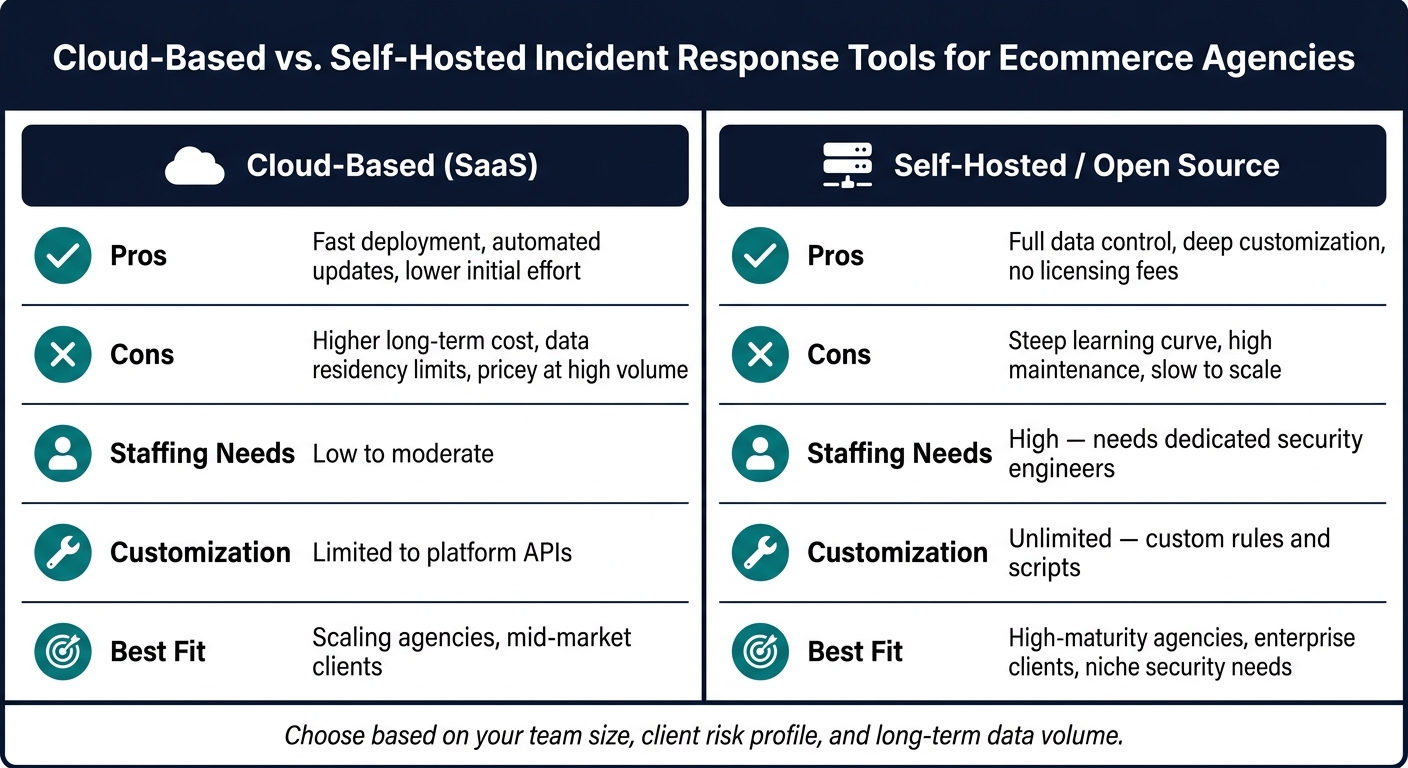
Cloud-Based vs. Self-Hosted Incident Response Tools for Ecommerce Agencies
The evaluation criteria that matter most in ecommerce
Start with your client mix, not software reviews.
Put strict tenant isolation first. Agencies need one platform that can handle many client environments without mixing accounts. If that line gets blurry, day-to-day work gets messy fast and overhead climbs.
After that, ecommerce-specific integrations matter more than a long list of generic security features. Your tools should connect with Shopify and WooCommerce, plus the systems where incidents often show up first: payment processors like Stripe and PayPal, and marketing tools like Klaviyo. Magecart-style injection and credential stuffing call for monitoring that understands the platform itself, not just generic logs [3].
Under PCI DSS 4.0, tools also need to monitor and control scripts on payment pages.
A few buying details often get missed, and they matter a lot:
- Implementation time
- Role-based access controls
- Whether pricing grows with data ingestion volume
Model your log volume before you buy. Ingestion costs can climb fast.
Tool choice matters less than fit. If the platform doesn’t match your staffing model, even a strong product can turn into a headache.
Cloud-based platforms vs. self-hosted workflows
For most ecommerce agencies, cloud-based tooling is the default.
| Approach | Pros | Cons | Staffing Needs | Customization | Best Fit |
|---|---|---|---|---|---|
| Cloud-based (SaaS) | Fast deployment, automated updates, lower initial effort [6] | Higher long-term cost, data residency limits, pricey at high volume [6] | Low to moderate | Limited to platform APIs | Scaling agencies, mid-market clients |
| Self-hosted / Open Source | Full data control, deep customization, no licensing fees [6] | Steep learning curve, high maintenance, slow to scale [6] | High; needs dedicated security engineers | Unlimited; custom rules and scripts | High-maturity agencies, enterprise clients, niche security needs |
Once you know what your client base looks like, pick the deployment model that matches your team.
Using merchant intelligence to decide where to invest in monitoring
Not every client account needs the same level of monitoring. Use merchant intelligence to tier coverage by revenue, geography, and stack complexity.
A merchant in the $10M–$50M+ range with a complex app stack, EU customer data, and a custom checkout setup has a very different risk profile from a smaller store with a simpler setup. The first account needs real-time script monitoring, tighter escalation thresholds, and breach notification workflows that can meet GDPR’s 72-hour window. The second usually doesn’t need that same depth.
StoreCensus lets agencies filter across 6M+ Shopify and WooCommerce stores by revenue tier, tech stack, country, and growth signals. That gives you a practical way to separate high-risk accounts from stores that can stay on a lighter-touch monitoring plan. If an account moves into the $10M–$50M range, or starts showing strong growth signals, that should trigger a review of its current monitoring coverage [3].
Those risk tiers should shape who gets real-time monitoring and faster escalation. They should also guide account ownership, access rules, and escalation paths.
Implementing incident response tools across client accounts
Once coverage is tiered, agencies need per-client access, playbooks, and notification ownership.
Design a multi-tenant setup with clear access and ownership
Turn tenant isolation into separate log streams, alert queues, credential stores, and case records. The goal is simple: one client account should never expose another.
Engineers should only see the client accounts assigned to them. Account managers need case status and communication threads. Merchant stakeholders should only see their own incidents. Leadership can keep a central view across all accounts without direct access to individual client credentials.
Write down each role, its permissions, and its approval path. SOC 2 auditors look closely at access controls across customer data environments [2].
Each incident also needs a minimum record:
- A timestamped timeline
- The systems involved
- Notified parties
- Timestamps
- Actions taken
Treat those records as living documents. Review them every quarter as client tech stacks change [5].
Build Shopify and WooCommerce playbooks for common incidents
Generic incident response plans tend to fall apart when things get messy. Agencies need platform-specific playbooks that tell engineers what to do in the first 30 minutes, not a loose framework they have to figure out in the middle of an incident.
Here are the highest-priority incident types and their core containment steps:
| Incident Type | First Containment Step | Approval | Recovery Check |
|---|---|---|---|
| Account takeover / suspicious admin login | Force password reset and kill active sessions | Merchant approval before live checkout changes | Confirm MFA is enforced on all admin accounts |
| Malicious app or plugin behavior | Revoke the app or plugin's API keys immediately | Document who authorized the install and the vendor's access; escalate if unknown | Review the vendor's permissions and data access |
| Payment skimming (Magecart-style) | Inventory checkout scripts and remove anything unexpected | Merchant approval before restoring live checkout changes | Verify third-party script management is in place |
| Phishing or BEC | Enforce DMARC, DKIM, and SPF | Escalate to breach counsel if customer data may be exposed | Confirm mailbox and admin access are clean |
For account takeover, enforce MFA across all admin portals and watch for credential-stuffing attempts that reuse stolen passwords [3].
For payment skimming, PCI DSS 4.0 makes third-party script and tag management on payment pages a required control. That means your playbook should include a step to inventory every checkout script and flag anything out of place [3].
The focus here is detection speed and containment, not perfect prevention.
For every app or plugin involved, document the vendor, the data it touches, and whether it has been notified.
Containment also needs a single owner. If no one owns the response and the notification clock, things slip.
Set up communication and breach notification workflows
Internally, every client account should have a named Incident Commander - one person who owns the response from discovery through resolution [7]. The discovery clock starts when an employee first notices unusual behavior, not when a breach is confirmed [1]. Train your team to escalate right away and follow carrier reporting deadlines.
Call the carrier's incident response hotline first.
For merchant-facing communication, pre-draft notification templates for the most common incident types. That way, account managers aren't writing from scratch under pressure.
For U.S. merchants, breach-notice deadlines vary. Florida and New York require notice within 30 days of a confirmed breach [1]. Your incident record should note which rules apply, when notification was sent, and who approved the customer-facing language.
Engage breach counsel early to preserve privilege over forensic work [1].
Conclusion: The minimum viable incident response system for ecommerce agencies
A minimum viable incident response system for an ecommerce agency isn't about piling on more tools. It's about making sure every phase is covered. Detection, triage, containment, communication, and post-incident review each need a clear owner and a defined process. If an incident slips through the cracks, the cost can snowball fast into legal, forensic, and recovery work.
This also has to work across many client accounts at once. That means clear ownership, platform-specific playbooks, and preapproved notification templates that teams can use without hesitation.
Once the response model is set, the last call is where to focus monitoring depth. Use StoreCensus merchant intelligence to tier coverage by revenue, stack complexity, and activity signals. Activity Signals flag app installs and theme changes, which gives your team a prompt to review risk.
The takeaway is simple: the best agencies decide ahead of time who owns each phase, which clients come first, and what done looks like.
FAQs
How do I choose the right incident response tools for my agency?
Choose tools that fit your agency’s setup, your team’s skill level, and each client’s budget. Start by mapping your most important assets - hosting, admin panels, plugins, payment providers, and API integrations - so you can spot the areas with the most risk.
Then focus on tools that support log correlation, threat detection, case management, and automated playbooks. They should also work well with your current stack and give you clear reporting for management and compliance.
What should be in an ecommerce incident response playbook?
An ecommerce incident response playbook should spell out who does what, when they do it, and how the team works together when a security issue hits.
The goal is simple: move fast, stay coordinated, and avoid chaos.
A strong playbook should cover:
- Security contacts so the right people can be reached right away
- Reporting channels for flagging incidents and sharing updates
- Breach notification procedures to guide internal and external communication
- Forensic steps to preserve evidence and figure out what happened
- Remediation workflows to contain the issue, fix it, and restore systems
- Compliance documentation to track actions, decisions, and legal requirements
- Regular tabletop testing so the team can practice before a live incident forces the issue
When this is written down in plain language, people don't have to guess under pressure. They can follow the plan and act fast.
When should a merchant get higher-tier monitoring?
A merchant should move to higher-tier monitoring when day-to-day operations get more complex or compliance demands get tighter.
Common triggers include hitting major revenue milestones, expanding into new markets, scaling fast, or needing stronger security. It can also make sense when you need downloadable audit logs, deeper compliance support like TCF v2.3 or GPC detection, and stronger incident response capabilities.