Fourth-Party Risk Management Software
Build layered fourth-party risk visibility with vendor records, attack-surface checks, breach alerts, dependency mapping, and trust-center monitoring.


Here’s the short answer: there is no single fourth-party risk tool that shows you everything. If I were choosing software, I’d build around five visibility layers: vendor records, internet exposure, breach alerts, dependency discovery, and trust-center change tracking.
That matters because fourth-party risk sits behind your direct vendors. And according to the article, 77% of breaches over the prior three years came from a vendor or other third party. So if I rely only on annual reviews or vendor questionnaires, I’m leaving gaps.
If I wanted a simple way to think about the market, I’d break it down like this:
- Vendor risk platforms keep the main record for vendors, owners, reviews, and declared dependencies.
- Attack-surface tools show public-facing assets, exposed services, and weak points tied to suppliers.
- Breach alert tools flag leaks, dark-web mentions, and incident signals.
- Dependency databases help find supplier relationships that vendors may not clearly disclose.
- Trust-center monitors track changes to SOC reports, certifications, privacy pages, and subprocessor lists.
The main takeaway: I would judge each product by what it lets me see, not by whether it claims to “do fourth-party risk.”
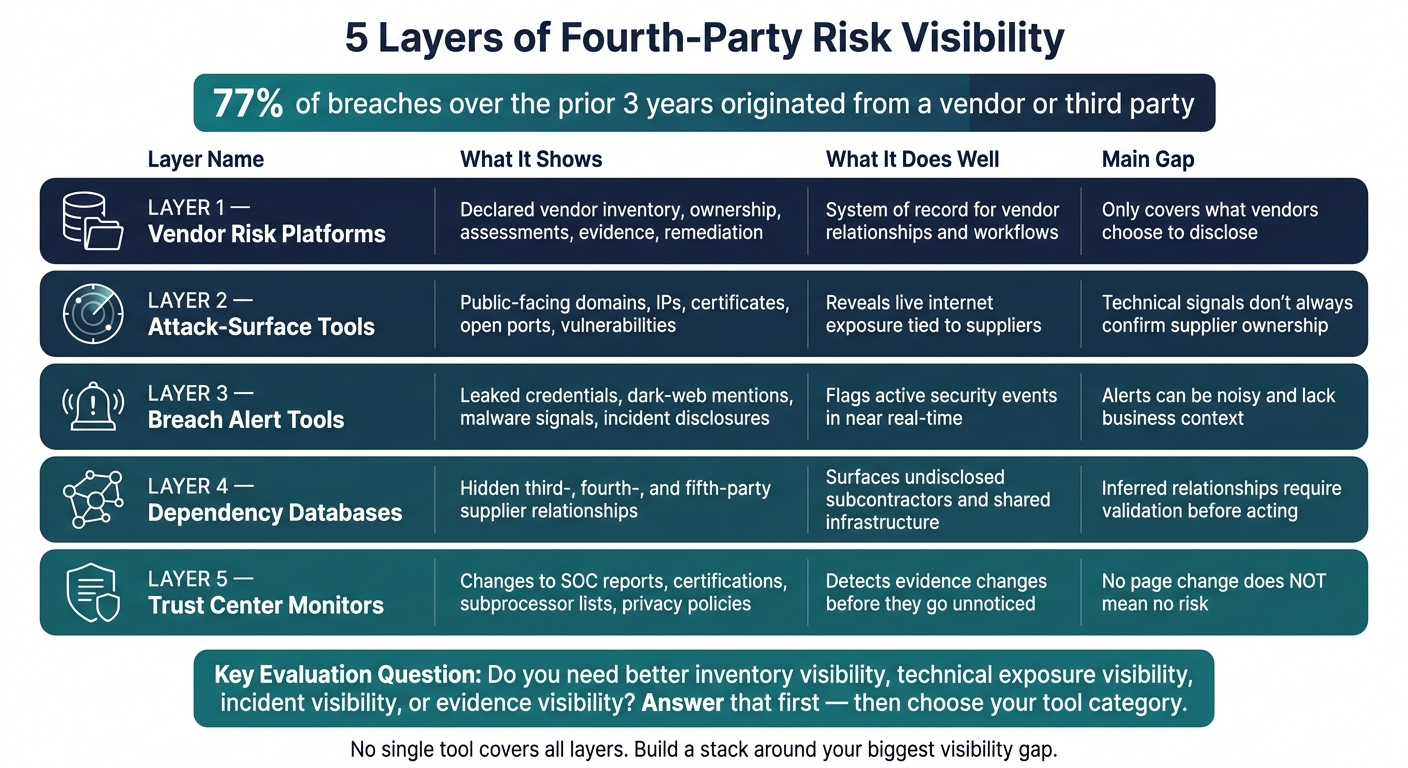
5 Layers of Fourth-Party Risk Visibility: Tool Categories Compared
What is Fourth-Party Risk and Why Does It Matter for Third-Party Risk Management?
sbb-itb-61169e3
Quick Comparison
| Category | What I use it for | What it does well | Main gap |
|---|---|---|---|
| Vendor risk platforms | Track vendors and declared dependencies | Ownership, assessments, evidence, remediation | Often depends on what the vendor discloses |
| Attack-surface tools | Check public-facing exposure | Domains, IPs, certificates, ports, weak points | Technical signals don’t always prove ownership |
| Breach alert tools | Watch for active security events | Leaks, dark-web signals, threat activity | Alerts can be noisy or lack business context |
| Dependency databases | Find hidden supplier relationships | Maps third-, fourth-, and fifth-party links | Some relationship data may need verification |
| Trust-center monitors | Watch for evidence changes | Subprocessor list updates, cert changes, report changes | No page change does not mean no risk |
If I were evaluating tools today, I’d start with one question: Do I need better inventory visibility, technical exposure visibility, incident visibility, or evidence visibility? That answer usually tells me which category to buy first.
Vendor risk management platforms: the system of record for vendors and declared fourth parties
These platforms are the system of record for vendor risk management. Use them to track vendor inventory, ownership, assessments, evidence, and remediation. In practice, VRM works best for declared relationships. Then you use technical tools and alerting tools to cover what the platform can’t prove on its own.
What this category helps teams see
VRM platforms record what vendors disclose about subprocessors, cloud providers, and other dependencies. They do not independently find hidden relationships. That’s the line that matters here: declared versus undisclosed.
Their main job is straightforward. They help teams assign owners, track questionnaires, collect evidence, log decisions, and manage remediation. Without a system of record doing that work, fourth-party risk efforts usually get stuck in spreadsheets.
What VRM can’t confirm by itself tends to show up somewhere else: technical exposure data and incident monitoring.
Products to review in this category
Vanta supports automated vendor discovery, inherent-risk scoring, AI-assisted assessments, and evidence requests.[6] It tends to work best when vendors keep current trust-center data public. If they don’t, coverage falls off.[1]
UpGuard covers the full vendor risk lifecycle - onboarding, assessment, remediation, monitoring, and reporting - and integrates with tools like Jira and Slack for follow-up.[7][9] One thing to press on during evaluation: is a dependency a declared relationship, an external signal, or both? And are those clearly labeled?
Bitsight is strongest for portfolio-level benchmarking, trend analysis, and board reporting based on externally observed risk signals.[8] Treat those ratings as signals, not as proof of full dependency mapping.
Panorays combines external attack-surface mapping with questionnaires, compliance mapping, and monitoring for changes like exposed services, certificate expirations, and configuration drift.[5] Ask whether a supplier relationship came from vendor disclosure or technical detection, because those call for different actions.
VISO TRUST maps dependencies using dynamic vendor graphs, open-source monitoring, and event-triggered reassessment.[2][3][4] It supports more than 30 global frameworks, including NIST CSF, ISO 27001, SOC 2, HIPAA, and GDPR.[2] During review, check whether it shows mapped relationships, external signals, or both - and how the platform marks the difference.
The table below compares these five platforms across the capabilities that matter most for fourth-party visibility:
| Product | Dependency mapping | Continuous monitoring | Questionnaires | Remediation workflows | Integrations | Fourth-party coverage |
|---|---|---|---|---|---|---|
| Vanta | Declared subprocessors via trust centers and questionnaires | Review-triggered; verify continuous scope | Automated evidence requests, AI-assisted assessments | Remediation plans with assigned owners | Procurement, GRC, ticketing, security tools | Strongest for vendors with public, current trust pages |
| UpGuard | Verify whether relationships are mapped or reported as separate profiles | Daily monitoring across 70+ risk vectors | 40+ templates; 95% faster completion claimed | Jira and Slack integration for follow-up | GRC, SIEM, ticketing, procurement | Verify whether coverage is disclosed, inferred, or explicitly mapped |
| Bitsight | Verify supplier/dependency graph vs. separate entity signals | External ratings, alerts, trend data | Verify questionnaire workflow depth | Verify whether alerts become owned tasks | ServiceNow, Archer, OneTrust, ProcessUnity, Aravo | Treat ratings as signals, not proof of complete dependency mapping |
| Panorays | Supply-chain discovery with declared and technical relationships | Certificate, config, and service changes | Questionnaires with compliance mapping | Risk treatment and closure tracking | ServiceNow VRM, Jira, Slack, Zapier | Distinguish declared vs. technically detected relationships |
| VISO TRUST | Dynamic dependency graphs with event-triggered reassessment | Open-source monitoring; event-triggered reassessment | AI-assisted assessment and evidence handling | Automated findings with ownership and residual risk | Verify available enterprise integrations | Confirm how named, inferred, and confidence-labeled dependencies are represented |
One practical note: start with a critical-vendor pilot instead of loading your full supplier list on day one. For each pilot vendor, capture the owner, criticality, declared dependencies, evidence, findings, and last review date. That small test makes it plain where VRM ends - and where the next visibility layer needs to take over.
Technical and incident visibility: attack-surface tools and breach alert platforms
Use EASM and alerting tools to test what VRM can't prove: live exposure and active incidents. Think of them as evidence layers under VRM, not substitutes for it.
External attack-surface management tools
These tools help you check whether a vendor's stated relationships line up with what is actually exposed on the public internet.
EASM platforms scan internet-facing assets for domains, IPs, certificates, storage, open ports, and vulnerabilities tied to suppliers. Bitsight Exposure Management extends visibility to fourth-party vendors and adds continuous monitoring with prioritization based on exploit activity, including a Dynamic Vulnerability Exploit score for active-targeting context.[10][11] UpGuard can connect an exposed asset or leaked credential to the right vendor or owner when attribution data exists.[14]
That said, technical linkage is not the same as proof of ownership. Shared cloud hosting, CDNs, and multi-tenant platforms can muddy the picture. An IP address may belong to a hosting company, not the supplier itself. A weak component may be run by a fourth party the vendor never named. Before you escalate, check the finding against contracts, procurement records, or vendor attestations.[12][13]
The table below shows where each tool helps most and where fourth-party coverage can still fall short:
| Product | Visibility advantage | Key limitation |
|---|---|---|
| Bitsight Exposure Management | Extends attack-surface visibility to fourth-party vendors with exploit-activity scoring.[10][11] | Asset ownership needs separate contract-based validation before you treat findings as supplier-confirmed.[13] |
| UpGuard Attack Surface / Breach Risk | Links exposed assets or leaked credentials to a specific vendor or owner when attribution data is available.[14] | Fourth-party relationships still need support beyond technical signals.[15][16][17] |
| CloudSEK SVigil | Assess external asset discovery, dark-web monitoring, and supplier-risk attribution during proof of concept. | Validate evidence completeness, attribution depth, and integration support before contract-level escalation. |
Breach and threat-intelligence alert tools
Use EASM to see current exposure. Use breach alerts when an event may already be underway.
Breach and threat-intelligence tools flag leaked credentials, dark-web mentions, malware activity, public disclosures, and major security changes. Bitsight Continuous Monitoring covers vulnerabilities, malicious activity, stolen credentials, breach signals, and dark-web exposure, with threat context meant to support investigation and vendor action.[10][11] UpGuard Breach Risk combines external attack-surface visibility with dark-web monitoring for leaked credentials and brand-impersonation detection.[16]
When you review Panorays and SecurityScorecard, don't judge them by alert volume alone. More alerts don't mean better visibility. What matters is whether alerts are tied to the right supplier, backed by evidence, and easy to route into a written response process.
Use these checks to judge whether a breach-alert tool fits your day-to-day work:
| Criteria | What to evaluate |
|---|---|
| Supplier linkage | Does the alert name the vendor, asset, or service - not just an industry sector? |
| Severity and business relevance | Does it explain exploitability, affected data or services, and downstream impact? |
| Evidence | Are indicators, timestamps, source information, and affected assets included and verifiable? |
| Alert precision | Does it cut duplicates and separate confirmed events from unverified mentions? |
| Workflow support | Can teams assign, escalate, document, track exceptions, and verify closure? |
| Integration | Can alerts flow into GRC, ITSM, SIEM, or case-management systems? |
Label every alert as observed exposure, suspected compromise, or confirmed incident, and record that label in your risk records. Each state calls for a different response. Use those labels as the starting point for supplier-discovery and trust-center checks.
Dependency and evidence visibility: supplier discovery databases and trust center monitoring
After alert triage, two problems still tend to sit in the shadows: hidden dependencies and changes in public security evidence. They sound similar, but they’re not. And if you treat them like the same thing, you’ll miss things that matter.
One is about figuring out who your vendor depends on. The other is about noticing when a vendor changes what it publicly says about its security and compliance.
Supplier discovery and dependency databases
Questionnaires and contracts only show what a vendor decides to tell you. That’s useful, but it’s not the whole picture. Dependency databases try to fill that gap by combining declared relationships - like subprocessor lists, SOC appendices, and contract disclosures - with inferred relationships pulled from DNS, certificates, software libraries, and observed infrastructure.
That split matters. Track declared and inferred relationships separately. A declared relationship has more weight because the supplier confirmed it. An inferred relationship is a lead. It may be right, but it still needs validation before you use it to make decisions.
TP Network TechPassport DaaS is built around shared supply-chain intelligence across financial institutions. It maps third-, fourth-, and fifth-party relationships across a sector.[22] That sector view helps teams spot concentration risk. If a large group of firms depends on the same cloud host or managed-security provider, that can turn one weak point into a sector-wide problem.
CloudSEK SVigil takes a different angle. It uses digital-footprint and contextual-AI analysis to surface hidden vendors, subcontractors, cloud services, software dependencies, and shared infrastructure that may never show up in a procurement system.[18][21] Its continuous-monitoring model is meant to catch dependency changes between formal review cycles, not just during questionnaire reviews.[19]
The table below shows what each product helps teams see:
| Product | What it helps teams see | Declared vs. inferred | Evidence quality or confidence |
|---|---|---|---|
| TP Network TechPassport DaaS | Third-, fourth-, and fifth-party relationships across a sector; systemic concentration and cross-organization dependencies | Network and supplier intelligence; provenance varies by record | Medium to high - verify whether each record is supplier-declared, independently validated, or inferred |
| CloudSEK SVigil | Hidden subcontractors, cloud services, software dependencies, and shared infrastructure | Strong emphasis on inferred technical dependencies | Medium to high for externally observable signals; inferred relationships require confirmation before contractual conclusions |
Before you buy or rely on any tool in this group, get specific. Ask how fast a newly disclosed subprocessor shows up in the platform. Ask whether removed suppliers stay visible in historical records. Ask whether each relationship has a last-observed or last-validated timestamp.
That last point is easy to gloss over, but it matters a lot. Vendors love terms like real-time and continuous. Fine. But what do those words mean in practice? Every 15 minutes? Daily? Weekly? Until you translate marketing language into refresh intervals, you don’t know what you’re getting.
The next layer looks at something narrower: changes to published security evidence.
Trust center monitoring tools
Trust center monitoring answers a simpler question: did a vendor change its published security evidence?
That can still be useful. If a SOC report disappears, a certification expires, or a subprocessor list changes, you want to know.
Vanta Trust Center supports publishing and managing subprocessors - including processing purpose and geographic location - alongside SOC 2 reports, ISO 27001 reports, penetration-test summaries, and other compliance materials.[20][24] Vanta’s documentation says trust-center resources can come from a knowledge base, be uploaded directly, or be linked from an external location.[23] In plain English, that means your monitoring workflow may need to track two things at once: documents hosted in the trust center and documents linked elsewhere.
Bitsight’s trust-management features map vendor-provided certifications and SOC 2 reports to frameworks such as NIST CSF, ISO 27001, and DORA.[25] But teams shouldn’t assume every evidence type gets the same level of monitoring. That part should be checked against current product documentation.
Here’s what teams usually watch in a trust-center workflow:
| Evidence type | Change to monitor | Evidence quality or confidence |
|---|---|---|
| SOC 1 or SOC 2 reports | New report, changed scope, added exceptions, or lapsed availability | High when the actual report and scope are visible; lower for a page-only notification |
| Certifications (ISO 27001, PCI DSS) | New, expired, or revised certification | High when certificate scope, issuer, and expiration are documented |
| Subprocessor lists | Added, removed, renamed, or relocated subprocessors | High when the list includes purpose, location, effective date, and change history |
| Privacy policies | New processing purposes, data categories, or transfer language | Medium to high, depending on version history and legal review |
| Business continuity / DR documents | Revised recovery objectives, testing claims, or dependency assumptions | Medium to high when dated documents and test evidence are provided |
| Incident-response commitments | Revised notification timelines or contact channels | Medium to high - contractual language may differ from actual disclosure behavior |
There’s one trap here that catches a lot of teams: an unchanged trust-center page is not proof of safety. A supplier might update the page late. It might leave out a material event. It might disclose only what the law requires. And even when a SOC report is posted, it may not cover the exact service or region you use.
So trust-center monitoring should be treated as evidence-change detection, not incident detection. It tells you that a document, statement, or disclosure changed. It does not tell you that nothing happened behind the scenes. That’s why this layer works best when it sits next to the technical and breach-alert layers covered in the previous section.
How to evaluate fourth-party risk software by visibility outcome
Evaluation criteria that matter in practice
Before you compare products, get clear on what you need to see and what decisions the software should help you make. That matters because each visibility outcome lines up with a different tool category.
In practice, the criteria that matter most are coverage breadth, refresh cadence, source traceability, technical attribution, incident context, false-positive controls, and workflow support.
Then put those criteria under stress with one real vendor record. Not a clean demo record. A messy one. Test what the tool finds, what it can't confirm, and how fast it sends findings to the right team.
Use the matrix below to match each visibility need to the category that fits it best.
| Visibility outcome | Vendor risk platforms | Attack-surface tools | Breach alert tools | Supplier discovery databases | Trust center monitors |
|---|---|---|---|---|---|
| Declared vendor inventory and accountability | Primary | Supporting | Supporting | Supporting | Supporting |
| Declared and inferred relationship mapping | Primary when supported | Supporting through inferred assets | Supporting through incident correlation | Primary for discovery | Supporting through subprocessor changes |
| Observable internet-facing exposure | Supporting | Primary | Supporting | Supporting | Limited |
| Breaches, exploitation, and threat activity | Supporting | Supporting | Primary | Supporting | Supporting |
| Hidden suppliers and dependency inventory | Supporting | Supporting | Supporting | Primary | Supporting |
| Current attestations, policies, certificates, and subprocessor disclosures | Primary for workflow | Limited | Limited | Supporting | Primary for change monitoring |
| Risk decisions, ownership, exceptions, and audit trail | Primary | Limited | Limited | Limited | Limited |
No single category covers every need.
Conclusion: build for layered visibility, not a single tool
Vendor risk platforms hold the records, workflows, and ownership structures that tie the program together. Attack-surface tools show what is visible on the public internet - exposed hosts, outdated certificates, and misconfigured services - whether or not a vendor reports it. Breach and threat-intelligence tools add incident context: which supplier was hit, when it happened, and how it connects to your relationship. Supplier discovery databases bring hidden dependencies to the surface, including ones that never show up in a questionnaire. Trust center monitors flag changes in posted security evidence before those updates disappear into someone's inbox.
A 2025 third-party risk impact report found that 77% of breaches over the preceding three years originated with a vendor or other third party.[26] That doesn't mean every tool here deserves the same level of urgency for every company. It does mean annual questionnaires alone are hard to defend. Build your stack around the visibility gap you need to close first.
FAQs
How do I choose which visibility layer to buy first?
Start by mapping your most critical assets - hosting, admin panels, plugins, payment providers, and API integrations - so you can spot where risk is highest.
Then group client accounts by revenue, geography, and stack complexity. That makes it easier to give your highest-risk accounts deeper monitoring, while keeping lighter coverage on the rest. StoreCensus can help segment your portfolio using those criteria.
Can one platform cover all fourth-party risk needs?
No. Good fourth-party risk management usually needs a layered setup with different tools doing different jobs.
That can include:
- vendor risk platforms
- attack-surface monitoring
- breach alerts
- supplier discovery databases
Each client environment comes with its own risk profile. Because of that, agencies need to tier coverage and use more than one system for log correlation, threat detection, and compliance.
StoreCensus can help by providing merchant intelligence, which makes it easier to segment accounts and decide where monitoring should come first.
How do I verify an inferred supplier relationship?
Map the data flow between the merchant and the third-party processor. Write down every app or service that touches customer data, what gets shared, and the reason it’s shared.
Make sure each vendor has a signed DPA in place. Then keep an eye on new app installs or stack changes, and follow the data path from checkout through connected tools like CRMs and marketing platforms.