
How to Automate Lead Identification with Intent Data
Combine first-, second- and third-party intent signals with automation to score, enrich, and route high-priority ecommerce leads fast.

Want to stop wasting time on cold leads? Intent data and automation can help you focus on prospects who are actively looking for solutions - and ready to buy. By combining intent signals with automated workflows, you can identify high-priority leads, qualify them faster, and connect with them before your competitors.
Here’s how it works:
- Intent Data Types: Use first-party (your website activity), second-party (partner data), and third-party (industry-wide signals) to spot buying intent.
- Why Automation Matters: Speed is crucial. Leads identified and contacted within 24 hours convert up to 25%, compared to 5-10% for slower outreach.
- Key Tools: Platforms like StoreCensus analyze ecommerce-specific signals (e.g., app installs, revenue changes) to enrich lead data.
- Lead Scoring: Assign points to actions like demo requests or pricing page visits, filter against your ideal customer profile, and prioritize leads accordingly.
- Automated Workflows: Set up triggers, enrich data, and route leads to sales reps or nurture sequences based on scores.
Mapping Intent Signals to Lead Qualification
Types of Intent Signals
Intent signals come in different forms and strengths, each tied to specific stages of the buying journey.
On-site signals carry the most weight. For example, if a store owner visits your pricing page or requests a demo, they’re actively evaluating your solution. Off-site signals, like researching industry keywords or reading competitor comparisons, suggest early-stage awareness. Then there are ecommerce-specific technographic signals, such as app installations, removals, or changes in a store’s tech stack. These often indicate operational shifts rather than casual browsing. For instance, if a Shopify store removes a fulfillment app, it could signal they’re re-evaluating their current setup. Tools like StoreCensus can help capture these signals accurately and feed them into your scoring system.
The next step is translating these intent signals into actionable qualification criteria.
Turning Signals into Qualification Criteria
To make sense of intent signals, assign weights based on their relevance to the buying stage:
| Signal Type | Examples | Scoring Weight |
|---|---|---|
| High Intent | Pricing page visits, demo requests, competitor app uninstalls | 15–25 points |
| Medium Intent | Case study downloads, feature page visits, webinar attendance | 5–10 points |
| Low Intent | Blog reads, social media engagement, email opens | 1–3 points |
It’s also crucial to filter these signals against your Ideal Customer Profile (ICP). Factors like industry, revenue tier, and geography should align with your target audience. To maintain accuracy, apply score decay - cutting scores by 50% after 30 days of inactivity - and use negative scoring for indicators that suggest a poor fit. This ensures your leads remain relevant and aligned with your ICP.
"Intent data becomes actionable only after passing through ICP, scoring, and verification filters." - Salesmotion
Once your scoring system is in place, use reliable ecommerce data to keep your lead scores updated and accurate.
Using StoreCensus for Ecommerce Intent Data
StoreCensus specializes in tracking ecommerce intent. It monitors over 2.5 million stores and provides structured data points like app installs and removals, revenue tier changes, growth metrics, and hiring trends. This continuous stream of data ensures your lead qualification process stays current and effective.
sbb-itb-61169e3
Actioning Intent Data: Step-by-step Strategies for Lead Generation Success in 2025
Building an Automated Lead Identification Workflow
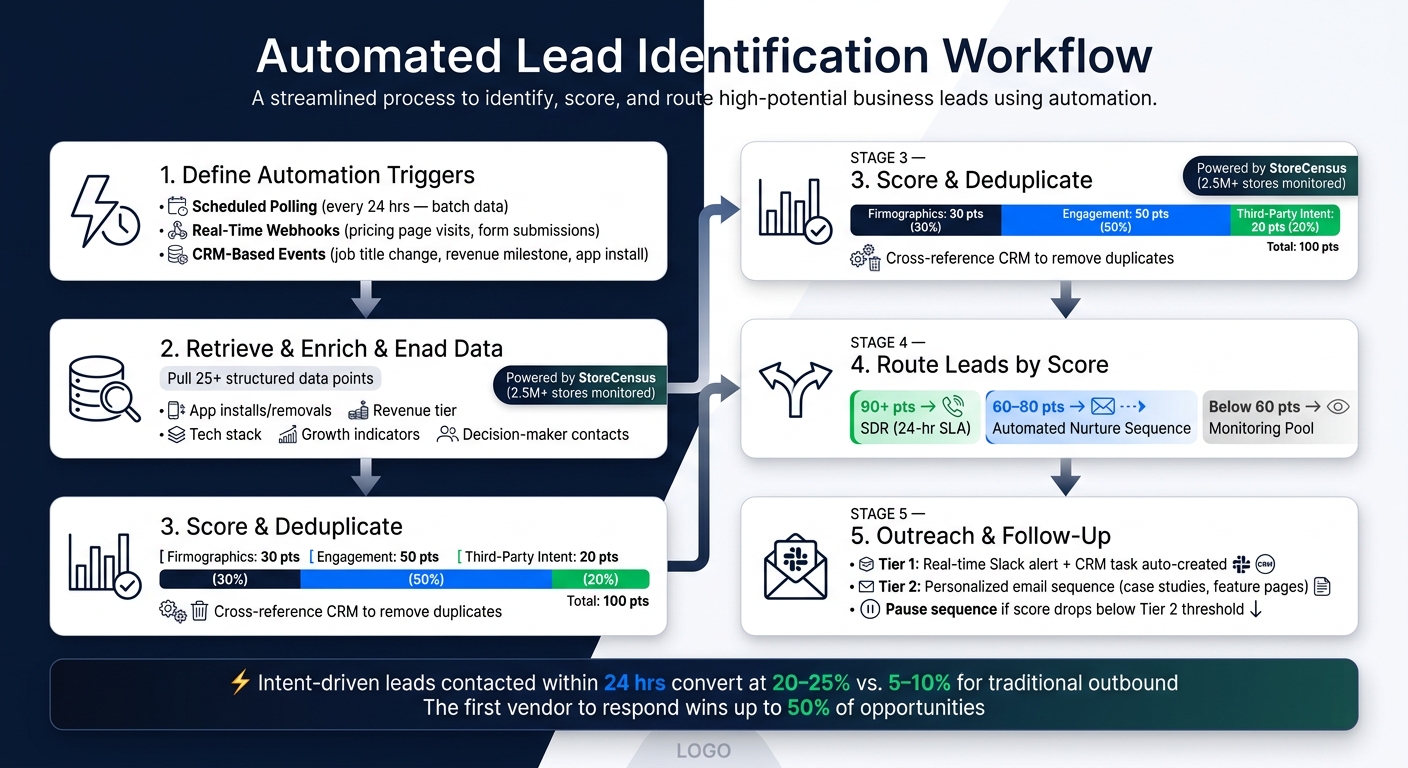
How to Automate Lead Identification with Intent Data: End-to-End Workflow
Once you've mapped your intent signals and established scoring criteria, the next step is to integrate these signals into a fully automated workflow.
Defining Automation Triggers
Start by setting up clear automation triggers. Here are three types to consider:
- Scheduled polling: This method checks for new intent data at regular intervals, such as every 24 hours. It's particularly useful for third-party data sources that update in batches overnight.
- Real-time webhooks: These triggers fire instantly when a first-party event occurs, like a visit to your pricing page or a form submission. These are your highest-priority triggers because they capture fresh signals that demand an immediate response.
- CRM-based events: These triggers activate when a record in your CRM changes. For example, a contact might update their job title, a company could reach a new revenue milestone, or a store might install a new app. These are better suited for slower-moving signals and can follow a daily polling schedule.
Once your triggers are in place, the next step is to enrich the raw data to ensure accurate scoring.
Retrieving and Enriching Intent Data
When a trigger activates, the workflow retrieves a complete, enriched profile of the lead before scoring begins. Raw intent signals alone don’t provide enough context - you need additional firmographic and technographic details for a clearer picture.
This is where StoreCensus becomes essential. When a trigger fires for an ecommerce store, StoreCensus delivers over 25 structured data points, including information on installed apps, revenue tiers, tech stacks, growth indicators, and decision-maker contact details. This enriched data equips your scoring model to assess the lead’s fit more effectively, rather than relying on incomplete signals.
"Intent without contacts is useless. Contacts without intent is just cold outbound." - Prospeo Team
Scoring, Deduplicating, and Routing Leads
After enrichment, each lead is scored using the composite model outlined earlier: assign 30 points for firmographics, 50 for engagement, and 20 for third-party intent, for a total of 100 points.
Before adding any lead to your CRM, deduplicate it by cross-referencing existing records. Skipping this step could lead to duplicate outreach, which not only harms your sender reputation but also wastes valuable sales team time. Once deduplication is complete, route leads based on their scores:
- 90+ points: These high-priority leads go directly to an SDR with a 24-hour response SLA.
- 60–80 points: These leads enter an automated nurture sequence.
- Below 60 points: These leads stay in a monitoring pool until further activity justifies re-evaluation.
Speed matters here. Intent-driven leads that reach SDRs within 24 hours convert at 20–25%, compared to just 5–10% for traditional outbound methods. This makes fast and efficient routing a critical part of your workflow.
Adding Automated Leads to Your Sales Workflow
Once you’ve scored and routed your leads, the next step is making sure your sales team can act on them efficiently. A well-organized workflow ensures your reps focus on selling, not wasting time sorting through leads. This step connects your automated lead scoring system to the hands-on sales process.
Setting Up Lead Queues and Views
In your CRM, create separate views for different lead score ranges. For example:
- Tier 1 (90+ scores): These leads should be sorted by the most recent intent activity, ensuring the hottest prospects appear at the top.
- Tier 2 (75–89 scores): Leads in this range should be grouped in a secondary view for quick follow-up.
- Below 75 scores: These leads can go into a nurture list or be monitored passively until their score improves.
Dynamic views are essential. As leads take actions - like installing a new app, revisiting key pages, or hitting a revenue milestone - their scores should update automatically, shifting them between tiers. This ensures your team isn’t wasting time on cold leads while keeping an eye on those newly entering a buying phase.
Don’t forget to incorporate periodic score decay to keep your queues fresh and relevant.
Automated Outreach and Follow-Up Tasks
Dynamic lead segmentation sets the stage for automated outreach. Once a lead is routed, trigger immediate actions. For Tier 1 leads, this could mean an SDR receives a real-time Slack notification, while a follow-up task is automatically created in the CRM - eliminating the need for manual updates.
Customize outreach based on the lead’s activity. For example:
- Use direct emails for leads showing immediate intent.
- Share case studies for those in early awareness stages.
Avoid overwhelming early-stage leads with requests like demo sign-ups, as this can backfire.
"Speed-to-lead is the single biggest factor in converting purchase intent into pipeline." - Trinity Nguyen, CMO, UserGems
Additionally, build workflows that pause sequences automatically. If a lead’s intent score drops below the Tier 2 threshold during outreach, stop further messaging to avoid sending irrelevant content.
Personalization and Ownership Rules
To make your automated outreach more effective, personalize every interaction and establish clear ownership rules. Use enriched data from StoreCensus to highlight specific signals, such as installed apps, revenue levels, or recent tech stack changes. For instance, mentioning a newly added subscription app in your email can turn a generic message into a meaningful conversation.
Assign leads to team members automatically during routing and set clear response deadlines: 24 hours for Tier 1 leads and 48 hours for Tier 2 leads. By integrating ownership and deadlines into your workflow, you ensure no lead slips through the cracks.
Measuring and Improving Your Automated System
Tracking Key Metrics
Once your system is live, it's time to monitor key metrics to see what's working. Focus on a few critical indicators: conversion rates segmented by score band, speed to lead, and pipeline velocity.
- Conversion rates by score band: This helps you evaluate if your scoring model is hitting the mark. For context, the median B2B MQL-to-SQL conversion rate is 15%. If you're prioritizing leads based on intent, your highest-tier leads should convert at a much higher rate.
- Speed to lead: Timing is everything. Studies show that the first vendor to respond can win up to 50% of sales. Measure the time between an intent trigger and your first outreach.
Here’s a quick breakdown of what to track and why it matters:
| Metric | What to Track | Why It Matters |
|---|---|---|
| MQL-to-SQL Rate | Conversion segmented by score band | Validates scoring accuracy |
| Speed to Lead | Time from trigger to first outreach | Directly impacts win rate |
| Reply & Meeting Rate | % of outreach that gets a response | Gauges message relevance |
| Pipeline Velocity | Days from MQL to closed-won | Measures overall workflow efficiency |
Use these insights to fine-tune your scoring and workflow processes.
Refining Scoring and Workflow Rules
Analyzing these metrics will guide adjustments to your scoring thresholds. For example, review the last 30 days of leads weekly to spot trends: What signals consistently led to closed deals? Which ones created noise? Use this data to refine your scoring weights.
Aim to update your scoring model quarterly. Businesses that refresh their lead scoring every quarter report a 35% increase in conversion rates. Buyer behavior evolves, so a model from earlier in the year might not reflect current trends. Adding a score decay system can also help keep your high-priority leads fresh and relevant.
Another improvement is shifting from single-signal triggers to signal clustering. For instance, three signals from the same account - like an app install, a pricing page visit, and a contact form submission - within 14 days suggest serious intent. On the other hand, a one-off action is more likely just noise.
"A scoring model without operational discipline is a dashboard nobody acts on." - House of MarTech
Improving StoreCensus Filters and Triggers
Your StoreCensus filters and triggers should evolve alongside your scoring model. Start by auditing your filters to identify which ones are driving qualified leads and which are sending you down dead ends. For instance, if a particular app-install trigger consistently leads to cold prospects, refine the related firmographic filters or eliminate that trigger altogether.
Begin with 10–15 intent topics or app filters that align closely with your ideal customer profile. Expand only after confirming their effectiveness. Adding too many filters too soon can overwhelm your system with low-quality leads. Use negative scoring filters to disqualify prospects automatically - such as those below a minimum revenue threshold or those showing competitor-related signals.
Finally, ensure your StoreCensus-to-CRM sync is running in real-time. Intent signals fade quickly - a lead that installs a payments app today might lose interest within a week. By combining real-time data with well-tuned filters, you can keep your system aligned with shifting buyer behaviors.
Conclusion: Key Steps for Automating Lead Identification
Automating lead identification with intent data demands more than just a standalone tool - it requires a well-connected system. Start by identifying the intent signals most aligned with your ideal customer profile. Then, create automation triggers to collect and enrich this data. Incorporate a composite scoring model to separate serious buyers from casual browsers, and establish routing rules to ensure the right sales rep engages with the lead at the most opportune moment. This approach sets the stage for continuous improvements throughout your sales process.
The numbers speak for themselves: conversion metrics reveal that the first vendor to respond to a high-intent signal can secure up to 50% of opportunities. These stats underscore the importance of tools that provide accurate, real-time insights - like StoreCensus.
For ecommerce-driven sales, StoreCensus monitors over 2.5 million Shopify stores, integrating real-time signals into your outreach strategy. This ensures your message reaches a store exactly when it's entering an active buying cycle.
To maintain success, focus on ongoing data refinement and real-time updates. Regularly evaluate your scoring model, eliminate outdated signals, and fine-tune your automation triggers. By doing so, you'll consistently identify the right leads with minimal manual effort, reinforcing the measurement and improvement strategies outlined in this guide.
FAQs
What intent signals should I track first?
Tracking behavioral signals and store activity changes is a smart way to gauge engagement and potential buying intent. Look for indicators like recent app installs, removals, design tweaks, or even signs of business expansion. These real-time updates can tell you a lot about how actively a store is evolving.
Another key area to monitor is store change signals. For example, new app integrations or platform updates often suggest that a store is actively adjusting its tech stack. These changes can point to high-intent prospects who may be more open to outreach and qualification efforts.
How do I choose lead score thresholds that work?
To establish effective lead score thresholds, begin by examining intent signals from both first-party sources (like website visits) and third-party platforms (such as activity on review sites). Assign weights to these signals based on their intensity and relevance to your goals. Leverage historical data to pinpoint conversion trends and fine-tune your thresholds accordingly. Make it a habit to review and adjust these thresholds regularly, using performance metrics to keep your lead qualification process running smoothly.
How do I connect StoreCensus signals to my CRM automatically?
To link StoreCensus signals with your CRM, leverage the platform's API and automation features. Start by setting up real-time tracking for store changes, such as app installs or sudden activity increases. These events can then trigger workflows that automatically send signals to your CRM. Use integrations or custom connectors to align the incoming data with the appropriate CRM fields, keeping your system updated with live e-commerce insights for better lead management.



