
Headless WooCommerce CMS: Pros and Cons
Compare standard vs headless WooCommerce: costs, performance, workflows, and when headless is worth the investment.


For most WooCommerce stores, headless is not the best move. I’d only look at it if your store has high traffic, high revenue, custom frontend needs, or sales across more than one channel. If not, a tuned standard WooCommerce setup will usually cost far less and still deliver strong results.
Here’s the short version:
- Standard WooCommerce is simpler to run, easier for marketers, and works with more plugins out of the box.
- Headless WooCommerce can improve page speed, frontend control, and traffic handling, but it adds more build work, more sync issues, and higher monthly costs.
- Build costs often jump from around $5,000–$30,000 for standard to $70,000–$100,000+ for headless.
- Monthly hosting and support can move from about $50–$150/month to $1,000–$2,000/month when you include infra and dev retainers.
- For many stores, speed fixes like better hosting, a CDN, image compression, and plugin cleanup can deliver most of the gain at a much lower cost.
- A headless setup starts to make sense when a store is doing around $3 million+ per year, needs a custom UX, or serves web, app, and kiosk experiences from one backend.
The tradeoff is simple: more frontend freedom and better performance vs. more cost, more dev work, and harder content workflows.
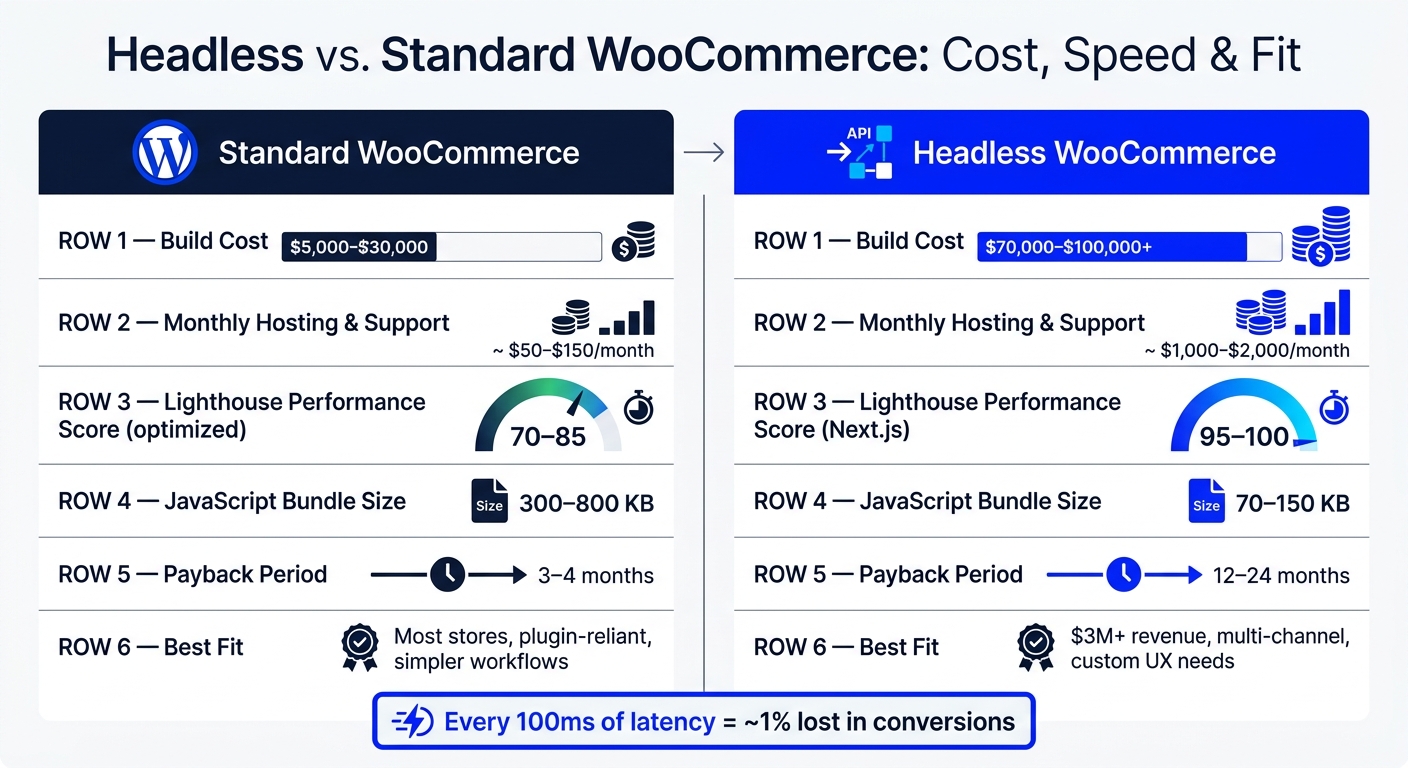
Headless vs Standard WooCommerce: Cost, Speed & Fit at a Glance
Headless eCommerce with WordPress & WooGraphQL
sbb-itb-61169e3
Quick Comparison
| Area | Standard WooCommerce | Headless WooCommerce |
|---|---|---|
| Setup | One WordPress stack | Separate backend and frontend |
| Cost | Lower upfront and monthly cost | Higher build and support cost |
| Speed | Good when tuned well | Often faster when built well |
| Plugin support | Strong out of the box | Many frontend features need rebuilds |
| Checkout | Native WooCommerce flow | More custom work |
| Content editing | Easier for marketers | More handoffs and dev support |
| Best fit | Most stores | High-volume stores with custom needs |
If I were making the call, I’d start with the business case, not the stack. If speed and UX limits are already hurting sales, headless can pay off. If not, standard WooCommerce is usually the better bet.
How Standard and Headless WooCommerce Work Day to Day
Standard WooCommerce: one stack, faster setup
With standard WooCommerce, the day-to-day workflow is pretty simple. Editors publish straight from WordPress, and common plugins usually work without any custom code. The WordPress ecosystem has 60,000+ plugins built around this setup.
SEO is simpler too. Tools like Yoast and RankMath handle meta tags, sitemaps, and structured data on their own. Checkout, cart sessions, and payment gateways like PayPal also work out of the box. In many cases, a WordPress generalist can handle routine upkeep without needing a specialist.
Headless WooCommerce: separate frontend that pulls data through APIs
Headless WooCommerce works differently. The WordPress backend and the JavaScript frontend are separate apps, and both have to stay in sync. That split adds more moving parts.
You're dealing with separate deployment pipelines, two hosting environments, and two sets of issues. Content previews need custom work. Cache invalidation and API responses have to line up. And if a plugin injects PHP into the frontend - like product configurators, wishlist widgets, or loyalty point displays - it stops working in the customer-facing layer. Those features have to be rebuilt as custom front-end components.
Authentication gets harder as well. Headless builds usually rely on token-based auth and custom account handling. Even small updates can take much longer because changes have to be coordinated across two systems. Checkout is a good example: in a headless build, it can take weeks to integrate because payment flows must be wired across both sides.
These workflow differences are what lead to the speed gains - and the added complexity - covered next.
Here’s the operational difference in one view:
| Workflow Area | Standard WooCommerce | Headless WooCommerce |
|---|---|---|
| Content previews | Native, built-in | Requires custom implementation |
| Plugin compatibility | Large plugin library works out of the box | Most frontend plugins need rebuilding |
| Cart & sessions | Native PHP session cookies | Custom API-driven state management |
| Maintenance | WordPress generalist | Specialized React/Next.js developers |
Pros of a Headless WooCommerce CMS
Headless WooCommerce makes sense when speed, design freedom, or delivery across many channels matters more than keeping things simple. Yes, it adds more moving parts. But those parts can pay off in three clear ways: faster pages, more control over the storefront, and less public exposure.
Better performance and more control over Core Web Vitals
Standard WooCommerce renders each page on the origin server. That creates a hard ceiling on performance. A headless setup gets around that by pre-rendering product and category pages with Incremental Static Regeneration (ISR) and serving them through a global CDN.
For stores where small delays can hurt sales, that matters a lot. Lower TTFB and lighter pages support revenue more directly than most teams like to admit. Every 100 ms of latency costs roughly 1% in conversions. That’s not a small hit.
Headless storefronts also tend to send less JavaScript to the browser. Typical bundle sizes land around 70–150 KB, while standard WooCommerce themes often load 300–800 KB. And that gap usually shows up in testing: Lighthouse scores often land in the 90s for headless builds, compared to 40–70 for default WooCommerce setups.
There’s another upside too. During peak sales periods, a headless frontend can handle traffic spikes with less strain. Of course, that only works if the frontend is built well and the caching setup is done right. A messy build won’t save itself just because it’s headless.
Speed is the first win. It’s just not the only one.
More flexible storefront design and omnichannel delivery
With standard WooCommerce, the user experience is shaped by theme hooks and templates. That works fine up to a point. Then you hit the walls.
Headless removes that limit. Teams can build custom product configurators, immersive 3D viewers, instant add-to-cart feedback, and app-like page transitions with React components. If the goal is a storefront that feels less like a stock WordPress theme and more like a custom product, headless gives you that room.
The bigger gain is delivery across more than just the website. One WooCommerce backend can power a web storefront, mobile apps, in-store kiosks, and other touchpoints through the same API. Standard WooCommerce is built for the web first. If you want to serve other channels, you usually need extra plugins or a lot of custom API work.
That changes the shape of the store in a practical way. Instead of rebuilding the same commerce logic for each surface, teams can reuse one backend across many customer touchpoints.
Headless also changes the security profile.
A smaller public attack surface
In a headless setup, the public-facing layer is usually static HTML and JavaScript served from a CDN. The WordPress admin panel and database sit behind the API instead of being directly exposed to customer traffic.
That cuts off some common WordPress attack paths, including brute-force login attempts and frontend PHP exploits. It doesn’t make the backend disappear, and it doesn’t remove maintenance work. But it does mean fewer parts are exposed to the public internet, which is a pretty big deal for stores that want tighter control over risk.
Cons of a Headless WooCommerce CMS
Headless WooCommerce gives you more speed and more control. But it also brings more cost and more moving parts. You feel those tradeoffs most in build cost, plugin support, and day-to-day content work.
Higher build cost and more systems to build and maintain
A standard WooCommerce store often costs $5,000–$15,000 to build. A similar headless setup usually lands between $25,000–$80,000.
Monthly costs go up too. Headless hosting and infrastructure can run $300–$1,000+ per month, while a standard setup often sits around $50–$150 per month. Maintenance can climb as well, with special hosting and developer retainers adding another $1,000–$2,000 per month.
Why does that happen? Because you’re no longer dealing with one system. You’re dealing with the WordPress backend, the API layer, and the frontend app. A small change can touch all three, which means more places for things to break and more developer time spent keeping them in sync.
There’s also a hiring issue. Teams need people who know both PHP/WordPress and modern JavaScript frameworks. That’s a tougher mix to find, and it pushes up the skill bar.
Plugin compatibility gaps and missing WooCommerce features
This is where headless can get messy fast.
A lot of WooCommerce extensions rely on PHP hooks. In a normal WooCommerce build, those plugin features just show up on the storefront. In a headless setup, they usually don’t. The front-end parts often need to be rebuilt by hand.
If a plugin doesn’t offer a REST or GraphQL endpoint, the job gets even bigger. At that point, teams have to rebuild the missing behavior in React or Next.js.
Checkout is often the riskiest part. Payment gateways may need custom tokenization work and PCI handling in a decoupled frontend. That’s not a small detail. It’s the part of the store where mistakes cost money.
Cart behavior is another sticking point. Standard WooCommerce uses PHP session cookies to track cart state. In a headless build, that native session handling disappears. So teams need to build their own cart state logic, including cart merging across sessions and devices.
Editorial workflow gets harder for marketers before it becomes efficient
The pain isn’t limited to developers. Marketing teams usually feel it too.
Content updates that once took a few minutes can now need help from the content team, frontend developers, and sometimes a full deployment cycle. That slows down simple edits and adds more handoffs.
SEO tags, schema, and analytics events also need to be built into the frontend instead of being handled through plugins. In plain English: work that used to be point-and-click often turns into dev work.
There’s one more catch. Incremental Static Regeneration can leave prices or stock out of date until the next revalidation. To avoid that, teams often need webhook-based cache invalidation so pricing and inventory stay current. That’s the hidden price of the extra flexibility headless gives you.
When Headless Makes Sense and When Standard WooCommerce Is the Better Choice
Good fit: high-growth stores with performance or UX constraints
This choice usually comes down to one thing: does the speed bump justify the extra build and upkeep? Headless makes sense for stores that have pushed past what theme-level tuning can do.
A store is a realistic headless candidate when it checks at least three of these boxes: $3M+ in annual revenue, 40%+ of traffic from outside the home country, multi-channel delivery needs like web, mobile app, or kiosks, or custom UI demands like 3D product configurators.
Bad fit: stores that rely on plugins and simple content workflows
If a store depends heavily on plugins, standard WooCommerce usually brings a better ROI. In many cases, standard tuning - better hosting, a CDN, image compression, and a plugin audit - can bring load times down to 460–560 ms for about one-third the cost of a headless build.
That payback gap matters. Standard optimization tends to pay back in 3–4 months, while headless usually takes 12–24 months.
"The real question is whether headless delivers enough ROI for the business. For 95% of WooCommerce stores, it doesn't." - Blaze Commerce
For agencies, the next move is pretty clear: look for merchants already feeling these pressure points.
How agencies can use StoreCensus to find likely headless prospects
StoreCensus gives agencies a way to filter across 6M+ Shopify and WooCommerce stores by revenue, tech stack, and growth signals, then pull verified prospect data. That mix helps surface merchants that have both the performance pain and the budget to act on it. From there, agencies can build targeted outreach much faster.
Final takeaway: performance and flexibility vs. cost and complexity
The fastest way to size up both paths is to compare cost and speed side by side.
| Standard (Optimized) | Headless (Next.js) | |
|---|---|---|
| Lighthouse Score | 70–85 | 95–100 |
| Initial Cost | $5K–$30K | $70K–$100K+ |
Headless WooCommerce can deliver major speed gains and more freedom in how the front end works. But that only pencils out when the business case is there: high revenue, multi-channel needs, and a team that can maintain the stack. For everyone else, a well-tuned standard setup gets most of the upside at a much lower cost and with far less complexity.
FAQs
Is headless WooCommerce worth it for a small store?
Usually, no.
For a small store, headless WooCommerce is a complex, high-investment setup. It tends to make sense for high-revenue brands that have very specific needs, like omnichannel growth or a highly custom UI.
For most small businesses, the rebuild, ongoing maintenance, and added complexity cost more than the upside. If your store feels slow, you’ll usually get a better return by improving what you already have.
That often means things like:
- caching
- CDN setup
- image compression
- plugin audits
In many cases, those fixes are faster, cheaper, and easier to manage than a full headless rebuild.
What breaks when WooCommerce goes headless?
Going headless splits the frontend away from the WooCommerce backend. That sounds clean on paper, but it also means features that depend on standard WordPress PHP rendering can stop working.
This is where the tradeoff shows up.
Common problems include plugin incompatibility, the need to rebuild cart and checkout logic, the loss of built-in SEO features, and more complicated support across the frontend, backend, and API layers.
In plain English: you get more control on the frontend, but you also take on more of the work that WooCommerce and WordPress used to handle for you.
How do I know when standard WooCommerce is enough?
Standard WooCommerce is enough for most stores. That’s especially true if you have a small product catalog, a tight budget, or a team that doesn’t work with specialized JavaScript frameworks.
If performance is an issue, start with the basics first: image compression, caching, database maintenance, and plugin cleanup. Standard WooCommerce also makes more sense if your current theme already does what you need or if you rely on frontend-based plugins that may not work in a decoupled setup.



