3-Step vs 6-Step Cadence For Ecommerce Outreach
Start with a 3-step cadence for high-fit ecommerce lists; only expand to 6 steps when extra touches generate enough qualified meetings without raising sender risk.

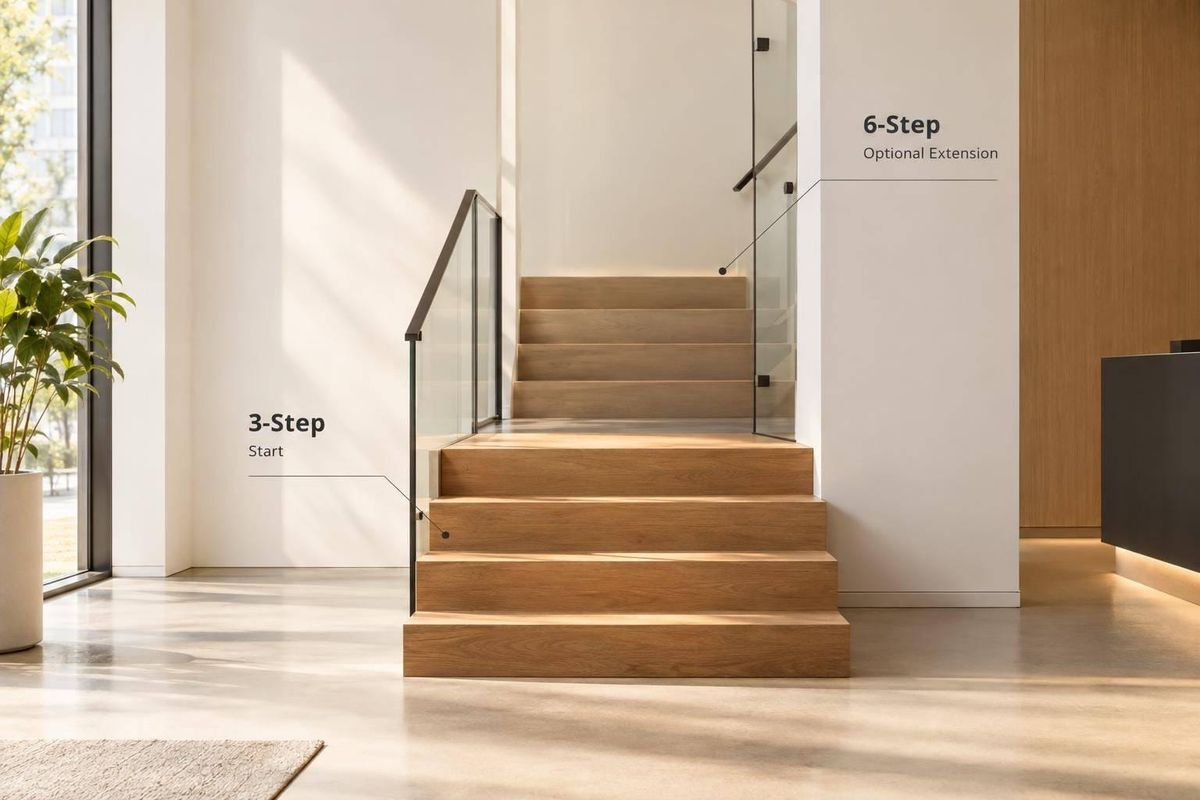
I’d start with 3 steps for a high-fit store list and test 6 for broader outreach. More messages mean more work - not guaranteed meetings. I’d keep the extra touches only if they add qualified meetings without pushing labor or sender risk past preset limits.
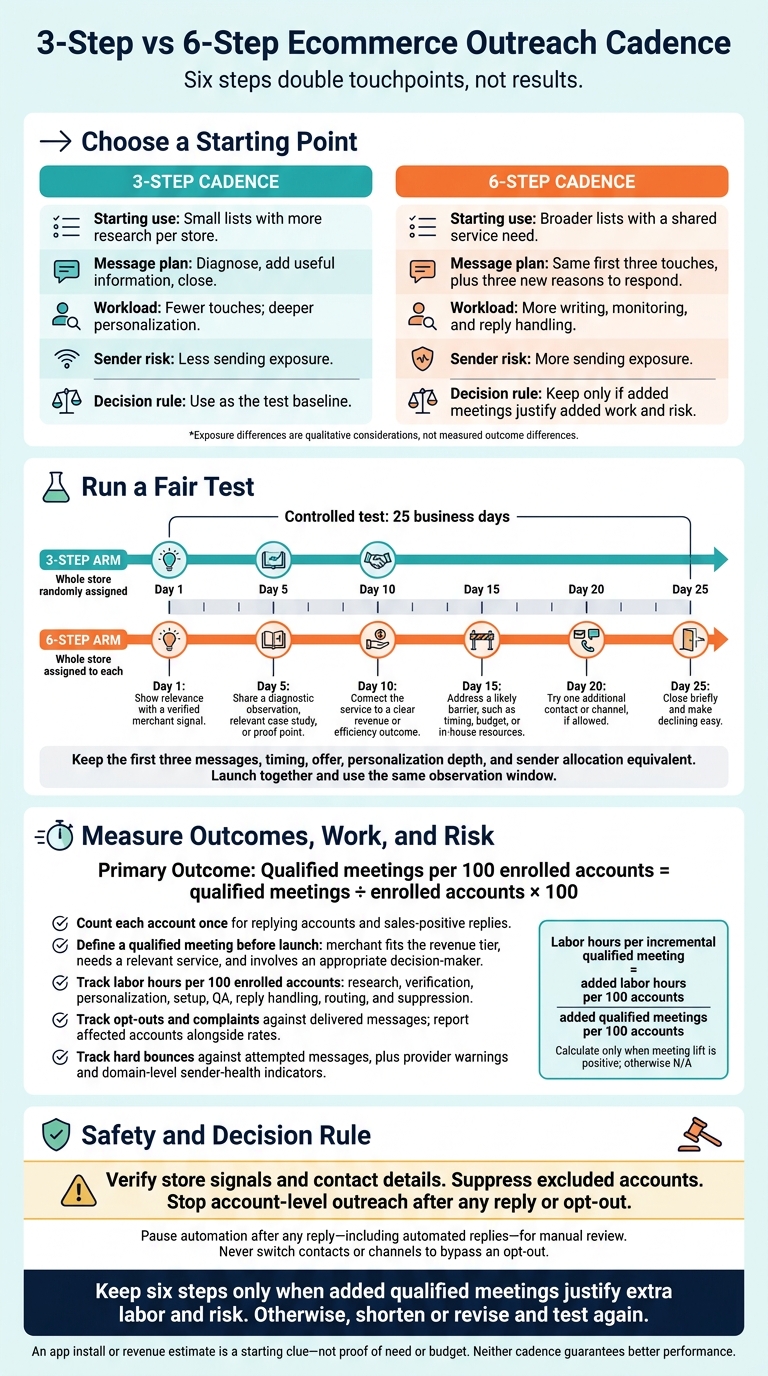
For a fair test, I’d randomly assign whole store accounts and keep the first three messages, timing, and offer the same. Then I’d compare qualified meetings per 100 accounts, positive replies, opt-outs, bounces, complaints, and labor hours - not replies alone.
Quick Comparison
| Criteria | 3-step cadence | 6-step cadence |
|---|---|---|
| Starting use | Small lists with more research per store | Broader lists with a shared service need |
| Message plan | Diagnose, add useful information, close | Same first three touches, plus three new reasons to respond |
| Workload | Fewer touches; deeper personalization | More writing, monitoring, and reply handling |
| Sender risk | Less sending exposure | More sending exposure |
| Decision rule | Use as the test baseline | Keep only if added meetings justify added work and risk |
My rule for both: <u>verify store signals and contact details, suppress excluded accounts, and stop outreach after any reply or opt-out</u>. An app install or revenue estimate is a starting clue, not proof that a store needs your service.
3-Step vs 6-Step Ecommerce Outreach Cadence
This Proven Sales Cadence Will Fill Your Calendar
sbb-itb-61169e3
Start With 3 Steps for Narrow, High-Value Store Lists
For a 3-step cadence, narrow your list before you personalize. Filter 200–500 stores down to 50–100 high-fit prospects before doing deep research.[3] A short sequence reduces sending risk and leaves room for manual follow-up.[2][5] Silence may mean bad timing or the wrong contact - not rejection.[2][3]
Build Your List With Verified Merchant Signals
Use StoreCensus to filter Shopify and WooCommerce stores by relevant merchant signals and find decision-maker contacts. Before writing, verify the storefront signal, the contact’s role, and the store’s tech stack. Treat revenue estimates as filters, not proof of budget.[2][3]
Give Each of the 3 Messages a Different Purpose
Give each message a separate job: diagnose, add value, then close.
Day 1 - Diagnose. Reference a verified theme change, ask whether the team has reviewed its impact, and offer a focused diagnostic review. Do not claim the change hurt conversion without performance data.[2][3]
Day 4 - Add value. Share a resource, insight, or relevant case study tied to the initial observation. Frame it as an assessment, not proof of weakness or a revenue guarantee.[3][5]
Day 7 - Close. Make it easy to decline or suggest a better time, without pressure. Move silent accounts to a 90–180-day revisit list to reassess their store signals.[3][5]
Test 6 Steps for Broad Store Prospecting
Six steps earn their extra touches over three only when the broad list shares the same service need and every message adds new information. Keep research lean. Use verified merchant signals - tech stack gaps, theme changes, app installs, or catalog growth - to make each touch relevant.[7][8]
Plan a Purpose for All 6 Touches
Run the test over 25 business days, with messages on days 1, 5, 10, 15, 20, and 25.[5] Keep the first three messages and their timing identical for both test groups. Only the six-step group receives touches 4–6.
| Touch | Business day | Purpose |
|---|---|---|
| 1 | 1 | Show relevance with a verified merchant signal. |
| 2 | 5 | Share a diagnostic observation, relevant case study, or proof point. |
| 3 | 10 | Connect the service to a clear revenue or efficiency outcome. |
| 4 | 15 | Address a likely barrier, such as timing, budget, or in-house resources. |
| 5 | 20 | Try one additional contact or channel, if allowed. |
| 6 | 25 | Close briefly and make declining easy. |
Each touch needs new information, not another “checking in.” Coordinate contacts and channels under one store account so teammates don’t send overlapping messages. Never switch contacts or channels to bypass an opt-out.[2][3]
Longer cadences also need tighter stop rules to protect sender health.
Set Reply, Opt-Out, and Completion Rules
Pause automation after any reply - including automated replies - for manual review. Immediately suppress hard-bounced addresses and opt-outs. For a company-level opt-out, suppress the whole account. Don’t automatically recycle completed sequences. Follow CAN-SPAM and mailbox-provider requirements throughout the six-step test.[2]
Track qualified meetings per 100 accounts and handling time, counting each account once. Report results from steps 4–6 separately. Pause expansion if those steps don’t add qualified meetings or if they increase unsubscribe risk, complaints, or sender-health issues.[2][3]
Compare Results, Sender Risk, and Workload
Six steps double touchpoints, not results. Test reply rates, qualified meetings, unsubscribes, and sender health. Neither cadence guarantees better performance.[2] The next test is whether steps 4–6 generate enough added qualified meetings per 100 accounts to cover the extra work.
Compare outcomes, risk, and labor - not just message counts.
| Metric | 3-step cadence | 6-step cadence | Measurement method |
|---|---|---|---|
| Replies | Fewer chances to reply | More chances, but reply quality is unproven | Unique replying accounts ÷ assigned accounts; report positive replies separately |
| Qualified meetings | Starting point for narrow, high-value lists | Added meetings must justify extra labor | Qualified meetings ÷ assigned accounts × 100 |
| Unsubscribes | Lower exposure | Higher exposure | Opt-out events ÷ delivered messages; also count affected accounts |
| Complaints | Lower exposure | Higher exposure | Reported complaints ÷ delivered messages; track provider-reported rates separately |
| Sender health | Lower volume risk | Higher volume risk | Hard bounces ÷ attempted messages, provider warnings, and domain-level indicators |
| Labor | Fewer touches; more personalization per store | More touches and follow-up work | Research, verification, personalization, setup, QA, reply handling, routing, and suppression hours per 100 accounts |
Measure Qualified Meetings per 100 Accounts
Define a qualified meeting before launch: the merchant must fit your revenue tier, need a relevant service, and involve an appropriate decision-maker. Track unique replying accounts, positive replies, booked meetings, and qualified meetings separately. Multiple replies or bookings from one store should not inflate account conversion. Use the same denominator and observation window for both cadences.[2][4]
Keep message-level health rates separate from account-level conversion. Measure unsubscribes and complaints against delivered messages, and hard bounces against attempted messages. Report affected accounts alongside those rates, and label every denominator. Providers may calculate spam rates using a different denominator, so your internal complaint rate is not interchangeable with Google’s reported spam rate.[2]
Measure Labor and Monitor Sender Health
Track each labor category in the table per 100 accounts, including research and personalization time per store. When modeling costs, state hourly labor rates in U.S. dollars.[2]
Monitor hard bounces, complaints, unsubscribes, provider warnings, and domain-level delivery indicators throughout the test. Google requires bulk senders to keep reported spam rates below 0.3%. Opens do not prove inbox placement, and a shorter sequence does not make poor targeting or bad contact data safe.[2]
Test Whether Steps 4–6 Add Qualified Meetings
Randomly Assign Accounts to Each Cadence
Use the 3-step cadence as the control and the 6-step cadence as the test arm. The goal: find out whether steps 4–6 add enough qualified meetings to justify their extra cost.
Randomly assign whole accounts by domain, keeping all contacts from the same store in one arm. Keep the first three messages, offer, personalization depth, and sender allocation equivalent across both arms. Launch both arms together, with a shared observation window and a fixed response period.[2]
Stop account-level outreach after any reply or opt-out. Include every enrolled account in the analysis.[1][2]
Weigh Added Meetings Against Added Labor
Once both arms finish and the shared observation window closes, use this scorecard to compare account-level lift and labor. Count each account only once for replies and sales-positive replies. Record opt-outs, complaints, and bounces with their denominators.[2]
| Metric | 3-step cadence | 6-step cadence | Difference |
|---|---|---|---|
| Enrolled accounts | |||
| Replying accounts | |||
| Accounts with sales-positive replies | |||
| Qualified meetings | |||
| Qualified meetings per 100 enrolled accounts | |||
| Opt-outs: events, affected accounts, rate | |||
| Complaints: events, affected accounts, rate | |||
| Bounces: count and rate | |||
| Sender-health indicators, by domain | |||
| Labor hours per 100 enrolled accounts | |||
| Labor hours per incremental qualified meeting |
Calculate the lift in qualified meetings per 100 enrolled accounts and the added labor hours per 100 enrolled accounts. Divide added hours by added meetings only when meeting lift is positive. Otherwise, mark N/A. Treat segment splits as inconclusive when sample sizes are small.[2]
Set Workload and Sender-Risk Limits Before Scaling
Before launch, use team baselines to set acceptable labor and sender-risk limits. Check spam and bounce rates daily. Pause outreach if opt-out handling fails or delivery drops.
Keep six steps only when the added qualified meetings justify the extra labor and risk. Otherwise, shorten or revise the sequence before testing again.[2]
Conclusion: Start With 3 Steps and Test More
Start with 3 steps for narrow, high-value ICP lists that call for deep personalization.[1][6] Test 6 steps for broader store lists only if the extra messages give recipients different reasons to respond.[3] Let the test results decide which cadence wins.
For a broader test, use StoreCensus to find stores by platform, revenue, tech stack, and growth signals. Then check the store, the contact’s role, and whether the email address is up to date. An installed app is a signal - not proof of need, budget, or buying authority.[2][7][8][9]
Before scaling either cadence, define what counts as a qualified meeting. Exclude customers, open opportunities, and anyone who previously unsubscribed.[2] Keep the steps that generate qualified meetings, not just replies.[2]
FAQs
How many store accounts do I need for a reliable cadence test?
Start with a pilot batch of 100–200 store accounts. If you’re A/B testing elements within the cadence, send each variation to at least 100 recipients over one week to establish stable baseline metrics. Before scaling, review the pilot’s delivery, reply rate, and meeting rate.
How do I attribute meetings booked after a cadence ends?
Tag each lifecycle stage change in your CRM with the outreach workflow that first made contact. This connects a prospect’s progress - such as a cold lead booking a discovery call - to the original cadence and the pipeline or revenue it generates.
When a meeting is booked, make sure your CRM updates the lead status and credits the original outreach cadence, even if the booking comes after the final touchpoint.
How do I calculate the break-even cost of extra touches?
Compare the added closed-won revenue from extra touches against their added labor and software costs. You break even when revenue equals costs. Extra touches turn a profit when revenue exceeds those costs [1][3].
Track reply rates, response-to-meeting rates, cost per opportunity, and total customer acquisition cost to see whether the extra steps improve results. Focus on high-value segments where targeted outreach delivers a 10% to 15% reply rate [2][3][4].