Adobe Commerce Incident Response Tool Checklist
Checklist to test Adobe Commerce incident workflows—alerts, logs, webhooks, evidence exports, routing, and handoff for go/no-go readiness.


I mark an Adobe Commerce toolchain No-Go if any required critical control fails or remains untested. Before relying on it for client incidents, I test five areas: the incident timeline, linked records, ticket routing, evidence exports, and agency handoff.
An alert is only the start. I check whether your team can:
- Rebuild the timeline: Verify log access, retention, UTC timestamps, alert history, file changes, and admin/API activity.
- Respond without losing ownership: Test webhook failures, duplicate events, ticket routing, approvals, and response deadlines.
- Deliver a checked evidence packet: Export logs and incident records, verify file hashes, and document containment, validation, and open risks.
- Complete the handoff: Confirm recipient access, client approval, follow-up owners, and removal of temporary access.
I also check the clock: Adobe Commerce Pro Staging and Production application logs have a 30-day default retention window. If your client needs longer, plan exports before records expire.
My rule is simple: <u>test the full workflow, not just the alert</u>. Record each result as Pass, Fail, or Unverified, then assign an owner and retest date for every gap.
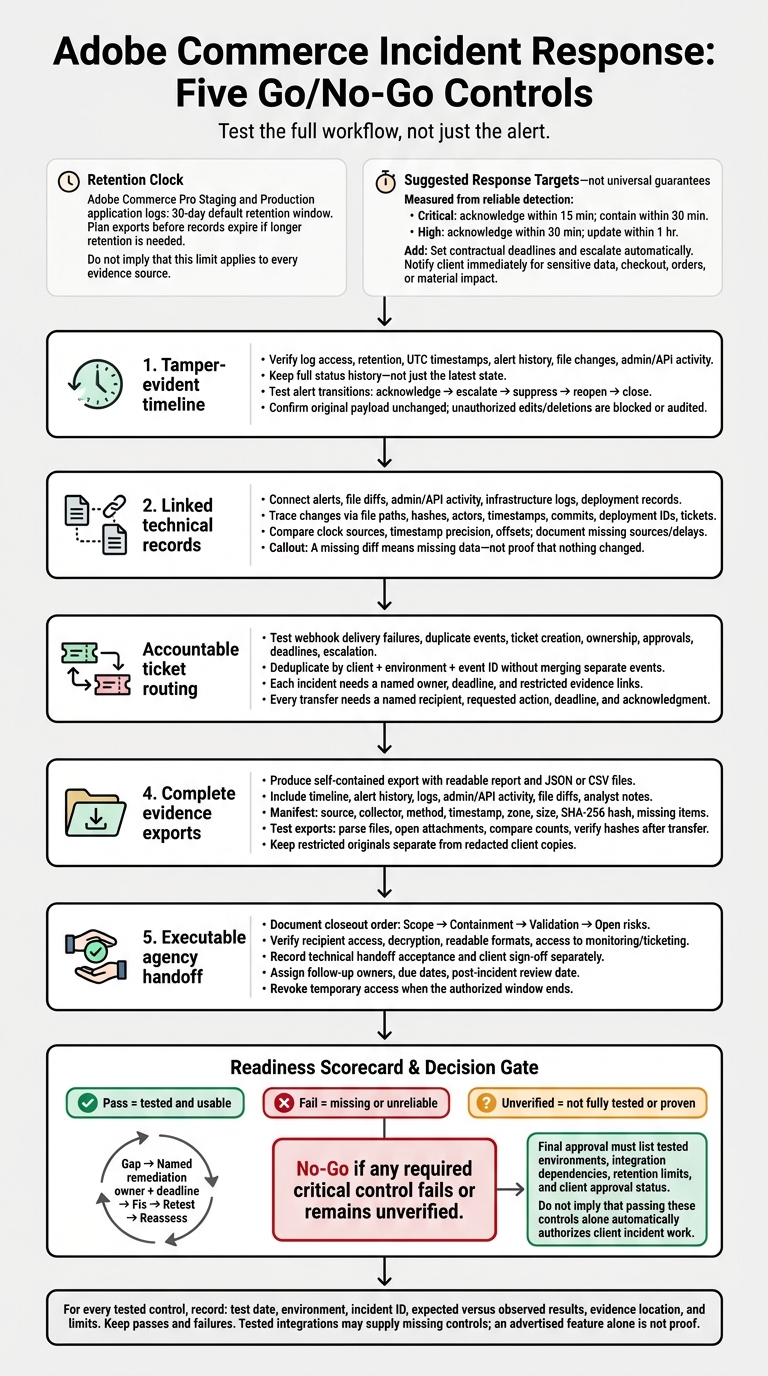
Adobe Commerce Incident Response: Five Go/No-Go Controls
Detection Checklist: Alerts, File Changes, and User Activity
Use the baseline to check that detection records are complete, searchable, and exportable.
Retain Alert History and Status Changes
Require a searchable record that includes a stable alert ID, detection time, store and environment, severity, source rule, alert status, original payload, and affected asset. Keep the full status history - not just the latest state. Record acknowledgments, escalations, suppressions, assignments, and closures, including the actor, timestamp, reason, and resulting status.
Create one staging alert and move it through acknowledge, escalate, suppress, reopen, and close. Export every state change and confirm that the original payload remains unchanged. Test whether attempts by a lower-privilege account to edit or delete records are blocked or audited. Confirm that scoped users can search only the records they’re allowed to access.
Verify File Diffs and Integrity Records
Require a baseline, file path, create/delete events, permission changes, timestamps, hashes, and retrievable content. A missing diff means missing data - not proof that nothing changed. Store suspicious originals securely, restrict access, and audit downloads and deletions.
Add a harmless staging file, modify it, change its permissions, and remove it. Confirm that each event creates an integrity record. Then search by path, hash, host, deployment, and time range.
Link approved changes to a commit, deployment ID, release window, or ticket. Investigators should be able to trace an unexplained change to related alerts and user activity.
Link Admin, API, and Infrastructure Logs
Check administrator sign-ins, failed sign-ins, account and permission changes, configuration edits, and integration activity. Use Action Logs to verify the username, IP, timestamp, action, result, and affected object, then export the records to CSV or Excel XML.[4][5]
Use separate test identities to make a controlled configuration change and API request. Check the user, service account, or token owner, along with the time, outcome, affected object, and available request identifiers. Test successful requests, failed authentication, expired credentials, and permission denial.
Link these records to relevant application, web server, PHP, database, queue, cron, operating-system, CDN, WAF, and deployment logs.[4][6] During the same test, compare clock sources, timestamp precision, and observed offsets. Document collection delays, parsing failures, and missing sources, along with the risk, owner, control, and remediation deadline.
sbb-itb-61169e3
Response Checklist: Webhooks, Tickets, and Ownership
Once detection is verified, test whether the tool can assign, route, and close incidents without losing evidence or ownership.
Test Webhook Delivery and Failure Handling
In staging, test incident notifications outside checkout for successful delivery, timeouts, unreachable endpoints, HTTP 4xx and 5xx responses, invalid authentication, and duplicate delivery.[8][11] Require HTTPS, authentication, configurable timeouts, limited retries with backoff, a dead-letter queue or failed-delivery view, and an operator alert after the final failed attempt.[13][14]
For Adobe I/O Events, acknowledge durable receipt promptly, then process tickets asynchronously. Delivery is at least once, so prevent duplicate work. Treat 4xx responses as request or configuration problems; do not assume Adobe will retry.[13][14]
Record the event ID, webhook name, endpoint, attempt number, response code, timeout status, and sanitized error message.[8][11] Test overlapping secret rotation, expired signatures, reused event IDs, and restricted replay. Use a sanitized payload for replay - not the original - and exclude secrets and unnecessary personal data.[9][12]
Where available, collect records of subscription creation, modification, enablement, disablement, deletion, and endpoint changes. Link those records to delivery evidence, and validate the available Admin pages, APIs, or CLI commands for the client’s version.[9][10] Do not use synchronous Commerce webhooks as incident notifications: their failure can interrupt the underlying Commerce flow.[9]
Verify that failed deliveries create traceable incidents rather than stopping at notification errors.
Route Tickets by Client, Severity, and Owner
Webhook failures should become assigned incidents with owners, deadlines, and evidence links. Trigger automatic ticket creation and verify separate routing by client and environment. Each ticket needs a stable incident ID, severity, detection time, affected service, current status, owner, deadline, and restricted evidence links.
Deduplicate by client + environment + event ID without merging separate events. Test status syncing to confirm it does not overwrite authoritative fields. Require audit trail entries for comments and status changes. If ticket creation fails, alert the on-call owner immediately.
Use the routing baseline below, and increase severity only when impact warrants it. Document who may increase severity or close incidents, and configure automatic escalation for missed deadlines.
| Event type | Agency default severity | Technical owner | Client-notification threshold | Required evidence |
|---|---|---|---|---|
| Repeated webhook delivery failure affecting an order or checkout flow | High | Commerce technical lead | Notify immediately if checkout, order processing, or fulfillment is affected | Event ID, endpoint, payload schema version, response codes, retry history, deployment status |
| Unauthorized Admin login or privilege change | Critical | Security lead or incident commander | Immediate | User ID, source IP, authentication events, role changes, session data, relevant timestamps |
| Unexpected production code or configuration change | High | Release engineer | Notify after initial validation or immediately if customer impact exists | File diff, deployment ID, actor, commit, environment, rollback decision |
| Suspected payment, customer, or credential exposure | Critical | Security lead | Immediate through the approved incident channel | Detection source, affected data category, access logs, containment actions, evidence hash |
| Failed ticket, webhook, or monitoring integration | Medium | Agency platform owner | Notify if it delays a required response or creates a coverage gap | Request ID, endpoint, error, retry history, last successful delivery, manual workaround |
Define Approvals and Response Deadlines
Once routing is in place, define who can act and how fast.
Assign an incident commander, technical owner, client approver, communications owner, and named backups. Specify who can act when a primary owner is unavailable.
Set contractual deadlines measured from reliable detection. Suggested targets are:
- Critical: Acknowledge within 15 minutes and make a containment decision within 30 minutes.
- High: Acknowledge within 30 minutes and provide an update within 1 hour.
Notify the client immediately when sensitive data, checkout, orders, or material customer impact may be involved. Start the timer at reliable detection, allow pauses only under a documented policy, and escalate automatically when a deadline is missed.[7]
Record who can approve disabling a webhook, placing the store in maintenance mode, rolling back a deployment, rotating API credentials, blocking an IP range, and revoking an integration. Include preapproved emergency actions and rollback requirements.
Run an after-hours tabletop covering a failed webhook, duplicate event, expired secret, unavailable primary owner, and failed ticketing integration. Measure time to acknowledgment, assignment, and client notification, along with duplicate tickets, evidence completeness, and authorization for disruptive actions.
Include Adobe Support in the handoff path for reproducible platform behavior in Adobe Commerce, persistent event-delivery failure after endpoint recovery, suspected Adobe service impact, or issues requiring Adobe-managed infrastructure investigation. Every transfer needs a named recipient, requested action, deadline, and acknowledgment - not just a dashboard link. Record gaps, owners, due dates, and a retest date.
Evidence and Handoff Checklist: Build the Incident Packet
Export Evidence and Verify Integrity
After containment and validation, assemble the incident into one handoff-ready record. Require a self-contained export with a readable report and JSON or CSV files. Include incident and source-system identifiers, timestamps, alert history, server and application logs, admin/API activity, file-diff records, and analyst notes. Identify the affected Adobe Commerce versions, stores, and environments.
The manifest must list each file’s source, collector, collection method, timestamp and time zone, size, and SHA-256 hash. It must also note missing items. Preserve source timestamps alongside the UTC timeline.
Test every export. Parse structured files, open referenced attachments, compare record counts against the source, and verify hashes after transfer. Keep restricted originals separate from redacted client copies, with a separate manifest and access policy for each. Never edit an original to create a client copy. Record the collector, everyone who accessed or transferred evidence, the access path, timestamps, and transfer channel.[15][17]
Record Containment, Validation, and Open Risks
Before cleanup, capture what remains and document what was lost. Complete the closeout checklist in this order:
- Scope: Record the affected store, environment, services, domains, accounts, integrations, time window, and suspected entry point.
- Containment: Document approved actions, credentials or tokens reviewed and rotated, and remediation. Preserve evidence before cleanup when feasible. If that isn’t possible, record what was unavailable, who approved the action, why immediate action took priority, what evidence may have been lost, and substitute sources.
- Validation: Record results from file-diff validation, deployment verification, account review, checkout testing, and post-remediation monitoring. Label findings as confirmed, probable, hypothesis, or unknown, especially when assessing possible customer-data exposure.
- Open risks: Give each remaining risk an owner, due date, severity, mitigation, and monitoring requirement.[15]
Transfer Ownership and Confirm Client Approval
Confirm the evidence recipient and contact method. Check that the recipient can access the evidence location, decrypt required files, read the formats, and reach the monitoring and ticketing systems. Record the transfer date and time, sender, recipient, package hash, delivery method, access confirmation, and any failed or expired links.
Send credentials, recovery codes, and secrets ONLY through an approved secret-sharing channel - not inside the packet.
Record technical handoff acceptance and client sign-off separately. For each decision, document the approver, date, conditions, and unresolved actions. Confirm ownership of follow-up work separately from evidence receipt. Set a post-incident review date and require evidence that follow-up work is complete.
Apply the client’s contract, incident policy, legal hold, regulatory obligations, and agreed retention schedule. When the authorized access window ends, revoke temporary agency accounts, shared links, VPN access, API keys, and tool permissions.[16]
Conclusion: Record the Pass/Fail Decision
Turn the checklist into a go/no-go decision by rating five controls separately across detection, response, evidence export, and handoff: tamper-evident timeline, linked technical records, accountable ticket routing, complete evidence exports, and executable agency handoff.
Use these ratings: Pass = tested and usable; Fail = missing or unreliable; Unverified = not fully tested or proven.
For each tested control, record the test date, environment, incident ID, expected versus observed results, evidence location, and limits. Keep every result - passes and failures. Give each gap a named remediation owner, a deadline, and a retest requirement.
If any required control remains weak, downgrade the tool’s status immediately. Tools with untested or failing controls are partial tools, not incident-response-ready systems, unless tested integrations supply the missing controls. A configured webhook or advertised export feature does not prove that the full workflow works.
Record No-Go if any critical control fails or remains unverified. Fix the gap and retest before relying on the toolchain for client incidents.
Final approval for client incident work must list tested environments, integration dependencies, retention limits, and client approval status.
FAQs
How often should we retest our incident response tools?
Run regular tabletop tests so the team can practice established procedures before a live incident [1]. Review incident records and playbooks quarterly to keep pace with changes in client tech stacks [1].
Check alert volume, action rates, and delivery monthly, and adjust thresholds as needed [2]. Review immediately after major changes to the business, such as entering new markets or hitting major revenue milestones [3].
How can we test incident workflows without exposing client data?
Use synthetic data and pre-built, non-customer payloads in staging. Keep logs in one place, with strict tenant separation so one client’s test signals can’t expose or interfere with another client’s data.
For external steps, send sample JSON payloads through webhook test functions. Check delivery, action, and retry logs without exporting real client evidence. Test new integrations in staging first, and limit access to assigned client accounts.
What should we do if an incident predates retained logs?
Create a timestamped incident record from the available evidence. Include when the incident was first discovered, what actions were taken, and any partial alerts.
Treat it as an open investigation immediately. Preserve and export the remaining evidence, review current platform activity to determine what was affected, and confirm notification timelines with the client so you can send notices without delay if exposure is suspected [1][2].