Debug Webhook Errors in Merchant Tracking
Start with delivery, then config, signature, retries, and CRM — a repeatable checklist to pinpoint merchant webhook failures.


If merchant tracking breaks, I check the chain in this order: delivery, setup, request check, retries, then CRM writes. That order cuts out guesswork and helps me find the first failed step fast.
In most cases, the problem is one of five things:
- the store never sent the event
- the webhook URL or topic is wrong
- the request fails HMAC validation
- retries or dedupe logic are off
- the CRM write fails after the webhook was accepted
A few numbers matter right away: I usually review the last 24–72 hours of delivery logs, watch for 401, 404, 429, and 500 responses, and remember that Shopify may retry failed events up to 8 times in 4 hours. If I see 200 OK but no CRM update, I know the break is farther downstream.
Here’s the short version:
- Check delivery logs first. If the event was never delivered, code is not the first place to look.
- Confirm the right store, topic, and API version. Test and production mix-ups waste time.
- Verify the HMAC on the raw body. If the body changes before validation, the request will fail.
- Treat duplicates and delays as normal. Use webhook IDs or event IDs for idempotency.
- Trace one event end to end. One correlation ID across endpoint, queue, worker, and CRM logs makes the break point easier to spot.
- Review CRM mapping and rate limits. A valid webhook can still fail on a bad field type or a
429.
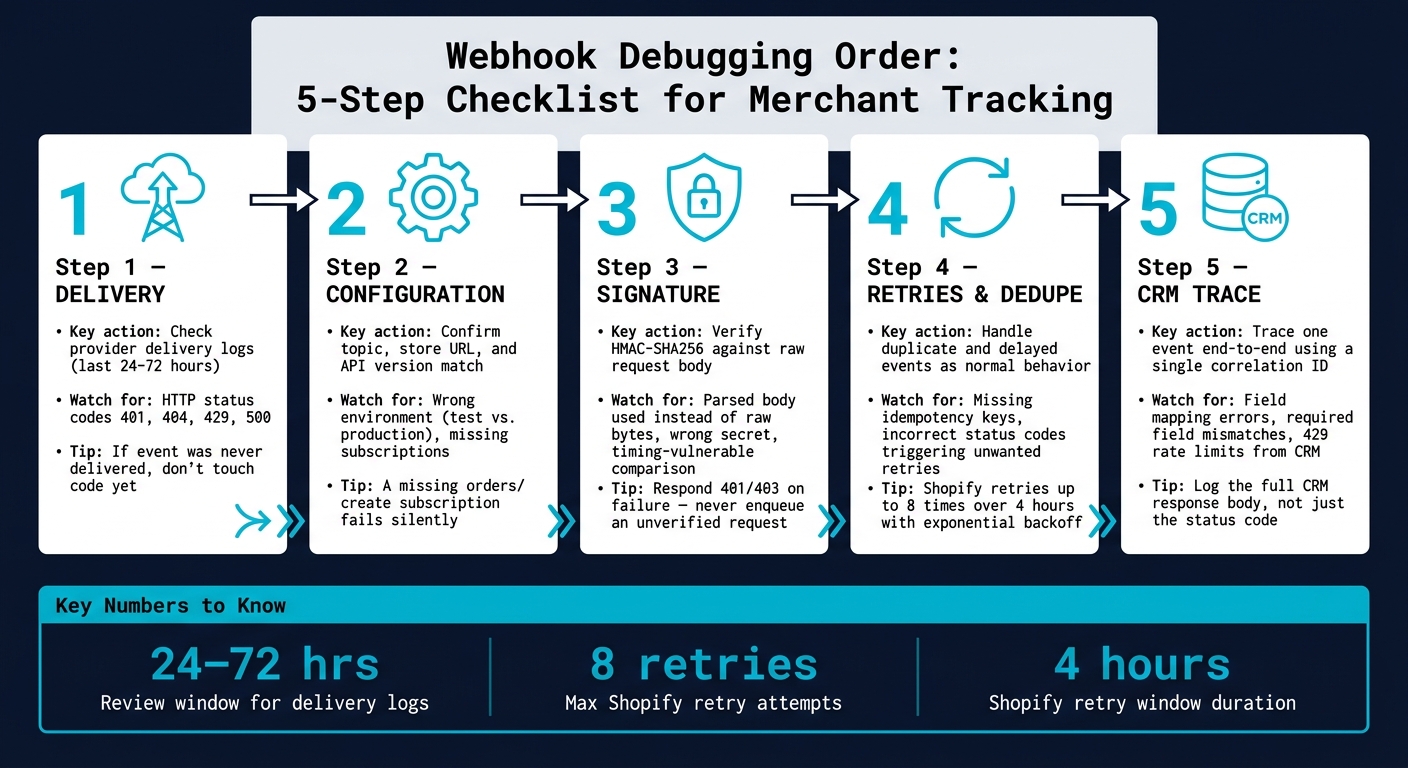
Webhook Debugging Order: 5-Step Checklist for Merchant Tracking
Webhook Debugging Made Simple How to Inspect, Diagnose & Fix Any Broken Webhook Integration
sbb-itb-61169e3
Quick Comparison
| Check area | What I look for | Common failure |
|---|---|---|
| Delivery | Provider logs, timestamps, retries, HTTP status | Event never reached the endpoint |
| Setup | Topic, store, URL path, API version | Wrong subscription or wrong environment |
| Request check | HMAC header, raw body, secret | Bad signature validation |
| Retry flow | Duplicate IDs, backoff, DLQ | Reprocessed or dropped events |
| CRM update | Field mapping, validation, throttling | Accepted webhook but failed write |
If I follow that path every time, I can narrow the issue down without bouncing between systems.
Checklist 1: Verify delivery status and webhook configuration
Start with the platform delivery logs and endpoint status before you dig into code.
Check provider delivery logs and endpoint status
Open the platform’s webhook delivery logs - Shopify’s "Webhook deliveries" view in the Dev Dashboard, for example - and filter by topic, status, and a recent time window. The last 24–72 hours is a solid place to start. If you manage more than one store, filter by store as well.
Focus on three things:
- The HTTP status codes your endpoint is returning
- The timestamps compared with when store actions happened
- The retry counts
A burst of 500s in a short period usually points to a short outage or a bad deploy on your side. 401s or 404s that keep showing up usually mean something is off in setup.
Use the table below to connect each status code to the next step.
| Status code | Most likely cause | Next debug step |
|---|---|---|
| 200 OK | Endpoint accepted the event successfully | Confirm the event was queued and the CRM object updated; if tracking is still broken, the issue is downstream |
| 401 Unauthorized | Invalid or missing auth | Check webhook secret and auth configuration; rotate keys if needed |
| 404 Not Found | Webhook URL path doesn't exist or routing changed | Verify the exact path in the store's webhook settings matches your deployed route |
| 429 Too Many Requests | Rate limiting by your API gateway, CDN, or app | Review rate limit rules, implement request queuing or backoff, and consider raising limits for high-value flows |
| 500 Internal Server Error | Unhandled exception, dependency failure, or code bug in the handler | Inspect application logs and tracing around the event timestamp; fix the root cause before more retries hit the same failure |
If delivery succeeds but updates still fail, move to signature verification and retry handling.
After you review the status codes, make sure the endpoint is reachable from the public internet. Run curl -v https://your-webhook-url from outside your network. Check TLS, certificate validity, and any response at all. A 401 is still better than a timeout.
Also check CDN and reverse proxy rules for bot blocking or body-size limits. Large merchant payloads - like orders or customer updates from high-volume stores - can reach several hundred KB. If those limits are too low, requests can fail without much warning.
Confirm the right topics, API version, and store are subscribed
If the endpoint looks healthy, the next place to check is subscription setup.
First, make sure the right topics are subscribed on the right store. A missing orders/create subscription on a production store won’t throw an error anywhere. It just means the event never fires, and your CRM slowly falls out of sync.
A topic-to-CRM map helps here. Sometimes what looks like a CRM issue is much simpler: the event never arrived in the first place. For common merchant tracking flows, it usually looks like this:
| Store topic | CRM object updated | What breaks if missing |
|---|---|---|
| orders/create | Deal / Opportunity, Revenue tracking | New orders never appear in pipeline reports; revenue dashboards undercount |
| orders/updated | Deal stage, fulfillment fields | CRM shows stale order status; fulfillment automations don't trigger |
| customers/create | Contact / Account record | New customers skip onboarding sequences; account targeting misses newly acquired merchants |
| customers/update | Contact profile, segmentation tags | CRM segments go stale; targeting by merchant revenue or tech stack becomes inaccurate |
Then check the API version and store identity. For Shopify, the webhook subscription API version - for example, 2026-01 - needs to match what your payload parser expects. Compare the API version with the parser directly.
You should also verify that the store ID or canonical URL matches the merchant record in your agency system. If those don’t line up, events can land in the wrong place, which is the kind of bug that wastes an afternoon fast.
If subscriptions are correct, trace the event payload itself.
Checklist 2: Validate signatures, dedupe logic, and retry handling
Once you’ve confirmed delivery is reaching your endpoint, the next step is making sure your endpoint handles those requests safely and correctly. At this point, you’re checking three things: can you trust the request, did you process it only once, and did it move cleanly into your worker flow? The full chain is store event → endpoint → worker → CRM, and this checklist focuses on the middle part.
Validate signatures against the raw request body
Verify the HMAC against the raw request body before parsing, and use a constant-time comparison. For Shopify webhooks, Shopify signs the raw body with HMAC-SHA256, base64-encodes the result, and sends it in the X-Shopify-Hmac-SHA256 header. In Express, use express.raw({ type: 'application/json' }) on the webhook route, or capture req.rawBody with a verify hook before express.json() runs.
| Failure pattern | Likely cause | Action |
|---|---|---|
| Signature missing | Reverse proxy or API gateway stripped the header | Confirm headers pass through unchanged; check proxy config |
| Signature mismatched | Parsed body used instead of raw bytes | Verify HMAC runs against the raw buffer; confirm base64 encoding, not hex |
| Wrong secret | API key used instead of client secret | Pull the client secret from your environment config and confirm it matches the app settings |
| Charset or encoding mismatch | The body changed before verification | Force UTF-8 when computing HMAC; check CDN and proxy body handling |
| Regular string comparison | Timing-vulnerable comparison | Switch to crypto.timingSafeEqual or equivalent |
If verification fails, respond with 401 or 403, log the event, and stop there. Don’t enqueue it.[3][1][4]
That’s a line you don’t want to blur. If the signature is bad, the request doesn’t move forward.
If the signature passes, move on to duplicate handling and delayed delivery.
Handle duplicate and delayed events as normal system behavior
The same event can show up more than once. That’s normal. Delays are normal too. So treat both as part of the system, not as edge cases.
Use X-Shopify-Event-Id or X-Shopify-Webhook-Id for deduplication. Both work well as idempotency keys.[2][7] Store processed IDs in Redis with a TTL, or in a relational processed_events table with a unique index. If the same event comes back, return 2xx again.
Also log both the provider timestamp and the receipt timestamp. That makes late arrivals much easier to spot.
If an order event arrives late during an active campaign, tag it as
delayed_webhookin your logs so you can avoid triggering time-sensitive automations on stale data.
The handoff pattern here should be simple: verify, enqueue, and return 2xx fast. Let background workers handle CRM writes.
If the event is valid but the CRM still misses the update, the next place to look is retry behavior and downstream recovery.
Use retries and dead-letter handling correctly
After dedupe, recovery is the last big failure point. Status codes matter here, and they need to be used on purpose. 2xx stops retries, 4xx marks a permanent error, and 5xx tells the sender to retry. Keep signature checks, validation, and enqueueing separate from CRM writes so each failure path is clear.
A signature failure should return 401, not 500. A schema validation error should return 400. Save 500 for actual infrastructure problems, like a database outage. That split makes troubleshooting a lot less messy.
Structured logs tied to each status code should include:
correlation_idwebhook_topicstore_idretry_attempt
Those fields make it much easier to tell whether repeated events point to a real server issue or just a bad endpoint setup. Shopify retries with exponential backoff - up to 8 times over 4 hours under current policy.[5][6]
For events that use up all retries, a dead-letter queue (DLQ) is your fallback. Store the full raw payload, headers, correlation ID, and last error details for the failing merchant event. Tag entries by topic and merchant ID so you can replay the most important store events first. Replay DLQ items into staging first, then production after the fix passes.
Checklist 3: Trace broken updates from store to CRM
Once your retry and dead-letter handling is solid, the next step is simple: find where a merchant update vanished.
The fastest way to do that is to trace one failed event from end to end with the same ID at every hop.
Trace one event across logs with a correlation ID
If delivery, signatures, and retries look healthy, trace one failed event through each hop until the write breaks.
Pick one failing event and follow it stage by stage. Use the platform's delivery ID - Shopify's X-Shopify-Event-Id, which remains constant across retries [2]. Use one stable ID per event. A short format works well: correlation_id=shopify:evt_9f0b3a1c.
| Stage | Typical failure modes | Log source to inspect |
|---|---|---|
| Store → Webhook endpoint | Non-delivery, signature errors, timeouts, misconfigured URL | Provider delivery logs, API gateway ingress logs |
| Endpoint → Queue | Enqueue failure, schema validation error, queue full | Ingest service logs, queue enqueue logs |
| Queue → Worker | Consumer down, deserialization error, transformation exception | Worker logs, exception tracker, DLQ entries |
| Worker → CRM API | Invalid payload, missing required fields, rate limit (429), permission error | CRM integration logs, HTTP request/response logs |
Go through the table from top to bottom with your correlation ID. Mark each stage as pass or fail until you hit the break. That gives you a clean path instead of guessing across five systems at once.
Check CRM field mapping, validation rules, and rate limits
Most CRM write failures come from three places: mapping, validation, or throttling.
Start with a data mapping doc that lists every source field and its target CRM property, along with data type, format, and whether the field is required. Small mismatches can cause big headaches. For example, mapping order_total into a CRM text property can trigger validation errors and make deal amounts impossible to sort in the right order. Treat required CRM fields as required in the payload too. Normalize currency and number formats before the write.
When a write fails, log the full CRM response body, not just the status code. A 400 by itself doesn't tell you much. The response body usually does. Parse field-level errors into separate log entries so you can filter by error type, like this:
{"stage":"crm_error","correlation_id":"...","field":"contact.email","error":"required","severity":"blocking"}
If you see a cluster of 429 responses, that usually means the CRM or your integration layer is throttling one merchant or one event type.
If the payload is valid but the write still fails, the break is in the CRM layer, not the webhook.
Debug high-value merchant flows first
Use merchant value to rank incidents, then look at the stores with the biggest impact first.
Prioritize the highest-value merchants first. Tag those stores in your tracking system and filter incident logs by merchant tier before you dig into lower-priority flows. Your workers should label every event with a store_value_tier tag. During an incident, filter logs to Tier 1 merchants first.
That way, your team spends time where the lost revenue is most likely to be. It’s a simple move, but in a messy incident, it keeps people from chasing the wrong problem first.
Conclusion: A repeatable webhook debugging checklist for agencies
Use the same debug order every time. Start with delivery. First, confirm the event was actually sent and received before you change anything. That one habit cuts out a lot of guesswork.
Next, check configuration. Make sure the subscription matches the right topic, store, and API version. After that, verify the signature against the raw request body. Then review retry handling so your dedupe logic deals with repeat deliveries cleanly. Check dead-letter handling too, so failed events don't just vanish. Last, trace one event from start to finish with a correlation ID until you find the exact point where the update stopped.
The order matters:
- delivery
- configuration
- signature
- retries
- CRM trace
That sequence keeps the team focused on the first broken hop instead of bouncing between systems and making random changes.
Agencies avoid repeat incidents when they use a documented process instead of ad hoc troubleshooting. A short runbook, a standard incident ticket, and a post-incident review go a long way. Without a clear process, the same failure tends to come back.
Merchant tracking stays stable when the checklist is written, tested, and used every time.
FAQs
Why do webhooks fail HMAC validation?
Webhooks usually fail HMAC validation when the signature in the header doesn’t match the one you calculate.
The most common reasons are pretty simple:
- You’re using the wrong secret key
- Something went wrong when sorting or joining payload parameters
- The request body was encoded in a different way than expected
To avoid this, use the correct client secret, verify the signature against the raw request body instead of parsed JSON, and compare signatures with crypto.timingSafeEqual.
How should I handle duplicate or delayed webhooks?
Cache the X-Shopify-Webhook-Id header and use it for deduplication. If that ID has already come through, skip the payload.
Shopify can retry webhook deliveries up to 19 times over 48 hours. So the safe move is to return 200 OK right away and push the payload into an async queue for later work.
When you update the CRM, rely on a local mapping table that links Shopify IDs to CRM IDs. That way, you can update existing records instead of creating duplicate entries.
What does 200 OK but no CRM update mean?
A 200 OK only tells you one thing: your server got the webhook.
It does not mean the CRM update finished.
In a lot of setups, the app accepts the webhook first, returns 200 OK, and then hands the job off to a queue for async processing. So the handoff may have worked even if the CRM update later failed.
If the CRM didn’t update, the problem is probably happening further down the line. Common trouble spots include:
- the background worker
- field mapping logic
- the CRM API request itself
Log the event as soon as you receive it. Then check your exception queue for hidden validation errors or mapping mistakes that may not show up in the initial webhook response.