
Best Practices for CRM Data Enrichment
Normalize and dedupe records, enrich only action-driving fields, protect rep-verified data, and track bounce, routing, and meeting metrics.

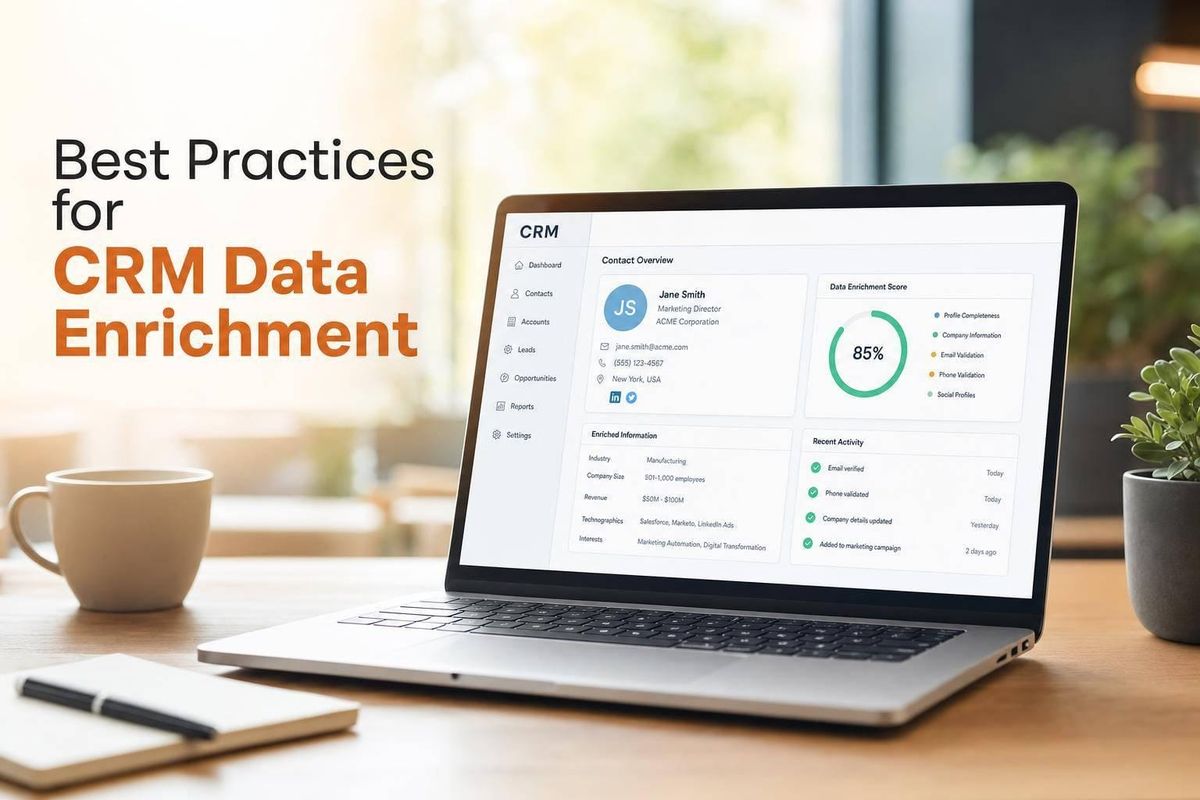
Bad CRM data wastes time and budget fast. If B2B contact data decays by about 30% per year, and 40%+ of CRM records miss at least one key firmographic field, I need a process that starts with cleanup, enriches only what I’ll use, and keeps records up to date.
Here’s the short version:
- I clean and standardize records before I enrich anything
- I deduplicate accounts and contacts before adding new data
- I enrich only fields tied to qualification, routing, scoring, or outreach
- I qualify the store first, then spend credits on contact data
- I set field ownership, overwrite rules, and manual locks
- I use push enrichment for new leads and scheduled refreshes for old records
- I track results with field completeness, bounce rate, routing accuracy, and meeting rate
A few numbers make the case clear:
- 30% yearly decay in B2B contact data
- Only 1.1% of Shopify stores in one dataset were ready for outreach
- 42.4% had unverified contact rows
- 4%–5% bounce rate is a warning sign that contact data needs review
What matters most is simple: I don’t enrich data just because I can. I enrich the fields that change who gets worked, who owns the lead, and what gets said in the first message.
That means store-level data often comes first for Shopify and WooCommerce agencies, such as:
- platform
- revenue band
- traffic tier
- app stack
- theme
- ad activity
- recent store changes
Then I move to contact data like:
- verified business email
- phone number
- job title
- seniority
- LinkedIn URL
The core idea is this: clean first, enrich second, govern third, measure always. That keeps the CRM usable instead of turning it into a bigger mess with more fields.
The article below walks through that process in the right order, with a clear focus on what to keep, what to automate, and what to protect.
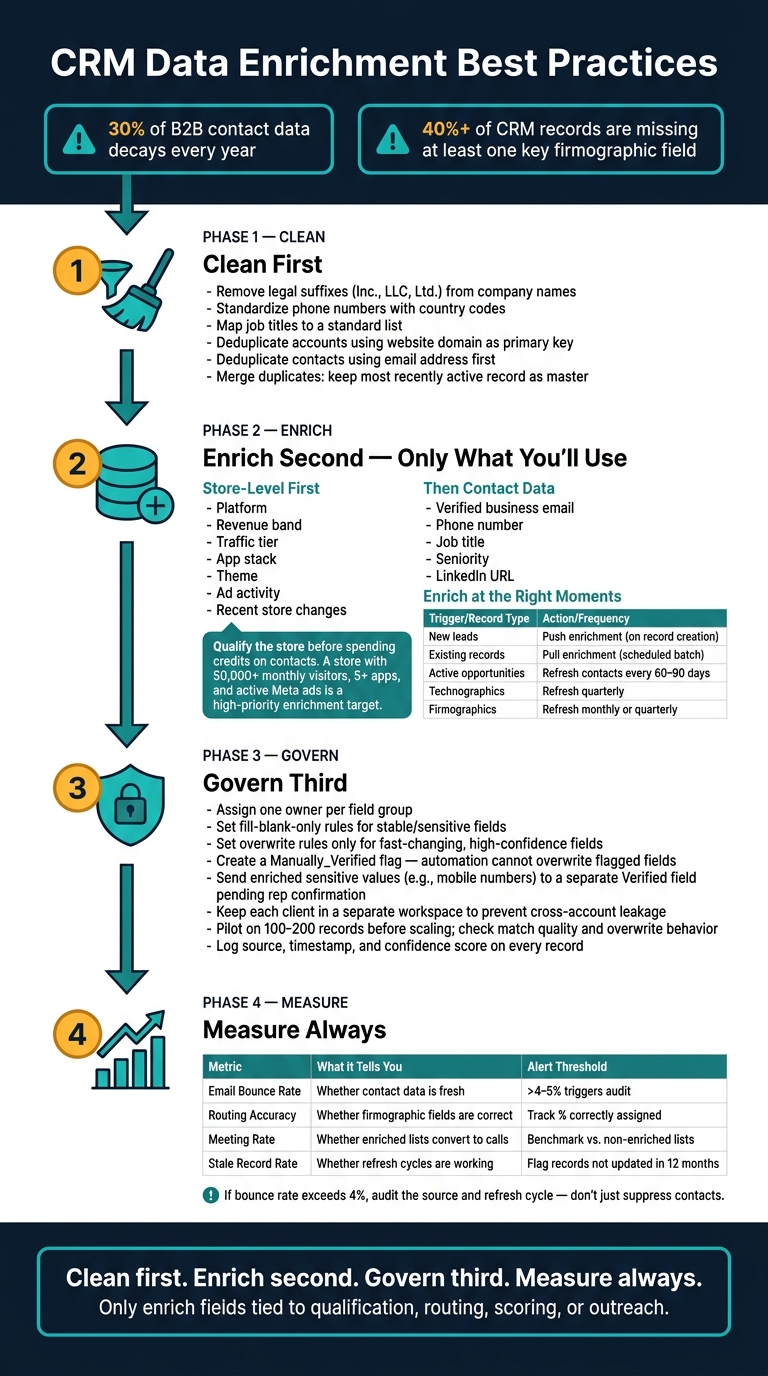
CRM Data Enrichment Best Practices: Clean, Enrich, Govern, Measure
How to Streamline and Automate Data Enrichment in HubSpot | Strategic HubSpot Tutorial
sbb-itb-61169e3
Clean the CRM Before You Enrich Anything
Enrichment doesn't fix a messy CRM. It just adds more detail to the mess.
If you append new fields to duplicate, stale, or corrupted records, you're paying to make bad data worse. That’s why enrichment should start only after the CRM is cleaned up and standardized.
The right order is simple: normalize first, deduplicate second, enrich third. Skip that order, and you don’t save time. You create duplicate ownership issues, burn through enrichment credits, and end up with a sales team that stops trusting the data.
Remove Duplicates and Normalize Core Fields
Before any deduplication tool can do its job, the data has to follow the same format. That means removing legal suffixes from company names like "Inc.", "LLC", and "Ltd.", standardizing phone numbers with country codes, and mapping raw job titles to a standard title list. A deduplication rule won’t match "Acme Inc" with "Acme, Inc." if the formatting is all over the place.
For account-level deduplication, use the store’s website domain as the primary key. For Shopify brand prospect lists and WooCommerce merchants, that’s usually the best unique identifier. For contact-level deduplication, match on email address first. If that’s missing, fall back to first name + last name + company name. When duplicates show up, use the most recently active record as the master, then backfill missing fields before merging.
Decide Which Fields Actually Drive Action
Around 40% of records in most B2B CRMs are missing at least one critical firmographic field. But that doesn’t mean you should enrich every field you can.
If a field doesn't trigger a play, a route, or a filter, don't enrich it. You're paying per record either way.
Keep the fields that change qualification, routing, or the first message. In practice, that usually means fields tied to ICP qualification, account routing, and outreach personalization, such as:
- verified business email
- normalized job title
- seniority level
- revenue range
- employee count
- industry
- tech stack
If a field doesn’t affect ICP fit, ownership, or outreach, leave it out. For more on building these segments, see our guide on how to find and target Shopify stores.
Set Source-of-Truth and Required Field Rules
Assign an owner to every high-impact field, and spell out the conflict rules. Don’t leave this to guesswork. An enrichment tool might own fields like job title and tech stack, while the CRM keeps ownership of lead source. The overwrite logic should be written down and enforced.
One rule gets skipped all the time, and it causes a lot of pain: protect manually verified data from automated overwrite. If a rep confirmed a direct-dial number or a personal email, that information is more accurate than what an enrichment tool is likely to return. Create locked "Rep Verified" fields that automation can’t change.
"SDRs stop trusting the data after they call three wrong numbers in a row, and that trust is hard to win back." - Bitscale
Once those ownership and overwrite rules are in place, automation can enrich records without wiping out verified data. At that point, enrichment can run as a repeatable workflow.
Build a Repeatable Enrichment Workflow
Once your CRM is clean and your field rules are locked in, enrichment stops being a one-off cleanup job. It becomes a process you run on a set cadence.
The order matters: collect store signals, map them to your ICP, enrich only the fields you’ll use, QA the output, and sync it back to the CRM. Start with fit. Before you enrich anything, tie each field to a use case.
Match Fields to Use Cases Before You Enrich
Map every field to a specific action before you enrich it.
| Use Case | Fields to Enrich | Action Triggered |
|---|---|---|
| Routing | Geography, company size, revenue band | Assigns the lead to the right rep or segment |
| Scoring | Revenue band, recent growth signals, app count, pixel depth | Prioritizes high-fit accounts for follow-up |
| Outbound | Decision-maker name, role, verified email | Enables personalized outreach to the right contact |
| Personalization | Tech stack gaps, current theme, active ads | Surfaces specific pain points to anchor the pitch |
Qualify the store first. Check traffic tier, app stack, and revenue band before you spend credits on contacts. Only move to people enrichment if the account clears your threshold.
Once the field list is set, the next step is timing.
Enrich at the Right Moments
Enrich new leads as they enter the CRM, whether they come from a form fill, an inbound inquiry, or a list import. That keeps routing and scoring based on complete data instead of half-empty records.
For records already in your system, use batch enrichment on targeted segments. Good examples include accounts that have gone cold, contacts missing a verified email, or stores you’ve marked as high-fit but never worked.
For active opportunities and target accounts, refresh contact data every 60 to 90 days, technographics quarterly, and firmographics monthly or quarterly. Intent and behavior signals need even tighter checks, because a store change or a new app install can open, or close, a buying window fast.
For Shopify agencies, the best signals are usually store-level signals, not broad firmographics.
Use Ecommerce-Specific Data to Improve Targeting
Generic firmographic enrichment - company size, industry, and headquarters location - can only take you so far when you sell to Shopify and WooCommerce merchants. The fields that tend to matter more are platform-specific: revenue band, installed app stack, theme, traffic tier, and recent store changes.
Qualify the store before enriching contacts. A store with 50,000+ monthly visitors, 5+ installed apps, and active Meta ads is a much better enrichment target than a store with fuzzy fit signals.
StoreCensus fits this workflow by helping agencies search 6M+ Shopify and WooCommerce stores by revenue, tech stack, theme, country, and growth signals, then surface decision-maker contacts. That gives reps a concrete reason to reach out.
Set Field Mapping, Update Logic, and Automation
Once you know which fields matter, the next step is simple: decide how each field gets into the CRM, how it can change, and when it should be refreshed.
Map Incoming Data to CRM Properties
Map each external field to one CRM property. Before import, clean up the values so the same thing isn't written three different ways. Use Account Name plus Website Domain as your match keys. For Shopify agencies, that helps routing, scoring, and outbound messaging stay tied to the right store and the right contact.
Normalization matters more than it sounds. If one country field says "USA" and another says "United States", your filters and segments can fall apart.
Set rules for multi-value fields too. If that part gets messy, segmentation gets messy right along with it.
A good rule here: only map fields that already have both of these in place:
- a defined CRM owner
- a clear update rule
Once the mapping is done, decide which fields can update on their own and which ones need to stay locked.
Choose Update Rules for Each Field
Use fill-blank-only for stable or sensitive fields. Use overwrite only for fast-changing fields when confidence is high. And don't let automation touch data that a person has already checked by hand.
Create a Manually_Verified flag and stop automation from overwriting any field marked true. For sensitive fields, like a direct mobile number, send the enriched value to a separate Verified Phone field until a rep confirms it.
That setup gives you a clean middle ground. Automation keeps records moving, but trusted data stays protected.
Automate Enrichment and Refresh Cycles
Use push enrichment for new records and pull enrichment for scheduled refreshes.
Push enrichment runs the moment a record is created, whether that comes from a form fill, inbound inquiry, or list import. That way, routing and scoring logic start with fuller data right away. Pull enrichment runs on a schedule against records that already exist, which helps fight the natural decay that creeps into CRM data over time.
Attach the source, last-enriched date, and confidence score to every record. If a record is low-confidence or stale, flag it for manual review before anything gets written back to the CRM.
Next comes ownership and QA, so these rules don't just exist on paper.
Govern the Data and Measure Whether It Works
Once enrichment is automated, governance is what keeps the data clean and lets you see if any of this is paying off.
Set Ownership, QA Checks, and Privacy Controls
Give each field group one clear owner. That person handles fixes, reviews exceptions, and signs off on rule changes.
Keep each client in a separate workspace or table. That helps prevent cross-account leakage and makes compliance easier to manage.
Before you scale, run a small pilot on 100–200 records. Then check match quality, overwrite behavior, and source logs. Also log the source and timestamp for audit purposes.
Use data minimization too. In plain English: only enrich the fields a given workflow needs.
After QA, don’t stop at data quality. Track whether enriched data actually changes routing, outreach, and conversion.
Track Field Completeness and Downstream Impact
Once governance is in place, the next step is simple: measure business impact, not just cleaner records.
Match rate tells you how the process is running. It does not tell you whether enrichment is helping. A better place to start is field completeness by segment. Look at what share of your ICP accounts has each critical field filled in. In many B2B CRMs, 40% or more of records are missing at least one critical firmographic field. That’s not a small issue. It can break scoring and routing before outreach even begins.
Then watch the metrics tied to pipeline and revenue:
| Metric | What It Tells You | Alert Threshold |
|---|---|---|
| Email bounce rate | Whether contact data is fresh | > 4–5% |
| Routing accuracy | Whether firmographic fields are correct | Track % correctly assigned |
| Meeting rate | Whether enriched lists convert to calls | Benchmark vs. non-enriched lists |
| Stale record rate | Whether refresh cycles are working | Flag records not updated in 12 months |
If bounce rate goes above 4%, audit the source and refresh cycle instead of just suppressing contacts. Otherwise, you’re treating the symptom and leaving the root issue in place.
Conclusion: Keep Your CRM Clean, Selective, and Current
Enrichment works only when the CRM is clean, the fields are selective, and the refresh cycle stays active. To prove impact, track field completeness, routing accuracy, bounce rate, and meeting rate.
Start by cleaning the CRM first. Normalize records, deduplicate them, and set required fields before you spend a single enrichment credit. Then enrich only the fields tied to a routing rule, a scoring model, or a personalization token. Set clear mapping and overwrite rules so automation doesn’t quietly damage data a rep already checked. Use push enrichment for new records and pull enrichment on a tiered schedule to fight the natural decay that sets in over time.
The agencies that treat the CRM like a living system tend to build outbound pipelines that keep working. Clean data, selective enrichment, clear ownership, and measured impact all matter here.
FAQs
How often should I refresh enriched CRM data?
Use a tiered refresh cadence based on the type of data you’re working with. A one-size-fits-all schedule sounds neat on paper, but it usually wastes time in one area and leaves gaps in another.
Re-check contact data every 60 to 90 days. Refresh firmographic data monthly. Update technographic data quarterly.
For behavioral signals like job changes or funding rounds, real-time updates matter most. Those details can shift fast, and stale signals can throw off outreach.
It also helps to match refresh timing to pipeline stage. Active sales accounts should get monthly updates. Cold or nurture records can usually wait 6 to 12 months before the next refresh.
Which CRM fields are worth enriching first?
Start with the fields that help your sales team take action right away: decision-maker names, job titles, verified email addresses, store names, and normalized roles like founder or marketing lead.
Next, add LinkedIn URLs. They help with multi-channel outreach and give you a simple way to confirm current employment.
From there, bring in optional data like revenue tiers, traffic levels, and tech stack only when those fields support a clear sales or marketing move.
How do I prevent enrichment from overwriting rep-verified data?
Use strict field-level governance and do-not-overwrite rules. Set enrichment to fill only blank fields, not replace existing values.
For critical fields like mobile numbers or email addresses, use a custom field such as Manually Verified. If it’s true, block automation from updating that record. You can also give internal insights first priority by keeping current values unless newer data has been confirmed as more accurate.



