
Best CMS for Shopify Plus Merchants
Pick a CMS that fits your team and storefront—not the flashiest option—balancing Shopify integration, editorial workflow, scale, and maintenance.


If you run Shopify Plus, the best CMS depends on who edits content, how your storefront is built, and how much dev work you can support.
From what I see in the article, the short answer is simple:
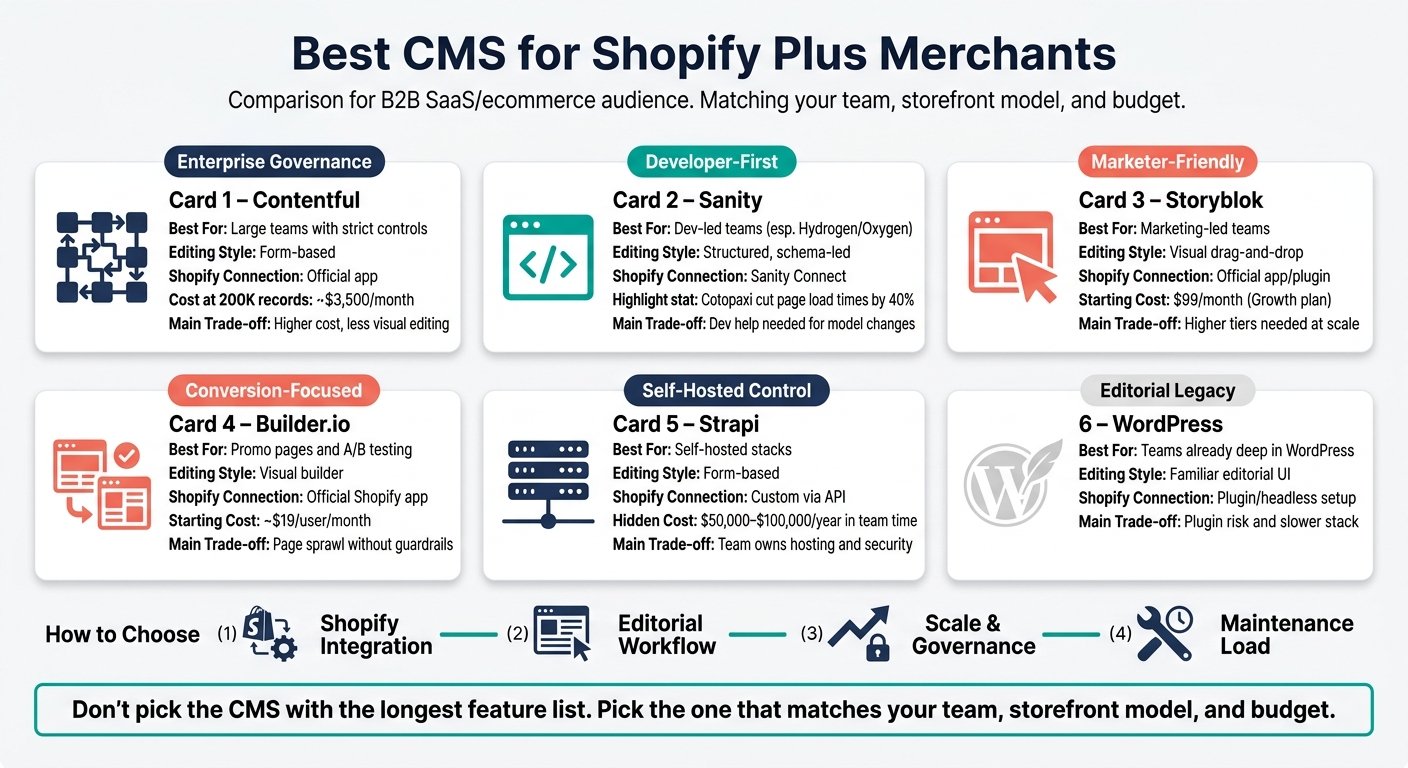
- Contentful fits teams with strict roles, approvals, and multi-region control
- Sanity fits dev-led teams, especially on Hydrogen/Oxygen
- Storyblok fits marketing teams that want visual page building
- Builder.io fits teams focused on landing pages and A/B tests
- Strapi fits teams that want self-hosting and full infrastructure control
- WordPress fits brands that already run a large editorial setup on WordPress
A few points stand out fast:
- Shopify’s native content tools can slow teams down once many people need to edit content
- Headless setups help split the work: Shopify for commerce, CMS for content
- At about 200,000 records, the article puts Contentful at around $3,500/month and Sanity at around $1,400/month
- The article also notes that self-hosting Strapi can cost about $50,000 to $100,000 per year in team time
- One case study says Cotopaxi cut page load times by 40% after moving to a Sanity-backed Hydrogen setup
Before I’d pick any CMS, I’d check four things first:
- Shopify integration
- Editorial workflow
- Scale across teams and markets
- Maintenance load
Best CMS for Shopify Plus: Side-by-Side Comparison
Best Headless CMS for Shopify and Shopify Plus in 2025 (Don't Choose Wrong ! )
sbb-itb-61169e3
Quick Comparison
| CMS | Best For | Editing Style | Shopify Connection | Main Trade-off |
|---|---|---|---|---|
| Contentful | Large teams with strict controls | Form-based | Official app | Higher cost, less visual editing |
| Sanity | Dev-led teams | Structured, schema-led | Sanity Connect | Dev help needed for model changes |
| Storyblok | Marketing-led teams | Visual drag-and-drop | Official app/plugin | Higher tiers may be needed |
| Builder.io | Promo pages and testing | Visual builder | Official Shopify app | Page sprawl without rules |
| Market Research | Data-driven teams | Store intelligence | Shopify store database | Requires analysis time |
| Strapi | Self-hosted stacks | Form-based | Custom via API | Team owns hosting and security |
| WordPress | Teams already deep in WordPress | Familiar editorial UI | Plugin/headless setup | Plugin risk and slower stack |
My takeaway: don’t pick the CMS with the longest feature list. Pick the one that matches your team, storefront model, and budget.
How to Evaluate a CMS for Shopify Plus
Before you compare platforms, set four criteria: Shopify integration, editorial workflow, scalability, and maintenance. Use those four lenses to judge each option below.
Integration model and storefront compatibility
Start with the integration model. If this part is off, the rest gets messy fast.
Most of the platforms here connect to Shopify through the Storefront API or an official connector, but the strength of that connection can vary a lot. Look for tools like Sanity Connect or Storyblok field-type plugins that let editors reference Shopify products and collections right inside the CMS. That way, teams don't have to copy product data by hand.
And that point matters more than it may seem: never duplicate product titles or prices into the CMS. Store the Shopify product handle or ID instead, then pull live data at render time. Once content gets copied, it drifts. And when it drifts, publishing mistakes tend to show up at the worst time.
Also check preview support for your frontend. If previews are broken or unreliable, teams often fall back to editing in production, which is a headache no one wants.
Before you commit, audit app compatibility too. Many Shopify apps depend on themes and won't work out of the box in headless builds. Review your must-have apps - reviews, loyalty, email capture - and confirm they offer JavaScript SDKs before the build starts, not halfway through it.
Editorial workflows, governance, and scale
The main question here is: who owns content day to day?
Contentful and Sanity lean toward structured, schema-led editing. Storyblok and Builder.io lean toward visual page building. That difference shapes how marketers, merchandisers, and developers work together.
For multi-market teams, multi-locale support and approvals aren't nice extras. They're table stakes.
Developer experience and ongoing maintenance
Once workflow is clear, look at ownership over time: how much engineering effort will this CMS need month after month?
Review API quality, SDK support, and the way schema changes are managed. Schema-as-code gives developers tighter control. Visual schema tools make iteration faster for teams that want to move with less developer input.
The matrix below gives a quick read on the tradeoffs:
| CMS | Shopify Integration | Editorial UX | Governance | Developer Flexibility | Best-Fit Use Case |
|---|---|---|---|---|---|
| Contentful | Official App; mature API | Form-based; Compose add-on for visual | Industry-leading; strict roles | High; REST/GraphQL | Enterprise compliance |
| Sanity | Sanity Connect app | Real-time; code-configured Studio | Strong; plugin-based | Maximum; Schema-as-Code | Dev-led teams; complex content models |
| Storyblok | Official Connect app | Best-in-class visual editor | Good | Moderate; component-centric | Marketer-led teams; high creative velocity |
| Builder.io | Official Shopify App | Drag-and-drop visual | Moderate | Moderate | Conversion teams; rapid A/B testing |
| Strapi | Storefront API (custom) | Form-based | Moderate | High; self-hosted | Budget-conscious teams with dev resources |
Use these criteria as you go through the platform roundup below.
The Best CMS Platforms for Shopify Plus Merchants
Contentful, Sanity, and Storyblok
For Shopify Plus teams, the main choice usually comes down to three things: governance, developer control, and editorial speed. And these three platforms line up with three different ways of working: enterprise governance, dev-led flexibility, and marketer-led publishing.
Contentful is the enterprise option. Its official Shopify app lets editors reference products and collections right inside structured content entries. That setup works well for teams with strict roles, approval flows, and multi-region needs. The downside is price. At a 200,000-record scale, Contentful can cost about $3,500/month. Its editor UI also isn’t as easy for merchandisers who want more visual control over pages.
Sanity tends to be the pick for developer-heavy teams, especially those building on Shopify Hydrogen. Its Sanity Connect app syncs products, variants, and collections into a content model that developers can query with GROQ, which helps with complex content relationships. Schema is defined in TypeScript, so a developer usually needs to step in for structural changes. But that also means the content model can match the storefront very closely. At the same 200,000-record scale, Sanity costs about $1,400/month. In late 2024, Cotopaxi moved to a Sanity-backed Hydrogen storefront, cut page load times by 40%, and launched co-branded collection pages in under two hours without a developer ticket.
Storyblok goes in another direction. Its visual drag-and-drop editor is built for non-technical users, and its Storyblok Connect app comes with a Shopify field-type plugin so editors can pull products straight into page components. That gives marketing teams room to build and publish landing pages without waiting on developers. The catch is that deeper ecommerce use often depends on a higher-tier plan, so pricing can climb fast at Shopify Plus scale. The $99/month Growth plan may not be enough for more complex setups.
Builder.io and Strapi
For teams focused on page building or infrastructure control, the tradeoffs shift.
Builder.io works as a visual layer for conversion teams. It’s made for merchandising teams that want to build, test, and update pages without touching code. It also includes native A/B testing, which is handy for brands running frequent promos or tuning product pages. But there’s a catch: design drift. If teams don’t have clear rules in place, pages can start to turn into one-off layouts that become messy to manage later. Paid plans start at about $19/user/month.
Strapi is the open-source choice for teams with compliance-heavy needs or self-hosted requirements. The community edition is free to self-host, and it gives engineering teams full control over data residency and infrastructure. That said, “free” doesn’t mean cheap. The main cost shows up in engineering time. Self-hosting usually takes 0.25 to 0.5 FTE, or about $50,000 to $100,000 per year.
WordPress as a Shopify Plus content layer
One older content stack still has a place, especially for brands that already have an editorial machine built around it. WordPress makes the most sense for brands with an editorial team that already knows the platform well. In that setup, WordPress handles the content layer while Shopify runs commerce, often through headless plugins or a WordPress VIP setup.
Still, the tradeoffs are hard to ignore. In a headless architecture, WordPress brings plugin dependency risk, extra security upkeep, and performance bottlenecks that purpose-built headless CMS platforms don’t usually have. Every plugin added to manage Shopify product relationships creates one more thing that can break. For brands starting from scratch, it’s rarely the best place to begin.
Matching the Right CMS to the Right Shopify Plus Merchant
Fit by team structure and content complexity
Once you’ve compared the platforms, the next step is simpler: match the CMS to the team that will use it every day.
In practice, CMS success has less to do with a flashy feature list and more to do with the people inside the tool. A developer-first CMS handed to a marketing team is usually a costly mismatch.
A simple way to think about it:
- Sanity or Strapi fit dev-led teams
- Storyblok or Builder.io fit marketing-led teams
- Contentful fits teams that need both structure and governance
That said, visual editors come with a trade-off. They give marketers more freedom, but that freedom can turn into design drift. Over time, pages can start to look inconsistent if there aren’t clear guardrails in place.
Fit by operating model and budget
Team structure gives you the shortlist. Budget trims it down.
Here’s how the main options compare:
| Business Case | Best Fit | Cost Level | Main trade-off |
|---|---|---|---|
| Content-heavy brands | Sanity, Contentful | High | High upfront dev setup for structured models |
| Enterprise governance | Contentful | High | High licensing and strict workflows |
| Marketing-led landing pages | Storyblok, Builder.io | Medium | Risk of design drift without clear rules |
| WordPress-heavy teams | WordPress VIP | Medium | Performance bottlenecks compared with pure headless options |
| Dev-led / custom stacks | Strapi | Low | Team owns security, hosting, and uptime |
For teams below that level, the long-term cost of headless can outweigh the upside.
Self-hosted CMSs put security, hosting, and uptime on the merchant’s side. SaaS CMSs usually cost more at the start, but they cut down the day-to-day operational burden. If a Shopify Plus team doesn’t have DevOps support, a vendor-managed CMS can take a lot off the team’s plate.
Once those two filters are clear, the last call comes down to storefront model.
Conclusion: Choose the CMS That Fits Your Storefront Model
The right CMS comes down to how your storefront is built and how your team works day to day. The platforms above made the shortlist for a simple reason: each one fits a different way of running a store. Pick the CMS that lines up with your stack and your team model.
Your CMS should fit the way your team ships storefront updates. Brands using Shopify Hydrogen/Oxygen with the right CMS have reported faster pages and better conversion results. That kind of lift comes from fit, not from picking the most popular name.
Here’s the part that matters most when narrowing your options.
Key points to carry into platform selection
Start with integration depth. How a CMS connects to Shopify's Storefront API matters more than a long feature list. After that, look at editorial workflow. The people publishing content every day will tell you pretty fast whether you need a developer-first tool or a marketer-first one.
Then look at governance needs and be honest about dev capacity.
- Contentful fits teams with heavy governance needs.
- Sanity fits developer-led teams.
- Storyblok fits marketer-led teams.
- Strapi fits teams that want self-hosted control.
If you're still on Liquid and Core Web Vitals have stalled, you may be getting close to the point where headless is worth the switch.
Choose the CMS that fits your storefront model, team workflow, and maintenance capacity.
FAQs
Do I need a headless storefront to use a CMS with Shopify Plus?
Yes. Moving to a headless architecture is the standard way to connect a dedicated headless CMS with Shopify Plus.
Here’s the basic idea: Shopify runs the commerce side of the site, including inventory, orders, and checkout. The CMS handles editorial content, landing pages, and more complex site structure.
Instead of building those pages with Shopify’s native Liquid templates, the front end pulls content through an API. That gives your team more control over how the site looks, feels, and is organized.
How much developer support will I need after launch?
It depends on your setup and how much freedom you want to give your marketing team.
A headless setup often needs more day-to-day help from developers. That usually includes deployment pipelines, API orchestration, and frontend maintenance.
If marketing autonomy matters most, visual, component-based platforms can cut down on developer involvement. Developer-first systems give you more control and customization, but they often come with continued engineering work for complex schemas and editorial workflows.
When does Shopify’s native content system stop being enough?
Shopify’s native content tools, including metafields and metaobjects, are often enough for single-locale stores with light blogging needs and no dedicated content team.
But there’s usually a tipping point. Once content volume grows, more people start touching the same pages, or localization turns into a routine task, friction shows up fast.
That’s when teams tend to need editorial workflows, audit trails, version rollbacks, scheduled publishing, or relational queries across content types.



