
AI Product Recommendations for Upselling and Cross-Selling
Most stores need better recommendations, not more traffic—place AI upsells on high-intent pages and fix your product data.

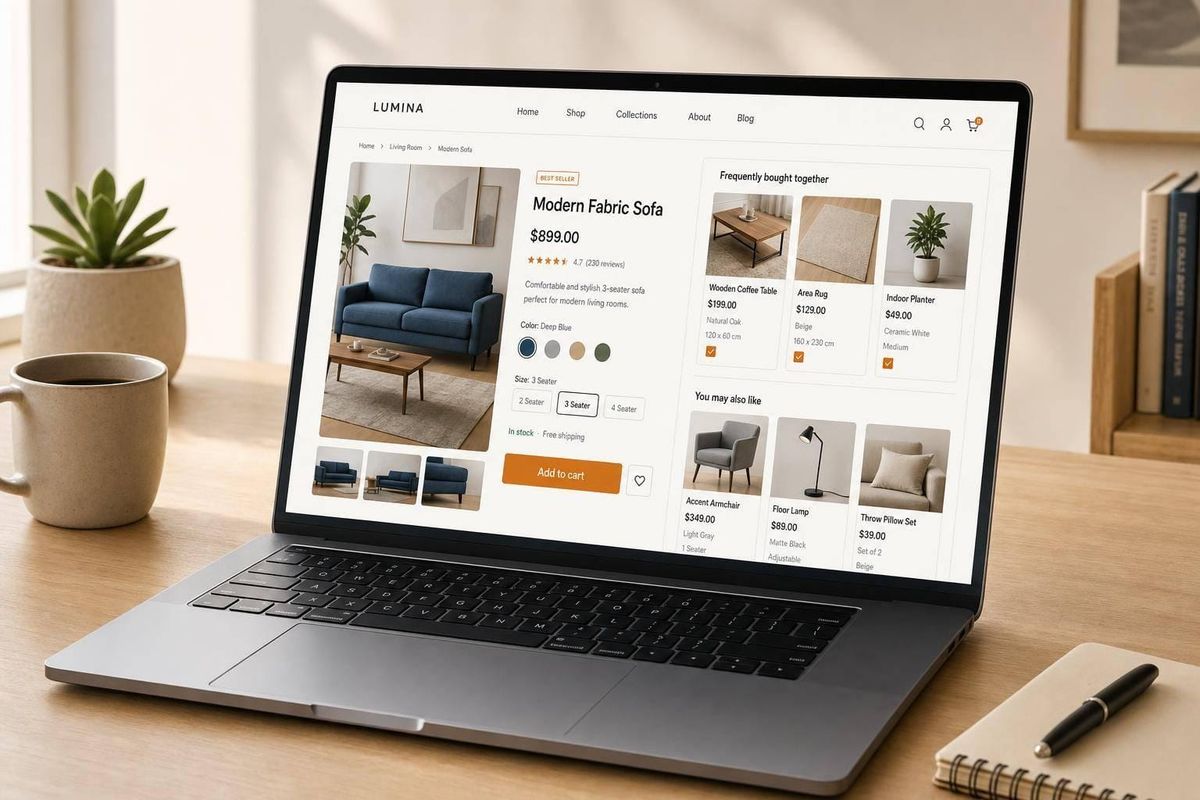
Most stores don’t need more traffic first. They need better product suggestions. I’d boil this article down to one idea: if you put AI recommendations on the right pages, feed them clean data, and judge them by revenue per session and AOV lift, you can push more upgrade and add-on sales without making checkout harder.
Here’s the short version:
- Upsells move shoppers to a better version of what they already want.
- Cross-sells add related items, like accessories or refills.
- AI beats static rules because it reacts to live behavior like product views, cart adds, searches, and discount clicks.
- Best placements are usually the cart, checkout, and post-purchase page because intent is highest there.
- Strong results often show up as 15%–35% AOV lift and 22%–35% more revenue per session when setup and testing are done well.
- Bad data kills performance. Product tags, categories, variants, inventory, and event tracking all need to be clean first.
- Agencies should start small: run a pilot on one page, check results in GA4, then expand.
- Low-volume stores should begin with manual bundles or content-based suggestions before moving into behavior-based models.
A few numbers stand out:
- Cart drawer suggestions with a small set of items can drive 34% higher CTR and 22% higher conversion than product page carousels.
- Checkout add-ons can convert at 37.8%.
- One-click post-purchase offers can land between 8.3% and 14.6%.
- AI-assisted chat sessions can convert at 12.3% versus 3.1% for unassisted visits.
If I were setting this up for a U.S. Shopify or WooCommerce merchant, I’d keep the plan simple: audit data, exclude bad SKUs, launch on one high-intent surface, keep recommendation sets small, and track sales impact before anything else.
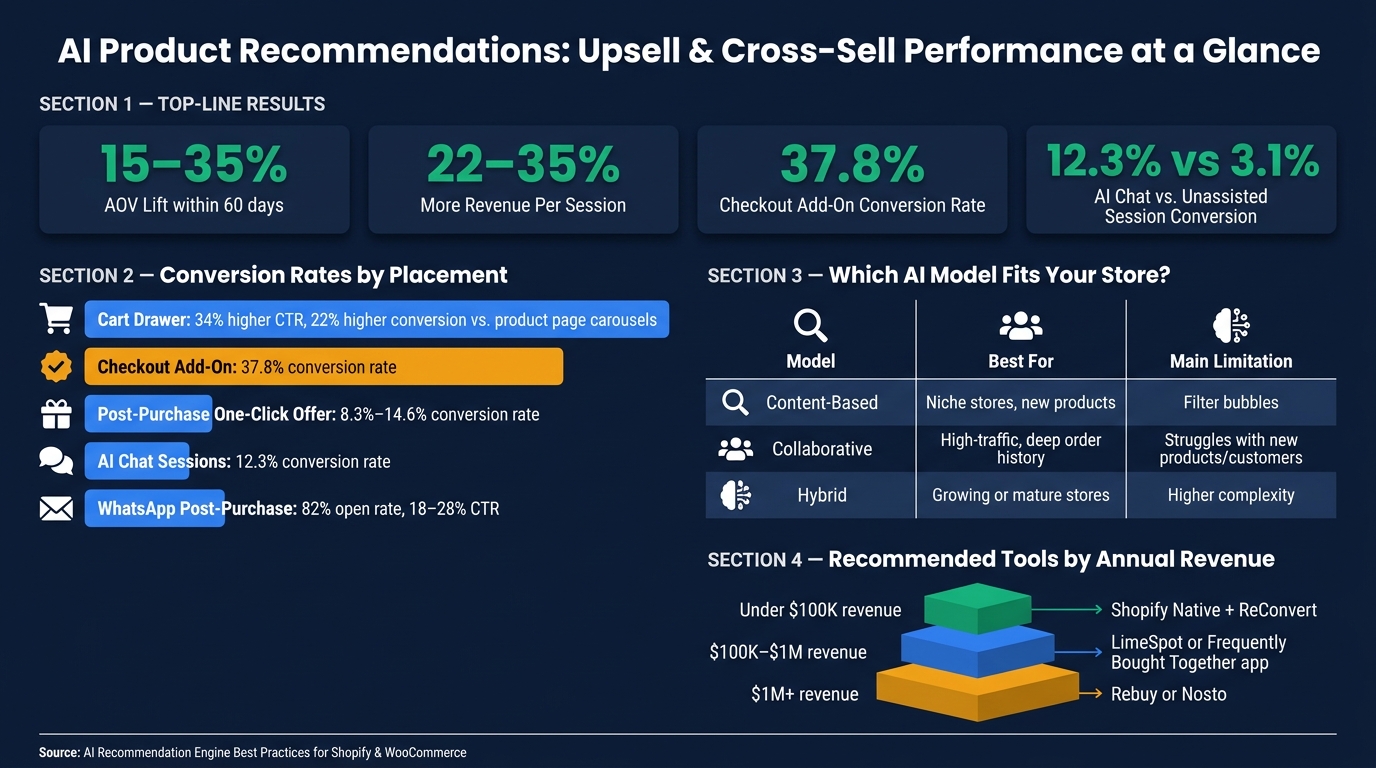
AI Product Recommendations: Key Metrics, Placements & Benchmarks
Shopify Upsell App to Boost Shopify Sales with AI-Powered Product Recommendations & Cross Sell
sbb-itb-61169e3
How AI recommendation engines work in Shopify and WooCommerce stores
To match recommendations to each store—whether you are analyzing a list of Shopify stores or a single niche site—you need the right mix of model, data, and trigger.
The core models behind product recommendations
Most recommendation engines use one of three methods - or a blend of them.
Content-based filtering ranks products by similarity. It looks at attributes like category, material, price range, tags, and descriptions. This method works well for niche stores or newer catalogs that don't have much purchase history yet. The downside is that it can get repetitive over time.
Collaborative filtering looks at behavior across your customer base. It uses past buying patterns to figure out which products tend to be bought together. The tradeoff is pretty simple: new products and new customers are harder to rank with much precision.
Hybrid models combine collaborative and content-based signals. Then they add real-time session behavior to cover gaps. So if a new product launches with little order history, the content-based layer can keep it in front of shoppers until enough purchase data comes in.
| Model Type | Best For | Main Limitation |
|---|---|---|
| Content-Based | Niche stores, new products, limited behavior data | Can create filter bubbles |
| Collaborative | High-traffic stores with deep order history | New products and new customers are harder to rank accurately |
| Hybrid | Growing or mature stores seeking maximum accuracy | Higher implementation complexity |
The data inputs required for accurate recommendations
Recommendation engines only work well when catalog data and behavior data are clean and complete.
On the catalog side, the basics include product titles, tags, categories, variants, inventory status, and metafields. If that data is missing or inconsistent, recommendation quality drops. That's why a catalog audit should happen before launch.
On the behavior side, engines use signals like page views, dwell time, add-to-cart events, search queries, and purchase history. Margin data also matters. It lets merchants push higher-profit SKUs closer to the top instead of ranking only by conversion probability.
Real-time triggers that power upsell and cross-sell blocks
Modern engines react in real time to what shoppers do on the site. The best triggers line up with current intent.
| Signal Type | Trigger Event | What the Engine Does |
|---|---|---|
| Product View | Customer views an item | Surfaces similar and complementary items |
| Add to Cart | Item added to cart | Shifts recommendations to accessories and add-ons |
| Search Query | Keyword entered | Aligns site-wide recommendations to search intent |
| Price Sensitivity | Shopper clicks sale items | Increases weight of discounted products in widgets |
Good engines also remove recently purchased items from recommendation blocks right away. That keeps suggestions relevant and cuts down on repetition. For cart drawers, keep the set small - 3 to 4 products is usually enough to avoid choice overload.
These models and signals shape where recommendations should show up next.
Where to place AI recommendations for the biggest revenue lift
Placement matters just as much as the algorithm. The same recommendation engine can drive very different results based on where it shows up in the buying journey.
The rule of thumb is simple: start where buying intent is highest, then move outward. Put recommendations first on high-intent on-site surfaces. After that, extend the same logic to post-purchase moments and outbound channels.
Product page, cart, and checkout placements
The product detail page (PDP) is a strong place to start. It works well for "Frequently Bought Together" bundles and "Complete the Look" modules, especially for fashion and home decor.
The cart drawer is the highest-intent on-site placement, so keep the offer tight and relevant. Showing up to 3 complementary items in a cart drawer leads to a 34% higher click-through rate and a 22% higher conversion rate than product page carousels. More choice might sound better, but here it usually backfires.
At checkout, add-ons convert at 37.8%, which is the highest rate of any upsell type. This is the place for low-friction, low-cost add-ons. Big bundles or harder decisions can slow people down and chip away at conversions. Inventory also needs to stay synced in real time, so you don't recommend something that's out of stock right before the order goes through.
Post-purchase, home page, and category page recommendations
The thank-you page is another high-value spot. Post-purchase offers work because the buyer is still engaged and can accept a one-click add-on without much effort. One-click offers that don't require re-entering payment details convert at 8.3% to 14.6%.
Home page personalization tends to work best for returning visitors. That's where browsing continuity starts to matter. A "Pick up where you left off" module can drive 24% longer sessions and 19% higher conversion rates compared with a generic homepage experience. For new visitors, it's better to fall back on "Best Sellers" or "Trending Now" until the engine has enough data to tailor results.
On category pages, show close substitutes and filtered-view alternatives to keep shoppers moving. The goal is to surface comparison options that line up with where they are in their browsing behavior.
Email, SMS, and chat-based recommendation delivery
Once shoppers leave the site, the same recommendation logic should follow them into email, SMS, and chat. Email, SMS, and WhatsApp can all help recover lost intent with personalized product suggestions.
WhatsApp stands out after purchase. Post-purchase sequences there see 82% open rates compared with 22% for email, with click-through rates ranging from 18% to 28%. Replenishment campaigns are a good fit in this channel because the AI can predict when a consumable product is likely about to run out.
AI-powered chat also earns its spot here. Shoppers who interact with a conversational AI assistant convert at 12.3%, compared with 3.1% for unassisted sessions.
Use the summary below to match each placement with its main job and data needs.
| Placement Type | Primary Goal | Data Requirements |
|---|---|---|
| Product Page | Upsell to higher tier | Product attributes (content-based) |
| Cart Drawer | Cross-sell accessories | Purchase co-occurrence (collaborative) |
| Checkout Add-On | Impulse add-on | Real-time cart signals |
| Post-Purchase | Repeat purchases | Individual purchase history |
| Email/SMS/WhatsApp | Recover lost intent | Browse/session behavior |
On mobile, each placement needs to fit a smaller screen. Horizontal carousels are easy to skip past on phones, so test vertical stacked layouts for mobile placements. In many cases, they perform better on smaller screens.
Implementation workflows for agencies serving Shopify and WooCommerce merchants
Once placements are set, the hard part starts: data quality, rollout order, and merchant fit. This is a data and rollout job, not a widget job.
Shopify and WooCommerce setup requirements
Before you install any recommendation app, audit the merchant's data layer. On Shopify, make sure product-view tracking is firing correctly in Shopify Analytics. On WooCommerce, you need GA4 ecommerce tracking with a clean data layer. If event tracking is messy, the engine is basically working with one eye closed.
Catalog quality is the other big blocker. Content-based engines need standardized product metadata across the full catalog. That means consistent tags, categories, materials, and price bands.
Set sitewide exclusion rules on day one. Exclude:
- Out-of-stock SKUs
- Discontinued products
- High-return SKUs
Also add a hard inventory threshold. Any SKU with fewer than five units on hand should be excluded automatically.
On the front end, load widgets asynchronously or defer rendering. For mobile, keep modules to 2–3 products per row and use large Add to Cart buttons.
A phased rollout plan from pilot to full-site deployment
Start with a 30-day pilot on one surface before rolling out more broadly. That gives the AI enough session and purchase data to move past the learning phase. It also gives you a clean baseline to show the merchant.
Validate results in GA4, not just in the app's native dashboard. Native app reporting can overstate significance.
For merchants with fewer than 50 orders, skip collaborative filtering at the start. Instead, manually curate "Frequently Bought Together" relationships for the top 20% of products, then hand things over to the AI as order volume grows. In most cases, collaborative filtering needs at least 1,000 purchase events before it can surface patterns that mean much.
Once the pilot surface shows a measurable lift - usually within 60 to 90 days - expand to checkout, post-purchase, and lifecycle flows.
Tool choice should match merchant revenue:
- Under $100,000/year: Shopify Native plus ReConvert
- $100,000–$1,000,000/year: LimeSpot or a dedicated "Frequently Bought Together" app
- Above $1,000,000/year: Rebuy or Nosto
Using StoreCensus to find merchants that need AI recommendation work
The same rollout logic can also show you which stores are ready for an upsell and cross-sell audit. For agencies, this framework makes it easier to spot merchants who are ready for recommendation work.
A lot of merchants still run basic "Related Products" widgets or Shopify's free Search & Discovery app. In many cases, that means missed AOV upside. That's the gap agencies can turn into a repeatable pipeline.
StoreCensus lets you filter across 6M+ Shopify and WooCommerce stores by revenue, tech stack, theme, country, and growth signals. A smart move is to look for mid-market stores with strong traffic growth but flat or declining AOV. Those merchants have often outgrown a basic recommendation setup, which makes them good candidates for an audit offer.
You can also pull decision-maker contact information and build a targeted outbound sequence around a free recommendation stack review.
The table below maps merchant segments to likely recommendation maturity and the pitch angle that tends to work best.
| Merchant Segment | Recommendation Maturity | Pitch Angle |
|---|---|---|
| New/Low Volume (<100 orders) | Manual or content-based only | Offer "Complete the Look" manual bundles to build initial AOV |
| Growth Stage (100–1,000 orders) | Basic algorithmic | Transition from manual to AI-driven FBT to handle catalog long-tail |
| Mid-Market ($1M+ revenue) | Advanced hybrid or ML | Pitch real-time personalization, post-purchase upsells, and A/B testing for the full revenue lift |
High-ticket verticals with strong accessory ecosystems - outdoor gear, electronics, and fashion - tend to produce the highest ROI for this kind of work.
Measurement, optimization, and key takeaways
The metrics that matter for AI upsell and cross-sell programs
After rollout, measure revenue impact first. Don't jump straight into placement tweaks or copy tests. CTR can look good on paper and still hide weak sales impact.
Revenue per session (RPS) matters most because it shows the full downstream effect of your recommendation program. Then use each metric where it makes the most sense in the funnel.
| Metric | Benchmark | Best Test Surface | Expected Direction |
|---|---|---|---|
| AOV Lift ($) | 15–35% within 60 days | Cart / Checkout | Increase |
| Recommendation CTR | 5–15% | Product Page / Cart Drawer | Increase |
| Attach Rate | 20–35% | Cart / Post-Purchase | Increase |
| Recommendation conversion rate | 2–8% | Checkout / Post-Purchase | Increase |
| Revenue per session | +22–35% | All placements | Increase |
| Return Rate | −12% | Post-Purchase | Decrease |
Attach rate - the share of orders that include a cross-sold item - is the clearest signal for cart and post-purchase performance.
How to run tests and apply guardrails
Use RPS and attach rate to find the bottleneck, then test one change at a time. Give tests 14 to 30 days at a minimum. Shorter runs can miss weekly seasonality and leave the model with too little data to settle down. You also need about 1,000 to 5,000 sessions per placement before the numbers start to hold up.
Keep the setup simple:
- Test one variable at a time: placement, algorithm type, or widget copy
- Segment results by new vs. returning visitors
That split matters. What works for a first-time browser often falls flat with a loyal customer.
For guardrails, three rules can't be skipped: never recommend out-of-stock items, items already in the cart, or margin-negative SKUs. Then add a price-fit check. A $200 add-on next to a $15 item feels off, creates friction, and chips away at trust. Also suppress offers during open support issues.
Key takeaways for agencies and merchant teams
Programs that hit the 15–35% AOV lift benchmark usually have three things in place: clean product data before launch, placements picked for the right funnel stage instead of convenience, and tests that run long enough to mean something.
Teams that skip the data audit and go straight to widget installation often underperform.
Once the metrics are in place, agencies can use them to spot merchants using Shopify brand prospect lists that are ready for an audit. A good starting point is merchants with traffic growth but flat RPS or AOV, especially if they're still relying on default Related Products widgets.
FAQs
What’s the best page to start with?
If you're just getting started with AI-powered product recommendations, start small.
A single placement is usually the best move. Put it live, track what happens, and then expand once you know it's working.
Most experts suggest starting on the product page or cart page. From there, set a baseline for:
- Click-through rate
- Conversion rate
- Average order value
Once you have those numbers, you can scale to spots like post-purchase emails, search results, or the homepage.
How much data does AI need to work well?
It depends on the AI model.
Collaborative filtering usually needs about 200 to 500 orders before it starts to beat manual setups.
That said, many modern AI systems can help from day one. They can use browsing behavior, product attributes, real-time intent, or semantic product data to make useful recommendations, even without past order history.
Which metrics should I track first?
Start with your data foundation. Before you set up AI recommendation rules, make sure your tracking is clean and complete.
You need accurate data on:
- purchase history
- session behavior
- search queries
- return data
- real-time inventory
Then zero in on the core metrics that show whether recommendations are doing their job:
- conversion rate from recommendation clicks vs. standard navigation
- AOV lift
- units per transaction
- take rates across product pages, cart, checkout, and post-purchase



