Cloud Forensic Tools for Small Ecommerce Agencies
Practical comparison of five cloud forensic tools to help small ecommerce agencies identify breaches fast while staying on budget.


When small ecommerce agencies face security breaches, time is critical. Investigations often rely on cloud logs rather than physical hardware, making the right tools essential for identifying issues quickly and accurately. This article explores five cloud forensic solutions tailored for agencies with limited budgets and resources:
- LimaCharlie: Affordable, pay-as-you-go platform with broad cloud compatibility and automation features.
- CrowdStrike Falcon Insight XDR: User-friendly, high-performing tool with advanced detection but higher costs.
- AWS Native Forensics Stack: Ideal for AWS users, offering integrated tools like CloudTrail and Amazon Detective.
- Google Cloud and Azure Forensics: Built-in tools with pay-as-you-go pricing, suited for agencies already on these platforms.
- Open-Source Tools: Free options like Cloud Forensic Snapshot and Scope for those with technical expertise.
Each tool offers unique strengths and trade-offs in cost, features, and usability. Agencies should choose based on their cloud environments, technical skills, and budget constraints.
Quick Comparison:
| Tool | Strengths | Weaknesses | Best For |
|---|---|---|---|
| LimaCharlie | Affordable, flexible, multi-cloud support | Requires API/YAML expertise | Budget-conscious agencies |
| CrowdStrike Falcon Insight XDR | High detection accuracy, user-friendly | Expensive, vendor reliability concerns | Teams prioritizing detection |
| AWS Native Forensics Stack | Integrated AWS tools, long log retention | Costly for data-plane logs, complex setup | AWS-heavy environments |
| Google Cloud/Azure Forensics | Built-in tools, predictable pricing | Limited retention unless upgraded | Existing GCP/Azure users |
| Open-Source Tools | Free, customizable | High maintenance, AWS-focused | Tech-savvy teams on tight budgets |
The right tool depends on your agency’s needs, cloud platforms, and technical capabilities.
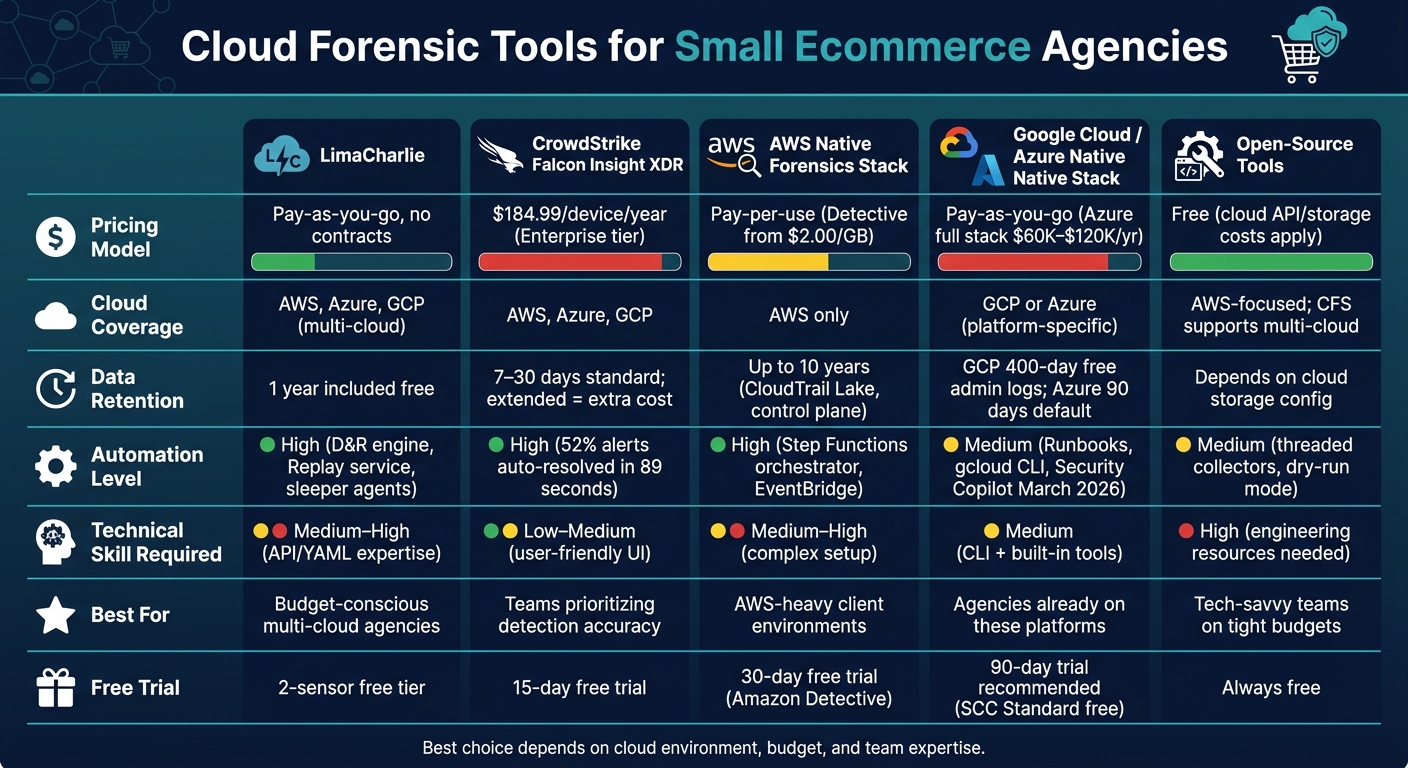
Cloud Forensic Tools for Small Ecommerce Agencies: Side-by-Side Comparison
How To Investigate A Compromised AWS Cloud Environment
sbb-itb-61169e3
1. LimaCharlie
LimaCharlie is a SecOps Cloud Platform designed to meet the needs of resource-limited teams looking for enterprise-level forensics without breaking the bank. For small ecommerce agencies managing multiple Shopify or WooCommerce environments, it offers a practical and affordable solution.
Cloud Coverage
LimaCharlie works seamlessly across platforms, pulling together telemetry from AWS, Google Cloud, and Azure into a single, unified view. Using cloud-to-cloud connectors and the LimaCharlie Adapter, it can ingest and parse logs from virtually any source, including critical services like Microsoft Office 365. It also supports containerized environments like Docker, making it ideal for agencies managing custom storefronts or middleware. This broad compatibility ensures comprehensive visibility, which is essential for effective evidence collection.
Evidence Handling
The platform collects real-time endpoint telemetry and standardizes all data into a common JSON format. This ensures consistent, real-time analysis across multiple sources. It also supports advanced artifact collection, such as Windows Event Logs, Mac Unified Logs, and PCAP captures on Linux systems. Users benefit from Insight, which includes one year of searchable telemetry storage at no extra cost. Audit logs are tamper-proof and can be forwarded to external infrastructure, ensuring compliance with chain-of-custody requirements. These features make it easier to conduct forensic investigations and enable swift automated responses.
Automation Features
LimaCharlie’s Detection & Response (D&R) engine automates key tasks like terminating malicious processes, isolating compromised hosts, and collecting artifacts when threats are detected. The Replay service allows users to apply D&R rules to up to a year of historical telemetry, making it easier to investigate new or evolving threats. Additionally, agencies can deploy "sleeper" agents that activate only during incidents, cutting down on response times.
"We can automate a significant portion of the tasks needed to operate the platform on a day-to-day basis, in a way that is scalable, repeatable, and self-documenting, using LimaCharlie's APIs to do the heavy lifting." - Paul Ihme, Managing Principal, Soteria
Pricing
LimaCharlie operates on a pay-as-you-go model with no long-term contracts. The base ingestion cost includes one year of telemetry storage. A two-sensor free tier, which includes the Insight retention feature, is available for trial. Many users have reported substantial savings: one MDR firm reduced expenses by $100,000 annually, and Black Hills Information Security cut their cost per endpoint by over 50%.
2. CrowdStrike Falcon Insight XDR
Designed with small ecommerce agencies in mind, who often use Shopify store guides for client research, CrowdStrike Falcon Insight XDR strikes a balance between advanced forensic tools and simplified operations. This well-regarded security solution addresses the forensic and operational challenges faced by smaller teams.
Cloud Coverage
Falcon Insight XDR provides comprehensive monitoring for cloud environments, integrating both agent-based and agentless approaches. It supports AWS, Azure, and Google Cloud, bringing all cloud assets into a single, unified view.
Evidence Handling
The platform automates the collection of forensic data across all endpoints and offers a "Workbench" interface. This feature allows users to map incidents, annotate findings, and manage remediation efforts effectively. With Real-Time Response (RTR), teams can quickly access evidence and address issues on the fly.
The results speak for themselves. For instance, Orica, a global leader in commercial explosives, reduced its response time by an astounding 95%, cutting triage efforts from 4 hours to less than 10 minutes. Additionally, CrowdStrike reported that 82% of detections in 2025 were malware-free, showcasing its effectiveness against modern threats.
"I'm able to get details on every little thing that occurs on that workstation, so if something occurs I can see what the history is. That kind of insight is critical." - Kurt Smith, CISO, Valenz Health
Automation Features
Falcon Insight XDR incorporates Falcon Fusion to streamline workflows through automation, allowing small teams to create repeatable response processes without the need for custom scripting. The platform's Charlotte AI simplifies complex attack commands by decoding and summarizing them in plain language, which is especially useful for teams lacking a dedicated forensic analyst.
Automation plays a crucial role in reducing manual workload. Approximately 52% of alerts are resolved automatically within just 89 seconds, significantly easing triage efforts. These features make the platform a cost-effective option, as detailed in the pricing section below.
Pricing
Falcon Insight XDR is bundled within the Falcon Enterprise tier, priced at $184.99 per device annually (or $19.99 per device monthly). The lower-cost Falcon Pro tier, priced at $99.99 per device per year, does not include Insight XDR capabilities. For agencies managing fewer than 100 devices, the Falcon Go tier is the only option, but it also excludes the Insight XDR module.
| Tier | Annual Price (per device) | Insight XDR Included |
|---|---|---|
| Falcon Pro | $99.99 | No |
| Falcon Enterprise | $184.99 | Yes |
| Falcon Complete | Contact Sales | Yes |
Standard data retention ranges from 7 to 30 days, with extended forensic retention available for an additional fee. To help agencies test its features, CrowdStrike offers a 15-day free trial, allowing users to explore its automated response capabilities.
3. AWS Native Forensics Stack
AWS offers a forensic solution built entirely using its own services. This approach eliminates the need for third-party integrations, making it a scalable and cost-conscious choice for small ecommerce agencies already operating on AWS infrastructure.
Cloud Coverage
The forensic stack gathers data from multiple AWS sources, including AWS CloudTrail, VPC Flow Logs, Amazon EKS audit logs, and security findings from Amazon GuardDuty and AWS Security Hub. It also handles artifacts like Amazon EBS snapshots, S3 access logs, and Lambda execution logs. For businesses relying on AWS, this setup ensures comprehensive data collection, simplifying evidence gathering in even the most complex environments.
Evidence Handling
At the core of the evidence analysis layer lies Amazon Detective, which continuously processes and correlates vast amounts of event data. It builds a visual graph that reveals relationships between users, IP addresses, and resources. This eliminates the need for manual log file correlation, making it easier to trace an attacker's path through your environment.
AWS also ensures evidence is preserved securely. Amazon S3 with Object Lock, AWS KMS encryption, and CloudTrail events meet NIST 800-86 chain-of-custody standards. With 11 nines durability, Amazon S3 provides reliable storage for forensic data.
"Amazon Detective makes it easier to analyze, investigate, and quickly identify the root cause of potential security issues or suspicious activities." - Amazon Web Services
This strong evidence-handling foundation is complemented by automated workflows for faster incident response.
Automation Features
Automation is a key part of the AWS forensic stack. The Automated Forensics Orchestrator uses AWS Step Functions to kick off essential tasks as soon as an incident is detected. For instance, when Amazon GuardDuty or AWS Security Hub flags malicious activity, Amazon EventBridge launches a workflow that isolates the compromised EC2 instance by applying a restrictive security group. Memory and disk evidence are then captured simultaneously.
For teams without dedicated forensic analysts, Detective Investigations simplifies the process further. It uses machine learning and MITRE ATT&CK mapping to identify compromise indicators on IAM users and roles with just one click.
Pricing
The AWS Native Forensics Stack follows a pay-as-you-go pricing model, which means you only pay for services when an investigation is initiated. This structure is ideal for small agencies with limited budgets and infrequent security incidents.
| Service | Pricing Model | Primary Cost Driver |
|---|---|---|
| Amazon Detective | Tiered per GB/month | Volume of CloudTrail, VPC Flow, and EKS logs |
| Evidence Storage (S3/EBS) | Per GB/month | Size of disk snapshots and memory images |
| Orchestration (Step Functions) | Per state transition | Complexity and frequency of automated workflows |
| Forensic Analysis (EC2) | Per second/hour | Instance type and investigation duration |
Amazon Detective pricing in the US East (N. Virginia) region starts at $2.00/GB for the first 1,000 GB. The cost decreases to $1.00/GB for the next 4,000 GB, $0.50/GB for the next 5,000 GB, and $0.25/GB for anything beyond 10,000 GB per account per month. New accounts also benefit from a 30-day free trial, which includes full access to features and cost estimates. This trial period helps you evaluate your typical log volume before committing.
4. Google Cloud and Azure Native Forensics Stack
Moving beyond AWS, Google Cloud and Azure offer their own built-in forensic tools that cater to similar needs for investigation and cost management. These tools are particularly helpful for small ecommerce agencies, as they eliminate the need for third-party platforms. With a pay-as-you-go pricing model, businesses only incur costs when incidents occur, keeping expenses manageable.
Cloud Coverage
Google Cloud Platform (GCP) provides a forensic toolkit that includes Cloud Audit Logs for tracking admin activities, system events, and data access, along with VPC Flow Logs, IAM policy bindings, and Compute Engine instance metadata. On the other hand, Microsoft Azure relies on Activity Logs for control plane events, Microsoft Entra ID audit and sign-in logs, NSG Flow Logs for monitoring network traffic, and persistent managed OS disk images for virtual machines. It's important to note that Azure’s ephemeral disks don’t support snapshots, making persistent managed disks the better option for forensic purposes.
Evidence Handling
Both platforms prioritize evidence integrity through immutable storage and artifact hashing. GCP achieves this with Cloud Storage buckets that use locked retention policies, also known as "GCS Bucket Lock." Meanwhile, Azure employs Immutable Blob Storage with options like Legal Hold or time-based retention to maintain a Write Once, Read Many (WORM) state.
"A legal hold demonstrates that the chain of custody is fully maintained within Azure... there's no opportunity to tamper with the evidence from the time the disk images are on a live VM to when they're stored." - Microsoft Azure Architecture Center
To ensure evidence remains unaltered, forensic analysis should always be conducted in a separate, isolated project. Attach evidence disks in read-only mode (mode=ro) to avoid accidental changes during the investigation.
Automation Features
Automation tools on both platforms simplify evidence management. Azure offers Automation Runbooks, such as the Copy-VmDigitalEvidence runbook, which streamlines tasks like creating snapshots and transferring storage. Additionally, Microsoft Security Copilot, available starting March 2026, provides AI-driven summaries to assist smaller teams without dedicated forensic analysts.
GCP supports automation through the gcloud CLI, Python scripts, and the libcloudforensics library. These tools allow agencies to pre-build and test evidence collection scripts, enabling faster responses when incidents arise.
Pricing
Both platforms offer pricing models designed to balance flexibility with cost predictability.
| Service Component | Microsoft Azure | Google Cloud (GCP) |
|---|---|---|
| Posture Management | Defender for Cloud (per resource/hour) | SCC Standard (free); SCC Premium (5–15% of GCP spend) |
| SIEM / Analytics | Microsoft Sentinel (based on data ingestion volume) | Google Security Operations (volume-indifferent at scale) |
| AI Investigation | Security Copilot (GA March 2026; separate pricing) | Vertex AI Security (integrated into SecOps workflows) |
GCP's Security Command Center (SCC) offers a free Standard tier, while the Premium tier scales with GCP usage, costing 5–15% of total spend. Azure's pricing, based on resources, provides more stability for smaller environments. However, using the full Defender for Cloud stack alongside Sentinel can result in annual costs ranging from $60,000 to $120,000.
"The SCC Premium tier bundles most of the detection and posture tooling at a fixed percentage of GCP spend, which makes pricing predictable in a way that AWS's line-item approach rarely matches." - Cybersecurity Essential
For smaller agencies, a good starting point is enabling GCP SCC Standard or Azure's basic security features for an initial 90-day trial. This period helps gauge log volumes and identify any gaps in coverage before committing to premium services.
5. Open-Source Cloud Forensics Tooling
If keeping costs low is a priority, open-source tools can provide an impressive range of capabilities. Most of these tools are licensed under the Apache License 2.0 or MIT License, making them free for commercial use. While they require a certain level of technical expertise to install and manage - especially for teams familiar with AWS CLI or gcloud - the learning curve is manageable. These tools serve as an excellent complement to paid solutions by offering affordable, multi-cloud forensic options for organizations on a tight budget.
Cloud Coverage
The open-source ecosystem generally falls into two categories: tools that work across multiple cloud platforms and those tailored specifically for AWS. Cloud Forensic Snapshot (CFS) is a great example of a multi-cloud tool, supporting AWS, Azure, and GCP with the ability to collect data from multiple regions simultaneously. For AWS-focused environments, Scope excels at automatically discovering resources across EC2, S3, Lambda, and RDS. It also normalizes raw CloudTrail logs into clean, timeline-ready formats like CSV or JSON. Another standout is CloudNecromancer, which reconstructs past infrastructure states by replaying CloudTrail events. It even exports these reconstructions as Terraform code, offering a unique way to revisit past configurations. For Google Workspace users, GDrive-Forensics collects file metadata without downloading the actual files, helping to keep data egress costs low.
Evidence Handling
CFS simplifies evidence management by automatically generating a manifest.json and a chain_of_custody.txt file, complete with SHA-256 hashes for all collected artifacts. This is particularly useful when findings need to be presented to clients or legal teams. A practical tip: always direct your collection output to an S3 bucket with Object Lock enabled, as this ensures the data remains immutable. CFS even provides warnings if the target bucket lacks this crucial setting.
Automation Features
Much like enterprise-grade tools, these open-source options prioritize automation to streamline incident response. For example, CFS uses threaded collectors to pull artifacts from multiple regions at the same time, reducing the time it takes to capture evidence after a breach is detected. Before running a full collection, you can use CFS's dry-run mode to check permissions and configurations without affecting evidence or incurring unnecessary API costs. Scope simplifies the often-overlooked task of locating CloudTrail log paths within S3 buckets, a lifesaver during high-pressure incident responses. Meanwhile, CloudNecromancer can fetch CloudTrail events directly from a Splunk index, bypassing AWS's standard 90-day LookupEvents limit.
Pricing
These tools are free to use, but you will still need to account for standard cloud costs like API calls, storage, and data egress fees. Here's a quick comparison of the key tools and what they offer:
| Tool | Cloud Coverage | Key Strength | License |
|---|---|---|---|
| CFS | AWS, Azure, GCP | Multi-cloud parallel acquisition | Apache 2.0 |
| Scope | AWS | Log discovery & timeline normalization | Apache 2.0 |
| CloudNecromancer | AWS | Point-in-time infrastructure reconstruction | MIT |
| GDrive-Forensics | Google Workspace | No-download metadata triage | Apache 2.0 |
Pros and Cons
When choosing a forensic tool, it's essential to weigh its strengths and weaknesses. This helps ensure the solution aligns with your agency's size, budget, and technical expertise.
LimaCharlie stands out as the most cost-effective commercial option for smaller agencies. Its pay-per-use model means you only incur costs during active incidents, and it includes a full year of searchable data retention at no extra charge. However, it requires a solid grasp of APIs and the ability to create custom YAML rules. As Yochai Greenberg, CTO of Nano Cyber Solutions, explains: "What differentiates LimaCharlie from everyone else is the price structure, the ability to build our own tools on top of it.". While this flexibility can be a game-changer, it’s only beneficial if your team has the necessary technical expertise.
CrowdStrike Falcon Insight XDR is known for its user-friendly interface and reliable performance, achieving 100% detection with zero false positives in the 2025 MITRE ATT&CK Enterprise Evaluations. However, its premium pricing - around $20–$35 per endpoint per month at enterprise scale - can be a hurdle for smaller agencies. Additionally, its reputation took a hit due to the global outage in July 2024, raising concerns about vendor reliability.
For cloud-native solutions like AWS, Azure, and GCP, the appeal lies in their built-in features. For example, AWS CloudTrail Lake offers free control-plane logging with retention for up to 10 years. However, enabling data-plane logs can be costly, and if not set up before an incident, your ability to reconstruct events may be limited.
Open-source tools are attractive because they come with no licensing fees and often provide specialized capabilities. However, they require significant engineering resources, lack official support, and tend to focus primarily on AWS, leaving multi-cloud environments less covered. These factors make them a better fit for agencies with strong technical teams and tighter budgets.
Here’s a quick comparison to help you decide:
| Tool | Key Strengths | Key Weaknesses | Best For |
|---|---|---|---|
| LimaCharlie | Cost-effective pay-per-use model with 1-year data retention | Requires API knowledge and YAML rule expertise | Agencies needing flexible, budget-conscious solutions |
| CrowdStrike Falcon Insight XDR | High detection accuracy with zero false positives | Expensive and vendor risk concerns from 2024 outage | Agencies focused on detection reliability |
| AWS Native Stack | Free control-plane logging with long retention | Costly data-plane logs and complex setup | Clients heavily reliant on AWS |
| Azure/GCP Native Stack | GCP offers 400-day free admin logs | Azure’s default retention is only 90 days, with added costs for extensions | Agencies already using these platforms |
| Open-Source Tools | No licensing fees and customizable features | High maintenance and AWS-centric focus | Teams with strong technical skills and limited budgets |
This breakdown highlights the importance of balancing cost, usability, and technical requirements when selecting the right tool for your needs.
Conclusion
Cloud-native forensic tools bring specific advantages to small ecommerce agencies, but there’s no universal solution. The best option depends on factors like budget, expertise, and client platforms. For clients heavily reliant on AWS, open-source tools provide a cost-efficient way to handle forensics. On Shopify, specialized tools like Recon offer smooth monitoring, while for Magento or Adobe Commerce, tools such as eComscan can save up to 20 hours in response time. These options align well with the multi-cloud and resource-conscious strategies highlighted earlier.
However, choosing the right tool is only part of the equation. The real opportunity lies in identifying the right merchants to target. Instead of focusing on businesses that aren’t ready to invest, prioritize those showing growth signals - like recent theme updates, new app installations, or an expanding product catalog.
StoreCensus simplifies this process with its targeted outreach solutions. By filtering through over 6 million Shopify and WooCommerce stores, you can pinpoint merchants earning $3M–$10M annually who may lack critical security tools. Even better, it helps you connect directly with decision-makers.
"Activity Signals notify you when stores make changes that indicate buying intent - like installing new apps, changing themes, or growing their product catalog." - StoreCensus
Combining the right tools with data-driven outreach can accelerate your agency’s growth significantly.
FAQs
Which cloud logs should we enable before an incident?
To get ready for forensic investigations, it's crucial to enable critical logging ahead of time. Once historical data is lost, there's no way to recover it. Key areas to focus on include:
- Audit and control plane logs: Examples include AWS CloudTrail and Azure Activity Logs.
- Identity and access logs: Think Entra ID sign-in logs or IAM role logs.
- Network telemetry: This covers logs like VPC flow logs or NSG flow logs.
- Host and application logs: Examples include Windows Event Logs or Syslog.
Make sure to centralize these logs securely to protect them from tampering.
How do we keep cloud evidence tamper-proof and court-ready?
To make sure cloud evidence remains secure and admissible in court, it's crucial to implement automated, immutable preservation right from the beginning. Store all artifacts in access-controlled buckets using tools like Object Lock or WORM (Write Once, Read Many) policies to prevent any modifications.
During export, generate SHA-256 hashes to confirm the integrity of the data. Additionally, maintain a clear chain of custody by recording essential metadata, such as export timestamps in UTC and the identity of the collector. To further safeguard evidence, rely on provider-native audit logs and stick to read-only operations whenever possible. This ensures the evidence remains both intact and reliable.
What’s the cheapest way to get multi-cloud forensics with a small team?
Small ecommerce agencies can save money and simplify operations with smart multi-cloud forensic strategies. One way to achieve this is by using cloud-native tools that eliminate the need for pricey hardware and scale effortlessly based on demand.
For example, SaaS solutions like Magnet Nexus allow agencies to collect data remotely and speed up investigations. These tools are designed to work across different cloud platforms, making them both practical and efficient.
Another option is membership-based models, such as E3:UNIVERSAL. These models provide predictable, subscription-style fees, helping agencies avoid hefty upfront costs. This approach makes it easier to budget while still accessing the tools needed for in-depth forensic work.
Additionally, tools like StoreCensus are tailored for ecommerce-specific research. They help agencies streamline their operations, stay data-driven, and cut unnecessary expenses - all without sacrificing the quality of their investigations.