How to Build CRM Reports for Shopify Leads
Set up, enrich, and maintain CRM reports to prioritize Shopify leads using traffic, tech-stack signals, and lead scoring.

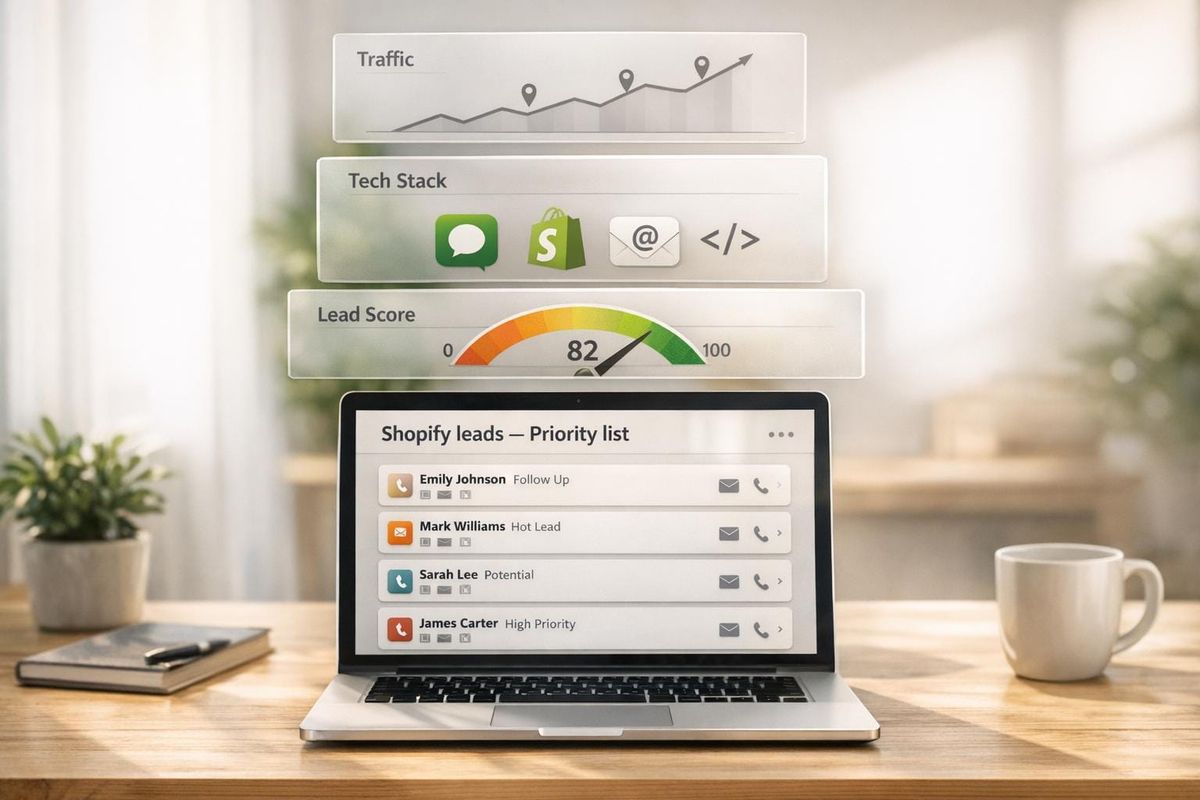
Managing Shopify leads is all about turning raw data into clear actions. With over 2.5 million Shopify stores, not every lead is worth your time, so you need to know how to find and target Shopify stores effectively. CRM reports help you filter, prioritize, and track leads so you can focus on the ones that matter most.
Here’s what you need to know:
- Shopify Leads: A good lead is a store with measurable signals like traffic, app usage, and a reachable decision-maker. Only 1.1% of Shopify stores have verified decision-makers, so structure is key.
- CRM Reporting Goals:
- Filter out unqualified leads (e.g., stores with less than 50,000 monthly visitors).
- Highlight high-value opportunities (e.g., stores with strong revenue and app usage).
- Track lead progress through your pipeline.
- Setting Up Your CRM: Sync Shopify data into tools like HubSpot or Salesforce. Use tools like StoreCensus to enrich data (e.g., revenue, tech stack) and organize leads with tags and workflows.
- Key Metrics: Focus on traffic, lead fit scores, and conversion rates to measure lead quality and pipeline health.
- Report Views: Build tailored CRM reports, like source performance, conversion funnel, and tech stack gaps, to guide your outreach strategy.
The takeaway? A structured CRM system ensures you spend time on leads that can convert while keeping your pipeline efficient.
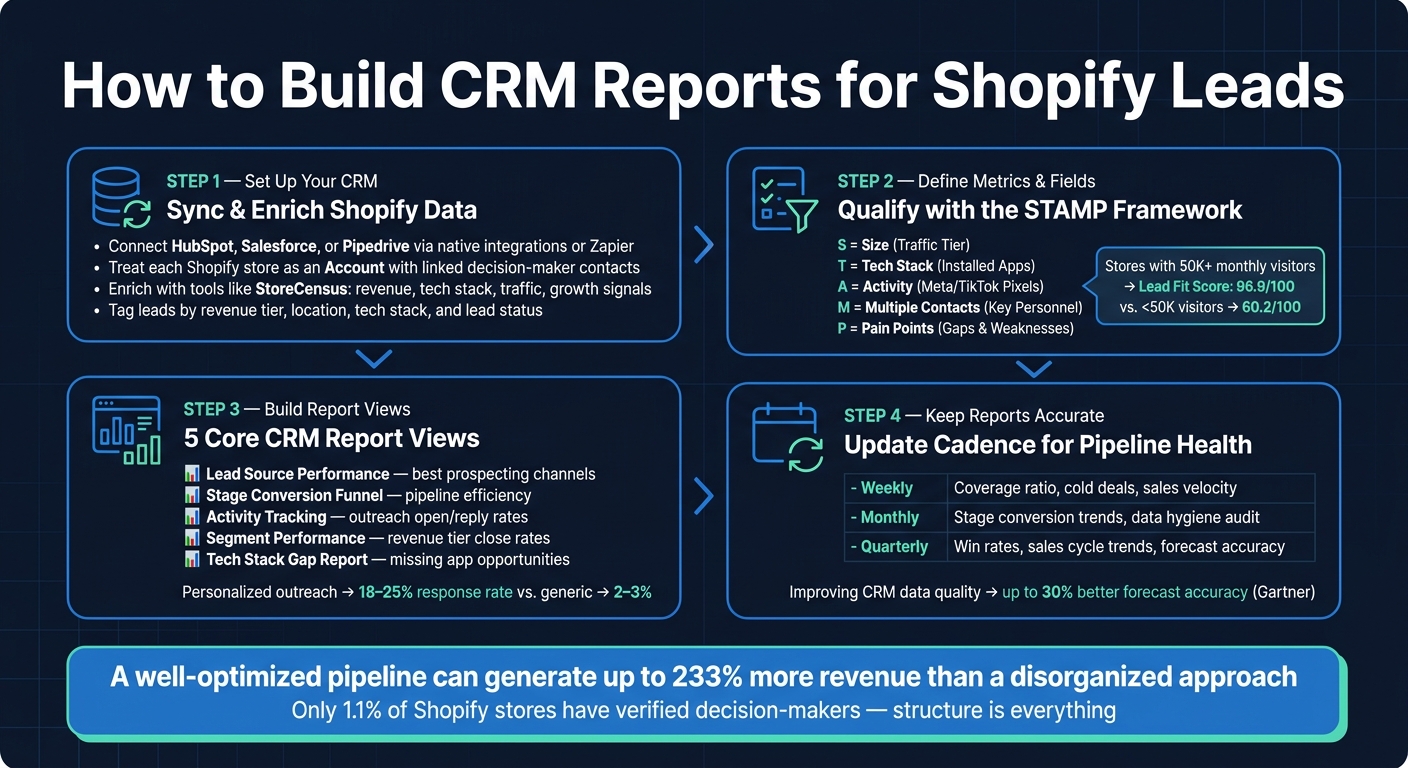
How to Build CRM Reports for Shopify Leads: 4-Step System
How to enable Shopify leads to CRM using HubSpot integrations - Step By Step

sbb-itb-61169e3
Step 1: Set Up Your CRM for Shopify Lead Data
To create meaningful reports, your CRM needs to handle clean, well-organized Shopify data. This involves connecting the right data sources, enriching incoming information, and structuring leads in a way that makes segmentation and action easier. A properly set-up CRM ensures that your reports are based on reliable Shopify data, making every metric and view more actionable.
How to Sync Shopify Data with Your CRM
Most popular CRMs - like HubSpot, Pipedrive, and Salesforce - offer built-in integrations or app connectors to sync customer profiles, order histories, and store-level attributes directly. If your CRM doesn’t provide a built-in integration, tools like Zapier or Make can fill the gap. These tools use Shopify webhooks to push events (like new orders, plan upgrades, or app installations) into your CRM almost instantly.
Before connecting anything, it’s crucial to define your data model. For example, treat each Shopify store as an Account, with contacts linked as decision-makers. Store-level details - such as Shopify plan, estimated monthly revenue (in USD), installed apps, theme, country, and U.S. state - should be recorded on the account level. This keeps reports clean and easy to filter by store attributes. Instead of syncing every transaction, focus on aggregated data like a 30-day order count or estimated monthly revenue to avoid cluttering your CRM.
Once your data is synced, use enrichment tools to gain deeper insights into your leads.
Using Enrichment Tools to Improve Lead Data
With your CRM receiving structured Shopify data, the next step is to enrich it. Enrichment helps qualify leads and provides sharper insights. Tools like StoreCensus allow you to search through over 2.5 million Shopify stores by criteria like revenue, installed apps, theme, country, and growth indicators. You can then sync this merchant intelligence directly into your CRM.
For example, you could create a saved search in StoreCensus for U.S. beauty brands earning $100,000–$500,000 per month and using both Klaviyo and Recharge. Sync this segment into your CRM as a distinct lead group. Map the revenue tier to a custom field for scoring purposes. Personalized emails referencing a store’s specific tech stack often see response rates between 18–25%, compared to just 2–3% for generic outreach.
Organizing Shopify Leads with Tags and Workflows
Once your data is enriched and structured, organization is key. Use tags and custom fields to keep your pipeline clear and your reports easy to interpret.
Set up a tagging framework with categories like revenue tier, location, tech stack, and lead status. Automate these assignments so qualified leads are instantly tagged, assigned to the right sales rep, and added to the appropriate outreach sequence. For instance, a U.S.-based fashion store using Klaviyo and generating over $50,000 per month in revenue could be automatically routed to the correct rep. This ensures no promising lead is overlooked, while also reducing the need for manual sorting.
Step 2: Define the Metrics and Fields for Your Shopify Lead Reports
Once your CRM is set up and your leads are organized, the next step is deciding what to measure. The focus here is on identifying the fields and metrics that highlight qualified opportunities.
Key Fields to Include in Shopify CRM Reports
Every field in your report should help answer critical questions: Does the store align with your Ideal Customer Profile (ICP)? Can they afford your services? Do they have a problem you can solve? And, most importantly, is there a reachable decision-maker?
To streamline this process, you can use the STAMP framework:
- Size: Traffic tier
- Tech stack: Installed apps
- Activity: Marketing signals like Meta or TikTok pixels
- Multiple contacts: Availability of key personnel
- Pain points: Areas where the store struggles
These categories directly inform the fields your CRM reports should include:
| Field Category | Essential Fields | What It Tells You |
|---|---|---|
| Fit | Category, Geography, Traffic Tier, Business Model | Verifies the store matches your ICP |
| Budget | Plus Status, Paid Theme, App Depth, Pixel Depth | Indicates the merchant’s willingness to invest in growth |
| Pain | Missing app categories, Outdated theme, Weak measurement | Pinpoints specific reasons to engage |
| Reachability | Contact Name, Verified Email, Role, LinkedIn Profile | Confirms the account is actionable |
| Timing | Recent app changes, New store, Migration deadlines | Identifies when to reach out |
Pay special attention to the decision-maker role. Having verified data about the person in charge is critical for effective outreach.
With the fields in place, the next step is to focus on the metrics that measure lead quality.
Metrics for Measuring Lead Quality and Pipeline Health
When it comes to metrics, traffic tier is one of the most reliable indicators of lead quality. For example, Shopify stores with over 50,000 monthly visitors boast an average lead fit score of 96.9 out of 100. In contrast, stores with less than 50,000 visitors average just 60.2. This stark difference makes traffic tier a practical filter - stores with lower traffic often lack the budget for personalized outreach.
In addition to traffic, tracking the lead fit score is essential. High scores typically correlate with strong app usage and evident growth signals. By segmenting your pipeline based on these scores, you can quickly identify your top opportunities.
"The goal isn't more leads. It's better leads. 50 qualified stores will outperform 500 random ones every time." - StoreInspect Team
To maintain a healthy pipeline, monitor metrics like response rates by lead score and call-to-proposal rates by traffic tier. Well-qualified lists generally achieve response rates of 10–15% and meeting booking rates of 3–5%.
With your fields and metrics clearly defined, you're ready to create tailored report views that drive action. To speed up this process, you can also leverage pre-built Shopify brand prospect lists to populate your CRM with high-quality data immediately.
Step 3: Build and Customize Your CRM Report Views
Take the fields and metrics you’ve defined and transform them into focused report views that directly address key pipeline questions. This structured approach ensures that each report view provides clear and actionable insights.
Core Report Views for Shopify Lead Management
Here are five essential report views that cover every stage of Shopify lead management, from prospecting to closing deals:
| Report Type | Purpose | Key Fields |
|---|---|---|
| Lead Source Performance | Identify which prospecting channels yield the best leads | Discovery source, lead score, response rate, meeting rate |
| Stage Conversion Funnel | Measure how efficiently leads progress through the pipeline | Funnel stage, conversion % per stage, days in stage |
| Activity Tracking | Track the volume and success of outreach efforts | Outreach channel, open rate, reply rate, positive response rate |
| Segment Performance | Compare performance across different tiers and niches | Revenue tier, category, close rate, average contract value |
| Tech Stack Gap Report | Highlight high-fit prospects missing key software layers | Traffic tier, installed apps, missing app categories |
These views work together to give you full visibility into your lead management process, from sourcing leads to closing deals.
Pay special attention to the Tech Stack Gap Report. This report is particularly useful for identifying Shopify stores running Meta Ads but lacking an email marketing app. These businesses are investing in traffic acquisition but failing to retain that traffic - an issue your services can address directly.
"Amateur prospecting is reactive and random. Professional prospecting is systematic and predictable." - StoreCensus
How to Filter and Segment Reports for Actionable Insights
To create actionable lists, use stacked filters (3–5 attributes) to refine your database. For example, you might filter for stores with Traffic > 50,000, in the Fashion category, without an email app, and located in the US. Each filter removes irrelevant data and sharpens your focus on stores that align with your ideal customer profile (ICP).
Start with revenue tier as your primary filter. Stores earning $500K–$2M in monthly revenue are the sweet spot for high-ticket agency services. Why? Within this range, 76.5% of stores are on Shopify Plus, they average 6.5 installed apps, and 83.1% have at least one reachable contact. This combination of budget, tech readiness, and accessibility makes them a high-priority segment.
To refine your targeting further, add a problem signal filter. Combine a maturity indicator (like Shopify Plus status or a lead fit score above 80) with a gap (such as using a free theme or missing an attribution app). This approach helps you zero in on high-potential prospects. For leads scoring above 95, invest time in manual research and personalized outreach. For those scoring between 70 and 84, automated nurture sequences can be a more efficient strategy.
Step 4: Keep Your CRM Reports Accurate Over Time
A CRM report is only as effective as the data it contains. Even the most well-organized reports lose their value if the data becomes outdated. Accurate, up-to-date information is key to maintaining scalable prospecting efforts and ensuring consistent engagement with leads using Shopify store guides.
How Often to Update Your CRM Reports
The frequency of updates depends on the metrics you're tracking. Here's a quick breakdown:
- Weekly updates: Essential for managing active pipelines. Use this time to check your coverage ratio, flag deals that have gone cold, and monitor sales velocity.
- Monthly audits: At minimum, review open deals for any records with no activity in over 30 days. Confirm that stage assignments are accurate and up to date.
- Quarterly reviews: Take a broader view to analyze win rates by segment, sales cycle trends, and how your forecasts compare to actual results.
| Review Cadence | Focus Metrics | Primary Goal |
|---|---|---|
| Weekly | Coverage ratio, cold deals, sales velocity | Identify deals needing immediate attention |
| Monthly | Stage conversion trends, data hygiene audit | Clean stale records and enforce consistent stage definitions |
| Quarterly | Win rate by source/segment, sales cycle trends | Adjust long-term strategy and verify forecast accuracy |
Here’s a surprising statistic: Gartner reports that fewer than 25% of sales organizations achieve forecast accuracy within 10% of actual results. However, improving the quality of your CRM data can increase forecast accuracy by as much as 30%. To keep your pipeline healthy, set aside 5–10 hours each week for prospecting and pipeline maintenance. This consistent effort separates businesses with predictable pipelines from those stuck in the ups and downs of feast-or-famine cycles.
Once your update schedule is established, make the process more efficient by using report templates.
Using Report Templates to Speed Up Pipeline Reviews
Templates can save you time and ensure consistency in your pipeline reviews. For weekly reviews, create a pre-filtered view that shows deals by stage, last activity date, and the next scheduled touchpoint. For monthly audits, use a template that highlights records missing key fields like close date or deal value. Enforcing these fields at stage transitions can prevent data issues from piling up.
Before reaching out to contacts, suppress bounced emails, duplicates, and current customers. A study of 741,701 Shopify contacts found that 42.4% of contact rows were unverified. Sending emails to unverified records wastes resources and distorts your reply rate data, making it harder to evaluate what’s working.
Adding Real-Time Shopify Signals to Your Reports
Static lists can quickly become outdated, so it’s important to integrate real-time updates into your CRM. For example, a Shopify store that wasn’t a good fit last month might now be a high-priority target after installing Klaviyo, launching Meta Ads, or surpassing a certain traffic threshold. These tech stack changes and growth signals should automatically feed into your CRM to trigger re-scoring and re-segmentation.
Tools like StoreCensus can help by tracking real-time changes across 2.5 million+ Shopify stores. This includes app installs and removals, theme updates, traffic shifts, and active ad signals. With these insights, you can set up filters to identify newly qualified stores on a weekly basis without having to rebuild lists from scratch. For instance, a store moving from under 50,000 to 50,000–200,000 monthly visits increases its contactability rate from 69.1% to 90.1%. Catching this change in your CRM can mean the difference between timely outreach and a missed opportunity.
When updating records, be precise. If there’s a gap in data, label it as "no visible app" to keep your reports accurate, as some tools operate on the backend or through private integrations.
Conclusion: Building a Scalable Prospecting System with CRM Reports
By implementing the recommended CRM setup, choosing the right metrics, and customizing your reports, you’re not just tracking leads - you’re creating a system that turns those leads into revenue. A well-structured CRM report becomes more than just a passive tool; it actively propels your pipeline forward when built with the right fields, updated regularly, and powered by real-time store insights.
For agencies, smarter prospecting leads to consistent revenue growth. Personalized, tech-driven outreach strategies can achieve reply rates of 5–8%, while a well-optimized pipeline can generate up to 233% more revenue compared to a disorganized approach.
The secret lies in structuring your system effectively: start by qualifying leads at the store level, then enrich them with contact details, and finally segment them by lead score to align outreach efforts with opportunity size. For example, stores scoring 95+ should receive detailed manual research and personalized outreach, while those scoring between 70–84 can be approached with less intensive efforts. Leads scoring below 70 should be deprioritized or removed altogether. This disciplined approach keeps your CRM reports streamlined and ensures your team focuses on high-value opportunities.
With tools like StoreCensus, managing this system becomes seamless. StoreCensus provides real-time insights into over 2.5 million Shopify stores, tracking app installations, traffic trends, and growth signals. This eliminates the need for constant manual updates, ensuring your CRM reports remain accurate and actionable. By leveraging these insights, your prospecting system evolves continuously, delivering consistent, predictable growth.
FAQs
What Shopify data should I sync into my CRM (and what should I skip)?
To make your lead management process more efficient, focus on syncing key data such as:
- Decision-maker names
- Verified job titles
- LinkedIn URLs
- Store domains
- Verified email addresses
Add segmentation fields like revenue tiers, Shopify Plus status, and details about the tech stack to better qualify your leads. Including country and time zone information also allows for more personalized outreach.
Be sure to skip generic email addresses (like info@) and unverified data, as these can clutter your CRM and reduce its effectiveness. Use tools like StoreCensus to automate the syncing process and maintain a clean, actionable CRM. This ensures your data remains accurate and ready for tailored outreach efforts.
How do I create a lead scoring model for Shopify stores using traffic, revenue, and app signals?
Creating an effective lead scoring model involves two key components: Fit and Intent. Here's how you can structure it step by step:
1. Fit: Understanding the Basics
The Fit component evaluates leads based on factors like traffic tier, revenue tier, and whether they're using Shopify Plus. You’ll need to enrich store profiles with data about their website traffic, revenue estimates, and platform details. This foundation helps you identify whether a lead aligns with your ideal customer profile.
2. Intent: Gauging Interest Through App Signals
The Intent component focuses on app usage signals. Assign points for stores using advanced tools - like premium email marketing apps - or for gaps where your offerings could fill a need. For example, if a store lacks a tool you provide, that’s an opportunity worth scoring.
3. Incorporating Score Decay and Negative Scoring
To keep your scoring accurate over time, implement score decay for inactivity. Leads that haven’t shown engagement in a while should gradually lose points. Additionally, apply negative scoring for leads that don’t fit your target audience or show signs of being a poor match.
4. Dynamic Lead Routing
Once scores are calculated, route leads dynamically based on their score:
- 90+ points: Send these high-priority leads directly to SDRs for immediate follow-up.
- 60–80 points: Place these leads into a nurture sequence to build engagement.
- Below 60 points: Monitor these leads but deprioritize active outreach.
This structured approach ensures your team focuses on the most promising opportunities while nurturing others effectively.
Which CRM report templates should I use to prioritize outreach and improve conversions?
To sharpen your outreach strategy and improve conversions, leverage CRM report templates that zero in on pipeline health, deal movement, and sales performance. Here are some key templates to consider:
- Pipeline health report: Offers insights into deal stages, uncovers bottlenecks, and provides revenue forecasts.
- Sales performance report: Evaluates the effectiveness of sales reps and pinpoints areas for coaching.
- Opportunity analysis report: Focuses on identifying high-value and high-priority deals to maximize potential.
- Win/loss attribution report: Examines deal outcomes to refine messaging and strategy.
These reports can help you make data-driven decisions and fine-tune your sales approach.