
BigCommerce vs Shopify: CMS Integration Challenges
Choose simplicity for fast launches or platform flexibility for complex multi-store needs—each CMS approach has hidden integration costs.


When it comes to CMS integration, BigCommerce and Shopify take very different approaches. Your decision depends on your business needs:
- BigCommerce is better for businesses managing multiple storefronts, complex catalogs, or needing deep customization. It offers flexibility through its API-first model and Multi-Storefront (MSF) setup but requires more development effort. Challenges include API rate limits, content synchronization issues, and complexities with third-party CMS tools like WordPress.
- Shopify focuses on simplicity and centralized management. Its Hydrogen framework and Shopify Markets make it easier to launch and manage international operations, but it’s less flexible for highly customized setups. Limitations include restricted API rate limits, high costs for headless builds, and compatibility issues with third-party apps in headless environments.
Quick Comparison
| Feature | BigCommerce | Shopify |
|---|---|---|
| CMS Integration | API-first, flexible, complex setup | Simplified, structured, less flexible |
| Headless Framework | Catalyst (Next.js) | Hydrogen (Remix) |
| Hosting | Vercel, Netlify, AWS | Oxygen (fully managed) |
| Multi-Store Management | Independent storefronts (MSF) | Centralized (Shopify Markets) |
| API Rate Limits | Higher limits (enterprise tier) | Lower limits on basic tiers |
| Setup Time | 3–6 weeks for MSF | 4–10 weeks for Markets |
| Cost | No transaction fees | 0.5%–2% fees for third-party gateways |
Key Takeaways
- Choose BigCommerce for complex, multi-store setups or highly customized storefronts.
- Opt for Shopify if you prioritize simplicity, fast deployment, and centralized management.
Both platforms have tradeoffs, so map your technical needs and business goals before deciding.
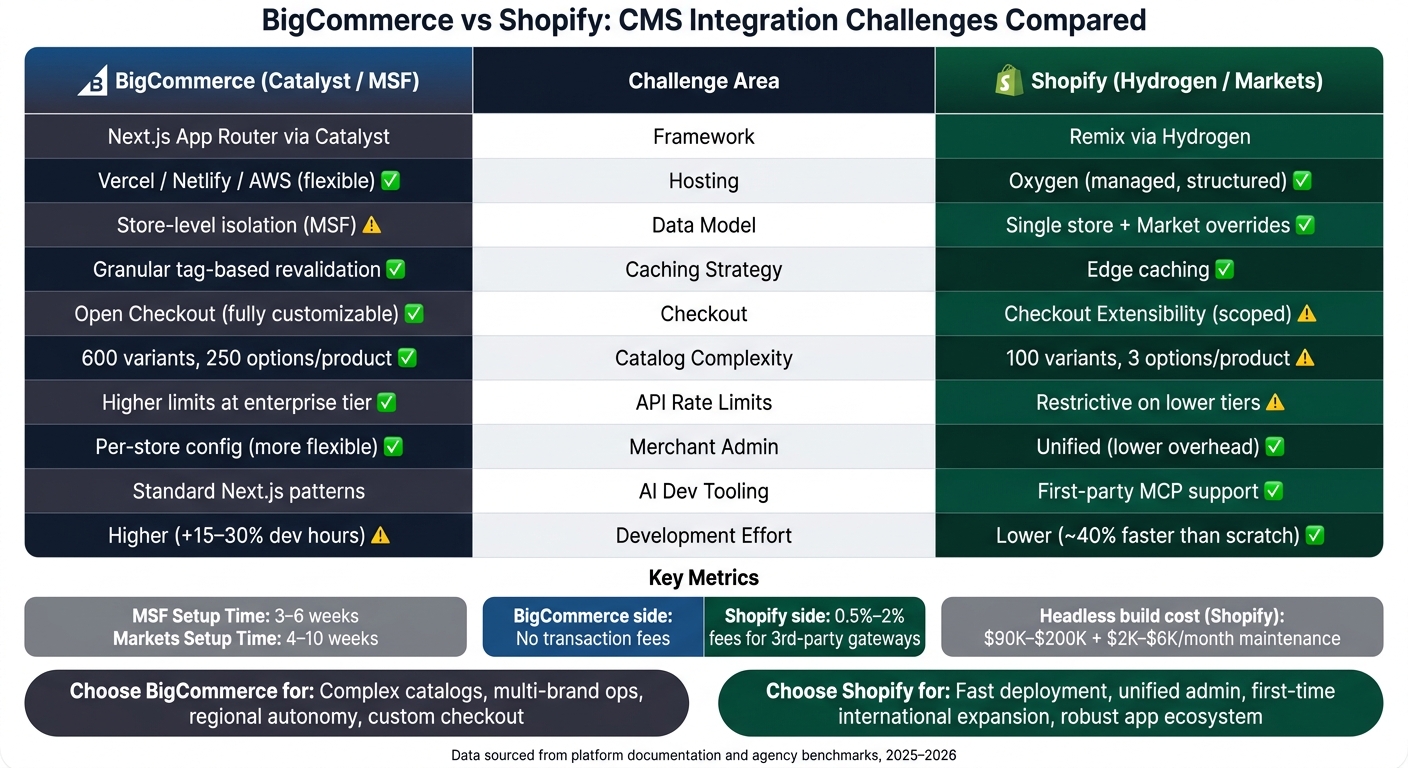
BigCommerce vs Shopify: CMS Integration Challenges Compared
BigCommerce CMS Integration Challenges
API Limits and Content Synchronization
BigCommerce's API is strong, but it has some gaps that can complicate content-heavy projects. For example, the native blog API (/v2/blog/posts) doesn't include a categories field or a dateModified field. This means external CMS platforms can't easily track content updates or maintain proper hierarchical structures without custom solutions.
For headless builds, local data caching is a must. Relying on BigCommerce's API for every page load can cause delays, so developers need to store product data locally within the CMS layer. Additionally, manual API calls require a bigcommerce_client_id and bigcommerce_access_token, which can slow down the early stages of development.
While BigCommerce boasted 99.97% uptime in Q1 2026, an API latency event in February 2026 caused a 90-minute disruption in checkout integrations. This kind of issue can be a major concern for agencies handling time-sensitive campaigns or product launches.
Now, let’s look at how WordPress integration brings its own set of challenges.
WordPress and Other CMS Integration Complexities
The BigCommerce for WordPress plugin works well, but it has limitations that developers need to consider. For example, it doesn’t support Multi-Storefront (MSF) or multi-site WordPress setups. This can be a major hurdle for agencies managing multiple brands or regional sites under one WordPress installation.
Another issue is field-level synchronization. If a product's name or description is updated directly in WordPress, BigCommerce will stop syncing that field during future catalog imports. Without proper awareness, this can lead to content inconsistencies between the CMS and the storefront. There are also functionality gaps: product rules don’t carry over through the WordPress integration, and GA4 purchase events on the checkout page require extra development work because standard GA4 integrations don’t fully support headless setups.
"When a merchant comes from Shopify with a stack of 30 apps, we can replicate maybe 22 of them cleanly on BigCommerce. The other eight require custom development." - Jason Byer, Head of Partnerships, Agency Fuel
Setup requirements can also be tricky. For instance, the WordPress permalink setting must be set to "Post name" before installation or the integration won’t work. Additionally, the cart page must be excluded from any page caching plugins to ensure cart data remains accurate.
These challenges become even more pronounced when managing multiple storefronts.
Multi-Storefront and Localization Complexity
BigCommerce’s Multi-Storefront (MSF) setup is great for brands with distinct regional needs, but it adds complexity when integrated with a CMS. Each storefront operates as a standalone entity with its own domain, checkout, and theme, rather than being a regional variation of a single store. This means external CMS platforms must handle separate content contexts for each storefront, tied to specific Channel IDs to control what products and content appear where.
As with API and WordPress challenges, keeping content in sync across multiple storefronts demands precision. Setting up MSF typically takes 3–6 weeks, significantly longer than the 1–2 weeks needed for unified models like Shopify Markets. The complexity increases when third-party apps are involved. Many apps for loyalty programs, subscriptions, and reviews don’t natively support MSF setups, often requiring custom middleware or separate paid instances for each storefront.
"The back-end efficiency is real. Where it falls apart is the moment a merchant needs their loyalty app and their subscription app to talk to each other across storefronts. That's where we're still building connectors by hand." - Marcus Webb, Head of Partnerships, Reforge Commerce Agency
BigCommerce’s Localization Manager, launched in late 2025, addresses some of these challenges by allowing per-storefront translation overrides and regional pricing without requiring a full headless setup. For teams adopting a headless approach, BigCommerce’s Catalyst framework (built with Next.js and GraphQL) became available in Q3 2025. This framework has been reported to reduce frontend build times for multi-brand projects by 30–40%.
"Catalyst cut our typical BigCommerce headless build from 14 weeks down to about eight." - Troy Speas, VP of Engineering, Velir
Shopify CMS Integration Challenges

Headless Commerce with Storefront API and Hydrogen
Shopify's move toward headless commerce brings both technical and financial hurdles. With the release of Hydrogen 3.0 in March 2026, Shopify introduced server components by default and revamped its caching architecture to address earlier performance issues. While these updates were steps forward, developers still face challenges like managing environment-specific variables (e.g., PUBLIC_STORE_DOMAIN) and navigating complex caching setups. Over time, these factors can add to the technical debt.
Switching to a custom Hydrogen frontend isn’t cheap. Costs typically range from $90,000 to $200,000, with development timelines extending by 4–8 weeks. On top of that, ongoing maintenance can add $2,000–$6,000 per month. Interestingly, headless adoption appears to have leveled off, with only 15%–20% of enterprise merchants opting for a fully decoupled frontend in 2026.
Another limitation lies in the Storefront API's native search capabilities, which struggle beyond 10,000 SKUs. To implement advanced features like faceted filtering or custom ranking, merchants often need external tools such as Algolia.
These limitations underscore the integration challenges Shopify presents, particularly for businesses with complex needs.
Content Modeling and Integration Gaps
Shopify’s native content tools work well for commerce-focused tasks but fall short when it comes to more intricate editorial requirements. Brands that need to create rich content - like certification pages, editorial lookbooks, or structured FAQs - often find Shopify’s CMS lacking. To fill this gap, many merchants integrate external headless CMS platforms like Storyblok, Contentful, or Sanity.
"Shopify's CMS is lighter than a dedicated headless CMS like Storyblok. For content-heavy brands, headless with Shopify plus Storyblok is a stronger endpoint than Shopify alone." - Nordic Web Team
Shopify has made strides with features like Metaobjects, but using these within Hydrogen demands custom-built, dynamic, route-based content rendering systems. Additionally, processing rich text often requires external libraries like Slate to handle admin outputs effectively.
Another challenge lies in app compatibility. By 2026, Shopify’s ecosystem had grown to over 13,000 apps, but many of these are designed for Liquid themes. This means they don’t work seamlessly in headless setups without custom middleware solutions. These limitations can complicate content management for brands looking to scale or diversify their offerings.
Multistore and Internationalization Challenges
Shopify Markets offers a relatively quick solution for entering international markets, with setup times ranging from 4 to 10 weeks. For many brands, this has proven effective: localized checkouts through Markets have led to a 22% boost in international conversion rates, and upfront landed costs have reduced cart abandonment by 14%. However, the underlying architecture comes with constraints.
Markets operates using a single-tenant model, where one catalog is adapted for different regions through "views" rather than creating entirely separate storefronts. This makes it difficult to implement region-specific pricing, promotional calendars, or tailored catalog segments.
International SEO also presents hurdles. Errors in hreflang mapping, for example, can take months to show up in traffic data, complicating optimization efforts. Shopify’s Managed Markets service does simplify duties and tax handling by acting as the merchant of record, but this convenience comes at a cost: a 2%–4% surcharge on cross-border GMV, in addition to the $2,300/month Shopify Plus fee. For brands generating $3M–$5M or more in cross-border revenue, these fees can add up quickly.
Together, these challenges highlight the complexities of managing content and commerce across multiple regions within Shopify’s CMS framework.
BigCommerce vs Shopify: CMS Integration Tradeoffs Compared
Integration Architecture and Data Flow
When comparing Shopify and BigCommerce, the main difference lies in how they handle storefronts. Shopify treats a store as a single entity, layering regional configurations like currency, language, and pricing on top of one central catalog. On the other hand, BigCommerce Multi-Storefront (MSF) treats each storefront as an independent entity, with separate APIs and data tailored to each channel.
For developers using headless setups, Shopify requires extra API orchestration to manage market-specific contexts. BigCommerce, with its channel-scoped APIs, naturally separates data but adds complexity when managing promotions, checkout rules, and payments across multiple stores.
Caching also works differently. Shopify's Hydrogen uses edge-based sub-request caching through its managed Oxygen hosting. BigCommerce's Catalyst, leveraging Next.js App Router, employs tag-based revalidation, allowing developers to update product descriptions at a different pace than inventory data. This granular approach minimizes cache invalidations, giving teams more control over updates.
These architectural differences create distinct experiences for developers and merchants, influencing how they work with the platforms.
Developer and Merchant Experience
The contrasting architectures of Shopify and BigCommerce shape how developers and merchants interact with these platforms. For developers, the choice often boils down to familiarity with frameworks and the level of control they want. Shopify's Hydrogen is more structured - it uses Remix, deploys to Oxygen, and offers a managed environment. BigCommerce's Catalyst, built on Next.js App Router, allows hosting on platforms like Vercel, Netlify, or AWS, offering more flexibility but requiring more upfront decisions.
"Catalyst's caching model is more intuitive for teams that have previously built high-performance SaaS applications, whereas Hydrogen's model requires a deeper understanding of the Remix request-response lifecycle." - No7 Software
Shopify has an advantage in tooling. Its Shopify.dev MCP (Model Context Protocol) server integrates with AI tools to simplify storefront schema and Polaris component usage, cutting down on repetitive coding tasks. In contrast, BigCommerce sticks to standard Next.js patterns and lacks first-party AI tooling. This difference means BigCommerce implementations often demand 15–30% more development hours due to its flexible approach, while Shopify's Hydrogen can reduce development time by around 40% compared to starting from scratch.
For merchants, Shopify's unified admin simplifies day-to-day tasks - catalog changes automatically apply across all markets. BigCommerce, however, requires individual store configurations, offering more flexibility but increasing administrative workload, especially for larger operations. These differences significantly impact how agencies and merchants handle ongoing CMS integration tasks.
Side-by-Side Comparison: CMS Integration Challenges
Here’s a direct comparison of key integration areas between Shopify and BigCommerce:
| Challenge Area | Shopify (Hydrogen/Markets) | BigCommerce (Catalyst/MSF) |
|---|---|---|
| Framework | Remix via Hydrogen | Next.js App Router via Catalyst |
| Hosting | Oxygen (managed, structured) | Vercel / Netlify / AWS (flexible) |
| Data Model | Single store + Market overrides | Store-level isolation (MSF) |
| Caching Strategy | Edge caching | Granular tag-based revalidation |
| Checkout | Checkout Extensibility (scoped) | Open Checkout (fully customizable) |
| Catalog Complexity | 100 variants, 3 options/product | 600 variants, 250 options/product |
| API Rate Limits | Restrictive on lower tiers | Higher limits at enterprise tier |
| Merchant Admin | Unified (lower overhead) | Per-store config (more flexible) |
| AI Dev Tooling | First-party MCP support | Standard Next.js patterns |
| Development LOE | Lower (ready-made solutions) | Higher (customizable approach) |
The choice between Shopify and BigCommerce depends largely on the complexity of the project. Shopify is ideal for teams managing a single brand with centralized operations, offering faster launches and easier management. BigCommerce, on the other hand, excels in scenarios involving complex catalogs, multi-brand operations, or highly customized checkouts - areas where Shopify's structured approach might feel restrictive.
sbb-itb-61169e3
Conclusion: Reducing CMS Integration Risk for Agencies and SaaS Teams
Key Takeaways: BigCommerce vs Shopify CMS Integration
When deciding between BigCommerce and Shopify for CMS integration, the choice often boils down to your team's priorities. Shopify is ideal for centralized teams seeking quick deployments, with Shopify Markets enabling launches in as little as 4–10 weeks. On the other hand, BigCommerce is better suited for regional teams that need independent control over catalogs, pricing, and promotions across different markets.
However, agencies need to be aware of two common pitfalls:
- Hreflang implementation errors in localized domain structures can take months to appear in traffic data, making them costly to fix post-launch.
- Catalog synchronization delays on BigCommerce can lead to data inconsistencies, requiring strict governance to mitigate.
"For most DTC brands doing international for the first time, Shopify Markets is the right call. The operational simplicity wins. But once you're managing distinct regional P&Ls and separate team structures, BigCommerce's model starts to make a lot more sense." - Arianna Castillo, Partner, Fuel Made Agency
A critical step for both platforms is to map content ownership early. Clarify who will manage campaign pages, product detail updates, and localized variants before development begins. This proactive approach helps agencies identify potential high-risk projects upfront.
Using StoreCensus to Spot High-Risk CMS Projects
Agencies can avoid surprises by identifying merchants with complex CMS needs before initial discussions. For example, merchants using headless architectures, managing multiple storefronts, or integrating third-party CMS tools like Contentful or Sanity will likely require more intricate solutions than a typical Shopify theme build.
StoreCensus simplifies this process by letting you search over 6 million Shopify and WooCommerce stores based on their tech stack, revenue tier, themes, and growth trends. This tool helps agencies pinpoint high-value integration opportunities and assess scope risks early, ensuring smoother engagements.
Choosing the Right Platform for CMS Integration
The decision-making process becomes clear when you focus on the specific needs of your client. If the priority is speed, unified administration, and a robust app ecosystem, Shopify is the safer choice. But if the client needs deeper catalog customization, advanced checkout options, or regional autonomy, BigCommerce's architecture justifies the added complexity.
It’s also worth noting the cost implications. Shopify charges transaction fees (0.5%–2%) for third-party gateways, which BigCommerce does not. For merchants with $10M GMV, these fees can add up to tens of thousands of dollars annually, potentially influencing the platform recommendation.
"The decision should almost never be made on price. It should be made on team capability and growth trajectory." - Danielle Schlossberg, Commerce Director, Wpromote
Ultimately, the right platform depends on the team’s ability to maintain it and the long-term growth strategy. By aligning platform choice with technical requirements and cost considerations, agencies and SaaS teams can keep CMS integration risks under control.
Shopify vs BigCommerce: Detailed 2026 Comparison
FAQs
When should I choose Shopify Markets vs a true multi-storefront setup?
Choose Shopify Markets if you're a single brand looking to expand internationally and prioritize speed and ease of use. It offers built-in tools for handling currency, language, and duty automation, making it a solid choice for minimizing re-architecture expenses. On the other hand, go for a true multi-storefront setup, like BigCommerce Multi-Storefront, if you need separate customer databases, distinct profit and loss accounts, or customized branding and checkout experiences. This option works best for regional markets or businesses managing complex B2B and DTC operations.
What data should be cached in a headless build to avoid API latency and rate limits?
To cut down on API latency and steer clear of rate limits in a headless build, focus on caching static and semi-static data, such as product descriptions and catalog information. Leverage tools like Hydrogen’s sub-request caching or Catalyst’s tag-based revalidation to make this process more efficient.
For data that changes more often, like inventory levels, use granular caching with shorter revalidation intervals to keep it up-to-date without overloading the system. Additionally, streamline your GraphQL queries to fetch only the data you actually need, which helps reduce payload sizes and improves overall performance.
How can I prevent content and product fields from getting out of sync between a CMS and the commerce platform?
To prevent content and product field mismatches, it's best to use a reference-based setup. In this approach, your commerce platform - whether that's Shopify or BigCommerce - acts as the single source of truth for product data. The CMS should only store key identifiers, like product IDs, while dynamic information such as prices or inventory is retrieved through APIs.
For better performance, you might want to explore edge caching or lightweight product mirroring. Additionally, implementing event-driven automation can help ensure content stays up-to-date whenever there are changes in the product catalog.



