Behavioral Biometrics in Ecommerce Fraud Study
Behavioral biometrics blocks bots but public evidence is limited for payment-fraud reduction. Audit live scripts, scoring, and privacy.

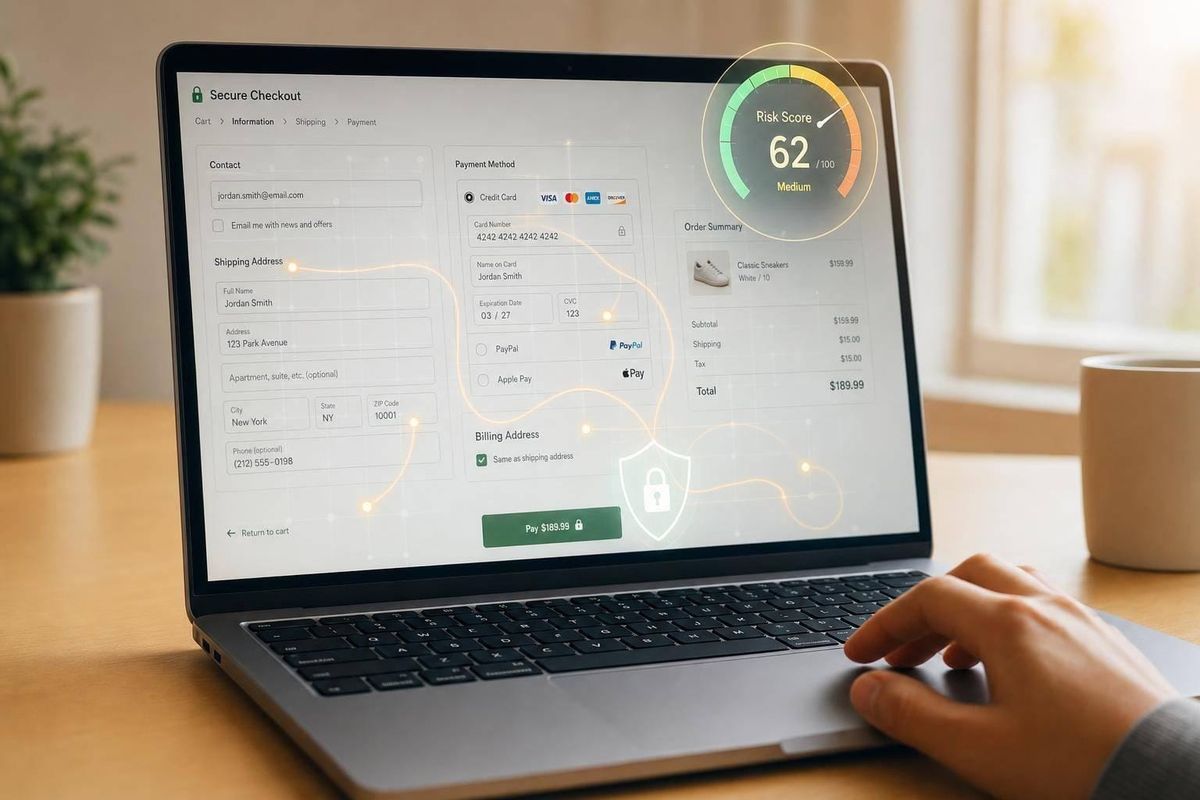
Here’s the short answer: behavioral biometrics can help spot bots, account takeover, and risky checkout activity - but public proof is much stronger for bot blocking than for big fraud-reduction promises.
If I were auditing a merchant today, I would not ask only, “Is a fraud app installed?” I would ask:
- Is behavioral data used live at login and checkout?
- Does scoring happen before payment is submitted?
- Can the team explain declines with clear reason codes?
- Does the setup lower chargebacks without adding too much friction?
- Are privacy rules in place for behavioral data retention and consent?
A few numbers frame the market fast:
- As of September 1, 2026, the top 25 Shopify fraud apps account for 59,617 installs across about 2.17 million tracked stores
- 204,540 stores match higher-priority fraud and payments signals such as 50,000+ monthly visits, Shopify Plus, or BNPL
- Blockify Fraud Filter leads the top-25 Shopify fraud app group with 25,570 installs and 42.9% share
- In the fraud-prevention category, Threads holds 80.6% of 75,184 installs
- Only 41.5% of stores that remove a fraud app add another app from the same category
What that tells me is simple: adoption exists, but much of the visible market is centered on basic fraud and bot controls, not standalone behavioral biometrics for payment fraud. And if no app is visible, that still does not mean the merchant has no protection. Some controls sit in payment processors, ERPs, or private backend systems.
Here’s the part that matters most for agencies: a storefront scan is only the start. I would treat missing fraud tooling as a lead for review, not as proof of exposure. The better audit checks live scripts, API calls, scoring speed, false declines, chargebacks, and data-retention rules.
| What to check first | Why it matters |
|---|---|
| Live scripts on login and checkout | Shows whether the tool is active, not just named in policy text |
| Real-time scoring | Tells you whether risk is checked before the order is placed |
| Chargebacks and review load | Shows whether the setup is helping finance and ops teams |
| Reason codes | Helps merchants understand why orders are blocked |
| Privacy controls | Flags risk around consent, storage, and purge timing |
So if you work with Shopify or WooCommerce merchants, the takeaway is direct: audit behavior and workflow, not just app presence. Put high-traffic stores, Plus stores, BNPL users, and stores with recent fraud-app removals at the top of your list.
The rest of this study explains where the public data is solid, where vendor claims are thin, and how I would turn that into a simple audit process.
Revolutionizing Fraud Prevention with Behavioral Intelligence
sbb-itb-61169e3
Behavioral Biometrics in Ecommerce: Definitions, Signals, and Detection Patterns
Behavioral biometrics looks at how a shopper behaves on a site. Bot protection, by contrast, looks for scripted actions that only pretend to be normal shopping. On Shopify, merchants usually add these controls through third-party apps that inspect JavaScript activity and request fingerprints [1]. The core issue is simple: which behavior patterns look human, and which ones point to bots or fraud rings?
Signals Collected During Login, Browsing, and Checkout
These tools track signals like typing cadence, cursor movement, scrolling, tap timing, and navigation speed during login, browsing, and checkout [1]. On their own, those signals don't say much. What matters is whether they consistently drift away from normal human shopping behavior.
Patterns That Separate Human Shoppers from Fraud and Automation
The useful signal isn't one isolated action. It's the mix of timing, repetition, and navigation style. That's where patterns start to stand out.
Bot protection is built to catch scripted sessions, scraping, and automated checkout behavior [4]. In practice, merchants don't rely on behavioral data alone. They layer it with network, identity, and transaction checks [1][4]. That stack helps flag ATO, bot-driven checkout abuse, and payment testing.
Comparison Table: Behavioral Signal Types and What They Detect
| Layer or control | What it detects |
|---|---|
| Behavioral biometrics / bot protection | Anomalies in typing cadence, cursor movement, tap timing, and navigation speed [1] |
| Network checks | Geographic and IP-based access anomalies [1][2] |
| Transaction-risk filters | Suspicious payment patterns and high-risk order attributes [1][4] |
| Identity verification | Step-up verification for elevated-risk sessions [1][4] |
Market Data, Vendor Claims, and Public Case Study Results
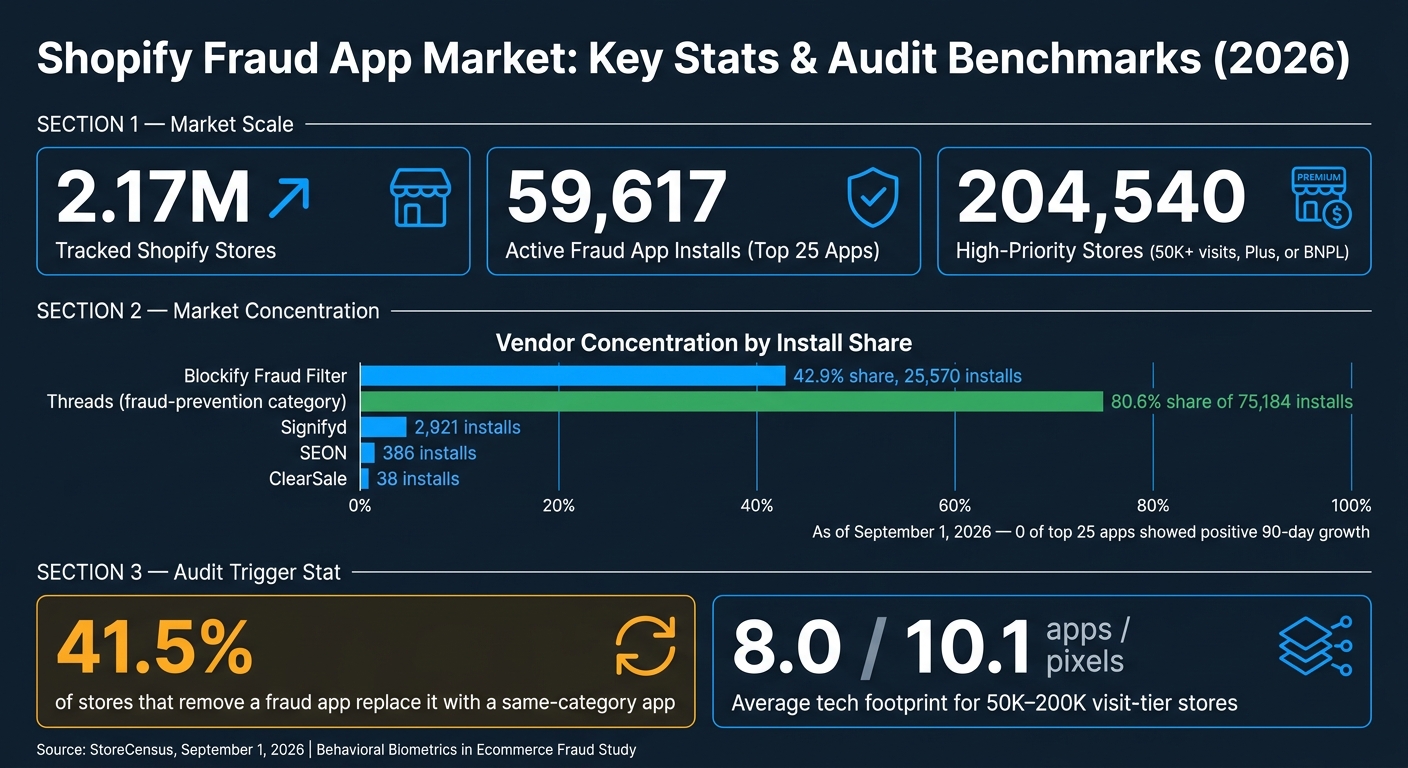
Shopify Fraud App Market: Key Stats & Audit Benchmarks (2026)
Market Size, Adoption Trends, and Why Payment Teams Are Buying
These signals only matter if merchants buy tools that can read them. So the next step is simple: look at where adoption shows up and which claims stand up to public data using Shopify store guides.
On Shopify, fraud apps are easy to find but spread across many vendors. That makes behavioral biometrics more of a niche control than a default layer for most merchants. As of September 1, 2026, the top 25 fraud apps on Shopify account for 59,617 active installations across about 2.17 million tracked stores [1][2]. That data matters because it shows operational use, not just marketing language in app listings.
The main buying zone for fraud and payment tools starts above 50,000 monthly visits. In total, 204,540 stores meet high-priority fraud-and-payments signals such as Shopify Plus, BNPL, or high traffic [5]. Higher-traffic stores are the best audit targets because behavioral scoring works better when there’s more activity to review.
Vendor concentration is also pretty clear. Blockify Fraud Filter holds 42.9% of the top-25 share with 25,570 installs [1][2]. By contrast, vendors tied to behavioral and advanced signals have much smaller footprints: Signifyd has 2,921 installs, SEON has 386, and ClearSale has 38 [1]. As of September 1, 2026, none of the top 25 fraud apps showed positive 90-day growth [1][2]. That points to a mature market where larger apps are pulling share away from smaller players.
Buying decisions here are usually role-based. Finance teams care about chargebacks and margin. Operations teams care about checkout friction and support volume [6]. That shift in focus matters during audits, because the conversation is usually about risk and day-to-day impact, not broad ecommerce growth.
Market share can show adoption. It does not show product quality or business impact. That’s where claim review starts to matter.
What Vendors Claim vs. What Public Evidence Supports
Vendor claims in this market usually fall into four groups: bot detection, fraud reduction, chargeback prevention, and low-friction scoring. Public evidence is strongest when measuring adoption patterns. It gets much weaker when vendors start talking about outcomes.
The fraud-prevention category has 75,184 total installations across its top 25 apps, and Threads holds 80.6% of that share [4]. That sounds big, but there’s a catch. Storefront signature analysis can’t see backend bot controls, so a merchant may have real protection in place that never appears in an outside scan [5].
Claims around fraud reduction, chargeback prevention, and low-friction scoring are much harder to check from the outside. Some stores show no visible fraud app at all because protection lives in backend systems like ERP tools, payment processor controls, or private finance integrations [5]. Dedicated chargeback apps such as Chargeflow appear in the top-25 market data with low install counts, which suggests many merchants may be leaning on processor-native workflows instead [1]. And when vendors publish lift numbers, those results rarely carry over neatly across Shopify merchants. That makes false-positive reduction the toughest claim type to verify on an independent basis [5].
The table below separates what outside data can partly support from what still leans mostly on vendor statements.
Comparison Table: Vendor Claims vs. Independent Findings
| Claim Category | Typical Vendor Statement | Public Evidence Available | Merchant Takeaway |
|---|---|---|---|
| Bot Detection | Eliminate automated abuse without adding friction. | 75,184 installs in the fraud-prevention category; Threads holds 80.6% share [4] | Basic blockers are widely used, but advanced mitigation may rely on backend bot controls that storefront scans miss [5] |
| Fraud Reduction | Stop high-risk orders before they become chargebacks. | 204,540 stores show high-risk signals, including BNPL and high traffic [5] | If no app is visible, that does not mean no protection exists |
| Chargeback Prevention | Automate disputes and recover lost revenue. | Dedicated apps like Chargeflow have relatively low install counts in the top 25 [1] | Low app adoption likely points to processor dependency, not weak demand |
| Low-Friction Scoring | Reduce false declines and improve approval rates. | High-traffic stores in the 50K–200K visit tier are the main adopters [5] | Vendor lift figures rarely carry across Shopify merchants [5] |
What the Findings Mean for Agencies Auditing Merchant Payment Risk Tools
A common audit mistake is treating behavioral biometrics like a simple yes-or-no item. Either the merchant has it, or they don’t. But that’s not the point.
What matters is whether the current stack uses behavioral signals as a live fraud signal at login and checkout, or whether the tool shows up only in vendor copy and policy text. That gap matters a lot. Audits should check runtime behavior, not storefront claims.
A Practical Audit Framework for Shopify and WooCommerce Merchants
Start with signal collection. Look at JavaScript signatures, API calls, and data attributes on login and checkout. If behavioral data is being captured in real time, you should see API calls fire during the session. If the vendor appears in site copy or a privacy policy but no active scripts fire, treat it as a marketing mention, not a live integration [1][5].
Then review five areas in this order: fraud loss, false declines, latency, clear reason codes, and authorization rate.
Use actual chargeback data and review outcomes for each one. Don’t lean on vendor lift figures. For latency, check whether scoring stays real time and avoids adding friction at checkout. Clear reason codes matter because teams need to know why a transaction was declined. For California traffic, review consent, retention, and purge rules for behavioral data. Indefinite storage is a risk flag [7].
Merchant size also changes the scope of the audit. Stores in the 50,000–200,000 monthly visit tier average 8.0 visible apps and 10.1 pixels, which makes them a solid working market for fraud-stack audits [3]. Shopify Plus merchants can use custom checkout scripts and checkout extensibility. Those are the technical prerequisites for deeper behavioral biometric integration [7].
One more trigger is easy to miss: app removal. Only 41.5% of stores that remove a fraud app replace it with something in the same category [8].
How StoreCensus Helps Agencies Find and Prioritize Payment-Risk Audits
Finding merchants that need a payment-risk audit is slow if you’re working blind. Once the audit criteria are set, the next step is finding stores whose stacks line up with the risk profile. StoreCensus lets agencies filter across 6M+ Shopify and WooCommerce stores by platform, revenue band, traffic tier, country, and installed tech stack. That means you can surface stores that match the audit profile instead of guessing.
For this use case, the strongest filter is 50,000+ monthly visits, plus Shopify Plus or BNPL usage, with no visible fraud app. As of September 1, 2026, that group includes 204,540 stores [5]. Of course, no storefront-visible fraud app doesn’t always mean no protection. Some merchants run controls through backend systems that storefront scans won’t catch. That’s why outreach should be framed as a diagnostic audit.
StoreCensus also tracks real-time app changes, and timing is where this gets interesting. When a store removes a fraud-related app and doesn’t add a same-category replacement, that event becomes an audit trigger. Agencies can use that moment to move the store up the list and reach out to decision-makers in Finance, Operations, or CX - the teams most likely to deal with chargeback pain and manual-review overhead [6].
Comparison Table: Audit Criteria for Behavioral Biometrics Tools
Use the criteria below to score each merchant the same way.
| Audit Area | Questions to Ask | Evidence to Collect | Signs of Strong Implementation | Risk Flags |
|---|---|---|---|---|
| Signal Collection | Is behavioral data captured at login and checkout? | Active JS signatures; API call timing | Scripts firing on both login and checkout pages [1] | Tool mentioned in marketing but no active scripts detected [5] |
| Real-Time Scoring | Does scoring happen before the pay-now click? | Network request timestamps | Low-latency real-time scoring [7] | Batch processing or post-purchase-only review [5] |
| Fraud Loss & Chargebacks | What is the chargeback rate vs. industry baseline? | Chargeback-to-revenue ratio; manual review volume | Low chargeback rate; automated recovery [5] | High manual review overhead; high USD fraud loss [5] |
| Clear Reason Codes | Does the tool explain why a transaction was declined? | Sample fraud alerts; reason codes | Clear reason codes such as bot-like typing speed | Black-box scores with no supporting data [7] |
| Privacy & Compliance | Is the tool aligned with California CCPA requirements? | Privacy policy; consent banner triggers; DPA | Granular opt-in; automatic data purging after 30–90 days [7] | Indefinite storage of raw behavioral signals; no CCPA mention [7] |
Conclusion: What This Study Suggests About Behavioral Biometrics in Ecommerce
Taken together, the evidence points in one direction: adoption is happening, but it mostly shows up in bot protection and bundled fraud suites - not behavioral biometrics as a standalone payment-fraud fix. Public evidence is strongest around bot detection and bundled fraud protection, and the fraud app market is consolidating. For agencies, a missing app should be treated as a lead, not proof that a merchant is exposed.
What agencies need to check is implementation quality and merchant fit. If an app doesn’t show up in a scan, that doesn’t prove protection is missing. Audit the workflow, not just the storefront.
So audits should focus first on behavior and workflow, not only app presence. Put high-traffic merchants at the top of the list, especially those using Shopify Plus, BNPL, and those with recent fraud-app changes.
For agencies, the job is simple: verify live fraud coverage, then focus on the merchants whose traffic patterns and app changes make the risk worth auditing.
FAQs
How accurate is behavioral biometrics?
Behavioral biometrics work well for identifying mainstream users, especially in fast payment flows. One-tap biometric approval already feels normal to many shoppers, and that familiarity can help conversions.
That said, the reviewed materials did not include specific fraud-detection accuracy rates. So agencies should use behavioral signals as supporting evidence, not hard proof.
There’s also a practical limit here: payment verification settings such as 3D Secure 2 are internal configurations. Because of that, they can’t be reliably scanned from the storefront.
Can it reduce chargebacks without hurting conversions?
Yes. Behavioral biometrics can cut chargebacks without adding the kind of checkout friction that hurts conversions.
Why? Because it works in the background. Instead of leaning only on extra authentication steps, it passively monitors how a user behaves during a session.
For U.S. merchants, that matters. It can help strike a better balance between fraud detection and checkout flow, lowering dispute costs while avoiding the extra friction that often pushes shoppers to abandon their carts.
How can agencies verify a tool is live?
Agencies can check whether a payment-risk or fraud-control tool is live by looking at the public storefront as a proxy.
Here’s the basic idea: confirm that the tool is actively installed by spotting storefront signature signals, such as JavaScript bundle signatures, API endpoint patterns, or HTML markers. Then scan the site again on a regular basis to make sure the integration is still there.
Storefront MFA, though, is a different story. It can’t be detected in a reliable way from the outside because it’s an internal admin setting with no public markers. So if you need to verify MFA, you’ll need a different validation method.