
How Attribution Windows Impact Ecommerce Ad ROI
See how attribution windows skew Meta-reported ROAS, when to use 1-day vs 7-day click, and audit tracking for accurate budget decisions.

Your ad ROI can look better or worse overnight without a single sales change. In most cases, the shift comes from the attribution window, not from the campaign itself.
I’d boil the article down like this: Meta’s default 7-day click + 1-day view setting often makes ROAS look higher than it is, while a short window like 1-day click can make good campaigns look weak. That matters because agencies use ROAS and CPA to decide what to scale, pause, or cut.
Here’s the short version:
- Attribution windows change reported results, not actual sales
- 7-day click + 1-day view can inflate Meta ROAS, especially in retargeting
- 1-day click can undercount sales for products with a longer buying cycle
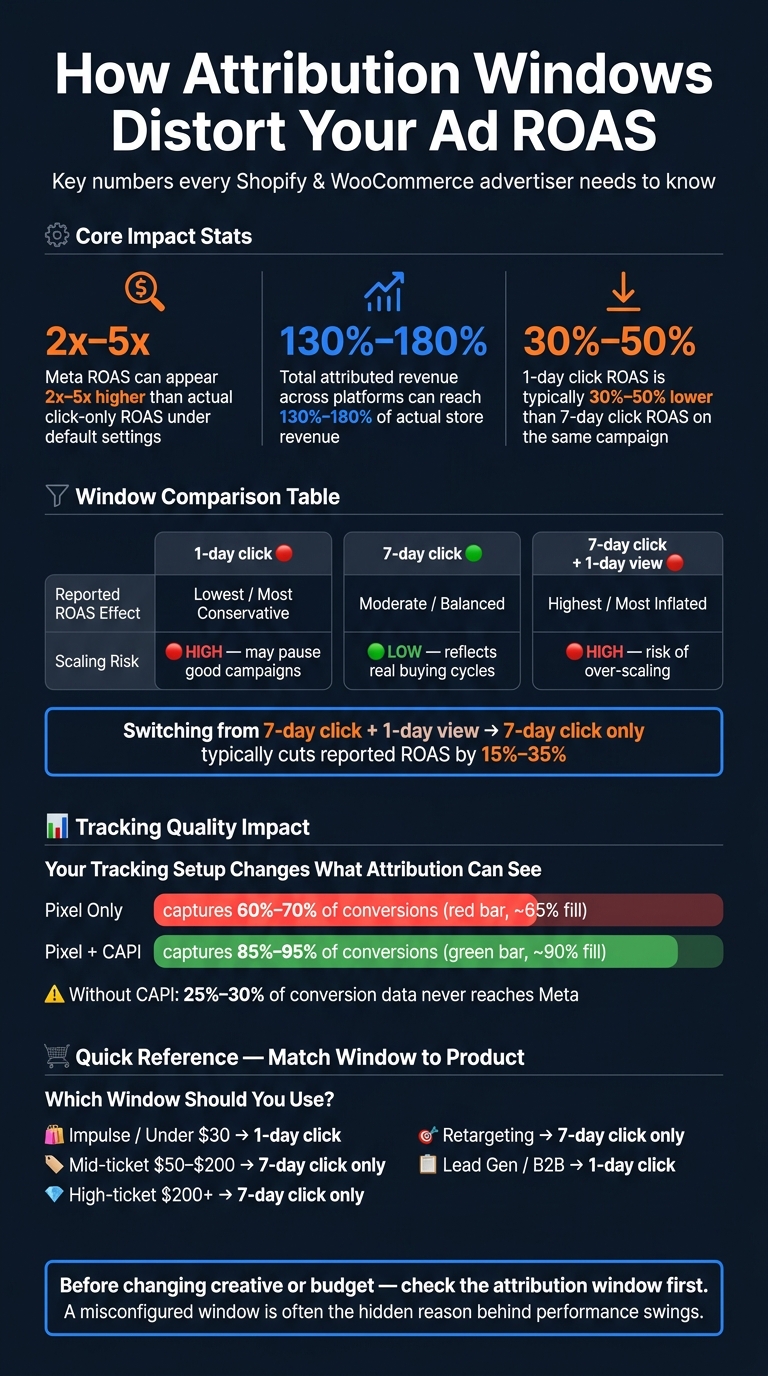
- Meta-reported ROAS can be 2x to 5x higher than click-only ROAS under default settings
- Across channels, total attributed revenue can hit 130% to 180% of actual store revenue when multiple platforms claim the same order
- 1-day click ROAS is often 30% to 50% lower than 7-day click on the same campaign
- Switching from 7-day click + 1-day view to 7-day click only often cuts reported ROAS by 15% to 35%
- Tracking setup still matters: Pixel-only setups may log just 60% to 70% of conversions, while Pixel + CAPI can reach 85% to 95%
If I were managing a Shopify or WooCommerce account, I’d keep the takeaway simple:
- Use 7-day click only for most DTC accounts
- Use 1-day click for fast-buy, low-price offers or lead gen
- Compare Meta data with Shopify or WooCommerce before changing budget
- Check attribution settings and tracking every month
- Treat any window change like a reporting break
Bottom line: before I blame targeting, budget, or ad copy, I’d check the attribution window first. It’s often the hidden reason the numbers look off.
Attribution Window Impact on ROAS: Key Stats for Ecommerce Advertisers
Why Is My Facebook Ads ROAS So High? The Truth About Meta Attribution
sbb-itb-61169e3
Misaligned Attribution Windows Are a Hidden ROAS Problem
One attribution window does not work for every buying cycle. Short windows make sense for impulse purchases. Longer windows make more sense for higher-priced products that take time and a few touchpoints before someone buys.
Meta’s default 7-day click + 1-day view is one of its broadest default settings, and that setting can end up taking credit for sales that were pushed along by other channels. When the attribution window doesn’t line up with how people actually buy, ROAS stops being a clean performance signal and starts looking more like a reporting quirk.
How Default Settings Produce Bad Readouts
This gets even messier in retargeting. Those audiences are already warm, which means many of those shoppers were close to buying anyway. So when view-through credit is included, the ad can look like it did more work than it actually did.
That’s why Meta-reported ROAS is often 2 to 5 times higher than actual click-only ROAS under default settings. And once you stack attributed revenue from Meta, Google, and email together, the total can hit 130% to 180% of actual store revenue because more than one platform is claiming the same order.
On the dashboard, the campaign may look like a star. In click-only reporting, it can tell a very different story.
Where the Mismatch Shows Up First
The first red flag is usually a gap between Meta-reported revenue and what shows up in Shopify or WooCommerce tech stacks. Retargeting campaigns may show ROAS in the 8x to 15x range while prospecting looks flat or weak. That’s a classic sign of view-through inflation.
You may also see conversions fall right after a reporting-rule change, even though spend and sales barely move. When that happens, the issue often isn’t the campaign itself. It’s the setup. A few repeat configuration mistakes tend to create these distorted readouts.
The Most Common Attribution Window Mistakes in Shopify and WooCommerce Accounts
Using Short Windows for Longer Buying Cycles
The first mistake is simple: using an attribution window that’s shorter than the way people actually buy.
A 1-day click window can work for impulse purchases under $30. Someone sees the ad, clicks, and buys on the spot. That lines up.
But that same setup falls apart for higher-AOV products or anything that takes a few days of thought. If the buying cycle is longer, a short window leaves Meta with too few conversion signals. The campaign can look weak on paper even when it’s helping drive sales over several days.
That’s where teams get burned. They look at the numbers, assume the campaign isn’t working, and cut spend too early. In many cases, the issue isn’t the campaign. It’s the window. 1-day click ROAS typically runs 30% to 50% lower than 7-day click ROAS for the same campaign. So if an agency uses short windows on higher-AOV stores, it may end up pausing campaigns that were doing their job.
A good rule of thumb:
- Use 7-day click for products above $50 AOV
- Keep 1-day click for flash sales, lead gen, or products under $30
Leaving View-Through Attribution On Without Checking Inflation Risk
The second mistake is letting warm-audience attribution make ROAS look better than it is.
View-through credit can overstate performance in retargeting. Here’s the problem: someone sees your retargeting ad on Instagram, then later buys after clicking a branded search result or an email link. Meta can still take credit for that sale. On the dashboard, ROAS goes up. In practice, that can pull too much budget into retargeting.
The fix is pretty direct. Use the Compare Attribution Settings tool in Ads Manager and check 7-day click against 7-day click + 1-day view side by side. If the gap is large, view-through inflation is probably in play.
This matters even more now. As of January 12, 2026, Meta removed 7-day and 28-day view windows from Ads Manager, leaving 1-day view as the only view-through option. That makes regular comparison checks a smart habit, not a one-off task.
Even then, the “right” window can still point you in the wrong direction if tracking is a mess.
Ignoring Tracking Setup Issues That Affect Attribution
The third mistake is trusting attribution settings before fixing the tracking setup.
Attribution windows only mean something when the conversion data is clean. If the tracking stack has holes, every window test gets shaky. Common issues include missing CAPI, low EMQ, broken deduplication, and incorrect AEM priorities.
The drop-off can be big. Pixel-only tracking captures only 60% to 70% of conversions, while a properly configured Pixel + CAPI setup brings that up to 85% to 95%. Without CAPI, 25% to 30% of conversion data never reaches Meta. So if your tracking is off, you’re not judging attribution windows on the full picture.
| Metric | Poor | Acceptable | Good | Excellent |
|---|---|---|---|---|
| Event Match Quality (EMQ) | < 4.0 | 4.0–5.9 | 6.0–7.9 | 8.0+ |
| CAPI Event Coverage | < 50% | 50–70% | 70–85% | 85%+ |
| Platform vs. Backend Gap | > 50% | 30–50% | 20–30% | < 20% |
| Deduplication Rate | < 80% | 80–90% | 90–95% | 95%+ |
Source: Benly.ai
Aim for EMQ 6.0+ in Events Manager. If scores sit below that, Meta is working with weaker data, and any attribution window setting becomes harder to trust. Only after the tracking setup is cleaned up do window tests start to reflect what’s actually happening.
How Attribution Windows Change Reported ROAS, CPA, and Scaling Decisions
Once the setup is clean, the next step is simple: look at how each attribution window changes the numbers you use to make budget calls.
Attribution windows change reported performance, not actual sales. ROAS is spend divided by credited revenue. The window decides how much revenue gets credit. Tighten the window, and fewer conversions show up. Reported ROAS drops. Reported CPA goes up. Widen the window, and more conversions get counted, so reported ROAS goes up. Same campaigns. Same sales. Different reporting.
That’s where people get into trouble. A campaign on a short window can look weak and get turned off, even though it helped drive purchases that happened on day 3 or 4. On the other side, a campaign with view-through credit can look much stronger than it should because it’s taking credit for conversions that may have happened through email or organic search anyway.
| Attribution Window | Effect on Reported ROAS | Scaling Risk |
|---|---|---|
| 1-day click | Lowest; most conservative | High - may pause campaigns that drive delayed value |
| 7-day click | Moderate; balanced | Low - reflects real ad-driven consideration cycles |
| 7-day click + 1-day view | High; captures views and clicks | High - risk of over-scaling based on false organic conversions |
Why Shorter Windows Usually Lower Reported ROAS
A shorter window credits fewer purchases. That pushes reported CPA up and reported ROAS down, even when sales stay the same. So before you change budgets, you need to standardize the window. Otherwise, you’re comparing numbers that don’t mean the same thing.
Why Longer or Mixed Windows Can Overstate Campaign Performance
A 7-day click + 1-day view window gives Meta credit for any purchase made within a day of someone seeing an ad, even if they never clicked. That can pull in conversions that were already on the way. Switching from the default 7-day click + 1-day view to 7-day click only typically reduces reported ROAS by 15% to 35% - not because the campaign got worse, but because the reporting stopped taking credit it didn’t earn.
If you scale spend off that inflated ROAS, you’re chasing a number that isn’t there.
The next step is matching the window to the account and checking it on a fixed schedule.
How Agencies Should Set, Test, and Standardize Attribution Windows
Once you see how much attribution windows can skew ROAS, the next move is simple: pick one standard window for each account and stick with it.
Match the Window to Product Price and Purchase Lag
Set the window based on how long people take to buy, not on whatever the ad platform picked by default.
Here’s a practical starting point:
| Product / Funnel Type | Recommended Window | Expected Reporting Behavior |
|---|---|---|
| Impulse / Low AOV (under $50) | 7-day click + 1-day view | Short-cycle purchases usually need a broader signal. |
| Mid-ticket ($50–$200) | 7-day click only | Captures multi-day research cycles without view-through noise. |
| High-ticket ($200+) | 7-day click only | Reduces view-through inflation on long-consideration purchases. |
| Retargeting (warm audiences) | 7-day click only | - |
| Awareness / Video campaigns | 1-day view | Measures view-based impact. |
| Lead generation and B2B forms | 1-day click | Decisions are usually same-session; longer windows can pollute lead quality. |
A good rule of thumb: use 1-day view only when the goal is to measure view-based influence.
If you run many accounts, set one default window for each vertical. That way, cross-client benchmarking still means something.
Build a Monthly Attribution Audit Process
After you choose a default window, check it every month on a fixed schedule.
The point of the audit is to catch drift, tracking changes, and weaker signals before they start warping budget decisions. A small setup issue can make a healthy account look broken. Or worse, make a weak account look better than it is.
Use Meta's Compare Attribution Settings tool in Ads Manager to view 1-day click, 7-day click, and 1-day view side by side. If view-through conversions make up more than 25% of total reported conversions, reported ROAS is probably being padded by organic demand. In that case, test 7-day click only to find the base line.
You should also review Event Match Quality (EMQ) each month in Events Manager. If scores fall below 6.0, Meta has a harder time matching events to users, which makes the attribution window less dependable. Strong accounts aim for 8.0+ on Purchase events, where attributed conversion rates are 15–25% higher than the 6.0 base line.
One more thing: treat every window change like a reporting break. If you change the window in the middle of a campaign, you reset the learning phase and make past-to-present comparisons messy. If you want to test another window, launch a new campaign instead of editing a live one.
Use StoreCensus to Turn Attribution Problems Into a Service Offer
Those audit gaps can also point you toward merchants worth contacting.
Attribution audits can work as an outbound service. StoreCensus helps you find Shopify and WooCommerce merchants showing the same growth signals, then pull decision-maker contacts so your outreach is more targeted.
Conclusion: Better Attribution Windows Lead to Better Budget Decisions
Attribution windows don't change sales. They change how Meta assigns credit for sales, and that shifts reported ROAS, CPA, and the budget calls that follow. So this is a reporting setting, not a statement of performance truth.
Meta's default 7-day click + 1-day view window can make reported ROAS look higher than it is. On the flip side, a window that's too short can make a solid campaign look like it's underperforming.
The fix is simple: pick one standard window and review it every month. For most DTC accounts, 7-day click only is a good reporting standard. Then compare Meta's numbers with what Shopify or WooCommerce actually recorded.
Here's the practical move: check the attribution window before changing creative or budget. A misconfigured window is often the hidden reason behind performance swings, and fixing it costs $0. Better attribution windows lead to better budget decisions.
FAQs
How do I choose the right attribution window?
Choose an attribution window by balancing data volume against the risk of inflated reporting. For most ecommerce businesses, 7-day click with 1-day view is the usual starting point.
The right window depends on how people buy your product. Use 1-day click for impulse purchases or flash sales. Go with 7-day click for standard transactions. If your product takes more time and research, a longer window often makes more sense.
One thing matters here: stay consistent. If you change attribution windows in the middle of a campaign, your reporting can get messy fast. It also gets harder to tell whether performance changed because of the campaign itself or because you changed the measurement.
It’s also smart to sanity-check platform data against your own analytics or incrementality tests. That extra step can help you spot reporting that looks stronger than it is.
Why doesn’t Meta ROAS match Shopify sales?
Meta ROAS and Shopify sales don't measure the same thing.
Shopify tracks completed checkouts and net revenue from your store. It's looking at what actually happened on-site.
Meta, on the other hand, reports attributed conversions. It uses a 7-day click and 1-day view window, and that can include modeled conversions and view-through conversions.
Here's where it gets messy: Meta's attribution window can overlap with other channels, like email or search. So if someone saw or clicked a Meta ad, then later came back through another touchpoint and bought, Meta may still take credit for that sale.
That overlap is a big reason Meta-reported revenue can look higher than what you see in Shopify store data.
When should I use 1-day click instead of 7-day click?
Use 1-day click when you want to measure immediate purchase intent, like impulse buys, lower-priced ecommerce products, and flash sales. As a rule of thumb, it fits items under $100. It can also give you a more conservative comparison with GA4 reporting.
Because it only counts conversions that happen within 24 hours, it usually shows a stricter ROAS. The tradeoff is pretty simple: you get less conversion data, learning can slow down, and your ads may look like they drove less total value than they actually did. That’s why 1-day click usually makes the most sense as a secondary directional check.



